1
A PPENDIX C - B ACKUP / R ESTORE
1. Backup Procedure
1.1. Preparing to Backup
Exit all running software applications.
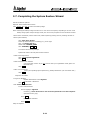
1.2. Starting the Drive Backup Wizard.
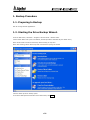
From the Start Menu, click Start > Programs > Norton Ghost > Norton Ghost.
Views: Select “Basic View” (this is the default, and this procedure describes only the “Basic View”).
Note: Norton Ghost can also be started by double-clicking its Tray Icon.
Note: After starting, Norton Ghost may take a while before opening its window.
Click the “Back Up Drives” backup option.
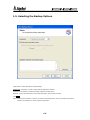
In the Drive Backup Wizard welcome screen that follows, click Next .
C-2