1
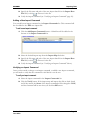
Defining the Import Map
EZ-CARE2
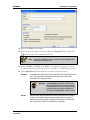
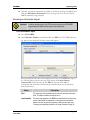
3. Specify the Name of the import.
4. Enter the name and path of the source file in the From File field, or click the
button to select the file name and location.
Note: When using an MDB file a new line appears under the From File field,
and will ask for the Main Table.
5. Select a Cabinet and Topic. The Topic of your import is the type of records
you will be importing (see the discussion of FAMILY vs. CHILD topics above).
6. Under Operation select the method you will use to import records :
Overwrite
Erase (delete and remove) all records in the cabinet prior to importing the new
ones. Then, generate a new record for each source record, with values
prescribed by the mapping of fields.
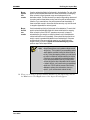
Warning!
Append
Version 7
June 2009
Using Overwrite is only done in certain cases,
such as initially installing your data. It removes
all data specified in your topic including Zipcodes
and classes which may cause a problem with
other topics using those tables. Use with caution.
Generate a new record for each source record, as described in the mapping.
Even if a record with the same information already exists in the cabinet, it
imports the new record anyway. It creates new records for all records in the
file, even if there is a match. (This operation is rarely used.)
Page 8