1
I. Setting Up Your SlimServer-based Network
Choosing Your Software
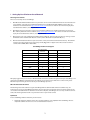
There are several ways to use SoundBridge:
1.
With Microsoft’s Windows Media Connect as your music server. You’ll need Windows XP Service Pack 2 installed on
your computer, and you’ll also need Windows Media Connect and Windows Media DRM 10 installed. They are
available as free downloads from http://www.microsoft.com . This choice is best for users who wish to play most
standard formats of music, excluding AAC files.
2.
With Apple’s iTunes as your music server. You’ll need iTunes software to be installed and running on your PC or
Mac. You may find the free iTunes software at http://www.apple.com/itunes/. This choice is best for users who wish
to play most standard formats of music, excluding WMA files.
3.
With a music server such as Musicmatch Jukebox running UPnP Av. This is best for users who are running a version
of Windows earlier than Windows XP/Service Pack 2 (such as Windows 2000, Windows Me, etc.).
4.
With the downloadable SlimServer open source music server (see below for download instructions). This software
is best for users who already have a large library of FLAC, Ogg-Vorbis or Apple Lossless files and do not wish to
convert them to WMA, MP3 or AAC format.
SoundBridge Audio Format Support:
WMA
Windows Media
Connect
X
Windows Media DRM 10
X
AAC
iTunes
SlimServer
X
X
X
X
X
X
X
DRM AAC
MP3
X
AIFF
WAV
X
X
X
AIFF
X
X
X
Ogg-Vorbis
X
FLAC
X
We highly suggest that you use iTunes or Windows Media Connect for seamless integration with your SoundBridge, and
support for SoundBridge’s complete feature set. However, if you choose to use SlimServer as a music client, please
follow the steps below to get the most out of your SoundBridge experience.
Who Should Use this Document
The following instructions address using the SoundBridge with the downloadable SlimServer software only. For
instructions on using your SoundBridge with iTunes, please refer to the user manual, which is enclosed separately. You
can install and run both SlimServer and iTunes on the same computer; SoundBridge can access only one music server at
a time, but switching between them is easy with a few clicks on your remote control.
Quick Start
To use SoundBridge with the SlimServer you will need to:
1. Download SlimServer software. Please note, the latest software is not compatible with SoundBridge. The last
compatible software version is 5.2.1. You can download this version at
2