1
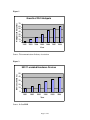
As shown in Figure 1, it is projected that there will be 45,000 wireless hotspots available
in 2006. This is up from less than 5,000 in 2002. A wireless hotspot is a wireless
network that has been set up for public use. The type of service is now offered at many
hotels, McDonald’s and Starbucks (to name a few).
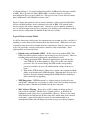
Figure 2 depicts the growth in sales of wireless hardware, with an estimated 40 million
wireless-enabled hardware devices estimated to be sold in 2006. This includes both
wireless routers and wireless network cards. Obviously, as these numbers continue to
rise, so will the number of more savvy computer users looking to take advantage of those
that are wireless-enabled but not mindful of their wireless security.
Typical Wireless Security Pitfalls
As will be shown later in this paper, the common wireless network user does very little, if
anything, to secure their wireless network from the outside world. While there is no way
to guarantee that any wireless network won’t be compromised, there are some very easy
ways to at least make a wireless network less attractive to the casual hacker. Three
typical pitfalls are discussed below:
•
Default service set identifier (SSID) – WAPs come set up with an SSID. This
SSID is broadcast from the router to alert in-range users to its presence. There are
two things that can be done to help make a network more secure.
1. Change the default SSID – Hardware manufacturers generally use the
same SSID for all of their equipment. They also use the same default
password. If a user doesn’t change the SSID and the corresponding
password, a hacker can access the administration settings of the access
point.
2. Turn off the SSID broadcast – Many access points come equipped with the
ability to not broadcast the SSID altogether. Although there are ways for a
hacker to detect the network, turning off the SSID broadcast will help to
make a network less appealing.
•
WEP Encryption – WEP Encryption is a security protocol developed for use
with WAPs. Although not very strong (as will be seen below), having encryption
turned on makes it much more difficult to break into a network.
•
MAC Address Filtering – Every piece of 802.11 hardware that is produced
comes with its own MAC (Media Access Control) address. A WAP can be
configured to only allow access to certain MAC addresses. This way, the owner
of the network can configure the WAP to only allow traffic from devices that he
or she owns. Again, this method of security is not insurmountable to an
accomplished hacker, but will help keep out the average over-curious neighbor.
Page 3 of 10