1
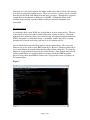
Obviously, entering possible pass-phrases one at a time is not a viable solution for using
this tool. However, when using a freely-available word list of English words, the WEP
encryption was once again easily cracked. (Note: In order to ensure the test would finish
quickly, I changed my pass-phrase to “aardvark”, as the word lists are in alphabetical
order).
Default Settings of Wireless Access Points
We have learned that cracking WEP is a relatively easy process under the right
conditions. However, from a hacker’s point of view, it’s quite a bit easier to break into a
network with no security at all than into a network with WEP enabled. In that vein, I
decided to look at WAPs currently offered by 3 of the large manufacturers of wireless
networking equipment – Linksys, Netgear, and D-Link. In order to execute this study, I
downloaded the user manual for the WAP from the manufacturer’s website. In
particular, I looked at the 3 WAPs below:
•
•
•
Linksys WRT54G
Netgear WPN824
D-Link DI-634M
In every case, the default setting was no wireless encryption. Why would this be?
Doesn’t the manufacturer care about the privacy of its consumers? The answer, in short,
is that they care more about their bottom line. Enabling WEP by default on the router
would require the end user to enable it on each of their network devices. Although
relatively easy, this would invariably lead to more support calls for the manufacturer,
with each call costing them money. Therefore, the consumer is left to make sure they’ve
turned on some sort of encryption for their network.
Wardriving
Wardriving is the activity of seeking out unprotected networks in order to find those
networks with minimal security. Presumably the “wardriver” would either use the
network for free internet access, or more deviously – to break into the network for
personal gain.
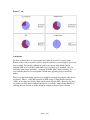
Knowing that WAPs often have no security by default, I spent an evening driving around
my town (Fair Lawn, NJ) to gather data on my neighbor’s security practices. To do this I
used a Windows-based tool called NetStumbler, which is able to detect wireless networks
and report a good amount of details on them (MAC, SSID, Channel, Vendor, etc…).
My results can be seen in Figure 6 below:
Page 7 of 10