1
Initial IP Configuration
When setting up your converter for the first time, the first thing you should do is
configure the IP address (default 192.168.0.200). This chapter introduces the
method to configure the device server’s IP address. For more details about
network settings, see the Network Settings section in Chapter “Web Console
Configuration”.
The following topics are covered in this chapter:
□□ Device Management Utility
□□ Serial to Ethernet Browser “View”
□□ Serial to Ethernet Browser “Modify IP”
□□ Serial to Ethernet Browser “Modify MAC”
Device Management Utility
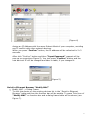
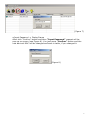
On PC we provide a Device Management Utility named “Serial to Ethernet
Browser.exe” which is an executable program in Windows 32 bit environments.
“Serial to Ethernet Browser” setup tool is used to detect and setup the installed
converters. It uses UDP broadcast packets to query and configure converters on
the network.
When you activate the tool, it will detect the existence of the installed converters
and depict the converters’ status such as IP address, Subnet Mask, MAC Address,
and Device ID (see Figure 1). The Setup Tool only can setup one converter at a
time. Thus if there are more than one converter on the network, please shut
down or disconnect other converters. Otherwise the “Serial to Ethernet
Browser”.exe can not detect the converter.
Due to the nature of broadcast UDP packets, “Serial to Ethernet Browser” has
following characteristics:
□□ Broadcast packets are not limited by subnet. Even if the IP address of the
converters and the computer running “Serial to Ethernet Browser” do not
belong to the same subnet, it still works fine.
□□ Broadcast packets can not pass routers. “Serial to Ethernet Browser” can only
be used to monitor devices with computer running “Serial to Ethernet
Browser” in the same segment of local area network.
(Figure 1)
2