1
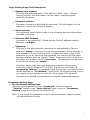
Login Setting Page Field Description
□□ System time elapsed
The time elapsed since start of this device in [Day : Hour : Minute :
Second] format. This information can be useful in identifying the
reliability of system.
□□ Firmware version
Converter firmware is identified by date code. This information will be
required in looking for technical support.
□□ Serial number
It is a product serial number code in the converter device and has been
provided by factory.
□□ Ethernet MAC Address
Converter is an unique MAC (Media Access Control) address used by
Ethernet in 6 digits.
□□ Password
This field is the administration password for authentication. Factory
default is “empty”. However, it is not recommended to leave it empty in
field operation. If you could not login, it means you have to key in the
password. If you do not know the password you can turn off the power
and then use any point tip to push “Reset” button and hold it to turn on
the power at the same time for 5 seconds. The password will be reset
to the factory default as “empty”.
Converter device uses the same password protection mechanism
commonly used in Windows NT or UNIX. If there are more than “3
consecutive failures” in password check during login, the login function
will be disabled for “15 minutes”. During this 15 minutes period, even if
you supply correct password, login will not proceed. This prevents
intruders from finding the password by computer generated program.
Parameter Setting Page
□□ The Parameter Setting Page
Type the correct password in the “Password” field and click the
“Confirm” button in the “Login Setting” page, then the “Parameter
Setting” page will be shown (see Figure 10).
Note: If you forget the password or can’t login successfully, please contact
the manufacturer directly.
7