1
Setup
Location for Installation
The performance of card printers is greatly influenced by
the environment of the installation location.
Do not install at the following locations.
• Dusty Location
The cleanliness level of location where the printer
is used should be compliant with ISO14611-1 Class
8. Different from the common type of paper printers,
dusty locations will result in uneven print density
and breakdown of the dusty thermal head. Switch
off the printer’s power when no card is being printed.
Fine dust will be collected inside the printer after
leaving the power on for a long time, resulting in
uneven or dirty print.
• Locations with strong vibrations and shock
• Locations exposed to direct sunlight
• Locations where there is possibility of foreign objects
such as metal pieces entering the printer
• Locations against the wall with poor ventilation
• Unstable and inclined locations
• Locations which easily give rise to static electricity
such as carpeted rooms
• Locations which easily give rise to condensation
inside the printer such as places near the cooler,
humidifier or stove
Setting Up the Printer
Connecting the Laminator
An optional laminator is available for this printer. A special
connection cable is required to connect this unit. Consult
your dealer for more details.
WARNING
Electric
shock
1.
Install and uninstall the laminator only after
switching off the power of the printer as well
as other devices that are connected to it and
pulling out the plug from the power outlet.
Failure to do so may result in danger of
electric shock!
Use the dedicated unit and cable when
installing the laminator. Failure to do so may
result in breakdown or electric shock and fire.
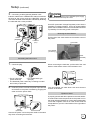
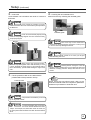
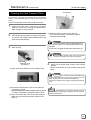
Set up the unit coupler plate which comes with the
laminator (optional).
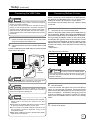
Temperature and humidity of room where printer is
installed should be as follows.
Temperature : 15 °C to 30°C
Humidity
: 35 % to 70 %
CAUTION
Using the printer in an environment
beyond the above range may cause printing problems due
to decrease in print density at low temperature and distorted
card and creased ribbon at high temperature.
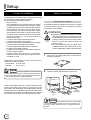
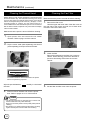
There are ventilation holes for cooling at the back of the
printer. Place back more than 10 cm away from the
surrounding wall. Additionally, ensure that there is at least
an allowance of 10 cm between the right end of the printer
and the wall so that cards can be discharged from the NG
Card Outlet. Do not place any object above the printer.
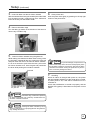
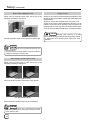
2.
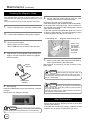
Insert the printer and laminator into the hole.
Printer
(DCP360i)
Laminator
(ILU)
Front
CAUTION
If the mounting is uneven, the card will
not be transported smoothly. Be sure that the units fit in
properly. Always install the unit at a horizontal and hard
surface.
10