1
SKYVISION
WCM-758DVR
WIRELESS 7" DVR MONITOR
user
MANUAL
2
INTRODUCTION
Thank you for choosing Elvid.
The Elvid WCM-758DVR SkyVision is a monitor designed to
wirelessly receive video and audio from your 5.8 GHz composite
video transmitter. Equipped with an integrated DVR, this
monitor can record incoming content to a microSD card. The
DVR incorporates practical functions such as loop recording for
maintaining a specific file length, and motion detection to initiate
recording when a moving object is detected.
The 7″ LED panel’s native resolution is 1024 × 600, with an
aspect ratio of 16:9 (native) that you can set to 4:3. The onscreen
menu makes it easy to fine-tune your image, offering adjustments
for brightness, contrast, hue, and saturation. Broadcast-specific
features include safety frame markers and multiple display
formats. The SkyVision can also be used for wired monitoring via
its HDMI and composite video inputs, as well as composite video
loop-through via its video output.
The SkyVision incorporates advanced tools like Check Field to
calibrate the monitor, a Focus setting to fine-tune your focus, and
Camera mode to scale the incoming video signal when shooting
on a DSLR. There’s also an integrated speaker and a 3.5 mm
stereo headphone output for live audio monitoring.
FCC Statement
This device complies with Part 15 of the FCC Rules. Operation
is subject to the following two conditions: (1) this device may
not cause harmful interference, and (2) this device must accept
any interference received, including interference that may cause
undesired operation.
3
PRECAUTIONS
•Please read and follow these
instructions and keep this manual in a
safe place.
•Disconnect this product from its
power source before storage and
during electrical storms.
•Exposure to high sound levels can
cause permanent hearing loss. Avoid
listening at high volumes for extended
periods of time.
•Do not use chemical solutions to clean
this product. Clean it with only a soft,
dry cloth.
•Keep this product away from water
and any flammable gases or liquids.
•Make sure this product is powered off
when plugging it into a power source.
•Keep this product away from children.
•Make sure that this product is intact
and that there are no missing parts.
•Use only the correct, recommended
voltage.
•To avoid damage to this product,
be careful not to overtighten or
improperly thread any of the threaded
fittings.
•Do not attempt to disassemble or
repair this product.
•All photos are for illustrative purposes
only.
•Do not place or store the SkyVision
facedown, since this can damage the
screen.
•Handle this product with care. Avoid
any unnecessary impacts to this
product.
•Do not block the vents in this product.
4
TABLE OF
CONTENTS
Product Contents.................................................................... 6
Overview................................................................................7-8
Powering On and Off.........................................................9-10
Using the WCM-758DVR.......................................................11
Wired Input And Loop-Through.................................... 12-13
Monitoring Sound...................................................................14
The Sunshade..........................................................................15
The Menu.................................................................................16
Color Menu.............................................................................. 17
OSD Menu................................................................................18
Function Menu........................................................................19
Sound Menu...........................................................................20
Using the DVR........................................................................21
Video Menu.......................................................................22-23
Setup Menu............................................................................ 24
Playback Menu...................................................................... 25
Recording and Playback................................................ 26-27
Specifications...................................................................28-29
Troubleshooting...............................................................30-32
Dip-switch chart.................................................................... 33
FCC Statement....................................................................... 34
Warranty................................................................................. 35
5
PRODUCT
CONTENTS
·· 7" Wireless DVR Monitor
·· Antenna
HDMI cable
·· 12 V DC adapter
·· Sunshade
·· Dip Switch Quick Reference Card
·· Mini HDMI to ·· User manual
NOTE: Additional battery plates and/or battery
adapters compatible with other popular brands can
be purchased by visiting www.elvidcinema.com
6
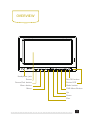
OVERVIEW
SOURCE/EXIT
SKYVISION
MENU
-
+
MENU
REC/OK
DVR
Headphone jack
Screen
Source/Exit button
Menu button
Minus
Rec/OK button
Status LED
Mode button
DVR Menu Button
Up
Down
Plus
7
SOURCE/EXIT
SKYVISION
MENU
-
+
MENU
REC/OK
DVR
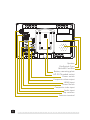
Speaker
Dip-Switch Chart
MicroSD Card Slot
Battery mounting plate
1/4″-20 Threaded socket
Power switch
Composite video output
HDMI input
Power Switch
Composite video input
Audio input
Dip switches
Antenna terminal
8
POWERING
ON & OFF
There are two ways to power the SkyVision: AC or a Sony
L-series battery.
AC POWER
To run the SkyVision via AC power, use the included 12 V
DC adapter to connect the SkyVision’s DC power input to
your AC power source.
To turn on the SkyVision, press the power switch to
the On position. The SkyVision will turn on and enter
standby mode, and the power indicator LED will glow red.
Press the Power button to enter ready mode. The power
indicator LED will turn green and then glow red.
CAMERA BATTERY
The SkyVision’s built-in battery plate accommodates Sony
L-series batteries. This allows you to power the monitor
with readily-available batteries that you may already own.
For more information on compatible battery types, refer to
Specifications on page 28 .
9
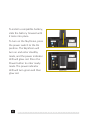
To install a compatible battery,
slide the battery forward until
it locks into place.
To turn on the SkyVision, press
the power switch to the On
position. The SkyVision will
turn on and enter standby
mode, and the power indicator
LED will glow red. Press the
Power button to enter ready
mode. The power indicator
LED will turn green and then
glow red.
10
using the
wcm758-dvr
MOUNTING THE SKYVISION
Use the SkyVision’s 1/4″-20 threaded socket to attach the
monitor to your mounting system. Make sure your bracket
can support the monitor.
SETTING THE SIGNAL
Before setting the signal, screw the antenna into the antenna
terminal.
Use the DIP switches on the SkyVision to set the proper
channel. Make sure the SkyVision and your 5.8 GHz
composite video transmitter are set to the same channel.
Refer to the DIP Switch Chart on page 33 for further
reference. For your convenience, there is an included DIP
Switch Chart quick reference card.
Press the Mode button to cycle through the input modes
until RF appears on the monitor. If your 5.8 GHz composite
video transmitter is using the same frequency as the monitor,
the image will appear onscreen, and the power indicator LED
will glow green.
11
WIRED INPUT &
LOOP-THORUGH
HDMI INPUT
The SkyVision is equipped with HDMI input for use as
a wired high-definition video monitor. Use the included
HDMI cable to connect your HDMI video source to the
SkyVision’s HDMI input, and then press the Mode button
to cycle through the input modes until HDMI appears on
the monitor. If your HDMI video source is sending a signal
to the monitor, the image will appear onscreen, and the
power indicator LED will glow green.
COMPOSITE VIDEO INPUT
The SkyVision also has a composite video input for use
as a wired standard-definition video monitor. Use the
included composite video input cable to connect your
composite video source to the SkyVision’s composite video
and audio inputs, and then press the Mode button to cycle
through the input modes until “video” appears on the
monitor. If your composite video source is sending a signal
to the monitor, the image will appear onscreen, and the
power indicator LED will glow green.
12
Note: Your composite audio cable must be plugged into the
SkyVision’s composite audio input in order to monitor the
sound.
Loop Through: The SkyVision offers composite video loopthrough, also known as pass-through. To loop the video
signal through the monitor, make sure the SkyVision is
receiving a video signal from your composite video source,
and then connect a compatible composite video output
cable to the output connection on the monitor.
You can monitor sound via the integrated speaker or
the 3.5 mm stereo headphone jack. To monitor via the
headphone jack, plug in a pair of compatible headphones.
For more information on volume control, refer to Volume
under the Sound Menu section on page 20 and Right
Button under the Using the DVR section on page 21 .
13
MONITORING
SOUND
You can monitor sound via the integrated speaker or the 3.5
mm stereo headphone jack. To monitor via the headphone
jack, plug in a pair of compatible headphones. For more
information on volume control, refer to Volume under the
Sound Menu section on page 20 and Right Button under the
Using the DVR section on page 21 .
14
The
SUNSHADE
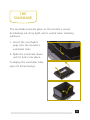
The sunshade prevents glare on the monitor’s screen
by blocking out stray light, and is useful when shooting
outdoors.
1. Insert the sunshade’s
pegs into the monitor’s
sunshade slots.
2.Slide the sunshade down
until it locks into place.
To deploy the sunshade, fully
open its lid and wings.
15
The MENU
Before using the SkyVision, make sure the monitor’s settings
are properly configured. All of the setting configurations are
located in the main menu, which has four submenus: Color,
Onscreen Display (OSD), Function, and Sound. The submenus
are located in the left column of the main menu window
Note: The menu is accessible only when the SkyVision is
receiving a video signal.
The Video menu has its own set of buttons that function
separately from the DVR buttons.
Source/Exit Button: When the menu is open, use the Source/
Exit button to exit the current menu, submenu, or menu item.
Menu Button: Press the Menu button to access the menu or
make a selection within the menu.
Minus and Plus Buttons: When the menu is open, use the
Minus and Plus buttons to navigate the menu or adjust the
value of a menu item. When the menu is closed out, you can
use these buttons to adjust the monitoring volume of the SkyVision.
16
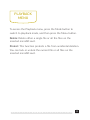
COLOR MENU
In the Color menu, you can adjust brightness, contrast,
hue, and saturation of the monitor from 0 (dimmest) to 100
(brightest), for example.
Check Field: Check Field mode is useful for calibrating the
monitor. When this mode is enabled, only the selected color
will appear onscreen. You can select red, green, blue, or
mono. In mono, a grayscale image will appear onscreen.
Color Temp: When using the SkyVision as a wired HDMI
monitor, you can select from the presets 9300, 7500, and
6500 K. You can also configure your own custom setting,
which is labeled User in the Color Temp menu. Customizing
the color temperature is recommended only for advanced
users.
17
OSD MENU
Language: You can set the onscreen language to English
(default), Simplified Chinese, French, Italian, German, Spanish,
Japanese, Korean, Russian, and Portuguese.
H Position: Adjust the horizontal position of the onscreen
menu.
V Position: Adjust the vertical position of the onscreen menu.
OSD Timeout: Use this setting to set the length of time the
onscreen menu is displayed. You can choose from 5 to 60
seconds, in 5-second intervals, or you can disable the feature
so the menu remains onscreen until you manually close it
out. The default setting is 10 seconds.
Transparent: Set the menu’s level of opacity. You can adjust
this setting from 1 to 7, with 7 being the most transparent.
The default setting is off, which makes the menu opaque.
18
FUNCTION
Menu
Reset: Restore the SkyVision’s menu to the factory default
settings.
System: Select the transmission display format. You can
choose NTSC M (default), PAL M, NTSC BG, PAL N, NTSC DK,
PAL DK, PAL I, or SECAM BG.
Display Ratio: You can set the aspect ratio for the onscreen
image. The options are 16:9 and 4:3. The default setting is
16:9, which is the SkyVision’s native aspect ratio. The 4:3
setting will scale the image to fit that aspect ratio.
Screen Markers: You can set the SkyVision to display an
onscreen box as a safety frame marker at a set percentage of
the screen size. You can set this to 80%, 85%, 90%, 93%, 96%,
or off. The screen marker will not display at the same time as
the menu.
Centre Markers: This setting displays a marker in the center
of the screen. The center marker will not display at the same
time as the menu.
Camera: Camera mode scales the incoming video signal to fill
the screen. This is useful when shooting on a DSLR. You can
turn this mode on or off.
19
SOUND
MENU
Volume: Adjust the monitoring volume of the SkyVision from
0 to 100.
Focus: Use this setting to check the areas of the image that
are in focus. Activating this setting increases the sharpness
and contrast of the monitor and exaggerates in-focus areas.
20
USING THE
DVR
The DVR can record your incoming wireless video to a
microSD card. Before getting started, make sure the DVR
settings are properly configured. The settings are located in
the three DVR menus: Video, Setup, and Playback.
The DVR system has its own set of buttons that function
separately from the Video buttons.
Up and Down Buttons: Use these buttons to navigate the
menu and the prompts.
Menu Button: Use this button to the Video or Playback
menu, switch from the Video or Playback menu to the Setup
menu, or close out the menu from the Setup menu or a
submenu.
Mode Button: Use this button to alternate between recording
and playback modes.
Rec/OK Button: Press this button to make a selection.
21
VIDEO
MENU
To access the Video menu, press the Menu button when the
DVR is in recording mode.
Resolution: Select the video resolution. You can choose D1
(720 × 576), VGA (640 × 480), or QVGA (320 × 240). Higher
resolution will produce a sharper image, however the file size
will increase as the resolution increases. The default mode
is D1.
As you increase resolution, you will increase the image
quality as well as the file size. You can choose D1 (720 × 576),
VGA (640 × 480), or QVGA (320 × 240).
Loop Recording: Loop recording will maintain a 3-, 5-, or
10-minute file. When video recording reaches the end of
the designated time limit, it will return, or loop back, to the
beginning of the file and continue recording to overwrite the
previously recorded data. This mode is ideal for surveillance
applications.
Motion Detection: This mode will cause the DVR to
automatically start recording when a moving object is detected.
22
Date Stamp: This setting superimposes, or burns, a date
stamp on the video and is useful for security or legal
applications because it cannot be altered after recording.
Recording Audio: Choose to record audio along with video.
Image Quality: The higher the image quality, the sharper and
more detailed the image but the larger the file size. You can
choose Super Fine, Fine, and Normal.
Motion Detection Sensitivity: Adjust the sensitivity of the
motion detection setting. You can choose high, medium, or
low.
23
SETUP
MENU
Format: This formats the microSD card inserted in the
SkyVision, and will erase all data on the card. To optimize the
file system, it is recommended to format the microSD card in
the monitor before use.
Date/Time: Set the SkyVision’s internal clock. Use the Up and
Down buttons to make adjustments, and the Rec/OK button
to advance to the next field.
Language: Set the onscreen language. You can choose English
(default), German, French, Spanish, Italian, Portuguese,
traditional Chinese, simplified Chinese, or Japanese.
TV Mode: Set the display format of the monitor. You can
choose NTSC or PAL.
Note: If the image is not synchronized or you are unable to
access the DVR menu after you the TV output format, this
is likely because the DVR output format is not synchronized
with the monitor format. If this occurs, set the format via the
monitor menu (not the DVR menu). For more information,
refer to System under Function Menu on page 19.
Default Setting: Restore the SkyVision to the factory default
settings. This will erase all current settings and replace them
with the default settings.
24
PLAYBACK
MENU
To access the Playback menu, press the Mode button to
switch to playback mode, and then press the Menu button.
Delete: Delete either a single file or all the files on the
inserted microSD card.
Protect: This function protects a file from accidental deletion.
You can lock or unlock the current file or all files on the
inserted microSD card.
25
RECORDING
& PLAYBACK
To start recording with the DVR, follow these steps:
Before recording, make sure all monitor and DVR settings are
properly configured.
1. In DVR recording mode, insert a microSD card into the card
slot. When the DVR recognizes the card, it will display “To
SD” onscreen, and a memory card icon will appear in the
bottom right corner of the screen.
2. Set the SkyVision to RF mode and make sure it’s receiving
a signal from your wireless video source. For more
information, refer to Setting the Signal on page XX.
3. Press the Rec/OK button to start recording video. The
status LED will blink red during recording.
To stop recording, press the Rec/OK button.
26
To play back video from the DVR, follow these steps:
1. Switch the SkyVision to DVR playback mode.
2. Use the Up and Down buttons to cycle through the video
and photo files on the inserted microSD card. Videos are
indicated by a film icon in the top right corner of the
screen, and photos are indicated by a camera icon.
3. To play or pause a video file, press Rec/OK.
To fast-forward or rewind, press the Down or Up buttons. You
can increase playback speed in either direction up to 2×, 4×,
or 8× by pressing Down or Up a second, third, or fourth time.
To resume normal playback, press Rec/OK.
27
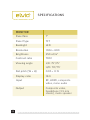
SPECIFICATIONS
MONITOR
Panel Size
7"
Panel Type
TFT
Backlight
LED
Resolution
1024 × 600
Brightness
250 cd/m²
Contrast ratio
700:1
Viewing angle
L/R: 75°/75°
U/D: 70°/75°
28
Dot pitch (W × H)
0.05 × 0.15
Display ratio
16:9
Input
RF, HDMI, composite
video, mono audio
Output
Composite video,
headphone (3.5 mm
stereo), mono speaker
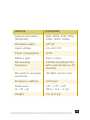
MONITOR
(CONTINUED)
Supported formats
(50/60 Hz)
480i, 480p, 576i, 576p,
720p, 1080i, 1080p
Threaded socket
1/4″-20
Input voltage
6 to 24 V DC
Power consumption
≤8 W
Battery type
Sony L-series
RF receiving
frequency
5.8 GHz broadband FM
A/V synchronization, 32
channels
RF wireless receiving
sensitivity
-90 dBm typical value
Frequency stability
±100 ppm
Dimensions
(L × W × H)
7.4″ × 5.3″ × 2.0″
(18.9 × 13.4 × 5 cm)
Weight
1 lb. (0.5 kg)
29
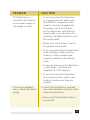
PROBLEM
SOLUTION
The SkyVision will not
turn on.
• If you are powering the
SkyVision with a battery,
make sure the battery is fully
charged and properly seated in
the battery plate.
• Make sure that the 12 V DC
adapter is fully plugged in,
and that your AC power source
is reliable. Try switching AC
power sources.
• Make sure the SkyVision is not
in standby mode. See Powering
On and Off on page 9 for
further reference.
The SkyVision is in RF
mode, but no wireless
signal is detected.
• Make sure your transmitter is
working properly.
• Make sure the SkyVision and
your 5.8 GHz composite video
transmitter are set to the same
channel. See the DIP Switch
Chart on page 33 for further
reference.
• If you replace the included
antenna, you may experience
a degraded signal or even
no signal at all. Make sure
the antenna matches the
transmitter.
30
PROBLEM
SOLUTION
The SkyVision is
turned on but there is
no onscreen image or
the image is weak.
• If you are using the SkyVision
as a wired monitor, make sure
the HDMI or composite video
cable is securely plugged into
the proper input connection
on the SkyVision, and that the
input mode is set correctly. Try
pressing the Mode button to set
the input mode.
• Make sure the monitor is set to
the proper input mode.
• If you are powering the SkyVision
with a battery, make sure the
battery is fully charged and
properly seated in the battery
plate.
• If you are powering the SkyVision
via AC power, use only the
supplied 12 V DC adapter.
• If you are using the SkyVision
as a wired monitor, check your
cables to make sure they are
reliable.
The screen displays
only a black and white
image.
• Check the brightness, contrast,
hue, and saturation settings, and
adjust as necessary.
• Make sure Check Field mode is
turned off.
31
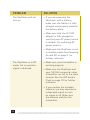
PROBLEM
SOLUTION
The images are not
synchronized.
• NTSC and PAL settings may not
be correctly set. Make sure the
monitor’s display format matches
that of the input. Refer to System
under the Function Menu section
on page 19 for further reference.
• The RF signal is too weak.
The onscreen image
size is incorrect.
• Make sure that Camera mode is
disabled.
• Check whether the aspect ratio is
set correctly.
• Make sure that the correct input
signal is selected.
• If you are using the SkyVision
as a wired monitor, check your
cables to make sure they are
properly connected and that they
are reliable.
The SkyVision is
emitting a highpitched whine
(feedback).
• Turn the monitor’s volume all the
way down or plug headphones
into the headphone jack.
There is no sound.
• Increase the monitoring volume.
• If you are using the SkyVision
as a wired standard-definition
video monitor, make sure your
composite audio cable is fully
plugged into the composite audio
input.
32
DIP-SWITCH
CHART
5760
5780
5860
5880
5865
5845
5825
5805
5785
5765
5745
5725
5733
5752
5771
5790
5809
5828
5847
5866
5705
5685
5665
5645
5885
5905
5925
5945
5740
5760
5780
5800
5820
5840
5860
5880
5800
33
FCC Statement
This device complies with Part 15 of the FCC Rules.
Operation is subject to the following two conditions:
(1) this device may not cause harmful interference, and
AUTION: (2) this device must accept any interference received,
OT SURFACE
including interference that may cause undesired
operation.
US
34
ONE-YEAR LIMITED WARRANTY
This Elvid product is warranted to the original purchaser to be free
from defects in materials and workmanship under normal consumer
use for a period of one (1) year from the original purchase date or thirty
(30) days after replacement, whichever occurs later. The warranty
provider’s responsibility with respect to this limited warranty shall be
limited solely to repair or replacement, at the provider’s discretion, of
any product that fails during normal use of this product in its intended
manner and in its intended environment. Inoperability of the product or
part(s) shall be determined by the warranty provider. If the product has
been discontinued, the warranty provider reserves the right to replace
it with a model of equivalent quality and function.
This warranty does not cover damage or defect caused by misuse,
neglect, accident, alteration, abuse, improper installation or
maintenance. EXCEPT AS PROVIDED HEREIN, THE WARRANTY
PROVIDER MAKES NEITHER ANY EXPRESS WARRANTIES NOR ANY
IMPLIED WARRANTIES, INCLUDING BUT NOT LIMITED TO ANY
IMPLIED WARRANTY OF MERCHANTABILITY OR FITNESS FOR A
PARTICULAR PURPOSE. This warranty provides you with specific legal
rights, and you may also have additional rights that vary from state
to state.
To obtain warranty coverage, contact the Elvid Customer Service
Department to obtain a return merchandise authorization (“RMA”)
number, and return the defective product to Elvid along with the RMA
number and proof of purchase. Shipment of the defective product is at
the purchaser’s own risk and expense.
For more information or to arrange service, visit www.elvidcinema.com
or call Customer Service at 212-594-2353.
Product warranty is provided by the Gradus Group. www.gradusgroup.com
Elvid is a registered trademark of the Gradus Group. © 2014 Gradus Group LLC.All Rights Reserved.
TM
ELVID
www.elvidcinema.com
GG1
A Gradus Group Brand
35