1
VoIP Hacks
By Theodore Wallingford
...............................................
Publisher: O'Reilly
Pub Date: December 2005
ISBN: 0-596-10133-3
Pages: 326
Table of Contents | Index
Voice over Internet Protocol (VoIP) is gaining a lot of attention these days, as more companies and
individuals switch from standard telephone service to phone service via the Internet. The reason is
simple: A single network to carry voice and data is easier to scale, maintain, and administer. As an
added bonus, it's also cheaper, because VoIP is free of the endless government regulations and
tariffs imposed upon phone companies.
VoIP is simply overflowing with hack potential, and VoIP Hacks is the practical guide from O'Reilly
that presents these possibilities to you. It provides dozens of hands-on projects for building a VoIP
network, showing you how to tweak and customize a multitude of exciting things to get the job
done. Along the way, you'll also learn which standards and practices work best for your particular
environment. Among the quick and clever solutions showcased in the book are those for:
gauging VoIP readiness on an enterprise network
using SIP, H.323, and other signaling specifications
providing low-layer security in a VoIP environment
employing IP hardphones, analog telephone adapters, and softPBX servers
dealing with and avoiding the most common VoIP deployment mistakes
In reality, VoIP Hacks contains only a small subset of VoIP knowledge-enough to serve as an
introduction to the world of VoIP and teach you how to use it to save money, be more productive,
or just impress your friends. If you love to tinker and optimize, this is the one technology, and the
one book, you must investigate.
VoIP Hacks
By Theodore Wallingford
...............................................
Publisher: O'Reilly
Pub Date: December 2005
ISBN: 0-596-10133-3
Pages: 326
Table of Contents | Index
Copyright
Credits
About the Author
Contributors
Acknowledgments
Preface
Why VoIP Hacks?
How This Book Is Organized
Using Code Examples
Chapter 1. Broadband VoIP Services
Section 1.1. Hacks 17: Introduction
Section 1.2. VoIP-Based Phone Service Providers
Hack 1. Get Connected
Hack 2. Use Pure VoIP Dialing with Your TSP
Hack 3. Wire Your House Phones for VoIP
Hack 4. Use a Softphone with a VoIP TSP
Hack 5. Prioritize Packets to Improve Quality
Hack 6. Got 911?
Hack 7. Update Your VoIP ATA Firmware
Chapter 2. Desktop Telephony
Section 2.1. Hacks 827: Introduction
Hack 8. Access Next-Gen Voice Features
Hack 9. Track Vonage Account Info on Your Desktop
Hack 10. Pick a Desktop VoIP Client
Hack 11. Sound Like Darth Vader While You VoIP
Hack 12. Grow Your Social Network with Gizmo
Hack 13. Record VoIP Calls on Your Windows PC
Hack 14. Handle Calls with Windows Software
Hack 15. Let Your Mac Answer and Log Your Calls
Hack 16. Run Phlink Even When Logged Off
Hack 17. Greet Callers Differently Each Day
Hack 18. Use Caller IDs in AppleScripts
Hack 19. Control iTunes from Phlink
Hack 20. VoIP While Fragging
Hack 21. Google for Telephony Info
Hack 22. Telephonize a Sound File
Hack 23. Record an Audio Chat on Your Mac
Hack 24. Create Telephony Sounds with SoX
Hack 25. Mix the Perfect Announcement
Hack 26. Sound Like a Pro Announcer
Hack 27. Record a Videoconference
Chapter 3. Skype and Skyping
Section 3.1. Hacks 2840: Introduction
Hack 28. Get Skype and Make Some New Friends
Hack 29. Skype Your Outlook Contacts
Hack 30. Skype People from the OS X Address Book
Hack 31. Enable Site Visitors to Skype You
Hack 32. Speak Jyve
Hack 33. Teach Your Browser to Speak Jyve
Hack 34. Carry Skype in Your Pocket
Hack 35. Degunk International SkypeOut Calls
Hack 36. From Podcasting to Skypecasting
Hack 37. Answer Your Skype Calls, Even When You're Not Around
Hack 38. Use Custom Rings and Sounds with Skype
Hack 39. Emote by Sight and Sound with Skype
Hack 40. Skype with Your Home Phone
Chapter 4. Asterisk
Section 4.1. Hacks 4158: Introduction
Hack 41. Turn Your Linux Box into a PBX
Hack 42. Attach a SIP Phone to Asterisk
Hack 43. Connect a Phone Line Using an FXO Gateway
Hack 44. Connect a Legacy Phone Line Using Zaptel
Hack 45. Forward Your Home Calls to Your Cell Phone
Hack 46. Selectively Forward Calls
Hack 47. Report Telephone Activity with Excel
Hack 48. Kindly Introduce Telemarketers to Mr. Privacy
Hack 49. Build a Four-Line Phone Server
Hack 50. Master Music-on-Hold
Hack 51. Record Calls
Hack 52. Get Your Daily Weather Forecast from Your Telephone
Hack 53. Put a Happy Face on Asterisk Using AMP
Hack 54. Run Asterisk Without Root, for Security's Sake
Hack 55. Link Two Asterisk Servers with PSTN
Hack 56. Link Several PBXs over the Internet
Hack 57. Route Calls Using Distinctive Ring
Hack 58. Tune Up Your Asterisk Logs
Chapter 5. Telephony Hardware Hacks
Section 5.1. Hacks 5971: Introduction
Hack 59. Record Calls the Old-Fashioned Way
Hack 60. Make IP-to-IP Phone Calls with a Grandstream BudgeTone
Hack 61. Build a Custom Ringtone for Your Grandstream Phone
Hack 62. Tweak Your Sipura ATA
Hack 63. Build a Bat Phone
Hack 64. Brew Your Own Zaptel Interface Card
Hack 65. Build a Speed-Dial Service on Cisco IP Phones
Hack 66. Power Cisco Phones with Standard Inline Power
Hack 67. Customize Your Cisco IP Phone's Boot Logo
Hack 68. Configure Multiple IP Phones at One Time
Hack 69. Customize Uniden IP Phones from TFTP
Hack 70. Control the Lights Using Your IP Phone
Hack 71. Use a Rotary-Dial Phone with VoIP
Chapter 6. Navigate the VoIP Network
Section 6.1. Hacks 7287: Introduction
Hack 72. Monitor VoIP Devices
Hack 73. Inspect the SIP Message Structure
Hack 74. Audit a Network's QoS Capabilities
Hack 75. Graph Latency and Jitter
Hack 76. Explore NAT Traversal
Hack 77. Shape Network Traffic to Improve Quality of Service
Hack 78. Create a Premium Class of Service
Hack 79. Build a $100 PSTN Gateway in 10 Minutes or Less
Hack 80. Make IP Phone Configuration a Trivial Matter
Hack 81. Peek Inside of SIP Packets
Hack 82. Dig into SDP
Hack 83. Sniff Out Jittery Calls with Ethereal
Hack 84. Log VoIP Traffic
Hack 85. Secretly Record VoIP Calls
Hack 86. Log and Record VoIP Streams
Hack 87. Intercept and Record a VoIP Call
Chapter 7. Hard-Core Voice
Section 7.1. Hacks 88100: Introduction
Hack 88. Build a Killer Telephony Server
Hack 89. Build an H.323 Gatekeeper Using OpenH323
Hack 90. Turn Your Linux Box into a Fax Machine
Hack 91. Build an Inbound Fax-to-Email Gateway
Hack 92. Teach Your Asterisk Box to Speak
Hack 93. Build a Mac PBX
Hack 94. Monitor Asterisk from Your Perl Scripts
Hack 95. Build a SoftPBX with No Hard Drive
Hack 96. Build a Standalone Voicemail Server in Less Than a Half-Hour
Hack 97. Automate Your Voicemail Greeting
Hack 98. Connect Asterisk to the Skype Network
Hack 99. Forward Your Home Phone Calls to Skype
Hack 100. Get Started with sipX
Colophon
Index
Copyright © 2006 O'Reilly Media, Inc. All rights reserved.
Printed in the United States of America.
Published by O'Reilly Media, Inc., 1005 Gravenstein Highway North, Sebastopol, CA 95472.
O'Reilly books may be purchased for educational, business, or sales promotional use. Online editions
are also available for most titles (safari.oreilly.com). For more information, contact our
corporate/institutional sales department: (800) 998-9938 or [email protected].
Editor:
David Brickner
Production Editor:
Sanders Kleinfeld
Series Editor:
Rael Dornfest
Cover Designer:
Marcia Friedman
Executive Editor:
Dale Dougherty
Interior Designer:
David Futato
Printing History:
December 2005:
First Edition.
Nutshell Handbook, the Nutshell Handbook logo, and the O'Reilly logo are registered trademarks of
O'Reilly Media, Inc. The Hacks series designations, VoIP Hacks, the image of a Morse code tapper,
and related trade dress are trademarks of O'Reilly Media, Inc.
Many of the designations used by manufacturers and sellers to distinguish their products are claimed
as trademarks. Where those designations appear in this book, and O'Reilly Media, Inc. was aware of
a trademark claim, the designations have been printed in caps or initial caps.
While every precaution has been taken in the preparation of this book, the publisher and author
assume no responsibility for errors or omissions, or for damages resulting from the use of the
information contained herein.
Small print: The technologies discussed in this publication, the limitations on these technologies that
technology and content owners seek to impose, and the laws actually limiting the use of these
technologies are constantly changing. Thus, some of the hacks described in this publication may not
work, may cause unintended harm to systems on which they are used, or may not be consistent with
applicable user agreements. Your use of these hacks is at your own risk, and O'Reilly Media, Inc.
disclaims responsibility for any damage or expense resulting from their use. In any event, you should
take care that your use of these hacks does not violate any applicable laws, including copyright laws.
ISBN: 0-596-10133-3
[M]
Credits
About the Author
Contributors
Acknowledgments
About the Author
Ted Wallingford is a senior network engineer with LCG Technologies Corp. in Elyria, Ohio, and the
author of Switching to VoIP (O'Reilly). Ted has led installations of VoIP technology in the
construction, manufacturing, and networking industries. A periodic contributor toMacworld magazine
and VoIPfan.com, Ted is a strong advocate of open standards and Star Wars movies. He updates the
web site http://www.macvoip.com/ at least a couple of times a year. Ted lives with his wife Kelly and
two amazing kids, Jacob and Madelyn, in suburban Cleveland.
Contributors
The following people contributed their writing, code, and inspiration toVoIP Hacks:
Brian Degenhardt
Brian's experience in the high-tech industry includes work in such diverse areas as network
engineering, online media delivery, and console game development. Currently he serves as
CTO of Four Loop Technologies, maker of the Switchvox PBX. Brian has contributed to
numerous open source projects, including the GIMP and the Squid web proxy cache. He
currently resides in sunny San Diego with his wife Tristan.
Kristian Kielhofner
Kristian is president of KrisCompanies (http://www.kriscompanies.com/), a consulting firm
based in Lake Geneva, Wisconsin, and creator of AstLinux, a Linux distro configured specifically
for Asterisk that features a very small footprint. Kristian has been working with Linux
professionally for more than five years, since he began doing Linux system administration at
the age of 16. Kristian started KrisCompanies in 2004 to help local businesses with their
technology needs. In addition to creating AstLinux, he has also been involved with AstShape
and Polycom configuration files.
Andrew Latham
Andrew is a networking consultant who offers VoIP, IP networking, and web development
expertise via his web site, http://www.lathama.com/.
Dave Mabe
Dave (http://dave.runningland.com/)is an accomplished and largely self taught engineer and
writer who strives to create simple, elegant solutions to complex problems. Dave has worked at
AT&T in the communications industry for eight years. Always looking to save a few keystrokes
and mouse clicks, he is the kind of person who would rather spend several hours inventing an
automated solution than spend a few monotonous moments each day performing a menial
task. Dave has been using Asterisk and other VoIP solutions for two years. He is the author of
BlackBerry Hacks (O'Reilly).
Joel Sisko
Joel has been a self-proclaimed network convergence professional since 1992. He is the
founder and CEO of Convergence Center LLC, a company focused on delivering the next
generation of convergence-based applications and communications systems for value-added
voice and data resellers.
Acknowledgments
The contributors who spent their very scarce time working on material for this book have my earnest
thanks. These gentlemen are truly talented networking engineers, and their input and technical
expertise were invaluable. Do business with these guysthey are established knowledge leaders in this
new industry.
I'd also like to thank Mike Loukides, who recommended that I write VoIP Hacks (or perhaps he
merely succumbed to my nagging). He edited Switching to VoIP, and he is the author or co-author of
several excellent O'Reilly volumes, including the highly usefulUnix Power Tools and one of O'Reilly's
earliest technical books, System Performance Tuning. He's a pretty amazing pianist, too.
VoIP Hacks was edited by David Brickner. David's editing is pragmatic, politically incorrect, and to the
point. I love that. I'll give David all the credit for anything good aboutVoIP Hacks!
This book survived the criticisms of several tech reviewers, including Kristian Kielhofner, Leif Madsen,
and Jim Van Meggelen. Thank you for looking over my work; your expertise added much to the
book's accuracy.
I must heartily acknowledge my hometown crowd, too. My wife Kelly and my friends at Pathway have
given me plenty of much-needed encouragement. The crew at LCG Technologies is a great bunch,
too. I just barely squeaked this book out thanks to my new workloadkeep up the great work, LCG.
Thanks to Brian Downey of The Linux Fix for his expert Linux support, as well.
Preface
Voice over IP, or VoIP, is a family of technologies that enables voice applications and telephony to be
carried over an Internet Protocol (IP) network such as the Internet. These technologies include
protocols, hardware and software standards, and computer programs. VoIP is employed in telephony
applications, from analog phones to next-generation IP phones and wireless headsets, and in desktop
voice chat services, from web-based party-line chat services (like Yahoo! Chat) to the well-known
Skype desktop voice-calling service.
VoIP has become an important technology that is integrating pervasively into the popular culture. It
is employed daily to drive new engines of commerceeverything from business-class VoIP-powered
calling services to simple desktop chat tools such as Apple's iChat. Other high-profile companies like
eBay, Microsoft, Google, and AT&T offer applications and services that utilize VoIP, too.
These big companies have recognized that the popular culture is moving to VoIP services en masse,
even as the telecom industry is being set on its ear by scrappy young VoIP startups like Vonage,
Packet8, and SpeakEasy.net. VoIP services deliver telephony applications less expensively than the
old phone companies can hope to. This is because VoIP is free of the continually burdensome legacy
technology investment the old phone companies must make to keep the "old" global phone network
running. VoIP is also free of the endless government regulations and tariffs imposed upon the old
phone companies.
In a nutshell, the way society looks at the voice network has changed. VoIP is the enabler of the
change, and tomorrow's global voice network is the Internet.
This book contains only a small subset of VoIP knowledgeenough to serve as an introduction to the
world of VoIP and teach you how to use it to save money, be more productive, or just impress your
friends. My friends love my on-hold music when they call my house; I love that when people call my
house, the call is connected to my notebook PC via Skype, no matter where I am in the world. You'll
learn how to do all of this and more. I hope this book gets your mental gears turning and that your
VoIP hacks are as enjoyable to implement and customize as they were for me to write!
For more VoIP theory and detailed reference information about Voice over IP, check out these great
O'Reilly titles:
Switching to VoIP
Skype Hacks
Talk Is Cheap
Asterisk: The Future of Telephony
Practical VoIP Using Vocal
Why VoIP Hacks?
The term hacker has a bad reputation in the press. They use it to refer to someone who breaks into
systems or wreaks havoc with computers as their weapon. Among people who write code, though,
the term hack refers to a "quick-and-dirty" solution to a problem, or a clever way to get something
done. And the term hacker is taken very much as a compliment, referring to someone as being
creative, having the technical chops to get things done. The Hacks series is an attempt to reclaim the
word, document the good ways people are hacking, and pass the hacker ethic of creative
participation on to the uninitiated. Seeing how others approach systems and problems is often the
quickest way to learn about a new technology.
Since it is based in software, VoIP is overflowing with hack potential. If you love to tinker and
optimize, this technology offers a cornucopia of exciting things to tweak and customize. As in the
heyday of the World Wide Web, fortunes will be made in the nascent VoIP industry, and lots of fun
will be had by voice hackers like you and me.
How This Book Is Organized
You can read this book from cover to cover if you like, but each hack stands on its own, so feel free
to browse and jump to the different sections that interest you most. If there's a prerequisite that you
need to know about, a cross-reference will guide you to the right hack.
The book is divided into seven chapters, organized by subject:
Chapter 1, Broadband VoIP Services
In this chapter, you'll be introduced to some Internet-based VoIP phone service providers who
can help you replace your traditional phone line with a cost-saving, feature-rich VoIP line.
Chapter 2, Desktop Telephony
Since VoIP is rooted in software, it has some wonderful uses on your desktop PC or Mac. In this
chapter, you'll learn how to customize and maximize productivity-enhancing telephony
applications.
Chapter 3, Skype and Skyping
Skype, the ubiquitous desktop voice-calling application, is one of the most hackable desktop
telephony tools, and therefore is worthy of an entire chapter of hacks.
Chapter 4, Asterisk
Just as VoIP enables desktop telephony, it also enables enterprise telephony. In this chapter,
you'll learn how to install, configure, and hack Asterisk, an open source PBX.
Chapter 5, Telephony Hardware Hacks
VoIP is rooted in software, but it is used with lots of different kinds of hardwareeverything from
next-generation IP phones to old-school rotary phones. This chapter shows you how to add
these devices to your VoIP setupand how to customize them.
Chapter 6, Navigate the VoIP Network
Voice over IP is carried over the network using packets, just like traditional data. With the
advice in this chapter, you can monitor VoIP and troubleshoot it using traditional admin tools.
Chapter 7, Hard-Core Voice
By the time you reach this chapter, you will have advanced to the hallowed ground that's held
by a very exclusive crowd: the community of hard-core voice hackers.
Conventions Used in This Book
The following is a list of the typographical conventions used in this book:
Italics
Used to indicate URLs, filenames, filename extensions, and directory/folder names. For
example, a path in the filesystem will appear as /Developer/Applications.
Constant width
Used to show code examples, the contents of files, console output, as well as the names of
variables, commands, and other code excerpts.
Constant width bold
Used to show user input in code and to highlight portions of code, typically new additions to old
code.
Constant width italic
Used in code examples and tables to show sample text to be replaced with your own values.
Gray type
Used to indicate a cross-reference within the text.
You should pay special attention to notes set apart from the text with the following icons:
This is a tip, suggestion, or general note. It contains useful supplementary
information about the topic at hand.
This is a warning or note of caution, often indicating that your money or your
privacy might be at risk.
The thermometer icons, found next to each hack, indicate the relative complexity of the hack:
beginner
moderate
expert
Using Code Examples
This book is here to help you get your job done. In general, you may use the code in this book in
your programs and documentation. You do not need to contact us for permission unless you're
reproducing a significant portion of the code. For example, writing a program that uses several
chunks of code from this book does not require permission. Selling or distributing a CD-ROM of
examples from O'Reilly books does require permission. Answering a question by citing this book and
quoting example code does not require permission. Incorporating a significant amount of example
code from this book into your product's documentation does require permission.
We appreciate, but do not require, attribution. An attribution usually includes the title, author,
publisher, and ISBN. For example: "VoIP Hacks by Ted Wallingford. Copyright 2006, O'Reilly Media,
Inc., 0-596-10133-3."
If you feel your use of code examples falls outside fair use or the permission given above, feel free to
contact us at [email protected].
Safari® Enabled
When you see a Safari® Enabled icon on the cover of your favorite technology book,
that means the book is available online through the O'Reilly Network Safari Bookshelf.
Safari offers a solution that's better than e-books. It's a virtual library that lets you easily search
thousands of top tech books, cut and paste code samples, download chapters, and find quick answers
when you need the most accurate, current information. Try it for free at http://safari.oreilly.com.
How to Contact Us
We have tested and verified the information in this book to the best of our ability, but you may find
that features have changed (or even that we have made mistakes!). As a reader of this book, you
can help us to improve future editions by sending us your feedback. Please let us know about any
errors, inaccuracies, bugs, misleading or confusing statements, and typos that you find anywhere in
this book.
Please also let us know what we can do to make this book more useful to you. We take your
comments seriously, and we will try to incorporate reasonable suggestions into future editions. You
can write to us at:
O'Reilly Media, Inc.
1005 Gravenstein Highway North
Sebastopol, CA 95472
(800) 998-9938 (in the U.S. or Canada)
(707) 829-0515 (international/local)
(707) 829-0104 (fax)
To ask technical questions or to comment on the book, send email to:
[email protected]
The web site for VoIP Hacks lists examples, errata, and plans for future editions. You can find this
page at:
http://www.oreilly.com/catalog/voiphks
For more information about this book and others, see the O'Reilly web site:
http://www.oreilly.com
To reach the author of this book, Ted Wallingford, you can send an email to:
[email protected]
Got a Hack?
To explore Hacks books online or to contribute a hack for future titles, visit:
http://hacks.oreilly.com
Chapter 1. Broadband VoIP Services
Section 1.1. Hacks 17: Introduction
Section 1.2. VoIP-Based Phone Service Providers
Hack 1. Get Connected
Hack 2. Use Pure VoIP Dialing with Your TSP
Hack 3. Wire Your House Phones for VoIP
Hack 4. Use a Softphone with a VoIP TSP
Hack 5. Prioritize Packets to Improve Quality
Hack 6. Got 911?
Hack 7. Update Your VoIP ATA Firmware
1.1. Hacks 17: Introduction
Voice over IP (or VoIP for short) is a technology that allows Internet Protocol (IP) networks like the
Internet to be used to enable voice communication, similar in some ways to a telephone. Some folks
call VoIP IP telephonyand the technology comes in many forms, from desktop communication
software to automated message recording and fax integration tools.
But in its simplest form, IP telephony enables you to place phone calls over the Internet rather than
over a traditional phone line. This is a pretty big deal, since no long-distance charges or hefty federal
access taxes are levied on Internet-based phone calls. Plus, IP telephony lets you integrate your
desktop PC, your desk phone, and your cell phone in ways never before imagined. I'm anxious to
share the details with you in this book.
In the tradition of O'Reilly's Hacks book series, you'll be using short hacks, like the basic ones in this
chapter, to learn about Voice over IP and computer-based telephony. I, and a number of my peers in
the telecommunications industry, have contributed some of the most useful, most educational, and
coolest projects to VoIP Hacks. Hopefully, beginning right here in this chapter, you'll be saying, "I
didn't know you could do that with VoIP!"
1.2. VoIP-Based Phone Service Providers
The Golden Age of broadband began with catchphrases like "surf the Web five times faster" and with
promises of ultra-fast music downloads. But in the late 1990s, few would have predicted that VoIPbased telephony would be one of the biggest beneficiaries of once-hyped broadband technologies like
cable Internet and DSL. Sure, web surfing at "the speed of light" and downloading music are greatbut
can they save you money? Legally?
VoIP telephony canand does. For roughly half the cost of a traditional phone line, you can subscribe
to a VoIP telephony service provider rather than to a phone company. You'll get a standard phone
number that people from the non-VoIP world can use to call youand you won't have to pay $5 a
month extra for voicemail and caller ID.
This chapter has a handful of hacks that will show you how to maximize yourbroadband voice
service. So, if you subscribe to a VoIP service provider, you're ready to hack. If not, what are you
waiting for? "Get Connected" [Hack #1] describes some VoIP-based phone providers that you
should evaluate as you prepare to dive into VoIP Hacks.
Hack 1. Get Connected
If you've got broadband, you're already using the Internet for data communication.
Wouldn't it be great to use it for telephone calls, too?
Internet telephony service providers (TSPs) get your voice onto the Net, allow you to make and
receive phone calls just like traditional phone companies, and tend to shrink your phone bill to boot.
Some of these service providers give you a basic, free service that enables you to call other users
over the Internet. Others allow you to make toll-free calls free of charge, but charge for local and
long-distance calls.
TSPs that allow you to call traditional telephone service subscribers do so by connecting your
standard home phone to the Net. Some TSPs also let you use a special piece of software called a
softphone to place calls with your PC. To get connected to a TSP, you need a broadband Internet
router configured as a DHCP server, a spare Ethernet port either on your router or on a nearby
switch, and a good old-fashioned analog telephone.
TSPs are data centers with telephony servers that route calls to and from your home network or
broadband VoIP device. The real-time packets that carry each call's sound over your broadband link
use IP and User Datagram Protocol (UDP) protocols, and the TSP communicates key moments in the
calllike dialing, connecting, and hanging upusingsignaling protocols that are similar in some ways to
the ones your browser uses to surf the Web.
The VoIP device that most TSPs provide to connect your home phone is known as ananalog
telephone adapter, or ATA. These little boxes allow you to connect a residential-style analog phone to
your broadband Internet connection, and they are normally supplied by your VoIP TSP when you sign
up for their service.
In addition to an ATA, some TSPs permit you to place VoIP calls using the following:
An IP phone
These telephones connect directly to an Ethernet network using a patch cable or wireless link.
They have an IP address as a PC would, and they communicate with the VoIP TSP's data center
over your Internet broadband link.
A softphone
These are software programs that run on a PC and permit telephone-style communication
using your broadband link. They appear on your Windows, Linux, or Mac desktop with graphical
user interfaces that often resemble a telephone, and they require that your PC have a
microphone and speakers.
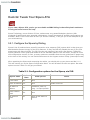
For this hack, I'll concentrate on connecting to a TSP that provides an ATA, allowing you to use an
analog phone to place and receive calls via the Internet. Table 1-1 lists domestic (U.S. and Canada)
TSPs that provide broadband VoIP calling.
"Bring your own device" means the TSP allows you to make phone calls across its VoIP network using
your choice of equipment, such as an IP phone, a PC, or your own ATA. TSPs that don't allow you to
bring your own device will provide an ATA to make the connection.
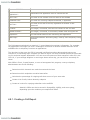
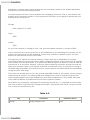
Table 1-1. VoIP TSPs
Company
Web site
Bring your own device
AT&T CallVantage
http://www.att.com/
No
BroadVoice
http://www.broadvoice.com/
Yes
Broadvox Direct
http://www.broadvoxdirect.com/ No
Net2Phone
http://www.net2phone.com/
No
nikotel
http://www.nikotel.com/
No
Packet8
http://www.packet8.net/
No
SOYO
http://phone.soyo.com/
No
VoicePulse
http://www.voicepulse.com/
Yes
Vonage
http://www.vonage.com/
No
Once you've subscribed to a VoIP TSP service (many allow you to subscribe on the Web) and you've
received your ATA in the mail, you'll probably be itching to hook it up and use it. Most of the time,
setting up an ATA is straightforward. All ATAs have an Ethernet interface, for connecting to your
network via an eight-wire CAT5 patch cable with two RJ45 connectors, and one analog telephone
interface, for connecting to a residential-style, single-line phone using a four-wire patch cable with
two RJ11 connectors. 8x8 Inc.'s DTA-310, standard equipment for Packet8 service, is such a device.
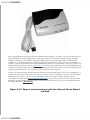
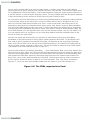
So is the Sipura SPA-2000 [Hack #62], pictured in Figure 1-1.
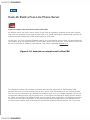
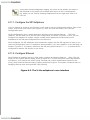
Figure 1-1. The front and rear panels of the Sipura SPA-2000 ATA
But other ATAs might offer additional capabilities. For instance, the Sipura SPA-2000, standard
equipment for VoicePulse service, offers an extra analog phone connector, so you can easily connect
two phones, or perhaps a phone and an answering machine. As shown inFigure 1-1, the SPA-200's
front panel has two phone connectors and a status LED, which indicates whether one of the analog
phones is off the hook. The rear panel has an Ethernet connector, an Ethernet activity/link indicator
LED, and a DC power connector.
More elaborate ATA devices integrate broadband routing and firewall functions, allowing you to
consolidate your VoIP ATA and residential firewall into a single unit. TheZoom 5567 is one of these.
It has a broadband IP router with a firewall, a four-port switch, an analog phone connector, and a
pass-through connector for placing calls on a traditional Bell phone line in the event the Internet
service fails.
So, depending on your service, setup could be a little more elaborate than just connecting the phone
and the Ethernet to your ATA. However, in most cases, the ATA is a simple, no-frills device designed
to accomplish one thingget your analog phone connected to the world's biggest VoIP carrier network,
the trusty ol' Internet.
After you've gotten the ATA out of the package, find a good place for it. It should be close to where
you intend to use the analog phone, though a long-enough phone cord would afford you more
distance.(In "Wire Your House Phones for VoIP" [Hack #3], you'll see how to use your house's
existing phone wiring to hook up several phones to a single ATA.) Your ATA also needs to be close
enough to your Ethernet switch or broadband router to connect to it with a CAT5 patch cable.
Once connected, most ATAs will automatically register with your VoIP service provider's server the
first time they are powered up. Don't interrupt this process. If the initial registration is interrupted, it
could render your ATA useless, and the TSP might need to exchange it for a new one. Some ATAs will
download firmware patches during the initial registration, too. Refer to your ATA's instructions for
indications on when this process is complete, making it safe to power off the ATA. Usually, if you can
hear a dial tone on the connected phone, the process is complete and it's safe to place a call or power
down the ATA.
If you can't hear a dial tone on the connected phone, check that it is connected to the appropriate
port on the ATA. Make sure your broadband router is configured as a DHCP server. Without DHCP
running on your network, the ATA will be unable to obtain an IP address, crippling it.
Many VoIP calling plans require that you dial the full 11-digit phone number,
even if you're just calling your next-door neighbor. So, if you make a lot of
local calls, get used to dialing your own area code a lot!
Once you hear a dial tone, it's probably best to investigate any features that are included with your
calling planvoicemail especially. Then, try calling a buddy to see if you can hear any difference
between a traditional call and a VoIP one. Chances are that the person on the other end won't notice
the difference unless you tell him you're on a VoIP call. Then, he might say he suspected you were on
a cell phone. The sound quality on a VoIP call is only as good as the network carrying it, and many
unsuspecting participants mistake VoIP calls for cell phone calls.
Hack 2. Use Pure VoIP Dialing with Your TSP
By using dialing shortcuts, you can keep your phone calls on the Internet and avoid extra
charges.
If you're able to make a phone call to a regular phone company subscriber using your new VoIP
service [Hack #1], you're ready to learn some cool TSP tricks.
Your VoIP phone bill is probably lower than that of your friends who still use traditional calling plans.
But a lower phone bill isn't the only luxury that comes with converting your service to VoIP. Because
your call uses the Internet rather than the public telephone network to route your call, you have
access to several cool dialing shortcuts when you call subscribers of other VoIP services. When an IP
network alone provides the pathway between caller and receiver, it's said to bepure (or native) Voice
over IP.
This can actually save you money, especially if you make a lot of internationalcalls. If you're a Free
World Dialup (FWD) subscriber and you talk frequently with your buddy in Mexico, who uses Vonage,
using dialing shortcuts will keep your calls pure VoIP and allow you to circumvent any related longdistance calling charges that would be assessed if your calls were to traverse the Public Switched
Telephone Network (PSTN).
To make pure VoIP calls using your TSP's service, you have to be aware of the dialing shortcuts your
TSP provides to route calls to other TSP networks using the Internetinstead of the PSTNas the carrier
network. Most VoIP TSPs will assume your call is destined for the PSTNjust because it's an 11-digit
phone number. So these shortcuts tell the TSP that you don't want to route your call to the PSTN.
Instead, you want to route it over the Internet to another VoIP TSP.
Why do this? If you have an unlimited calling plan, it won't really save you any money. The call
probably won't sound any better either. But this technique does conserve your TSP's public telephone
network capacity when you use pure VoIP rather than VoIP-to-PSTN calling. If your VoIP TSP bills
you by the minute, it might not charge for calls that don't use its PSTN capacity. Plus, it's just cool to
let the Internet replace the Bell System for your phone calls. Here's how.
VoIP services such as FWD, Vonage, IAXTel, VoicePulse, and Packet8 offer dialing shortcuts to allow
calls between their customers. If you're a Packet8 subscriber, you can reach any FWD subscriber by
dialing 0451 and the six-digit FWD number assigned to that subscriber (FWD subscribers don't have
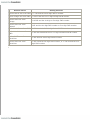
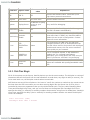
traditional 11-digit phone numbers because the service doesn't provide PSTN calling).ConsultTable 12 for a rundown of the VoIP dialing shortcuts that you can use to route calls between the various
VoIP services.
Table 1-2. Pure VoIP dialing between TSPs using the Internet
Desired action
Dialing shortcut
Call an IAXTel user from FWD *-1-700 and the seven-digit IAXTel number
Call a Vonage user from FWD
**-2431 and the full 11-digit Vonage PSTN number
Call an FWD user from
Vonage
0110393 and the six-digit or five-digit FWD number
Call an FWD user from
Packet8
0451 and the six-digit FWD number or five-digit FWD number
Call a Packet8 user from FWD **898-1 and the full 11-digit Packet8 PSTN number
Call a VoicePulse user from
FWD
1-700-900-0000 and the full 11-digit VoicePulse PSTN number
Call an IAXTel user from
VoicePulse
1-700 and the seven-digit IAXTel number
Call an FWD user from
VoicePulse
1-700-9 and the six-digit FWD number, or 1-700-99 and the fivedigit FWD number
Hack 3. Wire Your House Phones for VoIP
You can use your home phone wiring to connect all your home phones to your VoIP
service.
If you're happy with your VoIP service, you might want to consider replacing your existing land-line
telephone service with that of your new VoIP TSP. This means you must provide adial tone to all of
your analog phones using the ATA instead of a connection from the phone company. Your problem is
that most ATAs have only a single analog phone connector, limiting you to just one phone. Radio
Shack sells two-wire phone splitters that you can use to connect two analog phones to the same
jacksuch as the one on your ATAbut this isn't an ideal solution. Who wants telephone patch cables
snaking across the floor, anyway?
Emergency 911 service is required on all VoIP lines sold in the U. S. But since
VoIP TSPs handle emergency call routing differently than the old Bell system,
it's best to check with your TSP to determine how they handle 911 calls. This
way, you'll know what to expect should you need to dial 911.
Fortunately, you already have all the wiring you need throughout your house to share a single VoIP
provider's service with multiple analog phones. The phone wiring in most homes is a two-wire or
four-wire cable that runs from the telephone company's point of entry, called thedemarc, to various
rooms in the house. In these rooms, a standard modular phone jack provides a place to connect a
phone using an RJ11-equipped telephone patch cable. Modular jacks can support up to two phone
lines, since analog residential telephony requires only two wires per line. The vast majority of
telephone company subscribers use only a single phone line, though.
The analog wiring in the home provides a single-loop parallel circuit, which means that you can
piggyback modular jacks off each other. If you need to connect a phone in a new room, you just
locate the nearest modular jack and run the wiring to it, instead of running the wiring from the new
room all the way to the demarc. In the same way, you can connect the ATA to any modular jack in
the house, and all of the analog phones connected to the other jacks will be able to use the service
provided through the ATA.
Before you do this, however, it's very important to disconnect the wires from the phone company at
the demarc, because the electric current supplied over the phone-company lines could damage the
ATA. It's best to find the demarc while your phone company service is activethat way, you can hear
the dial tone disappear when you've disconnected the right pair of wires at the demarc. Find your
demarc, usually a gray or brown box mounted on the exterior of the building. Inside the box is a
cross-connect terminal with screw taps. On one side of the terminal are the wires going into the
building. On the other side are the wires from the phone company.
Carefully disconnect the wires from the phone company; the dial tone on the modular jacks inside the
building should disappear.(You can take a cordless phone with you to the demarc to listen while
you're working.) Even if your phone company lines are deadthat is, you have no phone company
serviceit's still a good idea to disconnect them. Disconnecting the wires from the phone company side
of the demarc will prevent electrical damage to your ATA in the event the phone company turns the
lines back on by mistake.
Don't accidentally disconnect your DSL line! If you have DSL Internet access
from the phone company, you might not be able to disconnect your phone
company voice service without inadvertently severing the DSL connection, too.
Sometimes DSL runs on the same pair of wires as a traditional analog phone
service. If you have DSL, it must be on a separate pair of wires from your voice
phone line, or this hack won't work, and you will have disconnected your
Internet service to boot! Cable Internet subscribers can hack without this
worry.
If you're attempting this hack in an apartment, it might be a little tougher. Your lease agreement
might prohibit you from making wiring changes like this. In some jurisdictions, the phone company
itself or building codes might prohibit this type of wiring hack. If you're not sure, call the phone
company and ask that a lineman come out to disconnect the wiring.
Once disconnected from the demarc, mark the pair of wires with a tag that reads, "Phone company:
Do not reconnect." This will prevent a well-meaning phone company service technician from
reconnecting your line and frying your ATA.
Assuming your phone company disconnect was successful, you can now connect the ATA into any
RJ11 modular jack on the premises. This will let you hear the dial tone generated by the ATA and
make VoIP calls through any phones that are connected to the other modular jacks throughoutyour
home.
Most ATAs are designed to handle the power requirements of only a phone or two, so check with the
manufacturer of your ATA to see if you can reliably connect more. I have two analog phones and two
cordless phones (which receive their power separately, anyway) connected to an 8x8 DTA-310, and I
don't experience any problems.
Devices that use analog modems to communicate on traditional phone lines,
like older TiVo boxes and fax machines, can't be used with the analog service
provided by an ATA. The fault lies with the analog-to-digital conversion ofVoIP
codecs, not with the modem itself.
Hack 4. Use a Softphone with a VoIP TSP
Get started with prevalent and freely available SIP softphones.
Depending upon which TSP you choose for your broadband VoIP service, your service agreement
might limit you to using only analog phones connected to an ATA. However, if you have a lenient
Bring Your Own Device (BYOD) service agreement, your TSP will allow you to use your choice ofIP
telephony access devices. This might mean you can use an IP phone, aPC softphone, an ATA of your
choosing, or even your own telephony server (Chapter 4 is dedicated to this proposition) with the
TSP's service. This hack will show you how to use Counterpath's X-Lite softphone with your TSP. But
first, a little background on telephone networks, both analog and VoIP.
When you subscribe to broadband VoIP service, what you're really doing is buying a single pathway
through the TSP's network. Likewise, when you subscribe to traditional phone service, you're really
just leasing a telephone line. With that line, you can use cordless phones, corded analog phones,
answering machines, fax machines, modems, and all kinds of other access devices. These different
analog devices all use the same electrical access signaling to communicate with the phone company.
You could think of this analog protocol as even more primitive than the Morse code. It's simple, but
it's what allows analog phone devices to place and receive calls.
If legacy telephony devices are more primitive than the Morse code, Session Initiation Protocol (SIP),
the predominant VoIP access signaling protocol, is light-years ahead of both. SIP is a suite of mediasignaling software specs that define how streaming media devices (and applications) should interact.
The most significant of modern streaming media apps is IP telephony, of course, which brings me to
my point.
Unlike old-fashioned telephone signaling, which isPlug and Play (PnP), using a softphone is a bit more
involved. To understand how a softphone works (or an ATA or IP phone, for that matter), you must
have a simple grasp of SIP. Although SIP is a sprawling specification with dozens of proposed spinoffs
and major revisions, you need to know only a few things to get by with a SIP softphone.
SIP is a lot like Simple Mail Transfer Protocol (SMTP). If you're comfortable with that, SIP will make a
lot of sense to you. Like SMTP, SIP clients (the phones) send packet messages to SIP servers (such
as proxies and telephone systems) or to other SIP clients (such as other SIP phones). In these
packet messages are headers, strings of data that form requests for specific functionality from the
device on the receiving end. The requests could be to establish a phone call, or merely to let a SIP
server know that the phone making the request is available to receive calls. Another function of these
requests is authentication. On many systemslike your broadband TSP's VoIP networkthe calling
device must register and pass a username/password authentication to place or receive calls.
1.6.1. Different TSPs, Different Policies
SIP softphones, such as CounterPath's X-Lite, have many, many built-in features. They can signal call
transfers, place callers on hold, and even do conference calling so that three or more parties can talk
together. But whether these features are enabled by your TSP is another issue. To conference-call,
for example, you might need to pay for an extra "line." Bear in mind that from one VoIP service
provider to the next, even a feature-heavy softphone product could be impotent (and then there are
those TSPs, such as Packet8, that don't support softphones at all).
1.6.2. Install the Softphone
To get X-Lite, download it from http://www.counterpath.com/. X-Lite is, in fact, a scaled-down
freeware version of X-PRO, but for the purposes of this hack, the feature disparity between versions
makes no difference. Installation is straightforward. On Windows, run the installer package, and on
the Mac, drag the X-Lite program icon into your Applications folder. Once installed, launch X-Lite,
step through its Audio Tuning Wizard, and look at its user interface. By some strange coincidence, it
resembles a nice-looking business phone. Imagine that.
Vonage Users, Beware
If you're a Vonage subscriber, you can download the Vonage-branded version ofX-Lite's
commercial counterpart, called X-PRO, from your account page on Vonage's web site. If
you're using Vonage, you're limited to using Vonage's version of X-PRO, and you won't
have nearly the flexibility that the non-Vonage version of the software provides. Indeed,
once you have the Vonage version running, the only administrative customization you
can do is to change your username and password. You can't really get at the softphone's
SIP guts because Vonage's version keeps all that stuff off-limits to the end user. Those
seeking a deep hacking experience should probably consider BroadVoice instead. Unlike
Vonage, BroadVoice openly supports noncrippled softphones such as X-Lite.
1.6.2.1. Setting up the basics.
After you've gotten through X-Lite's Audio Tuning Wizard, you're ready to dive into theSIP
configuration settings. These define how the softphone will authenticate and interact with your TSP's
SIP server. To access X-Lite's configuration settings, click the button to the right of the CLEAR button
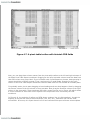
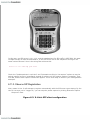
on X-Lite's main window, as shown in Figure 1-2.
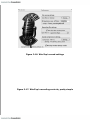
Figure 1-2. X-Lite's main window looks a bit like a cellular phone
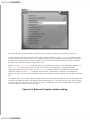
When the configuration window appears, double-click System Settings, and then double-click
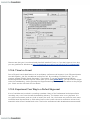
Network This to bring up the network configurations (Figure 1-3). Find the Provider DNS Address
setting and change its value to the DNS server provided by your VoIP TSP (not your Internet Service
Provider, or ISP). Your VoIP TSP might require the use of its own DNS because itsSIP resources
might be on a private domain that cannot be resolved through the public DNS system. If your VoIP
TSP didn't provide a DNS address, you can leave this setting blank.
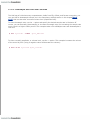
Figure 1-3. X-Lite's network configuration window
Click the Back button in the lower-left corner of the screen to get back to the prior window. Here,
you'll need to double-click SIP Proxy to open the SIP Proxy Settings window. Double-click Default,
and you'll be able to configure the softphone to use a SIP proxy server, which is located at your VoIP
TSP and routes your softphone's calls. The X-Lite softphone can use more than one SIP proxy, but in
most situations, you'll need to use only one. This list describes the settings you will need to
configure:
Display Name
Your name, or as much of it as you can fit.
User Name
The SIP username provided by your TSP. This is likely to be your phone number, including the
area code.
Authorization User
This is normally the same as the SIP username provided by your TSP, though some TSPs might
issue a distinct authorization username. In circumstances where multiple phones with their own
phone numbers are authorized for the same subscriber, the two usernames might vary.
Password
The password you and your TSP established when you set up your VoIP account.
Domain/Realm
This tends to be the domain name associated with your SIP user URI, which is similar to an
email address. For [email protected], your domain/realm would be
sip.broadvoice.com. Your TSP will issue you an appropriate realm name if it supports the use of
softphones.
SIP Proxy
This is the address of the proxy server that will handle all your VoIP registration activitythings
like authentication and notifying the server that you're available to receive calls. Unlike a SIP
URI, which always contains sip in the domain, the SIP proxy address can be any valid hostname. Again, your TSP will provide you the address to use when you sign up.
Outbound Proxy
This address is used to handle SIP requests that are bound for other SIP domains. Since most
VoIP TSPs don't support calling other realms using SIP, and generally only support calls to and
from the public telephone network, an outbound proxy isn't necessary. But BroadVoice, for
one, requires that you configure an outbound proxy addressand in its case, it's the same
address as that used for the SIP proxy setting.
Use Outbound Proxy
This setting tells X-Lite whether you want to treat all SIP requests as though they are destined
for another realm. This effectively circumvents the SIP proxy for any activity other than
registration, though if the two proxies have the same address, as in BroadVoice's configuration,
it doesn't matter what this setting is set to. The choices are Always and Never, in case you
were wondering.
Some TSPs have more than one SIP proxy, and they might allow you to
choose among them. To determine which one to use, ping them all. The
one with the least amount of variance from one ping packet to the next is
the one you want.
Register
This setting tells X-Lite whether you want the SIP client to authenticate and register with the
SIP proxy server. It's very uncommon not to register, and you won't get very far with your
VoIP service if you don't. So definitely set this one to Always.
For most TSPs, you can leave the rest of the settings unchanged. For a more detailed description of
X-Lite's settings, you can download a PDF user manual from CounterPath's web site,
http://www.counterpath.com/.
1.6.3. Make the Call
When the X-Lite phone has successfully registered with the TSP's proxy, its main window will display
a message like "Logged InEnter a Phone Number." Now, you should be able to type in a valid public
telephone network number (try your cell phone for an easy test, if you have one). The service should
function at least as well as it would via an ATA and analog phone, with one possible exception
echo.
Echo is common with softphones if you're using your PC speakers to listen to the person on the other
end of the call. If you experience echo when you speak, use a pair of headphones to cancel the
acoustic feedback loop.
Hack 5. Prioritize Packets to Improve Quality
Voice traffic competes for available bandwidth on your broadband connection. If there is
not enough bandwidth, packets get dropped.
VoIP media streams require a constant, uninterrupted data flow. This data flow is composed of UDP
packets that each carry between 10 and 30 milliseconds of sound information. Ideally, each packet in
a media stream is evenly spaced and of the same size. In a perfect world, a packet never arrives out
of sequence or gets dropped. Voice over IP media packets are framed in a highly precise,
performance-sensitive way, described in more detail in Switching to VoIP (O'Reilly). Dropped packets
and packet jitter (packets arriving out of order) cause problemsbig problemsfor an ongoing call.
These problems can cause the voices on the call to sound robotic, to cut in and out, or to go silent
altogether.
Most of the packet-drop problems you'll encounter while VoIPing will be the fault of your bandwidthlimited ISP connectionthe link from the ISP's network to your broadband router. If you're
downloading songs to your iPod, surfing the O'Reilly Network, and patching yourWorld of Warcraft
client all at once, you won't have enough bandwidth left over to support a VoIP call, but there's a way
to curb all those applications' thirst for bandwidth so that you can still VoIP successfully. Read on.
To maximize call quality, the network connection carrying VoIP media packets must be as reliable
and consistent as possible. The data link to the ISP should treat all voice media traffic withhigh
priority. That is, a VoIP packet gets handled first, as it is more important than another packetsay, for
your BitTorrent upload. If the data link is swamped and is out of capacity to carry any more data,
less important packets are discarded before more important ones. The net resultfor high-priority
services like voiceis better Quality of Service, or QoS. Several standards exist to ensure that QoS can
occur in a broadband VoIP setup, chief among them: Type of Service (ToS) and 802.1p.
If your broadband router is relatively new, it might support these standardsso enabling packet
prioritization is just a matter of flipping some configuration switches.
1.7.1. Prioritize Packets on a Linksys Broadband Router
ToS is a feature of Ethernet switches that permits packets tagged as high priority to be handled first,
maximizing their QoS. 802.1p is a similar concept, but tends to hang around on routers, not
switches. The Linksys BEFSR81 broadband router is a device that supports 802.1p. It sells for less
than $100 USD online, and you can probably find one secondhand on eBay for even less.
In fact, setting up priorities on this router is a snap, thanks to Linksys's usual snazzy web-based
interface. Once you get the router unboxed and hooked up, use the web interface to locate the QoS
screen. (You'll see it after you click on the Advanced Configuration button and the QoS tab.)
The QoS screen contains two sections: one that allows you to establish queuing priorities for packets
depending on their TCP/UDP port numbers, and one that allows you to alter the queuing priority
depending upon which Ethernet switch port the traffic originated from. That is, since this router has a
built-in switch, you can prioritize some of its eight Ethernet ports using the lower half of the QoS
screen.
1.7.1.1. Prioritize RTP traffic.
Most VoIP media streams are carried by Real-time Transport Protocol (RTP) packets. To raise the
priority of RTP traffic, enter the port numbers 5004 and 5005, each on its own line, in the section
labeled "Application-based QoS," and click on the High Priority radio button for each. After restarting
the router, all RTP traffic sent from the router will be handled before any other traffic. This technique
is especially good if your LAN has multiple VoIP devices that send media streams through the router.
1.7.1.2. Prioritize all the traffic from your VoIP ATA.
If you have only a single VoIP device to support, like a TSP-provided ATA, it might be best if you tell
the router to prioritize traffic by Ethernet port instead of by application, as in the preceding
paragraph. Specifically, you want your router to prioritize traffic that comes from the Ethernet port
where your ATA is connected. To do so, use the High Priority and Low Priority radio buttons for the
numbered Ethernet ports. Set them up however you want and reset the router.
1.7.1.3. Prioritize all the traffic from an attached Ethernet switch.
By setting the priority of a particular Ethernet port, you are telling the router to prioritize anything
from the device connected on this port, even if this device is another switch. So, an easy way to give
priority to all your dedicated VoIP devices, like IP phones and ATAs, is to connect them all to the
same switch and then connect that switch to a high-priority Ethernet port on the router.
1.7.2. Prioritize Traffic on a Standalone Switch
Many workgroup Ethernet switches offer QoS features that used to be found only on advanced
"managed" switches. These days, inexpensive switches like the NETGEAR GS605 provide support for
ToS and 802.1p. By placing such a switch between your broadband router and your VoIP device, with
voice traffic prioritized, you can ensure that outbound voice streams get sent to your broadband
router before anything else.
1.7.3. What Happens When VoIP Passes Your Router
Unfortunately, no matter how well prioritized and orderly your VoIP media traffic is when it's
forwarded by your broadband router, it still might get slowed down, ripped up, and otherwise
tattered as it makes its way across the Internet. The same is true of mediapackets that come from
the Internet to your routerthe packets carrying the voice of the person speaking to you. Since you're
receivingnot transmittingthose packets, you can't really prioritize them. That's the responsibility of
the routers that carried the packet to your routerand many routers on the Net these days are
ignorant of QoS.
In short, you can control traffic sent from your network, but not traffic sent from other networks to
yours. At first blush, this sounds like a threat to broadband VoIP, but over the last few years, many
have discovered that the outbound traffic is all you really need to prioritize to have success with a
broadband TSP. This is because most broadband ISPs limit the amount of outbound bandwidth
available to each customer to discourage customers from hosting high-traffic services on their
residential broadband connections.
So, there's less available bandwidth to you for sending than for receiving. The VoIP media stream
most likely to suffer as a result is the outbound stream, the one carrying your voice to the person on
the other end of the call. As such, it's appropriate to prioritize outbound traffic to overcome the limits
many ISPs force on outbound bandwidth.
Hack 6. Got 911?
For a multitude of technical and political reasons, Internet TSPs have been slow to make
reliable Emergency 911 dispatch dialing available for their customers. Here's how to know
if you've got it.
If you recently signed up for VoIP telephone service, the likelihood of you having911 service is low,
but some TSPs do offer it. The fastest way to find out if your TSP offers it is to contact them and ask.
Vonage, for instance, supports 911 call routing to most public safety jurisdictions, but you've got to
activate this "feature" first. Here's a snippet from Vonage's end-user agreement:
You acknowledge and understand that 911 dialing does not function unless you have
successfully activated the 911dialing (sic) feature by following the instructions from the "Dial
911" link on your dashboard, and until such later date, that such activation has been confirmed
to you through a confirming email. You acknowledge and understand that you cannot dial 911
from this line unless and until you have received a confirming email.
2.5 Failure to Designate the Correct Physical Address When Activating 911 Dialing
Failure to provide the current and correct physical address and location of your Vonage
equipment by following the instructions from the "Dial 911" link on your dashboard will result in
any 911 communication you may make being routed to the incorrect local emergency service
provider.
This is a heavy-handed contract item, but what it means is that you have to use Vonage's prescribed,
email-based activation routine to use its 911 call routing. Of course, I'm not a lawyer, and I can't
provide an attorney's interpretation of this agreement, so contact Vonage if you're unsure about it.
Other providers might handle 911 call routing similarly, so make sure you ask before you sign up if
911 is a highly important feature.
The best way to deal with this intimidating contract is to know firsthand whether your TSP has you
set up for 911 calling, or be ready for an emergency in case it doesn't. That's what you're about to
do.
1.8.1. The Problems with VoIP Emergency Dialing
With a traditional phone line, the power for the line and phone comes from a central power source at
the phone company's exchange switch. This means that even during isolated power outages, you can
still make and receive callsincluding 911 calls. With VoIP, your electric company and in-house
electrical circuits provide the power. If a circuit blows or the electrical supply fails, you won't be able
to make any calls.
This would also be the case if your Internet connectivity failed or experienced a VoIP-prohibitive
traffic jam. You wouldn't be able to make calls, or you might not be able to hear or be heard. Neither
would be acceptable in an emergency calling situation, yet broadband VoIP TSPs can't prescribe a
solution to this problem. This is because the TSP doesn't control the traffic between your VoIPdevice,
your ISP, and the rest of the Net that provides the data transport between your VoIP device and the
TSP. Unfortunately, there aren't many solutions to these issues.
1.8.2. Hack a Compromise Solution
In the event of an emergency, you're going to want to know you can pick up the phone and reach
help quickly. You can do a few things to ensure this.
1.8.2.1. Keep a Plain Old Telephone Service (POTS) line for 911 calls.
By keeping a traditional phone line hooked up, you ensure that you can reach 911 using "the old
phone," and you provide a line that your VoIP ATA might be able to use for 911 dialing. Many VoIP
ATAs and VoIP-integrated broadband routers, such as the Zoom X5V and V3 routers, allow you to
connect a standard POTS line that 911 calls can be routed to in case of an emergency. Check with
your VoIP TSP to see if it supports this kind of connection.
1.8.2.2. Program your VoIP device with speed dial to mimic 911.
If you absolutely can't keep a POTS line around (or you prefer not to bear the expense of one merely
for 911 dialing), you might be able to get your VoIP equipment to somewhat mimic the real thing:
Program speed-dial buttons or key combinations on your IP phone or softphone that will autodial the local fire department or dispatch center via its regular, non-911 number. You should be
able to obtain the local 10-digit phone number for the emergency dispatcher by contacting the
administrative office of your local fire department. Ask them to give you the phone number of
the line where 911 calls are answered. If you get lucky, the person you ask will know what VoIP
is and will understand why you're asking, but don't count on it.
If that's a dead end, you can program speed-dial buttons or key combinations (maybe even 91-1 itself) into your IP phone or softphone as a shortcut for calling a trusted neighbor or family
member. This isn't exactly emergency dispatching, but it's better than nothing.
1.8.2.3. Use a cell phone for 911.
Like a POTS line, a cell phone can often be used effectively to reach the 911 dispatcher, but check
with your cell phone carrier to make sure 911 service is available and reliable in your service area.
Just because wireless 911 service has been mandated by the Federal Communications Commission
doesn't mean it works everywhere, so check with your carrier to be sure.
1.8.2.4. Use a good old-fashioned permanent marker.
If all else fails, using a felt-tip permanent marker, write the full 10-digit phone number of thelocal
public safety dispatcher on every phone in your house that uses your VoIP service. Don't write it on
tape or sticky labels adhered to the phone, because they will eventually peel off, and you never know
when you'll need that important phone number.
Hack 7. Update Your VoIP ATA Firmware
An ATA with up-to-date firmware will have fewer problems.
"Yesterday, I made phone calls through my VoIP TSP all day long! But today, I don't even hear a dial
tone when I pick up the phone!" grumbled the frustrated consumer, regretting having replaced his
local telephone service with a slickly advertised VoIP service from a California company called
Ownage. This was the third or fourth time his VoIP service had quit working. So he grabbed his cell
phone and frantically called the Support Department at Ownage.
The tech who answered wasn't especially helpful. She listened to the customer describe his recurring
problem and then told him the same thing Support had been telling him ever since the first time the
dial tone disappeared: "Sir, can you reboot your analog telephony adapter by removing the power
cord and then plugging the power cord back in again after a few seconds? That should take care of
the problem."
"But I do that every time. Ma'am, I bought this VoIP Hacks book that taught me how to wire my ATA
into my home phone wiring so that I could replace my local phone service with Voice over IP, and
now I'm very frustrated because every few weeks, I pick up the phone and the dial tone is gone. I
have to run downstairs and reboot my ATA before I can place any calls, and I'm a little frustrated,"
the exasperated customer said. "Why is this happening?"
"Well, it's actually quite simple. The ATA receives an IP address from your DHCP server, which runs
on your broadband router," she explained. "And your broadband router receives an address from
your Internet provider's DHCP server. That IP address can change sometimes, when your DHCP lease
expires, breaking the UDP socket that connects your ATA with our network here at Ownage."
"In English, please?" the customer said.
"Well, the problem occurs because your ISP assigns you a dynamic address that periodically
changes," the support tech explained. "When it changes, the ATA loses communication with our VoIP
server."
"So, it's my ISP's problem?"
"No, not exactly. Most ISPs use dynamic addresses for residential broadband customers to prevent
them from, say, hosting their own servers. So, they have their reasons for using dynamic addresses,
and there's little we can do about it," she told him.
"Then what do I do to stop it from happening again?" the customer asked.
"I'm glad you asked," she replied. "You can download the latestfirmware patch for our ATA, which
should make the ATA automatically reregister with our server whenever it loses communication. That
would be the best thing to do."
"Is there anything else I can do?"
"If you'd like to hack a solution, you could build a system that can perform a regular, timed reboot of
your ATA. Or you could cron a shell script that dials into aDataprobe AutoPALthis is a really cool
device that lets you remotely reboot thingsor you could…."
But he cut her off. "OK, I think I'll just download the firmware patch. Can I get it from your web site?
" he asked.
"Of course. Is there anything else I can do for you today?"
"I don't think so," he said.
"Thanks for calling Ownage, sir. Have a good day," she said, and they both hung up. Satisfied, the
customer picked up a pen and jotted down the entire conversation in the hopes of someday
publishing it in a book about VoIP.
You can find out more about the Dataprobe AutoPAL at
http://www.dataprobe.com/power/auto_pal.html.
1.9.1. The Hack
Updating ATA firmware is a great way to stay on top of known performance issuesand it might allow
you to take advantage of new telephony features introduced by your TSP. Most telephony hardware
vendors tend to make their systems more stable with each release, so understanding your TSP's
prescribed method for installing firmware patches onto your ATA is important. I've chosen Packet8
for this example. Refer to your specific TSP's support site for details on its update procedures.
1.9.1.1. Get the firmware update.
Packet8, for one, offers a Windows executable that you can download from its web site
(http://web.packet8.net/download). This tool will automatically identify your Packet8-provided DTA310 ATA, download the patch, and install it. If you prefer not to use the tool, you can install the patch
using the Packet8 ATA's web interface. Instead of downloading the executable installer tool, just
download the firmware file. Save it and remember the path where you saved it.
1.9.1.2. Locate your ATA.
Next, if you don't know your ATA's IP address, use Packet8's IP-address identification service to find
out what it is. This will be helpful if you've forgotten it, or if your ATA is configured to get its IP
address via DHCP. Simply pick up your phone and dial 0120003. This will play back a recorded
greeting that includes your ATA's IP address.
Next, go to that address with your web browser, using a URL like this:http://10.1.1.200, replacing
10.1.1.200 with your ATA's actual address.
When the ATA welcome page appears, click the Upgrade Firmware link. Click the Browse button to
locate the firmware image file you downloaded earlier. Then, click Start Firmware Upgrade. After your
ATA has rebooted, the update will be finished.
Chapter 2. Desktop Telephony
2.1. Hacks 827: Introduction
To take advantage of computerized telephony, you don't need a VoIP gateway, a fancy Internet
Protocol (IP) phone, or an open source PBX (though those are certainly fun, hackworthy telephony
goodies). Your desktop PC can be the nerve center of all your voice communications, replacing your
telephone, your caller ID display, your answering machine or voicemail, and possibly even your
phone bill (some VoIP services will bill you electronically).
Some pretty amazing software goodies are available to make your voice communication life a real
joy. Programs like Gizmo Project and Skype let you make voice calls to buddies around the globefor
free. Some of these programs have built-in voicemail and call recording, and most are crossplatform, offering support for Mac, Windows, and Linux.
Hardware contraptions and telephony automation software bring even more exciting capabilities to
the table. With a telephone-line interface for the Mac or a voice modem in a Windows PC, all you
need is the right software to tie your phone completely to your desktopbut don't forget your wireless
headset. VoIPing is much cooler when you aren't physically bound to your PC.
So don't delay; dig in to this grab bag of desktop telephony ideas. They're just the tip of the iceberg.
Hack 8. Access Next-Gen Voice Features
Broadband VoIP providers like Vonage don't just provide phone service. If you know
where to find the features, they integrate with other applications on your desktopand
with your digital life.
When you subscribed to your amazing new VoIP telephone service, you might have missed the fact
that, along with your new Internet calling, money-saving VoIP service, you also picked up some nifty
desktop telephony enhancements. Most of the broadband VoIP phoneservice providers give you
some cool extras that you'd never get with a traditional phone companystuff like web-based account
management, voicemail-to-email integration, and even softphone calling from yourdesktop. Did you
know…?
2.2.1. Vonage Users Can Call Any Outlook Contact with One Click?
Vonage lets you place calls to your Outlook contacts with a special piece of software, an add-in called
Click-2-Call, which comes on the Vonage software CD. Install it and launch Outlook. You'll notice that
your Outlook contacts now have a Click-2-Call option in their Actions menu. Clicking this option dials
the contact's phone number via your Vonage analog telephone adapter (ATA) and then connects the
call with your phone. Pick it up; you should hear your call ringing in the handset, waiting for your
contact to answer.
2.2.2. BroadVoice Users Can Use a Web-Based Tool to Place and
Manipulate Calls?
If you're a BroadVoice subscriber, you've got some really cool web-based call-management tools at
your disposal. Thanks to BroadVoice Call Manager, a web-based tool that BroadVoice gives you
access to when you sign up, you can use a web page to control your voicemail, enable and disable
call forwarding, and even tell BroadVoice how to handle your incoming calls based on their caller
IDsmaybe you want to forward certain callers to one number, while allowing your BroadVoice
voicemail to handle other callers. Nifty, eh?
2.2.3. You Can Automatically Dump Unwanted Girlfriends and Boyfriends
Using a VoIP-Based Service?
Sad, but true. Hey, if you can get a date using the Web, why not dump people the Internet way, too?
VoicePulse, a broadband VoIP carrier, provides the VoIP network framework for a service that will
help you handle unwanted advances like a dating champ. You don't have to be a VoicePulse
subscriber to use the service, though. Any phone userVoIP, traditional, or cellcan dump somebody
the high-tech way.
Let's say you're at a party and some doofus asks you for your phone number. Give the doofus the
local number you find at RejectionHotline.com
(http://www.rejectionhotline.com/numbers_and_cities.php), rather than your real number. When the
dork calls for a date, he or she will instead get a professional rejection courtesy of theRejection
Hotline.
Aside from being cruelly entertaining, the Rejection Hotline provides a great demonstration of a
large-scale soft-based voice system. By the time you're done with this book, you'll probably have
enough VoIP chops to start your own version of the Rejection Hotline.
2.2.4. Broadvox Direct Users Can Use Find-Me-Follow-Me so that They
Can Be Reached Wherever There's a Phone?
You bet! When you subscribe to the Broadvox Direct VoIP service, you get aweb-based toolset that
lets you configure a find-me-follow-me call list. That way, when folks call your home phone, the
service can attempt to track you down on your cell phone, at Mom's housewherever you might be.
Hack 9. Track Vonage Account Info on Your Desktop
This tiny desktop tool helps keep track of your minutes and voicemails, too.
If you've never used Konfabulator (now known as Yahoo! Widgets) or Apple's Dashboard widget
system, you should try it out. Widgets are very simple, specialized desktop apps that provide short,
useful information in real time. They can be floating windows, or they can be embedded into your
desktop. Remember Active Desktop from 1997, which let you dock an informational web page into
your Windows desktop? Well, widgets are about nine times better.
The widget experience is best with Yahoo! Widgets, a widget framework that seamlessly integrates
with Mac OS X and Windowsspecifically, Mac OS X 10.2 and higher, or Windows 2000 and XP.
Literally thousands of different widgets are available that run on both Mac and Windowseverything
from weather reports and stock tickers to cute little iPod remote controls and telephony-related
goodies. One such goody is the must-have vonageGauge widget by Martin Koistinen, which gives you
a one-glance update of your remaining Vonage minutes, as well as a count of voicemails waiting to
be listened to (Figure 2-1).
2.3.1. Installing Yahoo! Widgets
It's quite worth your while to install Yahoo! Widgets, even if you can't benefit fromvonageGauge.
Throughout this book, I reference a number of other cool Yahoo! Widgets that will aide you in your
telephony travails. The place to start is http://widgets.yahoo.com/. Here, you can download a version
of the Y! Widgets system for either platform.
To install on Windows, just run the installer that you downloaded. To install on Mac OS X, drag the
Konfabulator icon (which might eventually become the Y! Widgets icons) from the downloaded DMG
volume folder into your system's Applications folder. Then, launch it by double-clicking it.
Figure 2-1. The vonageGauge widget in action
You'll be stepped through a wizard that helps you decide where you want to store downloaded
widgets as your inevitable widget addiction grows. When the wizard is complete, Konfabulator/Yahoo!
Widgets will automatically launch its default set of widgets. Now, to try out vonageGauge.
2.3.2. Installing the Vonage Widget
Download the vonageGauge widget from http://www.widgetgallery.com/view.php?widget=36334 and
save it in a temporary folder or in the standard spot where you put downloaded files. Unzip the
download (or mount it by double-clicking it, if on a Mac) and copy the enclosed widget file to the
widget folder you selected during installation.
Mac users can launch the widget with no further issues. Windows users, however, must do some
manual configuration due to lack of SSL support for the curl web utility in the Windows version of
Konfabulator. Don't worry, though. This is hardly a painful thing to fix. You need this because
Vonage's web site requires (as it should) SSL encryption to be employed when accessing account
information.
To rectify the matter, download the most recent version of curl from its web site,
http://curl.haxx.se/latest.cgi?curl=win32-ssl. From the downloaded zip file, note the files curl.exe
and curl-ca-bundle.crt, as you'll need them in a moment.
Then grab the needed SSL libraries, ssleay32.dll and libeay32.cll, from
http://www2.psy.uq.edu.au/~ftp/Crypto/. The libraries will be located in a binaries directory on one
of the FTP mirrors listed here. The specific file you need to download will have a name likeSSLeayX.X.X-DSA.msw32.zip. From inside this zip file, copy the two SSL dll files to the Konfabulator wbin
folder located at \Program Files\Pixoria\Konfabulator\UnixUtils\usr\local\wbin.
Copy the two files from the curl download here, too. In total, you should have copied four files into
this folder.
2.3.3. Gauging Your Vonage Utilization
Launch the widget by double-clicking its icon in yourwidgets folder. The thermometer-like display
shows you how many minutes are remaining on your monthly plan. The more minutes youuse, the
lower the height of the "mercury" in the thermometer. This can help you conserve your utilization
and spread your usage out to control your Vonage burn rate. Note that if you have an unlimited plan,
this isn't really doing much for you, aside from showing you how many voicemails you have waiting.
To listen to unheard voicemails, double-click the text at the bottom of the thermometer, and your
web browser will launch Vonage's services page, where you can hear them.
Hack 10. Pick a Desktop VoIP Client
There's no shortage of fantastic VoIP software for Windows, Mac, and Linux. But which
one (or two) do you need?
VoIP applications tend, like email, to have a few servers facilitating interaction on behalf of many
clients. In the case of email, those clients are applications like Microsoft Outlook, Eudora, and Apple
Mail. But in Voice over IP, clients can be standalone devices, like IP phones and interface boxes (ATAs
like those described in Chapter 1), or desktop applications like softphones or instant-messaging apps.
The information in this hack will help you decide which VoIP client is right for you.
Some VoIP clients use well-known standards such as the Session Initiation Protocol (SIP) and are
designed for use with your choice of VoIP service providers. Others are designed specifically to attach
only to a certain service such as AOL Instant Messenger (AIM). Still others are built using open
standards but are hard-wired to work with only certain services; Yahoo! Messenger uses SIP but
works only with the Yahoo! service. That is, you can't use the VoIP features of Yahoo! Messenger
with your own choice of VoIP service providers.
Some VoIP clients are quite functional "out of the box," such asSkype, which provides a user-friendly
wizard to sign you up for Skype service and get you logged in. With others, such asX-Lite and
GnoPhonewhich are designed for use with your choice of service providers, or even with your own
VoIP serveryou really need to know what you're doing to get much use out of them. Since X-Lite and
GnoPhone aren't officially sanctioned for use with a particular provider, you've got to knowhow to
configure them yourself.
2.4.1. Meet H.323, SIP, and IAX
VoIP clients and servers use three common standards for signaling call events. (These events might
be the beginning and end of a call, an attempt to join a voice conference, or looking up a phone
number to discover the best way to reach a particular user on a VoIP network.) These three
communication protocols are H.323, SIP, and IAX. Very rarely does a single client support more than
one of these protocols (Firefly is an exception, and provides support for both SIP and IAX). Having a
basic grasp of the different protocols will help you choose aVoIP client.
2.4.1.1. H.323: the earliest VoIP standard.
An H.323 client, such as Microsoft's Net-Meeting, really is good only in a corporate telephone system
environment. It was once fashionable to use H.323 to have voice conversations with buddies over the
Internet, but the rise of broadband firewall routerswhich break the H.323 signaling protocoland the
growth of better protocols such as SIP led to a backslide in NetMeeting's popularity as a personal
VoIP tool. Microsoft has since replaced much of the functionality of NetMeeting in its Windows
Messenger IM software. So unless you need a softphone that works with your H.323-based PBX
system (like an early-model Nortel PBX or Cisco media gateway), you're probably best served by
foregoing H.323-based software.
GnomeMeeting is a very NetMeeting-like application for Linux.
2.4.1.2. SIP: the dominant VoIP standard.
SIP has become the dominant multimedia communication protocol, used by an overwhelming
majority of VoIP service providers and professional phone system vendors. Aside from voice, you can
use SIP components to signal video and instant-messaging conversations, too. I'll concentrate on SIP
as it applies to voice, though.
There are two kinds of SIP VoIP clients: those that allow you to connect to a VoIP system of your
choice and those that are programmed for use only with a certain provider. SIP-supporting VoIP
client software includes products such as Yahoo! Messenger, Apple iChat, sipXphone, Firefly,
GnoPhone, Gizmo Project, and lots of others.
2.4.1.3. IAX: a really cool VoIP protocol.
Inter-Asterisk Exchange protocol (or IAX, pronounced eex) is used by a growing number of VoIP
client programs and service providers. The coolest thing about IAX is that it's firewall-proof. In
situations where SIP and H.323 are rendered inoperable by NAT firewalls like your home broadband
router, IAX shines. The only problem is finding a service provider with which to use IAX (visit
http://www.teliax.com/ to learn about one that offers an IAX-based VoIP telephone service).
IAXPhone and Firefly use IAX.
2.4.2. Understand VoIP Client Features
You ultimately will decide on a VoIP client based on features and compatibility. While one VoIP client
might support the protocol you needsay, SIPit might not support the features you need.iChat and XLite are both SIP software, but you can't use iChat with your own VoIP server; you need X-Lite for
that. (If you're reading this book from front to back, you might be wondering if I'm planning to show
you how to build a VoIP server. For the record, I am, but not until Chapter 4.)
Then again, the protocol or innards of the software might make absolutely no difference to you
(plenty of folks use Skype, which doesn't use a standard protocol at all).Table 2-1 is a matrix of VoIP
client software and their features and compatibility.
Table 2-1. VoIP client software compared
Software
Mac
Windows Linux
Uses
SIP
Uses
H.323
Uses
IAX
Uses with
your own
server
License
type
Gno-Phone
No
No
Yes
Yes
No
No
Yes
Open source
IAX-Phone
Yes
Yes
Yes
No
No
Yes
Yes
Open source
Skype
Yes
Yes
Yes
No
No
No
No
Free-ware
Yes
No
Yes
No
No
Yes
Open source
AIM
Yes (no
VoIP
features)
Yes
No
No
No
No
No
Free-ware
iChat
Yes
No
No
Yes
No
No
No
Free
X-Lite/XPRO
Yes
Yes
No
Yes
No
No
Yes
Free/Comm
Firefly
No
Yes
No
Yes
No
Yes
Yes
Free
Gizmo
Project
Yes
Yes
Yes
Yes
No
No
No
Free
Netmeeting
No
Yes
No
No
Yes
No
Yes
Free
GnomeMeeting
No
No
Yes
No
Yes
No
Yes
Open source
sip-Xphone No
As you work through the hacks in this and the following chapters, you'll become very comfortable
with the differences and similarities of these programsand you'll have an even better feel for their
strengths and weaknesses. A quick Google on any of these program names will get you to a place
where you can download and install the program. And, speaking of Google, to get the most out of
Google when using telephony, read "Google for Telephony Info" [Hack #21].
Hack 11. Sound Like Darth Vader While You VoIP
Using Audio Voice Cloak, you can sound like Darth Vaderor like Alvin and the
Chipmunkswhile you talk online.
Star Wars Episode III: Revenge of the Sith hit the screens right around the time I first tried this
hack. When I filed into the very first midnight screening of the movie at my local cineplex, I was
particularly excited by the prospect of again hearing the voice of the galaxy's most dysfunctional
father. There's just something about James Earl Jones and the flange effect.
After all, who hasn't looked into a mirror in a private moment and said, "I am your father!" a few
times? OK, maybe you're not as big a Star Wars geek as I am, but if you are a closet Wookiee lover,
I've got the perfect hack for you to use the next time you chat with fellow fans.
If you think spy movies are cooler than Star Wars movies, you can also use
this hack to make yourself sound like one of those disguised-voice phone
informants that sound a lot like, well, Darth Vader.
Gold Software's nifty voice-changing tool, Audio Voice Cloak, lets you tweak your speaking voice,
adding pitch shifting, EQ, echo, and other sound effects in real time (Figure 2-2). If you have
Windows, you're in luck (Mac folks, see the sidebar). Download and install AVC from
http://www.goldsoftware.com/downloads5903.html. Launch it and, after the shareware commercial,
you'll be able to click the All Controls button to reveal all of the sound-altering controls available to
you. The program uses the default microphone input, so if you're using a nonstandard microphone
channel for your telephony or online chat, you'll need to click the Recording Source button and select
the right input.
Figure 2-2. Audio Voice Cloak's main interface
While you tinker with AVC's settings, you can monitor yourself with the aptly titled Monitor Your Voice
button. Beware: you'd better put on a pair of headphones, or you'll get feedback.
To get the most authentic Vader imitation (short of hiring Ben Burtt, the famed sound effects guru
from Lucasfilm), you'll want a slightly southerly pitch shift (drag the pitch slider down a notch or two)
and a flange effect (click the Flange Off button to toggle it on). Finally, click the Center button on the
Equalization panel to flatten (or "reset") the equalizer. Then, monitor your speech to hear how you
sound. You should have the familiar, convincing tone of a half-machine Sith lord.
Now, fire up your Yahoo! chat client or AIM and surf on over to the closest chat room. Since AVC
passes the modified audio through in real time, you can chat live as Darth, ot you can raise the pitch
shift to sound like a chipmunk. And don't discount the immaturity factor: if you have kids who chat
with their buddies online, this could be a lot of fun!
Voice Alterations on a Mac
If you're a Mac user and you want to achieve the same voice alterations that Audio Voice
Cloak makes possible for Windows users, you'll need to get your hands on a tool for Mac
OS X called Soundflower. This awesome piece of software allows you to pipe audio
intoand out ofapplications in realtime.
The "pipes" carrying the audio are logical OS X sound devices, so you can use them with
any audio apps that support Core Audio, the standard sound framework on OS X. You
can create a pipe to carry your raw audio into Pro Tools Free or Logic Express, run it
through whatever real-time transformations you like, including pitch shift and flange for
the Vader effect, and then send it out to your softphone or chat application using another
pipe.
For more information on Soundflower, check out
http://www.macupdate.com/info.php/id/14067.
Hack 12. Grow Your Social Network with Gizmo
If you love Skype but hate the fact that it isn't open and standards-based, you'll be right
at home with Gizmo.
Gizmo Project, sponsored by SIPphone Inc. (http://www.sipphone.com/), seeks to create a free,
peer-to-peer softphone with instant messaging à la Skype, but without the proprietary hindrances of
Skype. In this regard, Gizmo does an excellent job. Its features are the same on Mac, Windows, and
Linux, toowhich means no more waiting two months for Windows only features to show up in the Mac
and Linux clients, something Skype users are accustomed to. Another cool plus that Gizmo brings to
the table is free voicemail, something Skype has yet to offer.
To get started with Gizmo, hook up your headset and microphone, and download and install the client
for your platform from http://www.gizmoproject.com/. Launch the Gizmo app, and register for your
Gizmo name from the login screen. This name is both your login ID and the name that other Gizmo
callers will use to call you. Once you're logged in, set up your user profile, as inFigure 2-3.
Figure 2-3. Gizmo's profile dialog
Don't forget to check the "List my profile in the White Pages for public searches" checkbox if you'd
like to hear from other Gizmo users. Otherwise, they won't be able to find you when searchingGizmo
Project's central user database. If you'd like to search for some buddies to add to your contact list,
start by clicking the Search button in Gizmo's main window. Its search function, which is similar to
but less elaborate than that of Skype, shows you the city, state, and country of each user, if they've
entered that information in their profile. Gizmo also has a big selection of rather cool built-inavatars
(buddy icons), or you can select your own image file to use.
Placing a voice call with Gizmo is as easy as entering the Gizmo name of the person you want to talk
to and clicking the round phone icon in the upper right of the main interface window. If you don't yet
have any buddies in your contact list, a great place to start is theGizmo Project Party Line, which you
can call by typing partyline in place of a normal Gizmo name. Calling the Party Line connects you to
other folks in a voice chat room who might be able to help you start your social network with Gizmo.
If there's nobody in the Party Line chat room at the outset of your call, you'll literally hear crickets
chirping (how appropriate).
2.6.1. Extra Gizmo Features
Gizmo comes with a few extra features not available with a default install of Skype.
2.6.1.1. Map It.
Have you ever wanted to know where the person you're talking to is located? When you're in a call,
click the Map It icon, and you'll see a very nice satellite photo with lines drawn between the
estimated locations of the call's participants, as in Figure 2-4.
Figure 2-4. Gizmo's Map It function
2.6.1.2. Record It.
Podcasters rejoice! Folks who've been looking for an easy way to record theirVoIP calls from Skype
and other softphone apps need look no further than Gizmo Project, which has the built-in ability to
record all calls without the need for any other software. As a call is in progress, if you want torecord
it, just click the circular record button at the top of the conversation pop-out window that appears at
the outset of each call. Recorded calls are saved in a WAV audio file on thedesktop by default (you
can change this location in Gizmo's preferences).
2.6.1.3. Gauge It.
At the bottom of Gizmo's main window is an icon that looks like the signal-strength icon you might be
familiar with from your cell phonea row of vertical bars that indicate thequality of the connection to
the phone network. In Gizmo's case, the bars represent the quality of the voice pathway your
Internet connection provides. If you double-click the icon, you'll get a pop-up dialog that gives you
more details about your available bandwidth, and you'll find out Gizmo's opinion of your Internet
connection (apparently Gizmo doesn't particularly care for mine; seeFigure 2-5).
Figure 2-5. Gizmo tells you how well it expects to perform using your
broadband connection
2.6.2. Share the Love
If you've come this far with Gizmo and still haven't placed an actual call, why not use that 25-cent
call-out credit that SIPphone Inc. provides and call a buddy to tell him about it. Do this by typing
your friend's phone number into the top drop-down list and clicking the round phone button. After a
few seconds, your friend's phone will ring and you'll be able to talk for as long as a quarter will
allowwhich isn't long, so you might want to purchase morecall-out credits by clicking the Out icon on
Gizmo's Home tab.
2.6.3. Also Worth Checking Out
If you're really into desktop VoIP and you'd like to experiment with other standards-based messaging
apps, I recommend JAJAH in addition to Gizmo. It's a Windows-based SIP softphone application that
lets you call traditional phone numbers, like Gizmo, but alsosupports the IAX protocol and Skype,
giving it the ability to communicate with several VoIP networks simultaneously.
I've always had to maintain several instant-messaging accounts to keep in touch with all of my online
buddies on Yahoo!, AIM, and ICQ. To avoid running several instant-messaging clients, I have adopted
Trillian, a Windows-based instant-messaging client that can talk to all of these networks, letting me
manage all my IM activity from a single interface. (A similar Mac multinetwork IM tool is Adium.)
As Skype, Gizmo, and other VoIP networks grow, you'll probably need to attach to them
simultaneously, as you would in the realm of IM. JAJAH lets you connect to VoIP networks using
several major standardsSIP, IAX, and Skypesimultaneously, saving you from having to run several
VoIP clients at the same time.
Hack 13. Record VoIP Calls on Your Windows PC
Unless you're using Gizmo, you probably can't record your VoIP calls without a little
outside software assistance.
If you constantly forget things (which I do), or you're a private investigator (which I'm not), you
might have wondered how to record calls so that you can listen to them later.Recording calls on
traditional phones and IP phones is a simple matter of analog electronics (seeChapter 5), but
recording softphone and instant-messenger voice calls is another matter entirely. Of course, you can
set an old-fashioned tape recorder on your desk and press the Record button, but come on! In our
digital world, there's got to be a better way, right?
Of course there is. You can find a handful of useful recorder apps athttp://www.download.com/ and
http://www.downloadsquad.com/ that can record WAV files and MP3s from any sound input or output
on your Windows PC. One such application is Total Recorder, developed by High Criteria (Figure 2-6).
In its default configuration, Total Recorder will record only the output (the person on the other end of
the call), but not your voice.
To alleviate this, click Total Recorder's Recording Source and Parameters button and then check the
"Record also input stream" checkbox. This way, your recording will be sure to contain both sides of
the call. The "Remove silence" checkbox will enable a feature that doesn't save moments of silence
into the recording. This might be useful if you record a ton of calls and review them regularly, as
waiting through unneeded silence would certainly slow this process and use up more hard-disk space.
A real time-saver is found by checking "Convert using Recording Parameters specified below" and
then clicking the Change button. In the dialog window that appears, you can adjust thesound
resolution and the output format. Just about every sound codec you'd want is supported, from
Windows Media to MP3. For even more sound-conversion goodness, be sure to check out "Create
Telephony Sounds with SoX" [Hack #24].
Figure 2-6. Total Recorder can save audio recordings from MSN
Messenger, Yahoo! Messenger, AIM, Skypeyou name it
Hack 14. Handle Calls with Windows Software
Have your PC screen your calls and take your messages with handy Windows tools.
If you've got a Windows PC with a standard modem (it doesn't have to be a voice modem), you can
use some really cool software applications that can identify incoming calls, with their caller ID
information shown on your Windows desktop. (Mac users can use Phlink for this purpose [Hack
#15].) Some of these apps can even respond to incoming calls so that you don't have to.
This kind of application is a lot of fun, because while it technically doesn't use any VoIP components
(it's still strictly legacy phone technology), it will give you an idea of how much power you as a phone
user have when you use software to enhance telephony applications. After all, your phone service is
merely an application, and you'll be using a PC application to enhance it.
You'll need caller ID service enabled on your phone line if you want your PC to
handle your calls in this way.
2.8.1. PhoneTray Free and PhoneTray Dialup
A cool freeware app that provides a caller ID pop-up window in the Windows system tray is
appropriately named PhoneTray Free. In addition to the pop-up display, PhoneTray will log all
incoming callshandy when you've been out, and you want to know whom to call backand it has a
feature called Privacy Manager that lets you block calls from certain callers (Figure 2-7). PhoneTray
also has a handy scheduler to establish your "quiet time," so you aren't receiving annoying calls in
the middle of the night. While these features might be available from your local phone company, you
can certainly save a few bucks by implementing them yourself with a PC tool like PhoneTray. The
only hardware requirement is a modem connected to your phone line.
Figure 2-7. PhoneTray Free's Privacy Manager
For a small premium, PhoneTray's developer will sell you a version of the package, called PhoneTray
Dialup, which works with caller IDenabled modems. Using this feature, if you're a dial-up Internet
user, you can receive caller ID signals on your PC desktop while remaining online. You can obtain
PhoneTray from http://www.traysoft.com/.
2.8.2. Call411
Another nifty free application that handles caller IDs in your Windows workspace is Call411. While
this app doesn't have the elaborate interface or the extensive call-handling options of PhoneTray, it's
an effective, no-frills tool for displaying caller IDs, as shown inFigure 2-8. You can associate a
custom ringtone with each caller ID if you like, and Call411 will even audibly announce incoming
callers' phone numbers if you wish. You can obtain Call411 from
http://www.soft411.com/company/Soft411/Call411.htm.
Figure 2-8. Call411 is a basic caller ID display tool
Tools like PhoneTray and Call411 are ideal for traditional phone service, but
should work OK with VoIP services like Vonage and Packet8, too, since their
ATA behaves just like a traditional phone line, with caller ID and all.
2.8.3. Call Soft and Call Soft Pro
If and when you outgrow Call411 and PhoneTray's features, and you find yourself wanting a complex
voicemail and auto-attendant to handle your calls, you can graduate to a more capable commercial
application such as Call Soft Pro, available from TOSC (http://www.toscintl.com/) and shown in
Figure 2-9. This full-featured telephony system lets you tap into many of the standard calling
features on your phone line. Even things like distinctive ring are supported. Call Soft Pro is a message
recorder and interactive voice-response tool, so your callers can be prompted to select which
voicemail box they'd like to record their message in. If you've got a large household, this can be a
godsend. Mom and Dad can have the generic family voicemail greeting, and teenagers Todd and
Susie can feel cool because they have their own individual voicemail greetings.With distinctive ring
enabled on your phone line, the kids can even have their own separate phone number, and Call Soft
Pro will recognize their ring pattern and play their special greeting.
TOSC makes a scaled-down version of Call Soft Pro called Call Soft, which is
geared more toward home users and lacks many of the automation features of
the Pro version.
Figure 2-9. Call Soft Pro is a comprehensive message recorder and
telephony package for Windows desktops
The program also offers a searchable call log, can receive faxes (which are saved as bitmapped files
so that you can view or print them), and turns your PC into a speakerphone so that you can listen to
calls through your PC's audio output and speak into your PC's microphone input. This allows you to
use your PC as a phone and to record your conversations, instead of merely using it for automated
call processing. Of course, there's a good bit of that in Call Soft Pro, too. Automatic forwarding of
recorded messages via email is supported, and Call Soft Pro can provide music-on-hold for your
callers, too.
Hack 15. Let Your Mac Answer and Log Your Calls
Ovolab's amazingly simple Phlink telephony package lets you do some really cool stuff on
your Maclike answer calls and remotely control your Mac with a telephone call .
Watching Steve Jobs pitching the digital lifestyle at Macworld Expo is a favorite pastime of Mac
enthusiasts. In fact, there's little that Mac users love more than watching the leader of the Mac world
tout new developments and cool little tweaks in Apple's flagshipiLife applications: iTunes, iPhoto,
iDVD, iMovie, and GarageBand. But for all the pomp and circumstance surrounding these ravishing
rollouts, Apple seems to have missed a critical component of the digital lifestyle, one that was around
long before DVDs or MP3stelephony.
Fortunately, an Italian company called Ovolab has created a really cool application that serves as the
missing telephony link for iLife. Phlink is a hardware-software combination that answers calls with a
voicemail greeting, logs them, and even allows you to set up AppleScripts that you can control
remotely from a touch-tone phone. The hardware piece of the Phlink setup is a USB device with two
RJ11-type ports, one for your standard phone line and another for your analog legacy telephone. The
software component (available at http://www.ovolab.com/phlink/ ) consists of an application that
looks like iTunes (see Figure 2-10 ). You get all of this for less than the cost of dinner (at a really nice
restaurant).
Installing Phlink is a snap. Just plug the USB interface into an available spot on your Mac or its
keyboard. There's no power adapter to worry about, thankfully. Plug your phone line into the "line"
port on the USB interface, and plug your analog phone into the "aux" port. Then, drag the Phlink icon
from the included CD-ROM to your Mac's Applications folder.
Figure 2-10. Phlink's main interface
2.9.1. Pop-Up Caller ID Notifications
In Phlink's Preferences window (available by clicking Preferences from the Phlink menu), you can
enable an option that shows you a pop-up window with the caller IDs of incoming calls on your
screen, so you can decide whether you want to answer them without having to even take your eyes
off the screen, let alone leave your desk.
What's cooler than that? Well, how about telling your Mac to answer the call so that you can get on
with what you're doing and not be bothered with answering the phone. To do so, just click on the
round phone button in the Phlink action window, as shown in Figure 2-11. This starts the greeting to
the caller and records the caller's message.
Figure 2-11. Phlink's action window
2.9.2. Custom Greetings
When Phlink answers each incoming call, it looks in thePhlink Items folder in the Library/Application
support folder of your user profile for a file called greeting.txt . If it finds the file, it uses the Mac's
built-in speech synthesis to speak the words in the file to the incoming caller. To modify this greeting,
simply refill the contents of this file with whatever you like.
If Phlink can't find the greeting.txt file, it looks in the same directory for greeting.aif or greeting.mp3
. Whichever of these files is present is played back to the caller. To create your own audio greeting,
use a recording program (such as Cacophony [Hack #22] ) to record and mix this greeting as you
see fit.
To get files into the right format for a greetingi.e., AIF or MP3use SoX. Refer to
"Create Telephony Sounds with SoX" [Hack #24] for tips.
2.9.3. Answer Fax Calls
Phlink can answer fax calls. In the Preferences window on the Fax tab is a checkbox to enable
automatic answering of incoming fax calls. You can have the Mac OS X fax viewer handle the faxes,
or use the script option to handle them yourself. And speaking of scripting, now that you've covered
the basics of Phlink, let's begin customizing!
Hack 16. Run Phlink Even When Logged Off
Phlink is a great application, but it's a desktop program, not a server app that's made to
run in the background. So, when you log off, it shuts down and can't answer callsunless
you customize it to do so.
To get Phlink to launch upon login is really easyjust make it a login item for your user account in OS
X Preferences. But getting Phlink to stay running even after you've logged out is a challenge. Of
course, Phlink is most useful when it's running at all times, so you need to be able to do this.
Thankfully, for every unique need there's an equally unique hack. In this case, we're going to launch
Phlink under a different user account. This user account will be automatically logged in at boot time,
allowing the Phlink application to launch in that user account. Then, we'll create an Apple-Script login
item to switch to the user-selection screen automatically, giving you the option of logging in as any
user you want.
To get started, open up System Preferences and click the Accounts preference pane. Click the + icon
to create a new account, and call it Phlink. Make sure it is set to log in automatically upon startup.
Now, log in as this user. Be sure to enable Phlink as one of its login items. To enable login items for
the Phlink user, return to System Preferences and select the Login Items tab. Now you can add Phlink
to and remove it from this list, causing it to launch whenever the userphlink logs in.
Now, launch the AppleScript editor, and create a script with this single line:
do shell script "/System/Library/CoreServices/Menu \\ Extras/User.menu/
Contents/Resources/CGSession suspend"
The purpose of this one-line AppleScript is to present the user-switching dialog on the screen. We'll
use this AppleScript to get back to the traditional login screen once thePhlink user has logged in and
the Phlink app has launched. Save this AppleScript and then make it a login item for the userphlink.
(Be sure it's listed after the Phlink login item.) Then, save and exit Preferences.
Now you're ready to try it. Reboot your Mac. If all goes well, your Mac will log in as the Phlink user
automatically, launch Phlink, and return you to the screen where you can choose which user to log in
as (or the username and password prompt, if that's how your Mac is configured).
Now, Phlink will handle your calls even while you're logged in as another user, or logged off
altogether, because it's running as its own user in the background.
Hack 17. Greet Callers Differently Each Day
Many voicemail systems let you use a different greeting depending on the day of the week
or the time of day, but not Phlinkthat is, unless you know how to use cron.
As you know from "Let Your Mac Answer and Log Your Calls" [Hack #15], a file in the
/Library/Application Support/Phlink Items directory contains your outbound greeting. Either it's
greeting.txt (for a synthesized voice greeting), or it's an audio file in the form ofgreeting.aif or
greeting.mp3. But suppose you want to use a different greeting depending on the day of the week.
Thank goodness for cronthe trusty Unix relic is a workhorse. Assuming you have all of your daily
greetings stored in the same place, you can create a script that cron can use to update the greeting
based on the day of the week. Here's the directory listing on my machine:
Mac-Mini:/Library/Application Support/Phlink Items kelly$ ls -al
total 328
drwxr-xr-x 10 tedwalli
admin 340
Jun 9 22:39 .
drwxrwxr-x
16 root
admin 544
Jun 6 19:50 ..
-rw-r--r-- 1 tedwalli
admin
6148
Jun
6 19:50 .DS_Store
-rw-r--r-1 tedwalli
admin
94
Jun
6 19:50 greeting.txt
-rw-r--r-1 tedwalli
admin
755002
Jun
9 22:39 greeting_friday.aif
-rw-r--r-1 tedwalli
admin
740222
Jun
9 22:39 greeting_monday.aif
-rw-r--r-1 tedwalli
admin
700101 Jun
9 22:39 greeting_thursday.aif
-rw-r--r-1 tedwalli
admin
694450 Jun
9 22:39 greeting_tuesday.aif
-rw-r--r-1 tedwalli
admin
801006 Jun
9 22:39 greeting_wednesday.aif
-rw-r--r-1 tedwalli
admin
154102 Jun
6 19:41 ring.aif
Now, create a quick shell script like this one, for each day of the week:
#!/bin/sh
## This script is for Monday.
cd "/Library/Application Support/Phlink Items"
cp f greeting_monday.aif greeting.aif
Save each daily shell script in a convenient place, perhaps in acronjobs folder in the user profile of
that phlink user we made in "Run Phlink Even When Logged Off" [Hack #16]. Don't forget to make
them executable (run chmod 755 * in the directory where you've put them). Then, add each file to
the last column of the /etc/crontab file, which defines scheduled Unix activities that should run in the
background on Mac OS X. In this example, the daily file rotation occurs at 6:30 a.m. from Monday
through Friday (the Friday greeting remains in place until Monday morning):
#
30
30
cron
6
6
30
30
6
30
jobs
to
*
*
6
rotate
*
*
*
*
6
the
*
*
*
*
phlink
fri
mon
tue
wed
thu
greeting
~phlink/cronjobs/Friday.sh
~phlink/cronjobs/Monday.sh
~phlink/cronjobs/Tuesday.sh
~phlink/cronjobs/Wednesday.sh
~phlink/cronjobs/Thursday.sh
Now, your Phlink setup will have a different greeting depending upon the day of the week.
Hack 18. Use Caller IDs in AppleScripts
One of Phlink's AppleScript hooks occurs when incoming calls arrive, which means you
can create actions to handle how those calls are handled.
If Phlink didn't have AppleScript support, it wouldn't be nearly as cool as it is. In fact, when I first
fired up the Phlink application, I looked at the minimal interface and thought to myself, "Is thatit?"
The fact is that Phlink's most awesome functionality is in its AppleScript object model. By using
Phlink's functions in tandem with other AppleScript aware applications, you can do some very cool
telephony automation, from music-on-hold to greeting callers with the Mac's speech synthesis in
interactive stages. Anything you can retrieve into an AppleScript variable from other Mac apps, you
[1]
can pass into Phlink functions for interaction with callers. The only limit, then, is your imagination.
[1]
For an unrelated affirmation of the limitlessness of the human spirit, visit http://www.zombo.com.
As I got into setting up these voice AppleScripts, I was reminded of the
interprocess communication goodness of the vintage Arexx scripting language
on my old Amiga 4000 computer. I got to thinkingwouldn't it be cool to do
some voice hacks on that 25 MHz classic? Then I realized that the Amiga's
pokey 680x0-vintage processors don't even have enough processing power to
encode and decode modern audio codecs! My hopes of splashing the cover of
O'Reilly's Make magazine with a really tasty Amiga VoIP hack were dashed, and
I returned to the 21st century realm of VoIP Hacks.
A great place to start building Phlink AppleScript hacks is with caller ID. When Phlink receives an
incoming call, the first script Phlink calls isring, which you'll create in the /Library/Application
Support/Phlink Items directory. The call doesn't have to be answered to execute this script; the line
just needs to ring.
Now, while I'm not going to give you a full-blown explanation of AppleScript (O'Reilly'sAppleScript:
The Definitive Guide does a far better job than I could hope to, anyway), these examples should
suffice to let you hack Phlink. Since we're starting out with thering script, take a look at this
example, which announces the caller ID of the call while it's ringing:
on incoming_call given callername:theName
if the Name is ""
return true
else
say ("You are receiving a call from " & theName) as string
return false
end if
return callAgain
end incoming_call
It will probably take two rings before caller ID information is transmitted from the phone company (it
tends to come between rings), but Phlink calls the ring script until it returns false, as in the previous
example. An even cooler use of the ring script is to retrieve the caller's Address Book entry based on
the caller ID signals received:
on incoming_call given callername:theName
if the Name is ""
return true
else
tell application "Address Book"
set selectedPerson to (the name of the person \
whose name contains theName)
end tell
end if
return callAgain
end incoming_call
Hack 19. Control iTunes from Phlink
If you have a ton of iTunes tracks just sitting there on your hard drive, why not put them
to work in Phlink.
One of the coolest things about Phlink is its AppleScript abilities. Much like PhoneValetand other
desktop telephony packages, custom scripting is where all the fun lies. Sure, letting folks record their
voicemail onto your computer is fun, but integrating the other stuff on your computer with the
phonethat's even better. You've seen how to do some basic database interaction between Phlink and
the Address Book [Hack #18]. That's a great starting point for this hack, because it introduces the
events that can trigger scripts within Phlink. If you haven't been there already, check it out, come
back, and I'll be waiting here with this iTunes hack.
Your iTunes music library makes the perfect source for on-hold music, or just for a cool telephone
gimmick like a "remote phone jukebox." The following AppleScript will actually search through your
iTunes music library and find non-copy-protected songs (i.e., songs imported from CDs or MP3 files,
and not purchased online) to play for the caller:
on do_action given call:my_call
tell application "iTunes"
set track_found to false
set num_retries to 0
repeat until track_found
set my_track to some file track of library playlist 1
if (kind of my_track contains "Protected") is false then
set track_found to true
else
set num_retries to (num_retries + 1)
if num_retries > 100 then
exit repeat
end if
end if
end repeat
set my_song_file to the location of my_track
end tell
tell application "Ovolab Phlink"
tell the_call to play (my_song_file as alias)
end tell
end do_action
my_song_file is a variable that stores the location of a song to play for the caller, which is triggered
to play in the fourth-from-last line in the script. You can trigger this bit of AppleScript from any of
Phlink's event-handling scripts (ring, greeting, hangup, etc.). The Ovolab Phlink user manual, written
by fellow O'Reilly author Matt Neuberg, provides a scholarly introduction to all of Phlink's eventhandling scripts.
2.13.1. Automatically Pause iTunes, Resume iTunes
Ovolab provides the following script to pause iTunes music playback when the phone rings. (This
script is really cool. As Forrest Gump would say, that's about all I have to say about that.) Save it as
ring.scpt (or modify your existing ring) and put it in the Phlink Items directory:
on incoming_call given call:the_call
set my_paused to false
tell application "Finder"
if (exists of (every application process whose creator type \
is "hook")) is true then
tell application "iTunes"
if player state is playing then
set my_paused to true
pause
else
set my_paused to false
end if
end tell
end if
end tell
tell application "Ovolab Phlink"
tell the_call
make new bag with properties \
{name:"pauseitunes", waspaused:my_paused}
end tell
end tell
return false
end incoming_call
Now, to resume iTunes automatically when the phone call is hung up, add this to yourhangup script:
on do_action given call:the_call
tell application "Ovolab Phlink"
tell the_call
try
if waspaused of bag "pauseitunes" is true then
tell application "Finder"
if (exists of (every application process whose \
creator type is "hook")) is true then
tell application "iTunes" to play
end if
end tell
end if
end try
end tell
end tell
end do_action
For more fantastic Phlink scripting magic, be sure to visit the message board at
http://www.ovolab.com/, and for some more cool ideas for iTunes/Phlink scripting, visit the source of
several of these scripts, http://www.gunsmoke.com/scot/home_automation/phlink.html.
Hack 20. VoIP While Fragging
This sure beats typing "OWNED!" in an in-game chat window.
If you're like most übergeeks (and I say this as an admitted übergeek), there might be no pastime
more satisfying to you than online gaming. Indeed, it's hard to beat the pure excitement of fragging
your best friend with a rocket launcher in Quake or laying down the Horde smack onto a World of
Warcraft n00b. Of course, if you're a Ventrilo or Teamspeak user, you can use Voice over IP to rub it
in your opponent's face verbally when you crush him.
Ventrilo and Teamspeak provide hands-free conference calling designed for online gaming. This way,
teammates can coordinate their strategies verbally, communicating by mouth without interrupting
their in-game action, rather than by typed messages, which can be a real distraction. Nothing's a
greater mood killer than having to stop to type a chat message to call for a rescue, only to get hit
from behind by a stray rocket while typing your plea.
One great feature of both Ventrilo and Teamspeak is their "push-to-talk" capability. This allows you
to treat them like a walkie-talkiecutting out the background noise that would otherwise be
transmitted if the chat were always live. With this feature, you can even forego headphones if you
keep your transmissions brief so as to discourage echo.
2.14.1. Ventrilo
Ventrilo, from Flagship Industries (http://www.ventrilo.com/), is a team voice chat system that uses
the Global System for Mobile (GSM) codeca very bandwidth-conservative codec that's excellent for
use with games (you don't want your voice traffic to create in-game lag, so a codec like GSM is
perfect). Ventrilo has client and server components. The client runs on Windows and Mac OS X, and
the server runs on Mac OS X, Windows, and Linux. A version of the client for Linux is said to be in
development.
To run the Windows client, you'll need DirectX 8.1 or later (available from Microsoft and standard
with Windows XP and above). The Mac client requires OS X Version 10.3.2 or higher. You'll also need
a microphone and a pair of headphones (the headphones are superior to using freestanding
speakers, because ambient noise from the speakers will "spill" into the microphone, creating really
annoying echo for your game-playing buddies).
2.14.2. Teamspeak
Teamspeak (http://www.goteamspeak.com/) is similar in purpose to Ventrilo, though its web-based
chat room administration tools are more advanced, and its bent toward gaming is a lot more obvious
(Ventrilo professes to be useful for other things in addition to gaming). Teamspeak uses theSpeex
codec, which, like GSM, is very lean on bandwidth, making it a good choice for lag-sensitive gamers.
Teamspeak offers clients and servers for Windows and Linux. They're fully interoperable with each
other. Like Ventrilo, Teamspeak requires DirectX 8.1 (or later), and its designers insist on a pair of
headphones to reduce echo. Also offered is a hosted, pay-for-play service based on the software.
Though not officially sanctioned by the designers of Teamspeak, a great Mac client called Teamspeex
has been developed. You can download it from http://www.savvy.nl/blog/download.
2.14.3. Skype
Perhaps the easiest way to VoIP while fragging is with Skype. This desktop voice chat package
supports conference calls with five participantsperfect for maintaining open communications for a
marauding patrol of Halo warriors behind enemy lines. Skype has several things going for it: it has
handsfree operation, making it ideal for gaming; it's fully cross-platform (even Linux has a client);
and it's stable.
But since only five conference participants at a time are permitted in Skype (four plus the person
hosting the conference), you aren't going to accomplish your entire 500-personEverQuest guild
meetings using Skype. That kind of scalability is something you'd need Teamspeak for. For small
conferences, Skype is adequate. Perhaps it's no coincidence that the maximum size of a quest group
in World of Warcraft is five membersideal for a Skype conference. Just be sure the host PC has plenty
of horsepower and a solid broadband Internet connection.
Skype for Windows runs on Windows 98 and up, while Skype for Mac runs on Mac OS X 10.2 and up.
For more Skype details, sift through the delicious goodies inChapter 3.
2.14.4. The Skype Alternatives
Gizmo Project, which is a lot like Skype but uses industry-standard SIP for call signaling, is (as of
Version 1.0) very limited in terms of conferencing. In fact, it doesn't have any VoIP-based
conferencing built in at all. Conference calling using SIP requires a centralized conference-mixing
server, a complexity that makes Skype preferable to Gizmo for in-game conferencing.
Google Talk (http://talk.google.com/) is another Skype alternative. Like Gizmo Project, Google Talk,
which has two-party voice calling features, supports a well-known standard for call signaling, called
Jabber. And like Gizmo Project, Google Talk is free. iChat can be configured for use with the Google
Talk Jabber network, as can various other IM clients such as Trillian and Adium. So you aren't
confined to using Google's Windows-only client if you want into the network. But that's where the
pros end and the cons begin. Like Gizmo, there's no way to do conference calls. And worse still, voice
chat between official Google Talk clients and non-Google clients such as iChat doesn't work at all. So
Google Talk's usefulness as an in-game voice conferencing tool is, well, nonexistent.
2.14.5. The Hardware
To have voice communication while blasting the competition to bits, you're going to needheadphones
and a microphone. The mic can be built into the headset, or it can be freestanding. But, definitely use
headphones. They'll cancel the acoustic feedback you would get if you were using regular speakers,
and they'll substantially reduce annoying echo. Your gamer buddies will thank you. There's nothing
quite as unnerving as a VoIP-enabled four-player round of Warcraft III when one of the players is
echoing like crazy. Friends don't let friends frag without headphones.
Hack 21. Google for Telephony Info
Harness the world's most knowledgeable search database for your own voice purposes.
Near the end of the dotcom boom, a little search engine startup called Google was born. Today
Google dominates search on the Internet. Though Google has moved into the realm of VoIP with
Google Talk, its new IM client, the company's best offering to telephony is still its famously useful
search engine, Google.com.
2.15.1. Mine for Phone Numbers
If you're looking for a particular phone number, or for a group of phone numbers to be used in
telemarketing or fundraising applications, a great place to start is with Google. (And a really smart
next step is the National Do Not Call Registry [http://www.donotcall.gov/] if you plan to solicit the
folks you're calling. Once a call recipient informs you that his number is on the list, it's illegalfor your
organization to call him again.) Here are some Google search queries that you can use to turn up
phone numbers.
Suppose you want to turn up numbers in a given area code and prefix. You can form your Google
query like so:
"(440) 328" OR "440-328"
The quotation marks surrounding the two expressions tell Google to treat them each literallythat is,
to return only instances of the entire expression ("(440) 328") and not mere instances of the
elements within the expression ((440) or 328).
Google will return web page hits that contain occurrences of the area code 440 and the prefix 328
(you might get some non-telephone-related stuff, too) in its two most common forms: with
parentheses, and with a hyphen. Of course, the results you get from that query might require a lot of
interpretation and massaging before you can really use the phone numbers that you've turned up in
an automated dialing app or something similar.
2.15.2. Complete That Phone Number
Sometimes the results from a Google phone number search can be fast, useful, and simple to
interpret. Let's say you need to call somebody in your neighborhood, like the local pizza parlor. Let's
also say that you know the pizza shop's phone number begins with the area code that's common in
your neighborhood. Bang a query like this into Google and you'll have the whole phone numberand
your pizzain no time:
Hungry Howie's Lakewood 216
By giving Google the name of the pizza place, the city it's in, and the area code you expect its phone
number to have, the first Google result is (almost) always the right oneand the entire phone number
you're looking for usually shows up in the short synopsis on Google's results page, so you don't even
need another click. Hey, when you're craving pizza, time is of the essence, right?
2.15.3. Telephone Privacy Check
While you're perusing Google's phone number department, you might want to see if your phone
number is in the Google search index. If it is, your privacy could be in question. Try Googling your
phone number, with and without punctuation, and see what results come back. You might even turn
up somebody who has published your phone number without your authorization. This isn't entirely
likely, but I remember a couple of years ago when a list of thousands of valid credit card numbers
made it into the Google index, so it's not out of the question.
2.15.4. Research VoIP History on Google Groups
Probably the best historical newsgroup search tool on the Web, Google Groups lets you go back in
time to search for public correspondence about all kinds of topics, including Voice over IP. By surfing
to Google Groups (http://groups.google.com/), I was able to find that the first mention of VoIP on
record occurred in early 1996 and that the first mention of Voice over IP dates back to early 1995. A
good deal of early IP telephony research is probably quoted in the Google Groups archives, so if
you're interested in the history of VoIP, this is a fantastic source. After all, as Gavin DeGraw sings,
"Part of knowing where I'm going is knowing where I came from."
Hack 22. Telephonize a Sound File
This trick is useful for taking on-hold music for a test drive, or just for making recordings
sound like they're coming through a telephone.
Whenever you work with telephony, be it desktop telephony apps or full-fledged IP phone systems,
you're bound to encounter prerecorded sounds; things like on-hold messages, voicemail greetings,
and even elevator music are often generated by computerized telephony applications. You might
even need to create sounds that can be used with these apps. Generating your owntelephony-ready
sounds is a snap using desktop recording software. You can even resample your recordings so that
you'll know exactly how they'll sound in a VoIP environment. This way, you can "preview" them.
Sound-effects producers who need to make somebody's voice sound as though it's being heard
through a telephone employ a technique called downsampling. This gives recordings that tinny
telephone flavor. For a perfect phone-sound simulation, you'd also need to chop the high and low
frequencies of the sound using an equalizer tool, but downsampling alone produces a pretty
convincing "phone sound." Here's how it's done.
The easiest way to downsample a sound is by using a simple sound editing tool such as Richard
Bannister's Cacophony for Mac OS X, or Windows Sound Recorder, which comes with Windows. In
essence, you open the sound file, change its sampling resolution to 8 bits per sample and 8,000
samples per second, and then save the file. (On a standard telephone call, there are 8 bits per
sample and 8,000 samples per second in the media stream.) This matches your prerecorded sound to
the sampling resolution of a typical phone call.
In Figure 2-12, an MP3 sound file has been opened in Cacophony. Its left and rightwaveforms are
displayed, since it's a stereo sound.
Figure 2-12. An MP3 file opened in Cacophonyready to "telephonize"
Clicking Cacophony's Resample function displays the Resample dialog, which lets you specify the
exact factors you'll use to downsample the sound. All telephony applications are mono, not stereo. All
legacy telephone equipment (and most VoIP equipment, too) uses a sampling resolution of 8 bits and
8,000 Hz, as shown in Figure 2-13. Once these settings are made, clicking OK dismisses the
Resample dialog and performs the downsampling on the sound file.
In Figure 2-14, the resulting sound waveform is telephonized. Listen to it now and hear the
difference. It sounds much flatter, less crisp, and possibly more robotic. It sounds like you're hearing
it through a telephone, which is the idea here.
If you are considering putting on-hold music or background music on your VoIP
system, this technique will let you hear roughly how it's going to sound. Some
musical recordings might sound very poor once they've been downsampled,
but now you'll know how they sound before your callers do.
Figure 2-13. Cacophony's Resample function lets you downsample
sounds from hi-fi to "tele-fi"
Figure 2-14. The resulting waveform is a mono, low-fi sound
Hack 23. Record an Audio Chat on Your Mac
Have you ever wished you had a recording of a past conversation?
Recording incoming audio from any application is a snap on Mac OS X, as long as you have Ambrosia
Software's free trial version of WireTap Pro or Rogue Amoeba's Audio Hijacktwo applications that
permit you to siphon audio produced by desktop applications into sound files in real time. In this
case, we'll use the X-Lite softphone [Hack #4] and Wiretap 1.0 to make an AIFF sound file that
contains an incoming caller's side of the conversation. With this hack, you can record anaudio chat
on your Mac.
To make a recording that mixes both ends of the conversationyour voice and
the caller's voiceyou'll need more elaborate sound-recording software, like the
pay-for version of Ambrosia's WireTap (WireTap Pro), or Rogue Amoeba's
Audio Hijack Pro. Both applications allow you to record from the Mac's audio
output (for grabbing the caller's voice) and its audio input (for grabbing your
voice).
First, we'll need to get WireTap (http://www.ambrosiasw.com/utilities/wiretap/) set up to make the
recording. Since the audio fidelity of a phone call on the X-Lite softphone isn't likely to be higher than
8-bit/8 kHz, we'll configure WireTap to save using the same fidelity. Once you've launched WireTap,
go to Preferences from its application menu and note the soundcompression settings. By default, the
fidelity will be 44.1 kHz stereo and 16 bit sampling depth, as shown inFigure 2-15. Click the Settings
button to change that.
As shown in Figure 2-16, you can drop the sample rate and depth to match an appropriate level for a
telephone call (and consequently make your AIFF recording smaller). There's no point in saving 16bit recordings if the audio coming from the recorded call is only 8 bits deep, and there's no point in
creating a stereo recording of a phone call. Once you've made the changes, click OK to dismiss the
Sound Settings window, and close the Preferences window, too, if you wish.
Next, fire up your X-Lite softphone (this will also work with Skype and iChat), and make sure it is
registered to send and receive calls with your VoIP provider, as described in "Use a Softphone with a
VoIP TSP" [Hack #4]. Then, call somebody or have somebody call you. As the call begins, click the
red circle (record) button in WireTap's floating window, shown inFigure 2-17. This will start an AIFF
recording of the current audio output, including the audio coming from the softphone. When the call
concludes, click the square (stop) button.
Figure 2-15. WireTap's Preferences window
Figure 2-16. WireTap's sound settings
Figure 2-17. WireTap's recording controls; pretty simple
If you didn't disable the option to launch the recording automatically upon completion, it should
immediately appear in a QuickTime window for you to listen to.
Hack 24. Create Telephony Sounds with SoX
Use the Swiss Army knife of sound-conversion utilities for your VoIP setup.
Though dozens of utilities are available for converting and tweaking audio files, the cross-platform
open source audio tool called SoX really stands out. If you've got a Linux or BSD PC, chances are
pretty good that you've got SoX installed. Windows and Mac users will have to download a compatible
version of SoX from http://sox.sourceforge.net/. And since SoX is a command-line utility, you'll need
to be at least a mediocre typist to get through this hack and the next two hacks. You'll also need to
know how to get to a command line on your particular platform. On Windows, this means running the
MS-DOS prompt. On the Mac, it's the Terminal. Linux and BSD users need only to fire up xterm. This
hack will show you the ins and outs of using SoX to convert audio files from one format to another,
add audio effects, and telephonize your audio through downsampling.
2.18.1. File Format Conversion
File format conversion is perhaps SoX's biggest strength. You can use SoX to convert from one
format to another (WAV, AIFF, etc.) and from one encoding to another (uLaw, MP3, etc.). It even
supports some fossilized sound formats like 8SVX and .voc. All of this format support is helpful if you
want to use a file that you have only in some oddball format that yourtelephony software can't use.
In most telephony applications, like voicemail andinteractive voice response (IVR), where recorded
voice prompts are the user interface, you'll encounter sounds in one of a few encoding formats:
GSM
An encoding commonly used on cell networks and in Voice over IP calls. This is the de facto
encoding used by Asterisk voicemail greetings and other announcements.
uLaw or aLaw
The two most common 8-bit pulse code modulation formats; they are most frequently used in
legacy telephony, such as T1 voice connections and digital PBX telephone systems. uLaw is
common in North America, and aLaw is common in Europe.
To convert a sound file from one format to another, there are two ways to go. SoX can recognize the
input and desired output formats merely by parsing the filename extensions you provide, as in the
following example:
$ sox basic
_instructions.ulaw basic_instructions.gsm
This syntax takes basic_instructions.ulaw and creates a GSM-encoded file called
basic_instructions.gsm. Of course, if the file you're converting doesn't have a file extension in its
name, you can express your intentions more explicitly:
$ sox t gsm
another_brick t aif another_brick_in_aiff_format
By specifying the encoding type with the -t option, you can tell SoX specifically how to convert the
file, regardless of filenames and extensions. But that's not all you'll find SoX useful for.
2.18.2. Adding Sound Effects
Aside from converting files between formats, SoX can add some cool effects, too. Equalization,
reversal, chorus, reverb, time shifting, and vibrato are some of the most commonly used effects
options. Some of these effects are probably more useful in a pro audio environment than in VoIP, but
there are uses for audio effects even in telephonylike an on-hold message that hypes a particular
product or event. Such an announcement might benefit from a little reverb or delay. Just think about
some of the sound effects used in monster-truck advertisements beckoning your attendance on
SundaySunday-Sunday! Consider the following syntax, which adds reverb to a sound:
$ sox
bigFootSunday.aif bigFootSundayVerb.aif
reverb 1 1000 15
This example takes bigFootSunday.aif and adds 1,000 milliseconds of reverb with a 15-millisecond
delay before saving the file as bigFootSundayVerb.aif. You can combine sound effects, too. So, for
instance, you can place a reverb and an EQ effect together:
$ sox
gilmour.aif gilmour.aif
reverb 1 1200 30 highpass 1000
The reverb effect is followed by a high-pass filter, which is an EQ technique that trims (reduces)
samples below a certain frequencyin this case, 1 kHz. You can experiment with the high-pass and
low-pass features to trim frequencies, letting you obtain a number of cool effects. Make your music
sound like it's coming through a megaphone or, with a little reverb, make it sound like you're singing
in the shower. Now, it's up to you to find an appropriate venue for all this aural awesomeness in your
VoIP setupper-haps in your Skype answering machine [Hack #37].
2.18.3. Resample and Re-Level Sounds
The SoX bag of tricks has many compartments. Aside from EQ, effects, and format conversion, you
can use SoX to downsample sounds, as in the Cacophony example earlier in this chapter[Hack
#22]. SoX can also alter a sound's volume level (amplitude level).
To alter the sample rate, use the -r option and specify the desired sample rate in kilohertz. Of
course, you can decrease (downsample) or increase the sample rate, but increasing the sample rate
won't result in a higher-fidelity sound. This example takes a file calledbytor.wav and downsamples it
to 8 kHz:
$ sox
bytor.wav
r 8000
bytor_8khz.wav
To alter a sound's amplitude, or volume level, use the -v option. This example increases the volume
of the sound by 25% (using a negative value will decrease the volume):
$ sox v 0.25
bytor.wav bytor_loud.wav
Hack 25. Mix the Perfect Announcement
Put SoX to work mixing different sound filesmusic, spoken wordsto make the ultimate
announcement message.
Are you looking for an easy way to make a seriously cool announcement for your Skype answering
machine or outgoing voicemail greeting on your Asterisk VoIP server? You could buy a copy of a highend audio package like Logic Express for all its cool sound-mixing and effects abilities. Even some of
the simpler sound editing tools let you merge files, but (if you have Unix) chances are good that
you've already got SoX! If you're on a Mac or Windows box, you're only a download away from
having it, so take the MacGyver approach and save some cash. (Mac, Windows, and Linux users can
get SoX from http://sox.sourceforge.net/.)
In this little project, we'll mix an announcement message with some background music, and then
trim the resulting file to just the right length, all using the SoX toolset. Finally, we'll save it in the
appropriate sound format.
To get started, find a piece of music that you think will make good background musicpreferably
something that has no lyrics to interfere with the spoken message you'll bemixing in. The music can
be in any format SoX can handle.wav, .mp3, whatever. If you can, note the length (in minutes and
seconds) of the music file, as this could come in handy later. To figure out the length, just launch the
file in your favorite sound player. It should show you the length.
If you use copyrighted music for commercial or nonprivate use, you'll need
permission from the artist who created the music, or you'll have to pay
royalties for using the music!
Next, record your announcement using Windows Sound Recorder, Cacophony, or your favorite sound
recorder. Drop the resulting file in the same folder with your music file. Ohand you might want to
note its length, too. Use these two commands to perform some conversions on your raw audio files:
$ sox
$ sox
bg_music.mp3
announce.wav
r 14400 c 1
r 14400 c 1
bg_music.wav
announce.wav
These two commands grab the files, resample them both to 14,400 kHz, and make them mono (-c
1), not stereo sounds, ready to be mixed together. The following command mixes the two resultant
files into a single file:
$ soxmix
bg_music.wav announce.wav mixed.wav
If you find that the background music is too loud or soft, you can adjust it and remix the files:
$ sox bg_music.wav v -0.25 bg_music_quiet.wav
$ soxmix bg_music_quiet.wav announce.wav mixed.wav
Then, all that's left is to get the file into the format you need for yourtelephony application. If it's for
an Asterisk announcement, you'll probably want it in GSM format at 8,000 kHz:
$ sox
mixed.wav
r 8000
mixed_for_asterisk.gsm
Converting to other formats as opposed to GSM is as simple as changing the extension on your final
filename.
Hack 26. Sound Like a Pro Announcer
Do you want to have a deep, commercial-sounding voice on your greeting messages?
Here's how.
You might think it takes a ton of natural talent to sound like one of those professional, deep-voiced
commercial announcers that you hear in the on-hold messages of big companies. But all it really
takes is adherence to a few simple guidelines for clear speech…and maybe a little hacking talent.
First, the speech guidelines. Commercial announcers usually speak much more slowly and concisely
than would be appropriate for normal conversation. As a result, they are very easy to understand
and follow. Radio announcers often place almost lopsided stress on the words they want to
emphasize, too. So, if your recorded announcements are sales pitches, you'll want to speak
concisely, slightly more slowly than normal, and with great stress on the words you'd like to
emphasize. You'll also want to smile while you record yourself. It seems odd at first, but a smiling
announcer conveys a different attitude than a blank-faced one. A high school or college speech
textbook might be a good source if you really want to hack your speaking ability!
Now, on to the hack. By now, you've probably used SoX to convert files from one format to another,
but did you know SoX can deepen your voice like a pro announcer? To do this, you'll need to use
SoX's shift (pitch) effect, which takes a positive or negative integer as an argument. If positive, the
integer will increase the pitch of the sound by the number of steps specified. The higher the number,
the higher the pitch will be. The lower the number, the lower the pitch will be. In this case, we're
going for pro announcer, not chipmunk, so start with a value of -2 and work your way down until it's
deep, but not artificial-sounding:
$ sox
announce.gsm announce_lower.gsm
pitch -2
Hack 27. Record a Videoconference
Snapz Pro X lets you record video and audio togetherthe perfect way to record a video
conference.
The term VoIP usually refers to Voice over IP, but it could easily mean Video over IP, too, since video
conferencing is such a popular use for the Internet today. Tools such as Yahoo! Messenger and Apple
iChat allow you to do face-to-face video conferences across the Internet, but one thing neither of
these tools allows is recording your conferences. Fortunately, Ambrosia Software's Snapz Pro X lets
you create a QuickTime file of any onscreen activities, including a video conference. Unfortunately, it
runs only on Mac OS X, so Windows and Linux users are out of luck.
You can download a copy of Snapz Pro X from http://www.ambrosiasw.com/. It will install as a
background application that you can summon with a special key combination that you'll assign right
after it installs, the first time it runs. When Snapz's main window appears, click the Movie button.
Here, you can configure the size and aspect of the capture, as well as the frame rate that will be used
in the saved video file and whether to include sound from the audio output (the conference
participants' voices) or microphone input (your voice).
You can crop, resize, and drag Snapz's viewfinder so that it wraps tightly around the area of the
screen you want to record. Just don't drag the window you're recording from out of the area of this
viewfinder, as it remains in a fixed size, shape, and location throughout the recording (unless you've
configured it to follow your mouse movements, which is probably not a good idea when recording
from a video chat window). Once you've got everything positioned just right, press the Return
(Enter) key, and Snapz will prompt you for a filename. Enter this and click OK, and recording will
begin and will continue until you summon Snapz again using the key combination you established
during installation.
Unless you change Snapz's default settings, the saved QuickTime file will appear in the Preview
immediately after the recording is complete. If you want to view it later, just call it up from the
Finder.
To burn a video DVD of a Video-over-IP conference, record it with Snapz and
then import the QuickTime file into iDVD.
Chapter 3. Skype and Skyping
3.1. Hacks 2840: Introduction
If you don't already use Skype, you really don't know what you're missing. Skype is the predominant
desktop VoIP application: a softphone and a peer-to-peer (P2P) network that operate over the
Internet to link people of all stripes around the globe. In fact, Skype has become a verb as well as a
noun. You can use Skype to call people, or you can Skype peoplehence this chapter's title. Ohand you
don't have to worry about finding somebody to call (that's been my problem with iChat AV), since
Skype has been downloaded 150 million times and averages anywhere from 1 million to 2 million
people logged in at a time.
Skype lets you make free, Internet Protocol (IP)-based phone-style calls to any other Skype user and
allows you, through optional paid services called SkypeOut and SkypeIn, to place and receive calls to
and from regular phones via the Public Switched Telephone Network (PSTN). Skype's sound quality is
often reported to be superior to that of a traditional telephone, to boot.
Skype has several things going for it that other VoIP softphone solutions don't. It's the only P2P
softphone application that runs on Windows, Mac, Pocket PC, and several flavors of Linux (Fedora,
SuSE, Debian, and Mandrake, anyway). It's also the only softphone application that implements its
own network and signaling protocol.
There's a reason for this proprietary characteristic of Skype's design despite all the great open VoIP
standards such as Session Initiation Protocol (SIP). Since Skype uses its own P2P network and
proprietary signaling protocol, it can get around the biggest problems facing the open-standard SIP
protocol, which often breaks when used on phones that have to connect to the Internet through a
broadband firewall router. SIP was designed without firewalls in mind, so SIP-based VoIP can prove
frustrating for home users who just want to call a friend without a lot of technical hassle. By solving
this problem, Skype has become the most widely used desktop VoIP application in the world. This
might be why Skype's official slogan is "it just works."
Yet this is also why Skype inspires some controversy. VoIP advocates want to leverage Skype's
ubiquity to advance VoIP's popularity, but to do this it needs to support the openstandard for VoIP
signaling: SIP. Perhaps at some point, Skype will provide for SIP compatibility or open the proprietary
Skype signaling standard so that VoIP hackers can bridge the gaps betweenSIP-based apps and the
Skype network.
Perhaps Skype's coolest feature isn't a feature at all. The Skype application programming interface
(API) is a development framework that allows programmers to build übercool add-ons for the Skype
network. I've pointed out a few of the coolest ones in this chapter.
3.1.1. How Skype Works
Unlike centralized voice networks like Yahoo! Chat and MSN Messenger, Skype uses a P2P network.
This means that call routing is handled by a collective, serverless group of PCs running the Skype
client software. As peers on the same network, each Skype node is responsible for routing calls on
behalf of other nearby nodes. This gives its proprietors advantages over traditional, SIP-based VoIP
telephony service providers (TSPs). For instance, Skype has less centralized infrastructure to
maintain, compared to a VoIP TSP like Vonage, which has to have server capacity dedicated to every
call it handles.
There are some centralized features in the global Skype network, of course. The contact search
function wouldn't work so hot if it weren't able to query a global database of user information.
Centralized functionality like this is clustered around Skypesupernodes, which are actually just PCs
like yours that are running Skype. Like a P2P file-sharing network, centralized search functions are
facilitated using certain member PCs that are elected to have specific duties, like cataloging user data
for searches and facilitating the logon process.
3.1.2. What It Does and Doesn't Do
Skype is largely feature-complete on all the platforms it officially supports, which makes it preferable
for voice chat to something like Yahoo! Chat, which is a web-based party-line system that really
works only with Windows. Skype is great for two-party direct voice calls, multiparty conference calls
with up to fifty participants, and text chatting. Even cooler is the fact that Skype's user directory has
advanced search functions, so you can find somebody of a certain age, gender, name, or country.
But Skype doesn't have the social networking depth of the Yahoo! system, so if you're looking for a
voice chat "room" where people can freely come and go from the conversation,Skype is inferior to
Yahoo! Chat. And unlike the Yahoo! and iChat instant messaging tools, there's no built-in support for
videoconferencing. For that, you'll need to download and install one of the video add-ons [Hack
#39].
3.1.3. What About Security?
As an ethically concerned VoIP hacker, you're probably wondering if this P2P network is secure. The
answer is that Skype is and isn't secure. The fact that Skype encrypts all call signaling and media
transmission does point to security, but the fact that your calls are routed using anonymous PCs that
are members of the Skype P2P network points to lack of security. As computers become faster and
faster, it might someday be trivial to crack Skype's encryption, and when that day comes, the P2P
network itself will be a security flaw. For the time being, Skype is fortunately quite secure, so dig in.
One hundred fifty million downloaders can't be wrong. If you need more information than what is
provided in this chapter, take a look at Skype Hacks (O'Reilly).
Hack 28. Get Skype and Make Some New Friends
Looking for like-minded buddies on the Net? Look no further than Skype's built-in contact
search function.
You can obtain the Skype software at http://www.skype.com/. Though it's available for the Pocket PC
[Hack #34], it is best to have your first Skype experience using a desktop operating system:
Windows, Mac OS X, or Linux. The Pocket PC version is really nifty, but not entirely practical. Nor is it
very customizable. So download one of the desktop OS versions from Skype's web site and install it.
Windows users will need Windows 2000, XP, or newer. Linux users will need SuSE, Fedora Core,
Debian, or Mandriva (consult Skype's web site to find out precisely which kernel versions are
supported). Mac OS X users will need version 10.3 (Panther) or newer. On all platforms, 256 MB of
RAM is a reasonable minimum, though you might be able to get by with less.
3.2.1. Set Up Skype
Once you've downloaded Skype, setting it up is as simple as running its installer (Windows) or
dragging its application icon to the Applications folder (Mac). On all platforms, the Skype installer is
practically foolproof.
(You'll find that ease of use is Skype's middle name; for instance, you can call a person simply by
double-clicking his name.) The first time you run Skype, you can set up a new Skype username, or
reuse an existing one to log in. Creating a Skype account is free, though some Skype features, such
as voicemail, require a paid subscription.
3.2.2. Find Someone to Talk To
The quickest way to find someone to talk to is to ask a real-life friend for his Skype username. Of
course, if you don't have a real-life pal to Skype, you can search the Skypeuser directory for a lonely
soul willing to talk to someone. Seriously, Skype has a mode calledSkype Me that users can enable,
which says they are willing to talk to anyone who comes calling. To find people willing to talk, click
the Add button in Skype's main window; then click the magnifying glass icon to display the search
window. Here, you'll see a checkbox labeled "Search for people in 'Skype Me' mode." Enabling this
option before clicking Search will hopefully display users looking for buddies to call them. Double-click
a search result to call that person.
One reason people have embraced Skype globally is because of its integrated social network. People
are able to find each other through Skype's built-in contact search (available through
Contacts/Search for People). If you're looking for somebody with whom you can speak German, for
example, it usually takes only a single visit to this window to find users in Germany with the status of
Skype Me.
Of course, if your objective is to learn German (or Mandarin, or Japanese… you get the idea), you can
search the Skype online forums at http://forum.skype.com/ for "learn German" or "learn Japanese."
You'll find bilingual users who would love for you to Skype them, with whom you can try out your
linguistic chops. A casual perusal of the Skype Me forum will put you in touch with thousands of other
folks who are endpoints on the social networkendpoints with various interests:
Pets (http://forum.skype.com/viewtopic.php?t=29213)
Chinese genealogy (http://forum.skype.com/viewtopic.php?t=29029)
CB radio (http://forum.skype.com/viewtopic.php?t=28119)
If you really want somebody to Skype you, post a message in one of these forums, and before too
long, you'll have a buddy list that's a mile long (or a mile longer). Maybe you'll even learn some
Swahili.
3.2.3. Still Don't Know Whom to Call? Meet Kerli
Here's something you'll find useful on both the desktop and mobile editions ofSkype: the official
(though minimally documented) Skype echo test service. This automated Skype service is a user
named echo123 that records a 10-second sample of your voice and then plays it back for you to
listen to. This will give you a rough idea of how well your Skype setup is working, andwhether it is
working.
According to blog lore, the voice that is heard in the sound-test announcement
is purported to belong to Kerli, a young Estonian woman.
There are also Chinese and Japanese sound-test users that you can call, each with their own
pleasant-sounding announcements. To sound-check in Chinese, try Skypingecho-chinese. If you'd
like to sound-check in Japanese, try soundtestjapanese.
These sound-test users offer another neat trick. If you send the text messagecallme, they'll call you
to initiate the sound check. This will help you verify that your Skype is fully workingthat you can place
and receive calls, hear and be heard.
3.2.4. A Solution for Those Inevitable Antisocial Moments
Sometimes you just don't want to be bothered. That's why Skype tells you who is calling so that you
can opt to ignore their calls. Then again, you might accept a call, thinking it's going to be a short one,
only to hear the caller blather on about something about which they mistakenly believe you care. In
times like these, you need a way out of the call. Luckily, there'sGotta Go, a Yahoo! Widget that plays
a sound (like a fire alarm, for example) that gives you just the excuse you need to end the call. The
calling party hears the sound, giving legitimacy to your claim that you've "gotta go!"
Check it out at http://www.widgetgallery.com/view.php?widget=27970.
Hack 29. Skype Your Outlook Contacts
Place Skype calls from Outlook, and even log your phone calls.
If you spend much time using Microsoft Office, Outlook is likely your email program of choice. And if
you're an Outlook user, you can leverage Skype directly within Outlook, allowing you to use your
Outlook address book to contact Skype buddies. All of this Office-integrated goodness comes by way
of the Skype Toolbar for Outlook add-on, a program that combines Office and Skype APIs to turn
your emailer into the world's coolest softphone.
The hardest part of the setup process is the download, which you can grab from
http://share.skype.com/directory/skype_toolbar_for_outlook_(beta)/. I think it's safe to assume that
once this software is no longer in beta, you can remove the_(beta) from that URL. Once you've
downloaded the software and stepped through the installer, you'll be eager to press buttons and turn
knobs.
3.3.1. Your New Outlook Toolbar
The first thing you'll probably notice when you launch Outlook is that it has a new toolbar that looks
like the one shown in Figure 3-1. The first button on the bar launches Skype, and the second button
provides a drop-down menu that lets you change your Skype status (very handy) and export your
Outlook contacts to Skype's buddy list.
Figure 3-1. The Skype Toolbar for Outlook
This export process, pictured in Figure 3-2, is a little shaky, but it does its job of matching users from
the global Skype directory to your existing Outlook contacts with passable accuracy, though at a
snail's pace (it took my batch of only 48 contacts about 10 minutes).
The next toolbar item changes depending on the contact of the message or the contact selected. Say
you're navigating your Inbox and you open a message from somebody whose phone number is in
your address book. This button changes to show the phone number of the person who sent the mail
and enables you to Skype-call that contact (via SkypeOut) with one click. If the contact is in your
Skype buddy list, this button will call the contact via his Skype name. If you have neither a phone
number in your address book nor a buddy list entry for this contact, the button will attempt to look
up the contact's Skype name via the Skype directory. So you're covered in any event, unless your
contact doesn't have a telephone or a copy of Skype installed. The last button on the toolbar, anA,
lets you launch a text chat with the current contact, too.
Figure 3-2. Exporting your contacts to Skype
3.3.2. Journal Your Skype Calls
What could be more useful than tracking when and whom you Skyped? This capability is actually built
into Skype, via its call list feature. But using Out-look's Journal feature to track the whens and whos
of Skype is far more useful. The Journal puts Office events (and now Skype events) in a
chronological, searchable view that resembles a timeline and provides a sort of audit trail for changes
made to files, messages, and contacts within Microsoft Office. Long after a particular message,
contact, or Skype call has been deleted, the journal still retains a record of itwhen it happened, who
called (or who you called), and how long. But the Journal option for Skype isn't enabled unless you
tell it you want itan option you'll find when you click the Configuration option located in the dropdown menu on the Skype Toolbar for Outlook.
If you'd like a slightly different approach to saving a log ofcalls made and received with Skype, try
Avantlook (http://share.skype.com/directory/avantlook/view/), another Skype toolbar add-on for
Outlook. Instead of using the Office Journal, it actually stores Skype events as items in its own
searchable, sortable message folder.
Hack 30. Skype People from the OS X Address Book
Using AppleScript and the Mac OS X Address Book, you can Skype any phone number in
your address book with two mouse clicks.
Though the Skype API provides some power tools for Skype hackers on the Mac, you can do quite a
bit with Skype using plain-old AppleScript. This is great, since not all hackers prefer the same tools
(or, if you're like me, you've stubbornly refused to understand C). In "Skype Your Outlook Contacts"
[Hack #29], you saw a few different ways to tie Windows-based Outlook to Skype. You can do the
same thing for the Mac OS X Address Book with a little bit of assistance from trusty old AppleScript.
Thanks to the simple but awesome script shown in the next section, it's a snap to call any of your
Mac OS X Address Book contacts using Skype.
3.4.1. The Code
For starters, you'll want to key the following script into the AppleScript Editor. You can find the
AppleScript Editor in your Mac's Applications folder:
using terms from application "Address Book"
on action property
return "phone"
end action property
on action title for p with e
return "Call with Skype"
end action title
on should enable action for p with e
return true
end should enable action
on perform action for p with e
set x to value of e as string
if character 1 of x is not "+" then
set x to "+1" & x
end if
set SKYPEurl to "callto://" & x
tell application "Skype"
get URL SKYPEurl
activate
end tell
return true
end perform action
end using terms from
3.4.2. Running the Code
In the AppleScript Editor, save this code as an AppleScript in your user'sLibrary/Address Book Addins folder. Then, fire up the OS X Address Book and find a contact with a phone number, as shown in
Figure 3-3.
Figure 3-3. The Mac OS X Address Book
Now, right-click (or Ctrl-click) the contact's phone number. The contextual menu should contain an
option labeled Call with Skype if you've done everything correctly up until this point. Clicking that
option will cause Skype to attempt a call to the phone number in the contact record. Note that you'll
need to have SkypeOut credit to call a PSTN phone number using Skype.
Remember those Skype pay services I mentioned at the beginning of this
chapter? SkypeOut is one of them. It lets you call old-fashioned phone
numbers from your Skype client for just a few cents a minute. You can buy
minutes ahead of time from http://www.skype.com/.
Even though the Address Book's phone fields are referred to as numeric in nature throughout the
Address Book AppleScript documentation, you can enter alphanumeric values for any phone field. So,
if you want to Skype somebody from your address book using their Skype name rather than their
PSTN phone number, just enter their Skype name into a phone number field in the Address Book.
That will work just fine.
Hack 31. Enable Site Visitors to Skype You
Want to make it easier for folks to Skype you? Put a Skype Me link on your web site or
blog, and your visitors will chime in .
Chances are if you have a web site, you have more than enough HTML skills to pull off this simple
hack. If visitors to your web site have Skype installed on their computers, they already have the
Callto URI handler set upin other words, they can click a link on your page to call you using Skype.
Here's an example of such a link, at the upper-left corner of the page in Figure 3-4.
Figure 3-4. A Skype Me link embedded in a web page
The nifty Skype Me graphic is provided by the good folks at Skype, so all you need to do to create
this link is plug in a bit of HTML with your Skype username, like this:
<a href="callto://Your_Skype_Name">
<img src="http://goodies.skype.com/graphics/skypeme_btn_small_blue.gif"
border="0"></a>
You'll need to replace Your_ Skype_Name with your own Skype namehopefully that was obvious to
you. The image I've used in Figure 3-4 is blue (believe it or not). If blue isn't your color, you can visit
http://www.skype.com/community/ for a host of other colors, sizes, and styles of ready-made Skype
Me graphics. Once you stick one of these buttons on your home page, all Skype users need do is click
it, and seconds later, you'll receive a Skype call.
If the user clicking your Skype link doesn't have Skype installed and is on a
Windows machine, the Callto handler will try using NetMeeting instead! For
this reason, you should add a Skype download link for them and suggest
visitors install it before they try to Skype you using your link.
Hack 32. Speak Jyve
Skype is not just a communications tool; it's a social-networking platform, too .
Skype inherits many of the cool features of instant messaging, includingpresence , that useful list of
status names that your buddies can use to see whether you're available to chat. This includes status
indicators that tell if you are Away, Busy, or Availableand, of course, Skype Me, which allows you to
connect to people around the world interested in chatting with strangers. But wouldn't it be cool if
you could put a status indicator on your web site so that folks would know whether it's a good time to
Skype you?
Thanks to Jyve, you can do precisely that. Jyve is a social-networking service for Skype that adds
some pretty useful features to an already great application. (If your social life is in need of new
features, though, you might need the input of something other than Jyve.) Aside from being able to
publish your status on your home page, visitors to your page will be able to request a phone call (a
Skype or old-fashioned phone call) from you via a text message that is sent to your Skype client.
That way, even if you aren't there to chat, the message will be waiting on your screen when you
return.
Jyve even provides the equivalent of a V-Card contact record for your web site, which Jyve calls aQCard . It's a web page hosted by Jyve that contains your Skype information and a form that visitors
can use to text-message you (even if they don't have Skype). Using a bit of JavaScript pasted onto
your home page, you can integrate your Q-Card into your web site.
A V-Card is a small file that contains contact information for a certain person,
like a "virtual business card." V-Cards are used by email programs, for the
most part.
3.6.1. Get Signed Up
Does all this web-enabled Skype goodness sound like fun? I'm sure it does, but first things first. To
use Jyve's service, you've got to create an account on the Jyve server. To do so, surf over to
http://www.jyve.com/ and find the "Get your Skype Card Here" link on the main page. Here, you'll
have to fill out a pretty standard membership form. On the following page, you'll be able to create
and customize your Q-Card. You can preview your Q-Card, too. Though it's optional, you should
upload some kind of portrait; the Q-Card looks a bit bare without a picture.
3.6.2. Make Jyve a Buddy
You might be wondering how Jyve is able to keep tabs on your Skype status, since only Skype
buddies can see your Skype presence information. You're completely rightonly Skype buddies can see
if you're "Available" or "Hacking your Volkswagen." So, to share this info with people who view your
Jyve Q-Card, you'll need to make Jyve a buddy in your buddy list. To do this, click the Add button
and type jyve01 for the buddy's Skype name (or type what Jyve instructs you to type on your
account page).
3.6.3. Add Jyve's HTML to Your Web Page
On your account page, click the Get HTML button, and you should get atext box with some HTML
that looks like this:
<a href="javascript:void(0)" onClick='window.open("http://jyvesolutions.
jyve.com/Qcard/your_name.htm",
"QCard","menubar=no,scrollbars=no,height=500,width=800")'>
<img src="http://jyvepresence1.com/qzoxy/your_name.png"
border="0"></a>
This bit of HTML, when placed in the source of your own web page, will put your portrait on the web
page with a link to your Q-Card, which will open in a new window when clicked. Figure 3-5shows you
an example of a Q-Card embedded in a web page using the preceding HTML.
3.6.4. Start Jyving
The Q-Card in Figure 3-5 is being used to send a text message. This is ideal for enabling people to
get in touch with you, even if they don't have Skype, because they can enter their call-back number,
and it will be sent to you in the text message. This could be a great customer-service tool for your
company web site, or just a nice novelty item for your personal blog. Figure 3-6shows what an
incoming Jyve text message looks like.
Figure 3-5. A Jyve Q-Card
Figure 3-6. A Jyve text message sent from the Q-Card
Hack 33. Teach Your Browser to Speak Jyve
With a little extra help from the Jyve web browser plug-in, you can extend Skype's
presence features to your web browser.
If you've signed up for a Jyve account, you already know how cool the Jyve Q-Card is. But with the
Jyve web browser plug-in, you can take Jyve's intimate use of Skype's presence features to the next
level. This might mean being able to receive a Skype instant message whenever somebodyvisits a
certain page on your web site, or even letting people send you a voicemail from your web site.
Unfortunately, to enable these features, your web site visitors must install the Jyve browser plug-in,
which works only with Windows. You can get the plug-in athttp://www.jyve.com/.
Once installed, the Jyve plug-in enables a number of new protocol prefixes that allow your web
browser to trigger different kinds of Skype functionality. These prefixes includeIMTO:, SVMTO: , and
CREATECONFCALL:. Using these prefixes and a bit of HTML, you can create links on your personal web
page that leverage some of Skype's coolest features, like instant messaging and voicemail.
Like SkypeOut and SkypeIn, Skype Voicemail is a paid service. To use
voicemail features, you'll need to have paid for Skype Voicemail service.
3.7.1. Add Skype Instant Messaging to Your Web Site
To create a link on your site that allows surfers to send you an instant message, use theIMTO: prefix
and the following code:
<script src="http://plugin.jyve.com/js/plugin.js"></script>
<a href="IMTO://voiphacks~Hello World"><img src='http://jyvetools.jyve.com/
IMTO.gif' border='0'
onclick='setENDown();'></a>
3.7.2. Track Visits to Your Site by Jyve Users
You can create a trigger on a web page that sends text messages to you when the web page is
visited, without allowing the surfer to compose or add to them. The visitor won't see an instant
message window, either. The idea here is to send you a message when somebody hits a certain page
on your site. Using the following JavaScript in one of your page body's onLoad events, you can use a
"pop-under" window to send you a Skype instant message automatically whenever a visitor with the
Jyve plug-in visits:
<script language="JavaScript">
<!function popunder() {
pu = window.open("SENDIMTO://voiphacks~I visited your site!", "default");
pu.blur();
window.focus();
pu.close();
}
//-->
</script>
<body onLoad="javascript:popunder()">
3.7.3. Simplify Communication for Visitors to Your Site
The best thing you can do if you want to keep in touch with somebody is get into their buddy list and
vice versa. If you'd like to have a link that lets the surfer add you as a contact to hisSkype contacts
list, try a link like the following, which pops up a dialog confirming the addition of you as a new
contact in her list:
<script src="http://plugin.jyve.com/js/plugin.js"></script>
<a href="ADDCONTACT://voiphacks"><img src='http://jyvetools.jyve.com/
addcontact.gif' border='0' onclick='setENDown();'></a>
Finally, to make a link that allows surfers to send you a Skype voicemail (sorry, the Skype Answering
Machine, a free voicemail alternative to Skype's official Voicemail service, won't work with the Jyve
SVMTO: prefix), try a link like this one:
<script src="http://plugin.jyve.com/js/plugin.js"></script>
<a href="SVMTO://jyvetest1"><img
src='http://jyvetools.jyve.com/sendvoicemail.gif' border='0'
onclick='setENDown();'></a>
If you don't like the premade graphics that Jyve provides (in the<img> tags), you can use your own
or substitute text instead.
3.7.4. Trigger Conference Calls from the Web
Skype also includes a function that lets you create a link that starts a conference call with theSkype
users of your choosing. This might be useful for somebody who hosts a regular conference call with
the same people every weeklike an editor and her authors. By keeping a central link on a web page
that all the attendees can access, the weekly conference can still go on, even if the regular host isn't
available to set it up. A fill-in member need only click the link to launch the conference call. Try a link
like the following:
<script src="http://plugin.jyve.com/js/plugin.js"></script>
<a href="CREATECONFCALL://jyvetest1~garfield~odie~nermil"><img
src='http://jyvetools.jyve.com/sendvoicemail.gif' border='0'
onclick='setENDown();'></a>
Just put a tilde (~) between each contact in the link. When clicked, the Jyve plug-in will use the
Skype client of the clicker to host the conference call.
Hack 34. Carry Skype in Your Pocket
Turn your Pocket PC PDA into a wireless VoIP phone.
You can use your WiFi-enabled Pocket PC as your personal Skype portable phone. Well, not any
Pocket PC; only a Pocket PC running Windows Mobile 2003 will work. And it'll need a 400MHz
processor, too. Pretty hefty specs, I know. But to do cool things, you need cool hardware, right? (The
sizzling HP iPAQ hx4700 Pocket PC has an XScale processor that cruises along at a cool 624 MHz,
incidentally.)
Grab PocketSkype from http://www.skype.com/products/skype/pocketpc/ and install it on your
Pocket PC device using ActiveSync. Once you've installed it, you should be able to Skype people using
the Pocket PC in the cradle, sharing your PC's network connection. The PocketSkype user interface,
shown in Figure 3-7, is similar to the desktop versions.
Figure 3-7. Skype for Windows Mobile 2003
PocketSkype works equally well uncradled, provided you have an 802.11b or better wireless
connection. This is plenty of bandwidth for Skype calling, but keep in mind a couple of things:
Using wireless will drain your Pocket PC's battery.
Wireless LAN will add some delay to your voice signal transmission, often resulting in noticeable
lag during the conversation. (To test the sound of your Skype calls, read "Get Skype and Make
Some New Friends" [Hack #28].)
The range of most wireless LANs is a few hundred feet (less than that indoors), so your
PocketSkype will only be as mobile as your LAN allows.
Pocket PCs aren't known for their stunning wireless reception, so if you plan to rely on your
PocketSkype setup, invest in an extended-range base station. Try to use a channel that performs
very well (try pinging over your wireless LAN and watch for jitterbig variances in the ping time; this is
bad), and locate the base as close to the center of its desired range as possible. If you can't cover
the entire area, connect a WLAN extender like Apple's AirPort Express in the area the base station
doesn't cover. Or, use a couple of base stations.
3.8.1. Don't Forget Wireless Security
To make sure your neighbor can't inadvertently access your wireless LAN from his patio, and possibly
make his own Skype calls on your dime, you'd better secure your wireless access point. This is good
practice even if you don't use Skype.
There are three ways to do this. Either restrict the MAC hardware addresses allowed to connect to
your base station, or use a Wireless Encryption Protocol (WEP) shared key to keep your neighbor's
hands off your wireless LAN. The third way is to use both techniques. This is the most secure method
of all.
To find out the MAC address on your Pocket PC, power it up and tap Start. Then tap Settings, and
then the System tab on the bottom of the screen. Next, tap the WLAN icon (it might say "iPAQ
WLAN" depending on your brand of Pocket PC). Then tap the Status button. The MAC address will be
listed near the bottom of the screen. Add it to your wireless base station's access list.
Hack 35. Degunk International SkypeOut Calls
With SkypeOut, you can easily make international long-distance calls, but keeping track of
international country codes isn't so easy. Neither is keeping track of calling rates, which
vary from one country to the next .
The SkypeOut service is one of several paid services (SkypeIn, Voicemail, etc.) that Skype provides
for its users. The service lets you place calls to regular phone numbers on the PSTNthat's the
telephony network still used by everybody who isn't as cool as you are.
SkypeOut minutes are purchased in advance, and, at least for international calls, their rate is quite
competitive. You can SkypeOut to any existing phone numberyour buddy's cell phone in Uruguay or
dear old mom in Kalamazoo. The trick isn't merely calling folks; it's remembering how to dial their
numbers. If you already do a lot of international calling, you're probably familiar with the system of
country codes that exists to route calls around the globe. Country codes are dialed before area codes
as a part of the receiving party's phone number. But there are almost as many country codes as
there are countries, so you might appreciate this shortcut to help you remember how to dial
international numbers on Skype.
At http://www.skype.com/products/skypeout/rates/ , Skype maintains a nifty script that allows you
to enter the local phone number (including area code) and select the country. Then, the script shows
you exactly how to dial it using Skype, as in Figure 3-8. Just follow the steps on the page: enter the
phone number and pick a country. Besides learning how to dial the number, you'll also get a handy
SkypeOut rate quote for calls to this number (in euros).
Figure 3-8. The SkypeOut Dialing Wizard
To convert from euros to the currency of your choice, you've got a couple of options. You can go the
web-based route, using a site like http://www.xe.com/ucc/ , the Universal Currency Converter. Or, if
you're a Mac OS X 10.4 (Tiger) user, you can launch the handy Unit Converter widget in the
Dashboard. For more information about the Dashboard and other cool Mac goodies, pick up a copy of
Mac OS X Tiger: The Missing Manual (O'Reilly). Whether it's currency conversion for SkypeOut or just
checking the weather forecast, widgets are really nifty. Windows and Mac users alike should take a
look at Yahoo!'s really cool widget framework (formerly known as Konfabulator) at
http://widgets.yahoo.com/ .
Hack 36. From Podcasting to Skypecasting
With some simple recording tools, you can easily integrate Skypeand other VoIP calling
softwareinto your podcasts.
Audio blogging, or podcasting, as it's called, is a form of amateur radio broadcasting that uses the
Web as a means of distribution, just as blogging is a personal form of journalism that uses the Web
for distribution. Podcasters record their broadcasts in MP3 audio files, and their audience downloads
them for listening on a PC, iPod, or other portable MP3 player.
The art and science of podcasting deserves its own book. Fortunately, a great
one is available. For a more detailed explanation of podcasting, check out
Podcasting Hacks (O'Reilly).
3.10.1. If You Build It, They Will Come
Creating cool content for podcasts isn't always easy. Without a broadcast license, it's not a simple
thing to use (legally, anyway) copyrighted music in podcasts, since their distribution is heavily
protected by the long legal arm of the Recording Industry Association of America (RIAA), the same
folks who dumped millions into suing harmless teenagers who download Cold-play singles that sell for
99 cents apiece through iTunes. But I digress.
The point is that podcasts can get old really quickly unless you have a constant flow of good audio
content, and this doesn't come easily. Fortunately, the talk format, which is stridently avoided by
most of those downloading teenagers I mentioned earlier, is a content miracle. It won't get you in
trouble with the RIAA, either.
But you don't need to have Rush Limbaugh's golden microphone or Howard Stern's subtle wit to
master the talk format in your podcasts. You just need to be able to record your Skype (or MSN
Messenger, or AIM) VoIP conversations, call them "interviews," and podcast them! You can also use
your computer to record your traditional phone calls for podcast purposes, using tools like Phlink
[Hack #15].
3.10.2. Mac Podcasting Tools
Using a tool like WireTap [Hack #23], grabbing the audio from a Skype conversation is a snap. Then
it's just a matter of editing it down (the talk format isn't forgiving of coughing fits or belches) and
converting it to MP3 format. Using Cacophony or GarageBand, you can insert the recorded interview
into the middle of a podcast, or give it some bumper music just like the pro talkers.
Another cool app for recording audio from VoIP conversations on Mac OS X is Soundflower
(http://www.cycling74.com/products/soundflower.html). This app actually lets you treat the output
of any application as a sound input device in other applications, so you can use it to recordSkype
conversations and to process them later on so that they sound differently. With GarageBand, for
instance, you can add reverb to a live sound input before adding it to the podcast. Or you can run it
through EQ, compress it, or do a host of other cool stuff to it to whip it into shape for your own radio
show.
Great for sound effects, GarageBand, in concert with Soundflower, could be the makings of the
ultimate radio drama podcast. You can apply reverb, echo, and pitch shifting to sound inputs in
GarageBand, taking your dramatic podcast to the Grand Canyon, or to a village of squeaky-talking
munchkins as in The Wizard of Oz.
3.10.3. Windows Podcasting Tools
A great place to start on your quest to make the ultimate Skypecast is Total Recorder Standard
Edition, a Windows shareware tool that you can grab from http://www.highcriteria.com/. Like its Mac
counterpart, WireTap, Total Recorder lets you intercept audio from one or more channels, like the
sounds from a Skype conversation, and save it to a file that you can integrate into your Skypecast.
As you can see in Figure 3-9, the creators of Total Recorder were thoughtful enough to create the
"Record also input stream" option, which automatically mixes the microphone input channel with the
sound output you're recording, simplifying the task of recording your Skypecast (that is, unless you
don't want your voice to be heard during the interview). Once you've saved a WAV file with your
interview, you can edit it into the rest of your podcast using Windows Sound Recorder or your
favorite sound editor.
Then, if your editor doesn't support saving the whole thing as an MP3, you can run the finished WAV
version through SoX (see Chapter 2 for a refresher on SoX) to make it ready for publishing to the
Web:
$ sox
my_skypecast.wav my_skypecast.mp3
Figure 3-9. Total Recorder's parameters dialog
Chances are that your Linux box already has SoX installed. If not, or if you don't have a Linux box,
you can grab SoX for Windows at http://prdownloads.sourceforge.net/sox/sox12177.zip?download.
3.10.4. Three's a Crowd
One of Skype's knock-dead features is its multiparty conference-call support. Up to fifty participants
can talk together, just like a traditional conference call. By recording a conference call, you can
create a podcast-friendly "panel discussion." Even better, if you use Alex Rosenbaum'sSkype
Answering Machine software to greet callers while you're away [Hack #37], you can even use Skype
to do the broadcasting, via the greeting the Skype Answering Machine plays for callers as they Skype
you. Check out the next hack for the details.
3.10.5. Experiment Your Way to a Perfect Skypecast
A lot of variables are involved in recording a podcast. Many of the fundamental techniques ofvoice
recording carry over from the radio broadcasting industry. The human voice is very dynamic. It's
very quiet one moment, and very loud or boomy the next. Yet, the human ear prefers a much more
controlled aural dynamicthat is, we'd rather listen to the human voice at a consistent volume level,
especially when there's background noise. That's why professional radio broadcasts arecompressed,
or processed so that the quiet moments are louder and the loud moments are quieter. This way, the
sound is at a much more consistent volume level (traditional phone calls work in much thesame
manner).
Microphones matter. A microphone with a windscreen (that afro-shaped sponge you see on news
reporters' microphones) will reduce the unprofessional-sounding harshness caused when pronouncing
the letters f and p. A microphone with a wide frequency response range will pick up more of your
voice than a laptop's built-in mic or a cheap $9 USB mic. Of course, a good mic onyour desk won't
help your interviewee sound any better. They'll need a good mic, too.
Using different voice chat tools (iChat, Skype, Yahoo! Chat, etc.) will certainly deliver different levels
of compression and equalization, and you might discover that you prefer one over the other. Using
different post-processing tools (GarageBand, AcidPro, etc.) will afford you greater flexibility in making
your podcast sound the way you want it to. But don't expect any of these applications to have the
magical "podcast preset." You'll need to experiment until it sounds like what you think a broadcast
should sound like. If you're talking a lot, listen to talk radio for inspiration (not only with respect to
production, but also the subject matter).
3.10.6. See Also
Podcasting Hacks (O'Reilly)
Hack 37. Answer Your Skype Calls, Even When You're Not
Around
Thanks to the Skype API, Windows and Mac developers can create useful tools to extend
the functionality of the Skype platform. One such tool is the Skype Answering Machine for
Windows.
Skype makes you ultimately accessible. In fact, if you log into your Skype account using Skype
clients on three different computers (on three different continents) simultaneously, any Skype calls to
you will alert you on all three computers at once. You can answer such calls on any of the three, to
boot!
But sometimes you might not want to be bothered. Say that you're out on your million-dollar
pleasure yacht in some exotic port being fed plump red grapes while lounging behind your Ray-Bans.
Now would not be a good time to receive a Skype alert (unless it is from the ship's master chef,
informing you that your filet mignon is ready).
Times like this call for the Skype Answering Machine (SAM), at least if you're a Windows user (though
the Skype API exists for Mac, SAM is only for Windows). This software add-on for Skype is a fully
featured answering machine that can record your callers' messages, and even greet unknown callers
differently from callers that are already in your buddy list. Grab it from
http://www.freewebs.com/skypeansweringmachine.
Any time you add a new Skype add-on, like SAM, Skype will prompt you to
grant permission for the new add-on to access Skype. This is a security
precaution that's built into Skype, so don't be alarmed. If you've used Windows
for any length of time, you're probably quite accustomed to these security
warnings.
It's a tiny download. Close Skype before you run the installer. Once it's installed, you'll see a small,
green SAM icon in your system tray. Double-click it to launch the user interface, and the first thing
you'll see is SAM's call-log dialog. This is where each of your calls will be logged and you can listen to
the messages that folks leave you. Click the Options tab, as shown inFigure 3-10, to see where the
fun settings are.
Figure 3-10. Skype Answering Machine's Options tab
You can tweak the answering delay time and select your own recording to use as the outgoing
greeting. SAM supports only WAV files, but you can record those easily enough using the Windows
Sound Recorder. But since SAM also answers calls with a text message, you can specify the text to
use as your "auto-away" message. You can also set the maximum length of incoming recordings. The
Advanced button will allow you to establish a second configuration set for calls originating from folks
that aren't in your buddy list, as shown in Figure 3-11.
Figure 3-11. Skype Answering Machine's Advanced Options dialog
3.11.1. Let Windows Automatically Rotate Your Greetings
If you want to use a different greeting depending on the time of day, similar to the daily rotation
used in "Greet Callers Differently Each Day" [Hack #17] you can use a batch file combined with
Windows Scheduled Tasks to rotate the greetings at predetermined intervals. In this case, let's do an
a.m./p.m. rotation, meaning we'll need just two greetings. You can set up a single Windows batch file
to swap two previously recorded greeting files stored in a \greetings directory:
cd \greetings
copy /Y greeting.wav greeting_tmp.wav
copy /Y greeting_bak.wav greeting.wav
copy /Y greeting_tmp.wav greeting_bak.wav
del greeting_tmp.wav
Now, copy your p.m. greeting to greeting.wav, and we'll schedule this to run beginning at noon using
Scheduled Tasks, available from Start
All Programs
Accessories
System Tools
Schedule Tasks. Set the task to start at 12:00 p.m., and enter the full path to the batch file you
created earlier. Click Advanced, and you'll see a dialog like the one inFigure 3-12.
Figure 3-12. Windows Scheduled Task's Advance Schedule dialog
Check the Repeat Task checkbox, and set this task to run every 12 hours. Then click OK, and click
OK again on the preceding Scheduled Tasks window. Now, every day at noon and midnight,
beginning at noon today if it's morning, your Skype Answering Machine greeting files will be swapped.
3.11.2. Skype's Voicemail Service
If you're using Skype on a platform that doesn't support the Skype API, or if you would prefer a
voicemail solution that allows you to retrieve your voicemail messages from anywhere (not just from
your Skype PC), you should consider Skype's subscription-basedVoicemail service. You can sign up
for the service at https://secure.skype.com/store/member/login.html.
Hack 38. Use Custom Rings and Sounds with Skype
Skype allows you to use your own sounds to alert yourself to incoming calls and
eventswith a few gotchas.
One of the most popular downloads (and purchases) for cell phones are customizedringtones. This
feature is available for Skype too, with none of the proprietary nonsense pushed on you by your cellphone carrier; you can use just about any WAV file as a Skype ringtone. (On a Mac, an AIFF file will
suffice, too!) But not just any WAV file will make Skype happy: stereo WAVs won't work, as the WAV
needs to be monaural (one channel). Thankfully, you can use a common recording tool to convert
your stereo WAV file so that it can work with Skype.
If you've got SOund eXchange (SoX) installed (see "From Podcasting toSkypecasting" [Hack #36]
to find out where to get the Windows version) on your Windows, Mac, or Linux machine, you're ready
to convert files to mono:
C:\> sox
stereo_file.wav
c 1
mono_file.wav
SoX's -c option knocks that stereo file down to one channel, perfect for use with Skype. If you'd like
to convert an MP3 file into a mono WAV file, just specify the WAV file extension for the destination
file's name:
C:\> sox
stereo_file.mp3
c 1
mono_file.wav
Drop the file created by SoX into a directory where you can access it from Skype, and pull up Skype's
Options dialog. To do so on Windows, select Options from the Tools menu in Skype F
( igure 3-13). To
do so on a Mac, select Preferences from the Skype application menu (Figure 3-14).
Figure 3-13. Skype for Windows Sound Alerts options dialog
Figure 3-14. Skype for Mac OS X Events options dialog
When the preferences window appears, click Sound Alerts (Windows) or Events (Mac). Here, you can
browse to the sound file you'd like to assign as your ringtone. The Mac version even allows you to
have Skype use OS X's speech synthesizer to announce the name of the incoming caller, if you like.
It's not just the incoming call event that you can disassociate from the default alert sound, either.
Thumb through the event list to check out all the possible combinations.
Hack 39. Emote by Sight and Sound with Skype
In this modern age of voice and video, emoticons are not forgotten and have become
equally modern.
In the early days of text-based chat, we developed text expressions like :) and =( to show signs of
happiness and dissatisfaction, respectively. We called theseemotion indicators, emoticons, or simply
emotes. And unless you've never chatted online, never talked to an Internet user, or never seen the
film You've Got Mail with Meg Ryan and Tom Hanks (or one of its several knockoffs), chances are
good you know what emoticons are. Today, with voice chat augmenting text chat and video chat and
with webcams becoming commonplace, the old-fashioned emoticon seems plain out of place. It's
small, monolithic, and, well, underwhelming. Emoticons just don't convey as much emotion as a
speaking voice or the human face, which is what you hear or see when you Skype folks using voice or
video facilities.
You're about to use Skype add-ons to enable audio emotes, 3-D avatars, and video chat, making oldschool text emotes seem downright archaic. The tools I've looked at are all built around the Skype
API for Windows, though, so if you've got a Mac (for which theSkype API has only just been
introduced), you'll be watching the action from the sidelines.
3.13.1. Adding Sound and Video Emoticons
Sound emotes and 3-D avatars are two really cool add-ons for Skype that can enhance the social
aspect of the Skype experience. Sound emotes are essentially just prerecorded sounds that you
trigger as a part of your normal sound transmission so that the person on the other end of the
conversation can hear them. As with old-fashioned text emoticons, sound emotes can be just the
thing you need to lighten up a conversation, or just to raise the silliness level a bit. (Yes, even I, the
ever-stodgy VoIP aficionado, have been known to be silly once in a great while.)
To get started with sound emotes, you'll need to pick up a copy of Porto Ranelli'sHotRecorder 2.0 for
Windows (http://www.hotrecorder.com/). This ad-supported shareware application lets you select
from a small batch of prerecorded sound emotes, including applause, a room full of people laughing,
a baby cryingin other words, a wisecrack for every occasion. Also included in HotRecorder is a
voicemail utility for Skype (I prefer Skype Answering Machine, though) and a sound recorder, so you
can add your own sound emotes. To play them back during a Skype conversation, just click the one
you want from the selection on the Emotisounds tab in the HotRecorder application. For some real
fun, try importing sound clips from your favorite movies.
That's just sound, though. To bring the visual aspect of emoticons into the 21st century, download a
copy of 3D Avatar Messenger (http://share.skype.com/directory/skype_3d_avatar_messenger/view)
and install it on your Windows PC. It's kind of hard to describe what this application does, though
Yahoo!'s IMvironments are probably the closest analogy. Figure 3-15 shows the application's
interface.
3D Avatar Messenger is a Java application that uses the Skype API to send animated, threedimensional emoticons involving a cartoon character that has several characteristics that you can
manipulatehair, shirt, and pants color, and gender (though it appears you'll be stuck with red shoes
no matter what). The coolest part about 3D Avatar Messenger is how it displays your character in the
same window as your conversation partner's character, allowing you to interact with him. The
application is limited to two participants at a time, of course, and it's the most fun to use during a
Skype voice conversation.
To install it, unpack the zip file you'll find at the URL mentioned earlier and execute itsrun.bat file,
either by double-clicking or executing at the command prompt. This will launch the Java interpreter
and allow the program to run. Once it's up and running, you'll need to find a partner who also has it
installeda husband or wife will work well (hey, it works for me). Otherwise, you'll be emoting by
yourself, as in Figure 3-15.
Figure 3-15. Skype 3D Avatar Messenger enhances VoIP calls with an
animated alter ego
3.13.2. Sometimes There's No Substitute for Video
If you want to use your webcam to enhance your Skype calls withreal-time video, just like the video
viewer screens on Star Trek[1] (only lower resolution), point your browser to two of the coolest
video-on-Skype plug-ins:
[1]
Star Wars holograms look cooler than Star Trek video screens, but I'm afraid there aren't any hologram plug-ins for Skype yet.
Festoon (http://www.festooninc.com/)
video4IM (http://www.video4im.com/)
At the moment, both work only with the Windows version of Skype, but considering the recent
release of the Skype API for the Mac, I suspect we'll see some video goodies for Mac Skype very
soon.
To be seen by your Skype buddies, you'll need a webcam connected. Logitech, Microsoft, Sony, and
Creative all sell USB webcams that are suitable for Skype video. You don't need a webcam to see the
video from your buddy's webcam, of course.
Hack 40. Skype with Your Home Phone
Combine high-tech VoIP with a low-tech analog phone to make VoIP palatable to even
your technology-phobic spouse.
If you've worked with Skype for very long, you've probably become accustomed to its (mostly) good
sound quality and friendly interface. However, I always have a hard time with how it feels to be
speaking to a computer. Instead of the secure feeling of an old-school phone receiver, I am
uncomfortable speaking into a USB headset or, worse still, speaking into my PowerBook's built-in
microphone. For once, I just wish I had a good old-fashioned analog phone to slideup next to my
earyes, even for Skype calls.
Fortunately, this is now possible. Using the Actiontec Internet Phone Wizard, a USB device for
Windows PCs, you can integrate Skype with your old-fashioned residential-style phone. The device is
sort of an analog telephone adapter (ATA) that allows your PC to act as a gateway between the
analog phone and the Skype network. Too cool.
3.14.1. Make the Connection
For this hack, you'll need a computer running Windows 2000 or newer and the ActiontecInternet
Phone Wizard, pictured in Figure 3-16, which needs to connect to your PC's USB port. The two RJ11
ports on the device's back allow you to connect it to an analog phone and a plain-old telephone line.
This pass-through connection allows you to place certain calls on your ordinary phone line if you
prefer. That connection can also handle emergency calls (911), which is important, since Skype has
no provision for 911 call routing.
Perhaps the wizard's most valuable characteristic is the way it translates Skype's features so that a
traditional telephone can use them. For instance, when you receive a Skype call, the phone will ring
and you can answer it; later, while you're still on that call, if you receive a second Skype call, your
phone will use a call waiting signal to let you know another call is ringing in. This way, you can switch
between two Skype callers as you would with call waiting on a legacy telephone line.
Figure 3-16. Actiontec's Internet Phone Wizard
Also supported are conference calling and speed-dial integration. This way, you still can access your
Skype buddies who have alphanumeric names by dialing your telephone keypad, which has only
telephone numbers. The wizard's included software lets you associate speed-dial numbers with
contacts in your Skype buddy list, simplifying the act of calling them. Once you've run Actiontec's
installer, your Skype buddy list will have an additional option in its contextual (right-click) menu: the
Assign Speed-Dial option, shown in Figure 3-17. Click this option to define which two-digit speed-dial
number to associate with each member of your buddy list. That way, when you want to Skype them
using the attached phone, you need only press the speed-dial numbers.
Finally, the Internet Phone Wizard has two LEDs that indicate what type of call you're engaged in: a
Skype call or a regular phone line call. It gets its power from the USB port, so that's one less power
adapter to worry about, too. For more information about the Internet Phone Wizard, see its
manufacturer's web site at http://www.actiontec.com/. To see how you can use the Internet Phone
Wizard to provide Skype network access to an Asterisk PBX system, check out "Connect Asterisk to
the Skype Network" [Hack #98].
Figure 3-17. Skype's contextual menu with the Internet Phone Wizard
installed
Chapter 4. Asterisk
4.1. Hacks 4158: Introduction
The Linux domain of free software is a land flowing like milk and honey with telephony hacksthe
hackers' Promised Land, so to speak. Of course, many of these hacks translate to BSD, and even to
Mac OS X, since they're cast from a similar Unix mold.
In this chapter, I'll cover Asteriskthe open source telephony server designed originally for Linux, but
now available for Mac OS X and BSD. Asterisk is a workhorse, a flexible, open system that's the
telephony equivalent of Apache, the world's most widespread web server.
Because of its modularity and flexibility, Asterisk is as much a platform as is Linux. It's sort of
become the cornerstone of Linux-based telephony, thanks to a vibrant developer community and a
sound, open source foundation.
4.1.1. Getting Telephony Devices Connected to Asterisk
Besides implementing "pure VoIP"voice calls over packet networks like the Internet or your Internet
Protocol local area network (IP LAN)Asterisk can also handle legacy telephone technologies, such as
analog phones and phone lines, T1 lines, and various kinds of legacy signaling methods. A large and
growing selection of PC expansion (PCI) cards are available that facilitate connecting analog phones
and phone lines to an Asterisk server. So, if you want, you can build an Asterisk server that doesn't
use VoIP at alljust legacy technologies like analog phones. Or you can build a server that bridges
those previous-generation devices with Voice over IP.
The Asterisk software is maintained by Digium, Inc. (http://www.digium.com/), a manufacturer of
many of the interface cards (and VoIP gateway devices) Asterisk supports. You can certainly use
other interface cards with Asterisk, such as those manufactured by Sangoma and VoiceTronix. These
manufacturers provide drivers for Asterisk's Zaptel driver framework that allow Asterisk to use them.
4.1.1.1. To FXO or to FXS, That Is the Question
To use traditional analog telephones and lines with an Asterisk server, you'll need to understand the
difference between FXO and FXS. Their definitions are a source of some confusion, even among
telecom folks. FXS (foreign exchange station) interfaces are used to connect telephones, which are
FXS devices. FXS interfaces cause the Asterisk server to appear like the telephone company's central
office switch when you plug in a phone. FXO (foreign exchange office) interfaces, on the other hand,
are used to make your Asterisk server appear like a telephone so that you can connect it to the
central office switch.
So, FXO interfaces connect your server to the phone company, and FXS interfaces connect your
server to analog phones. Keep this distinction in mind as you work through the hacks in this chapter.
FXS and FXO interfaces are manufactured by many companies, including Intel, Digium, Sangoma,
and Cisco, and they come in a variety of hardware flavors, too: PCI cards, rack-mountable
enclosures, and tiny little single-line "converter boxes" that are reminiscent of Ethernetmedia
converters. Though these interfaces are self-contained, standalone devices, they tend to be called
media gateways, or just gateways.
For IP phones and Internet-based connections to the phone company, there is
no FXO/FXS vernacular and no legacy signaling involved at all. When there's no
legacy signaling, it's called pure VoIP.
4.1.1.2. And Then There Was T1
Digital circuits that employ the T1[1]carrier (the most widespread type of digital telecommunications
connectivity) can also be used to connect legacy phones to the Asterisk server, and to connect the
Asterisk server to central office switches. Depending upon your needs and on what is available from
your phone service provider, you might employ a primary rate interface (PRI) to hook up to 23 phone
lines at a time to an Asterisk PBX, all on a single T1. Likewise, you can connect a T1 to an FXO
interface box (a media gateway) to connect analog phones to the server, or you can connect a T1 to
a device called a channel bank to connect 24 legacy analog phones or analog phone lines.
[1]
In Europe, T1s are called E1s, use a different voice codec, and have 30 phones lines.
I've chosen hacks that will let you experiment with Asterisk while avoiding the relatively high cost
and management overhead of T1s, though. I don't have a T1 in my home or in my business test lab,
and I don't expect you to, either. Fortunately, though, lots of other great sources of information
about T1 are available. For starters, check out T1: A Survival Guide (O'Reilly). Then, when you're
ready to integrate legacy digital telecom into Asterisk, check out Switching to VoIP (O'Reilly) and
Asterisk: The Future of Telephony (O'Reilly) for the details. You'll also get a much deeper exploration
of Asterisk and enterprise telephony, to boot!
Now, let's get hacking, shall we?
Hack 41. Turn Your Linux Box into a PBX
Install and test the Asterisk open source telephony server on your Linux PC.
Some RPM packages are available to simplify Asterisk's installation, but manual compilation is
relatively easy. So I'm going to show you how to download, compile, and install Asterisk the "oldfashioned" way. The development branch you'll download from is stable, though once you get
comfortable with Asterisk, you'll want to jump out on the bleeding edge and try the developer
releases, too. Each release tends to introduce something new and worthwhile, even if it's not in the
stable branch yet.
The easiest place to download the Asterisk software is theCVS repository at Digium, the company
responsible for Asterisk and some of the hardware components that work with it. To access the CVS
repository, you'll need to be logged into your Linux computer at a shell prompt as root. Type these
commands to run the CVS check-out routine and download the source code:
$
$
$
$
cd /usr/src
export CVSROOT=:pserver:[email protected]:/usr/cvsroot
cvs login
cvs checkout zaptel libpri asterisk
Alternatively, you can specify a particular version of Asterisk:
$ cvs checkout -r v1-2 zaptel libpri asterisk
When prompted, use anoncvs as a password. If you don't use /usr/src as the local location for
compiling programs, substitute the appropriate path. The CVS client you're running here will create
the /usr/src/asterisk directory that contains all the Asterisk source code. Once the download
completes, you are ready to begin compiling.
Asterisk consists of several software components for Linux. Not all of these packages are required, as
some of them are drivers for Digium's interface cards. If you aren't planning to use Digium's cards,
you'll need to build only the last of the three, asterisk:
libpri
A driver module that supports Zaptel-compliant interface cards (described in this chapter's
introduction) so that ISDN and PRI trunks can be interfaced with Asterisk
zaptel
A driver module that allows legacy telephone line interfaces cards that provide FXO, FXS, and
T1/E1 signaling to be used with Asterisk
asterisk
A modular software daemon that provides telephony, management, and call-accounting
features, including voicemail, Session Initiation Protocol (SIP) telephone support, dial plan, and
so on; in a nutshell, Asterisk is an all-software PBX
If you're wondering about these technical terms, don't worry. As you experiment with Asterisk and
learn more about VoIP, they'll become very familiar. For now, just compile and install all three
packages.
After you run the CVS download, the source code for each Asterisk software component is sitting in
its respective directory in /usr/src. Let's compile each software component by issuing the following
commands. Again, you need to compile zaptel and libpri only if you're planning on using legacy or
Digium interface cards. Many of the examples in this book use legacy devices, so it's probably a good
idea to compile them all right now. Here is the sequence of commands:
#
#
#
#
#
#
cd zaptel
make clean ; make install
cd ../libpri
make clean ; make install
cd ../asterisk
make clean ; make install
Do compile Zaptel before you compile Asterisk, or else Zaptel features will be
missing from the Asterisk build. What is Zaptel, you ask? Keep reading….
It should take 20 minutes at most to complete the whole build on an average PC. Once built, Asterisk
is ready to use. But you can't race a Ferrari without a training lap on the test track, and you can't
really use Asterisk until you understand the basics of configuring it. So it's time for driving school. To
get started, run this command in the Asterisk source directory:
# make samples
This creates a basic sample set of Asterisk configuration files and places them in/etc/asterisk. You
might want to peruse these filesespecially extensions.conf and sip.conf, where you'll likely be
spending a lot of time.
If you've used an RPM package or some other precompiled Asterisk distribution (or if you've obtained
a Linux distribution with Asterisk already installed), you can still obtain the source distribution files
from Digium's CVS repository and issue only the make samples command. This will give you the
sample configuration files without actually rebuilding Asterisk on your PC.
4.2.1. Start and Stop the Asterisk Server
The Asterisk program has two modes of operation: server mode and client mode. The server is the
instance of Asterisk that stays running all the time, handling calls, recording voicemails, greeting
callers while users are away, and so on. The client is the instance of Asterisk that allows you to
monitor and manipulate the server while it runs. The mode the program uses depends on how
Asterisk is invoked at the command prompt or within a shell script.
To launch Asterisk in server mode, execute this command:
# asterisk -vvv &
The more v's, the more verbose Asterisk's console output will be.
To connect Asterisk in client mode on the local machine already running in server mode, execute this
command:
# asterisk r
Once the Asterisk client is connected to the Asterisk server, you can use Asterisk'scommand-line
interface to issue queries and commands about the telephony server. These include listing calls in
progress, listing used and unused channels, and stopping the Asterisk server.
You can shut down the server using one of several Asterisk CLI commands:
Restart now
Restart when convenient
Stop now
Stop when convenient
The "restart" commands stop and then restart the Asterisk server process, which can be helpful in
situations where the server's configuration has changed significantly and needs to be restarted. The
"stop" commands just shut down the Asterisk server process. You'll have to execute the Asterisk
program in server mode to get it running again.
The "now" and "when convenient" arguments tell Asterisk how quickly to shut down or restart. If you
want to interrupt the current calls and tasks in progress on the server, "now" is appropriate. If you
want Asterisk to wait until all the calls and tasks are finished and there is no call activity at all, "when
convenient" is appropriate. Generally, especially if you're planning to have any callers besides
yourself on the system, get in the habit of using "when convenient."
All of these commands ultimately shut down Asterisk. If you make a
configuration change that doesn't require a complete restart, like a change to a
certain phone extension, you can just use reload at the Asterisk prompt.
4.2.2. Linux-Specific Start and Stop Scripts
Depending on your particular flavor of Linux, be it Fedora, Debian, SuSE, or something else, you'll
find your system's normal startup scripts in a place that's unique to each flavor. Fortunately,
Asterisk's Makefile has an option that lets you automatically generate start and stop scripts that are
specific to your flavor of Linux. In your Asterisk src directory, just issue the command make config,
and the scripts will be installed. These scripts start and stop not only Asterisk, but also the Zaptel
drivers, if you've compiled them.
As it stands at this point, your Asterisk server won't be especially useful. You'll be able to explore the
Asterisk command prompt with asteriskr, but the truly fun stuff, like hooking up phone lines and
phones, is still to come. To try out Asterisk's cool demonstration routineslike interactive voice
response (IVR) and an Internet-based VoIP callyou've got to configure a phone of one sort or another
to access the Asterisk server. Keep reading!
Hack 42. Attach a SIP Phone to Asterisk
Asterisk is a phone system. But it won't do you much good without some phones
connected.
You're about to use a SIP telephone to access the de facto auto-attendant greeting and to access a
brief demonstration of an Inter-Asterisk Exchange (IAX) trunk over the Internet. Sound like too
much? Don't worry; most of this is already configured with Asterisk out of the box. The toughest part
for a VoIP beginner will be making sure Asterisk is willing to answer SIP callsand that's pretty easy.
You won't need a regular phone line for this hackjust a SIP phone, Asterisk,
and an Internet connection.
SIP is one of several standards that allow IP voice endpoints and application servers such as Asterisk
to establish, monitor, and tear down media sessions across the network. Asterisk uses SIP to
facilitate calls on behalf of SIP-based IP phones such as theBudgeTone 101, the Cisco SIP IP Phone
7960, and the Avaya 4602. I've chosen the BudgeTone 101 hardware because it's cheap, but you can
go even cheaper and apply this hack using a softphone like the X-Lite[Hack #4], which is free.
The Sipura SPA-841 is another excellent low-cost SIP phone.
4.3.1. Configure a Grandstream BudgeTone 101 IP Phone
The BudgeTone 101 phone has a Menu key, an LCD display, and two arrow keys that you use to
navigate its configuration menu options: DHCP, IP Address, Subnet Mask, Router Address, DNS
Server Address, TFTP Server Address, Codec Selection Order, SIP Server Address, and Firmware
Versions (called Code Rel on the phone's screen). When you get to the option you want, you press
the Menu key to select it, and then you enter the numeric data required for each option using the
keypad. Use this menu only to set up the IP address, subnet mask, and router (default gateway)
address.
To get the phone enabled for the next configuration step, turn off DHCP and assign an IP address,
subnet mask, and router address.
More advanced configuration is performed using the BudgeTone's built-in web configuration tool.
When you access the IP address you assigned to the phone using your web browser, you'll be
prompted to log in to the phone. The default password is admin.
Then, you'll be confronted with a big page of configuration options. Many of these options are
available only through this interface, not from the phone's keypad menu. After you apply your
configuration changes, you need to power-cycle the BudgeTone.
Some IP phones offer a Telnet interface rather than (or in addition to) a webb-ased one. To use these
tools, you must connect to the phone with a Telnet client rather than with a web browser. In any
event, once you've set the network configuration on the BudgeTone, ping its address from another
host on the same network subnet to make sure it's speaking Transmission Control Protocol/Internet
Protocol (TCP/IP).
4.3.2. Set the IP Phone to Use a SIP Server
The IP phone, whose address I'll assume is 10.1.1.103, must be set to use yourAsterisk box as a SIP
server if you're to interact with the Asterisk demo. In your test lab, the IP phone should refer to the
IP address of the Asterisk server (10.1.1.10, say) being used as its SIP server. Configure the SIP
User ID setting as 103, too. For the DTMF Mode option, select SIP Info. Then apply the config
changes and reboot the IP phone. (The same configuration options are supported by other makes of
SIP phone, too.) The configuration page for a BudgeTone phone that has been configured to use a
local SIP server (your Asterisk box) is shown in Figure 4-1.
Figure 4-1. A Grandstream BudgeTone that has been configured to use a
SIP server at 10.1.1.10
4.3.3. Allow the IP Phone to Place Calls Via Asterisk
Until you authorize a SIP phone to communicate with Asterisk using Asterisk's SIP configuration file,
you will always receive SIP error messages when trying to dial to (or through) the Asterisk server.
This is Asterisk's way of ignoring what it sees as an unauthorized endpoint. Unlike traditional PBXs,
which tend to give network access to any phone connected on an active port, SIP servers tend to
enforce some securityusually in the form of password authentication.
So tell the Asterisk server to stop ignoring requests from your IP phone. Asterisk, the softPBX, refers
to IP phones and other SIP devices as channels. SIP channels (or peers, if you like) are defined in
Asterisk's configuration file, /etc/asterisk/sip.conf. To enable the phone as configured in Figure 4-1,
add the following to the end of this file:
[defaultsip]
type=friend
context=default
username=103
fromuser=SIP Phone
callerid=103
host=10.1.1.103
nat=no
canreinvite=yes
dtfmode=info
disallow=all
allow=ulaw
The preceding configuration settings add the 10.1.1.103 IP phone that matches the configuration of
the Grandstream BudgeTone. Take note of the username, callerid , and host values, which resemble
each other (103 ) in this case. They don't need to resemble each other, however, because there's no
relation between a phone IP address and its SIP username or caller ID. These can all be completely
different.
One of the biggest differences between SIP and its predecessor, H.323, is that
SIP identifies its phone endpoints (or terminals in H.323-speak) by IP address
(and port number) exclusively, whereas H.323 still relies on their Ethernet MAC
hardware addresses. This makes SIP more flexible!
There are two ways to enable the configuration change you've just made. One is to restart Asterisk:
# asterisk -rx restart
Bear in mind that restarting your softPBX might be acceptable at home or even in a small office
environment, but you'd better make sure no calls are in progress if you restart it in any production
environment, lest you draw the ire of angry phone users. Perhaps a better way to handle the addition
of a new endpoint to the softPBX is the reload method. To do this, issue the Asteriskreload
command using the -rx shell option:
# asterisk rx reload
Or log into the Asterisk CLI (as in "Turn Your Linux Box into a PBX" [Hack #41]) and issue the
Asterisk reload command:
pbx*CLI> reload
No calls are interrupted when the reload occurs. This should keep everyone who is using the system
at that moment happy.
Now, you can place calls to the Asterisk server and to the other peers and channels that will be
connected to it. The default configuration installed with Asterisk when you compiled it allows for
several interesting demonstrations of its capabilities using aSIP phone. (You also can try them using
an analog phone, if you have a Zaptel card installed and a phone hooked upbut that's another project
[Hack #44].)
4.3.4. Listening to Asterisk
In its default configuration, Asterisk has an auto-attendant that can route calls. To try it out, take the
IP phone off the hook and dial 2. Then dial the BudgeTone's Send button. You will hear a friendly
voice saying, "Asterisk is an open source, fully featured PBX and IVR platform…."
Try this demo while watching the call progress on Asterisk's console by issuing
asterisk vvvvvr at a Unix shell before beginning the call.
While listening to the automated attendant greeting, dial 500. This will cause the Asterisk server to
greet you, connect you to a server at Digium, Inc. using the Internet, and allow you to listen to
another automated greetingthe one being played back by a production Asterisk PBX at Digium's
office. This connection does not use the Public Switched Telephone Network (PSTN) at all, but rather,
a Voice over IP "trunk" that is set up on the fly by Asterisk.
The Voice over Internet demo requires User Datagram Protocol (UDP) port
4569. If you're using a firewall or NAT device, be sure it permits outbound
traffic on this port. Most broadband routers will permit this type of traffic by
default.
You can also perform an echo test by dialing 600, and you can access Asterisk's built-in voicemail
service by dialing 8500. This will give you at least some idea of how your voice sounds when it's been
processed and played back for the person on the other end of a call.
Hack 43. Connect a Phone Line Using an FXO Gateway
The easiest way to interface Asterisk to a standard phone linelike the traditional phone
line in most homesis by using a telephone media gateway .
There are essentially two ways to connect a traditional, non-IP phone devicebe it an analog phone, a
digital phone interface, or a telephone lineto the Asterisk system. The first way is via theZaptel
telephony framework, a driver standard that permits telephony interfaces to be used with Asterisk.
(Oddly, Zaptel's inventor, Jim Dixon, named his creation after the early 20th century Mexican
revolutionary, Emilano Zapata.)
Zaptel engineering is a very deep subject that warrants its own hack[Hack #44] , and even its own
book (such as O'Reilly's Asterisk: The Future of Telephony ), so we're going to start with the other
way of connecting non-IP phone devices to Asterisk: via media gateways. Once you've got this down,
you can move on to the wonderful world of Zaptel.
A media gateway is a device that offloads the responsibility of hardware interfacing from the server.
It converts non-IP signaling into VoIP signaling and vice versa. Media gateways don't need driver
frameworks like Zaptel to support connecting phone lines or other legacy technology. They come
ready to install on the network, with no software to compile. Just plug, configure, and go. Connecting
legacy phones and phone lines to Asterisk via a media gateway is decidedly easier than using Zaptel,
so that's the route we're taking here.
The analog telephone adapter (ATA) pictured in Figure 1-1 of "Get Connected" [Hack #1] is a media
gateway, since its job is to connect an analog phone to a VoIP service provider's SIP server over the
Internet. In this case, though, we want to do the reverse of that. We want to connect a telephone
company line to our own server. We'll do it using a Clipcomm CG-200 media gateway, an
inexpensive, Korean-made gateway that supports connecting up to two phone lines (the CG-400
supports up to four).
When complete, the phone line, connected to the media gateway, will be answered automatically by
the Asterisk server, and a greeting message will be played for the caller.
4.4.1. Configure the Gateway
The Clipcomm CG-200 and CG-400 are similar to other phone media gateways: they provide an
Ethernet interface (or two) and two or more FXO ports that each allow you to connect a telephone
line. But unlike some other gateway hardware, the Clipcomm has a fantastic web-based configuration
interface, as shown in Figure 4-2 .
Figure 4-2. The Clipcomm's web-based configuration interface
Let's assume you've already set up the TCP/IP basics on your Asterisk server machine and on your
media gateway. Make sure you can ping back and forth between them, too. Then, accessing the VoIP
configuration page on the Clipcomm, enter the Asterisk server's IP address into the SIP Server field.
Enable SIP Registration and enter the Asterisk server's IP address again into the Registrar and
Outbound Proxy fields. This will cause the media gateway's SIP client to register with the Asterisk
server.
Registration is the process by which a SIP client is authenticated with the SIP
server and is also the means by which the SIP server knows how to reach the
endpoint in case it needs to route a call to it. Just as a TCP/IP device can
register with a DHCP server, a SIP client can register with a SIP server, called a
registrar .
Now, you'll need to tell the media gateway what credentials (username and password) to use for
each phone line you're going to be "passing through" to the Asterisk server. If you're justconnecting
a single line, you need only establish credentials for VoIP1. (VoIP2, VoIP3, and VoIP4 correspond to
the second, third, and fourth phone lines you can connect.)
The User ID tends to be a phone number. When this User ID is dialed by a caller, it signifies that this
SIP endpoint should be called. This differs from theAuthentication ID, which is used to register the
SIP endpoint with the Asterisk server. Authentication ID and User ID needn't be the same, but they
often are. In this case, we've chosen 7711 for both. This is the number we'll use later with Asterisk to
handle calls to and from the phone line that's connected to this media gateway.
Click the Save and Restart command button to reboot the media gateway. Then click Supplementary
Function. This will pull up a page similar to the one in Figure 4-3.
Figure 4-3. The Clipcomm's supplementary function configuration page
On this page, you can see the FXO channels that correspond to the VoIP channels. They're called
PSTN1, PSTN2, etc., and they represent the two or four RJ11 jacks on the gateway's back panel. To
get incoming calls from the attached phone line to be forwarded automatically to the SIP server on
the Asterisk machine, click the radio button under PSTN1, labeled Call Forwarding to VoIP. Now,
when calls come into the Clipcomm from the phone-company line, they'll be answered automatically,
and the Clipcomm will attempt to route them through to the Asterisk server. Don't forget to save this
configuration.
If we wanted SIP calls outgoing from Asterisk to the Clipcomm to be forwarded
to the PSTN, we would need to enable Call Forwarding to PSTN for each VoIP
channel, too. Keep this in mind for the next hack.
4.4.2. Configure an Asterisk SIP Peer for the Gateway
Asterisk refers to SIP endpoints as SIP peers, and it uses /etc/asterisk/sip.conf to establish settings
for them: everything from usernames and passwords to basic audio preferences. Our objective here
is to establish a SIP peer configuration for the media gateway we've just configured. So, using your
favorite text editor, add the following to your sip.conf file:
[7711]
callerid="Outside Line" <200>
canreinvite=no
context=default
dtmfmode=rfc2833
host=dynamic
port=5060
type=friend
username=7711
Notice how the bracketed heading and the username setting of 7711 match the media gateway's User
ID and Authentication ID settings, respectively.
4.4.3. Make Asterisk Answer Automatically
Now, save sip.conf and open up /etc/asterisk/extensions.conf . This file tells Asterisk what to do
whenever a user dials a phone number. It contains the "dial plan"that guides the system-wide callhandling functionality of the Asterisk server. In the [default] section of the file, comment everything
out and add these lines:
exten => s,1,Answer
exten => s,2,Playback(abandon-all-hope)
exten => s,3,Hangup
Save the file and launch (or relaunch) Asterisk:
# asterisk -rx reload
Now, calling the phone number of the line connected to the media gateway will result in the call being
answered by the Asterisk server. You'll hear a voice message, and then the call will be hung up.
Hack 44. Connect a Legacy Phone Line Using Zaptel
You don't need to buy a VoIP phone to make use of Asteriskuse your home phone instead.
About a dozen interface cards support the Zaptel standard, allowing you to connect something as
simple as a two-wire analog telephone, or something as sophisticated as a digital T1 breakout box
(called a channel bank) for connecting digital business phones. In this hack, you'll see how to connect
a phone line using such an interface cardeither an X100P or a TDM400P, both manufactured by
Digium.
To build a Linux PBX that can communicate with the PSTN (the network that 90 percent of the world
still uses for telephony), you'll need at least one trunk channel to communicate with the FXS interface
in the phone company's central office switch. This channel will provide you with a dial tone from your
local phone company, so calls to and from the PSTN can be handled by theAsterisk server. There's
not much to setting up an FXO channel with Asterisk. One way, covered in this hack, is to install an
X100P, TDM400P, or similar FXO line card in the Asterisk server. (The other way is to use an FXO
media gateway [Hack #43]).
The connection from your premises to the phone company's switch is called the
local loop.
4.5.1. Install an Interface Card
To get started, you'll need to obtain an Intel i537-based FXO interface card such as the Digium
X100P. (If you'd like to save a few bucks and build your own X100P clone, check out "Brew Your Own
Zaptel Interface Card" [Hack #64].) Install the X100P card into your PC's PCI bus (sorry Mac users,
you're stuck using a media gateway, as covered in the previous hack) and connect an RJ11 standard
phone patch cord from the wall jack of an active telephone company Plain Old Telephone Service
(POTS) line into the appropriate port of the X100P. On the X100P, this port is the one marked with an
etching of a telephone wall jack.
Now, download and compile the Zaptel driver and Asterisk [Hack #41]. This creates the zaptel and
wctdm modules, which need to be loaded during startup, by adding this code to the script that
launches Asterisk, right before the line where Asterisk itself is launched:
modprobe zaptel
modprobe wctdm
/etc/rc.d/init.d/asterisk start
By now, the card is in a PCI slot on the Asterisk server, the phone line is connected, and you've
compiled and installed the Zaptel drivers. Your next step is to define the FXO trunk connection as a
channel that is usable by Asterisk. Once defined, you can reference the channel within your Asterisk
call-routing scheme. The POTS line can serve as the full-time gateway for all PSTN calls and all
telephones in your home or office. Or the POTS line can just be a connection mechanism so that the
Asterisk server can answer incoming calls on the POTS line if they aren't answered by a person within
a certain number of rings. But first, the FXO connection must become a namedAsterisk channel.
Each voice channel in Asterisk has a number. This number consistently represents the same channel
throughout all of Asterisk's configuration files and in its logging output. The numbering of voice
channelsespecially those that require a dedicated piece of interface hardware in the serveris
determined by the order in which their drivers are loaded and the order in which they are identified in
the PC's PCI bus. Figuring out which card is whichsay, in a situation where you have just installed
three or four X100P cards, each with its own POTS linecan require a bit of trial and error. In this
project, we're using only one card and one line, so it should be a breeze.
The voice channel we're going to create will be called Zap/1-1. Asterisk follows a similar convention
when naming all voice channels, even if they aren't analog phone line channels. The channel name is
divided into two pieces. The first piece, Zap/1, refers to the physicalZaptel interface channel (which
is either an FXO/FXS interface or a PRI channel). The second piece, -1, refers to theline number
(more on multiple-line interfaces later).
For Zaptel interfaces that support only a single line, you can refer to them
without the line numberi.e., Zap/1 and not Zap/1-1.
Assuming you haven't touched the Asterisk configuration files since runningmake samples in the first
Asterisk hack, you'll have to make only two quick config changes to fire up your POTS line. The first
change is in /etc/zaptel.conf. Add the following lines to the end of the file:
fxsks=1
loadzone=us
defaultzone=us
The first line tells the Zaptel configuration program,ztcfg, to set the X100P card to use FXS
Kewlstart signalinga variation of conventional FXS loop-start signaling. The number1 is referenced
because only one Digium card is installed, and it has only one channel, like the X100P card, so it's
card number one and its channel will be 1 as well. If two cards were installed side by side, the first
line would say fxsks=1-2 instead. If there were more than one channel per card (like the TDM400P),
a single channel number would be used for each channel on that cardi.e.,fxsks=1-4 for a card with
four lines attached. fxsks=1-8 would work fine if you had two TDM400Ps installed with four FXS
modules apiece. The next two lines in the code snippet localize the FXS signaling functionality of the
X100P interface with loadzone and defaultzone. Other valid zones include fr, de, and uk.
Now, you might be asking yourself, "Why am I configuring the FXO interface card to use FXS
signaling?" The answer is simple: to communicate with the FXS device interface at the central office,
the local interface must use FXS signaling. Recall from this chapter's introductionthat only FXS
devices can receive signals meaningfully from FXO devices, and vice versa.
To alleviate confusion over FXS/FXO kernel module naming, wcfxs has been
deprecated in favor of wctdm in releases of Asterisk later than 1.0.5.
The next change you need to make is in the /etc/asterisk/zapata.conf file. The sample configuration
should be completely commented out (comments are denoted by semicolons at the beginning of the
line). If it's not commented out, place a semicolon at the front of each line. Then, add the following
lines to the end of the file:
context=default
signalling=fxs_ks
usecallerid=yes
echocancel=yes
callgroup=1
pickupgroup=1
immediate=no
channel=>1
The first line tells Asterisk what set of assumptions to make (i.e., what "context" to choose) when
handling calls coming in on the POTS line. The second line tells Asterisk (notztcfg) what type of
signaling the X100P has been set to use. The following lines turn on a few traditional telephony
featurescaller ID, echo cancellation, and other stuff that's covered in more detail later. The last line
assigns all the previous settings to channel 1. The assignment of these inherited settings uses the =>
assignment operator rather than just an equals sign (=). The Asterisk configuration parser doesn't
distinguish between them; the convention is merely for ease of human readability.
Contexts are Asterisk's way of meaningfully grouping call-flow scenarios. A
context describes what behavior is caused by dialing 1 at the outset of a call,
while another context describes what behavior is caused by dialing 1 at some
point thereafter. These contextual behaviors are defined in
/etc/asterisk/extensions.conf.
You'll need to make one more quick change to Asterisk's sample configs: change the Zap/g2 definition
for $trUNK in extensions.conf to Zap/1. (This step might not be necessary with earlier versions of the
sample config.) This will allow outbound dialing to be directed to the correct channel, Zap/1, the one
that represents the connection to the PSTN.
Now, since you've added a new hardware interface, you must restart Asterisk. Once you've done
that, try calling the POTS line you've connected to the X100P using a second phone line or your cell
phone. After a few rings, assuming you haven't changed the configuration, Asterisk will answer and
you should hear the familiar demo greeting that you heard in "Turn Your Linux Box into a PBX"
[Hack #41]. If you examine Asterisk's console output during this demo, you'll see something like
this:
---…
--…
Starting simple switch on 'Zap/1-1'
Executing Wait("Zap/1-1", "1") in new stack
Executing Answer("Zap/1-1", "1") in new stack
Playing 'demo-abouttotry'
Executing Dial("Zap/1-1", IAX@/[email protected]/s@default) in new stack
Through the console output, you can trace every step Asterisk took to recognize, answer, and
process the incoming analog call from the PSTN and to connect it using the IAX protocol to a remote
server across the Internet. Note that although this chapter is about legacy, circuit-switched
telephony, we're using IAX to get our feet wet with VoIP. Plus, the IAX demo is so easy to run with
Asterisk "out of the box" (it isn't broken by broadband routers the way SIP often is) that it's a great
way to demonstrate how a VoIP signaling protocol can be used with legacy signaling on the PBX.
Hack 45. Forward Your Home Calls to Your Cell Phone
Using Asterisk, you can create a simple call forwarder, so calls to your home can follow
you whenever you go.
Asterisk is a programmable platform in the same way that the Apache Web Server is. There are
many ways to program Asterisk, but all of them connect in some way to the core of Asterisk's
functionalityits so-called "dial plan." The dial plan begins (and usually ends) in
/etc/asterisk/extensions.conf. Using the dial plan, you can program how your softPBX should behave,
which phones should ring when different digits are dialed, how long they should ring, and what to do
if nobody answers when they ring.
So, it's actually pretty straightforward to program the dial plan to forward all incoming calls from a
certain line to another phone number via a second line. There are many uses for this, including
having your phone calls follow you wherever you go, as well as using theAsterisk server as a screen
so that you don't have to give people the number you are forwarding to. This is a great way to keep
your cell phone or parents' home phone number private. The Asterisk server will dial the cell phone
on the second line and then bridge (or conference) the two lines together for the duration of the call.
The hardest part about setting up this configuration is connecting two lines (or two SIP peers acting
as lines [Hack #43] to the Asterisk server. Once that's done, the forwarding part is simple. But
before we get to that, let's check out the configuration for the two lines.
Let's assume that two SIP peers are connected to the Asterisk server, vis-à-vis a media gateway with
two SIP clients, like the Clipcomm used earlier [Hack #43]. The sip.conf configuration for these
peers would look something like this:
[7711]
callerid="Outside Line 1" <200>
canreinvite=no
context=incoming
dtmfmode=rfc2833
host=dynamic
port=5060
type=friend
username=7711
[7712]
callerid="Outside Line 2" <201>
canreinvite=no
context=default
dtmfmode=rfc2833
host=dynamic
port=5060
type=friend
username=7712
Line 1 is SIP peer 7711, and line 2 is SIP peer 7712. Let's say that the line we're going to receive
calls on is line 1, and the line we're going to use to call the cell phone is line 2. Note
context=incoming. This creates a context within Asterisk for incoming calls to arrive. Now, open up
extensions.conf so that you can create a dial plana set of instructions that tell Asterisk what to do in
this incoming contextto correspond to peer 7711's incoming context setting:
[incoming]
exten => s,1,Dial(SIP/7712/${CELL_PHONE},30)
exten => s,2,Playback(abandon-all-hope)
exten => s,3,Hangup
Since sip.conf indicates that all incoming calls from SIP peer 7711 should enter the incoming context,
we've created that context in the dial plan (as shown in the previous code snippet). Using the special
s extension, whose purpose is to incorporate into the context incoming calls that haven't been
triggered by a user dialing an extension number (calls like those incoming from the outside world),
we can specify three steps to deal with the call:
1. Dial the cell phone number on the second SIP peer (7712). You can specify the numberfor
instance, 1-440-864-8604instead of using the ${CELL_PHONE} variable, since we haven't really
covered variables yet. The 30 specified in the first command says to attempt to bridge
(conference) the call on the two lines for up to 30 seconds before giving up.
2. If the call isn't bridged because the Dial command times out, the Playback command will play a
greeting. In this case, I've specified a greeting called abandon-all-hope.
3. If either of the previous steps cannot be completed, the caller will be disconnected.
So, when an incoming call from SIP peer 7711 hits the server, SIP peer 7712 (the "second line") will
be directed to call your cell phone and attempt to bridge the call.
I know what you're thinking: "Why wouldn't I just use my phone line's built-in call-forwarding service
to do this?" My answer is "Selectively Forward Calls" [Hack #46].
Hack 46. Selectively Forward Calls
You can pass caller ID signals into Asterisk, and have them acted on
appropriatelyincluding auto-ignoring the people you don't want to speak to.
By making some clever use of Asterisk's built-in caller ID channel variable and a little workflow logic,
it's easy to turn your call-forwarding project from the previous hack into something even more
useful. In this hack, we'll make Asterisk forward calls to your cell phone only if they're from a certain
caller ID. That way, you need only be bothered with answering your cell phone if dear old Mom is
calling (or your boss).
Asterisk refers to the one or more voice communication links of a phone call as channels. So, when a
call-forwarding setup that uses two SIP peers is active, it's said to use two channels. Each channel
has with it a number of channel-specific variables that contain information about the ongoing call.
When the call ends, the channels, and these channel-specific variables, disappear. One of these
variables is ${CALLERIDNUM}, which contains the phone number of the calling party, as signaled by the
calling peer. (On the PSTN, caller ID signals originate from the exchange switch of the calling party.)
We can use this variable to figure out whether we want to forward a call.
Unless you're paying for caller ID service, your Asterisk server won't receive
caller ID signals, and this hack won't work. Some phone companies (and just
about all VoIP service providers) include caller ID for free.
Consider the following:
[incoming]
; Priority 1: Check to see if the call is Mom's home phone.
; If so, go to priority 5; if not, continue to priority 2.
exten => s,1,GotoIf($["${CALLERIDNUM}" = "3138853352"]?5:2)
; Priority 2: See if the call is Mom's cell phone.
; If so, go to priority 5; if not, continue to priority 3.
exten => s,2,GotoIf($["${CALLERIDNUM}" = "3132981848"]?5:3)
; Priority 3 and 4: This call's not Mom, so just drop it.
exten => s,3,Playback(carried-away-by-monkeys)
exten => s,4,Hangup
; Priority 5: Dial my cell phone for 30 seconds to connect Mom.
exten => s,5,Dial(${MYCELLPHONE},30)
; Priority 6 and 7: If not answered in time, drop the call.
exten => s,6,Playback(carried-away-by-monkeys)
exten => s,7,Hangup
Note the syntax of the GotoIf command. If you're familiar with logic control structures in
programming, the ? should look like a "then" in an if-then workflow statement. A colon (:) separates
the then-target from the else-target. The targets correspond to the step numbers in each of the
exten directives, of course.
If you think Asterisk dial-plan syntax is atrocious, well, you're right. Don't get too hung up on it now,
though. There are some good references out there for Asterisk dial-plan commands, including
http://www.voip-info.org/ and the unforgettable classic, Switching to VoIP (O'Reilly). For now, just
keep hacking, and you'll get comfy.
4.7.1. Hacking the Hack
With a little modification, you should be able to forward incoming calls todifferent numbers,
depending on their caller ID values. Just rearrange the previous example so that eachGotoIf
numbered target step contains a Dial command with a different phone numberone for Mom, one for
Dad, etc. You can even forward calls with no caller ID signals (like those from telemarketers) to a fun
destination [Hack #48].
Hack 47. Report Telephone Activity with Excel
With a little help from Microsoft Excel, you can dig into your CDRs, chart your top callers,
and create utilization records for the users of your PBX server .
Most commercial softPBX systems provide a detailed logging mechanism for keeping track of when
and to whom calls were made and received. Asterisk provides this, too. In /var/log/asterisk/cdr-csv/
Master.csv , a flat text log of all call activity is retained. It's a snap to import this into Excel or your
favorite spreadsheet for analysis. You can download the file from your server using FTP, or you can
run the following command to email it to you (keep in mind that large logfiles might not work well
with this trick):
# cat /var/log/asterisk/cdr-csv/Master.csv | mail
[email protected]
Of course, replace [email protected] with your email address. If your Linux server has sendmail or
a similar Simple Mail Transfer Protocol (SMTP) agent running (most do), the contents of the file will
be emailed to you. You can then copy and paste them into Excel, as shown in Figure 4-4. Place the
cursor on column A, row 1 before pasting.
Figure 4-4. A portion of the Asterisk ASCII call-detail-record (CDR)
logfile, copied and pasted into the Macintosh version of Excel
Once you paste the text or open the file, select column A by clicking the A column heading. Then use
Excel's Text to Columns function, on its Data menu. This will launch a wizard that will help you
organize the text file into columns so that it's actually useful within Excel. You'll see a preview of the
text you pasted in the bottom portion of the window that appears. Leave the Delimited radio button
selected and then click Next.
Select Comma as a delimiting character, make sure no other delimiters are selected, as in Figure 4-5
, and click Finish. Now, you're ready to label the column headings according to their purposes. Insert
a blank row at the top of the spreadsheet, and you can label them as outlined in Table 4-1.
Figure 4-5. The second step of the Text to Columns Wizard breaks up the
CDR log text into meaningful cells of data
Table 4-1. Asterisk CDR default fields
CDR field
Description
Account code
A tag that can be used in billing and analysis
Source:
The unique identifier of the endpoint placing thecall
Destination:
The unique identifier of the endpoint receiving the call
Context*:
The dial-plan context of the call (more on this later)
Caller ID:
The calling-party identification signals supplied by the calling
endpoint
Incoming Channel:
The voice channel that routes to the caller
Destination Channel:
The voice channel that routes to the receiver
Application*:
The Asterisk software function handling the call
CDR field
Description
Last Data Sent to
Application*:
Information the application uses to connect the call
Start Time:
The time of first contact from the caller to the softPBX
Answered Time:
The time the receiving endpoint answered, if applicable
End Time:
The time of the end of the call, regardless of whether it was
answered
Duration:
The length, in seconds, from the first contact to the end time
Billable Duration:
The length, in seconds, of connected, billable time during the call
Disposition:
The last known status of the call during this application
AMA Flags*:
Automated Machine Accounting flags, used by some telephony billing
software
The field names marked with an asterisk (*) record Asterisk proprietary information. For example,
the Application field might not have a meaningful correlation on another softPBX because not all
softPBXs refer to telephony functions as applications.
The idea here is that once the CDR is imported into Excelor another data-analysis toolyou can
interpret it in interesting ways. Suppose you want to figure out which customer places the most calls
to your technical support department. You can count occurrences of that customer's caller ID in the
CDR. Or, if your teenage daughter is receiving a dozen calls a day, you can bill her accurately for
them!
With CDRs in Excel, Crystal Reports, or even a homegrown Perl program, a savvy telephony
administrator can do the following:
Determine which channels are used the most and the least
Determine which endpoints are called most often
Calculate the percentage of outgoing calls that are out of your area code
Create a list of calls, broken down by endpoint
Create an invoice for a paying subscriber to the softPBX
Asterisk's CDRs can also be stored in PostgreSQL, MySQL, and even syslog,
depending upon the modules you compile and install.
4.8.1. Creating a Call Report
One of Excel's coolest features is the Pivot Table Report. I actually used Excel for years without
touching this menu option, passing over it dozens of times, until one day I had to build a sales report
for an application I'd been developing. I had a choice between coding the report myself, building it in
a tool like Access, or performing the analysis in Excel. The only problem with that last option was that
I didn't know how to do the analysis in ExcelI knew only that it could be done.
So, I turned to the Pivot Table Report (or should I say, Iahempivoted to it) and built a sales summary
in five minutes, which to this day is still in use at the office where I built it. Needless to say, I've
sworn by the Pivot Table Report function ever since. I never knew what I was missing out on by
passing over that peculiarly intimidating Excel menu option. And, when it comes to those telephony
logs, the Pivot Table Report function ever since. I never knew what I was missing out on by passing
over that peculiarly intimidating Excel menu option. And, when it comes to those telephony logs, the
Pivot Table Reports, you can generate some very cool call-activity analysis. List your top callers. List
your top system users. Or just figure out your total long-distance and local utilization down to the
minute to verify your phone bills.
We'll do one report that sums activity (in minutes) by caller and a second report that adds a
breakdown of the total minutes for every phone number called by each caller. To get started, we'll
first need to get our hands on the Asterisk CDR logfile, as described at the beginning of this hack.
Next, we'll insert a blank row at the top of the worksheet and key in the names of the CDR fields at
the top of each column, as shown in Figure 4-6 . This will be needed to make the Pivot Table Report.
(The names of the CDR fields are laid out in Table 4-1.)
Once the CDR columns are labeled, select Data
Pivot Table Report. Now, you'll get a wizard. Click
Next on the first step, where you'll find yourself being prompted to provide the name of a data range
where the source data exists. In this case, the source data is the first sheet in the workbookthe one
that contains the CDR data. Select this sheet and drag-select all of the columns that contain CDR
data. Then, return to the wizard window and click Next. The final step asks you where you want to
put the report; choose the option to place it in a new worksheet. Then, click Finish. As shown in
Figure 4-7 , you'll now have a pivot-table toolbar with the names of your CDR columns on it.
Figure 4-6. The CDRs, imported into Excel
Figure 4-7. A pivot-table toolbar with Asterisk CDR fields
Now, you can drag those column names from the pivot-table toolbar to the left and right columns of
the blank Pivot Table Report worksheet. Dragging to the left pivot-table column treats the data from
that CDR column as a group label. If you're familiar with Crystal Reports or Access, data grouping in
reports should be a friendly concept. If not, read onyou're in good hands. Dragging to the right
column of the Pivot Table Report worksheet treats the data from the CDR column as summary data.
It's probably easier just to start dragging column headings and see what happens. Start by dragging
the Source column to the left column in the pivot table. Next, drag the Duration column to the right
column in the pivot table. These two drags will build a report like the one in Figure 4-8, which shows
a sum of minutes for each caller on the system over the period of time covered by the CDR
worksheet.
In Figure 4-8 , the majority of callers are PSTN phone numbers (the 10-digit numbers), though the
majority of minutes are from private extensions (104, 200, etc.). Extension 200 has the most
minutes261. Of course, this report doesn't tell us how extension 200 spent all those minutes w
( hom
200 was talking to), so let's drag another CDR heading from the toolbar to the lefthand column. Drag
the Destination column, and the report will now show the minute totals of each phone numberto
whom each caller placed calls, as shown in Figure 4-9 .
Figure 4-8. A Pivot Table Report that shows all the minutes of call
activity on the system, broken out by caller
Experiment with the other columns. What can Excel tell you about your call activity? With these
reports, you'll have a handle on precisely who called whom, and when. That way, if your mom ever
says, "Why don't you ever call?" you'll have the perfect response: "Mom, we talked 108 minutes last
week alone, and 96 minutes the week before!"
Figure 4-9. A Pivot Table Report that shows detailed minute totals for
each extension, for every phone number called
Hack 48. Kindly Introduce Telemarketers to Mr. Privacy
If you enjoy being contacted by anxious telephone pitchmen promising a lower interest
rate or offering a great deal on term life insurance while you're just sitting down to
dinner, skip this hack.
Using techniques similar to those in "Selectively Forward Calls"[Hack #46], it's possible to discern
between phone numbers that supply a caller ID and those that don't. This is different from merely
identifying a certain caller ID number and then handling it. What we're doing here is shovelingall
unidentified calls into a certain action.
If you like, you can even have your phone server handle these calls without interrupting you, putting
a decisive end to those annoying dinner-hour calls from "Private" or "Unknown." Using a great little
feature in Asterisk, the PrivacyManager command, we can fight fire with fire. This dial-plan command
screens calls as described earlier, identifying the caller ID, or forcing the calling party to enter a caller
ID if none is provided at the outset of the call. Best of all, everything can happen without your phone
ever ringing, saving you from the aggravation of a sales pitch when you're trying to enjoy a filet
mignon.
Consider the following from the [default] context, in extensions.conf:
exten
exten
exten
exten
=>
=>
=>
=>
s,1,PrivacyManager
s,2,Dial(Zap/2,30)
s,3,Hangup
s,102,Hangup
The first priority of this extension contains the PrivacyManager command, which prompts the user to
enter his 10-digit telephone number if no caller ID signals have been sent on the channel to identify
the caller. If the caller doesn't enter his phone number, he gets dumped to priority 102 (100 plus the
current priority), where the call is disconnected using the Hangup command.
When telemarketers call you, pretend you're Scarface, brandishing your Privacy
Manager and saying, "Say hello to my little friend."
If the caller does successfully enter his 10-digit phone number, the dial plan proceeds to the next
priority. In the previous example, a Dial command rings a phone connected to a Zaptel card (that's
what's referenced by Zap/2) for 30 seconds before giving up and disconnecting the call if nobody
answers.
4.9.1. Hacking the Hack
You can combine this hack and "Selectively Forward Calls" [Hack #46] to maintain privacy, and to
pick and choose functionality based on caller IDfor instance, forwarding calls based on who's calling.
And as shown here, you can make sure you know who's calling, with your new friend, Mr. Privacy:
[incoming]
exten => s,1,PrivacyManager
exten => s,2,GotoIf($["${CALLERIDNUM}" = "3138853352"]?6:3)
exten => s,3,GotoIf($["${CALLERIDNUM}" = "3132981848"]?6:4)
exten => s,4,Playback(carried-away-by-monkeys)
exten => s,5,Hangup
exten => s,6,Dial(${MYCELLPHONE},30)
exten => s,7,Playback(carried-away-by-monkeys)
exten => s,8,Hangup
exten => s,102,Playback(carried-away-by-monkeys)
exten => s,103,Hangup
Hack 49. Build a Four-Line Phone Server
Create a simple, fully functional small-office PBX.
An Asterisk server can be the nerve center of two kinds of telephony networks: an all-VoIP network
that uses only IP-based connections to route calls, or a hybrid VoIP/legacy network that uses both IP
and time division multiplexing (TDM) technologies to route calls.
In this hack, you'll use a Digium TDM400P card to turn your Asterisk server into a full-blown PBX that
can support up to four legacy phones (or four legacy phone lines) at a time. These legacy devices will
be able to call, and be called by, VoIP phones. This setup is depicted inFigure 4-10.
Figure 4-10. Asterisk as a simple small-office PBX
The TDM400P card has four modular interfaces that can host either FXO or FXS modules. FXO
modules allow you to connect phone lines to your server, and FXS modules let you connect phones.
You can use any combination of FXO and FXS modules (up to four) on a single TDM400P, so you can
connect two analog phones and two phone lines, or one phone line and three analog phones, and so
on. When you purchase the TDM400P card, you can specify what combination of interfaces you'd like.
Here's the main thing to remember, so you don't get the wrong configuration: the redcolored FXO
modules connect phone lines, and the green-colored FXS modules connect phones. So, if you want
three analog phones to share a single analog phone line, you would use three FXS modules and one
FXO module.
The Linux driver framework that allows Asterisk to use the TDM400P card is called Zaptel, and if you
worked your way through "Turn Your Linux Box into a PBX" [Hack #41], you've already got the
Zaptel drivers installed. Since these drivers don't yet work with Mac OS X, you'll be able to use the
TDM400P card only on i386 Linux. I'll cover enabling the drivers in a moment.
If you're using certain servers, the TDM400P might not be compatible with
certain Dell PowerEdge servers. Also, some Intel equipment has known issues
with the TDM400P card. So check Digium's web site (http://www.digium.com/)
to be sure: you could save yourself some time and aggravation. VoiceTronix
makes alternative cards that you might want to consider, too.
But first, you need to get the card installed. This is pretty straightforward. If you've got a spare PCI
slot, you're ready to snap the card into place. There are four numbered modules on the card, which
correspond to the four numbered eight-wire jacks on the case plate of the card. Before inserting the
card, screwing down the back brace, and replacing the PC's cover, you might want to note which
jacks are for connecting phones and which are for connecting phone lines. It's hard to know once the
case is on.
There's one more thing to connect after the TDM400P is slipped into place: a four-wire hard-drive
power cable that runs from one of the PC's power leads to a power connector on the card. This cable
brings power to the card above and beyond what's available from the PCI bus so that the card can
provide ring voltage to any phones that are connected. You don't need to connect this little power
cable if you aren't using FXS modules.
Once the card is in and your Linux box is booted up, you'll need to make sure theZaptel drivers that
were compiled when you first installed Asterisk are loaded before Asterisk is launched as a part of
your normal system startup. To accomplish this, execute these commands before Asterisk is
launched, perhaps in /etc/rc.d/rc.local:
/sbin/modprobe zaptel
/sbin/modprobe wctdm
ztcfg
Note the difference between this startup routine, which provides driver support for both analog
phones and analog phone lines, and that of "Connect a Legacy Phone Line Using Zaptel"[Hack
#44], which provides driver support only for phone lines. The addition ofwctdm is the difference.
Run make config in your Zaptel and Asterisk source directories to create
startup scripts that are customized for your Linux distribution.
The wcfxs driver needs to be modprobed only if you're using FXO modules (with phone lines
attached), and the wctdm driver needs to be modprobed only if you're using FXS modules (with
analog phones attached). The ztcfg application tests the Zaptel driver configuration and returns
nothing if it's valid. If there's a hardware error or a problem with the Zaptel configuration files, which
we're about to discuss, ztcfg will return an error description to the standard error output.
The /etc/zaptel.conf settings tell the Zaptel driver framework which modules on the TDM400P card
are which. For a card with two FXO and two FXS modules, a configuration file like this would be used:
; zaptel.conf example
loadzone = us
defaultzone=us
fxsks=1,2
fxoks=3,4
The numbers assigned, 1 through 4, are channel numbers that Asterisk will use to refer to activity on
each module. Within Asterisk, each legacy interface port on the TDM400P has its own channel. Since
the point of this hack is to build a four-line phone server, we're going to assume that all of the
channels are using the same type of signaling:
; zaptel.conf example
loadzone = us
defaultzone=us
fxsks=1,2,3,4
In this case, there are four FXO interfaces, to which we're going to connect one phone line apiece.
fxsks (FXS Kewlstart) signaling is specified because the phone company switch to which these
phones connect expects us to be using a telephone. Ordinarily, telephones interface to that phonecompany switch (called a foreign exchange office in signal-ese) using electro-mechanical line
signaling (called FXS signaling in Asterisk slang). Hence, our switch will be pretending to be a phone
by using FXS signaling on its FXO interfaces. Confused yet? No worriesonce your server is up and
running and your TDM400P is functioning as planned, you'll probably never need to mess with it
again.
Now that you've saved zaptel.conf, bring up /etc/asterisk/zapata.conf in a text editor and make sure
it resembles this example precisely:
[channels]
language=en
context=default
signalling=fxs_ks
usecallerid=yes
hidecallerid=no
callwaiting=yes
callwaitingcallerid=yes
threewaycalling=yes
transfer=yes
callreturn=yes
group=1
channel => 1
channel => 2
channel => 3
channel => 4
This block of config fine-tunes the settings of the four Zaptel channels that are provided by the card
(for a concise description of what all of these settings do, check out Chapter 17 of O'Reilly's really
amazing book, Switching to VoIP). Save this file before proceeding.
4.10.1. Set Up Incoming Calls
Now, pay a visit to /etc/asterisk/extensions.conf. Here, you'll need to adjust the default context
section of the file so that incoming calls on the four lines can be handled appropriately.
Take a look at this sample default context section in extensions.conf, which deals with incoming calls
from the TDM400P-connected phone lines (and from any other channels that point to the default
context):
[default]
exten => s,1,Dial(SIP/100,30)
exten => s,2,Voicemail(100)
exten => s,3,Hangup
So, as of right now (or at least after you reboot your Asterisk box or load the kernel modules
manually), incoming phone calls to the connected phone lines will ring on the SIP phone configured
as SIP peer 100. For a refresher on SIP peers, refer back to "Connect a Phone Line Using an FXO
Gateway" [Hack #43].
4.10.2. Set Up Station-to-Station Calls
If you'd like your SIP phones to be able to call each other, be sure to add the following extension to
the default context:
exten => _1XX,1,Dial(SIP/${EXTEN},30)
exten => _1XX,2,Voicemail(${EXTEN})
exten => _1XX,3,Hangup
The _1XX pattern matches any phone numbers dialed that are three digits long and begin with 1. It
deals with them by attempting to ring the SIP peer that is registered with a user ID that matches the
extension number dialed, and then sends them to the appropriate voicemail box after 30 seconds if
the SIP peer doesn't answer.
4.10.3. Set Up Outgoing Calls
Now, you've got to make it so that any connected phones can place calls using the four lines that
you've just hooked up to the installed FXO modules. This is accomplished by a special patternmatching extension in those phones' contexts. For SIP phones, this is established in sip.conf. Let's
say that a SIP phone's context is [private-phones]. To allow this SIP phone to dial out using your
newly connected phone lines, you'll need to make sure there is a context inextensions.conf that
looks something like this:
[private-phones]
exten => _NXXXXXX,1,Dial(Zap/g1/${EXTEN})
exten => _NXXXXXX,2,Congestion
exten => _1NXXNXXXXXX,1,Dial(Zap/g1/${EXTEN})
exten => _1NXXNXXXXXX,2,Congestion
exten => 911,1,Dial(Zap/g1/911)
exten => 911,2,Congestion
The string patterns _NXXXXXX and _1NXXNXXXXXX are actually masks designed to identify phone
numbers that are 7 and 11 digits long, respectively. This way, if the dialed number is 7 or 11 digits
long, Asterisk knows it must dial the number (represented by the variable ${EXTEN} ) using the group
of four phones (Zap/g1) you previously defined in zapata.conf. The 911 extension performs call
routing to the phone company's Public Safety Answering Point (PSAP), via the standard 911 phone
number. (In countries other than the United States, local jurisdictions will use different numbers for
this purpose, so check with your local emergency dispatch authority to find out what number to use.)
Add a _011X extension to enable international dialing.
Of course, none of this is going to work until the drivers are loaded and the dial plan is reread by
Asterisk, so give your machine a reboot, or load the modules and restart Asterisk manually. Then,
call and be calledon the cheap. The coolest thing about the PBX you've just built is its cost
effectiveness. To buy a four-line business phone system new is usually more expensive than
equipping an Asterisk box like you've done in this hack. Plus, you've got access to Asterisk's
programmable dial plan and application programming interfaces (theAsterisk Gateway Interface and
Asterisk Manager API), giving you a metric ton more capabilities than a low-end commercial PBX.
Hack 50. Master Music-on-Hold
"Can you hold on a minute?" the operator asks. Suddenly you're listening to Frank Sinatra
singing "New York, New York." Before you know it, you're tapping your finger and the
wait doesn't seem so bad.
Few things are more dreaded among telephony end users than the short yet foreboding phrase,
"Please hold." Perhaps what bothers folks is that they never know quite how long they're going to be
on hold, or maybe it's the notion that they're going to have to re-explain themselves to a whole new
person who winds up on the line after the hold time is over with. Fortunately, music-on-hold makes
that wait time a little bit more tolerable.
Asterisk gets its music-on-hold sound signals from MP3 files that are decoded and piped toAsterisk
by one of two supported MP3 players: Mpg123 and MPEG Audio Decoder (MAD). In this hack, I'm
going to use MAD because there are some well-documented security issues with Mpg123 that have
yet to be dealt with. (Of course, if you'd like to use Mpg123, you can just issuemake mpg123 from
your Asterisk source directory.) To get MAD, start at http://mad.sourceforge.net for a list of mirror
sites to download the MAD distribution. You'll need three pieces: theID3 library, the MAD library, and
the madplay application. Each is in a separate archive that you'll need to download, unpack, and
install as follows:
# cd /root
# mkdir mad
# cd mad
# wget http://kent.dl.sourceforge.net/sourceforge/mad/madplay-0.15.2b.tar.gz
# wget http://internap.dl.sourceforge.net/sourceforge/mad/libmad-0.15.1b.
tar.gz
# wget http://peterhost.dl.sourceforge.net/sourceforge/mad/libid3tag-0.15.
1b.tar.gz
# tar xvzf madplay-0.15.2b.tar.gz
# tar xvzf libmad-0.15.1b.tar.gz
# tar xvzf libid3tag-0.15.1b.tar.gz
# cd libid3*
# ./configure
# make
# make install
# cd ../libmad*
# ./configure
# make
# make install
# cd ../madplay*
# ./configure
# make
# make install
Now, type madplay and press Enter. If you get a "failed to load" message about one of the library
files, as shown here, the installation routine might have put the libraries in the wrong location:
madplay: error while loading shared libraries: libid3tag.so.0: cannot open
shared object file: No such file or directory
If this is the case, try moving them. On my system, I had to move them to/usr/lib:
# mv /usr/local/lib/libmad.so* /usr/lib
# mv /usr/local/lib/libid3tag.so* /usr/lib
Once madplay executes without any error notices, you're ready to go on to the next step. You've got
to tell Asterisk's voicemail module that you want it to use madplay as its preferred player. Comment
out the default line in the /etc/asterisk/musiconhold.conf file, and add an entry like this in its place:
default => custom:/var/lib/asterisk/mohmp3/,/usr/local/bin/madplay \
--mono -R 8000 --output=raw
This tells Asterisk to use the madplay application to stream random MP3 files from
/var/lib/asterisk/mohmp3 in mono at a forced sample playback rate of 8 MHz (perfect for telephony).
Though you don't need the Zaptel driver or card for a SIP-only setup, music-on-hold bridging is
dependent on the Zaptel driver framework's built-in timing code, and you won't hear much music on
hold unless you load either a real Zaptel driver (for a real Zaptel card) or the Zaptelztdummy driver,
which is meant to fill in on machines that don't have an actual Zaptel board installed. Lucky for you,
when you compiled the Zaptel drivers [Hack #41], you also unwittingly compiled ztdummy. How
convenient. Put these commands in /etc/rc.d/rc.local before Asterisk loads if you have no Zaptel card
installed:
modprobe zaptel
modprobe ztdummy
Next, make a test extension that lets you listen to some on-hold music. Place an entry like this in
/etc/asterisk/extensions.conf in the most appropriate context:
exten => 100,1,MusicOnHold(30)
exten => 100,2,Hangup
The idea here is that when you dial 100 in this context, you'll get 30 seconds of hold music before the
server disconnects your call. Save the changes to /etc/extensions.conf, and go ahead and reboot
your Linux box (or modprobe ztdummy and restart Asterisk).
4.11.1. Hacking the Hack
You can assign different groups of phones and phone lines to their ownmusic-on-hold classes
(classes define selections of recordings that you can assign to groups of peers) so that they hear
different music. A group of SIP phones can be in one music-on-hold class, and a group of Zaptelconnected phone lines can be in another.
Add as many classes as you like (such as default, as shown earlier) to the musiconhold.conf file, and
then "point" your various Zaptel channels and SIP phones at those classes. For Zaptel channels, you'll
configure this in zapata.conf. The first two Zaptel channels are pointed at the Stevie-Ray class, and
the second two are in the BB-King class:
[channels]
language=en
context=default
signalling=fxs_ks
usecallerid=yes
hidecallerid=no
callwaiting=yes
callwaitingcallerid=yes
threewaycalling=yes
transfer=yes
callreturn=yes
group=1
musiconhold=Stevie-Ray
channel => 1-2
musiconhold=BB-King
channel => 3-4
4.11.2. Hacking the Hack Some More
If you'd like to use a streaming MP3 Internet radio station instead of a group of MP3 files for your onhold music source, make an entry like this in musiconhold.conf to create a class:
default => /var/lib/streaming,http://64.236.34.196:80/stream/1040
Now, create the directory /var/lib/streaming and leave it empty, and this class will play back the
streamed audio after your next Asterisk restart.
Hack 51. Record Calls
Pitch the microcassette and stick-on microphone. With Asterisk, all you need to record a
phone call is Monitor( ).
There are two ways to record calls with Asterisk. One way is to use a softphone that supports call
recording or some other client-side desktop solution (in fact, "Secretly Record VoIP Calls"[Hack
#85] describes precisely this scenario). The other way is to have Asterisk do all the recording and
have SoX do all the mixing. SoX, short for SOund EXchange, is the Swiss army knife of soundconversion tools. It allows all kinds of format conversion, resampling, and mixing, topics covered in
more detail in "Create Telephony Sounds with SoX" [Hack #24].
To record a call with Asterisk, you can use the built-in Monitor dial-plan command. In
extensions.conf, any extension can be monitored as follows:
exten => s,1,Answer
exten => s,2,Monitor(wav,most-recent-call,M)
This example creates a WAV file called most-recent-call-ext in /var/spool/asterisk/monitor. The M
argument causes the call to be mixed automatically so that caller and receiver can both be heard in
the same file. Without the M, Monitor would just create two different files, most-recent-call-in-ext and
most-recent-call-out-ext. ext represents the extension that the caller dialed to trigger this Monitor
to begin with.
SoX must be installed for the M option to work. Without SoX, Asterisk cannot
output automatically mixed call recordings. Most of the major Linux
distributions provide a SoX package as an installation option.
4.12.1. Hacking the Hack
If you want to keep every call you record without overwriting already-recorded WAV files, you'll need
to come up with an automatic way of uniquely naming every file that Monitor creates. The best way
to do this is probably to base the filename off of the current system date and time. Not only does this
make them unique, but it also affords you an easy way to find files by date and time later on when
you need them. This example uses the ${DATETIME} variable to produce a file whose name is
something like 112205-09:45:42-40:
exten => 40,1,Answer
exten => 40,2,Monitor(wav,${DATETIME},M)
Once the files are recorded, you can use cron to automatically archive them withgzip, or even use
the mail command to send them to an email address, much as you did with faxes in "Build an
Inbound Fax-to-Email Gateway" [Hack #91].
Hack 52. Get Your Daily Weather Forecast from Your
Telephone
The Weather Channel has "Local on the 8s" every 10 minutes, but why wait 10 minutes
for your forecast when you can be listening to it on your IP phone right now?
Aside from cataloging sea species and running a really great tsunami readiness web site, theNational
Oceanic and Atmospheric Administration (NOAA) also operates the National Weather Service. Those
are the guys from whom excitable TV meteorologists get their severe weather warning and watch
information. But TV weather guys don't have an exclusive on NOAA's weather data feeds.
At NOAA's web site, http://www.noaa.gov/, localized weather data is published in text-file feeds that
are updated regularly. Your Asterisk server can grab these feeds and, thanks to Festival [Hack
#92], read you a weather report based on their contents. Have a look at this example:
exten => 50,1,Answer
exten => 50,2,System(/usr/bin/curl -s \
ftp://weather.noaa.gov/data/forecasts/city/oh/cleveland.txt \
| text2wave weather-feed.wav
exten => 50,3,Wait(1)
exten => 50,4,Playback(/tmp/weather-feed.wav)
exten => 50,5,System(rm /tmp/weather-feed.wav -f)
exten => 50,6,Hangup
The extension 50 grabs the text feed for Cleveland, Ohio, using thecurl application, and immediately
converts it using text2wave, a piece of the Festival distribution, into a WAV, which it plays back using
Asterisk. If you want to keep tabs on the weather in a few different cities, you can create an
extension for each.
If you don't have curl, grab it from http://curl.haxx.se/.
Hack 53. Put a Happy Face on Asterisk Using AMP
When you've got Apache and MySQL on your Asterisk PBX, you've got the makings of a
web-based administration interface for your whole phone system.
Since Asterisk runs on Unix, it is able to leverage many of the niceties of a modern Unix
environment: shell scripts, Perl programs, sockets, and so on. Historically, one of the chief
shortcomings of Unixand of Linux in particularis the lack of a graphicaluser interface (GUI). Asterisk
shares Unix's general inferiority in the user-interface department. But there's something you can do
about it.
Asterisk Management Portal (AMP) gives you some real interface power tools: a web-based
configuration tool suitable for nontechnical administrators, database routines for storing and
retrieving the PBX's dial plan, and some handy preconfigured call flow and fax features that make
day-to-day life with Asterisk much easier. For instance, AMP lets you upload music-on-hold files using
a web interface and lets you create IVR menus without having to type them directly into
extensions.conf or to program Asterisk macros.
4.14.1. How AMP Works
AMP provides a web-based GUI using Apache and connects to Asterisk using a combination of
techniquesmost notably, via the Asterisk Manager API. It uses PHP to build the web pages you
interact with, and it controls Asterisk with code written inPerl. MySQL provides a repository where
the entire dial-plan configuration is stored, retrieved, and modified by the web interface.
4.14.2. The Setup Process
AMP has a ton of software prerequisites, as you can see. But it's fairly easy to install. The basic steps
are spelled out here and are detailed in the following sections:
1. Get the prerequisites, including Apache and MySQL.
2. Install Perl modules and custom telecom tools.
3. Build the MySQL database.
4. Run AMP's install script and finish up.
4.
4.14.2.1. Get the prerequisites.
A few dependencies are standing between your Linux server and AMP. Check to make sure that your
Linux box is running Apache, libtiff, MySQL with development libraries installed, PHP (version 3 or
higher), OpenSSL, Perl, ncurses, SoX, and curl. If you're running a Red Hat 7 or later distribution,
you should have all of these packages either preinstalled or available via RPM. If you're not using Red
Hat, chances are still pretty good that you've got everything you need, because most of these
packages are either commonplace or required by Asterisk, and therefore are already installed on your
machine.
Before you can go any further, though, you need to be certain that your Asterisk instance is running
as a nonroot user. To do so, follow the recommendations in "Run Asterisk Without Root, for Security's
Sake" [Hack #54], because the rest of the AMP installation is going to assume your Asterisk
instance runs as a nonprivileged user. But keep your finger on this page, because there's a lot more
to do!
4.14.2.2. Install Perl modules and telecom tools.
You can download AMP from http://amportal.sourceforge.net. Unpack the AMP source distribution
using tar (there are numerous examples of tar-unpacking throughout this book) into the/usr/src/
directory. Once it's unpacked, install the Net: Telnet Perl module from CPAN, which allows Perlbased packages such as AMP to use Telnet sockets:
# perl -MCPAN -e "install Net::Telnet"
Now, to enable AMP's music-on-hold upload feature, you can usevi to make a few modifications to
the PHP configuration (PHP 4 users might need to substitute /etc/php4/apache2/php.ini in place of
/etc/php.ini). The idea here is to increase the upload_max_filesize value to 20M and to change the
corresponding LimitRequestBody value to 20000000 . This way, you'll be able to use AMP to upload
large files, like music-on-hold MP3s.
# vi +482 /etc/php.ini upload_max_filesize=20M
# vi +14 /etc/httpd/conf.d/php.conf LimitRequestBody 20000000
If you've already modified your PHP configuration files, these commands will
not work correctly, and you should find the appropriate lines manually instead.
Next, you'll need to install the Asterisk Perl modules for Asterisk, like this:
#
#
#
#
#
#
wget http://asterisk.gnuinter.net/files/asterisk-perl-0.08.tar.gz
tar xvgf asterisk-perl-0.08.tar.gz
cd asterisk-perl-0.0.8
perl Makefile.PL
make all
make install
Then, grab a couple more Perl modules from CPAN and install them (these enable the forwarding of
faxes received, if you want AMP to handle faxes):
# perl -MCPAN -e "install IPC::Signal"
# perl -MCPAN -e "install Proc::WaitStat"
To make sure that AMP's email integration works correctly, grab a copy of the MIME Construct
package from Roderick Schertler (http://search.cpan.org/src/ROSCH/mime-construct-1.9) and
unpack it to /root or /usr/src, whichever you prefer. Then, from the directory where it's been
unpacked, install it as follows:
# make Configure.PL
# make install
To add fax-receiving support to AMP, install the spandsp package per the instructions in "Turn Your
Linux Box into a Fax Machine" [Hack #90]. Then, you'll need to set up the MySQL CDR interface for
Asterisk. (When you downloaded the Asterisk CVS, this was downloaded to/usr/src/asteriskaddons.)
#
#
#
#
cd /usr/src/asterisk-addons
make clean
make
make install
4.14.2.3. Configure the MySQL database.
Now you're getting to the meat of the hack: the MySQL database for storing the CDRs and AMP's
replica of the Asterisk configuration. To set this up, blow the dust off your latent MySQL skills, and
issue the following commands:
# /usr/bin/mysql_install_db
# /etc/init.d/mysqld start (or /etc/init.d/mysql start)
# mysqladmin -u root password 'db_root_pwd'
# mysqladmin create asteriskcdrdb -p
# mysql --user=root --password=db_root_pwd asteriskcdrdb < \
/usr/src/AMP/SQL/cdr_mysql_table.sql
# mysqladmin create asterisk -p
# mysql --user root -p asterisk < /usr/src/AMP/SQL/newinstall.sql
The text files directed to MySQL's standard input are provided as a part of the AMP distribution, and
they contain all the queries needed to set up AMP's database. Now, launch the MySQL client:
# mysql --user root -p
Once you get to the mysql prompt, you can begin entering the access privileges for the database:
mysql> GRANT ALL PRIVILEGES ON asteriskcdrdb.* \
TO asteriskuser@localhost IDENTIFIED BY 'amp109';
Query OK, 0 rows affected (0.00 sec)
mysql> GRANT ALL PRIVILEGES ON asterisk.* \
TO asteriskuser@localhost IDENTIFIED BY 'amp109';
Query OK, 0 rows affected (0.00 sec)
mysql> quit
4.14.2.4. Run AMP's install script and finish up.
About the only conventional part of this configuration is AMP's shell script for installing its standard
files, which you need to run now:
# /usr/src/AMP/install_amp
Finally, add /usr/local/lib to the /etc/ls.so.conf file, which will include the spandsp fax libraries you
loaded earlier. Add the following lines to your /var/lib/asterisk/.bash_profile file:
# PATH=$PATH:/usr/sbin:$HOME/bin
# export PATH
# export LD_LIBRARY_PATH=/usr/local/lib
Then open /etc/rc.d/rc.local in your favorite text editor. Replace the line that currently loads Asterisk
(probably something like asterisk vvv &) with this:
/usr/sbin/amportal start
Are you still reading? Excellent! You've just installed AMP. Now, to try it out, you can restart Asterisk,
Apache, and MySQL, or you can just reboot to achieve the same effect. Once your reset or reboot is
done, point your browser to http://AsteriskServerAddress. You'll be greeted with the Asterisk
Management Portal, the ultimate Asterisk GUI. Now, go have fun configuring. (If you want this page
to be secured by a username and password, you can use Apache's htpasswd utility. For more info on
this, check out http://www.apache.org/.)
Hack 54. Run Asterisk Without Root, for Security's Sake
Running a critical service as root makes a security-minded sysadmin squirm. But it
doesn't have to be that way. Asterisk doesn't need to run as the all-powerful root user.
By default, Asterisk runs as rootthe user account with total, unrestricted power. This is generally
considered a bad idea, as an exploit to Asterisk can lead to someone taking over your entire
machine. To avoid this, the Apache Web Server doesn't usually run as root. This hack shows you how
to run Asterisk as a less-godly user.
To do so, create a user called asterisk. In the following command, I use the Red Hat adduser
command:
# adduser -c "Asterisk PBX" -d /var/lib/asterisk asterisk
Next, you'll need to alter Asterisk's Makefile, located at /usr/src/asterisk/Makefile. Using your favorite
text editor, find the ASTVARRUNDIR constant in the file, and alter its definition to match what follows:
ASTVARRUNDIR=$(INSTALL_PREFIX)/var/run/asterisk
The directory referenced here needs to be writeable by the user runningAsterisk, just as the
directory normally used should be writeable only by root. By changing the setting, you're allowing
Asterisk to use a directory that can be written by its own nonroot user account. Now, recompile
Asterisk using this sequence of commands:
# cd /usr/src/asterisk
# make clean ; make install
Once the recompile and install are done, you'll need to make sure the new user account has
appropriate permission to several Asterisk-related directories, including the one you referenced in the
altered Makefile:
# chown -R asterisk:asterisk /var/lib/asterisk
# chown -R asterisk:asterisk /var/log/asterisk
#
#
#
#
#
#
#
#
#
#
chown
chown
chown
chmod
chmod
chmod
chmod
chmod
chown
chmod
-R asterisk:asterisk /var/run/asterisk
-R asterisk:asterisk /var/spool/asterisk
-R asterisk:asterisk /dev/zap
-R u=rwX,g=rX,o= /var/lib/asterisk
-R u=rwX,g=rX,o= /var/log/asterisk
-R u=rwX,g=rX,o= /var/run/asterisk
-R u=rwX,g=rX,o= /var/spool/asterisk
-R u=rwX,g=rX,o= /dev/zap
R root:asterisk /etc/asterisk
-R u=rwX,g=rX,o= /etc/asterisk
You can now launch the Asterisk server from the new user account, or from root using the su
command:
# su asterisk -c /usr/sbin/safe_asterisk
Finally, you'll need to adjust the safe_asterisk script so that it uses the new user account to launch
Asterisk, rather than root. To do so, open /usr/sbin/safe_asterisk in your favorite text editor, and add
su asterisk -c before each instance of an asterisk command. Be sure to leave the commands
unchanged, aside from prefixing them with the su command.
Once these steps are taken, Asterisk will have only as much power as you grant theasterisk user.
Would-be attackers might be able to crash Asterisk, but in so doing, they won't be able to gain access
to root's credentials.
Hack 55. Link Two Asterisk Servers with PSTN
You don't have to have dedicated point-to-point lines to link two PBX systems. Just use
the PSTN phone lines that are already connected to them, and you can simulate a direct
link.
You can build a two-office unified dial plan using two Asterisk servers. This way, a user need only dial
the extension of the user at the other office to reach him, instead of calling that office's main
number, waiting for prompts, and then dialing the user's extension.Asterisk can handle all of these
steps automatically, routing the call to the other office's PSTN trunk, waiting until it's answered, and
dialing the recipient's extension to complete the connection. Figure 4-11 illustrates just such a
configuration.
Figure 4-11. Two offices with PBXs connected to the PSTN
Ordinarily, if a West user wanted to reach an East user, he'd have to pick up his phone, dial the
phone number of the East office, wait for an answer, and then request that user, either by speaking
with a receptionist or by dialing that user's extension. This awkward process is shown inFigure 4-12.
Direct Inward Dial could shorten the process, but the dialing user still wouldn't be able to reach his
co-worker using a convenient, four-digit extension.
Figure 4-12. Figure 4-12. A caller has to dial a lot of digits to reach his
intended recipient at the other office
4.16.1. The Configuration
We'll use the same dial-plan extension-numbering convention as shown in Figure 4-12. Phones at the
East office will be 30003099; phones at the West office will be 34003499. Have one SIP phone
register with the East server and the other SIP phone with the West server (our West user will be
using the phone that registers with the West server, and the East user will be using the Eastregistered phone). The following code shows the SIP peer config for 3001 at the East office:
# East office sip.conf
…
[3001]
callerid="East User" <3001>
canreinvite=no
context=default
host=dynamic
mailbox=3001
secret=3001
type=friend
username=3001
The following code represents the SIP peer config for 3401 at the West office:
# West office sip.conf
…
[3401]
callerid="West User" <3401>
canreinvite=no
context=default
host=dynamic
mailbox=3401
secret=3401
type=friend
username=3401
With these first two configs committed, the SIP phones can now register with their respective
Asterisk servers and place calls in their own default contexts. But they still can't call each other
without dialing a lengthy PSTN phone number, waiting for the auto-attendant, and dialing the
extension on the answering Asterisk system. To get around that, we can tell both Asterisk servers to
route calls bound for the extension-number range of the other office out through the PSTN and
automatically dial the extension on the answering system, as follows. We'll start with the dial-plan
config for the East office:
# East office extensions.conf
…
[default]
exten => _34XX,1,Dial(Zap/1/5551340,35,mD(${EXTEN}))
And we'll institute a mirror of that config so that West office users can dial 30XX extensions:
# West office extensions.conf
…
[default]
exten => _30XX,1,Dial(Zap/1/5551300,35,mD(${EXTEN}))
Let's dissect this exten directive. First, _30XX is a wildcard expression that matches any number dialed
that begins with 30. 1 is the extension priority. The Dial command tells Asterisk to dial the number of
the other office on the Zap/1 channel and to wait for up to 35 seconds for the call to be answered.
Then, the D(${EXTEN}) option tells the Dial command to send DTMF digits representing the extension
number that was dialed by the user. ${EXTEN} is an Asterisk variable that always contains the
extension number used for the current call. Finally, as with all Dial commands, the call will be
connected after the DTMF digits are sent.
The net result of this config is that the users at West can dial 30013099 to reach the users at East,
and the users at East can dial 34013499 to reach the users at West, all without any PSTN dialing or
auto-attendant interaction. Here, the PSTN trunks are used like private trunks to connect two
switches, while the dial plan makes it easy for the users.
4.16.2. Control Caller ID When Using PSTN Trunks
In the preceding example, the receiving PBX doesn't know the extension number of the party who is
calling, because the calling PBX supplies the caller ID signals for the Zaptel channel and phone line
being used, not the caller ID signals for the extension that originated the call. So, the receiving user
will see that she is getting a call from the "other office," but she won't know which user is calling her.
Using some Asterisk dial-plan wizardry, you can preserve the original caller's caller ID information
throughout the interswitch calling process:
# West office extensions.conf
…
[default]
exten => _30XX,1,SetCIDNum(${EXTEN})
exten => _30XX,2,Dial(Zap/1/5551300,35,mD(${EXTEN}))
In this case, Asterisk will supply the originating extension number as the caller ID number.SetCIDNum
establishes the caller ID number for outgoing channels on the current extension. This config would, of
course, have to be mirrored for the East office, too:
# East office extensions.conf
…
[default]
exten => _34XX,1,SetCIDNum(${EXTEN})
exten => _34XX,2,Dial(Zap/1/5551340,35,mD(${EXTEN}))
To override the phone company's caller ID, you'll need to be using PRI
signaling, and the phone company will have to permit you to supply your own
caller ID information.
There you have it: a two-office Asterisk PBX network that uses existing telephone lines to simulate a
direct link between the two sites.
Hack 56. Link Several PBXs over the Internet
Since wide area networking is the cornerstone of IP networking, VoIP can be extended
outside the local area network. Six PBXs on six continents all managed by one person? No
problem.
One of the beauties of VoIP is the last two lettersIP. IP stands for Internet Protocol, and IP is the
protocol that makes the Internet and private wide area networks (WANs) possible. It provides the
fundamental addressing and routing scheme that keeps data traffic flowing around the globe.
Just as people have been setting up VPNs to link remote offices' LANs over the Internet, you can now
use the Internet to link several remote PBXs to create one large interconnected voice network. This
will enable extension-to-extension calling from one office to another, over the Internet, all at no cost
per call. Asterisk is the perfect solution for this purpose.
Keeping VoIP secure as it travels the globe is no simple matter. You can use
Internet-based VPNs, but they can degrade quality. A more expensive and
more reliable alternative to secure global VoIP trunks might be a managed VPN
service or a frame relay service.
I will assume that you already have Asterisk in use as the PBX at all of your offices. If this is not the
case, you might want to look into setting up an Asterisk gateway machinea server that provides VoIP
enablement for a legacy PBX (see "Build a Four-Line Phone Server" [Hack #49] and "Connect a
Legacy Phone Line Using Zaptel" [Hack #44] for ideas on how to use legacy TDM interface cards).
Now let's assume:
You have three offices: one in Chicago, one in Tokyo, and one in London.
None of the offices has more than 99 separate extensions.
They all have 24/7 Internet connectivity.
They all have static IP addresses.
Their Asterisk installs are directly on the Internet, or the network administrator has
forwarded/passed UDP port 4569 to the Asterisk server in each location.
It is worth pointing out that the last three items do not necessarily have to be the case. With all of
Linux's power, you can actually work around those issues. While this is too much information for me
to cover here, you can use the "register" feature of IAX with dynamic IP addresses, even those
behind NAT! A simple Google search should return the necessary details to use register statements
successfully to work around those problems.
Let's also assume that none of your locations has overlapping extensions. That is, each location has
globally unique extension numbers. For the purposes of this hack, we are going to assume that your
extensions are set up like so:
Chicago
81XX (where XX is 0199)
Tokyo
82XX
London
83XX
So your first extension in Chicago is 8101, and your last possible extension in London is 8399.
If your extensions are not set up like this, it will probably be to your advantage to renumber. As you
will see, this method has one big advantage: unless every extension is globally unique, it's more
difficult for each Asterisk server to route calls.
The beginning "8" signifies an internal extension. I begin with this to standardize on four-digit
extensions so that an internal extension is readily recognized as being a free internal call, as opposed
to an outside call to the pizza place. (This prefix helps Asterisk figure out where to route the callto an
internal user or to the phone company.) Using the same numbering convention around the world will
make your life easier. When you bring that new office in Stockholm online, you just have to assign it
the 84XX range and update your Asterisk servers, and the phones around the world will automatically
recognize it as a valid range.
If you have not already done so, let's set up some basic DNS records for this system. We are going to
create several A records in our existing DNS zone, twidgets.com. These A records are going to be
called chicago.twidgets.com, tokyo.twidgets.com, and london.twidgets.com. They should each point
to the static IP address of the Asterisk server at each respective location.
Once DNS is set up properly, verify basic IP connectivity byusing the ping command to each location,
from each location. Ping Tokyo from Chicago and London. Ping London from Tokyo. You get the drift.
This is what you should have so far:
Table 4-2.
City
Chicago
Hostname
chicago.twidgets.com
Extension block
81XX
City
Hostname
Extension block
Tokyo
tokyo.twidgets.com
82XX
London
london.twidgets.com
83XX
4.17.1. Configuring the Dial Plan
On each Asterisk server, you need to add a matching extension for each dial pattern. So, log into
your server in Chicago and add the following to your [internal] context in
/etc/asterisk/extensions.conf:
exten
exten
exten
exten
=>
=>
=>
=>
_82XX,1,Dial(IAX2/[email protected]/${EXTEN},20)
_82XX,2,Congestion
_83XX,1,Dial(IAX2/[email protected]/${EXTEN},20)
_83XX,2,Congestion
Let's take a look at what we have done so far. In the first line, we're telling Asterisk to create an
extension that matches anything in the 82008299 range. (Remember thoseX's from before? They
signify to Asterisk any digit between 0 and 9.) The first thing that Asterisk should do is try to reach
that extension at the Tokyo office by using the IAX protocol (Version 2) with the usernameguest.
The guest username is just a placeholder. You can use a more descriptive name if you want.
The IAX protocol is a signaling protocol, like SIP, which is more efficient at
trunking multiple simultaneous calls between the same two locations.
If that extension at the Tokyo office is unreachable for any reason, Asterisk will returncongestion.
Congestion is usually signaled to the user as what is called "fast-busy." If you have ever left a POTS
phone off the hook for too long, you have heard a fast-busy.
4.17.2. Adding the Remote Locations
Save extensions.conf and reload Asterisk with asterisk -rx reload. If the servers in Tokyo and
London have been set up with those extensions, go ahead and try calling them. They won't be able to
call you back yet, but you should at least be able to verify that you now have direct dial around the
world (for free)!
You should now repeat this process on your Asterisk servers in London and Tokyo. For brevity's sake,
I will give abridged versions of the preceding instructions for the Tokyo and London offices.
For Tokyo, edit /etc/asterisk/extensions.conf and add the following to your internal context:
exten
exten
exten
exten
=>
=>
=>
=>
_81XX,1,Dial(IAX2/[email protected]/${EXTEN},20)
_81XX,2,Congestion
_83XX,1,Dial(IAX2/[email protected]/${EXTEN},20)
_83XX,2,Congestion
Save extensions.conf and reload Asterisk with asterisk -rx reload.
For London, open /etc/asterisk/extensions.conf and add the following to your internal context:
exten
exten
exten
exten
=>
=>
=>
=>
_81XX,1,Dial(IAX2/[email protected]/${EXTEN},20)
_81XX,2,Congestion
_82XX,1,Dial(IAX2/[email protected]/${EXTEN},20)
_82XX,2,Congestion
Save extensions.conf and reload Asterisk with asterisk -rx reload.
Hopefully, after this hack, you have realized that with four lines of configuration on three Linux boxes
around the world, Asterisk can revolutionize the way your organization communicates. What would
have been incredibly difficult and expensive to do just a few years ago has now been reduced to a
few pages in a book. It's truly amazing!
Kristian Kielhofner
Hack 57. Route Calls Using Distinctive Ring
Do you have only one phone line, but wish you could use two phone numbers with your
Asterisk server? Try distinctive ring.
Distinctive ring is a feature offered by some phone companies that permits you to use two or three
phone numbers with the same POTS line. Depending on which number is dialed, the ring signal will
differ, causing the ring to sound unique for each number. This feature allows parents to avoid
answering their teenagers' incoming calls. With a fax/voice ring switch device, you can use distinctive
ring as an inexpensive way to receive both fax and voice calls on a single line.
Distinctive ring is a legacy signaling solution. That is, it works only with POTS.
On VoIP trunks, such functionality would be handled by out-of-band signaling.
With Asterisk, you can use distinctive ring to route calls automatically from the PSTN trunk to a
specific phone or group of phones. Or, the distinctive ring can just be passed through to all of the
phones on the private network, which will ring distinctively, and the intended recipient can answer
her call on any available phone.
You can configure each Zaptel channel to detect up to four different distinctive signals. The first thing
you'll need to do is open zapata.conf and add this configuration to the section for the trunk in
question:
usedistinctiveringdetection=yes
Enabling distinctive ring on a Zaptel channel will cause a slight delay before
Asterisk can answer incoming calls, because the distinctive ring signals can
take up to five seconds for the Zaptel channel to detect.
The signals used by distinctive ring consist of analog electrical cadencesvariations in voltage that
cause analog phones to produce certain ring patterns. Asterisk uses thedring attribute in zapata.conf
to describe the signals. Unfortunately, these signals vary from one regulatory jurisdiction to the next,
and you'll have to figure out what value to give dring attributes yourself.
Here's how. When an incoming call is received on a POTS interface, Asterisk records the ring pattern
in Asterisk's verbose logging output (assuming you launched Asterisk with-vvvv on the command
line). Use the tail command with its -f option to watch your logfile for changes as they occur:
# tail -f /var/log/asterisk/full
While tail is following the logfile, call each number that causes distinctive rings on your POTS lines.
When the POTS interface senses the ring pattern, a log entry will appear containing Asterisk's
representation of it: a string of digits made up of three values separated by commas. Each value
represents a duration of ringing, such that each ring pattern could have up to three rings of varying
length in a one- or two-second time span. The pattern repeats at regular intervals until the call is
answered.
This string supplies a value to the dring argument in zapata.conf. Repeat this process until you've
identified the strings needed for each phone number associated with your POTS line. Here's a sample
config in zapata.conf that describes two distinctive ring signals and assigns them different contexts in
the dial plan:
usedistinctiveringdetection=yes
dring1=325,95,0
dring2=95,0,0
dringcontext1=TedsCalls
dringcontext2=JakesCalls
channel =>1
Distinctive ring features outside North America can use caller ID signaling
instead of ring-pattern signaling to indicate which phone number is being
called. Check with your telephone company to see how they support distinctive
ring.
The Zaptel channel's configuration will tell Asterisk the context into which distinctively rung calls are
sent. In this example, we've used a POTS line with two ring signals and two corresponding contexts.
Now, we've got to create those contexts in the dial plan. Here's a sample that accomplishes that in
extensions.conf:
[TedsCalls]
exten => s,1,Dial(SIP/201,30)
exten => s,2,Voicemail(201)
[JakesCalls]
exten => s,1,Dial(SIP/202,30)
exten => s,2,Voicemail(202)
There! Ted's distinctive ring will send Ted's calls to SIP/201, and Jake's distinctive ring will send them
to SIP/202.
Hack 58. Tune Up Your Asterisk Logs
How much log detail is too much? That depends on whom you ask. Asterisk's log output
can be pretty granular, which is bad for disk utilization and good for troubleshooting.
Log analysis should be the core of your daily system monitoring and security activities. Like other
softPBX servers, Asterisk supports flexible logging, providing several levels of logging detail in several
different files. It also supports using syslog.
By default, Asterisk stores its logs in /var/log/asterisk.
You configure Asterisk logging in the /etc/asterisk/logger.conf file, which Asterisk reads at boot time
or whenever it is started. The first section of the file is [general], where you can assign a value to
the dateformat option to specify what date format to use in Asterisk's logs. To figure out the syntax
of the data formats, read the manpage for strftime( ) by running man strftime.
The next section, [logfiles], describes which files should be used for logging output and how
detailed each should be. The syntax for this section is:
filename => level,level,level…
Consider the following logging configuration:
[general]
[logfiles]
messages.log => notice,warning,error
debug.log => notice,warning,error,debug,verbose
In this example, messages.log will contain a digest version of Asterisk's logging output, and
debug.log will get everything in minute detail. Be careful with logs, thoughAsterisk won't start once
the logfiles reach 2 GB in size. On a busy system, a file like the preceding debug.log would hit that
size pretty quickly, so make sure your logfile rotation includes Asterisk.
If you use console as a logfile name, Asterisk will assume you mean the console device, not an actual
logfile. So, if you add this to the [logfiles] section, the desired level of logging will be output to the
console session where Asterisk is launched:
[logfiles]
console => warning,error
Some attackers cover their tracks by removing commonly used logfiles that could contain evidence of
their tampering with the system. So it's generally a good idea to keep logfiles in anondefault place.
That way, if an attacker uses an automated program to remove logfiles, the program will be less
likely to find and destroy Asterisk.
If you were an intruder and wanted to control Asterisk, you might start by
attacking the Asterisk Managerthe remote API that allows users who've
provided the right password to control certain aspects of Asterisk's operations
via a TCP connection. If your Asterisk server is open to the Internet, pay
special attention to Asterisk Manager log entries.
To change Asterisk's default log location, edit /etc/asterisk/asterisk.conf and change the astlogdir
directive to a path of your choosing. (Then make sure that path has appropriate permissions to allow
Asterisk to write files in whichever path you choose.) A sampleasterisk.conf follows:
[directories]
astetcdir => /etc/asterisk
astmoddir => /usr/lib/asterisk/modules
astvarlibdir => /var/lib/asterisk
astlogdir => /var/log/asterisk
astagidir => /var/lib/asterisk/agi-bin
astspooldir => /var/spool/asterisk
astrundir => /var/run/asterisk
Syslog can be a target for Asterisk logging output, too. To enable it, use asyslog keyword in the
[logfiles] section, similar to the console keyword:
syslog.local0 => warning,error
Chapter 5. Telephony Hardware Hacks
Section 5.1. Hacks 5971: Introduction
Hack 59. Record Calls the Old-Fashioned Way
Hack 60. Make IP-to-IP Phone Calls with a Grandstream BudgeTone
Hack 61. Build a Custom Ringtone for Your Grandstream Phone
Hack 62. Tweak Your Sipura ATA
Hack 63. Build a Bat Phone
Hack 64. Brew Your Own Zaptel Interface Card
Hack 65. Build a Speed-Dial Service on Cisco IP Phones
Hack 66. Power Cisco Phones with Standard Inline Power
Hack 67. Customize Your Cisco IP Phone's Boot Logo
Hack 68. Configure Multiple IP Phones at One Time
Hack 69. Customize Uniden IP Phones from TFTP
Hack 70. Control the Lights Using Your IP Phone
Hack 71. Use a Rotary-Dial Phone with VoIP
5.1. Hacks 5971: Introduction
One of the reasons VoIP is such a positive evolutionary step for telecommunications is that it employs
a highly distributed, software-centric design philosophy. It has the extensibility and programmability
of the Internet, putting telephony power back into the hands of the users, not the phone companies.
It is programmabilitysoftwarethat makes IP telephony such a killer application.
Yet, critical parts of voice telecommunications are entirely in the domain ofhardware. This chapter
focuses mainly on hardware hacks: projects with a decidedly piquant, earthy flavor; projects that
deal with analog telephone adapters (ATAs), phone line gateways, and "bat phones." You won't need
much in the way of 'l33t coding skills, but you'll use some basic Perl. Have some Ethernet patch
cables and Velcro handy. Oh, and it might help to have a bottle of XML on ice if the mood is right.
In this chapter, you're going to be looking at VoIP and legacytelephony hardwareeverything from
state-of-the-art Internet Protocol (IP) phones to vintage rotary-dial candlestick phonesand how to
get them working together. You might also pick up some handy tips for your cell phone, as well.
Hack 59. Record Calls the Old-Fashioned Way
Digital and IP phone handsets are analog inside, which means you can use a transducer
microphone to record a phone call.
It's fairly easy to record from a standard telephone using an inline recorder switch. These devices
allow you to record the analog audio signal on a standard Plain Old Telephone Service (POTS) line or
a handset-to-deskset line using an analog recording device like a microcassette recorder or a
personal dictation recorder. An easy way to use one of these recorder switches to produce a digital
recording of a call is to connect the mono audio output to your computer's microphone line-in.
Most of these switches (such as Radio Shack's model 43-1237) offer a 1/8-inch male audio
connector, which is perfect for use with a PC sound card or a Mac line-in, which both tend to be 1/8inch female connectors. Just plug the recorder switch into the phone line and your computer's audio
input, and you've got an instant call recorder in the form of your favorite audio recording program
(such as Windows Sound Recorder).
Since inline recorder switches work only with analog lines, you can't use them to record calls on
digital or IP telephones. If you want to use your PC to record from these devices, you'll need
something a little more James Bondish, like a transducer pickup. This is a microphone that you stick
to the outside of your telephone handset, on the back of the receiver, that is sensitive enough to
record the audio inside the handset. Since even digital and IP telephones use purely analog handsets,
a transducer pickup can record them all. Some pickups (such as Radio Shack's model 44-533) include
a built-in suction cup that adheres easily to the handset. Like a recorder switch, these pickups
provide a 1/8-inch mini plug that you can mate with your sound card's audio line-in jack to make
digital recordings.
Recording phone calls can get you in trouble unless all parties on the call are
aware that the call is being recorded. Check your local laws before recording
any phone calls.
5.2.1. See Also
"Record VoIP Calls on Your Windows PC" [Hack #13]
"Record an Audio Chat on Your Mac" [Hack #23]
Hack 60. Make IP-to-IP Phone Calls with a Grandstream
BudgeTone
With minimal effort, Grandstream's BudgeTone series of IP phones can make and receive
calls on your networkeven without a PBX server.
In most enterprise VoIP setups, you have a PBX that connects all of the phones on the network. The
PBX acts as a centralized signaling authority and access-control server for all of the telephone users.
But some IP phones don't need a PBX at all. They can call each other directly by way of an IP
address. You're about to make a direct IP-to-IP call with a BudgeTone hardphone.
A hardphone is an IP phone that isn't a softphone. It looks just like an ordinary
business phone, but plugs directly into an Ethernet local area network (LAN).
The Grandstream BudgeTone 100 phone model has a Menu key, an LCD display, and two arrow keys
that you use to navigate its configuration menu options: DHCP, IP Address, Subnet Mask, Router
Address, DNS Server Address, TFTP Server Address, Codec Selection Order, SIP Server Address, and
Firmware Versions (called Code Rel on the phone's screen). When you get to the option you want,
you press the Menu key to select it, and then enter the numeric data required for each option using
the keypad. Use this menu only to set up the IP address, subnet mask, and router (default gateway)
address, because you'll be doing the rest of the phone's configuration using its web interface.
To get the phone enabled for the next configuration step, turn DHCP off and assign an IP address,
subnet mask, and router address.
You can perform more advanced configuration using the BudgeTone's built-in web configuration tool.
When you use your web browser to access the IP address you assigned, you'll be prompted to log in
to the phone. The default password is admin.
Then, you'll be confronted with a big page of configuration options, many of which are available only
through this interface, not from the phone's keypad metu. For this project, the only settings we're
concerned with are the codec selection ones. Configure the first (highest-priority) codec to be P
" CMU"
if you're in North America or "PCMA" if you're elsewhere in the world. That's all we're going to cover
about codecs for now. After you apply any configuration changes, you need to power-cycle the
BudgeTone.
Some IP phones offer a Telnet interface rather than a web-based one. To use these tools, you must
connect to the phone with a Telnet client rather than a web browser. In any event, once the network
configuration is set on the IP phone, ping its address from another host on the same network subnet
to make sure it's speaking Transmission Control Protocol/Internet Protocol (TCP/IP).
Many VoIP devices need access to a time clock. The network time protocol
(NTP) server we've chosen is time.nist.gov. More NTP servers are available
from the list at http://www.nist.gov/.
5.3.1. Make an IP-to-IP Phone Call
With both IP phones connected to the same Ethernet switch, or directly connected (to each other)
using a crossover patch cable, make a note of the IP address you've established for each. In this
example, we'll use 10.1.1.103 for the receiver and 10.1.1.104 for the caller. If you have your phones
configured for DHCP, give them this static configuration instead.
The BudgeTone can place IP telephone calls from one IP endpoint directly to another without the
need for a VoIP call-management server. This is known as IP-to-IP calling. Since each IP phone has a
unique identification characteristic within the scope of the networkan IP addressone phone can call
the other by IP address as if it were a phone number.
Now, to dial by IP address. All IP addresses are 12 decimal digits long, even if preceding zeros aren't
visible when notated. Conversely, the dots (.) that are normally included in a notated IP address are
not dialed. So, on the BudgeTone phones, 10.1.1.103 is dialed as:
010 001 001 103
To dial, take the phone off the hook so that you hear a dial tone, and then press the Menu key, dial
the address of your second phone according to the convention just shown, and press the Send or
Redial button. Of course, nobody would want to dial 12-digit IP addresses to place phone calls all the
time; call management servers, like Session Initiation Protocol (SIP) registrars, provide more elegant
dialing conventions. However, dialing by IP address does allow you to circumvent call management
and make a direct VoIP connection between two endpoints.
When the receiving phone rings, have somebody answer the call. If you can hear them talk through
your IP phone's handset, you've just made your first successful VoIP phone callsort of the IP
equivalent of Bell and Watson's first phone call back in 1876.
If the receiving phone doesn't ring, you might have to check the IP address you dialed, check the
phone's configuration to make sure it is listening on the default port for SIP5060and make sure SIP
registration is turned off. These options concern the Grandstream's use with a PBX server, which isn't
a factor in this case.
5.3.2. Mounting the Grandstream on the Wall
For practical, day-to-day use, Grandstream, shown in Figure 5-1, has a few shortcomings. At the top
of my "bug list" for the Grandstream 101 is its half-baked support for being hung on the wall (in
addition to sitting flat on the desktop). I say half-baked because Grandstream provides screw holes
for hanging the phone on the wall, but it doesn't provide a notch to keep the handset on the phone
when it's hanging. So, the handset just slips off the phone when you attempt to set it upright.
Figure 5-1. The Grandstream BudgeTone is a great, cheap SIP phone
This won't do. I've envisioned two ways to deal with this problem. First, you can go the Velcro route.
Apply about a square centimeter of Velcro adhesive hook strip to the handset, at the point where a
normal wall-hanging handset's notch would be. At the corresponding position on the phone itself, put
the same amount of Velcro latch strip so that when you hang up the handset, it actually stays in
place.
The second way to deal with the wall-hanging problem, which is probably a longer-lasting or more
durable approach, is to drill a small hole in the phone base at the point where the wall-hanging notch
should be. The hole should be about one-third of an inch to three-quarters of an inch in diameter.
Then, again, at the corresponding spot on the handset, screw into the plastic casing a very short,
round-headed screw. The head of the screw, if small enough to fit into the hole you drilled, should
keep the handset firmly latched onto the phone's base. Not pretty, but it works.
Hack 61. Build a Custom Ringtone for Your Grandstream
Phone
Sure, your cell phone has a custom ringtone, but does your IP phone? With a little help
from Perl, you'll able to load any sound you like onto the Grandstream phone.
If you carry a cell phone, you've no doubt changed your ringtone once or twice. From a sample of a
vintage mechanical ringer to a recording of a C-3PO line fromStar Wars, ringtones have become
central to pop-culture communication. So why can't you customize the ringtone on aGrandstream IP
phone, one of the cheapest and most popular SIP hardphones available?
Well, since you asked, you can. It just takes a little hack job.
The Grandstream's firmware stores the ringtone in its own odd format, a uLaw sound file with a
custom header at the beginning of it. It's simple enough to make auLaw sound file; just use SoX
[Hack #24]. But to add the header, a little Perl magic is needed.
5.4.1. The Code
This script was written by Tony Mountifield, and its purpose is to create aGrandstream-compatible
ringtone file:
#!/usr/bin/perl
$filename = shift or die "need output filename\n";
undef $/; # slurp whole file at once…
$audio = <>; # … like this
$filesize = 512 + length $audio;
if ($filesize & 1) {
# length odd, add a zero byte (should never happen)
$audio .= chr(0);
}
die "Audio file too large\n" if $filesize > 65536;
# this is the format for the header
$headerfmt = "n n n C4 n C C C C a22 n x216 n n x36 a216";
# get the current date and time
($min, $hour, $day, $month, $year) = (localtime)[1..5];
$year += 1900;
$month += 1;
# create the header, with zero for the checksum
$header = pack $headerfmt,
0, # 0000
$filesize/2,
0, # put checksum in later
1,0,0,1, # version
$year, $month, $day, $hour, $min,
$filename,
0,
# 0000 or 00C8 - why?
256, # 0100
$filesize/2,
"Grandstream standard music ring";
# sanity check
$headerlen = length $header;
die "header length wrong ($headerlen)\n" unless $headerlen == 512;
# add the audio
$header .= $audio;
# compute the checksum
$checksum = unpack "%16n*", $header;
#printf "checksum before = %04x\n", $checksum;
# insert it in the correct place
substr($header,4,2) = pack "n",-$checksum;
# ensure the new checksum is zero
$checksum = unpack "%16n*", $header;
#printf "checksum after = %04x\n", $checksum;
die "checksum failed\n" unless $checksum == 0;
# write the file
open F, ">$filename" or die "can't open output file $filename: $!\n";
print F $header;
close F;
5.4.2. Running the Code
To use this program, save it as makering.pl, make it executable (chmod 755 makering.pl), and pipe a
uLaw sound file into it in a shell, like so:
$ sox my_sound -r 8000 -c 1 -t ul - rate | makering.pl ring1.bin
In this example, the file my_sound will be resampled to 8000 Hz and will be piped in uLaw format to
the standard input of makering.pl, which is the Perl script shown earlier. The enhanced output is then
saved as ring1.bin. Upload this file to the /tftpboot directory of your Grandstream's TFTP server and
then reboot your Grandstream. (For some tips on setting up a TFTP server, see "Make IP Phone
Configuration a Trivial Matter" [Hack #80].) With a fun new ringtone, your IP phone is now as cool
as your cell phone.
Hack 62. Tweak Your Sipura ATA
If you own a Sipura ATA, you've got a veritable softPBX hiding in that slick plastic enclosure.
If only you knew how to set it up !
Sipura Technology, now a division of Cisco, makes some very powerfultelephony devices. With
hundreds of options and many potential combinations, literally thousands of possible configurations are
available. While I can't cover them all here (for obvious reasons), I can give you a few examples to get
your mind working.
5.5.1. Configure the Sipura by Dialing
Sipura's line of products has a powerful interactive voice-response (IVR) system built in that gives you
administrative access to many of the ATA's features. In fact, the IVR will probably be one of your first
experiences with Sipura's ATAs. The IVR (like the web interface) has quite a few options. Thankfully,
Sipura publishes a user guide that details all of the available options in the IVR menu, as well as in the
web configuration screens. In fact, so many options are available that the user guide was 87 pages long
at the time of this writing! You can find this document in the Support section of http://www.sipura.com/
.
After unpacking the Sipura and connecting the cables, you should pick up your phone and dial ****.
This will connect you to the Sipura Configuration Menu. You will be asked to enter an option. But what
option to enter? Table 5-1 will get you started.
Table 5-1. Configuration options for the Sipura, via IVR
Option name
DHCP status
Option
name
Valid options
100
None
Check IP address 110
None
Set static IP
address
111
IP address; enter IP,
using * to input periods
Check network
mask
120
None
121
Same as Set static IP
address
Set network
mask
Notes
Reads current IP
Option name
Check gateway
IP
Option
name
Valid options
130
None
Set gateway IP
address
131
Same as Set static IP
address
Check DNS
server
160
None
161
Same as Set static IP
address
Set DNS server
IP address
User" reset
"Factory" reset
877778
73738
Notes
Reads current IP
None
Resets all of the "user-changeable" settings
to their defaults. Use with caution!
None
Resets all of the available configuration
options to their defaults. Use with caution!
Remember to add a trailing # for each option. So, for example, to have theSipura read its current IP
address, you should enter **** and then 110# . Another thing to remember: when you are entering IP
addresses for the device, default gateway, and DNS server, use the * key to represent periods (.). So,
you'd enter the IP address 10.1.1.50 as 10*1*1*50#.
5.5.2. Various Tweaks
After you have the Sipura connected to your network and you know its IP address, you can get to its
web interface. If you're used to dealing with web interfaces for Network Address Translation (NAT)
firewalls and the like, the Sipura web interface, shown in Figure 5-2, is probably unlike anything you've
seen. Most people that use the web interfaces of small-office/home-office (SOHO) NAT/firewall/router
devices are shocked when they see the web interface on a Sipura. Here, I will attempt to point out the
most common and useful, yet often overlooked, web interface parameters.
To reach the web interface, simply enter the Sipura's IP address in your web browser. Once you see the
gray status screen, click the Admin link in the top right-hand corner. When the page refreshes, click
Advanced. You should see several more tabs appear. Now we are ready!
While I fully encourage you to review the user guide and browse the configuration pages, I have
summarized in Table 5-2 my "Top 10 Sipura options" for your hacking pleasure.
Figure 5-2. The Info tab on the Sipura ATA's web interface
Table 5-2. Top 10 Sipura options
Tab title
Option name
Recommended
value
Explanation
System
Primary NTP
Server
pool.ntp.org
Sets the SPA's clock automatically.
System
Admin
Password
Make it up!
Sets the admin password.
Tab title
Recommended
value
Option name
Explanation
SIP
SIP T1
.52
Sets the SIP timeout value. Crank this up for
high-latency network connections.
Regional
Time Zone
Your time zone
Sets the SPA's time zone.
Syslog Server
IP address of syslog
server on your
network
Very useful for debugging.
Yes
Will use the URL from "Upgrade Rule" to upgrade
the SPA's firmware automatically.
Yes
This requires the Sipura profile compiler. If you
have more than 10 SPAs, you should be able to
obtain this tool to aid in configuration. Contact
Sipura for more information.
Varies
This controls the IP TOS value for Real-time
Transport Protocol (RTP) or audio packets from
the SPA. When used in conjunction with intelligent
switches and routers, this can ensure excellent
voice quality on your network.
0
This is a common request. It will disable the
"splash ring" for voicemail notifications.
Otherwise, your analog phone will chirp every so
often if you have a voicemail. Very annoying.
Varies
Sets the preferred voice codec to use. Various
codecs are available with quality/bandwidth tradeoffs.
System
Upgrade
Provisioning
Enable
Provision
Provisioning
Enable
X Line
X User
X Line
RTP
TOS/DiffServ
Value
VMWI Ring
Splash Len
Preferred
Codec
5.5.3. Dial-Plan Magic
Of all of the options on the Sipura, the dial plan lets you be the most creative. The dial plan is a string of
characters that tell the Sipura how to treat callswhere to send them, any digits to add (or remove), etc.
In its most basic use, the dial plan controls when to send calls.
VoIP devices are much like cell phones. You have to "send" the number as a whole to the remote server.
But how does the ATA know when you are done entering digits? On the Sipura line of ATAs, this is
controlled by two more parameters that you should be familiar with. They are called Interdigit Short
Timer and Interdigit Long Timer, and you can find them on the Regional tab. Interdigit Short Time
specifies the delay (in seconds) for sending numbers that match a string found in thedial plan. Interdigit
Long Timer specifies the delay (also in seconds) for sending numbers that do not match the dial plan.
Here is an example:
Line 1 Dial Plan: (7xxx)
Interdigit short time: 3 seconds
This means that when I dial 7104, the Sipura will send that number to the remote SIP server 3 seconds
after I press 4. If I were to dial 2627638123, the Sipura would send that number to the remote SIP
server 10 seconds after I entered 3 because there is no pattern matching that number. Let's take a look
at a more complete example:
Line 1 Dial Plan:
([2-9]xx[2-9]xxx|[2-9]xx[2-9]xxxxxx|1[2-9]xx[2-9]xxxxxx|011[2-9].|7xx|7xxx)
Interdigit short time: 3 seconds
Interdigit long time: 10 seconds
This example matches NANPA 7-digit, 10-digit, and 11-digit dialing. It also includes NANPA international
dialing, as well as matches for three- and four-digit extensions beginning with 7. This way, most
standard dialing, as well as extension dialing, will be covered by this dial plan, thus matching the
Interdigit Short Timer of 3. I should point out that if you want a number dialed immediately, regardless
of whether it matches the dial plan, you can add # to the dial string. Thus, in the previous example,
12345678# will send 12345678 to the remote server immediately, even though it does not match the
dial-plan string. It's probably worth pointing out that there is a limit to how long a dial-plan string can
be. A dial-plan string has a maximum length of 2,047 characters. On the Sipura SPA-3000, you can
have eight dial-plan strings for the Public Switched Telephone Network (PSTN) line. The limitation for
those is 511 characters each.
5.5.4. Advanced Dial-Plan Examples
Here are some more-advanced dial-plan examples:
(<111:[email protected]:5061)
This is a slight modification of the dial-plan string from "Build a Bat Phone"[Hack #63] . This string will
call extension 1002 on the Sipura at 192.168.0.22 on port 5061. However, it will do this only if you dial
111. This is a very inexpensive way to set up a PBX with no SIP server at all. You could take several
Sipuras with static IP addresses and assign them extensions. You could even includean SPA-3000 for
single-line POTS termination/origination. Here is a more complete version of the preceding code:
(<111:[email protected]:5061>|<112:[email protected]:5061>|<113:
[email protected]. 0.13:5061>)
If you had this same dial plan on every device, you would be able to call between them simply by dialing
111, 112, and 113.
This example is another slight modification. Essentially, here we are adding 1847 to any number that
the user dials as seven digits:
(<:1847>[2-9]xx[2-9]xxx|1[2-9]xx[2-9]xxxxxx|011[2-9].|7xx|7xxx|xx.)
The following configuration will work on the SPA-3000 only:
([49]11<:@gw0>|*xx<:@gw0>|[2-9]xxxxxx<:@gw0>|[2-9]xx[2-9]xxxxxx<:@gw0>
|1800xxxxxxx<:@gw0>|18[6-8][6-8]xxxxxxx<:@gw0>|7xx|7xxx|1[2-9]xx[2-9]xxxxxx|011[2-9].)
The following list explains what this dial plan does for you:
Calls to 411 and 911 go to the PSTN via the POTS line.
*xx (e.g., *69) goes out via POTS.
Seven-digit and ten-digit calls go out via the POTS line.
Toll-free calls go out via POTS.
Three- and four-digit extensions are sent to the first SIP server defined.
Eleven-digit long-distance numbers are sent to the first SIP server.
International dialing is sent via SIP as well.
Here is yet one more advanced dial plan:
([49]11<:@gw0>|[2-9]xxxxxx|[2-9]xx[2-9]xxxxxx|1800xxxxxxx|18[6-8][68]xxxxxxx|7xx|7xxx|1[2-9]xx[2-9]xxxxxx|<9:>xx.<:@gw0>)
This is very similar to the previous plan, however any calls prefixed with 9 that are longer than three
digits will be sent via the POTS line.
These are limited examples of what you can do with the Sipura line of ATAs. After more
experimentation, you will quickly realize how much fun you can have with a $70 ATA!
Kristian Kielhofner
Hack 63. Build a Bat Phone
Do you think Bruce Wayne uses VoIP to receive emergency calls from the Mayor of
Gotham? Of course he does. He's that cool (his car is OK, too).
If you've worked your way through "Tweak Your Sipura ATA" [Hack #62], you know Sipura
Technology makes some very powerful and flexible ATAs. So powerful, infact, that you can use them
to set up a point-to-point "hot line" with no SIP proxies or registrars.
A "bat phone" (or automatic ring-through in the telco world) is best known from the popularBatman
television series. Batman would have such a burning desire to speak with the commissioner that he
didn't even have time to dial. The simple act of picking up the phone automatically connected him to
the designated remote station.
Here is what you will need to get this going with your two Sipuras:
Two Sipura ATAs
As of this writing, the 841, 1000, 1001, 2100, 2000, and 3000 were widely available, but
Sipura has just been acquired by Cisco, so these model numbers could change.
Static IP addresses or dynamic DNS
Each Sipura will need to know where the other is. On a simple LAN, this is incredibly easy. Just
assign static IP addresses, and move on. Over the Internet, behind NAT and/or firewalls, this
task can get complicated. While it's too much to cover here, you will want to look into port
forwarding and dynamic DNS.
5.6.1. First Things First
Take out one of your shiny new Sipuras. This will be called ATA1. Connect the phone (to line 1 if you
have more than one line) and Ethernet cables. Then connect the power. If your LAN uses DHCP, the
Sipura will acquire its IP address using DHCP. If you pick up your telephone, you should here a dial
tone. Enter ****. You should hear a not-so-friendly voice say the words "Sipura configuration
menu." At this point, you should enter 110#. The same "friendly" voice should come back and read
you your IP address. Make a note of it.
While DHCP does make it easier to attach new devices, it makes it harder to
keep track of them. Once you get into the web interface, you should assign a
static address, or use the static mapping features of your DHCP server to
assign the ATAs the same IP addresses at all times.
After you have made note of the IP address for ATA1, repeat the process for your other Sipura,
ATA2. For the rest of this hack, we'll assume ATA1 and ATA2 have the respective IP addresses
192.168.1.101 and 192.168.1.102.
After you have the IP addresses of your Sipura devices, fire up a web browser on a machine
connected to the same LAN. Using your web browser, enter the IP address of ATA1. You should see a
gray screen filled with status information. Open another window (or tab) and enter the IP address of
ATA2. You should see a similar (if not identical) screen, with the exception of the different IP
addresses. Now we're ready to have some real fun!
5.6.2. Configure the Sipuras
The dial plan on the Sipura ATAs is one of the more attractive features of the SPA line of products
[Hack #62]. It is the dial plan that is going to make this hack possible. In your web browser for
ATA1, click on the Admin link in the top right-hand corner. You should see several more options
become available. Then click Advanced. You should see even more options become available.
Next, click the Line 1 tab and scroll down to Username. Enterata1. Do the same for Display Name.
Scroll down to Dial Plan. In the Dial Plan edit box, erase what is currently there and replace it with
the following:
(S0<:[email protected]:5060>)
Save your changes. Now, for ATA2. Switch over to the ATA2 browser window, and click Admin and
Advanced again. Now, move over to the Line 1 tab, and down to Username and Display Name. Fill in
ata2 for both. Again, scroll down and fill the Dial Plan box, this time using the values for ATA1:
(S0<:[email protected]:5060>)
Again, save your changes. Now, any time you pickup either phone connected to line 1 on ATA1 or
ATA2, it will automatically call the phone attached to line 1 on the other ATA.
5.6.3. Hacking the Hack
Nothing says "Holy phone mod, Batman!" like a bright-red rotary-dial phone with the mechanical dial
wheel removed. Replicas of such phones are actually available on eBay, as are plans to build ones
that have flashing lights, too. But for this hack, all you really need to do for an authentic redbat
phone[1] is the following:
[1]
I've since learned that "true" bat phones not only are red, but must also reside in a glass cake cover when not in use.
1. Find a cheap, old rotary-dial phone at a garage sale or in the attic.
2. Remove the dial wheel and discard it.
3. Carefully remove the electromechanical guts of the phone and set them aside.
4. Use some bright-red, plastic-friendly Krylon Fusion spray paint to turn that vintage monster red,
like a tomato. Allow it to dry, of course.
5. Put the phone guts back into the newly blushing enclosure, reconnect to your Sipurabat phone
ATAs, and use that hotline to your heart's content.
Kristian Kielhofner
Hack 64. Brew Your Own Zaptel Interface Card
With a little tweaking, a very common fax/modem card can become a clone of the singleline X100P interface card.
The Digium X100P foreign exchange office (FXO) card, used to connect a single phone company line
to an Asterisk server, is actually an Intel V.92 Data/Fax/Voice modem card. One visual comparison
between an Intel V.92 Winmodem PCI card and an official X100P, and it's obvious that the two cards
are identical. So, using the less-expensive modem card in place of an X100P card is not only possible,
it's downright easy.
The Intel 537EP chipset is a V.92 PCI modem chip family. Many modems are built on the Intel 537EP
chipset, but this hack is known to work only with the Intel V.92 Winmodem card.
The critical thing about using an Intel V.92 modem card that has not been purchased from Digium as
an X100P, but otherwise looks the same, is that the vendor ID encoded into the card will read
differently, breaking the original Zaptel driver and rendering the card useless. Fortunately, there are
two ways around this. The most obvious solution is to hack the code of the driver. Before you compile
Asterisk and Zaptel from the Digium CVS archive [Hack #41], you'll need to edit the zaptel/wcfxo.c
file.
Here's the existing code snippet you'll need to change:
static struct pci_device_id wcfxo_pci_tbl[] __devinitdata = {
{ 0xe159, 0x0001, 0x8085, PCI_ANY_ID, 0, 0, (unsigned long) &wcx101p },
{ 0x1057, 0x5608, PCI_ANY_ID, PCI_ANY_ID, 0, 0, (unsigned long) &wcx100$ };
Change this section in zaptel/wsfxo.c to this:
static struct pci_device_id wcfxo_pci_tbl[] __devinitdata = {
{ 0xe159, 0x0001, 0x8085, PCI_ANY_ID, 0, 0, (unsigned long) &wcx101p },
{ 0xe159, 0x0001, 0x8086, PCI_ANY_ID, 0, 0, (unsigned long) &wcx101p },
{ 0x1057, 0x5608, PCI_ANY_ID, PCI_ANY_ID, 0, 0, (unsigned long) &wcx100$ };
The line added in the middle will allow the Zaptelwcfxo driver to work with standard Intel V.92
Winmodem boards (while still keeping the driver compatible with official Digium X100P cards).
Recompile the Zaptel drivers [Hack #41], and your Intel V.92 cards can be used as FXO interfaces.
Pretty neat, eh?
The other, more difficult way to enable this feat is by modifying the boards themselves. This means
re-creating the same modification that Digium does when it modifies Intel cards to create so-called
genuine X100P cards. Remove the resistors marked R13 and R19 by unsoldering them. But be
careful, and don't expect to return your Intel V.92 card, as its warranty will now be invalid.
Hack 65. Build a Speed-Dial Service on Cisco IP Phones
Cisco's 7900 series IP phones have some powerful programmable firmware that you can
harness for your own unique purpose, answering the age-old question, "Doesn't this LCD
display seem a bit large for just caller ID?"
That expensive Cisco phone on your desk has some great hidden capabilities. Additional tools and
toys that lurk beneath the 79xx's gray exterior could increase your productivity and foster some
innocent fun. I'm talking about things like automated weather reports on the phone's display, simple
menu-driven applications (like a time card, say), and just about anything else you can program using
an XML web site.
In fact, you'll probably build so many cool tools and toys that you'll need a way to sort through them,
like a directory or a menu. Using the Cisco VoIP phone's XML application capability, you can set up
such a directory.
For this hack, you're going to use XML to create your own custom menus that access hidden features
of the Cisco phone. To make your menu appear on the phone, you'll need to configure the phone to
look for your custom menu file.
Cisco phones, like most IP phones, have a Flash storage device onboard that is checked and
optionally updated at every startup. During startup, the phones contact a TFTP server and attempt to
download settings stored in files on the server [Hack #80]. By setting the services_url property on
the phone's console to the URL of your menu, you can configure the phone to load your custom menu
upon its next reboot. To set this property, press the Settings button on the Cisco phone. Then, select
Unlock Config and use the keypad to enter the password (the default iscisco). Next, select the XML
URL option, followed by the Services URL option. Enter the URL, like the following example, using the
phone's keypad (you enter slashes and colons by cycling through the # and * keys):
http://lathama.com/services/cisco/
Now, when the phone boots, it will attempt to load a menu for the Services button by accessing an
XML file at the URL. You can also set this URL in a configuration file on the TFTP server. (If you do
neither, the Services button will be rather useless, as it doesn't default to any built-in settings.) Edit
the SIPDefaults.cnf file on the TFTP server to set the Services URL. Use an entry like this:
services_url: "http://lathama.com/services/cisco/"
Leave the ending slash in there. It will tell the web server to grab the default or index file. Testing
this with a web browser will be difficult, as the XML has no headers to tell the browser what is going
on. Create a file called index.html (default.htm for Windows web servers) on a nearby web server
that's accessible at the URL you supplied to the phone, and fill it with XML content like this:
<CiscoIPPhoneMenu>
<Title>My New Menu</Title>
<Prompt>Prompt This</Prompt>
<MenuItem>
<Name>Menu Item</Name>
<URL>http://domain/cisco/services/menuitem.xml</URL>
</MenuItem>
<SoftKeyItem>
<Name>Soft Key</Name>
<URL>http://domain/cisco/services/softkey.xml</URL>
<Postition>1</Posititon>
</SoftKeyItem>
</CiscoIPPhoneMenu>
This sample shows you a simple yet slick method of loading a menu. When you press the Settings
button on the phone, the menu shows up as simple text bars and allows you to arrow-down or up to
the option you choose, using the phone's navigation controls and softkeys. After you make a
selection, the listed URL is queried. This convention is the formula behind what Cisco callsservices.
You can think of services as the little applications (stock tickers, games, etc.) on modern cellular
phones. The Cisco phones split the phone directory off as its own service (available through the
Directory button rather than the Services button), but that shouldn't stop you from making your own
directory with this hack.
The menus are simple to create, but you'll need to become familiar with the strange tags. If you're
not familiar with XML, the <CiscoIPPhoneMenu> tag, which is used to enclose Cisco phone menu
structures, might seem a little strange to work with. I would have just used<Menu>, but that might
not work in newer firmware. Menus contain one or more menu items denoted with the tag
<MenuItem>. A softkey type of menu that uses the <SoftKeyItem> tag also is available. Softkey menus
use the buttons on the side of some of the phones (the 7960, for example, has six on the right and
four at the bottom of the display). Some of the older Cisco phones do not have the extra buttons, so
for compatibility with all of Cisco's IP phones, stickto simple menus.
Inside <MenuItem> are easy tags, such as <Name> and <URL>. These are casesensitive on some current
firmware versions. <Name> is what shows up as the item's name, and <URL> is what it will request if
the user selects the menu option. Notice that the http:// part is in the URL, but FTP URLs will work,
too.
Now, on to your first menu. Start the following example and adjust it to suit. Let's say you use the
extension of the phone for the title, to allow you and your friends or users to know the extension at
any time. Break up the menu into chunks that you can handle:
<CiscoIPPhoneMenu>
<Title>EXT 1234</Title>
<MenuItem>
<Name>PIM</Name>
<URL>http://domain/cisco/services/pim.xml</URL>
</MenuItem>
<MenuItem>
<Name>Work</Name>
<URL>http://domain/cisco/services/work.xml</URL>
</MenuItem>
<MenuItem>
<Name>Play</Name>
<URL>http://domain/cisco/services/play.xml</URL>
</MenuItem>
</CiscoIPPhoneMenu>
So you now have three sections to add things into. Work on PIM first, and add a list of favorite
restaurants (hey, you'll want to reward yourself with a pizza when this is through!). Go to the
pim.xml file on the web server. Add some local and not-so-local places, and then allow the menu to
dial the number for you. To keep my favorite places safe, I'll suggest fictional restaurants and phone
numbers. (Actually, if you're in the Detroit area, nothing beats National Coney Island!)
<CiscoIPPhoneMenu>
<Title>EXT 1234 - PIM</Title>
<MenuItem>
<Name>Restaurants</Name>
<URL>http://domain/cisco/services/pim.xml</URL>
</MenuItem>
</CiscoIPPhoneMenu>
<CiscoIPPhoneDirectory>
<Title>EXT 1234 PIM - Restaurants</Title>
<DirectoryEntry>
<Name>Larrys Latkes</Name>
<Telephone>18005551212</Telephone>
</DirectoryEntry >
<DirectoryEntry >
<Name>Timbos Nacho World</Name>
<Telephone>18665551212</Telephone>
</DirectoryEntry >
<DirectoryEntry >
<Name>Drunken Cow Steak House</Name>
<Telephone>18775551212</Telephone>
</DirectoryEntry >
</CiscoIPPhoneDirectory>
Look at all that's changed. You are now using the <CiscoIPPhoneDirectory> tag to show the dial and
other buttons at the bottom of the screen. You also are now using <DirectoryEntry> rather than
<MenuItem>, and <Telephone> rather than <URL>. To complete the hack, edit the work.xml and
play.xml files.
Andrew Latham
Hack 66. Power Cisco Phones with Standard Inline Power
To avoid lock-in with Cisco-only phones and switches, learn how to power Cisco phones
from non-Cisco switches.
IP phones can be powered through their Ethernet connections. The standard for this inline power is
called 802.3af, and many equipment manufacturers support itexcept for Cisco, which uses its own
proprietary inline power method. Because of this, you can match Cisco IP phones only with Ciscopowered switches (unless you use Cisco's only phone model to support 802.3afthe 7970). This is an
unfortunate form of vendor lock-in, but all is not lost. You can do a couple of things to get Cisco IP
phones to draw power from non-Cisco switches.
If your budget permits, the obvious (though proprietary) solution to this problem is to use Cisco PoE
switches to power the phones. Some other switch makers, like Foundry Networks, also support
Cisco's proprietary PoE standard. If you can't afford to forklift your switches, you might instead want
to power your Cisco phones by way of a power injector, which is a patch panel that adds inline power
to a CAT5/CAT6 cable connection. Consider Cisco PoE-compatible injectors like those made by
PowerDsine (http://www.powerdsine.com/).
But, if you can't do that either, do the next best thing: hack.
Hacking inline power will almost certainly void your IP phone's warranty, and
probably your switch's or power injector's, too. A short circuit could fry your
switch and phone if you're not careful. Proceed with caution!
By changing some wires on a standard UTP Ethernet patch cable, you can make a compatibility cable
that lets you plug Cisco IP phones into any 802. 3af source, as shown inFigure 5-3. Essentially, you
are flipping wires 4 and 7, and 5 and 8. Be advised, this technique could void the warranty of your
phone and your switch.
Figure 5-3. The wiring diagram for a hacked PoE cable
Make sure your switch lets you program, port by port, which ports get power and which ones don't,
because in a native Cisco PoE solution, Cisco IP phone power requirements are "auto-detected," so
power can turn itself on and off as necessary on each port. There's no such provision when using a
hacked cable to supply 802.3af power to a Cisco PoE-using phone. If this is a problem, and 802.3af
won't work with the hacked cable, try using a device that does the two-pair flip but also works with
auto-detection, such as 3Com's 48-volt IntelliJack switch converter, part number 3CNJVOIPCPOD.
The Cisco 7970 IP phone does support 802.3af power sources, unlike the more
popular (and less expensive) 7960 and 7940 phones.
Hack 67. Customize Your Cisco IP Phone's Boot Logo
Change the logo on your Cisco IP phone, and reflect your inner geek's refined sense of
monochrome style.
Have you ever wished you could change the boot-up logo on your cell phone? Have you ever wanted
to use custom graphics on your appliances' LCD screens? Most Linux geeks love to plaster Tux the
Penguin, the official mascot of Linux, all over the placeand what better place than a hackable display?
If you're like me and you have a thing for the penguin, allow our underdressed friend to show himself
on your Cisco VoIP phones.
First, the facts: when most IP phones boot, they look for configuration files on a nearby TFTP server
and download them to configure the phone further [Hack #80]. The configuration files allow the
specification of a logo, along with other tweakable goodies. By editing or adding thelogo_url setting
in a phone's configuration file, you can dictate which logo the phone should use. The storage or
location for this logo varies depending on the version of the firmware that's loaded on your phone,
but you should be able to specify a standard HTTP URL to point the phone toward its logo. (This kind
of hack is also possible on other phones, so look it up.) Here's the specific setting for a Cisco
configuration file:
logo_url: "http://domain/cisco/logo.bmp"
As you can see, the URL points to a bitmap picture (logo.bmp ). So far, this looks to be a simple hack,
and with a few notes, it will stay that way. The image that the phone downloads is on a server, so it
needs to find the server somehow. In other words, make sure the phone's DNS server setting is right
so that it can resolve the hostname you provide in place of thedomain place-holder in the URL.
The image size and color are also important. If you use an image with the wrong size or aspect, it will
come out looking a bit funky on your Cisco's LCD. The default size for the display on the Cisco 7960 is
133 x 65 pixels, so that would be a good place to start. The image should be monochrome, at least
for the 7960. Color is supported on newer models, like the 7970G. (You can always specify a different
URL in your color phone's config files that points to a color version of the same image if you need to
support color and monochrome displays.) The older and current phones will alter an image to fit the
screen and color if it does not match. This auto-correction might not be perfect, so you might want to
run your image through Photoshop or the GNU Image Manipulation Program (GIMP) to meet the size
and color requirements.
When I did this hack, I used a PNG-format picture of Tux the Penguin. Tons of great images like this
are available at http://images.google.com/. I opened my image in the GIMP to have a look. Then I
resized the happy fellow so that his height matched the height of the LCD, 65 pixels. Finally, I
converted to grayscale and saved. Figure 5-4 shows the finished product. Cute, isn't he?
Figure 5-4. The Tux logo, as he appears on a Cisco 7960's display
I then simply uploaded the file to my web server, at the URL specified in my 7960's TFTP
configuration file. The next time I booted up my 7960, there was Tux, happy as usual.
Andrew Latham
Hack 68. Configure Multiple IP Phones at One Time
Uniden's IP phones, like the UIP200, are excellent business-grade telephones that can be
mass configured by TFTPthat is, if you know how.
As you might have already gathered, you can configure IP phones in three ways: directly, using the
phone's LCD and buttons; through a web or Telnet interface; or via a configuration file the phone
downloads from a TFTP server during boot-up. Those three methods are presented in order of the
level of detail to which you can administer the phone, with TFTP configuration allowing the most
precise control. Once you've got a TFTP server running [Hack #80], you need only drop the right
text files onto your TFTP server to mass-configure your IP phones.
The Uniden IP phones don't offer the trademark high-end look and feel of the Cisco 7900 series of
phones, but they do provide a good value nonetheless. At half the price of a typical Cisco SIP phone,
the Uniden UIP200 SIP phone supports all of the standards fundamental to a VoIP LAN: inline power,
SIP, and several of the key audio codecs. Getting a UIP200 onto the network and doing useful things
with your softPBX is a snap, with the help of mass configuration via TFTP.
5.11.1. Get the Uniden on the Network
To get started, I'll assume your UIP200 is connected to your Ethernet LAN and is powered up. You
might want to use a static IP configuration on the phone (as opposed to DHCP), so pop into the
Uniden's Quick Setup utility by pressing the phone's Menu key. Use the directional arrow keys to
access the Network Settings menu. Then, press the Menu key to select it. Now, press the down arrow
until you reach IP Address; then press Menu again. Now, you can key in the IP address, substituting
stars (*) for periods. Press Menu to accept the address, and then arrow down to the Subnet Mask
and enter the appropriate value for your LAN. Repeat this process for the Default GW option, entering
the right value for your LAN's default gateway (probably the address of the nearest router).
Next, use the arrow keys to select DNS Server 1, press Menu, and enter the IP address of the
nearest DNS server. Then, reboot the phone by powering it off and on. Try pinging the phone's IP
address from a nearby PC to see if it's communicating with the network.
5.11.2. Connect the Uniden to TFTP
To alter the phone's automatic configuration mode (i.e., TFTP-based configuration), you need to
unlock the configuration menu. To do so, press the phone's Menu key and press the down arrow until
you reach Unlock Config. Press Menu again. You'll be prompted for a password, which you can enter
using the number pad (on most UIP200 firmware versions, the password is 2002). Press the Menu
key to confirm the entered password.
Next, press the up arrow until you reach Network Settings. Press Menu; then press the up arrow until
you reach TFTP IP Address. Press Menu, enter the address of your TFTP server, and then press Menu
again to confirm it. Now, press the Cancel key to go back to the main menu. Use the arrows to find
Phone Settings, and press Menu. Then, it's the arrows again until you find Auto Config. Press Menu,
and then press the up arrow to set Auto Config to Enabled. Press Menu, press Cancel, and then press
Menu twice to reboot the phone. On the next boot, the phone will look to your IP address to find its
SIP and telephony configuration.
5.11.3. Build a Uniden Configuration File
The best way to learn Uniden SIP configuration is to step through the Uniden configuration files. But
before we do so, let me go over the basic structure a Uniden UIP200 phone looks for when booting up
and searching for its config on a TFTP server. First, the phone expects to find a file called
unidencom.txt, which describes the operational characteristics that apply to all phonesthings like sitewide audio settings, addresses of SIP proxies (softPBX servers, that is), DNS servers, and the like.
The phone will also look for a file called uniden<MAC>.txt, where <MAC> is the MAC hardware address of
the phone. So there is a single unidencom.txt file, and there are many uniden<MAC>.txt files.
I'll step you through the key settings found in unidencom.txt:
ProxyServer
10.1.1.10
ProxyServerPort 0
OutboundProxy1 10.1.1.10
OutboundProxy1Port 0
The proxy settings tell the phone which SIP server to deal with when resolving dialed numbers and
attempting to connect calls. ProxyServerPort allows you to override the default SIP UDP port of 5060,
if your softPBX is configured this way (not likely).OutboundProxy1 allows you to specify that you want
to use a different SIP server for nonlocal calls. In most cases, OutboundProxy1 will be the same as
ProxyServer.
Registrar1
10.1.1.10
Registrar1Port 10.1.1.10
Like a SIP Proxy, which routes calls, a SIP Registrar also handles connections from SIP phones, but
for a different reason. A SIP Registrar keeps tabs on SIP users and informs requesting callers as to
where a particular SIP user can be found (i.e., what IP address that user is registered from). You can
specify a different registrar. But in most cases, this will also be the same address as your SIP Proxy,
as proxies and registrars tend to be on the same server more often than not.
DnsServer_1
10.1.1.10
This setting lets you override whatever DNS server address you provided in the Quick Setup
menuunless the phone is using DHCP, in which case it will use whatever DNS server is recommended
by the DHCP server when it acquires its address.
RegisterExpireSec 3600
RegisterRetrySec 90
These settings tell the phone how often to register with the SIP registrar, and how often to retry
failed registrations.
SipPort
5060
SipPort tells the phone which UDP to use when listening for SIP messages, such as incoming calls.
5060 is the default, and in most scenarios, you want to leave it at 5060.
G711MuTxPacketLength 20
G711MuJitterBufferLength 10
G711ATxPacketLength
20
G711AJitterBufferLength 10
G729TxPacketLength
20
G729JitterBufferLength 10
The Uniden's three supported codecs are G.711 muLaw, G.711 aLaw, and G.729. The G.711 codecs
are standard 64 Kbps PCM bitstream codecs that mimic the sound framing technology used by the
legacy time division multiplexing (TDM) equipment on the public telephone network. G.729 is a highcompression codec that requires about half the bandwidth of G.711. These settings allow you to
tweak the packet length (in milliseconds) of each codec. Adjusting the packet length (also called the
packet interval) changes how large each sound packet will be. Shorter lengths will yield smaller
packets, but will require greater bandwidth because they incur more Ethernet and IP overhead. (For
a great description of how packet intervals and overhead interact, if I do say so myself, pick up
O'Reilly's Switching to VoIP.)
The jitter buffer settings tell the UIP200 how many milliseconds of sound data to record before
transmitting to overcome the commonplace network instability known as jitter. In all reality, you
might not need to touch any of these settings, though it is certainly fun to toy around with the jitter
buffer length if your wide area network (WAN) link is particularly jittery.
DiffServMode
OFF
DefaultDiffServParam 192
RTPDiffServParam 160
DiffServ is a Quality of Service (QoS) mechanism that uses a policy-based approach to enforcing
different classes of service on the same WAN. It's not a bad idea to switchDiffServMode to ON, but
don't expect this to increase the quality of your phone calls over the Internet, as most Internet
routers don't support the DiffServ standard. Class of service is useful only in a controlled enterprise
environment.
VlanMode
VlanID
PcVlanID
Disable
1
2
Virtual LANs, or VLANs, are a way Ethernet switches can segment traffic to create logically
independent networks on the same equipment. In most enterprise VoIP scenarios, there are separate
VLANs for voice and data traffic. These settings allow you to specify which VLAN ID to join the phone
with. And since the phone has a built-in Ethernet switch for piggyback connection of a PC, you can
specify the PC's VLAN, too. That way, even though phone and PC are connected on a single uplink
cable, they can still be on separate VLANs. This functionality is common on most IP phones that
double as Ethernet switches. Remember that since we're talking aboutunidencom.txt, the VLANs
specified here will apply to all phones that use this TFTP server.
TftpAddress
10.1.1.10
Just in case the DHCP server ever crashes and the phone can't acquire a TFTP server address from it,
you can set the address of the TFTP server here.
TimeZone
-6
EnableDST
YES
EnableSNTP
YES
SntpServerIP
10.1.1.10
SntpRetrySec
1800
These settings control the time and date configuration on the phone. TimeZone sets the local time
zone of the phone, expressed as an offset of Greenwich Mean Time. In this case, the phone is 6 hours
behind because it's in the Eastern time zone. EnableDST allows the phone to switch from Eastern
Daylight Time to Eastern Standard Time automatically, and vice versa, and SntpServerIP and
SntpRetrySec enable the phone to use Simple Network Time Protocol to synchronize its clock with the
other devices on the network.
PreferredCodec
g711u,g711a,g729
Language
English
The PreferredCodec setting tells the phone which codecs you prefer to use when connecting calls. If
the device on the other end of the call is deemed not to support your preferred codec, the phone
goes to the next one in the list. G.711 uLaw is most common in the United States, and G.711 aLaw is
common elsewhere in the world. G.729 is a bandwidth-conserving codec. If this phone is going to be
used by a road warrior or telecommuter with unpredictable bandwidth capacity, or used over a small
(128 kbps at the least) wide area link, you might consider putting G.729 at the front of this list.
Uniden's firmware doesn't like spaces in this list, by the way.
Language tells the phone which language to use for the menu prompts. Your choices are English,
Spanish, and French (sorry, übergeeks: no Klingon).
StunServerAddr
StunServerPort
0.0.0.0
3478
Simple Traversal of UDP NATs (STUN) is a protocol that helps IP phones deal with the problem of
Network Address Translation (NAT), a common technique employed by many firewalls to mask a
group of privately addressed devices (like IP phones) behind one or more public IP addresses. The
protocol is dealt with in more detail in Chapter 6. Leaving StunServerAddr at 0.0.0.0 disables the
UIP200's STUN client, and StunServerPort allows you to override the default port number.
DirectIpDialing
No
To enable direct dialing by IP address (so that you can call another IP phone by its address rather
than its phone number), as shown in the example given in "Make IP-to-IP Phone Calls with a
Grandstream BudgeTone" [Hack #60], change this setting to Yes.
AdminPassword
1234/5678
The AdminPassword setting allows you to change the menu password rapidly on all of the phones that
get their configs from this TFTP server. The format is oldpassword/newpassword.
Hack 69. Customize Uniden IP Phones from TFTP
Use unique configurations on each IP phone, and while you're at it, do some firmware
revision control, too.
There are two files for each Uniden IP phone on the TFTP server: one that's shared by all of the
phones on the network (unidencom.txt, described in "Configure Multiple IP Phones at One Time"
[Hack #68]) and one that's exclusive to each phone on the network. These exclusive, phonespecific config files, whose filenames contain the names of their corresponding phone's MAChardware
address, control the firmware and hotkey setup of that particular IP phone. I'll step you through a
sample Uniden phone-specific config file, as it might appear on your TFTP server:
AutoFirmwareUpdate YES
FirmwareFileName
uip200_455enc.pac
FirmwareVersion
BS4.55
Enabling AutoFirmwareUpdate with a YES will cause the phone to attempt a firmware patch
automatically when it boots. It will try to grab (and install) the firmware package specified by
FirmwareFileName from the TFTP server. The desired firmware version is specified by
FirmwareVersion, and the phone will grab the firmware file you specify only if the version is different
from the version currently running on the phone.
MyLcdDisplay
Maddie's Phone
MyDialNumber
1138
DisplayName
Madelyn
UserNameForProxy 1138
PasswordForProxy uniden
UserNameForRegistrar 1138
PasswordForRegistrar uniden
MyLcdDisplay determines what greeting to display on the phone when it is waiting to call or be called,
and MyDialNumber determines what number to display. DisplayName attempts to set the caller ID
name to be used on outgoing calls, if the softPBX supports this.UserNameForProxy,
PasswordForProxy, UserNameForRegistrar , and PasswordForRegistrar establish the login credentials
to be used when the phone logs into the SIP servers that handle its calls (proxies and registrars are
often hosted on the same server, so the credentials are often identical).
ProgrammableKey1
ProgrammableKey2
ProgrammableKey3
ProgrammableKey4
ProgrammableKey5
ProgrammableKey6
OneTouchDial
TwoTouchDial
CallForward
DoNotDisturb
VMA
Mute
The ProgrammableKey1 through ProgrammableKey8 settings allow you to assign functions to the
UIP200's hotkey. Here's what the possible values do:
OneTouchDial
Causes the phone to dial a phone number (supplied in theOneTouchKey settings later in the
file).
TwoTouchDial
Causes the phone to dial a phone number that's associated with one of the 10 digit keys on the
dial pad (these 10 numbers are supplied later in the file).
CallForward
Enables call forwarding, if supported by the softPBX to which the phone is connected.
DoNotDisturb
Causes the phone not to ring, even when calls are received (if voicemail is available courtesy of
your SIP proxy, it will answer calls instead; otherwise, the calling party gets a busy signal).
VMA
Voice Mail Access. Causes the phone to dial a number associated with retrieving voicemail
messages. The exact number is specified later in the file.
Mute
This is a standard telephone mute setting that disables the microphone in the phone so that it
won't pick up input on your end.
OneTouchKey1 18005551212
OneTouchKey2 411
TwoTouchDigit0 3000
TwoTouchDigit1
TwoTouchDigit2
3001
3002
You use the OneTouchKey1 through OneTouchKey4 settings to supply the phone numbers that are used
with up to four ProgrammableKey settings, so you can set up to four of the UIP200's eight hotkeys to
be one-touch dialing keys. The TwoTouchDigit0 through TwoTouchDigit9 keys, on the other hand, are
used to set up two-touch dialing (first the hotkey, and then a number key on the dial pad). Values
supplied here become the phone numbers that are called whenever a two-touch dial occurs.
VmaDirectCallNo 8080
VmwiLampIndicator Enable
VmaDirectCallNo tells the phone what number to call when the VMA hotkey is pressed.
VmwiLampIndicator, when Enabled, permits the phone to light its message-waiting indicator light. It's
probably not a good idea to disable this one.
Once you've got this file set up the way you like, save it in the formatuniden<MAC>.txt, where <MAC>
is the Ethernet hardware address of the phone it applies to. Then, reboot the phone!
Hack 70. Control the Lights Using Your IP Phone
Using an X10 phone controller, you can turn your lights on and off from the comfort of
your IP phone.
X10 home-control interface equipment has been a favorite pastime of geeks for decades. Since the
early days of 8-bit hobby computers, you've been able to automate your home using your keyboard
(and later, your mouse). X10 interface controllers connect to lights and other appliances in your
house, and your computer can send serial commands to the controllers to turn them on and off and
adjust voltage like a dimmer. Some X10 interfaces even offer telephone-based user interfaces, letting
you control them by calling them with your phone.
There are a few ways to integrate X10 controls with an Asterisk phone system. The integration
method depends on the type of X10 controller purchased. For this hack, I chose the X10TR16A
phone controller that operates by DTMF digits. Ordinarily, you would hook a phone line to it and then
call that phone line with a standard phone to operate the TR16A. But, with Asterisk, you can connect
directly to the TR16A as if you yourself are the phone company. Then,controlling the TR16A is as
simple as a dial-plan hack in Asterisk.
The Asterisk system I used to connect to the TR16A contains a single Wild-card TDM400P using two
foreign exchange station (FXS) modules and one FXO module. The system has one analog phone and
one SIP-enabled Polycom IP500 phone. The SIP phone is the one I used as my "remote control"the
phone from which I sent my commands to the X10 controller.
I performed the following steps to integrate the TR16A with the Asterisk system.
For the TR16A controller:
1. I connected it to a suitable 120VAC outlet.
2. I set the Answer delay switch to Minimum.
3. I set the controller to the appropriate house code.
4. I set the four-digit PIN to verify access when accessing the unit. (The device includes
instructions on how to do this.)
5. I used a modular cord to connect from the RJ11 port to the Asterisk FXS port.
For the Asterisk system:
1.
2.
1. I assigned the FXS port an extension number using an Asterisk Dial command.
2. I set the SIP peer for the IP phone to pass digits in-band (dtmfmode=inband).
3. I set the SIP peer for the IP phone to use the G.711 uLaw codec.
Here's the bit from /etc/asterisk/extensions.conf that you would use, assuming the FXS port is Zap/1:
exten => 100,1,Dial(Zap/1)
Here's the bit from /etc/asterisk/sip.conf:
[200]
username=200
secret=200
type=friend
dtmfmode=inband
disallow=all
allow=ulaw
Verifying if the setup is correct requires a few test calls. Use the Polycom IP phone to call the
controller. Go off-hook on the IP phone and dial the extension number assigned to the controller (100
in this example). The line will ring for about 15 seconds before the controller will answer. When the
controller answers, you will hear three beeps. Enter your PIN code, and then a second set of three
beeps will confirm that you entered the proper PIN code. After the second set of three beeps, enter
the module number you want to control, followed by * or # to turn the module on or off,
respectively.
I mentioned that there are a few ways to integrate X10 controls with Asterisk. Using the TR16A, I
demonstrated how you could connect to an Asterisk phone system using an FXS port and an IP
phone to operate the X10 controller. X10 has another controller known as the CM15A. The CM15A
connects to your local PC using a USB cable, and it boasts a free SDK that you can use to write
custom scripts. Using the Asterisk system's IVR function, you can program Asterisk to run a script. In
turn, that script can control the X10 modules, allowing for a pure software-based solutionthat is, no
FXS interfacing necessary.
5.13.1. Hacking the Hack
To have Asterisk dial the PIN code for you automatically, add it to the extension definition that dials
the controller (assuming your PIN is 1212), so that it dials your pin automatically after connecting:
exten => 100,1,Dial(Zap/1,30,D(1212))
Joel Sisko
Hack 71. Use a Rotary-Dial Phone with VoIP
Or "How Grandma Mabel Learned to Love Voice over IP."
What do a 19th-century Missouri undertaker and SIP have in common? The common thread is their
ability to connect two parties without a third party intervening. That is, they both serve an
intermediary role between caller and callee, signaling the call and providing a pathway for its sound
signals.
In 1891, a Missouri undertaker, Almon B. Strowger, was granted a patent for an electromechanical
device called a stepper switch. The stepper switch allowed the calling party to control whom he would
connect to without the need for an operator. Today, that control mechanism might be analogized to a
phone number. But the important point is that Strowger's invention made it possible to connect
phone calls without a telephone operator's intervention.
SIP promotes the ability to call a party without the need for a SIP gateway or gatekeeper, as long as
you know the recipient's sip@ address, called a SIP Uniform Resource Indicator (URI). To pay
homage to the pioneering Mr. Strowger, we have included this hack to connect a rotary phone, such
as a 1920 Western Electric candlestick phone (Figure 5-5), to a VoIP network.
First, let me give you a quick overview of how a rotary phone works. The rotary phone provides
signaling to the central office by establishing a flow of current and then interrupting the flow
momentarily to signal a pulse. The number of pulses produced in a given time period represents the
number being dialed. Five pulses represent the number 5.
Adding a rotary phone to a VoIP network is a relatively painless process, as long as you can build an
intermediary gateway that understands pulse signaling and SIP, and can signal both legs of the call.
What can be painful is finding a VoIP device that supports rotary or "pulse" dialing. That's why you
might be better off building this gateway yourself.
5.14.1. Do Pulse with an IAXy
The Digium IAXy FXS gateway supports pulse dialing, providing a simple and complete solution. In
fact, the IAXy is a complete gateway in and of itself: it has an analog phone port on one side and an
Ethernet RJ45 port on the other, complete with a little Inter-Asterisk Exchange (IAX) user agent built
in.
Figure 5-5. A 1920s vintage Western Electric candlestick phone
The Digium IAXy supports pulse dialing out of the box. Configure /etc/asterisk/iax.conf with some
entries that will allow the IAXy to be used as a peer:
[rotary]
type=peer
username=asterisk
secret=supersecret
In this case, I used rotary as the IAX peer name. All you need to do, once this config is done, is
register the IAXy with your Asterisk server as the IAX user asterisk. The rotary phone connects to
the IAXy. Now you can use the rotary phone as you would any valid endpoint in your dial plan by
routing calls to IAX/rotary using a Dial command.
5.14.2. Do Pulse with a Wildcard
If you opt to use Digium's Wildcard TDM400 with an FXO module installed, you'll need to add a line of
code to the /etc/asterisk/zapata.conf file on the Asterisk phone system. In the Zaptel channel section
of zapata.conf for this particular FXO channel, the following bit of config will enable the FXO port to
support pulse dialing:
pulsedial=yes
Once you have modified the zapata.conf file, connect your home line to the FXO port. To test, go offhook and try dialing an extension off the Asterisk system from the rotary phone. Remember that
using a rotary phone takes a little longer to dial, so be patient. Once you have confirmed that you
can dial internally, access the outside line configured for pulse dialing and call someone.
5.14.3. "Pass Through" Pulse Dialing Signals
With many of the other VoIP product manufacturers, the rotary end-to-end solution is not as easy to
configure or operate. Most VoIP gateways support pulse dialing on the FXO connections to the phone
company. But they typically do not support pulse dialing with the FXS connections (i.e., the phones).
A simple hack to overcome this limitation, at least in theory, is available on some of these gateways.
One could assign a dedicated FXO port that is enabled for pulse dialing directly to an FXS port. The
FXS port in turn would automatically seize the outside line when the rotary phone goes off-hook. In
this way, the pulse signals sent by the phone are "passed through" to the phone line.
The drawback of this configuration is that you will not be able to dial internal extensions directly. Oh,
and you'll be scratching your head if your local central office doesn't support pulse dialing! Make sure
your local central office supports pulse dialing, or this hack definitely won't work.
5.14.4. Do Pulse Without Any Special Hardware
If none of the previous solutions turns your crank, there's yet another way you can use your classic
rotary-dial phone with modern telephony services like VoIP and your tone-dialing-only phone
company. If you have Yahoo! Widgets (formerly Konfabulator), you can actually do tone dialing via
your rotary phone with the help of your Windows PC or Mac. Download and install Harry Whitfield's
totally 'leet DTMF Dial widget (http://www.widgetgallery.com/view.php?widget=35922).
By taking your old-school phone off the hook and holding its mouthpiece up to your computer's
speakers while dialing on the widget, the DTMF tones this widget generates will be sent through the
phone line to the phone company (or to your VoIP ATA if you use a VoIP service). Just make sure the
volume on your computer is up high enough for the mouthpiece to pick up the sound of the tones.
Joel Sisko
Chapter 6. Navigate the VoIP Network
Section 6.1. Hacks 7287: Introduction
Hack 72. Monitor VoIP Devices
Hack 73. Inspect the SIP Message Structure
Hack 74. Audit a Network's QoS Capabilities
Hack 75. Graph Latency and Jitter
Hack 76. Explore NAT Traversal
Hack 77. Shape Network Traffic to Improve Quality of Service
Hack 78. Create a Premium Class of Service
Hack 79. Build a $100 PSTN Gateway in 10 Minutes or Less
Hack 80. Make IP Phone Configuration a Trivial Matter
Hack 81. Peek Inside of SIP Packets
Hack 82. Dig into SDP
Hack 83. Sniff Out Jittery Calls with Ethereal
Hack 84. Log VoIP Traffic
Hack 85. Secretly Record VoIP Calls
Hack 86. Log and Record VoIP Streams
Hack 87. Intercept and Record a VoIP Call
6.1. Hacks 7287: Introduction
Switching to Voice over IPespecially in an enterprise environmentis wrought with perils that you won't
experience on a non-VoIP network. Real-time applications like voice require a high-quality, real-time
network. And, at least by itself, traditional Internet Protocol (IP) networking gear doesn't fully deliver
on that promise. Fortunately, you can apply some old toolssuch as Perl and Etherealto VoIP
networking to troubleshoot and improve your IP network.
When problems occur, your trusty old network troubleshooting apps will come to the rescue. In this
chapter, you'll use Ethereal to sniff Session Initiation Protocol (SIP) signaling messages as they
traverse the network inside of User Datagram Protocol (UDP) packets. If you're a seasoned hacker or
a timid script kiddie, you can start with this chapter's Perl scripts, which graph and monitor VoIP
activity on the network. You'll also be able to monitor latency and jitterthe two things VoIP admins
want to avoid like the plagueusing standard IP networking commands.
If you play your cards right, you might even learn how to beat a SIP-mangling firewall. (OK, you
don't have to play cards at all. Just read "Explore NAT Traversal" [Hack #76].) I'll also show you
how to clandestinely monitor and record actual VoIP phone callsthe IP equivalent of a phone tap.
Hack 72. Monitor VoIP Devices
The only thing worse than having a VoIP service outage is being the last to know about it.
It's the phone company's job to monitor traditional telephony links. Some legacy phone vendors,
such as Avaya, even monitor their PBXs in the field via phone links back to their support
headquarters. But no such convenience exists for downtime-wary VoIP administrators. Thanks to
Perl, though, good system monitoring for VoIP is within your grasp. In this hack, you'll develop a Perl
script that monitors SIP hosts over the network and reports back on their availability.
This script determines that the SIP host is alive by sending a SIP OPTIONS packet to the remote host
and receiving a response. This determines not only whether the host is reachable via the network,
but also whether the SIP application on the other end is listening and responding to requests.
6.2.1. The Code
Your Perl development environment will need the Time::HiRes module for this hack. Grab it from
http://search.cpan.org/dist/Time-HiRes/:
#!/usr/bin/perl
use IO::Socket;
use POSIX 'strftime';
use Time::HiRes qw(gettimeofday tv_interval);
use Getopt::Long;
use strict;
my $USAGE = "Usage: sip_ping.pl [-v] [-t] [-s <src_host>] [-p <src_port]
<hostname>";
my $RECV_TIMEOUT = 5; # how long in seconds to wait for a response
my $sock = IO::Socket::INET->new(Proto => 'udp',
LocalPort=>'6655',
ReuseAddr=>1)
or die "Could not make socket: $@";
# options
my ($verbose, $host, $my_ip, $my_port, $time);
GetOptions("verbose|v" => \$verbose,
"source-ip|s=s" => \$my_ip,
"source-port|p=n"=> \$my_port,
"time|t" => \$time) or die "Invalid options:\n\n$USAGE\n";
# figure out who to ping
my $host = shift(@ARGV) or die $USAGE;
my $dst_addr = inet_aton($host) or die "Could not find host: $host";
my $dst_ip = inet_ntoa($dst_addr);
my $portaddr = sockaddr_in(5060, $dst_addr);
# figure out who we are
$my_ip = "127.0.0.1" unless defined($my_ip);
$my_port = "6655" unless defined($my_port);
# callid is just 32 random hex chars
my $callid = ""; $callid .= ('0'..'9', "a".."f")[int(rand(16))] for 1 .. 32;
# today's date
my $date = strftime('%a, %e %B %Y %I:%M:%S %Z',localtime());
# branch id - see rfc3261 for more info, using time() for uniqueness
my $branch="z9hG4bK" . time();
my $packet = qq(OPTIONS sip:$dst_ip SIP/2.0
Via: SIP/2.0/UDP $my_ip:$my_port;branch=$branch
From: <sip:ping\@$my_ip>
To: <sip:$host>
Contact: <sip:ping\@$my_ip>
Call-ID: $callid\@$my_ip
CSeq: 102 OPTIONS
User-Agent: sip_ping.pl
Date: $date
Allow: ACK, CANCEL
Content-Length: 0
);
# send the packet
print "Sending: \n\n$packet\n" if $verbose;
send($sock, $packet, 0, $portaddr) == length($packet)
or die "cannot send to $host: $!";
my $send_time = [gettimeofday()]; # start the stopwatch
my $elapsed;
# get the response
eval
{
local $SIG{ALRM} = sub { die "alarm time out" };
alarm $RECV_TIMEOUT;
$portaddr = recv($sock, $packet, 1500, 0) or die "couldn't receive: $!";
$elapsed = tv_interval($send_time); # stop the stopwatch
alarm 0;
1;
} or die($@);
# print our output
if ($verbose) {
printf("After (\%0.2f ms), host said: \n\n\%s\n", $elapsed*1000,
$packet);
}
elsif ($time) {
printf("%0.2f\n", $elapsed*1000);
}
else {
print("$host is alive\n");
}
6.2.2. Running the Code
Execute this script using a command like this:
# ./sip_ping.pl 192.168.0.123
If you see output like this, the SIP host is indeed running:
192.168.0.123 is alive
Using the -v option with this command gives more verbose outputspecifically, the contents of the SIP
response and the round-trip latency (in milliseconds) of the SIP message exchange.
You can work this technique into other monitoring tools and run it periodically to inform yourself of
any outages. Because the majority of commercial VoIP service providers use the SIP protocol, it can
be quite useful. You can even use this script to monitor remote SIP handsets and softphone
applications, because all SIP hosts, if implemented correctly, respond in the same manner to the
request this script sends.
Brian Degenhardt
Hack 73. Inspect the SIP Message Structure
SIP is the predominant signaling standard among VoIP carriers and VoIP enabled PBX
systems, so it might be a good idea to know something about it, beyond what the
acronym stands for.
SIP is a conversational, connectionless signaling protocol. In English, that means that SIP uses a twoway data conversation, generally using a UDP socket. Its message structure is similar to that of
Simple Mail Transfer Protocol (SMTP) or HTTP messages, which also contain headers and a payload.
SIP serves many purposes in a telephony environment, including setting up and tearing down VoIP
phone calls.
Poking around the VoIP network with Perl is a great way to learn about SIP's message structure.
Besides monitoring the availability of hosts, you can use the script from "Monitor VoIP Devices"
[Hack #72] as an investigation tool for understanding how the SIP protocol works. Using the-v
switch, you can see the full output of a SIP interaction:
# ./sip_ping.pl v 192.168.0.123
The preceding command sends the following SIP message to the specified host:
OPTIONS sip:192.168.0.123 SIP/2.0
Via: SIP/2.0/UDP 127.0.0.1:6655;branch=z9hG4bK1116720069
From: <sip:[email protected]>
To: <sip:192.168.0.123>
Contact: <sip:[email protected]>
Call-ID: [email protected]
CSeq: 102 OPTIONS
User-Agent: sip_ping.pl
Date: Sat, 21 May 2005 05:01:09 PDT
Allow: ACK
Content-Length: 0
The response from the remote host is as follows:
SIP/2.0 200 OK
Via: SIP/2.0/UDP 127.0.0.1:6655;branch=z9hG4bK1116720069;received=192.168.0.52
From: <sip:[email protected]>
To: <sip:192.168.0.123>
Call-ID: [email protected]
CSeq: 102 OPTIONS
Contact: <sip:[email protected]:5060;line=j522azny>
User-Agent: snom200-3.56m
Accept-Language: en
Accept: application/sdp
Allow: INVITE, ACK, CANCEL, BYE, REFER, OPTIONS, NOTIFY, SUBSCRIBE, PRACK,
MESSAGE, INFO
Allow-Events: talk, hold, refer
Supported: timer, 100rel, replaces
Content-Length: 0
Notice the plain-text structure of a SIP message packet. Both the request and the response contain
very human-readable headers. This is no accident. The body responsible for SIP, the IETF, has a
history of advocating human-readable protocols. As a result, SIP avoids machine-friendly ASN.1
encodings such as those used by SIP's predecessors.
The response captured here is from a Snom 200 SIP hardphone. The User-Agent field indicates that
it's running version 3.56m of Snom's firmware. Note the Allow, Allow-Events, and Supported headers
showing all of the different SIP functionality that this host supports. This is the intended purpose of
the OPTIONS request in SIP: to determine the functionality of a remote SIP service.
OPTIONS is just one of several methods (by the way, methods is SIP's word for requests) that SIP
implements. The INVITE method is used to establish calls, and the SUBSCRIBE method is used with
presence capabilities like user availability and location. These methods are akin to GET and POST in
HTTP. And like HTTP, the host receiving the methods has a variety of numericresponses. In this
case, 200 represents that the method was successful, and the response message contains the
desired information. Like HTTP, the response for "resource not found" is 404. So, if a SIPINVITE was
sent for a user that didn't exist on a particular SIP device, the response would be a 404.
If you point this script at other SIP hosts, you'll see a large variety of responses due to the variation
in behavior of different SIP implementations on the Internet and due to the variations in available
functionality from one SIP host to the next. A SIP video-conferencing device might not support the
same methods (as listed on the Allow line) as a SIP phone, for example.
6.3.1. See Also
The official SIP specification at http://www.faqs.org/rfcs/rfc3261.html
Switching to VoIP (O'Reilly)
Practical VoIP Using VOCAL (O'Reilly)
Brian Degenhardt
Hack 74. Audit a Network's QoS Capabilities
Networks without Quality of Service (QoS) measures aren't always suitable to carry voice
traffic. So how do you know whether a network path supports QoS?
Using pathping and traceroute during peak traffic periods, you'll be able to establish whether a
particular IP route is a good place for time-sensitive traffic like VoIP media streams. You'll know the
jitter and latency qualities of the network, you'll have identified problem routers and potential traffic
bottlenecks, you'll know whether each router supports Resource Reservation Protocol (RSVP, a QoS
standard that allows network bandwidth to be reserved for each call), and you'll know how well the
network supports 802.1p precedence tagging. (I explain what 802.1p is in this hack; keep going!)
Though Linux is better equipped to provide VoIP services and to serve as a base for troubleshooting,
Windows does have a nifty command-line tool that you can use to determine if IP routing supports
basic class-of-service measures. pathping, which ships with Windows 2000 and Windows XP, lets you
see how well your Internet provideror your corporate networksupports 802.1p and RSVP. This makes
pathping a particularly useful Windows-only VoIP networking tool.
On non-Windows boxes, though, you still have traceroute, of course. While not implicitly a QoS
measurement tool, traceroute can gather useful performance data from the VoIP network.
6.4.1. Using pathping
pathping is similar to traceroute. It first determines the IP route along all hops from the host where
it's running to the host at which it's targeted. Then, it collects information from each hop along the
way, like latency times, and displays what information it has collected. The following command
returns the hostname and IP address from each hop along the route to the destination, if each hop
provides an ICMP response:
C:\> pathping www.broadvoxdirect.com
The output shows the route to the destination, similar to traceroute:
Tracing route to www.bigvoxdirect.com [65.67.129.23]
over a maximum of 30 hops:
0
kelly-6aizy9qd1.ce1.client2.attbi.com [10.1.1.202]
1 10.1.1.1
2
3
4
5
6
7
8
9
10
11
12
13
14
15
10.248.164.1
bic01.elyehe1.oh.attbb.net [24.131.64.38]
12.244.65.61
12.125.176.121
gbr2-p70.phlpa.ip.att.net [12.123.137.26]
tbr1-p012601.phlpa.ip.att.net [12.122.12.101]
tbr1-cl8.n54ny.ip.att.net [12.122.2.17]
ggr2-p300.n54ny.ip.att.net [12.123.3.58]
so-1-0-0.gar4.NewYork1.Level3.net [4.68.127.5]
ge-2-1-0.bbr1.NewYork1.Level3.net [64.159.4.145]
so-0-0-0.mpls1.Cleveland1.Level3.net [209.247.11.134]
ge-6-0.hsa1.Cleveland1.Level3.net [209.244.22.98]
BIGVOX-DIS.hsa1.Level3.net [64.156.66.10]
penguin.bigvoxdirect.com [65.67.129.23]
The following example, which uses the T option, checks to see whether each router along the path
supports 802.1p precedence tags. These tags are used by routers and switches to prioritize real-time,
delay-sensitive packets such as the UDP datagrams commonly used in VoIP. The more hops along a
route that support 802.1p, the better off your VoIP quality on that route is likely to be, because those
routers can prioritize voice data over nonvoice data.
C:\> pathping www.bigvoxdirect.com T
Checking for connectivity with Layer-2 tags.
1
2
3
4
5
6
10.1.1.1 OK.
10.248.164.1 OK.
24.131.64.38 OK.
12.244.65.61 OK.
12.125.176.121 OK.
12.123.137.26 General failure.
The output from pathping first shows the route, like the previous example, but also adds the 802.1p
feedback as far along the route as possible. Not all devices along every route support 802.1p. In this
example, the sixth hop does not, because the router isn't configured for IPType of Service (ToS) and
802.1p. Since the 802.1p header can't be carried past the sixth hop, subsequent hops cannot be
tested for 802.1p support.
The -R option will do a similar check for RSVP support, in a similar fashion. You aren't nearly as likely
to find RSVP-supporting hops on the public Internet as you are 802.1-aware hops. But, if RSVP is
configured on a private network, you can use pathping to help you evaluate that network's hardware
readiness for QoS. It will tell you which routers support RSVP and which routers need to be either
reprogrammed or upgraded to support it.
6.4.2. Measure the Latency Time and Jitter on a Call Path
The cumulative latency on a route is a good indicator of how latent it is and, therefore, how well it will
work as a VoIP call path. An easy way to record latency between hops (routers) on a route is by
using traceroute (on Windows, tracert).
Using traceroute, you can discover the route to the host at the specified address, send severalICMP
packets to each hop on the route, and then be shown the following:
The highest round-trip latency to each router, in milliseconds
The lowest round-trip latency to each router
The average round-trip latency to each router
The IP address and/or hostname of each router
Whether an ICMP ping response was received from each router
The syntax for traceroute is very simple:
# traceroute www.macvoip.com
Tracing route to www.macvoip.com [65.31.69.11]
over a maximum of 30 hops:
1
2
3
4
5
6
7
8
9
10
11
12
13
14
15
16
1
14
18
19
31
25
32
28
31
32
29
64
60
59
57
64
ms
ms
ms
ms
ms
ms
ms
ms
ms
ms
ms
ms
ms
ms
ms
ms
1
13
16
21
23
26
27
28
30
28
47
48
60
54
53
66
ms
ms
ms
ms
ms
ms
ms
ms
ms
ms
ms
ms
ms
ms
ms
ms
1
18
12
34
24
28
27
34
28
43
34
62
62
66
63
68
ms
ms
ms
ms
ms
ms
ms
ms
ms
ms
ms
ms
ms
ms
ms
ms
10.1.1.1
10.248.164.1
bic01.elyehe1.oh.attbb.net [24.131.64.38]
12.244.65.61
12.244.72.70
tbr1-p012401.phlpa.ip.att.net [12.123.137.45]
tbr1-cl8.n54ny.ip.att.net [12.122.2.17]
ggr2-p300.n54ny.ip.att.net [12.123.3.58]
att-gw.ny.aol.net [192.205.32.218]
bb2-nye-P1-0.atdn.net [66.185.151.66]
bb2-vie-P12-0.atdn.net [66.185.152.201]
bb2-chi-P6-0.atdn.net [66.185.152.214]
RR-DET.atdn.net [66.185.141.98]
os0-0.fmhlmi1-rtr1.twmi.rr.com [24.169.225.65]
ig0-1.fmhlmi1-ubr5.twmi.rr.com [24.169.225.22]
www.thelinuxfix.com [65.31.69.11]
Whether on Linux, Windows, or Mac, traceroute's output tends to be the same. This sample output is
from Windows, but all traceroutes show you the minimum, average, and maximum latency to each
hop along the route.
Not all IP networks permit ICMP trafficor traceroutes in particularbecause some system operators
prohibit them for security reasons. Most routes across the Internet should provide a valid response
when using the traceroute command. As you examine the output from the traceroute command, pay
special attention to the variance in highest and lowest latency times (not the average latency time).
This variance is a good, rough estimate of jitter between each hop. (If you don't know what jitter is,
don't freak out! Just refer to "Sniff Out Jittery Calls with Ethereal" [Hack #83].)
Keep in mind, though, that the latency and jitter patterns of VoIP traffic (which is UDP and very
consistent in nature) can vary from your readings here, since traceroute uses ICMP packets that are
very bursty in nature. The routers along the route that you're evaluating might already be configured
to treat VoIP traffic with greater precedence, but at least you'll get an idea of the general service
conditions along the route.
6.4.3. See Also
http://www.microsoft.com/ technet for more information on pathping
Hack 75. Graph Latency and Jitter
Use sip_ping.pl to record latency and jitter data in a nice, pretty graph .
It's time to step beyond the basic ping and traceroute , and to graph packet flow using Perl. In
"Monitor VoIP Devices" [Hack #72] , you saw how to determine the availability of a SIP host using
Perl and the SIP OPTIONS packet. The next logical step is to time how long it takes to receive a
response to monitor the latency on the link between you and the device you're monitoring. This hack
uses the script from "Monitor VoIP Devices" [Hack #72] , but this time you use the t option to time
the round trip:
# ./sip_ping.pl t 192.168.0.123
50.77
This shows me that it took almost 51 milliseconds for my Snom handset to respond to a SIP request.
This isn't a terribly useful test, however, considering I'm timing this response from my desktop
computer hooked up to phone's built-in switch. Latency (and its cousin, jitter) starts to be an issue
when your VoIP traffic passes out of your local area network (LAN) and traverses the wide Internet.
For every router that your VoIP traffic passes through, there is a chance for your VoIP packets to be
delayed or, worse, dropped. You can use the traceroute (tracert on Windows) application to see how
many hops it takes to get from your computer to a remote VoIP provider. Here is an example from
my PC to a SIP-based Internet telephony provider:
# traceroute sip.example.com
traceroute to sip.example.com (172.16.15.15), 30 hops max, 38 byte packets
1 192.168.0.1 (192.168.0.1) 0.213 ms 0.189 ms 0.194 ms
2 10.69.128.1 (10.69.128.1) 12.113 ms 12.343 ms 22.133 ms
4 10.25.25.25 (10.25.25.25) 7.280 ms 7.777 ms 9.138 ms
5 sip.example.com (172.16.15.15) 74.124 ms 77.450 ms 77.033 ms
This shows that my VoIP traffic has to pass through five routers every time I make a call. If any
router gets congested or starts having problems, my call quality can suffer. Though knowing about
troublesome routers along the path is important, to keep things simple, you can focus most of your
concern on the time delay between yourself and the destination host. To determine this you can use
the ping utility:
# ping sip.example.com
PING sip.example.com (172.16.15.15) 56(84) bytes of data.
64 bytes from 172.16.15.15: icmp_seq=0 ttl=53 time=74.4 ms
64 bytes from 172.16.15.15: icmp_seq=1 ttl=53 time=74.4 ms
64 bytes from 172.16.15.15: icmp_seq=2 ttl=53 time=79.0 ms
64 bytes from 172.16.15.15: icmp_seq=3 ttl=53 time=75.4 ms
64 bytes from 172.16.15.15: icmp_seq=4 ttl=53 time=77.8 ms
This shows that there is a 74 to 78 ms delay between my computer and the remote VoIP server. This
delay is called latency . In the context of VoIP traffic, it's not always a bad thing to have consistent
latency. Imagine if I consistently have 100 ms of latency on my call. That is, it takes one-tenth of a
second for my speech to reach the ears of the person I am talking to. This isn't terribly noticeable.
However, if this 100 ms delay suddenly evaporated to 50 ms and then jumped back to 100 ms, this
would definitely create audible abnormalities in my speech. Every time it sped up, the audio would
skip over the slower packets that hadn't arrived yet. Every time it slowed down, there would be a
slight pause, waiting for more audio to arrive. This is calledjitter , and this is the true source of
quality problems on the VoIP frontier. However, this is not to say that latency is not an important
measurement. Latency measurements can be a basis for measuring the potential for jitter. For
example, say I have two hosts: one with 200 ms of latency and one with 5 ms of latency. A 20%
variation in latency will result in 40 ms of jitter from the first host, and only 1 ms of jitter from the
second.
One way to deal with jitter is to use a jitter buffer , a device that basically delays playing or sending
on the audio packets for a short period of time to cushion against any delayed or out-of-order
packets. As the packets arrive, the buffer grows and shrinks to accommodate variations in their
latency, thus smoothing out their perceived latency. While jitter buffers are an excellent tool for
improving audio quality on VoIP traffic, they still come with the cost of added latency in the call. It is
preferable to eliminate the jitter on the network altogether, if possible.
One big source of jitter and latency is network congestion. Let's suppose that you're on an important
VoIP call, when somebody on your network decides to download the latest movie trailer, instantly
using up all of your bandwidth. Suddenly your VoIP packets have to wait in line behind the movie
trailer packets, causing a change in latencyi.e., jitter. One solution to this problem is to use QoS
policies on your router. This is the practice of prioritizing some types of network traffic ahead of
others. QoS works well because some network traffic, like downloading movie trailers or checking
your email, is not affected by small changes in latency or jitter, and other services, like VoIP traffic,
are.
This uncovers a flaw in our use of traceroute and ping to measure latency. Because ping traffic is not
the same as VoIP traffic, some routers' QoS policies might treat them differently. Hence the need for
our Perl SIP ping utility [Hack #72] . As it uses SIP, it provides a much better estimate for
measuring VoIP latency and jitter. In addition to network latency, it will also measure any latency
injected into the system by the SIP application listening on the other end.
However, since SIP-based VoIP relies heavily upon another protocol altogether to carry the actual
audio streamsReal-time Transport Protocol ( RTP)measuring latency and jitter merely by sending SIP
messages isn't foolproof. Yet, since SIP and RTP are almost always UDP (and ping packets are not),
this kind of measurement is better than using ping and traceroute . Plus, many VoIP-aware routers
give the same preference to SIP as they do to RTP, so the results you get using this technique might
not be too far off.
6.5.1. The Hack
Timing the round trip of SIP with Perl is only half of this hack. The second half is using a Unix
program called RRDtool (http://people.ee.ethz.ch/~oetiker/webtools/rrdtool/ ) to graph the data.
RRDtool is a generic utility for graphing data over time. You'll need to build it by following the
instructions at the author's web site.
Once you've installed RRDtool on your Linux PC, you'll use it to graph the SIP latency of three
different SIP providers. The first thing to do is create therrd database file, which RRDtool will use to
accumulate the data you'll graph later:
$rrdtool create voiphacks.rrd -s 300 DS:provider1:GAUGE:300:U:U \
DS:provider2:GAUGE:300:U:U DS:provider3:GAUGE:300:U:U \
RRA:MAX:0.5:1:10000
This says that we will take 10,000 samples of SIP ping time. One ping will happen every 5 minutes
until 10,000 pings have occurred. There are three data sources, one for each of three providers that
will be guinea pigs with which to build the graph. You will notice that this creates a file called
voiphacks.rrd . This is the database file that will be storing the latency measurements. The next step
is to make the measurements. The following shell script will launch an instance ofRRDtool , taking
latency measurements from the three providers using our sip_ping.pl utility once every 5 minutes:
#!/bin/sh
SIP_PING="../sip_ping.pl -t"
while /bin/true; do
PROVIDER1=`${SIP_PING} sip.provider1.com 2>/dev/null || echo "INF"`
PROVIDER2=`${SIP_PING} sip.provider2.com 2>/dev/null || echo "INF"`
PROVIDER3=`${SIP_PING} sip.provider3.com 2>/dev/null || echo "INF"`
rrdtool update voiphacks.rrd N:${PROVIDER1}:${PROVIDER2}:${PROVIDER3}
done
You can run this in the background on a Unix system. Don't forget to make your script executable
(chmod 755 filename.sh ) and put it in a place where it can be seen by any startup scripts if you
decide to have it run on system boot. If you'd like to run the script periodically, you can add it to your
/etc/crontab file so that the cron daemon can run it automatically according to your own timetable.
After you have accumulated a day's worth of data, you can graph the results:
$rrdtool graph pingtimes_daily.gif -v "milliseconds" \
--title="Latency over 1 day" -s now-1d -w 875 -h 475 \
DEF:provider1=voiphacks.rrd:provider1:MAX \
DEF:provider2=voiphacks.rrd:provider2:MAX \
DEF:provider3=voiphacks.rrd:provider3:MAX \
LINE2:provider1#882222:"Provider 1" LINE2:provider2#228822:"Provider 2" \
LINE2:provider3#222288:"Provider 3"
This will produce a graph of a full day's results, taken at five-minute intervals (Figure 6-1). If you'd
like to graph a longer period of time, you can change the -s option to something like now-1w for a
week, or now-1m for the results graphed over a month. The manpage for rrdgraph has some more
examples that show how to tweak the output.
Figure 6-1. A graph of latency and jitter across a VoIP link
This graphs latency measured over time. To determine jitter, you can examine the variation in the
line on the graph for each host. If it's a consistent 80 ms flat line, there's little likelihood of jitter. If it
bounces all over the place, it's more likely that you'll experience jitter on a call.
Because this script takes a sample only every five minutes, it doesn't provide the truest possible
measurement of the type of jitter that will affect a VoIP call. But since it's very difficult to trigger UDP
datagrams at a real-world rate of 20 to 50 per second using the sip_ping.pl and RRDtool tools,
measuring latency over time will have to suffice. Plus, with that many samples, you'd have a ton of
numbers to crunch to figure out the utilization trends over a long span of time, like days, weeks, or
years. By compromising short-term accuracy and taking samples only every five minutes, it's easy to
look at latency over long spans of time.
Brian Degenhardt
Hack 76. Explore NAT Traversal
Network Address Translation (NAT) poses a fundamental problem for VoIP. But like so
many problems, the first step toward a solution is realizing you've got a problem.
Have you ever tried a Voice over IP application that purports to let you talk to your buddies over the
Net, only to fire it up and not be able to call them or, worse yet, to hear only dead silence on the
other end? Chances are, the VoIP application is being broken by your firewall router.
NAT is most often used to permit computers that are on private networks
behind firewall routers to access services on the public Internet without having
to have public IP addresses.
The Internet is designed such that most private networks that have access to the Internet do so
using a device called a NAT firewall. By using NAT, computers on the private networks are afforded a
certain amount of security when accessing the Internet, because the NAT firewall can block certain
network services and log all access attempts. The most common form of NAT is calledmasquerading,
which uses a public IP address on the firewall's external interface to conceal all of the computers
connected to the private interface. In this way, those computers "masquerade" as the firewall to the
outside world.
The problem with this practice is that it breaks applications that rely on that public IP address. When
a private computer makes a request, the server handling the request might attempt to respond to
the requester using the firewall's public IP address rather than the requestor's private IP address,
which is unknown to the responding server. This wreaks havoc on many protocols, including the file
transfer protocol (FTP) and SIP.
Indeed, SIP's poor NAT traversal capabilities are famous. That is, if you have a router that does NAT,
as most broadband routers do, it can potentially cause problems with using SIP. This is because the
SIP protocol requires SIP hosts to instruct each other on how they can be reached by using theVia
header, which looks like this:
Via: SIP/2.0/UDP 127.0.0.1:6655
This can cause issues when your SIP host places its internal IP address in the Via header instead of
the external address of the NATing router. There are a plethora of solutions to this problem, including
Simple Traversal of UDP NATs (STUN) and RFC 3581. STUN is a client-side technique used to
determine the correct external IP address and port, which are then placed in theContact header. RFC
3581 is a server-side solution where the server responds to the host that sent it the packet instead of
the host in the Contact header. You can see this in action by using thesip_ping.pl script from the
previous hack:
# ./sip_ping.pl -v proxy01.sipphone.com | grep Via
Via: SIP/2.0/UDP 127.0.0.1:6655;branch=z9hG4bK1116737044
Via: SIP/2.0/UDP
127.0.0.1:6655;rport=14328;received=66.27.57.228;branch=z9hG4bK1116737044
Note the addition of the rport and the received parameters in the response of this ping. These show
the remote port and IP address, respectively. While our client stated to the server that its Contact is
127.0.0.1 port 6655, the remote host decided to send the packet back the way it came, to
66.27.57.228 on port 14328.
Some router manufacturers have tried to get into the game and transparently rewrite SIP packets
that pass through them. Although this was borne out of good intentions, it can cause problems on
certain SIP implementations when the returning response does not match what was transmitted. If
you're trying to use SIP behind a firewall and you aren't aware that that well-meaning firewall has
altered your transmissions, it will be next to impossible to get around the fundamental problem of SIP
using other, more generally accepted solutions (like STUN; more on that later). Here is an example of
a SIP packet sent through a router with SIP translation enabled:
# ./sip_ping.pl -v proxy01.sipphone.com | grep Via
Via: SIP/2.0/UDP 127.0.0.1:6655;branch=z9hG4bK1116737081
Via: SIP/2.0/UDP 10.1.1.5:6655;branch=z9hG4bK1116737081
Note that since the packet was rewritten, the remote host's RFC 3581 implementation did not insert
the received and rport fields. However, when the packet returned, a different IP address was
inserted in the Via header. This can be especially troublesome on hosts with multiple IP addresses, as
the router rewriting the headers might be assuming that all responses should go to one host. This
can be a good thing when you have a single SIP device on the private network, but it's a bad thing
when you've got a whole building full of SIP phones. If the router is rewriting SIP headers arbitrarily,
it won't be possible for all of these phones to receive their SIP responses.
The sip_ping.pl script takes two additional arguments (-s, for source, and -p, for port) that you can
use to explore NAT traversal. These are the source IP address and the source port to be placed in the
Via and Contact headers. By taking the rport and received addresses of the preceding example, we
can rewrite the headers correctly to make it appear as though our packet is coming from the external
interface of the NAT firewall:
# ./sip_ping.pl -v s 66.27.57.228 p 14328 proxy01.sipphone.com | grep Via
Via: SIP/2.0/UDP 66.27.57.228:14328;branch=z9hG4bK1116737949
Via: SIP/2.0/UDP 66.27.57.228:14328;branch=z9hG4bK1116737949
This now specifies the correct external IP address and port in the Via header. By specifying the public
IP and port, we can now traverse NAT, even when contacting remote hosts that do not support RFC
3581. This is a great example of how we can get around the NAT problem with SIP.
Now, if only our SIP clientthe phonewere smart enough to employ this technique itself, our SIP phone
would appear as though it were outside the firewall to the remote SIP devices it calls. That's where
the STUN protocol comes into play.
6.6.1. Get STUNned
STUN is an IETF recommendation that allows SIP clients to connect to aSTUN server on the Internet
to determine what address and port the connecting client appears to have from behind aNAT host.
This way, the client can send the appropriate SIP Via headers, and, at least in theory, the SIP devices
it calls will be able to respond by sending packets to the client'sNAT firewall. Once a SIP device sends
response packets to the NAT firewall, it's up to the firewall to forward them to the appropriate client
on the private network.
So, there are two steps to hacking out a functional STUN server. First, set up and configure the
server. Second, configure your NAT firewall so that it forwards inbound VoIP traffic to your SIP
phone.
To build a STUN server, you'll need a Unix box (Linux, BSD, Mac OS X, etc.) that has a non-NATted
connection to the Interneti.e., it has a public IP address. There is a Win32 version of STUN, too, but
compiling on Unix is a lot less trouble. You can obtain the STUN server software from
http://sourceforge.net/projects/stun/. Download and unpack it into your Unix machine's /usr/src/
directory; then compile and install it like this:
#
#
#
#
#
#
#
wget http://kent.dl.sourceforge.net/sourceforge/stun/stund_0.94_Oct29 .tgz
cd /usr/src
tar xvzf stund_0.94_Oct29.tgz
cd stund
make
cp server /usr/sbin/stund
/usr/sbin/stund &
That last command launches the STUN server. Make a note of your STUN server's internal IP address
(on a small network, this is probably your default gateway), as you'll need to provide it to your SIP
phone as the STUN server address.
6.6.2. But What About RTP?
So, STUN will allow your SIP client to know what to put in the SIP Via header, but remember that the
VoIP call also relies upon RTP (an entirely different protocol) for transporting the voice packets. These
packets must flow on two separate UDP sockets: one from you to the person you're calling and one
from that person back to you. NAT breaks this, too! To make sure your SIP phone can receive voice
packets behind the NAT box, you'll need to tell the NAT box to forward incoming RTP traffic to your
SIP phone's IP address.
For the sake of this example, I'm going to use the X-Lite softphone, a free STUN-aware SIP
softphone for Mac and Windows. Download it from http://www.counterpath.com/ and install it.
(Review "Use a Softphone with a VoIP TSP" [Hack #4] for a quick refresher.) If you want to attempt
this hack with another softphone, be sure it supports both SIP and STUN, or no cigar.
Get the IP address of the computer where X-Lite is installed. Make a note of it (I'll use10.1.1.50 for
this example). You'll need to tell your NAT firewall to forward all VoIP traffic to this address. If your
NAT box runs Linux, you can use the following commands to forward all the inbound VoIP traffic to
10.1.1.50your IP phone. This assumes the Internet-facing interface is eth0 and its address is
201.101.1.1, so replace that address to suit your firewall:
# iptables -t
--dport 5060
# iptables -A
-j ACCEPT
# iptables -t
--dport 5061
# iptables -A
-j ACCEPT
# iptables -t
--dport 5000
# iptables -A
-j ACCEPT
# iptables -t
--dport 5001
# iptables -A
-j ACCEPT
nat -A PREROUTING -p udp -i eth0 -d 201.101.1.1 \
-j DNAT --to 10.1.1.50:5060
FORWARD -p udp -i eth0 -d 10.1.1.50 --dport 5060 \
nat -A PREROUTING -p udp -i eth0 -d 201.101.1.1 \
-j DNAT --to 10.1.1.50:5061
FORWARD -p udp -i eth0 -d 10.1.1.50 --dport 5061 \
nat -A PREROUTING -p tcp -i eth0 -d 201.101.1.1 \
-j DNAT --to 10.1.1.50:5000
FORWARD -p tcp -i eth0 -d 10.1.1.50 --dport 5000 \
nat -A PREROUTING -p tcp -i eth0 -d 201.101.1.1 \
-j DNAT --to 10.1.1.50:5001
FORWARD -p tcp -i eth0 -d 10.1.1.50 --dport 5001 \
Now, any inbound SIP (ports 5060 and 5061) or RTP (ports 5000 and 5001 in this example) traffic
will be forwarded directly to host 10.1.1.50, where your SIP softphone is running. (Ordinarily, you
wouldn't need to forward the SIP ports for outbound calls to work; STUN takes care of that as long as
the SIP client can use STUN.)
For a list of VoIP-related port numbers, refer to "Log VoIP Traffic" [Hack
#84].
Next up is configuration of the STUN client in the softphone. Launch X-Lite and configure it as you
normally would; then add the private address of your NAT machine, which is now running a STUN
server as well, to the Primary STUN Server entry of X-Lite's preferences dialog. Now, call somebody
outside your private network to see if it works (if that person is also behind a NAT, it might not!).
Hack 77. Shape Network Traffic to Improve Quality of
Service
There's a reason why the Public Switched Telephone Network (PSTN) has been the
dominant global voice network for a century: Quality of Service.
VoIP is a wonderful technology. It enables all kinds of features and portability options that are not
available with traditional telephony technologies. However, unlike traditional telephony, VoIP has
some inherent quality issues. By the time you finish reading this hack, you'll know how to tackle the
quality problem with the VoIP engineer's best weapon: the Linux kernel's built-in router.
On the traditional telephone network, every single call has adedicated time slot using a technology
called time division multiplexing (TDM). With TDM, a circuit is divided into several time slots, each
with its own dedicated slice of bandwidth. This is what ensures that your call is the only call in that
time slot, and that after all of the time slots are used, the circuit is at top capacity and no further
calls will be allowed.
With VoIP, your call is converted into thousands of small datagrams (or packets, if you please). These
packets are then queued up on a device (your computer, analog telephone adapter [ATA], router,
etc.) and thrown out over the wire, with no guarantee that they will even reach their ultimate
destination, wherever that might be. You can see how this might cause problems with voice quality,
especially when other data traffic on that same link is vying for that link's limited capacity (or
"bandwidth," depending on your preferred vernacular).
This is especially problematic with consumer access technologies such ascable modem or DSL. In a
typical residential or small-office setup, you will have one relatively high-speed link to the Internet,
and that link is responsible for carrying email, web surfing, and even the occasional big download of a
CD-ROM image or something. Now try to put voice traffic on this link.
Humans are very sensitive to delay when listening to speech. If one web site on your computer loads
250 ms slower than another web site, you're not really going to notice. However, if there is a 250ms
delay in a conversation, you'll perceive that as a very annoying delay, and it will make ordinary
conversation difficult.
With all of this traffic on one link, how can I make sure that someone downloading a song from
iTunes does not cause the audio on my VoIP call to suffer? It's easy, with a technology referred to as
Quality of Service (QoS). QoS is a general term applied to a family of technologies that essentially
manipulate the first in, first out (FIFO) queues on devices. Remember that PC from before, or that
router or ATA? Normally, all of the IP traffic from that device will be placed into a FIFO queue for
delivery to the remote endpoint. With QoS, we can manipulate that queue and pass judgment on
packets matching certain attributes that move them to the front of the line, regardless of what time
they got in, because they are more important to us. This is what you'll do with your VoIP packets.
A router with Linux (i.e., a PC with two Ethernet interfaces and Linux installed) will help us. When you
place this router between two networkssuch as the Internet and your LANyou can use it to enforce
QoS measures.
Thanks to the wonderful folks at http://www.lartc.org/, I was able to create a traffic-shaping script
that works very well for prioritizing VoIP traffic. It is called AstShape, and it is included in the
AstLinux distribution. However, you can use it in any Linux distribution that includesiproute2. This
should be just about any major, modern distribution out there today.
The first thing you need to do is visit my web site, http://www.kriscompanies.com/, and click on
Downloads
Asterisk
AstShape. The AstShape script will begin downloading, and should finish
very quickly. After you have saved it to your hard disk, copy it onto your router in a place like
/usr/local/sbin. Whatever directory you pick, make sure that it is in your $PATH. You can see your
$PATH by executing echo $PATH from the command prompt.
Once you have AstShape "installed," make it executable by running the following:
# chown root:root astshape ; chmod 750 astshape
This will ensure that no one other than root can run this script. Open AstShape in your favorite text
editor, and take a look around. I will show the first few lines of AstShape and explain their meanings:
Set this to the downstream speed of your connection (in kilobits). Use a speed test like the one
available at http://toast.net/ to get an accurate idea of your connection's actual speed; for instance,
the overhead of PPPoE accounts for an approximate 10%13% drop in speed from what is advertised
by many consumer DSL packages. Test and test often! Also, you will want to set this number to
about 85% of your actual test speed. (See the sidebar "VoIP QoS" for an explanation.)
DOWNLINK=5500
VoIP QoS
Most broadband service providers configure their networks for bulk traffic speed. They
know that to most customers, speed is measured by how many KB/s their web browser
displays when downloading a large file. However, this is not the whole story. With VoIP, a
measurement called latency is far more important.
The best possible way that I have ever heard to describe the concept of latency is the
Concorde (R.I.P.) versus Boeing 777 analogy. The British Airways Concorde can get 92
people from New York to London in about 3.5 hours. The Boeing 777 can get 440 people
from New York to London in about 6.5 hours. Which is faster? If you had to transfer a
large number of people (using only one plane), the 777 would be "faster," even though it
travels at half the air speed of the Concorde. If you had to transfer a small number of
people very quickly, the Concorde would be "faster." This applies to VoIP very well. When
you are downloading a large file from a remote web server, you will be dealing with
fewer, very large packets. With VoIP, you are dealing with many more, much smaller
packets. In fact, with some VoIP codecs, the size of the Ethernet/IP/UDP header is much
larger than the codec payload itself (G729 being a good example)!
So, VoIP is the Concorde and most everything else is the Boeing 777. What does this
have to do with limiting the speed of your connection by 15%? Simple. By limiting the
speed of your connection by 15%, we are (hopefully) ensuring that the FIFO queues
outside of your control do not fill up completely. Anyone who has ever used VoIP on a
cable modem or DSL line knows what happens when someone else using that connection
begins downloading a very large file. The user on the VoIP connection experiences large
gaps in audio transmission, sometimes lasting several seconds. This is because the FIFO
queues on your cable/DSL modemand on your Internet Service Provider's (ISP's)
CMTS/DSLAMfill completely with web traffic, and your tiny little VoIP packet is at the end
of the line. Because we can't control these FIFOs like we can our Ethernet interface, we
have to place a hard limit on the amount of traffic.
However, not all hope is lost. If you are an ADSL subscriber using Linux, you should look
into the S518 ADSL board from Sangoma Technologies. For around $115 USD, you can
have an internal PCI form factor ADSL modem that you have complete control over.
When you use it with the PPPoE client software from Roaring Penguin, you can eliminate
your SpeedStream kludge of a modem and gain the enhanced speed, logging, and
feature set provided by the S518. I highly recommend it to anyone already using ADSL
and Linux. Plus, you don't have to cap your link speed at 85%, as the queuing on the
S518 can be controlled from Linux!
Set this to the upstream speed of your connection. Use the Internet speed test results from before,
and again subtract 15% from your results. The best way to determine this number isby testing,
testing, testing:
UPLINK=550
This is your external network deviceprobably eth0 or etH1. However, if you are using the Sangoma
S518 mentioned in the sidebar "VoIP QoS" (or dial-upin which case you must really love torturing
yourself), this will probably be ppp0:
DEV=eth1
This is a list of ports, separated by spaces to be added to the VoIP class. This class of traffic is given
highest possible priority. 4569 is the port for IAX2, Asterisk's native Inter-Asterisk Exchange (IAX)
protocol. Do notdo notput 5060 here, ever (more on this later)!
VOIPPORTS="4569"
This is a list of ports to be given "interactive" priority. This is the next highest level of priority, and by
default it includes two common ports used for SIP signaling. Please note that with common SIP
devices, signaling (SIP) and audio transmission (RTP) take place in two (or more) separate UDP
connections and do not travel on the same port. Many people make the mistake of adding port 5060
to their highest class of service for QoS. This does nothing for audio quality, and merely assures that
SIP messaging (call setup, status, etc.) is given highest priority. While SIP is a time-sensitive
protocol, RTP audio is much more so! Also, you might be thinking of adding port 22 (SSH) to this list.
Don't do it just yet. You'll need to have more tricks up your sleeve for SSH:
INTPORTS="5060 5061"
This is a list of source ports to be added to the "bulk" class of service. This should include all traffic
that tends to be large, sustained downloads/uploads. You might ask why port 22 (SSH) is listed here.
As I mentioned before, we have some special instructions for SSH later on. Adding port 22 here
essentially covers file transfers using SSH, not SSH shell sessions:
NOPRIOPORTSRC="25 22 80 110 143 943"
This is the same as the NOPRIOPORTSRC line, except it refers to destination ports:
NOPRIOPORTDST="25 22 80 110 143 943"
6.7.1. The Actual Script
Here I will go over the actual commands from AstShape and attempt to break them down. If you are
not interested in modifying AstShape beyond adjusting the preceding values, you do not need to read
this section. If you need to do more tweaking, or are just plain curious, read on!
This line installs the root hierarchical token bucket (HTB) queue and points default traffic to the 30
class:
tc qdisc add dev $DEV root handle 1: htb default 30
This line defines the queue used for VoIP. As I say in thescript, this is the "Crown Prince of
Bandwidth." Nothing has higher priority than VoIP in AstShape:
tc class add dev $DEV parent 1:1 classid 1:10 htb rate \
${UPLINK}kbit burst 6k prio 1
The same for the "interactive class":
tc class add dev $DEV parent 1:1 classid 1:20 htb rate \
${UPLINK}kbit burst 6k prio 2
The default class:
tc class add dev $DEV parent 1:1 classid 1:30 htb rate \
$[9*$UPLINK/10]kbit burst 6k prio 3
The bulk class:
tc class add dev $DEV parent 1:1 classid 1:40 htb rate \
$[8*$UPLINK/10]kbit burst 6k prio 4
Now that we have our queues defined, we need to assign traffic to them.
Any IP packets with TOS=0x18 belong in the VoIP class:
tc filter add dev $DEV parent 1:0 protocol ip prio \
10 u32 match ip tos 0x18 0xff flowid 1:10
Any IP packets with TOS=0x10 (minimum delay) belong in the interactive class:
tc filter add dev $DEV parent 1:0 protocol ip prio \
20 u32 match ip tos 0x10 0xff flowid 1:20
By default, most SSH client/server programs will set the IP TOS field to 0x10. How convenient!
Add DNS to "interactive," too:
tc
21
tc
22
filter add dev $DEV parent 1:0 protocol ip prio \
u32 match ip sport 53 0xffff flowid 1:20
filter add dev $DEV parent 1:0 protocol ip prio \
u32 match ip dport 53 0xffff flowid 1:20
DNS is a very time-sensitive protocol, where delays in name resolution can usually be noticed by a
user or application very easily. Also, DNS queries are not very large, so it is to our benefit to add
them to a higher class of service.
You will see several lines that talk about Transmission Control Protocol (TCP) ACKs. These are TCP
acknowledgments, and they won't be covered in this book. Trust AstShape (and me)by leaving this
alone.
Finally, we assign whatever is left to the earlier default class:
tc filter add dev $DEV parent 1: protocol ip prio \
30 u32 match ip dst 0.0.0.0/0 flowid 1:30
As you can see, AstShape is a very simple yet powerful traffic QoSscript. A big thanks goes to the
folks at LARTC for providing WonderShaper, which AstShape was based on. For more information on
traffic shaping/QoS under Linux, please visit the LARTC web site athttp://www.lartc.org/.
Kristian Kielhofner
Hack 78. Create a Premium Class of Service
You can produce high-octane voice service for premium users by building distinct classes
of service.
In this hack, we will be using the AstShape script that we played with in "Shape Network Traffic to
Improve Quality of Service" [Hack #77]. However, you'll now be prioritizing just one class of voice
traffic over another. This is particularly useful when you need to segment two groups of users,
regardless of the applications they're running. In the other hack, I showed you how to prioritize voice
for everybody. But suppose you want to prioritize it only under certain circumstances. If you were
going to launch a service like Skype, where users can make free calls to other Skype users and pay
for calls to non-Skype users, you would want to provide the highest possible quality for the paying
users, right?
Let's say that you have a VoIP service that allows callers to interconnect with the PSTN (like Skype)
and with other VoIP users on the Internet. Let's also say that you have two pricing levels. The
"economy" pricing level does not guarantee quality (and is less expensive, or perhaps free), but the
"premium" pricing level does (and costs more in return). I will show you how you can implement this
using a slightly modified version of AstShape.
There are two ways Linux traffic control can build classes of service: by port
number and by ToS headers.
First, I am going to assume you've got a PC with two Ethernet interfaces loaded up with Linux, and
the ability to control the IP ToS bits or port numbers used by the VoIP devices you're going to
support, be they IP phones or VoIP servers. This is absolutely critical. All we are going to use to
separate the two levels of our traffic are the IP ToS bits or UDP/TCPport numbers, so without that
ability, this hack will be less than useful (and not much fun either).
But how do you know if you can control the port numbers used by VoIP applications? Just about all
VoIP software lets you control the port numbers employed by the signaling protocol (SIP) and the
voice stream (RTP). Asterisk lets you adjust these settings in /etc/asterisk/sip.conf, and IP phones
and softphones like X-Lite have user-configurable port-number preferences.
To view or adjust the range of RTP ports used by Asterisk, take a peek inside
/etc/asterisk/rtp.conf.
As I mention in other hacks, SIP is just the call signaling protocol. RTP is the protocol that carries
voice and other data (video, images, data, etc). The port numbers used by RTP are pseudo-randomly
selected from a predefined port range. In Asterisk, this can be configured in/etc/asterisk/rtp.conf.
Actually, the default range of 1000020000 is considered by many to be too wide for most installs.
Please adjust according to the size of your installation.
Altering the ToS bits can be a little trickier. Most IP phones and VoIP services tag media packets with
the highest possible priority, so forcing them to "downgrade" some of the packets into a lower class
of service is hard. Ideally, you'll build your premium and economy service classes using the port
number rather than the ToS bits.
Once you have met these conditions, you are ready to proceed. Surf over to
http://www.kriscompanies.com/. Go to Downloads, and then Asterisk, and then locate AstShape
(Provider). Download it to your machine, place it somewhere in your$PATH (like /usr/local/sbin),
make it executable (chmod +x astshape-provider), and optionally change the name to something
that you will remember. Let's take a look at the script, shall we?
6.8.1. Get Started with AstShape Provider
Open AstShape Provider in your favorite text editor. If you have ever seen AstShape, you will notice
that AstShape Provider is actually smaller and simpler. That's because we are assuming that all this
router will handle is VoIP traffic. There are no provisions for handling other types of traffic, and, as
the script says, you will want to block this traffic withiptables or some other firewall. There are four
possible knobs to turn, and they look conspicuously like those in plain-vanilla AstShape.
This is the speed (in kilobits) of your Internet connection. This value can be best determined by
testing, and testing often. This will be the hardest part:
LINKSPEED=1000
This is the wide area network (WAN) interface on which to do QoS:
DEV=eth1
What you have here is a list of ports, separated by spaces, that will be placed in "Class 1." This is the
premium (more important) class of service. I've chosen 5000 and 5001 for mypremium class's
ports:
#Class 1 priority ports
CLASS1PORTS="5000 5001"
Next, you have a list of ports, separated by spaces, that will be placed in "Class 2," the economy
class. In this class, I've put ports 10000 and 10001:
#Class 2 priority ports
CLASS2PORTS="10000 10001"
Once you have these values set to the correct port numbers, save the script and exit. Now all you
have to do is run it:
# ./astshape-provider
You shouldn't see any errors. The ./astshape-provider status command will list the queues that
have been defined.
6.8.2. Explaining the AstShape Provider Script
What is this doing? How does this work? What if I need more? Hold on! Slow down! The AstShape
Provider script is actually quite simple. Let me break it down for you on a line-by-line basis:
Here you can see that the first packet queue set up by tc is known as the root queue. I've told tc to
use HTB queuing. This is just one of many packet-queuing techniques supported by the Linux kernel:
tc qdisc add dev $DEV root handle 1: htb default 30
This says to slow everything to $LINKSPEED to prevent queuing at our ISP. Traffic class prioritization
works only if you aren't being speed-limited by the router on the other end of the connection:
tc class add dev $DEV parent 1: classid 1:1 htb \
rate ${LINKSPEED}kbit burst 6k
Now, I'll add the first class of service, the premium one, as shown earlier:
tc class add dev $DEV parent 1:1 classid 1:10 htb \
rate ${LINKSPEED}kbit burst 6k prio 1
Here I'll the second class of service, the economy one, as shown earlier:
tc class add dev $DEV parent 1:1 classid 1:20 htb \
rate ${LINKSPEED}kbit burst 6k prio 2
Finally, I'll added the "default" class, as shown earlier. This is where undefined traffic will falli.e.,
anything not on the ports I specified in the previous section:
tc class add dev $DEV parent 1:1 classid 1:30 htb \
rate $[9*$LINKSPEED/10]kbit burst 6k prio 3
The following command makes IP packets that have the IP TOS header set to 0x19 match Class 1, our
premium class. Remember that if you're prioritizing by port number, you might have no needto
prioritize by the ToS header. So, you might be able to skip this line, especially if you have no control
over your ToS headers, as discussed earlier:
tc filter add dev $DEV parent 1:0 protocol ip \
prio 10 u32 match ip tos 0x19 0xff flowid 1:10
The following line says that any packets with an IP TOS header equal to 0x18 will match class two, the
economy class. This isn't foolproof either; not all packets even have a ToS header value inserted.
Starting to get the idea? Discriminating by port numbers is more consistent and easier to manage
than discriminating by ToS bits, but there it is, so you can see how it's done:
tc filter add dev $DEV parent 1:0 protocol ip \
prio 20 u32 match ip tos 0x18 0xff flowid 1:20
The simple loop shown in the following snippet makes sure that the ports defined in the$CLASS1PORTS
variable match Class 1:
for a in $CLASS1PORTS
do
tc filter add dev $DEV parent 1:0 protocol ip \
prio 11 u32 match ip dport $a 0xffff flowid 1:10
tc filter add dev $DEV parent 1:0 protocol ip \
prio 11 u32 match ip sport $a 0xffff flowid 1:10
done
Likewise, the simple loop in the following snippet makes sure that the ports defined in the
$CLASS2PORTS variable match Class 2:
for a in $CLASS2PORTS
do
tc filter add dev $DEV parent 1:0 protocol ip \
prio 24 u32 match ip dport $a 0xffff flowid 1:20
tc filter add dev $DEV parent 1:0 protocol ip \
prio 24 u32 match ip sport $a 0xffff flowid 1:20
done
The following code says that any traffic not matching the other rules is "bulk" and ends up in the bulk
class, neither economy nor premium:
tc filter add dev $DEV parent 1: protocol ip \
prio 30 u32 match ip dst 0.0.0.0/0 flowid 1:30
For any type of commercial service, you will certainly want to work on this script a bit. Smart users
could cheat you by hacking their IP ToS headers or by using a different port number to "stow away"
in the premium class. So, regardless of how you implement classes of service, you'll also need to
ensure that users of your service are authenticated with usernames and passwords, and you'll need
to emphasize good logging so that you always know who's using which levels of service and so that
nobody breaks the rules.
Kristian Kielhofner
Hack 79. Build a $100 PSTN Gateway in 10 Minutes or
Less
The Sipura SPA-3000 is a marvel of engineering. For less than a hundred bucks, you can
interface your phone line with your VoIP network. What's cooler than that?
When your phone line is connected to your plain-old analog phone, it works and works well. But when
it's connected to your VoIP network, it takes on a whole new personality. Suddenly you can do all
kinds of cool stuff.
This hack will show you how to connect a PSTN phone line to an Asterisk-based VoIP network using
the Sipura SPA-3000 ATA. This device is like other ATAs in that it has one FXS port. However, the
SPA-3000 has a trick up its sleeve: a single FXO port as well. Not only does it have the hardware, but
Sipura's firmware is actually quite flexible, allowing you to do all kinds of things to impress your
friends and make life easier (hopefully). For this hack you'll need an Asterisk machine nearby[Hack
#4].
I am going to demonstrate this hack using Asterisk and the SPA-3000. But because the SPA-3000
speaks SIP, you can just as easily use it in conjunction with most other SIP-compatible devices out
there. (In fact, the Clipcomm CG-200 gateway [Hack #43] would make a fine substitute.)
The Asterisk server has a sip.conf file that allows calls to be placed into the default context from
remote SIP endpoints. I am going to assume that you want incoming calls to the FXO port on the
Sipura to be forwarded to an extension on that existing Asterisk server; I'm using 1000 for this hack.
I'm also assuming the Sipura and the Asterisk server are on the same LAN and the server's IP
address is 192.168.1.1.
On your Asterisk server, open up /etc/asterisk/sip.conf and create a new entry at the bottom of the
file:
[spa3k]
type=friend
username=spa3k
secret=spa3k ;<----- Pick a new password and write it down!
dtmfmode=rfc2833
host=dynamic
context=default
nat=yes
allow=all
Save sip.conf and reload Asterisk with asterisk -rx reload. If you would like to place outbound calls
using your new SPA-3000, continue reading. Otherwise, you can skip ahead to the section
"Configuring the Sipura." Next we will need to edit /etc/asterisk/extensions.conf. Underneath the
[globals] section, add a new line:
TRUNK=SIP/spa3k
If you already have a TRUNK variable defined, it is up to you to figure out how you want to mix and
match your existing trunk(s) with your SPA-3000. Now, scroll down to the bottom of the file and add
a new section here:
[spa-trunk]
exten => _NXXXXXX,1,Dial(${TRUNK}/${EXTEN},20)
exten => _NXXXXXX,2,Congestion
exten => _NXXNXXXXXX,1,Dial(${TRUNK}/${EXTEN},20)
exten => _NXXNXXXXXX,2,Congestion
exten => _1NXXNXXXXXX,1,Dial(${TRUNK}/${EXTEN},20)
exten => _1NXXNXXXXXX,2,Congestion
exten => _011.,1,Dial(${TRUNK}/${EXTEN},20)
exten => _011.,2,Congestion
exten => _NXX,1,Dial(${TRUNK}/${EXTEN},20)
exten => _NXX,2,Congestion
This dial plan will enable NANPA-style dialing of local, 10-digit local, long-distance, international, and
emergency/information services from your system to the SPA-3000. You will want to make sure to
include this new section in your local phone configuration. So, if your SIP phones, as defined in
sip.conf, are in the "local" context, you will want the local context inextensions.conf to contain this
line:
include => spa-trunk
This will enable your SIP phones to use your new PSTN gateway. Save extensions.conf and reload
Asterisk with asterisk -rx reload.
6.9.1. Configuring the Sipura
Once you have unpacked the Sipura, connect your POTS telephone line to the RJ11 jack labeled LINE,
connect an analog telephone to the RJ11 jack labeled PHONE, connect Ethernet, and then power up.
Once the Sipura has powered up, dial **** from the analog telephone. As soon as you hear the voice
prompt, dial 110#. The answering voice will read back the SPA-3000's IP address.
Moving to your PC, enter the SPA-3000's IP address in your web browser. You should see a gray
screen with some status information. In the upper right-hand corner, click Admin, and then click
Advanced. You should see a wealth of new options appear.
Move over to the PSTN Line tab. Table 6-1 shows you the values to fill in for this page.
Table 6-1. Values to place in the PSTN Line configuration
Field name
Value
Proxy
IP address of Asterisk server
Username
spa3k
Display Name
spa3k
Password
spa3k
Register
Yes
Make Call without Register
No
Ans Call without Register
No
Dial Plan 8
(S0<:1000 )
PSTN Ringthrough
No
PSTN Default DP
8
PSTN Answer Delay
8
After you have entered these changes, click "Submit all changes." The Sipura will reset, and once it
reboots, you should have a fully functioning SIP/PSTN gateway,connecting calls between your
Asterisk server and the PSTN.
Kristian Kielhofner
Hack 80. Make IP Phone Configuration a Trivial Matter
Trivial File Transfer Protocol (TFTP) servers are simple, stripped-down file storage servers
that play a role in VoIP networks that's anything but trivial.
When an IP phone is first powered up, it goes through a boot-up sequence that's similar to that of a
PC. While most PCs boot up from a functional configuration that's stored locally, an IP phone's
configuration can be controlled remotely by an administrator, who can store each configuration in a
central repository. IP phones use the TFTP protocol to retrieve updated configurations from that
repository, known as a TFTP server.
With a TFTP server, you can centrally store and manage an entire network's worth of IP phone
configurations. Merely placing a particular phone's configuration file on the TFTP server will change
the phone's functionality to match the new configuration file the next time the phone is booted. Many
ATAs can be configured this way, too. In addition, firmware updates for IP phones and ATAs can be
delivered by TFTP. So clearly, understanding a little about TFTP and learning how to set up such a
server is useful for any VoIP network.
6.10.1. Set Up a TFTP Server
TFTP servers can be hosted on Windows, Mac, Linux, and BSD machines (and on Cisco routers, too),
and there's a host of free software (and plenty of good shareware) to enable a basic TFTP server for
your test lab. For a more robust TFTP server, use the age-old tftpd software that's included in most
Unixes.
To set up a simple TFTP server on Windows, download TFTP Desktop from Weird Solutions. This is a
limited version of Weird's commercial Windows TFTP server, and it allows one transfer at a
timeenough to satisfy the needs of a VoIP network with a half-dozen IP phones or so. (You can find
TFTP Desktop at
http://www.weirdsolutions.com/weirdSolutions/pages/02products/download/index.htm.)
Mac users can turn to my favorite TFTP server, Fabrizio La Rosa's aptly named TFTP Server, available
at http://www.macupdate.com/info.php/id/11116. Like TFTP Desktop for Windows, this application
creates a basic TFTP server with a simple graphical user interface (GUI), but it does so using Mac OS
X's built-in TFTP daemon, meaning there are no limits to how much traffic it can handle. You just tell
TFTP Server what folder you want to share using TFTP, and that's it.
Linux and other Unix users can probably find a fully functionalTFTP server already on their systems.
To be sure, issue a tftpd & at the root command line. If you don't get a "command not found"
response, you've got the TFTP daemon, and you just have to figure out how to make it work.
Thankfully, there's nothing to it. Just create a directory to create your TFTP repository (commonly
/tftpboot), and launch the TFTP daemon like this:
# mkdir /tftpboot
# chown nobody /tftpboot
# tftpd l s /tftpboot &
This will launch the TFTP server (which on many Linux systems runs as the phantom usernobody for
security reasonshence the chown to give nobody permission to the TFTP directory). Any files placed in
/tftproot will be accessible from a TFTP client, such as the one built into IP phones.
6.10.2. Understand IP Phone Configuration
The syntax of the phone configuration files saved on the TFTP server varies from one make of IP
phone to the next. That is, Cisco has a different configuration-file structure than Uniden, for example.
But they all bear a few things in common.
First, most IP phone configuration files are regular text files that look like a Unix.conf file or an oldfashioned Windows .ini file. Second, most IP phones support two methods of configuration by TFTP:
default and phone-specific.
Default configuration files apply to all phones of a specific make that connect to the TFTP server.
Phone-specific configuration files apply only to an individual IP phone. These tend to be denoted by
the IP phone's MAC hardware address in the filename of the configuration file. So, if you were to
browse through the contents of a typical TFTP server on a VoIP network, you'd see at least one
filename without a MAC address (the default configuration) and a handful of files that have MAC
addresses in their filenames, denoting them as phone-specific configurations. Most IP phones will
revert to the default configuration automatically if no phone-specific file exists on the TFTP server.
Other phones will include settings from the default configuration file if theyaren't mentioned in the
phone-specific file.
Uniden's IP phones generally follow this convention. Take a look at this sample/tftpboot directory:
uniden00e01102ffb7.txt uniden00e01103000a.txt unidenBase.txt
uniden00e01102ffc3.txt uniden00e01103001c.txt unidencom.txt
uniden00e01102ffca.txt uniden00e01103001f.txt
This directory contains several phone-specific configuration files (the unidenXXXXXXXXXXXX.txt
ones) and a default configuration file, unidencom.txt. unidencom.txt covers the networking
configuration of the phones (specifically, SIP proxies). So, if you wanted a particular config to affect
all the phones (unless overridden in the phone-specific configs), you would place that config in
unidencom.txt. Cisco, Grandstream, and others use a very similar model to Uniden. For some tips on
Cisco and Uniden TFTP configuration, check out the hacks in Chapter 5. (The unidenBase.txt file is
there just as a template from which to generate future phone-specific config files.)
Hack 81. Peek Inside of SIP Packets
When the going gets tough, the tough sniff packets .
Adding VoIP to any network can be a daunting challenge, but accomplishing the task can seem
particularly impossible when problems begin to arise. To help troubleshoot any network problems,
being proficient with the use of network-analysis tools can provide some restful nights.Ethereal is a
network-analysis tool that allows for the " sniffing" or capturing of data packets on the network.
Ethereal has some VoIP-specific features, too. By digging deep into VoIP signaling conversations with
Ethereal and assessing SIP traffic problems using a conventional call-flow graph, you'll reveal the
source of many problems you're likely to encounter. Because of the dominance of SIP, this exercise
will concentrate on using only the features of the Ethereal sniffer that support analyzing this protocol
rather than any of the protocols that came before it (MGCP, H.323, etc.). Feel free to learn those
other protocols if you like, but know that almost every commercial VoIP provider uses SIP (when I
say almost , I mean 95% or more).
You can use Ethereal to inspect network traffic from the Ethernet layer all the way up to the
application layer. Packets are captured in a buffer and are displayed on the screen. Filters can be
applied to restrict the capture to packets matching a certain source, destination, size, protocol, or
service.
To obtain Ethereal, download it from http://ethereal.com/ and install it on your Windows, Mac, or
Linux box. The screenshots and examples here assume the Windows version.
On a switched network, a nonadministrative user can only capture packets being sent to or from his
own machine. So, to keep things simple, this hack monitors traffic for the SIP softphone known as XLite [Hack #4] . Both X-Lite and Ethereal will need to be running on the same machine. If you're
using a nonswitched network, like a hub, Ethereal can observe packets not bound for or originated
from your PC, which means you'll be able to monitor all VoIP traffic without restrictions. Butfor now,
I'll assume you can monitor traffic only on your own PC.
Another way to view packets bound for other PCs on a switched Ethernet
network is to use a technique known as port spanning . With port spanning,
you can program an Ethernet switch to let you snoop traffic on ports other than
the one where your PC is connected. Check out Cisco IOS in a Nutshell
(O'Reilly) for an introduction to port spanning.
To demonstrate SIP packet observation with Ethereal, we'll set up a filter that allows us to capture
SIP registration signals in two scenarios: one for a successful SIP registration and another for a failed
SIP registration. As in the other projects, the SIP server's IP address is 10.1.1.10. In this instance,
Asterisk is used as the SIP server.
X-Lite offers excellent diagnostic logging, too. Some of the packets you observe
with Ethereal in this project will correlate with entries in the X-Lite diagnostic
log, which you can view by selecting Diagnostics from the right-click menu in XLite's UI.
6.11.1. Configure the SIP Softphone
If you're setting up X-Lite for the first time, you'll need to click the Configuration button, right of the
center, next to the Clear button (see Figure 6-2 ). Once you click this button, you'll see the
Configuration menu.
In the Configuration menu, double-click Menu and then select System Settings
SIP Proxy
[default]. This will take you to the SIP client configuration, as shown in Figure 6-3. Here, you can
configure the softphone to register using a number and/or password to match what you've
established in the dial-plan configuration on the SIP server.
Once configured, the SIP softphone will automatically register with the SIP registrar as soon as you
close the Configuration menu. If registration was successful, you'll see Logged In in the UI display, as
shown in Figure 6-2 . If it wasn't, make sure the SIP proxy profile called [default] is enabled and is
configured to match a SIP account on the server.
6.11.2. Configure Ethereal
Once Ethereal is installed, launch it. Next, begin a capture by selecting Capture
Start. This will
show you the Capture Options dialog, shown in Figure 6-4 . To limit the kind of traffic that Ethereal
will capture, you'll need to use a filter string. Ethereal has a rather sophisticated syntax for this
string, which instructs Ethereal what to capture and what to ignore. This syntax is explored more in
Managing Security with Snort and IDS Tools (O'Reilly).
Figure 6-2. The X-Lite softphone's user interface
In this case, our SIP server is 10.1.1.10, and the standard port for SIP traffic is UDP 5060. We want
to capture traffic in both directionsthat is, to the SIP server and to the softphone running on the
same host as Ethereal. Here is the string that achieves this:
host 10.1.1.10 and udp port 5060
Check the "Update packets in real time" and "Automatic scrolling in live capture" options to see the
packet capture log occur immediately instead of waiting until the capture session is complete. Then,
click OK, and the main capture window will appear. You're now ready to observe your SIPregistration
attempts.
6.11.3. Observe SIP Registration
Now, restart X-Lite. It will attempt to register automatically with the SIP server upon startup. By the
time X-Lite says you're "Logged In," you can stop the packet capture by clicking Ethereal's Capture
Stop menu item.
Figure 6-3. X-Lite's SIP client configuration
The main capture window should be filled up with a number of packets, as shown in Figure 6-5.
In this instance, Ethereal shows the first packet, packet number 1, as a SIP REGISTER method. Newer
versions of Ethereal, such as the 0.10.7 version used here, can parseSIP packets and tell you which
methods and responses they contain. Packet 4 is a second registration request (the first one failed
because X-Lite tries anonymous registration first).
Packet 5 is the 100 TRying SIP response sent from the SIP server back to the softphone. Packet 6 is
the 200 OK SIP response sent from the SIP server back to the softphone, indicating that the
registration was successful. Packet 7 is a SIP NOTIFY method asking for username 204 at the SIP
registrar. Packet 8 is the 200 OK response. At this point, registration is complete. The additional
packets (9 and 10) are keep-alive packets that X-Lite sends to its SIP registrar. Not all SIP phones do
this.
The bottom pane of the main capture window shows the actual hexencoded content of the packet and
the ASCII-encoded content of the packet that corresponds to it. The hex is on the left, and the ASCII
is on the right. This is where you can usually pick out problems: an incorrect password or a botched
username would be easy to spot this way.
Figure 6-4. Ethereal's Capture Options dialog
Figure 6-5. An Ethereal capture of a SIP registration
6.11.4. Observe Registration Failure
Outside the test lab, you probably won't have occasion to capture SIP packets unless something is
working incorrectly. But then, why else would you need a packet sniffer? Simulating a registration
failure is very easy. Just alter the registration username of the SIP proxy profile in X-Lite to one that
doesn't match a SIP peer on the SIP server. (Be sure that your softPBX requires SIP clients to use a
username and password; you can configure Asterisk to allow anonymous registration!) Then, start
the Ethereal capture with the filter string used earlier, restart X-Lite, and watch the registration crash
and burn.
6.11.5. Capture SIP Statistics
Once you have saved a capture file, you should be left with a trace screen that looks something like
Figure 6-6 , showing all the data packets captured.
Figure 6-6. An Ethereal packet capture log
To help sort through all this captured data, you will use Ethereal's handy SIP statistics tool by
navigating to Statistics
SIP. This tool produces a simple report on the statistics of the SIP
messages sent and received on the interface, as shown in Figure 6-7.
Figure 6-7. Ethereal's SIP statistics dialog
Ethereal has many built-in tools for filtering and colorizing data traces, but it can be a bit
overwhelming to digest all of the data at once. To help network administrators graphically view the
call flow of a SIP signaling conversation, navigate to Statistics
VoIP Calls. You are presented with
a list of captured voice calls, from which graphs like the one in Figure 6-8can be produced.
The illustration technique used in Figure 6-8is a standard way of representing data conversations. In
Chapter 7 of O'Reilly's Switching to VoIP , the details of SIP signaling are covered with a half-dozen
examples that are graphed in this fashion. A standard convention of a SIP call-flow graph is the
direction arrow. In this example, there are many of them: one for each SIP message sent. When you
click on one of the arrows, it automatically drills down to the specific packet regarding that part of the
call flow in the trace window. This is fantastic for literally stepping through the signaling steps of call
setup and tear-down.
Figure 6-8. A SIP call, graphed by Ethereal
Joel Sisko
Hack 82. Dig into SDP
No SIP-based telephone call happens without Session Description Protocol, and there's an
SDP message inside every SIP Invite .
Knowing what SDP messages look like will help you identify the cause of failed calls that are rooted in
incompatible phones. That's right; if the phones (or softphones) calling each other with SIP don't
have (or aren't configured to use) the same media codecs, they won't be able to talk to each other!
Of course, the phone isn't going to say, "Hey dude, I don't have the right codec!" It's more than likely
just going to give you a busy signal. So you'll need to dig into SDP to find out if a mismatch of media
capabilities is to blame.
SDP is an essential part of SIP call signaling. Its elements are text tokens sent inSIP packets with the
SDP content-type header. These tokens advertise the capabilities and requirements of each endpoint
according to the parameters of the application, be it a telephone call, instant message, or something
else.
During call setup, specifically during the SIP INVITE method, the SDP payload is sent from one
endpoint to the other. A SIP 200 OK response indicates agreement with the SDP parameters, and a
4xx response indicates disagreement or incapability. For a much deeper discussion on SIP, have a
peek inside my book, Switching to VoIP (O'Reilly).
6.12.1. Inspect Successful Capabilities Negotiation
Using Ethereal configured with the same filter string from "Peek Inside of SIP Packets"[Hack #81] ,
you can capture a successful capabilities negotiation. In its default configuration, Asterisk supports
G.711 so that just about any IP phone, including X-Lite, can place calls to it. In this case, X-Lite will
be used to call Asterisk extension 201, and the SDP exchange for this call will be captured.
If you don't have such an extension on your dial plan, you can call Asterisk's default auto-attendant
demo at extension 500 instead. (If you've removed this extension in your hacking of Asterisk, just
run a make samples from your Asterisk source directory [Hack #41] to get the default config back
again.)
When you place the call on X-Lite, use Ethereal to capture the SIP packets and zero in on the SDP
content carried in the INVITE methods and 200 OK responses. In Figure 6-9 , you can see that the call
setup was successful.
Figure 6-9. Ethereal can parse SDP content so that it's easier for you to
troubleshoot call setup problems
Packet 5 is the authenticated INVITE method. The user in this example is calling SIP user 201.
Included in packet 5 is an SDP payload. Ethereal indicates this in its Protocol column in the top
packets pane of the main capture window, shown in Figure 6-9. Packet 6 is the 100 TRying response.
Packet 7 is the OK response, which also includes an SDP payload. If there's a codec match in the
media attributes list of the SIP INVITE and the 200 OK response (shown in the bottom pane), all that's
needed is a SIP ACK method sent by the caller to confirm agreement on the first matching attribute.
That's what packet 8 is.
6.12.2. Inspect Failed Capabilities Negotiation
If there was no capabilities match, call setup would fail. This scenario can be produced easily by
temporarily crippling the capabilities of the Asterisk server. To make it impossiblefor the X-Lite
softphone to negotiate an audio stream with the Asterisk server, you can disallow all codecs
supported by X-Lite and permit only Global System for Mobile (GSM) codecs, which X-Lite doesn't
support. Take a look at this snippet of /etc/asterisk/sip.conf , which does just that:
[general]
port = 5060
; Port to bind to (SIP is 5060)
bindaddr = 0.0.0.0 ; Address to bind to (all addresses on machine)
disallow=all
#allow=ulaw
#allow=alaw
#allow=gsm
The G.711 and GSM codecs have been commented out. This simulates a codec capabilities mismatch,
so the SIP client won't be able to pass the SDP negotiation and call setups will fail. (Don't forget to
issue a "reload" command at the Asterisk command line.) Now, we can run the capture again while
X-Lite tries to call extension 500. (In Ethereal, select Capture
Start.) Only this time, the call will
fail because there's no suitable codec common to both the caller (X-Lite) and the receiver (Asterisk).
Packet 7 is shown in Figure 6-10 . It's a SIP INVITE carrying SDP content that includes a list of a
tokens. These represent media attributes, or capabilities. Ethereal presents the SDP content in a
parsed, hierarchical fashion.
The raw ASCII SDP payload of this SIP packet, which can be seen in X-Lite's diagnostic log, actually
looks like this:
…
content-Type: application/sdp
User-Agent: X-Lite release 1103m
Content-Length: 290
v=0
o=203 146336832 146337009 IN IP4 10.1.1.201
s=X-Lite
c=IN IP4 10.1.1.201
t=0 0
m=audio 8000 RTP/AVP 0 8 3 98 97 101
a=rtpmap:0 pcmu/8000
a=rtpmap:8 pcma/8000
a=rtpmap:3 gsm/8000
a=rtpmap:98 iLBC/8000
a=rtpmap:97 speex/8000
a=rtpmap:101 telephone-event/8000
a=fmtp:101 0-15
Figure 6-10. The bottom pane of the capture window shows the media
attribute list: the SDP text payload that advertises the capabilities of the
calling endpoint
The capabilities are listed with a reference number following thertpmap keyword. 0 pcmu/8000
indicates that 0 is the reference number that RTCP will later use to refer to this G.711 uLaw at
8000Hz capability. The other capabilities are advertised with other numbers. (These numbers are
reserved like commonly used port numbers in TCP/IP, and they can be overridden.)
In Figure 6-11 , you can see that the 200 OK response sent by the receiver to the sender has an SDP
payload that presents no audio codecs at all in its media attributes. This is because they have been
purposefully disabled, of course. Packet 10 is the customary SIP ACK method acknowledging receipt of
the 200 OK and giving the go-ahead for RTP to begin. But without any matching SDP media attributes
to establish the RTP media channel, the receiver selects attribute reference number 101 using SDP's
m token. 101 means that no valid capabilities match. RTCP will report to the calling endpoint a few
seconds later that no media channel exists, and the receiver "hangs up" with a SIPBYE method in
packet 12.
Figure 6-11. The bottom pane of the capture window shows the media
attribute list: SDP's listing that advertises the capabilities of the
receiving endpoint, in this case Asterisk
Don't forget to re-enable the codecs after doing this experiment, or you'll have
a real problem to troubleshoot!
Call-signaling issues can be frustrating, especially when using a mixed bag of SIP products from
different vendors and vintages. Just like for revealing SDP failures and authentication problems,
packet capture is the best tool for exposing any and all signaling problems.
Hack 83. Sniff Out Jittery Calls with Ethereal
I have seen the enemy, and its name is Jitter .
One of the biggest concerns when using VoIP is packet jitter. Jitter is the difference in time that
packets take to arrive at the final destination. The greater the difference, the worse your calls will
sound, and the more you'll want to hang up that phone and return to a traditional telephone system.
But it doesn't have to be that way. Instead of throwing your hands up and giving up on the
converged network dream, you can just get serious about the jitter problem, and the first step is
identifying instances of jitter on your network.
You've seen how to do this in a "big-picture fashion" usingRRDtool and sip_ping.pl [Hack #75] , but
that technique has a few shortcomings. Though it gives you a long-term assessment of jitter
conditions on the network, it doesn't do so using RTP, the protocol that carries real voice payloads,
and it takes samples only every five minutes, meaning that you can't assess the jitter conditions for
any given call. This is where Ethereal can really help youout.
6.13.1. Identify Jitter
If you've looked at "Graph Latency and Jitter" [Hack #75] , you've already seen the face of the
enemy. With some help from Ethereal, you can zero in on jitter and prepare to squash it like a bug.
When you're examining jitter, you're mainly concerned with RTP packets. To use Ethereal here, you
must first locate an RTP packet in the trace file screen. (You'll need to have grabbed a packet sniff
like the one you grabbed in "Peek Inside of SIP Packets"[Hack #81] .) Once you find an RTP packet
in the trace file screen, navigate to Statistics
RTP
Stream Analysis. Figure 6-12 shows the
report analysis.
Figure 6-12. An Ethereal RTP stream analysis lets you know if you have
the jitters
By examining the stream analysis, you can see that, at least in this particular sequence, the jitter is
nearly nonexistent, staying well below a rate of 1 ms. In a problem scenario, jitter would need to be
10 to 20 ms at a minimum to be audibly perceived (of course, the codec has a lot to do with how
much jitter the human ear can tolerate; G.711 is highly resilient to jitter, and G.729 is less so).
6.13.2. The Jitter Solution
Once you've got the jitters, the only way to get rid of them is to implement QoS at the points on your
network from which jitter is originating. Typically, these arerouters, VoIP servers, or extremely busy
switches. More than a dozen different QoS specifications are available (among themDiffServ, RSVP,
VLAN, and IP Precedence, to name a few), and there are probably twice that many ways to
implement them. So how do you choose?
Good question. There's no simple answer, because each specification is aimed at a different solution.
RSVP is a bandwidth reservation technique for WANs, and Virtual LAN (VLAN) is a trafficsegmentation technique for LANs. Both have implications for QoS that are deserving of their own
book (I like the hardcover classic, Quality of Service (Cisco)).
Jitter might in fact be a losing battle, depending on how you use VoIP andwhere your VoIP calls
travel. If they go across a network jurisdiction that's out of your control, like the Internet, it might be
impossible to provision QoS, and you might never get acceptable voice quality. The moral of this
story is very basic: you can perfect VoIP quality on private, controlled networks, but on the Internet,
it's a crapshoot.
Joel Sisko
Hack 84. Log VoIP Traffic
A Linux PC's built-in IP router and firewall, NetFilter, can be a useful tool for logging VoIP
traffic.
In a scenario where several satellite offices on a WAN (or the Internet) are linked together as an IP
telephony network, origin- and destination-based logging is crucial, because it will tell you which
office is using the most VoIP capacity, which is using the least, and when it's all being used.
When a Linux NetFilter firewall is used to protect a group of enterprise VoIP servers or just as a
gateway router for a segment where VoIP is used, a lot of VoIP-related events can be monitored and
logged. Logging from the firewall is useful for the security-minded, but it's important for other
reasons, too. It lets you get a feel for which remote networks and hosts are communicating with your
VoIP services and how often they are doing this. This will improve your understanding of bandwidth
consumption and traffic patterns on your network, besides giving you a keener awareness of security.
6.14.1. Logging with NetFilter
NetFilter's default configuration provides for no logging. If you want a particular type of packet
loggedsay, from a specific network or on a specific portyou must tellNetFilter to log it. When a packet
is logged, its pertinent information is sent to syslog to be stored. syslog is the system-wide logging
daemon that is a staple in most Unix-variant operating systems.
Logging packets using NetFilter doesn't save the contents of the packetsjust
information from the packets' headers! If you want to capture packets, you'll
need other software, like Network Associates' Sniffer or the open source tool
Snort.
To enable logging, you must set up a rule that specifies which packets you want to log. The following
rule says to log all packets sent to the machine running the NetFilter firewall (keep in mind that this
will eat up tons of storage space fast!):
# iptables A INPUT j LOG -log-prefix "Log it all baby."
The log prefix options allows you to specify what will appear at the beginning of the log entry for each
packet. That way, when you comb through lengthy databases of these entries, you can find
specifically what you're looking for. The following rule is very broad; it captures any and all SIP traffic
going through the firewall (FORWARD chain) and logs it:
# iptables A FORWARD p udp -dest-port 5060,5061 j LOG \
--log-prefix "SIP"
Let's say that you are operating a SIP proxy that facilitates VoIP calling via SIP directly to two other
proxies. Let's also say that all three SIP proxies are in the same organization and that a site-to-site
VPN is used to connect them all. The three proxies support three VoIP LANs at separate offices. The
LANs they support have the network addresses 10.1.0.0/16, 10.2.0.0/16, and 10.3.0.0/16, as in
Figure 6-13. The configuration examples given in this section are assumed to be running on the
firewall in the 10.1.0.0 network.
Figure 6-13. Three physically separate softPBXs connected by an
Internet VPN
Assuming a VoIP WAN like the one in Figure 6-13, it's possible to do some interesting logging and
prefixing. Say you want to log SIP traffic by remote network. You can use the following commands to
tag inbound and outbound traffic:
# iptables A FORWARD P udp s 10.2.0.0/16 -dest-port 5060 j \
LOG --log-prefix "FromDetroit"
# iptables A FORWARD P udp d 10.2.0.0/16 --dest-port 5060 -j \
LOG --log-prefix "ToDetroit"
# iptables -A FORWARD -p udp -s 10.3.0.0/16 --dest-port 5060 -j \
LOG --log-prefix "FromChicago"
# iptables -A FORWARD -p udp -d 10.3.0.0/16 --dest-port 5060 -j \
LOG --log-prefix "ToChicago"
This example tags all the Detroit traffic separately from the Chicago traffic, making it easier to
discern later on when you're viewing the packet log.
A simple modification to the previous example would allow you to log RTP traffic (port 8000 or
whatever your endpoints use). On a strategically placed Linux firewall, this could provide valuable
information about bandwidth consumption at the Detroit and Chicago sites in the example.
Another technique is to differentiate VoIP traffic that is to/from the private network from that which is
to/from the Internet or another foreign VoIP network:
# iptables -A FORWARD -p udp -s 10.0.0.0/8 --dest-port 5060,8000 \
-j LOG --log-prefix "Private VoIP"
# iptables -A FORWARD -p udp -d 10.0.0.0/8 --dest-port 5060,8000 \
-j LOG --log-prefix "Private VoIP"
# iptables -A FORWARD -p udp -s 0.0.0.0/0.0.0.0 --dest-port 5060,8000 \
-j LOG --log-prefix "Internet VoIP"
# iptables -A FORWARD -p udp -d 0.0.0.0/0.0.0.0 --dest-port 5060,8000 \
-j LOG --log-prefix "Internet VoIP"
In this example, private trafficthat is, traffic to or from a 10.x.x.x hostis tagged separately from
Internet traffic, which is indicated by the catch-all network address0.0.0.0.
In a VoIP network that's connected to the Internet but doesn't use the Internet as a call path, it
would be a good idea to log all VoIP traffic originating from the Internet. Such traffic could be an
indicator of system abuse, just as email systems are abused by spammers. Logging this type of
traffic would tip you off to somebody trying to originate long-distance phone calls from your
systemsomething I've encountered in the field myself.
To dig into your VoIP traffic, consult Table 6-2, which is a list of commonly used VoIP port numbers,
by protocol.
Table 6-2. Commonly used VoIP ports
Service
Standard port numbers
SIP
5060, 5061 (usually UDP)
H.323
2099, 2517, and 2979 UDP and TCP
MEGACO/H.248
2944 and 2945 TCP and UDP
Service
Standard port numbers
TFTP
69 TCP and sometimes UDP
Asterisk Manager API
5038 TCP
RTP
Varies often among 5000, 5001, 10000, and 10001; always UDP
IAX
5036 and 4569 UDP
6.14.2. Read and Analyze VoIP Traffic Logs
Once you've used iptables to tell NetFilter to catch some VoIP traffic and log it, the log data is stored
in the kernel facility of a syslog database file, where it can be retrieved using the dmesg command on
Red Hat Linux. Other operating systems might provide different tools for viewing system logs.
When packets are logged, several bits of information about each packet are stored:
The protocol of the packet (UDP, TCP, ICMP, etc.)
The date and time the packet traversed the NetFilter chain where it was logged
The size of the packet
The source and destination addresses and ports (sockets)
The originating MAC hardware address (when the packet comes from an Ethernet interface)
Of course, the prefix that you specify in the --log-prefix option, if any
dmesg, an application for reading kernel logging messages like the ones you captured earlier, provides
flat text output that you can redirect to a file or pipe into another application for further filteringlike
grep. Suppose you want to isolate the traffic prefixed with "Chicago" into a file by itself. You can use
this command:
# dmesg | grep Chicago >chicagoVoIP.txt
Or, better yet, email that log to somebody, perhaps so that they can import it into a spreadsheet for
further analysis. In the following example, hitting Ctrl-C will stop thedmesg application, and an email
will be sent containing the "Chicago" entries:
# dmesg | grep Chicago | mail
[email protected]
By combining good logging with good, high-level network traffic assessment[Hack #75], you'll have
an excellent grip on what's happening beneath the application layer on yourVoIP network. You'll
know how it all works, because you'll have many techniques to observe VoIP packet flow, including
the packet logging I've just described.
6.14.3. See Also
"Graph Latency and Jitter" [Hack #75]
"Peek Inside of SIP Packets" [Hack #81]
"Sniff Out Jittery Calls with Ethereal" [Hack #83]
Hack 85. Secretly Record VoIP Calls
G.711 uLaw is the most common codec used in enterprise VoIP, but it's far from secure.
The G.711 codec is the de facto standard for voice encoding on VoIP networks, because the earliest
VoIP gear and software didn't have enough processor power for real-time transcoding from one codec
to another. This means that if a call were to originate on the PSTN and terminate on a VoIP device,
the entire call would have to be in the same codec. The codec that's always been used on the (North
American) PSTN is G.711 uLaw. Unfortunately, even as Cisco CallManagerarguably the world's first
enterprise VoIP platformbecame popular, it was painfully clear that running G.711 uLaw across the
Internet was a very insecure thing to do.
That's because the RTP packaging convention used by most VoIP systems doesn't encrypt the media
stream of a call, making it the aural equivalent of clear text, ripe for outside snooping. Usingtcpdump
and a copy of vomit (Voice over Misconfigured Internet Telephones), you can actually capture phone
calls midstream and convert them into WAV files. How's that for security? (I argue that it's actually
harder to secretly record calls with VoIP than it is on the PSTN, but let me digress here….)
To clandestinely record a G.711 uLaw phone call, you'll need to be able to runtcpdump, the common
packet capture utility, or its Windows counterpart, windump. This means you'll need to be a
privileged user on the machine you're going to record from (for Windows, this means Administrator;
for Unix, it means root).
You'll also need the ability to view network traffic to and from the host(s) participating in the call.
This means running the capture on one of the hosts directly, programming your switch to let you
monitor the port where one of the hosts is connected, or (gasp!) connecting both hosts to a hub,
where you can capture packets to your heart's content. To put this in plain English, unless you're
using a hub or a specially configured switch, you'll be able to record calls only from a device that's
actually on the call pathi.e., the caller's host, the receiver's host, or a VoIP server in the middle of the
conversation.
6.15.1. The Hack
It's possible to do this hack on Windows (you'll need the sameWinPCap library you used when you
installed Ethereal on your Windows PC [Hack #81]; you did install Ethereal already, right?).
However, I'll assume you're using Unix, since tcpdump is a standard Unix utility and because it's
easier to install vomit on Linux or BSD than it is on Windows.
6.15.1.1. Compile and install libdnet and libevent.
To download, compile, and install the libdnet and libevent libraries, required by vomit, log in as root
and use these commands:
#
#
#
#
#
#
#
#
#
#
#
#
#
#
cd /usr/src
wget http://ufpr.dl.sourceforge.net/sourceforge/libdnet/libdnet-1.10.tar.gz
tar xvfz libdnet-1.10.tar.gz
cd libdnet-1.10
./configure
make
make install
cd ..
wget http://www.monkey.org/~provos/libevent-1.1a.tar.gz
tar vzxf libevent-1.1a.tar.gz
cd libevent-1.1a
./configure
make
make install
Obviously, this is just a sequence of commands to fetch the libraries, open the archives, and compile
the source code within.
6.15.1.2. Compile and install vomit.
Next, grab the vomit tarball and compile it on the same machine, again as root:
#
#
#
#
#
#
#
cd /usr/src
wget http://vomit.xtdnet.nl/vomit-0.2c.tar.gz
tar zvfx vomit-0.2c.tar.gz
cd vomit-0.2c
./configure
make
make install
6.15.1.3. tcpdump some packets.
When I did this hack, I did it on my Asterisk server running on Linux. This simplified the capture
process, since all I had to do was set up an extension on the Asterisk server that answered the call
immediately and produced some audio. (For a refresher on doing this, flip back to "Attach a SIP
Phone to Asterisk" [Hack #42].) Once the extension was in place, I started tcpdump like this:
# tcpdump w test.file
When you use this command, it will create a dump file in the current directory that contains every IP
packet sent or received by the default interface. This file is going to get big pretty quick, so run this
command only for as long as is necessary to capture the call you're placing to the server. Then, at
the conclusion of the call, hit Ctrl-C to stop tcpdump.
6.15.1.4. "Wave" goodbye to privacy.
Now, here's the truly fun part. The point of vomit is to pick the G.711 RTP packets out of the dump
file created by tcpdump (test.file, as shown earlier) and string them together into a WAV file. Try it:
# vomit r test.file > test.wav
Run that WAV file through SoX if you need it in another format[Hack #24], and off you go. Just
don't record any calls without full knowledge of the participants, or you could find yourself in legal
trouble.
Hack 86. Log and Record VoIP Streams
Biblically speaking, there's not a whole lot that Cain and Abel had to do with Voice over
IP. But the program that bears their names is a really cool VoIP tool .
If you're not a Unix fan or you just don't have the time to compile vomit and its dependencies to
record a call, I've got the solution for you. There's a program for Windows calledCain & Abel. It uses
the WinPCap library (just like Ethereal) for packet sniffing, network device identification, password
recovery, reconnaissance, and literally dozens of other intriguing tasks. Cain & Abel is literally a Swiss
army knife of handy networking goodies.
Not least among these goodies is a VoIP call sniffer/recorder that's slicker than a wet rock. It
provides a sortable, date-and timestamped list view that logs any VoIP calls it picks up during a sniff.
It assumes that any RTP traffic is VoIP and attempts to decode it and record it into a WAV file.
According to the Cain & Abel web site (http://www.oxid.it/cain.html), the program can decode calls
in uLaw, aLaw, ADPCM, LPC, GSM, iLBC, and a host of other codecs. Of course, it can't interpret any
streams that are encrypted, so it's still nearly impossible to record a Skype call from another host.
Cain & Abel has a ton of password-cracking and networking-snooping stuff built
in, so be sure to abide by the local policy of the network you're working on, or
you could end up in a heap of trouble.
6.16.1. The Easy Way to Intercept Calls
To record a call from the local computer where Cain & Abel is runningthat's the easiest wayinstall the
program on a machine with X-Lite or a comparable softphone that can place calls in one of Cain &
Abel's supported codecs. Of course, this technique will only allow calls placed to and fromthis
machine. It will not sniff out calls between other computers or IP phones.
Fire up Cain & Abel. Then, select the Configuration menu option in Cain & Abel to launch the Cain &
Abel configuration dialog. It's shown in Figure 6-14. Click the Filters and Ports tab and check the
SIP/RTP entry to ensure that you'll be capturing VoIP traffic. Then click OK.
Figure 6-14. The Cain & Abel Filters and Ports list
When the Configuration dialog disappears, click the Start/Stop Sniffer icon on the toolbar. Now, place
a phone call on the locally running softphone. This could be X-Lite, Firefly, NetMeeting, or whatever,
as long as it uses SIP or H.323 for signaling and RTP for voice transmission (just about all VoIP
applications do). Click the Sniffer tab, then the VoIP tab (on the bottom of the GUI) to reveal the call
list.
Notice that as you place and receive VoIP calls on the machine whereCain & Abel is sniffing, your call
log will begin to fill with entries on the VoIP tab, as shown in Figure 6-15. The call log will tell you the
source and destination IP addresses of the media stream used in the VoIP call, the codec that is
employed (if Cain & Abel recognizes it), and the port numbers involved in the RTP media path.
Figure 6-15. The Cain & Abel VoIP call log
After you stop the sniffer by clicking the Start/Stop Sniffer button on the toolbar again (it toggles
sniffing on and off), you'll see the filenames where Cain & Abel has saved the recorded calls. The
WAV files produced by Cain & Abel end up in \Program Files\Cain\VoIP , and you can play them by
opening them in your favorite sound player, or by right-clicking them here in the Cain & Abel GUI.
6.16.2. The Tricky Way to Intercept Calls
If you want to record a call between two devices that can't run Cain & Abel, like a call between two IP
phones or a call from a Mac softphone to a Linux softphone, the method described in the previous
section won't work. Instead, you need to enable your Ethernet switch to "share" packets destined for
the devices involved in the VoIP call with your PC running Cain & Abel. With your PC connected to a
particular port, a typical managed Ethernet switch allows you to "listen in" on traffic on the other
portslike the ports where a VoIP call participant is connected.
On a nonswitched network, like a hub, you can use the "easy way" to monitor
any device that's connected to the hub.
Cisco switches use a technique called Port SPAN to mirror the packets sent or received on one port to
another port. In this manner, the switch administrator can inconspicuously capture all traffic on any
port he chooses. To record a VoIP call, you'll need to set up port spanning between your PC's port
and the target VoIP device's port. For the moment, I'm going to assume you're eloquent enough with
Cisco configuration that you can at least get into your switch's command prompt and Enable mode. If
you've no idea what this means, you might want to invest in James Boney's insightfulCisco IOS in a
Nutshell (O'Reilly).
Let's say the VoIP device we want to record packets from is connected to port 5 on the switch. Use
this command to mirror packets into what Cisco calls a "SPAN Session," a place we can retrieve them
from on another port:
Switch(config)# monitor session 1 source interface fastethernet 5/1
Now, traffic to and from port 5 is mirrored to SPAN Session 1. Next, we need to reflect that traffic to
the port where the sniffing PC is connectedsay, port 4:
Switch(config)# monitor session 1 destination interface fastethernet 4/1
So now, traffic from port 5 will also occur on port 4, where theCain & Abel PC can sniff it. (Don't
forget a "write mem" if you want to keep the switch configured this way permanently.) Now you can
use Cain & Abel (and vomit , for that matter) to record calls that traverse your switched network,
even if you can't install a recorder on one of the participating VoIP devices.
Hack 87. Intercept and Record a VoIP Call
This is the ultimate sneaky way to intercept and record VoIP calls .
I'm going to demonstrate why people say VoIP isn't secure. If you've got a laptop and a patch cable,
you can record calls from a Cisco CallManager IP telephony network or even from a Vonage
subscriber. More specifically, you'll be doing so without the need for port spanning on the switch
[Hack #86] and without installing a recorder or sniffer on the device you're trying to record[Hack
#85] .
Instead, you'll be resorting to a tactic that's, well, unnatural. In fact, if you do this outside the test
lab, it could be considered unethical, too, so be careful. I am about to teach you how to secretly
listen in on other users' VoIP calls without having any direct contact with their VoIP phones or PCs
and without being the administrator of the local network. Be advised, though, I'm not recommending
that you ever do this in the field. I'm just passing on some knowledge I picked up while working as a
networking consultant.
6.17.1. Get to Know Cain & Abel
While you're here, make sure you've read "Log and Record VoIP Streams" [Hack #86] , which
introduces the software tool I'll be using to make all this happen: Cain & Abel. If you don't know Cain
& Abel, go back a hack, read it through, and you'll be able to proceed with confidence.
Now, on to the hack.
An Ethernet switch has anywhere from 4 to 48 ports where Ethernet devices like PCs and IP phones
can connect. Each device connected to the switch has a 32-bit hexadecimal address, called a MAC
address. Ordinarily, the switch knows which port to send a particular packet to because address
resolution protocol ( ARP) has been used by the sender (or by the closest router) to address the
packet to the correct MAC address. All the switch has to do to get the packet to the right destination
is transmit it on the port where the device with a matching MAC address is connected.
The secret to recording another person's VoIP calls is in making the switch think your MAC address is
a valid destination for the VoIP traffic that's bound for that person's VoIP device. Specifically, when
the sending device uses ARP to resolve the IP address of the intended recipient, your PC must
respond by saying, "I am the holder of that IP address; send the data to me!" This hack, which
rather goes against the prescribed way an Ethernet LAN is supposed to work, is calledARP poisoning.
The result is that your PC intercepts the packets destined for the intended MAC address, so you can
do with them whatever you like.
Once intercepted, the packets must be forwarded to the correct MAC address, or a denial of service
will occur on the device you're snooping. In the case of VoIP, your PC can record (or play in real
time) the media stream before passing the packets to the actual intended receiver. A classic man-in-
the-middle hack, this technique is simplified by the outstanding network tool, Cain & Abel.
To get started, use Cain & Abel's host-discovery tool. Click the Sniffer tab and then the Hosts tab at
the bottom of the GUI. Then, click the + in the toolbar. This will pop open a dialog where you can tell
Cain & Abel to discover all of the devices on your network. I used it to discover the IP andMAC
addresses of my Cisco 7960 phone (10.1.1.104) and my Asterisk server (10.1.1.10). Both are listed
in Figure 6-16 .
Figure 6-16. Cain & Abel's list of discovered hosts on the LAN
You're discovering all of these hosts and resolving their actual MAC addresses because Cain & Abel
will need these details to perform the ARP poisoning. Once you can see the host you want to monitor
in the list, click the ARP tab and then click the + toolbar icon again. You'll see the New ARP Poison
Routing dialog, as shown in Figure 6-17 .
Figure 6-17. Cain & Abel's ARP Poison Routing dialog
Select the host you want to snoop on the left, and then select one or more of the destinations related
to that host on the right. This way, you'll be poisoning ARP requests for the snooped hosts only if
they're sent from certain IP addresses. I don't recommend that you ARP poison a large groupthis
could cause difficulties on the network, including a rather comprehensive denial of serviceso stick to
one IP address on the left and one on the right until you've got the hang of it.
Ideally, the address on the right will be the host on the other end of the call, but it doesn't have to
be. If the VoIP call is to a user on the Internet somewhere (via the default gateway), you would
choose the IP address of your Internet router on the right side. In fact, if you wanted to sniff your
Vonage calls, you would pick the address of your Vonage ATA on the left, and the address of your
Internet router on the right. Once you've got a pair of addresses selected for monitoring, click OK.
Now, start the sniffer and the ARP poison router by clicking the Start/Stop Sniffer icon and the
Start/Stop APR icon (which looks like a radiation symbol). Wait for a VoIP call to be placed on the
targeted hostor place one yourself on that hostand watch the call list in the VoIP tab. In a moment,
an entry will pop up, indicating that the call is in progress and is being recorded into a WAV file by
Cain & Abel, as shown in Figure 6-18 .
Figure 6-18. A call has been logged and recorded in Cain & Abel using
ARP poisoning to intercept it
Pretty amazing, eh? One more thing: I can't emphasize enough how unethical this hack would be if
performed in an environment where you aren't authorized to take these actions. I strongly urge you
to be responsible with this type of hack and keep yourself out of trouble while you learn about VoIP
security. Unless you have administrative authorization and the express right to monitor users' calls
on the network where you're working, you should keep ARP poisoning confined to the test lab.
Chapter 7. Hard-Core Voice
Section 7.1. Hacks 88100: Introduction
Hack 88. Build a Killer Telephony Server
Hack 89. Build an H.323 Gatekeeper Using OpenH323
Hack 90. Turn Your Linux Box into a Fax Machine
Hack 91. Build an Inbound Fax-to-Email Gateway
Hack 92. Teach Your Asterisk Box to Speak
Hack 93. Build a Mac PBX
Hack 94. Monitor Asterisk from Your Perl Scripts
Hack 95. Build a SoftPBX with No Hard Drive
Hack 96. Build a Standalone Voicemail Server in Less Than a Half-Hour
Hack 97. Automate Your Voicemail Greeting
Hack 98. Connect Asterisk to the Skype Network
Hack 99. Forward Your Home Phone Calls to Skype
Hack 100. Get Started with sipX
7.1. Hacks 88100: Introduction
If you've been involved in Linux VoIP hacking for very long (hey, you made it toChapter 7, so you've
been around a while), you're probably already quite familiar withAsterisk, the open source PBX (and
the predominant open source VoIP platform). Aside from Asterisk, tons of open source voice
networking projects are out there, including OpenH323, GnuGK, sipX, SIP Express Router, OhPhone,
SaRP, and GnoPhone. Try Googling some of these. You'll find there's enough open source VoIP stuff
to keep you busy for a while.
New VoIP projects arrive weekly at SourceForge.net, so this chapter represents only a partial
smattering of what's out there. There's no question that the open source world is a voice hacker's
paradise, a realm of mission critical, high-stakes, real-time applications with very little tolerance for
underperformance, and SourceForge is crawling with new ways to take advantage of real-time,
converged networks for mission-critical voice apps.
Being a voice hacker is sort of like being a network marine. You've got to train hard to spot issues
that don't show up in other, less loss-sensitive kinds of networking. You've got to be "first to fight"
when problems occur on a voice network, because voice users will pick up on network slowdowns and
outages before plain-old data users. It takes thick skin and quick thinking to join the ranks of the
voice hacker.
I've saved some of the coolest and toughest "hard-core hacks" for the last chapter because I wanted
to ease you into them. You'll need a pretty good understanding of the Session Initiation Protocol
(SIP), Asterisk, and Linux to get through this chapter unscathed. So, if you haven't read the first six
chapters, it would be a good idea to do so now. Have some fun with those hacks, and when you're
ready to get serious, come on back.
Do you want to build and harden the ultimate PC-based telephone server? Do you want to master the
old VoIP standard, H.323? How about building a fax-to-email gateway? How about building a PBX
server with no hard disks, or bridging a SIP network with the Skype network?
I'm willing to bet you'll rise to the challenge.
Hack 88. Build a Killer Telephony Server
Using any old PC with Linux is great way to experiment and learn about Internet Protocol
(IP)-based telephony, but to implement a production server, you'll need some slightly
bigger iron, and you'll need it hardened.
In my travels as a networking consultant, I get to visit a lot of enterprise data centers. These range
from meager, stuffy, 100-degree closets crammed with desktop PCs that accidentally became
servers, surrounded by a spaghetti pile of crummy cabling, to the 2,000-square-foot, raised-floor,
uncomfortably cool server rooms with halon fire-prevention systems and row after row of racks filled
with quad-processor servers.
When I have an opportunity to work in a modern, decked-out environment, I'm thankful that I'm not
crammed in an undersized, overheated closet searching in vain for a free port on an incorrectly
labeled Ethernet switch where I can plug in my PowerBook. It never ceases to amaze me just how
little some folks seem to care about the environmental state of their critical data and communications
equipment. As long as things keep running, I suppose they aren't likely to balk at the sorry state of
their servers.
But with a critical application like telephony, from which humans have come to expect 100%
reliability over many decades, a dilapidated hodge podge of PC equipment sitting under a leaky roof
just isn't going to work. A desktop-gone-server isn't going to cut it either.
Fortunately, you're about to find out how to build a voice server right. This means selecting the right
PC or commercial telephone PBX chassis, connecting it to the right components, choosing the right
operating system, and hardening it. And that means following a principled philosophy ofstability, high
availability, and compatibility.
7.2.1. The Three Things That Matter Most in Telephony
When building a server for an enterprise telephone system, you should keepthree areas of focus in
mind. Here they are, in my order of importance:
Stability
The predictable, reliable operation of the server. Downtime should be nonexistent, and
responsiveness should be instant.
High availability
The server (and network) must be adequate to host real-time applications without a noticeable
impact when server resources are shared among many users. The server must also be able to
survive a hard disk or power-supply failure without interruption to the hosted application.
Compatibility
The server, OS, and installed voice services must support well-known standards to be
adaptable to changes in the business, such as growth, strategic partnerships, and geographic
moves.
7.2.1.1. Creating stability.
To provide the utmost stability, a server's environment must be kept cool, with a room temperature
of 65 to 75 degrees Fahrenheit. It should be kept dry (duh) and connected to a protected power
source with a battery backup. Large environments should consider a backup power generator with an
automatic transfer switch. The switches and routers that provide connectivity to the server should be
on protected power, too.
The server should also be well hardened against potential denial-of-service attacks, which you'll do
shortly.
7.2.1.2. Creating high availability.
To assure that the server is always available and that its voice services aren't affected by internal
hardware failures like failed disk drives and power supplies, you should design redundancy into each
server. A RAID 5 disk array with four or more hard disks provides a "hot spare" so that you can swap
out a failed drive without having to shut down the server (you can also consider building a server
with no hard disks [Hack #95]). Redundant power supplies allow the same hot-swap ability in case
a power supply bites the dust. There are other techniques for high-availability, too, like clustering.
7.2.1.3. Building in compatibility.
If you want to future-proof your voice server, don't bother building it on software that doesn't
support the open standards needed to make it interoperable with other servers. Specifically, your
software needs to support SIP and Real-time Transport Protocol (RTP). This means sticking with a
highly compatible VoIP platform like Asterisk or sipX, or carefully evaluating a commercial solution.
7.2.2. Size and Select a Voice Server
If you've chosen a commercial softPBX like the Avaya Media Server or Cisco CallManager, you're
pretty much pinned to the sizing guidelines provided by the manufacturer. When you build it
yourselfon Linux or BSDyou've got total control over scalability.
With that said, there's really no hard and fast rule for determining how much processor power your
server needs. I've run small workgroup (5- to 10-user) Asterisk servers on Pentium II machines. A
large workgroup with hundreds of phones connected would certainly need a much beefier computer.
VoIP can be a very light load on a PC, or an immense one. If you have five SIP phones connected to
a single Asterisk server, all using the simplest codec (uLaw), a Linux server with a slower processor
(Pentium II or newer) and 256 MB of RAM is probably just fine. But if you have 50 SIP phones using
three or four different codecs and attaching to the Public Switched Telephone Network (PSTN), you'll
need at least a 2 GHz Pentium 4 or equivalent with 1 GB of RAM.
SIP-to-SIP calls are much less processor-intensive than SIP-to-Zaptel calls. Conference calls are
more processor-intensive than normal two-party calls, and bandwidth-preserving codecs like the
G.729 are the biggest processor hogs of all. If you have a great need to support highly compressed
codecs on a lot of phones, and you'll be attaching your Asterisk server to the PSTN or to legacy
phones using Zaptel, you'll need more speed, more RAM, and then more speed again.
To relieve the burden on a softPBX, try offloading processor-intensive tasks to dedicated hardware.
Try to maintain an all-SIP, all-uLaw environment on your softPBX. Let off-board equipment like SIPto-PSTN gateways (such as the Clipcomm [Hack #43]) handle codec-processing tasks to preserve
capacity on the softPBX.
7.2.3. Select an OS and Harden It
If you're building a Linux voice server, there's not much point using an older Linux distribution. So
get a recent revision of Fedora Core, burn it to CD-ROMs (four of them), and install it, keeping a few
things in mind about all of those optional software packages the installer will prompt you about:
The more optional packages you install, the less room you'll have for things like voicemail and
logfiles, both of which are important in the world of telephony, right?
The more optional packages you install (like the X WindowSystem), the more security risks you
take. Security is a good thing, right?
The more optional packages you install, the less dedicated processing power your server will
have for telephony purposes. (Are you starting to see a pattern here?)
Once Fedora Core is up and running, you're ready to start hardening. Though I've geared this
discussion toward an Asterisk server, it is principally accurate for any softPBX.
Why not use Windows for a phone server? Well, as it turns out, Windows
doesn't support nearly the selection of free, high-quality telephony software
such as Asterisk, sipX, OpenH323, and other open source, server-side stuff. It
also turns out that Windows itself comes towing a rather pricey license fee. So
I figured I'd stick to what you can download from the Net without breaking the
bank. The less money you spend on licensing fees, the more you can spend on
other parts of your telephony solution.
When hardening a server, you need to examine two basic aspects of the soft-PBX: the software that's
installed and the software that's running. In terms of hardening the software that's installed but not
running or not needed, the course of action is quite simple: remove it.
7.2.3.1. Remove unnecessary software.
That means getting rid of Bind if you're not using it, removing Apache if it isn't needed, and unloading
MySQL if you've no need for it. Just because the software isn't running doesn't mean you can't use it
to facilitate a sophisticated security exploit, so remove it altogether if you don't absolutely need it.
Since we're dealing with Asterisk, you can disable a number of modules to reduce the risk of security
exploits. Asterisk provides modules for all kinds of signaling protocols and telephony applications, and
you might not need them all. Use the noload directive in /etc/modules.conf to specify those that
you'd like to disable:
noload => pbx_kdeconsole.so
noload => chan_modem.so
In this case, the two modules being disabled are the KDE log console module, which provides a
graphical console for the KDE desktop environment, and the modem module, which is used for ISDN
connectivity with Asterisk. Keeping unnecessary modules from loading also conserves memory on the
server.
7.2.3.2. Clean up xinetd.
xinetd is Fedora's catchall daemon for Telnet, finger, and a number of other Unix network
applications. (It's the successor to inetd.) Its configuration files, in /etc/xinetd.d, are used to enable
or disable support for a long list of network-access services. Use this configuration directory to
disable all but those that you absolutely need. Here's the contents of a file in this directory,
/etc/xinetd.d/imap, controlling the imap daemon:
service imap
{
disable = yes
socket_type
= stream
wait
= no
user
= root
server
= /usr/sbin/imapd
log_on_success += HOST DURATION
log_on_failure += HOST
}
This particular service is disabled, per the disable = yes line. Check all the files in this folder for the
disable=yes line, or, if you prefer, you can altogether remove the config files for the services you
don't need.
The idea is to eliminate unnecessary Transmission Control Protocol/Internet Protocol (TCP/IP)
listeners, reducing the likelihood of an attacker discovering vulnerability. So, if you don't need Telnet,
the Trivial File Transfer Protocol (TFTP), talk, and finger, for goodness sake, disable them. The fewer
services that have listening ports, the more secure your server will be.
7.2.3.3. Optimize the local firewall on the softPBX.
To build a local firewall policy on the softPBX server, you'll need to identify which VoIP protocols
you're using and plan a policy based on the kind of TCP and User Datagram Protocol (UDP) port
access needed by each one. Table 7-1 lists the important protocols and their respective ports.
Table 7-1. Ports used for each VoIP protocol
Protocol
Ports
SIP
5060 (TCP) and 5061 (TCP and UDP)
H.323
Both TCP and UDP on ports 2099 and 2517
H.332 Video (a.k.a.
TCP and UDP on port 2979
H.263)
MEGACO/H.248
TCP and UDP on ports 2944 and 2945
TFTP
TCP and UDP on port 69
ASTMAN
5038 (TCP)
RTP
Depends on configuration of capabilities negotiation preferences of the
endpoint RTP implementation; many RTP agents use 5000/5001, 5004/5005,
10000/10001, 8000/8001, or high-numbered ports
IAX
5036 (UDP)
RSVP
TCP and UDP 3455
RTSP
TCP and UDP on ports 1756, 1757, 4056, and 4057 (RTSP can vary by session
like RTP)
So, if you are using SIP, you need to permit inbound SIP signaling on UDP ports 5060and 5061.
Consider the following iptables policy commands:
iptables
iptables
iptables
iptables
iptables
P
A
A
A
P
INPUT j DROP
INPUT p UDP -dport 5060-5061 j ACCEPT
INPUT p UDP --dport 5036 j ACCEPT
INPUT p UDP -dport 5004 j ACCEPT
OUTPUT j ACCEPT
This set of iptables commands manipulates the kernel's firewall such that the server can accept only
RTP, Inter-Asterisk Exchange (IAX), and SIP traffic; all outbound traffic (OUTPUT chain) is permitted.
This policy is based only on UDP port numbers. If incoming traffic isn't on ports 5060, 5061, 5036, or
5004, it is dropped. A truly hardened server would restrict outbound traffic, too.
For more information about securing VoIP, refer to Switching to VoIP (O'Reilly).
Hack 89. Build an H.323 Gatekeeper Using OpenH323
H.323 is a VoIP signaling protocol that predates SIP by five or six years, but its use in
commercial telephony and desktop conferencing apps (NetMeeting, for instance) is
widespread.
OpenH323 is an open source implementation of the H.323 signaling protocol suite, managed by
Quicknet Technologies, the same company that makes the Internet Phone Jack line of analog
interface cards. OpenH323 is distributed in binary and source code forms for both Linux and
Windows, though a crafty hacker should be able to get it running on a BSD-ish OS, too.
This project will allow a Microsoft NetMeeting H.323 softphone and an OpenH323OhPhone softphone
to place calls through an H.323 gatekeeper running on a Linux computer. In this example, I'll use
Microsoft NetMeeting on Windows XP and OhPhone on Mac OS X.
Although OpenH323 provides a framework of tools for developing H.323 servers and endpoints, it
also natively implements a complete H.323 gateway, MCU, and endpoint. Here's a partial list of
software packages that accompany OpenH323:
OpenGK
A simple H.323 gatekeeper server example
OhPhone
An H.323 softphone for Linux and Windows (OhPhoneX is the Macintosh version)
OpenMCU
An H.323 conference bridge server
PSTNgw
An H.323 gateway server
Each requires the base distributions of OpenH323 and its prerequisite, PWLib, a project-specific class
library.
7.3.1. Installing OpenH323
A Pentium III clocked at 600 MHz should be sufficient to handle the role of a small-scaleH.323
gatekeeper. The PC should be running Linux (though H.323 is also Windows compatible) and can be
the same PC that runs Asterisk, if you like.
The best place to get OpenH323 is from its maintainer's web site,
http://www.openh323.org/code.html. Compiling all of these elements is straightforward on Linux. (If
you want to run OpenH323 on Windows, use the precompiled executables. The instructions I'm
providing are for Linux.)
First, download and install PWLib. Save pwlib_1.5.2.tar.gz (or the filename appropriate for the
version you download) to /root as the root user. Then, unzip and untar it:
# tar xvzf pwlib_1.5.2.tar.gz
Now, you'll need to set some environment variables so that the OpenH323 software knows where to
find the PWLib libraries:
#
#
#
#
#
#
PWLIBDIR=$HOME/pwlib
export PWLIBDIR
OPENH323DIR=$HOME/openh323
export OPENH323DIR
LD_LIBRARY_PATH=$PWLIBDIR/lib:$OPENH323DIR/lib
export LD_LIBRARY_PAT
If you plan to make this H.323 setup permanent, you should add the preceding environment variable
commands to .bash_profile in /root. Now, build the PWLib distribution by using make:
#
#
#
#
cd $PWLIBDIR
./configure
make opt
make install
Next, download the main OpenH323 file to /root. Then, unzip and untar it, substituting the filename
that's appropriate for the version you download:
# tar xvzf openh323_1.12.2.tar.gz
Now, build OpenH323:
#
#
#
#
cd $OPENH323DIR
./configure
make opt
make install
The developers recommend a 128 MB swap partition to complete the build error-free. This need is
minimized if you have enough physical RAM; 256 MB of physical RAM should be plenty. This build
could run for 30 minutes or more, so enjoy a delicious beverage.
7.3.2. Set Up the GNU Gatekeeper
Once the OpenH323 build is finished, you need to downloadand compile the OpenH323 Gatekeeper
(gnugk) software. Don't confuse this with the opengk software that comes as a part of the OpenH323
distribution. This gatekeeper comes from a different source altogether but is built using the same
libraries as opengk. The big difference is that gnugk is a much more complete implementation of a
gatekeeper, and opengk is a reference example and is not very useful yet.
First, download and save the gnugk source code from http://www.gnugk.org/h323download.html into
/root. It will be named gnugk-2.0.8.tgz or something similar. After the download is finished, build the
gnugk package:
# tar xvzf gnugk-2.0.8.tgz
# cd openh323gk
# make opt
Now, issuing the gnugk command will launch the gnugk gatekeeper. If you receive an error indicating
shared libraries cannot be located, make sure you've got those environment path variables set in
your login profile. If you run into compiler errors, try grabbing the x86 Linux executable from the
gnugk site. Regardless of whether you compile it yourself, copy the contents of the package'sbin
directory into /usr/sbin and the contents of its etc directory into /etc, as follows:
# cd openh323gk
# cp bin/* /usr/sbin
# cp etc/gnugk.ini /etc
To install a sample config file that allows any endpoint to register with the gatekeeper, copy
etc/proxy.ini also:
# cp etc/proxy.ini /etc
proxy.ini is far more permissive than the default configuration file, and it will allow you to register
unauthenticated (i.e., passwordless) endpoints. Now, you can rungnugk with the config file in /etc by
issuing the following:
# gnugk c /etc/gnugk.ini
7.3.3. Register an H.323 Softphone Using OhPhoneX
If you're using a Windows PC, chances are you already have Microsoft NetMeeting. This is a very
capable softphone, and it works well with OpenH323. In fact, the next section describes how to set it
up.
But since the OpenH323 project produces a phone, too, we'll use it. That phone is called OhPhone,
and it's distributed as an executable for Linux, Windows (http://www.openh323.org/), and Mac
(http://xmeeting.sourceforge.net/).
These examples use screen grabs from the Mac OS X version. The Linux and Windows versions have
only a text-based UI, but for those platforms, GnomeMeeting and MS NetMeeting make great
alternatives.
The first thing you'll need to do with OhPhoneX is access its Preferences menu option. The
Gatekeeper tab of the Preferences window will allow you to specify a gatekeeper, username,
password, alias, and E.164 address (phone number), as shown inFigure 7-1.
In Figure 7-1, the address of the gatekeeper is 10.1.1.10. The ID is a superficial, freeform ID used
like caller ID. The User Alias/ID is required only ifgnugk is configured for authenticating registration
attempts. The password field is optional; its use is policy-dependent, asgnugk accepts blank
passwords. Finally, the E.164 number is the phone number to which the endpoint is registering and,
ultimately, the phone number that will be used to route calls to this softphone. Be sure to check the
"Use gatekeeper" check box, too.
When you close the Preferences window, click the Start Phone button and then click the Console
button. You'll see whether the softphone's registration attempt with theH.323 gatekeeper was
successful. The console log of OhPhoneX, shown in Figure 7-2, contains the details of the registration
attempt.
Now, if you register a second softphone from a second PC, you can call back and forth between them
using the gatekeeper as the E.164 alias translator. This works the same way with H.323 hardphones.
Callers dial the E.164 digits, and the gatekeeper provides the E.164 "resolution" that allows the
software in the phone to do its H.225, H.245, and RTP signaling to facilitate the call.
Figure 7-1. OhPhoneX's Preferences window has all the options an H.323
endpoint could possibly need to register with a gatekeeper
Once a call is in progress, the Connection Stats window shows the status of the call in excellent
detail, as in Figure 7-3.
7.3.4. Register an H.323 Endpoint Using NetMeeting
Microsoft NetMeeting is an H.323 softphone application that comes packaged with Windows Me,
2000, and XP. To run it on XP, however, you'll have to perform a slight hack to activate it. Select
Start Menu
Run, type conf, and click OK. Then, select "Put a shortcut to NetMeeting on my
desktop" in the wizard that follows. Once this is done, NetMeeting is activated on Windows XP just as
it would normally be on Windows 2000.
To configure NetMeeting to register with the gatekeeper, inside NetMeeting click Tools
Options.
This will display the Options dialog, where you can click the Advanced Calling button. The Advanced
Calling Options dialog box will appear, as in Figure 7-4. Check the boxes next to "Use a gatekeeper to
place calls" and "Log on using my phone number." In the "Phone number" field, enter the address of
the gatekeeper, as well as the E.164 address you'd like to use.
Figure 7-2. OhPhoneX's console log can help you troubleshoot the
registration process
Figure 7-3. OhPhoneX's Connection Statistics window tells you which
codec your call has selected and how much bandwidth it's using
Figure 7-4. The NetMeeting Advanced Calling Options dialog box allows
you to configure gatekeeper registration
Microsoft NetMeeting is a very worthwhile H.323 softphone, and it's quite customizable. It allows
video calling as well as audio calling, and it has a built-in T.120 whiteboard and instant-messaging
(text chat) applications. You can tweak the codec-selection preferences by choosing Audio from the
Options dialog and then clicking Advanced. The codec-selection dialog is shown inFigure 7-5. If
you're really looking to restrict codec selection, most compliant gatekeepers allow you to do it
centrally.
7.3.5. Make the Call
Once both phones are registered with the gatekeeper, you can call between them using their E.164
numbers, since they're on the same zone. Now, if you like, download OpenAM from theOpenH323
project to set up an H.323-based personal message recorder.
Figure 7-5. NetMeeting ships with a selection of five codecs, including
G.711 (uLaw/aLaw) and G.726 (ADPCM)
Hack 90. Turn Your Linux Box into a Fax Machine
Have you ever wished you could handle fax traffic with your Linux machine?
Asterisk offers a built-in fax-detection mechanism. This allows you to handlefaxes that are sent to
your Asterisk box on a Plain Old Telephone Service (POTS) line connected via a Zaptel interface. It's
Asterisk's Answer( ) command that triggers the fax detection. If an incoming fax is detected, Asterisk
automatically transfers the call to the special extension calledfax, if it exists.
To use this special extension, you'll need to compile and install thespandsp package. Download the
latest version from ftp://ftp.opencall.org, and unzip the file into /usr/src/spandsp. To compile it, issue
these commands:
#
#
#
#
#
#
#
./configure --prefix=/usr
make; make install
cp app_rxfax.c /usr/src/asterisk/apps
cp app_txfax.c /usr/src/asterisk/apps
cp Makefile.patch /usr/src/asterisk/apps
cd /usr/src/asterisk/apps
patch <Makefile.patch
If you're worried about the security concerns associated with compiling as root,
you can use a nonroot account to compile spandsp.
These commands compile the spandsp package, which provides a source code patch for Asterisk. As
such, you'll need to recompile Asterisk now:
# cd /pathtoasterisksource/
# make clean ; make install
asterisk
The next step to faxing with Asterisk is to enable fax detection on the Zaptel channel you want to use
for faxing. This doesn't stop the channel from being used for normal voice calls; it just enables the
channel to discern fax calls from normal calls. To enable this function, be sure that the channel's
section in /etc/asterisk/zapata.conf has this entry:
faxdetect=both
The valid parameters for the faxdetect option are incoming, outgoing, both, and no. By default, fax
detection is disabled.
7.4.1. Receiving Faxes
Now, consider the following snippet from a dial plan:
[incoming-local]
exten => s,1,Answer
exten => s,2,Dial(SIP/202,45,rm)
exten => s,3,Voicemail(202)
exten => fax,1,SetVar(TIFFILE=/var/spool/faxes/thisfax.tif)
exten => fax,2,rxfax(${TIFFILE})
In this context, the Answer() command triggers fax detection. If the call isn't a fax, the dial plan calls
for a call to SIP peer 202. If it is a fax, the fax extension takes over, saving the fax image into a TIFF
file located in /var/spool/faxes. Another script can then process the file in any way you see fit,
perhaps printing it immediately, like this:
exten => fax,1,SetVar(TIFFILE=/var/spool/faxes/thisfax.tif)
exten => fax,2,rxfax(${TIFFILE})
; dump the FAX file to the default printer and remove the FAX file
exten => fax,3,System('tiff2ps ${TIFFILE} | lpr')
exten => fax,4,System('rm ${TIFFILE}')
tiff2PS is a utility provided in the libtiff package, a library for dealing with TIFF
files. It's a standard part of many Linux distributions, Red Hat included.
7.4.2. Sending Faxes
Receiving faxes with Asterisk is quite a bit easier than sending them, because when receiving them,
the work of scanning them into digital form is done already. This is the part neither Asterisk nor
spandsp addresses. However, these packages can very easily fax a TIFF file. So it's up to you to get
that TIFF file in a path where spandsp can grab it.
This can happen in any number of ways. You can create a simple web interface that allows you to
upload TIFF files to the server, or, if you have the right software, you can just scan them directly
using the Linux machine. I don't recommend either of these approaches, however, because neither of
them provides a straightforward way of telling Asterisk where to send the fax from the outside
application or script that's handling the scanning and packaging.
Without a lot of hacking, Asterisk just doesn't make a good day-to-day, occasional-use fax server for
outbound fax transmittals. There are better solutions to this need already. One of them isHylaFAX, a
freely available fax server for Linux and BSD operating systems. HylaFAX can use standard
fax/modems, which also makes it cheaper to implement than Asterisk with (comparatively expensive)
Digium voice cards. You can obtain HylaFAX from http://www.hylafax.org/.
Hack 91. Build an Inbound Fax-to-Email Gateway
Once you start faxing with your Linux box, why stop there? This hack shows you how to
route faxes automatically into emails and PDF files.
In the previous hack, you built a configuration to direct all incomingfaxes from Zaptel channels to a
file, which, in turn, you could automatically print. But, if the server were working on behalf of many
possible fax recipients, you would have to rely on the incoming fax's cover sheet to know which
recipient it's destined for. Worse still, someone would have to go to the printer, pick up the fax, and
hand-deliver it to the correct person.
There's a better way, of course: email. It's just as easy to email that TIFF file to somebody's inbox as
it is to print it. Here is a dialing plan that will do just that:
exten => fax,1,SetVar(TIFFILE=/var/spool/faxes/thisfax=${CALLERIDNUM}.tif)
exten => fax,2,rxfax(${TIFFILE})
; email the FAX file to the receptionist and then delete it
exten => fax,3,SetVar([email protected])
exten => fax,3,System('mewencode -e ${TIFFILE} | mail -s FAX ${EMAIL}')
exten => fax,4,System('rm ${TIFFILE}')
This configuration receives the fax, MIME-encodes it using themewencode command (a standard part
of most Linux distributions), and emails it to the email address stored in the${EMAIL} variable. This is
a catchall solution; it sends every fax that's received to the same recipient, who can then forward it
(and screen it if necessary) to the appropriate person based on the content of each fax message.
7.5.1. Automatic Fax Routing
To have the Linux server automatically route each fax to the right recipient (instead of having a
certain email user doing it), we must have a way of associating each fax with the correct recipient.
We'll have to associate a certain line (or a certain DID) with each user so that whenever a fax is
received on that line (or DID), we'll know where to route it. Each phone line's number, or each DID
number, if we're using a primary rate interface (PRI), will become a single user's fax number.
To associate a DID with a particular user's email address, we can use anLDAP inquiry. An LDAP client
library for Linux, openldap, provides applications with the ability to access LDAP servers and perform
such inquiries. Your LDAP server might be an Exchange or Lotus Domino server where directory
information is stored. The Red Hat distribution includes OpenLDAP binary package and the OpenLDAP
developer package.
But you'll need more than just the LDAP client library. You'll also need an actual LDAP client for
Asterisk, such as Sven Slezak's LDAPget package. Download it from http://www.mezzo.net/asterisk/
and unzip it into the Asterisk source directory, /usr/src/asterisk.
Next, as root, copy the app_ldap.so file into /usr/src/asterisk/apps. Then, use a text editor to add
app_ldap.so to the list of applications that begins with APPS= in /usr/src/asterisk/apps/Makefile.
While you have the Makefile open, add the following rule just above the app_voicemail.so line:
app_ldap.so : app_ldap.o
$(CC) $(SOLINK) -o $@ $< -llber -lldap
Now, LDAPget is ready to be compiled. Save your changes in the text editor and exit back to the
shell, where you'll issue these commands to compile the package:
# cd /usr/src/asterisk
# make; make install
If Asterisk isn't currently running, start it. Then, go to the Asterisk command line and load the
LDAPget module (alternatively, you can just restart Asterisk):
pbx*CLI> load app_ldap.so
pbx*CLI> show application LDAPget
The show application command will confirm that the module is installed and loaded by showing you
a brief description of the LDAPget dial-plan command. Now, you can set up the LDAP inquiry your dial
plan will use to get email addresses based on the DID provided by${EXTEN} . To set up this query,
open /etc/asterisk/ldap.conf. It might not exist yet, since you've only just compiled the LDAP module.
Create an entry like this in ldap.conf:
[mailfromdid]
host = ldap.oreilly.com
user = cn=root,ou=People,o=oreilly.com
pass = jarsflood
base = ou=Addressbook,o=oreilly.com
filter = (&(objectClass=person)(|(fax=%s)))
attribute = email
convert = UTF-8,ISO-8859-1
This configuration will cause an LDAP inquiry to ldap.oreilly.com, asking for an object of the person
class with the attribute fax equal to the value of the %s token (which will be replaced with the DID at
runtime). The attribute setting tells the inquiry which attribute from the object to return as a value to
the dial plan's variable. This might seem confusing right now, but it should be clearer once you see
howthe LDAPget command is used in the dial plan.
In the context where your incoming PSTN calls begin (specified inzapata.conf), you can capture the
DID from the ${EXTEN} variable and use it to supply an argument to an LDAP inquiry. If the inquiry is
successful, Asterisk's LDAP client will return the email address with which the fax number (i.e., DID)
is associated, as in this snippet of extensions.conf:
[incoming-pstn]
exten => s,1,SetVar(DID=${EXTEN})
exten => s,2,Answer
exten => s,3,Ringing
; allow 4 seconds for the FAX detection
exten => s,4,Wait(4)
; if no FAX, send this call to be handled elsewhere
exten => s,3,GoTo(incoming-voice)
; here's the fax handling extension, which sends the call to the
; 'inc-fax' context
exten => fax,1,Goto(inc-fax,1,1)
[inc-fax]
exten => s,1,SetVar(TIFFILE=/var/spool/faxes/${DID}.tif)
; The 'mailfromdid' LDAP inquiry is defined in Asterisk's ldap.conf file.
exten => s,2,LDAPGet(EMAIL=mailfromdid/${DID})
; If the LDAP inquiry succeeds, priority will be 2+1.
exten => s,3,rxfax(${TIFFILE})
exten => s,4,GoTo(105)
; If the LDAP lookup fails, priority will be 2+101.
exten => s,103,SetVar([email protected])
exten => s,104,rxfax(${TIFFILE})
; Now, e-mail the FAX file to whichever e-mail address was decided upon.
exten => s,105,System('uuencode ${TIFFILE} uuenc | mail -s FAX ${EMAIL}')
exten => s,106,System('rm ${TIFFILE}')
[incoming-voice]
; non-fax calls are handled here
The result of all of this compiling and config tuning is that different email recipients now have
assigned fax numbers on the PRI (or assigned POTS lines for their exclusive use as inbound fax
lines). When you send a fax to Todd's fax number, Todd receives the email. When you send it to
Susie's, Susie receives the email, and so on. Of course, it's up to you to populate yourLDAP server
with the right information and to make sure the inquiry config inldap.conf matches your LDAP
server's schema.
Don't have an LDAP server? You can use Asterisk's built-in database commands
to resolve DIDs to email addresses. Chapter 17 of Switching to VoIP (O'Reilly)
contains a command reference that covers these dial-plan commands.
7.5.2. Hacking the Hack
In the previous hack, you used the tiff2ps command to create a printable version of the fax, but
with a few extra steps, you can turn a TIFF into a PDF file, too. PDF can be preferable to TIFF when
using email, as we are in this project. Consider the following dial-plan changes to the[inc-fax]
context:
exten => s,105,System('tiff2ps -2eaz -w 8.5 -h 11 ${TIFFILE}| ps2pdf \
>${TIFFILE}.ps')
exten => s,106,System('uuencode ${TIFFILE}.ps uuenc | mail -s FAX ${EMAIL}')
exten => s,107,System('rm -f ${TIFFILE}*')
Now, instead of just encoding the TIFF file and emailing it, the file is converted to a PostScript file and
then to a PDF file, before being uuencoded and emailed to the appropriate recipient.
Hack 92. Teach Your Asterisk Box to Speak
Sometimes you just don't want to get off the couch and walk to the caller ID display. Your
Linux server understands and wants to help.
My first exposure to synthesized speech was on a Commodore 64; the speech demo took an eternity
to load off a floppy diskette, and the speech sounded like an English as a Second Language student
was speaking it directly into a pillow. Today, with DSP and decades of additional speech programming
research in the bag, synthetic speech is much more passable, and folks are constantly coming up
with novel uses for it.
In Detroit, I have a buddy whose Linux server used to announce logfile entries and tell him when the
doors around his house were opened and closed. While this speaking server was mysteriously
silenced right around the time he got married, I still love his hack. Adapting speech capability around
Asterisk is a logical use for two of my favorite pieces of open source software:Asterisk and Festival,
the University of Edinburgh's speech synthesizer. With a little bit of dial-plan configuration, your Linux
Asterisk server will be announcing your incoming calls in no time (and announcing a whole bunch of
other stuff, if you want).
Mac OS X users will find that Festival is similar in some ways to theSay
command on OS X, though Festival provides much more functionality to
Asterisk than Say does. For example, you cannot use Say to speak to callers, as
you can with Festival.
First, you'll need a sound card installed and working in your Linux box. Most commercial distributions
of Linux (Red Hat, Debian, etc.) make sound card configuration a straightforward affair. Next, get
your hands on the Festival source code at http://www.cstr.ed.ac.uk/projects/festival/download.html.
Find a link to download it, and save it from your browser, or use wget to grab it (and its supporting
Speech Tools libraries):
# wget http://www.cstr.ed.ac.uk/downloads/festival/1.95/festival-1.95-beta.
tar.gz
# wget http://www.cstr.ed.ac.uk/downloads/festival/1.95/speech_tools1.2.95beta.tar.gz
# wget http://www.cstr.ed.ac.uk/downloads/festival/1.95/festlex_CMU.tar.gz
# wget http://www.cstr.ed.ac.uk/downloads/festival/1.95/festlex_POSLEX.tar.gz
# wget http://www.cstr.ed.ac.uk/downloads/festival/1.95/festvox_kallpc_16k.
tar.gz
Once you've downloaded Festival, you should unpack, compile, and install it with these commands:
#
#
#
#
#
#
#
#
#
#
#
#
#
tar xvzf speech_tools-1.2.95-beta.tar.gz
tar xvzf festival-1.95-beta.tar.gz
cd speech_tools
./configure
make; make install
tar xvzf festlex_CMU.tar.gz
tar xvzf festlex_POSLEX.tar.gz
tar xvzf festvox_kallpc16k.tar.gz
cd festival
patch -p1 </usr/src/asterisk/contrib/festival-1.4.3-diff
cd ../festival
./configure
make; make install
The make; make install commands take the longestupward of five minutes each on my trusty old
garage-built Pentium III machine. Of course, if you've already compiled and installed Asterisk[Hack
#41], installing Festival will seem fast.
While you're waiting for the compile to complete, let me give you a quickFestival crash course.
Festival has an interactive mode, where you can issue speech commands, as well as an "execute and
exit" mode, where you can pass instructions to it from the Unix shell. Simply executingfestival in a
shell will put you in interactive mode, where you can interact with the speech synthesizer:
festival> (SayText "Hello world .")
festival> (tts "text-file.txt ")
The SayText command simply causes Festival to speak the quoted text using your PC's sound card,
and the tts command speaks the contents of the text file indicated. By the way, if you'd like to quit
interactive mode and return to the shell, hit Ctrl-D.
When you execute Festival from the command line, you've got some cool functionality at your
disposal. Executing with --pipe causes Festival to take commands from standard input. Recent builds
of Festival also include the text2wave application, which generates Wave-format sound files from text
input.
7.6.1. The Hack
For Asterisk to support text-to-speech via Festival, you have two approaches. The first is to use
Asterisk's built-in Festival( ) command, which is a standard part of the Asterisk distribution, when
patched for Festival as described earlier. To get to this command, you might need to recompile
Asterisk after the Festival patch has been applied. The Festival installation instructions provided
earlier show how to apply this patch. In the Asterisk extensions.conf file, the Festival command
simplifies the playing of synthetic speech for callers:
exten => s,1,Answer
exten => s,2,Festival('Hello caller. My name is Mr. Synthetic.')
To greet a caller by name, use Asterisk's built-in caller ID variables:
exten => s,1,Answer
exten => s,2,Festival('Hello ${CALLERIDNAME}. My name is Mr. Synthetic.')
The Festival command allows you to send speech to callers, but not to the sound card. To do that,
you'll need to pump some output from Asterisk to the Festival application at the appropriate time in
the dial plan. Using Asterisk's System() command, you can trigger all kinds of activity in the Unix
shell from within Asteriskincluding, of course, Festival activity. Take a look at this Festival shell
command, which simply speaks the quoted text through the PC's sound card:
# echo "Hello world" | festival --tts
This causes the text output of the echo command to flow to Festival's standard input. It is then
spoken using the audio output of the sound card. Commands like this really giveAsterisk some cool
speech abilities. Say you wanted to have your Asterisk server announce the caller ID of each
incoming call:
exten => s,1,System(echo "You are receiving a call from {$CALLERIDNAME}" \
| festival -tts)
exten => s,2,Dial({$DEFAULTPHONES})
7.6.2. Mac the Hack
If your Asterisk server runs on a Macintosh [Hack #93], you can do the caller ID announcements
using the Mac Unix command, Say , instead of Festival. One of the coolest things about the Mac's
built-in speech synthesis is its selection of different voice styles; males, females, whispers, and
hysterical laughing all make Mac speech a lot of fun. In fact, you can use theSay command's -v
option to use those different voices, depending on the variables of the call. Here, different voices are
used depending on which phone is being dialed:
exten
exten
exten
exten
=>
=>
=>
=>
10,1,System(say v Agnes Kelly, you have an incoming call.)
10,2,Dial({$KELLYSPHONE})
20,1,System(say v Hysterical Jake, you have an incoming call.)
20,2,Dial({$TEDSPHONE})
The preceding sample uses the Agnes voice to announce Kelly's calls and the Hysterical voice to
announce Jake's calls.
Hack 93. Build a Mac PBX
The Mac mini is a very tiny and rugged PC, making it a great small-office PBX.
When Apple introduced the Mac mini, most onlookers were pleased to see a smaller machine with
plenty of muscleenough to handle a few dozen VoIP phone calls at a timeeven though most observers
didn't have VoIP in mind for it. At less than $500, the mini is great for the cost-conscious, and for
those who don't trust the likes of Windows in a real-time application like IP telephony, a Mac provides
a secure, friendly alternative. Of course, there are comparably equipped "small" PCs, but none with
the tiny (two inches tall, and six by six inches square) form factor of the Mac mini. So, if you need a
space-conscious, cheap VoIP server, you need look no further than the mini.
Would you rather use an Xserve with this hack? Great idea! The Xserve has
faster processors and a RAID hard-drive array. This means high-performance
PBX action. It also has an extra Ethernet interface and a swappable power
supply, making it better in mission-critical situations than the mini.
But, since the Mac mini has no card slots (and since multichannel PCI telephony drivers are not
available for OS X), attaching analog phones and phone lines to a Mac mini isn't the same as in a
traditional, PCI-equipped server chassis, where you can snap foreign exchange office/foreign
exchange station (FXO/FXS) cards into place to connect phone lines. This is where VoIP comes in
handy. Just because the Mac mini can't connect directly to analog lines and phones doesn't mean you
can't use them with it.
You can connect analog lines and phones to a Mac mini by way of an analog telephone adapter (ATA)
or an FXO gateway device. An ATA will connect an analog phone to an Ethernet network, and an FXO
gateway will attach a phone line to the Ethernet network. These devices provide a signaling proxy
that allows analog phones and lines to be used with VoIP servers like thatMac mini PBX we're about
to set up. The Clipcomm CG-410 referenced elsewhere in this chapter is one such devicean FXO
gateway device.
This hack works on any Mac with OS X 10.2 or higher. To get started, let's download an installation
package for a Mac-compatible distribution of Asterisk. The one I like was built by Benjamin Kowarsch,
a Mac telephony hacker. You can download it from http://www.astmasters.net/ or
http://www.macvoip.com/. You'll probably want to grab the latest version available from one of those
sites. Unpack it (StuffIt should prompt you to unpack it as soon as you download it) and launch the
Asterisk.pkg file. This package looks like most Mac installer packages. Step through the Introduction,
Read Me, and License screens; agree to the license; and select the volume where you want to install
Asterisk (Figure 7-6). Your boot volume is the only place you can install Asterisk, so don't bother
yourself with trying to figure out how to install it elsewhere. Besides, unless you like time-consuming
nondefault settings that require the constant attention of a Unix snob, the boot volume should be
adequate.
The quickest way to launch Asterisk (on any system), once it's installed, is to issue this command:
$ sudo /usr/sbin/asterisk -vvvc
The more v's you tack on, the more verbose Asterisk's debugging output will bevery useful when
troubleshooting things.
If you've issued this command in the OS X terminal and received the following message, or
something similar, you weren't using the root account when you launched Asterisk:
Logger Warning: Unable to open log file '/var/log/asterisk/messages': Permission denied
Figure 7-6. The Asterisk installer package
You'll need to be root, the all-powerful Unix administrator account, to launch Asterisk as installed by
the installer package. Becoming root on OS X isn't as simple as it is on Linux, however. The root
account itself is actually hidden away and disabled until you go in and "turn it on" manually. This
practice is generally frowned upon, as using the root account gives you enormous capacity to harm
your Mac's filesystem and settings, so don't say I didn't warn you. We're just going to do this once,
so you can see how it's done to launch Asterisk, and then we'll return to the safe zone of nonroot
access. As the default user (the first user created when you first installed OS X on your Mac), open a
terminal and issue this command:
$ sudo passwd root
You'll be prompted for a password. This password will establish the root user's password so that you
can use the root account from now on. Yes, that simple command "turns on" the root account. Now,
you should be able to launch Asterisk on the Mac using the preceding Asterisk command. If you get a
few screens full of log output that eventually ends up at a PBX prompt, you've launched Asterisk
successfully.
Yet even after all that, Asterisk won't be set to start automatically every time you boot your Mac, so
you'll need to make sure it's launching every time. This is easy. In/System/Library/StartupItems,
create a folder called Asterisk.
In that folder, create a text file called Asterisk and place the following code inside:
#!/bin/sh
##
# Ted's Asterisk Telephony Server Startupitem
##
. /etc/rc.common
StartService ( )
{
echo "Starting Asterisk telephony"
/usr/sbin/asterisk -vvvg &
}
StopService ( )
{
echo "Stopping Asterisk telephony"
/usr/sbin/asterisk -rx "stop when convenient"
}
RestartService ( )
{
echo "Restarting Asterisk"
StopService
StartService
}
RunService "$1"
This script handles the proper startup (and shutdown) of Asterisk when the system boots (and shuts
down). Likewise, rebooting your Mac PBX will also automatically shut down and restart Asterisk.
Before you reboot, though, you'll also need to create a file calledStartupParameters.plist in the same
foldera text file with the following contents:
{
Description = "Asterisk";
Provides = ("Asterisk");
Uses = ("Disks", "NFS");
}
Once those two files are in place, give your OS X machine a reboot, and your Mac PBX is built. Now
all you need is somebody to call.
Hack 94. Monitor Asterisk from Your Perl Scripts
If you've used Linux (or FreeBSD or Mac OS X or Solaris) for longer than an hour, chances
are good you've used Perl. Now, use Perl to monitor and control your Asterisk PBX.
The Perl module of choice for Asterisk is appropriately calledasterisk-perl. It provides connections
between the Asterisk Gateway Interface (AGI) and the venerable scripting language named after a
misspelled maritime phenomenon. It also links Perl with Asterisk's Manager interface, a socket
application programming interface (API) that lets you control and monitor Asterisk by sending
messages to it on a TCP port5038 to be exact.
For ad hoc interaction with the Asterisk Manager, you can telnet to that port on your Asterisk serverif
the manager is enabled, that is. To ensure Asterisk Manager is indeed running and able to respond to
your requests so that your Perl programs will actually do something once asterisk-perl is installed,
you need to pay a visit to /etc/asterisk/manager.conf. Make it look roughly like this, being sure to
include enabled=yes and to add a section like the [hansolo] one to define a username and password
with which to access the Asterisk Manager later on:
;
; Asterisk Call Management support
;
[general]
enabled = yes
port = 5038
bindaddr = 0.0.0.0
[hansolo]
secret = falcon
deny=0.0.0.0/0.0.0.0
permit=127.0.0.1/255.255.255.0
read = system,call,log,verbose,command,agent,user
write = system,call,log,verbose,command,agent,user
You'll need to restart Asterisk (run asterisk rx as root at the shell prompt) to commit these config
changes. Next, you'll need to install the Asterisk Perl module. Download, compile, and install it as
follows:
# wget http://www.netdomination.org/mirror/asterisk.gnuinter.net/ \
files/asterisk-perl-0.08.tar.gz
#
#
#
#
#
tar xvzf asterisk-perl-0.08.tar.gz
cd asterisk-perl-0.08
perl Makefile.PL
make all
make install
Now, pop into your asterisk-perl source directory and check out the Asterisk Manager example in the
examples directory. It's called manager-test.pl, and it demonstrates how to poke Asterisk with Perl.
For it to work, though, it will need to be authenticated as a legitimate Asterisk Manager API user, and
that means adjusting the beginning of the script to match the username and password you put in
/etc/asterisk/manager.conf. Open manager-test.pl and make the username and password match:
$astman->user('hansolo');
$astman->secret('falcon');
$astman->host('localhost');
localhost is used to specify the host that the Perl script will connect to in order to send messages to
the Asterisk server; in this case, it'll connect to the same machine as the one where the script is
running. Run the script like this:
# ./manager-test.pl
If you place a call to any of the channels on the Asterisk server, the script will give you output like
this, via its connection to Asterisk Manager:
Event: Newchannel
Uniqueid: 1121992811.1
Callerid: <unknown>
Channel: Zap/3-1
State: Ring
Event: Newexten
Channel: Zap/3-1
Context: default
1121992811.1:
Extension: s
Application: Answer
appdata: Uniqueid
Priority: 1
Event: Newstate
Callerid: "Cleveland OH" <4403281441>
Channel: Zap/3-1
State: Up
Uniqueid: 1121992811.1
This output says that the Asterisk server has received a call from 440-328-1441 on channel Zap/3,
assigned it a unique ID (for tracing it among the other Asterisk Manager output), and indicated that it
is being handled by extension s (the default extension) in the default context. The State: Ring bit
indicates that the channel is merely ringing and hasn't yet been answered. TheApplication: Answer
line indicates that, in accordance with the dial plan in/etc/extensions.conf, this call is being handled
by the Answer( ) command. Quite a lot of useful information for a short, simple Perl program.
Besides viewing status output (using the eventloop method of the Asterisk:: Manager class), you
can also use the asterisk-perl Perl extensions to issue commands to Asterisk. Consider this simple
Perl script:
#!/usr/bin/perl
use lib './lib' '/..lib';
use Asterisk::Manager;
my $astman = new Asterisk::Manager;
$astman->user('hansolo');
$astman->secret('falcon');
$astman->host('localhost');
$astman->connect || die $astman->error . "\n";
print STDERR $astman->command('iax show peers');
The output of this script, at least on my Asterisk server, which has a single permanent IAX peer set
up, looks like this:
Name/Username Host
Mask
Port Status
mtech/199 68.46.190.45
(S) 255.255.255.255 4569 Unmonitored
Of course, with the command method of the Asterisk::Manager class, you can send any Asterisk
console command and get its output. So, you can grab the whole dial plan usingshow dialplan or
zaptel show channels to show all the current Zaptel activity on the system. Once you get that
output, you've got to parse it. Otherwise, your Perl program won't be able to do much more than
print it out. So I recommend that you brush up on those great Perl text-parsing functions.
If you're familiar with the Asterisk Manager API command structure, you can also send API
commands, allowing you to originate phone calls, hang up and transfer calls in progress, and do
other fun things. There's a nice Asterisk Manager API reference at the end of my bookSwitching to
VoIP (O'Reilly). There nowyou have the tools to build an Asterisk empire using Perl and Perl alone. Go
now, and conquer.
Hack 95. Build a SoftPBX with No Hard Drive
You don't really need a hard disk to run a phone system; even an IP-based softPBX
doesn't need a hard drive. A CompactFlash-based PC will do the trick.
Sometime around September of 2004, I was looking at one of PC Engines' WRAP boards and
wondering how well it could run Asterisk. Knowing that I would not want to run a full-size distribution,
I started pulling apart a Gentoo install, removing components that are not critical to the functionality
of Asterisk. After a fairly significant amount of work, I was left with a slimmed down Gentoo that fit
on a 256MB CompactFlash card (which was the smallest that I had at the time) and would run
mounted, read-only. After working on the init system and writing some extra scripts, I decided to put
it up on my web site just in case someone else found it interesting or useful. I decided to call it
AstLinux, version 0.1.0. After about 4,000 downloads, I think that I had my answer, and AstLinux
was born!
By 2005, I realized that to make AstLinux truly spectacular, I was going to have to make it smaller
and more flexible. Work on AstLinux 0.2.x began. After messing around quite a bit with different build
systems and methodologies, I found and stuck with a wonderful combination of crosstool and
PTXdist. After some serious time and effort, AstLinux was reborn, and this time it came in at just
under 27 MBsmall enough to fit on a 32MB CF card.
This hack will show you how to use AstLinux to create a softPBX system that doesn't require a hard
drive. Read the next section to find out the kinds of features you can fit into such a tiny system.
7.9.1. Current Features of AstLinux
As of this writing, AstLinux has the following features:
DHCP server/client
File transfer protocol (FTP) server
TFTP server
Asterisk (with zaptel and libpri)
Sangoma WANRouter with voice time division multiplexing (TDM) support
Web server with HTTPS
Administration via console, serial console, SSH, or web graphical user interface (GUI)
Network time protocol (NTP) client/server
VPN support (IPSEC IKE and OpenVPN)
SPI firewall (iptables with my astfw script)
Quality of Service (QoS; my AstShape script)
NFS client/server
Linux 2.6 kernel
Caching DNS proxy/server (dnsmasq)
Additionally, AstLinux now runs on everything from the Soekris net4801/PC Engines WRAP series of
Single Board Computers (SBCs) to Dell rack mount gear. Pretty much any modern machine using PC
hardware is now supported by the AstLinux i586 image.
7.9.2. AstLinux's Keydisk
One of the more interesting concepts of AstLinux is the use of a single configuration file and the
concept of a keydisk. In AstLinux, you can configure almost all of the system (with the exception of
Asterisk itself) in one configuration file, /etc/rc.conf./etc/rc.conf is a very simple text file with
VARIABLE NAME = VALUE pairs. So, for instance, to set the IP address on the external interface, you
would uncomment EXTIP and change it to the desired network address. You will also want to change
EXTNM, etc., but I will cover that in more detail later.
Now for the keydisk. This is a perplexing concept to some people, and it can be difficult to explain.
Think of it as a personality, similar to a SIM card in a Global System for Mobile (GSM) phone. The
partition that AstLinux resides in is purely for AstLinux. No user files or configuration is stored there;
this is how it can stay mounted read-only and how the system can still function. Also, it provides a
ton of flexibility and allows for some very interesting uses of AstLinux.
When the system first boots, you will see several entries in the GRUB bootloader. They all boot
AstLinux; they just pass different arguments to the kernel that the startup scripts then look at to
determine what to do. One of these arguments is astkd=. So, for the USB keydisk, astkd should
equal /dev/sda1. To use another partition on the system, just fill in the path to that partition.
7.9.3. Hardware Requirements
To use AstLinux, you will need at least the following:
A Soekris net4801/PC Engines WRAP board (net4801 image) or any modern PC hardware with a
Pentium or better processor
A CompactFlash IDE adapter (i586 image)
A USB CF adapter (or an IDE adapter)
A computer already running Linux or Windows
A CompactFlash card of 32 MB or larger (a 256 MB SanDisk is recommended)
A PC with two Ethernet devices (one is acceptable, as discussed shortly)
7.9.4. Install from Windows
I have tried very hard to make AstLinux as easy to install and configure as possible. The simplest way
to get started is to go to the AstLinux web site at http://www.astlinux.org/ and look for the
Downloads section. Once there, you should find the Windows install package, which you will want to
download and save to a local disk. Once you run the install package, follow the prompts until it
notifies you of a successful installation. Under the Programs group in the Start menu, you should see
a new entry called AstLinux, with shortcuts to creating CFs and some documentation.
Attach your USB CF adapter (with CF inserted) and click on the shortcut for the image that you would
like to create. A screen will appear, prompting you to select a target disk. This is the harder part of
the install, because many people don't know one disk from the other. What I can tell you is that it is
usually the last disk listed, but I cannot be sure because all machines are different. One thing to note
is that by default, the CF writing utility will refuse to write to disks larger than 800 MB. This will
prevent you from accidentally overwriting your hard disk (which should be much larger than 800
MB).
Once you have selected your disk, follow the remaining prompts until you see the progress counter
write the entire image and the words "Press any key to continue" appear. You can now safely remove
the USB adapter.
Although your fresh, new CF is now ready to be used, I would like you to take a look through the
AstLinux User Guide, which is also available from the AstLinux Programs group. Because AstLinux
was created from scratch, it bears little resemblance to any existing distributions, and the User Guide
attempts to familiarize the user with its features and configuration.
7.9.5. Install from Linux
As stated earlier, go to the Downloads section of http://www.astlinux.org/. Here you should find
compressed (gzipped) versions of the AstLinux images. Download the image you would like and save
it to a place on your hard drive. Connect your USB CF adapter (with CF inserted), and look in
/var/log/messages to see what device it was assigned. If you don't have any other USB or SCSI disks
attached to the system, it should be located in /dev/sda. That is what I will assume, but make sure to
note whether your CompactFlash card is located in a different device. To verify the location of your
CF card, type the following:
# fdisk -l /dev/sda
You should see the partition table and drive layout information for your CF card. Now it's time to burn
the image. At the command prompt as root, type the following:
# gunzip -c
/path/to/imagefile.img.gz > /dev/sda
where /path/to/imagefile.img.gz is where you downloaded the image file to and /dev/sda is where
your CF card is located. After the command completes and you are returned to the shell prompt, you
can remove your USB CF writer. As with my Windows installs, I highly recommend that you read the
AstLinux User Guide. Because you didn't download a package, you should go back to
http://www.astlinux.org/ and download the User Guide to familiarize yourself with AstLinux.
7.9.6. Install from CD-ROM
The newest way to install AstLinux is via a more traditional means: an install from CD-ROM. As with
the other versions of AstLinux, you can download the install CD-ROM image from the Downloads
section of http://www.astlinux.org/. Once you have downloaded the ISO image, you can write it to a
CD-ROM under Windows using such tools as Nero. Under Linux, cdrecord (or a graphical frontend
such as K3b) works quite well.
Once you have written the ISO image, insert the CD in the drive of your soon-to-be-AstLinux
machine. Make sure that the machine is set to boot from CD-ROM, and power on. Once the machine
boots, you should see a very simple instruction screen. Typinginstall and pressing Enter will start
the AstLinux installer. It will attempt to detect any hard drives in the system and prompt you as to
which one you would like to install to. You should choose your selection carefully, as AstLinux will
overwrite any data on that disk!
Actually, the install portion will also detect USB CF writers as hard disks (sda,
sdb, sdc, etc.). This way, you can boot the machine from the CD and write to
an AstLinux CompactFlash card without ever touching the machine's hard
drive!
7.9.6.1. Don't install at all!
While someone who is serious about setting up an AstLinux/Asterisk server would not use this
method in production, the same AstLinux CD-ROM image used in the preceding section can also be
used as a Live CD. This is actually the default! Once you have created the CD, you simply boot the
machine and accept the defaults. Hopefully, in a matter of moments, you will be running AstLinux
without having to overwrite your hard drive. And hopefully you will like what you see and decide to
run the installer as mentioned earlier in this hack!
7.9.6.2. More about the AstLinux CD-ROM.
The AstLinux CD-ROM also includes a nifty Windows Autorun portion that will give you access to the
AstLinux User Guide, a link to the web site, and the tools and utilities provided by the Windows install
package. Try it out!
7.9.7. Boot Time
After reading the User Guide, it's time to boot! Insert the CF, make sure that the machine will boot
from the CF, and power on! After POST, you should see the GRUB menu with a few options available.
For now, it's probably best to select the first entry. By default, AstLinux will attempt to obtain an IP
address via DHCP on the first Ethernet interface that it finds, and it will statically configure the second
interface with an RFC 1918 private address to do Network Address Translation (NAT). If this is not
optimal for your situation, I will show you how to change this once the system boots.
After the usual kernel messages go by, you should finally get to a login prompt; log in with the
username root and the password astlinux . Now that you are logged in, it's time to set up your
system.
The first thing you are going to want to do is set up your keydisk. As mentioned before, a keydisk is a
separate partition or device that AstLinux will use to store your configuration. I am going to assume
that you are using a second Flash drive (such as a USB pen drive) for a keydisk and that the USB
Flash drive is the Linux device /dev/sda. (When you boot with the CF disk, it is considered an IDE
device and should appear on your system as /dev/hdaso, don't think I'm asking you to overwrite
your CF disk.) Verify that Linux can see the keydisk by typing the following:
# fdisk -l /dev/sda
You should see the partition table for your device. Make sure to take a good, hard look at it, because
now is the time to tell you that in a matter of moments, we will be erasing everything on that device!
If this is not OK, remove the USB drive and chose another one. If it is OK to lose all of the data on
this Flash drive, move on to the next paragraph.
Now that we have those warnings out of the way, let's finally create your keydisk by typing the
following:
# genkd
The genkd script will take care of finding the device, partitioning it, formatting it, and copying some
base configuration files to it. You should see some status information and messages go by, but it
should be finished in no time, returning you to the command prompt. If you would like to verify it
was successful, type the following:
# ls /mnt/kd
You should see a file there called rc.conf. If it's there, you should now type reboot to restart the
system and begin using the keydisk. If it's not there, make sure that your device really is/dev/sda,
and that it is connected, etc.
Once the system has booted back up, you can start making configuration changes. The/etc/rc.conf
file is where you are going to want to begin to look. In an attempt to keepAstLinux small, I've
included only the vi text editor, as it was part of the BusyBox collection of utilities I was already using
(http://www.busybox.net/). If you're not comfortable editing text files with vi, you can use the web
interface. To use the web interface, make sure that you are using a machine on the internal interface
of the AstLinux machine (eth1) and that you have obtained a DHCP address from the AstLinux
machine. Once you have done this, simply point your web browser tohttps://pbx (this resolves only
if you got your DHCP information from the AstLinux machine, so be sure you are connected to the
right interface). You will be prompted for a username (admin) and password (astlinux ). Go to
General, then Setup, and then "Edit rc.conf." The rc.conf file should open up in a small text edit
window inside your browser. Make any necessary configuration changes, including setting theEXTIP
family of variables. To apply these changes, simply save the file and reboot the system. In future
versions of AstLinux, so many reboots won't be necessary, but for now it is always nice to know that
the system will come back up after you have made your changes.
7.9.8. PBX-Only Mode (or Help! I Have Only One Ethernet Interface!)
As noted earlier, you don't really need two Ethernet interfaces. If you don't want to use AstLinux as a
router, you need only one interface when you configure AstLinux forPBX-only mode. PBX-only mode
will prevent AstLinux from attempting to configure your internal interface (eth1), and it will prevent
the startup of certain services that are not necessary (iptables, routing, QoS, DHCP, etc.).
You can configure PBX-only mode by commenting out INTIF= in rc.conf and rebooting. Note that the
configuration for EXTIF still applies as usual to your first Ethernet interface, eth0.
7.9.9. Wrap-Up
After the system boots, you should verify IP connectivity. You can do this by using theping command
to attempt to reach a remote system. So, try typing ping www.google.com. You should see ping
replies. If you do not, you might be having Internet issues, or you might have to configure a static IP
address.
If the ping is successful, you have correctly set up AstLinux! Feel free to log into the system through
the console or SSH and take a look around. Explore the web interface, as a lot of neat things are
happening there. If you have any questions, you can always go to the AstLinux-Users mailing list at
http://lists.kriscompanies.com/. Enjoy!
Kristian Kielhofner
Hack 96. Build a Standalone Voicemail Server in Less
Than a Half-Hour
If you're a decent typist, it might take you only 15 minutes.
Asterisk comprises many quality applications, and voicemail is one of them. In fact, Asterisk is
perhaps best known for the feature set of its voicemail system. In this section, I will demonstrate
how you can harness Asterisk's extremely powerful voicemail application in 30 minutes or less. This
way, everybody in your house (or your office) can have a customized voicemail greeting and
message recorder, even if they don't have a desktop phone. Think of this as a road-warrior voicemail
solution.
First, you will need to download my Asterisk distribution,AstLinux. AstLinux is made to run from
CompactFlash, but it doesn't have to be that way. (Incidentally, if you'd like to run it from
CompactFlash, check out "Build a SoftPBX with No Hard Drive" [Hack #95]. Pay attention to the
keydisk portion, as you'll want one for this hack!) But because we want ourvoicemail server to be as
reliable as possible, I am going to assume that you have a fair amount of storage spaceCompactFlash
or hard diskavailable for use on this hack.
To build a standalone voicemail server, you'll need the following:
A standard PC with AstLinux
An IDE-to-CF adapter
A CompactFlash card of 32 MB or greater (a 256MB SanDisk is recommended)
Depending on what type of technology you are going to integrate this server with, your hardware
needs will vary. If you are looking for an all-VoIP solution (possibly for use with another SIP
PBX/proxy, etc.), you won't need any additional hardware, and you can skip ahead to the actual
setup.
However, if you will be interfacing with a legacy PBX, you will need to get yourself some PSTN
interface hardware. For some options, visit http://www.digium.com/ and http://www.sangoma.com/.
The PCI interface cards from Digium and Sangoma allow you to connect to a legacy PBX using POTS
lines or T1s. (For a crash course in configuring a Digium TDM card, read "Connect a Legacy Phone
Line Using Zaptel" [Hack #44].)
Now for the nitty-gritty. After you have AstLinux running (and have made a keydisk), you need to do
away with the default Asterisk configuration. There is just too much there for this simple task. You
can blowit away by using this simple command (oh, and if there's anything in this file you want to
keep, back it up first):
# echo > /etc/asterisk/extensions.conf
You then need to add some basic meat back into extensions.conf. Open extensions.conf in a text
editor (vi is included by default) and add the following:
[general]
static=yes
writeprotect=yes
autofallback=no
[globals]
VMBASE=8XXX
[default]
include => vmserv
exten => i,1,Hangup
exten => t,1,Hangup
[vmserv]
exten => _${VMBASE},1,Voicemail(u${EXTEN}@vmserv)
exten => _${VMBASE},2,Hangup
exten => _9${VMBASE},1,VoicemailMain(${EXTEN:1}@vmserv)
exten => _9${VMBASE},2,Hangup
The first two lines under [general] tell Asterisk never to overwrite this file with something you tell it
dynamically. This is a good idea. The next line tells Asterisk never to try to guess what to do if no
action is assigned. For this simple configuration, it won't make much difference, but it is generally a
good idea.
The line under [globals] is what you will want to pay the most attention to. Here, we are setting a
variable named VMBASE that will contain the value of our mailboxes. In this configuration, we are
creating a range of extensions that will map into a range of voice mailboxes. At this point, that range
is 80008999 ( 8XXX). If this does not match what you have or need, change it now, as we will be using
this variable throughout this hack.
Underneath [default], we are telling Asterisk to include the separate section [vmserv] . We are also
defining what to do when a call goes to an invalid extension or times out: hang up on them!
The [vmserv] context is where the magic happens. We are using the variable ${VMBASE} to create a
range of extensions. We are also telling Asterisk that when we get a call for one of those extensions,
we should put that call into the voice mailbox of that extension, which has the same number. We will
play back the unavailable greeting from that mailbox and hang up on the caller when he is finished
leaving a message.
So how do we retrieve these voicemails? Simple; all you have to do is call into the Asterisk system
and add a 9 before your mailbox number. So if your mailbox number is 8000, extension 8000 will
allow callers to leave a message in mailbox 8000. To check mailbox 8000, you will call extension
98000. There are many ways to do this, and I suggest that you look into Asterisk substrings and
extensions.conf to get a better idea. But for now, save extensions.conf because we are done here.
7.10.1. Create the Voice Mailboxes
Now that we have told Asterisk what to do with incoming calls, we need to tell Asterisk what voice
mailboxes we want. The voicemail application is configured with the fileyou guessed it
voicemail.conf.
As we did before, open it with vi or the web editor.
In the [general] section, uncomment forcename=no and set it to forcename= yes. This option enables
Asterisk to force a new user to record his real name when he first accesses his voicemail. Asterisk
determines whether a user is new by his PIN. If his PIN and voice mailbox are identical, Asterisk will
guide him through setting up his voice mailbox. Scroll down to the bottom ofvoicemail.conf, and
create a new section that looks like this:
[vmserv]
8000 => 8000,Lisa Hayes,[email protected]
8001 => 8001,Rick Hunter,[email protected]
8002 => 8002,Lynn Minmei,[email protected]
8003 => 8003,Max Sterling,[email protected]
8004 => 8004,Miriya Sterling,[email protected]
Here, you are creating five voice mailboxes for a fictional group of five folks. The fields in
voicemail.conf map out like so:
mailbox number => PIN,Real Name,E-mail address
There are many more options, but you will have to dig deeper into Asterisk on your own time to
discover them. You have only 30 minutes to get this done for me to be true to the title of this hack!
Now, all that remains is actually creating the directory structure for the mailboxes. AstLinux includes
the addmailbox script from the contrib/scripts directory of the Asterisk source code. It is extremely
easy to use and will do all the work for you based on your input. At a shell prompt, simply type
addmailbox to get started. It will ask you for the voicemail context. Enter vmserv. It will then ask you
for the mailbox number. Enter 8000. Congratulations! You just gave Lisa Hayes a mailbox. To create
mailboxes for the rest of the users, simply rerun addmailbox, replacing 8000 with 8001, 8002, and so
on.
7.10.2. Final Setup
If you would like to use the voicemail-to-email functionality provided by Asterisk and AstLinux, you
will need to edit the /etc/rc.conf file and fill in the variable SMTP_SERVER with the IP address or
hostname of an SMTP server that will relay mail for your Asterisk server. If you are delivering email
to only one domain name, you can use the SMTP server for that domain name, as it will accept mail
for it from any system. After making any other configuration changes, you will want to reboot your
server to verify its configuration.
Now, how are you going to get your callers into this system? If you have a SIP platform, you simply
need to send the callers into the PBX with a simple SIP URL, such as8000@<IPAddress of Asterisk
server>. This SIP URL will put the caller into Lisa Hayes's mailbox.
If you are using PSTN hardware (POTS/T1/E1/etc.), you are going to need to set up Zaptel and
Zapata [Hack #44]. The same principles as before still apply; just make sure that you are sending
callers into the default context when they ring in on Asterisk's Zaptel channels. And there you have
it: a state-of-the-art voicemail system using all open source components, done in 30 minutes or less.
Kristian Kielhofner
Hack 97. Automate Your Voicemail Greeting
Use an AGI script with Asterisk to update your voicemail greeting automatically.
In the business world, people often update their voicemail greeting on a daily basis. For example, you
might call a co-worker and be greeted with "You've reached the desk of Bob Smith. Today is
Tuesday, August 16, and I am in the office today." You can imagine Bob's routine when he gets into
the office in the morning: he verifies the current date, rehearses his new message a couple of times,
and then calls into his voicemail and updates it. He probably stumbles over the words a couple of
times, so he probably has to start over at least once.
This takes far more effort and time than I am willing to commit just to update the current date in my
voicemail greeting. I've got more fun things to work on than that! Here's how you can use an AGI
script with Asterisk and some home automation to keep your voicemail greeting up to date
automatically, without lifting a finger.
7.11.1. Create the Sound Files
You can always use Asterisk's built-in text-to-speech engine to speak your messagefor you, but that
is a little too cold. Instead, with a little work, you can have Asterisk play the appropriate sound files
that you've recorded with your own voice. I used the sound recorder that comes with Windows to
record several sounds: one for each day of the week (wday1.wav for Monday, wday2.wav for
Tuesday, etc.); one for each month of the year (month1.wav for January, month2.wav for February,
etc.); and one for each day of the month (1.wav for the first, 2.wav for the second, etc.). You'll also
want to record a beginning for your greeting, and two different endings, one for when you're in the
office and one for when you are out. I named these files start.wav, endnormal.wav, and endooo.wav.
When speaking these months and days, you might be surprised how difficult it
is to get the words to flow together without sounding choppy. I finally started
saying an entire date and then cropping the file at the appropriate place to get
it to flow better when Asterisk plays it.
By default, Asterisk doesn't have a codec to play .wav files. Instead of installing a new codec, you
can use the SoX sound converter [Hack #24] (http://sox.sourceforge.net/) to convert the files into
the .gsm format that Asterisk can play with its default installation. Use the following command to
convert a .wav file into a .gsm file:
$ sox
foo.wav
-r 8000
foo.gsm
resample ql
After you've converted all your sound files, create a directory calledvm-sounds in
/var/lib/asterisk/sounds and copy the files into it.
7.11.2. Motion Detection Code
I set up a motion detector right under my desk in my office. I use an excellent home automation
package called MisterHouse (http://www.misterhouse.net) to monitor the motion detector. I know
that if there is no motion in my office between 8 a.m. and 9 a.m., I am probably not going to be in
the office that day. Here's the code file I give to MisterHouse to write a file if I'm in the office between
those times:
$office_movement = new X10_Item('A1'); # A1 is the X10 code
my $office_presence_start = "8:00 AM";
my $office_presence_end = "9:00 AM";
my $office_presence_file = "office.presence.txt";
if (time_now($office_presence_start)) {
# reset the file
unlink $office_presence_file;
}
if (state_now $office_movement eq ON
and time_greater_than($office_presence_start)
and time_less_than($office_presence_end)) {
open PRESENCE, ">$office_presence_file";
print PRESENCE time();
close PRESENCE;
}
Save the previous code in a file and place it in the MisterHouse code directory. You'll need to reload
MisterHouse to have it start using your code.
7.11.3. Dialing Greeting Code
Here is the code I use to control the creation of my dialing greeting. Note that it requires the
Asterisk::AGI Perl module:
#!/usr/bin/perl
use strict;
use Asterisk::AGI;
my ($sec,$min,$hour,$mday,$mon,
$year,$wday,$yday,$isdst) = localtime(time);
my $yyyymmdd = sprintf ("%04d%02d%02d",$year+1900,$mon+1,$mday);
my $month = $mon + 1;
my $vm_sound_dir = "vm-sounds";
my $office_presence_file = "/path/to/file/office.presence.txt";
my $AGI = Asterisk::AGI->new;
my %input = $AGI->ReadParse;
my
my
my
my
my
my
$greeting_start = "start";
$greeting_end_in_office = "endnormal";
$greeting_end_out_of_office = "endooo";
$weekday_sound = "wday" . $wday;
$mday_sound = $mday;
$month_sound = "month" . $month;
my @files_to_play = ();
push @files_to_play, $greeting_start;
push @files_to_play, $weekday_sound;
push @files_to_play, $month_sound;
push @files_to_play, $mday;
if (-e
push
} else
push
}
$office_presence_file or $hour == 8) {
@files_to_play, $greeting_end_in_office;
{
@files_to_play, $greeting_end_out_of_office;
foreach my $sound (@files_to_play) {
$AGI->verbose("Playing sound $sound");
$AGI->stream_file("$vm_sound_dir/$sound");
}
Save the code to a file named vmautomate.pl and place it in the /var/lib/asterisk/agi-bin directory.
Add the following lines to your extensions.conf file, where 8001 is your extension and 100 is your
voice mailbox number:
exten => 8001,1,Dial(SIP/8001,20,rt)
exten => 8001,2,AGI(vmautomate.pl)
exten => 8001,3,Voicemail,100
After you reload Asterisk, when you call your extension, your phone will ring for 20 seconds and then
the AGI script will run. Depending on the time of the day and the presence of$office_presence_file,
you should hear the appropriate greeting. You should replace your "regular"voicemail greeting with
the default greeting so that it flows properly once it reaches theVoicemail directive.
It doesn't take long to imagine some cool functionality with AGI scripts. For example, you can take
this a step further and have an AGI script that reads your calendar that you've published with iCal to
see whether you're scheduled to be out of the office that day. You can even have Asterisk announce
to a caller when you have free time during that particular day and suggest that the caller try back
then.
Dave Mabe
Hack 98. Connect Asterisk to the Skype Network
They said it couldn't be done without the Skype API. They were wrong.
Wouldn't it be great if your Asterisk server could place calls to (and receive calls from) the Skype
network? Imagine the possibilities: putting your Skype buddy list within reach of the Asterisk dial
plan so that all your calls can be routed to the appropriate Skype buddy depending on what you dial
on your Asterisk-connected phone. Well, that dream is now a realitywith a few gotchas.
The first gotcha is that you'll need to use a little bit of legacy technology (FXO/FXS interfacing) to set
up the connection. The second gotcha is that you'll need a Windows PC sitting next to your trusty
Asterisk server, and that Windows PC will need to have Skype running and an Internet Phone Wizard
USB interface attached. The final gotcha is that the Internet Phone Wizard must already have speeddial numbers associated with the members of your Skype buddy list [Hack #40]. You would need
this anyway if you were going to use the Internet Phone Wizard for its intended purpose: connecting
a traditional analog phone to the Skype network via a Skype client on the USB host PC.
Connect a standard RJ11 phone cord from the telephone jack on the Internet Phone Wizard to an
FXO port on your Asterisk box. This FXO port can be on a Digium TDM400P, a Digium X100P, or a
Sangoma WANPIPE PCI card (several examples for setting up the TDM400P are given inChapter 4).
Configure the Zaptel channel for this FXO port as you normally would if you wanted to connect the
Asterisk server to a standard phone line. (The standard phone line is going to be substituted by the
connection from the Internet Phone Wizard.)
Next, you'll need to add your Internet Phone Wizard speed-dial numbers to your Asterisk dial plan so
that they'll be dialed via the Zaptel FXO channel. (Remember, I'm assuming you've already set up
your speed-dial numbers on Skype using the Internet Phone Wizard, so if you haven't, flip back to
"Skype with Your Home Phone" [Hack #40].) In the default Asterisk context for the phone you're
going to be calling from, add something like this:
Exten => 71,1,Dial(Zap/1/71)
Exten => 72,2,Dial(Zap/1/72)
Exten => 73,3,Dial(Zap/1/73)
If you had buddies with speed-dial numbers of 71, 72, and 73, the Asterisk server would attempt to
call them on Skype via the connected Internet Phone Wizard. Of course, all the Asterisk box sees is
the Zaptel interface. To be even slicker, you can assign an entire range of numbers to be used for
Skype purposes. Here, I've set aside 80 through 89. The dial plan will always dial these extensions on
the Zaptel interface, passing the extension number through to the Internet Phone Wizard as dialed
digits:
exten => 8X,1,Dial(Zap/1/${EXTEN})
To get calls from Skype routed into your Asterisk dial plan, all you need to do is modify the default
context of the Zaptel channel you've used to connect the Internet Phone Wizard. Refer to "Connect a
Legacy Phone Line Using Zaptel" [Hack #44] for an example that points out how to do this. Now, if
you really want to get fancy with Asterisk and Skype, check out the next hack.
Hack 99. Forward Your Home Phone Calls to Skype
For those times when you really, really need to stay in touch.
This is just plain cool. If you've come this far with Asterisk and theInternet Phone Wizard, you've
unlocked a world of wicked-cool hack potential. To get you primed for your journey to Aster-Skype
hackatopia, let me show a very simple dial-plan modification that will simultaneously ring your
incoming phone calls on your locally connected phones as well as on your Skype phone. In
/etc/asterisk/extensions.conf, consider the following:
exten => s,1,Dial(SIP/100&SIP/200)
This extension will dial the two phones connected on SIP peers 100 and 200, and connect the call to
whichever peer answers first. But let's say an Internet Phone Wizard is connected to channel Zap/2
[Hack #98]. Now, you can actually dial those two phones and a Skype speed-dial alias from your
buddy list:
exten => s,1,Dial(SIP/100&SIP/200&Zap/2/99)
Now, whoever is associated with speed-dial number 99 in your Skype buddy list will also receive a call
(through the Skype network), courtesy of the Internet Phone Wizard that you've hooked up to a
Zaptel FXO port (Zap/2) on the Asterisk machine. So, if this was your default context for incoming
calls from your home phone line (connected to Asterisk via another channel), your incoming home
phone calls would also ring on the Skype client that was logged in as the buddy in your list.
Ideally, this buddy is a second Skype account you've set up, because Skype doesn't let you "call
yourself." So, I would set up Ted1 and Ted2 as Skype buddy names and then have the Internet
Phone Wizard's Skype client log in as Ted2, while I go about my normal business logging in as Ted1.
In essence, my home phone calls will be forwarded from Skype user Ted2 to Skype user Ted1.
Hack 100. Get Started with sipX
Asterisk, like Cisco CallManager and other softPBX platforms, implements SIP as a method
of supporting SIP phones and trunks, but does not employ the SIP design philosophy. Yet
SIP and SIP alone can replace your entire PBX system. Enter sipX.
Like Asterisk, the sipX project implements a call-management server for Linux, implements a
voicemail server with message-waiting indicators, and allows you to build a voice network of SIP
phones. Unlike Asterisk, sipX does it exclusively using SIP. This means that external interface
gateways must be used to communicate between sipX and non-SIP networks (the PSTN, H.323,
etc.). In a minute, at least if you follow this little outline, you'll beinstalling sipXpbx, a comprehensive
SIP PBX server.
SipXpbx brings some cool functionality to the table, including a built-in web-based administration
tool, two SIP softphones (sipXPhone and sipXez-Phone), and a suite of interoperability testing tools.
Awesome stuff! Perhaps most important, sipX implements the following components of a SIP network
according to the official IETF SIP specifications (unlike Asterisk, which only implements certain parts
of a SIP network):
Registrar
A SIP server that keeps track of SIP clients by tracking the IP addresses where they're located
and the usernames associated with each registration; a directory of active SIP clients, if you
will
Proxy
A server that relays SIP messages and media streams between disparate networks
Client
A user agent that uses SIP for telephony, text messaging, voice chat, or some other media
applications
7.14.1. sipX's Requirements
sipX runs on Linux. There's presently some limited support for BSD, but Windows and Mac users, at
least for the moment, are out of luck. An installer is available for Fedora Core 3, a distribution of
Linux put forth by Red Hat. In fact, Fedora Core 3 is an ideal environment for sipX; 256 MB of RAM
and 500 MB of available disk space are plenty for setting up a sipX test lab.
When setting up Linux for sipX, be sure to install thePostgreSQL database as well as the Apache Web
Server, both of which sipX utilizes.
7.14.2. Install sipXpbx
Get logged on to your target machine as root. I'm going to assume that you're running Fedora Core
3. For other distributions, such as Fedora Core 2 and Gentoo Linux, see the official sipX compatibility
list at http://www.sipfoundry.org/. First, download and run the sipX Fedora Core 3 install script:
# wget http://www.sipfoundry.org/pub/sipX/sipXpbx-2.8.1-fc3.sh .
# sh ./sipXpbx-2.8.1-fc3.sh
When prompted by the script, answer y and be sure to enter a password for the sipxchange user that
the script creates. That's all there is to installing sipXpbx.
Next, you've got to generate an SSL certificate for sipX to use:
#
#
#
#
#
mkdir $HOME/sslkeys
cd $HOME/sslkeys
/usr/bin/ssl-cert/gen-ssl-keys.sh
/usr/bin/ssl-cert/install-cert.sh server-01
/usr/bin/ssl-cert/install-ssl-keystore.sh server-01
Use the default password of changeit , and answer yes when the script asks whether you trust the
certificate.
7.14.3. Launch sipXpbx
Starting and stopping sipXpbx is a snap. Use the service command like this to start sipX, and replace
start with stop to stop it:
# service sipxpbx start
If sipXpbx complains about HTTPD syntax errors the first time you try to launch it, just give your
Fedora machine a reboot.
7.14.4. Finish sipXpbx Setup by Web Interface
sipX uses the JBOSS application server as the foundation of its excellent web-based GUI. To access
the web-based site installation wizard in your web browser, visit the following URL, replacing
sipx.your.domain with the address of your sipX server:
http://sipx.your.domain:8080/pds/ui/install/install.jsp
On the web page that appears, enter installer as the username and password as the password.
Then click continue, and you'll be greeted by the sipX Configuration Server, as shown inFigure 7-7.
Here, you'll want to enter your friendly organization name, your server's DNS domain name, a simple
authentication realm name (of your own choosing), and an alphanumeric PIN that will later serve as
your administrator password on sipX. Click Submit, and after a few moments, you should be looking
at the standard login prompt.
Use the username superadmin and the password you established on the PIN prompt in the preceding
page. Click Submit, and watch as sipXconfig loads the administrative GUI.
This is where extra RAM and a fast processor will really come in handy. Unlike Asterisk and the
Asterisk Management Portal, which use Perl and PHP and run swiftly on a minimally configured
machine, sipXconfig is a highly sophisticated set of Java applications that really call for heavy-duty
server hardware. A Pentium 4 PC with at least 512 MB of RAM should be sufficient to run sipXconfig
at an acceptable pace.
Figure 7-7. sipX's initial configuration screen
7.14.5. Register for the Administration Guide
To expand your sipX prowess beyond installation, you should get your eyes on the sipX
Administration Guide. But to do this, you've got register with the chief commercial sponsor of the
sipX project, Pingtel. The URL for registration is
https://secure.pingtel.com/registration/registerUser.jsp.
Colophon
Our look is the result of reader comments, our own experimentation, and feedback from distribution
channels. Distinctive covers complement our distinctive approach to technical topics, breathing
personality and life into potentially dry subjects.
The tool on the cover of VoIP Hacks is a Morse code tapper. Also known as a telegraph key, this
electrical switching device is used to send Morse code over electrical wires.
The old-school variety of telegraph key, glamorized in many classic films, was the straight key, a
simple contraption fashioned from a bar with a knob fastened atop one end. When the knob was
depressed, the bar completed an electrical circuit, and current flowed through the telegraph wires. By
rapidly forming and breaking this circuit, telegraphers could transmit a series of signals,
conventionally known as "dits" and "dahs" (or, more colloquially, "dots" and "dashes"), which spurred
an electromagnet on the receiving end to produce clicking noises that could be recorded to paper
tape or deciphered directly by skilled operators.
Unfortunately, design constraints of the straight key limited its transmission capabilities to a mere 20
words per minute. Additionally, the vigorous "brass pounding" required of early telegraphers
sometimes led to a repetitive stress injury called glass arm, known today as carpal tunnel syndrome.
Sanders Kleinfeld was the production editor, and Audrey Doyle was the copyeditor forVoIP Hacks.
Sanders Kleinfeld proofread the book. Philip Dangler and Claire Cloutier provided quality control. Ellen
Troutman Zaig wrote the index.
Marcia Friedman designed the cover of this book, based on a series design by Edie Freedman. The
cover image is from the Classic Business Equipment CD in the Classic Photographic Image Object
Library. Linda Palo produced the cover layout with Adobe InDesign CS using Adobe's Helvetica Neue
and ITC Garamond fonts.
David Futato designed the interior layout. This book was converted by Keith Fahlgren from Microsoft
Word to Adobe FrameMaker 5.5.6 using open source XML technologies. The text font is Linotype
Birka; the heading font is Adobe Helvetica Neue Condensed; and the code font is LucasFont's
TheSans Mono Condensed. The illustrations that appear in the book were produced by Robert
Romano, Jessamyn Read, and Lesley Borash using Macromedia FreeHand MX and Adobe Photoshop
CS. This colophon was written by Sanders Kleinfeld.
Index
[SYMBOL] [A] [B] [C] [D] [E] [F] [G] [H] [I] [J] [K] [L] [M] [N] [O] [P] [Q] [R] [S] [T] [U] [V] [W] [X] [Y] [Z]
Index
[SYMBOL] [A] [B] [C] [D] [E] [F] [G] [H] [I] [J] [K] [L] [M] [N] [O] [P] [Q] [R] [S] [T] [U] [V] [W] [X] [Y] [Z]
3Com's 48-volt IntelliJack switch converter
3D Avatar Messenger
8-bit pulse code modulation formats
802.1p
support by standalone Ethernet switches
802.1p precedence tagging
checking support with pathping
802.3af standard for inline power
8x8 Inc.'s DTA-310
911 emergency service 2nd 3rd 4th 5th
compromise solutions
problems with VoIP emergency dialing
TSPs and
Index
[SYMBOL] [A] [B] [C] [D] [E] [F] [G] [H] [I] [J] [K] [L] [M] [N] [O] [P] [Q] [R] [S] [T] [U] [V] [W] [X] [Y] [Z]
access signaling by analog devices
access signaling protocol (SIP)
ACK method (SIP) 2nd
Actiontec Internet Phone Wizard
Address Book 2nd 3rd
ADSL subscribers using Linux
aLaw encoding
Ambrosia Software
Snapz Pro X
WireTap Pro
AMP (Asterisk Management Portal) 2nd 3rd 4th
configuring MySQL database
downloading and installing
Perl modules
running install script
setup process
software prerequisites
analog modems
analog phones and phone lines
analog telephones
connecting to Asterisk server
connecting to SPA-2000 ATA
hooking up to Skype network 2nd
placing and receiving calls via the Internet
animated
Answering Machine 2nd 3rd 4th
rotating greetings with Windows
AOL Instant Messenger (AIM)
Apache
use by AMP web-based GUI
Apple
AirPort Express
Mac mini 2nd 3rd 4th
Apple iChat
AppleScript
caller ID for Phlink
calling Address Book contacts with SKype 2nd 3rd
application-based QoS
ARP (Address Resolution Protocol)
ARP poisoning 2nd
Asterisk 2nd 3rd 4th 5th 6th 7th 8th 9th 10th 11th 12th 13th 14th 15th 16th 17th 18th 19th 20th 21st 22nd 23rd 24th 25th 26th 27th 28th
29th 30th 31st 32nd 33rd 34th 35th 36th 37th 38th 39th 40th 41st 42nd 43rd 44th 45th 46th 47th 48th 49th 50th 51st 52nd
attaching SIP phone 2nd
connecting legacy phone line using Zaptel 2nd
connecting PSTN phone line using Sipura SPA-3000 ATA 2nd
connecting standard phone line using FXO gateway 2nd
connecting telephony devices to
connecting to Skype network
dial plan
commands
for PBXs linked over the Internet
Monitor command
routing Skype calls to
faxes 2nd 3rd
forwarding home calls to your cell phone 2nd
four-line phone server 2nd 3rd 4th 5th
getting daily weather forecast
installing and testing server on Linux PC 2nd 3rd 4th
integrating X10 controls with phone system 2nd
LDAP client
linking servers with PSTN 2nd
configuration
Mac mini PBX
monitoring from Perl scripts 2nd
music-on-hold 2nd 3rd
PrivacyManager
recording calls 2nd
reporting telephone activity with Excel
routing calls with distinctive ring 2nd 3rd
software components for Linux
teaching Asterisk box to speak 2nd 3rd 4th
tuning up logs
voicemail greeting updates 2nd 3rd 4th
voicemail server
web-based administration interface 2nd
asterisk (modular software daemon)
Asterisk Gateway Interface
Asterisk Manager API
commands
asterisk-perl module
Asterisk Manager example
Asterisk::AGI Perl module
Asterisk::Manager class
AstLinux 2nd 3rd 4th 5th 6th 7th
addmailbox script
current features
hardware requirements
installing from CD-ROM
installing from Linux
installing from Windows
keydisk
PBX-only mode
AstShape Provider script 2nd
AstShape script 2nd 3rd 4th
ATAs (analog telephone adapters)
automatic registration with VoIP service provider
choosing your own
connecting analog phones to Mac mini PBX
connecting to your network
connection to modular phone jack 2nd
keeping firmware up to date 2nd
listing of ATAs that provide
media gateway
number of phones connected
placement of
providing dial tone to your analog phones
Sipura SPA-3000
audio chat 2nd
audio fidelity
Audio Hijack
Audio Voice Cloak
auditing for VoIP network
QoS (Quality of Service)
using traceroute
authentication
Authentication ID
Authorization User setting (X-Lite)
auto-attendant for calls (Call Soft Pro)
automatic call answering
automatic ring-through 2nd
Avantlook
avatars (buddy icons)
Away
Index
[SYMBOL] [A] [B] [C] [D] [E] [F] [G] [H] [I] [J] [K] [L] [M] [N] [O] [P] [Q] [R] [S] [T] [U] [V] [W] [X] [Y] [Z]
base stations (extended range) for wireless LANs
bat phone (automatic ring-through) 2nd 3rd 4th
Bring Your Own Device (BYOD) service agreement
broadband router 2nd
broadband routing in ATAs
broadband VoIP service
BroadVoice
support of configurable softphones
web-based tool to place and manipulate calls
Broadvox Direct VoIP service
web-based toolset to configure find-me-follow-me call list
buddy list (Skype)
BudgeTone 101 IP phone 2nd 3rd 4th
Busy
BYE method (SIP)
Index
[SYMBOL] [A] [B] [C] [D] [E] [F] [G] [H] [I] [J] [K] [L] [M] [N] [O] [P] [Q] [R] [S] [T] [U] [V] [W] [X] [Y] [Z]
cable modems
cables
connecting ATA to your network
RJ11-equipped telephone patch cable
Cacophony (sound-editing tool)
using in podcasting
Cain & Abel 2nd 3rd 4th
ARP poisioning used to intercept call 2nd
call detail records (CDRs) 2nd 3rd 4th 5th 6th
call events
call forwarding
from phone company lines to Asterisk server
home phone calls to Skype
home phone calls to your cell phone 2nd
call quality 2nd 3rd 4th
call sniffer/recorder
Call Soft Pro application
call-out credits (Gizmo)
Call411 application
caller ID
controlling for Asterisk PBX when using PSTN trunks
having Asterisk server to announce
identifying calls without
in Phlink AppleScripts
pop-up caller ID notification (Phlink)
prompting user to enter
Windows software for
calls
handling with Windows software 2nd 3rd 4th
recording VoIP calls on Windows PC
recording VoIP calls with Gizmo
CDRs (call detail records) 2nd 3rd
cell phones
using for 911 service
CG-200 and CG-400 media gateways
channel bank 2nd
channels
FXO 2nd
legacy interface ports on TDM400P card
chorus effect (SoX)
Cisco IP phones
customizing boot logo
powering with standard inline power
Cisco switches
classes
Click-2-Call (Vonage)
clients 2nd
communication protocols
comparison of features and compatibility
Gizmo
H.323 clients
IAX (Inter-Asterisk Exchange)
understanding features
Clipcomm CG-200 and CG-400 media gateways
CM15A controller
codecs
compatibility for SIP phones 2nd 3rd 4th 5th
G.711
PreferredCodec SIP setting
processor power and
selection
supported by Uniden IP phone
command line interface (CLI)
command-line interface (CLI)
CompactFlash-based PC 2nd 3rd
compatibility
compression
compromise solutions
911 emergency service
POTS line
speed dialing with VoIP device
emergency 911 service
POTS line
conference calls
Skype
Skype users
TSP policies on
congestion
signaled by Asterisk
source of jitter and latency
connecting telephony devices to
Asterisk
FXO or FXS interfaces
T1
Contact header
contact search
contexts (Asterisk)
dialing out on legacy phone lines connected to Asterisk PBX
editing for TDM400P-connected phone lines
incoming
CounterPath
web site
country codes for international calls
credentials
cron utility
curl utility 2nd
required for AMP
currency conversions
CVS repository for Asterisk (at Digium)
Index
[SYMBOL] [A] [B] [C] [D] [E] [F] [G] [H] [I] [J] [K] [L] [M] [N] [O] [P] [Q] [R] [S] [T] [U] [V] [W] [X] [Y] [Z]
Dashboard widget system (Apple)
Dataprobe AutoPAL
date format for Asterisk logs
demarc (telephone company entry point)
disconnecting wires from phone company
desktop telephony 2nd 3rd 4th 5th 6th 7th 8th 9th 10th 11th 12th 13th 14th 15th 16th 17th 18th 19th 20th 21st 22nd 23rd 24th
Audio Voice Cloak
choosing VoIP client 2nd 3rd 4th
creating telephony sounds with SoX
getting info with Google
Gizmo Project
Mac 2nd 3rd 4th 5th 6th
recording audio chat on Mac 2nd 3rd
tracking Vonage account info 2nd 3rd
VoIP 2nd 3rd
DHCP
IP address assignment to ATAs
problems with changes in dynamic IP addresses
turning off for BudgeTone IP phone
DHCP server 2nd
Dial command
dial plan
Asterisk
Sipura ATA 2nd 3rd
dialing by IP address
dialing shortcuts for pure VoIP 2nd
DIDs
DiffServ (QoS mechanism) 2nd
digital telecommunications (T1)
digital telephones
Digium
TDM400P card 2nd
Direct Inward Dial
DirectX
Display Name setting (X-Lite)
distinctive ring 2nd 3rd 4th
dmesg command
DNS Address setting for TSP provider (X-Lite)
DNS records for Asterisk servers
DNS server
Grandstream BudgeTone IP phone
Uniden IP phone
Do Not Call Registry
Domain/Realm setting (X-Lite)
downsampling
recordings of audio chats
dropped packets
DSL
avoiding accidental disconnection
voice traffic over
dynamic IP addresses
Index
[SYMBOL] [A] [B] [C] [D] [E] [F] [G] [H] [I] [J] [K] [L] [M] [N] [O] [P] [Q] [R] [S] [T] [U] [V] [W] [X] [Y] [Z]
echo
on Ventrilo voice chat system
with softphones
echo command output
echo test service
effects
eight-wire CAT5 patch cable with two RJ45 connectors
electrical damage to the ATA from phone-company lines
email
routing faxes into
voicemail-to-email functionality
email integration
emergency 911 calls
emergency 911 service 2nd 3rd
emoticons 2nd
adding sound and video emoticons
real-time video
encodings
mixed voice and music file for announcement
equalization
SoX effect
voice chat tools
Ethereal 2nd 3rd 4th 5th 6th 7th 8th
capturing failed capabilities negotiation
capturing successful capabilities negotiation
observing SIP registration
SIP registration failure
sniffing out jittery calls 2nd 3rd
Ethernet connections
Ethernet interface
Ethernet port
Ethernet switches
ToS feature
euros
extended-range base station for wireless LAN
extensions.conf file
context for SIP phones dialing out on Asterisk PBX with legacy phone lines
context section
dial plan for SIP peer incoming context
extra features
Gizmo Project
Map It
Record It
Index
[SYMBOL] [A] [B] [C] [D] [E] [F] [G] [H] [I] [J] [K] [L] [M] [N] [O] [P] [Q] [R] [S] [T] [U] [V] [W] [X] [Y] [Z]
fast-busy
fax calls
fax machine
turning Linux box into 2nd 3rd
using analog modems over traditional phone lines
fax-receiving support for AMP
fax/modem card
faxes 2nd
Festival (speech synthesizer) 2nd 3rd
reading weather report
Festoon
FIFO (first in
file format conversion (sound files)
find-me-follow-me call list
Firefly
support for SIP and IAX
firewall functions in ATAs
firewalls
IAX and
NAT
NetFilter 2nd 3rd
optimizing local firewall on softPBX
SIP and
Flash storage device
forums
four-line phone server
Asterisk
setting up incoming calls
setting up outgoing calls
four-wire patch cable with two RJ11 connectors
FWD (Free World Dialup)
FXO (foreign exchange office)
channel
Digium X100P FXO card
gateway connecting phone line to Asterisk 2nd 3rd 4th
gateway device connecting analog phones to Mac mini PBX
interface card 2nd
modifying FXO channel for pulse dialing
modules on TDM400P card
FXS (foreign exchange station)
Digium IAXy FXS gateway
interfaces
Index
[SYMBOL] [A] [B] [C] [D] [E] [F] [G] [H] [I] [J] [K] [L] [M] [N] [O] [P] [Q] [R] [S] [T] [U] [V] [W] [X] [Y] [Z]
G.711 codec
games
GarageBand
gateways
Gauge It (Gizmo Project)
genkd script
Gizmo Project 2nd 3rd 4th 5th 6th
conferencing limitations
downloading and installing client
extra features
placing a call
support for SIP
Global System for Mobile
GnoPhone 2nd
GNU Gatekeeper (gnugk)
GnuGK
Google
images
Google Groups
Google Talk
GotoIf command
Gotta Go widget
Grandstream BudgeTone
making IP-to-IP phone calls 2nd
mounting on the wall
Grandstream IP phones 2nd 3rd
graphical user interfaces (GUIs)
Asterisk
web-based sipX GUI
graphing jitter and latency data (RRDtool) 2nd
greeting messages
different message each day
mixing different sound files for
voicemail 2nd
greeting script 2nd
GSM (Global System for Mobile) codec 2nd 3rd
Index
[SYMBOL] [A] [B] [C] [D] [E] [F] [G] [H] [I] [J] [K] [L] [M] [N] [O] [P] [Q] [R] [S] [T] [U] [V] [W] [X] [Y] [Z]
H.323 softphone
SIP
H.323 standard
building H.323 gatekeeper using OpenH323 2nd 3rd 4th 5th
VoIP clients
Hangup command
hangup script
hardening a server
cleaning up xinetd
removing unnecessary software
hardware 2nd 3rd 4th
configuring multiple IP phones at one time 2nd 3rd
controlling house lights from IP phone 2nd
creating a Zaptel interface card
custom ringtone for Grandstream phone 2nd
customizing Uniden IP phones from TFTP 2nd
IP-to-IP phone calls with Grandstream BudgeTone 2nd 3rd
recording calls from standard phone on a PC
Sipura ATA 2nd 3rd
using rotary-dial phone with VoIP 2nd
headers 2nd
headphones
high availability (telephony server)
high priority for voice media traffic
historical newsgroup search tool (Google Groups)
HotRecorder 2.0 for Windows
HP iPAQ hx4700 Pocket PC
HylaFAX
Index
[SYMBOL] [A] [B] [C] [D] [E] [F] [G] [H] [I] [J] [K] [L] [M] [N] [O] [P] [Q] [R] [S] [T] [U] [V] [W] [X] [Y] [Z]
IAX (Inter-Asterisk Exchange) protocol 2nd
register feature with dynamic IP addresses
support by JAJAH
used with legacy signaling on Asterisk PBX
VoIP clients
IAXy FXS gateway
iChat
ICMP packets
ID3 library
iLife applications
images
IMTO: prefix
incompatible phones
inline power
inline recorder switches
installing and testing server on Linux PC
Asterisk
Linux-specific start and stop scripts
starting and stopping server
instant messaging
recording voice calls on Windows PC
Skype instant messaging
integrating Skype into
podcasting
experimenting for perfect Skypecast
Mac podcasting tools
Windows podcasting tools
Intel 537EP chipset
Intel V.92 Data/Fax/Voice modem card
interactive voice response (IVR)
Sipura ATA
interface cards
international calls
Internet
routing calls over using pure VoIP dialing 2nd 3rd
using to link several remote Asterisk PBXs 2nd 3rd 4th
Internet Phone Wizard 2nd 3rd
INVITE method (SIP) 2nd
IP addresses
setting for Uniden IP phones
IP phones 2nd
allowing to place calls via Asterisk
configuration with TFTP 2nd 3rd
configuring BudgeTone 101
recording calls on your PC
setting to use SIP server
IP Precedence
IP telephony
IP telephony access devices
IP-to-IP calling
enabling for Uniden IP phone
iptables
policy commands for kernel firewall
iTunes
controlling from Phlink 2nd
Index
[SYMBOL] [A] [B] [C] [D] [E] [F] [G] [H] [I] [J] [K] [L] [M] [N] [O] [P] [Q] [R] [S] [T] [U] [V] [W] [X] [Y] [Z]
Jabber protocol
JAJAH
JavaScript
JBOSS application server
jitter
buffer settings for Uniden IP phone
network congestion as source of
jitter buffers
Journal feature (Outlook)
Jyve 2nd 3rd
creating account
HTML to embed Q-Card in your web page
making a Skype buddy
web browser plug-in
Index
[SYMBOL] [A] [B] [C] [D] [E] [F] [G] [H] [I] [J] [K] [L] [M] [N] [O] [P] [Q] [R] [S] [T] [U] [V] [W] [X] [Y] [Z]
Kewlstart signaling
FXS (foreign exchange station)
configuring for FXO interface card
Kewlstart signaling (FXS) 2nd
keydisk (AstLinux) 2nd
Index
[SYMBOL] [A] [B] [C] [D] [E] [F] [G] [H] [I] [J] [K] [L] [M] [N] [O] [P] [Q] [R] [S] [T] [U] [V] [W] [X] [Y] [Z]
language setting
LARTC
latency 2nd
graphing over time with RRDtool
measuring on a route
LDAP inquiry to associate DIDs with email address 2nd 3rd
LDAPget package
libdnet library
libevent library
libpri module
libtiff
line number (Asterisk voice channel)
linking serveral PBXs over the Internet
Asterisk
adding remote locations
configuring dial plan
Linksys BEFSR81 broadband router
Linux
finding TFTP server
NetFilter firewall 2nd 3rd
PBX that communicates with the PSTN 2nd 3rd 4th 5th
Skype
turning into an Asterisk PBX
local public safety dispatcher
logging
configuring for Asterisk
VoIP traffic 2nd 3rd 4th 5th
Index
[SYMBOL] [A] [B] [C] [D] [E] [F] [G] [H] [I] [J] [K] [L] [M] [N] [O] [P] [Q] [R] [S] [T] [U] [V] [W] [X] [Y] [Z]
MAC addresses
Pocket PCs
Mac OS X
installing vonageGauge
podcasting tools
recording videoconference with Snapz Pro X
Skype 2nd
Skype Events options dialog
Soundflower
widgets
Macintosh
answering and logging your calls 2nd 3rd 4th 5th 6th 7th 8th 9th
Asterisk server caller ID announcement using Say command
building PBX with Mac mini 2nd 3rd
SoX utility
MAD (MPEG Audio Decoder)
madplay command
Map It (Gizmo Project)
masquerading
Master.csv file
media gateways
methods (SIP)
mewencode command
microphones
for Skypecasts
voice communication with gaming
Microsoft Excel 2nd 3rd 4th 5th
MIME Construct package
MisterHouse
mixing sound files with SoX
modem card
modular phone jacks
ATA connection to
Monitor dial-plan command
MP3s
Asterisk music on hold
editing for telephony with Cacophony
recording on Windows PC
streaming Internet radio station for music on hold
MPEG Audio Decoder (MAD)
Mpg123 player
music
downsampling sound files for telephony
mixing with spoken greeting message
music-on-hold
Asterisk 2nd 3rd
assigning different phones/lines to different music classes
musiconhold.conf file
MySQL
CDR interface for Asterisk
Index
[SYMBOL] [A] [B] [C] [D] [E] [F] [G] [H] [I] [J] [K] [L] [M] [N] [O] [P] [Q] [R] [S] [T] [U] [V] [W] [X] [Y] [Z]
NAT (Network Address Translation) exploring NAT traversal 2nd 3rd 4th 5th 6th
STUN protocol
National Do Not Call Registry
National Oceanic and Atmospheric Administration (NOAA)
native Voice over IP
ncurses
Net::Telnet Perl module
NetFilter 2nd 3rd
NetMeeting
registering H.323 endpoint 2nd
NOAA (National Oceanic and Atmospheric Administration)
Index
[SYMBOL] [A] [B] [C] [D] [E] [F] [G] [H] [I] [J] [K] [L] [M] [N] [O] [P] [Q] [R] [S] [T] [U] [V] [W] [X] [Y] [Z]
OhPhone 2nd
OhPhoneX
online forums
online gaming 2nd
OpenGK
OpenH323 2nd 3rd 4th 5th 6th
downloading and compiling OpenH323 Gatekeeper (gnugk)
installing
software packages
OpenLDAP
OpenMCU
OpenSSL
operating system
OPTIONS method (SIP) 2nd
Outbound Proxy setting (X-Lite)
Outlook 2nd 3rd
Outlook contacts
Ovolab
Index
[SYMBOL] [A] [B] [C] [D] [E] [F] [G] [H] [I] [J] [K] [L] [M] [N] [O] [P] [Q] [R] [S] [T] [U] [V] [W] [X] [Y] [Z]
packet interval
packet jitter
packets
prioritizing to improve VoIP quality
panel discussion
Party Line (Gizmo Project)
Password setting (X-Lite)
pathping tool 2nd 3rd
PBXs
Asterisk server supporting four legacy phones 2nd 3rd 4th 5th
building Mac PBX
linking several Asterisk PBXs over the Internet 2nd
PC expansion (PCI) cards
PC softphones
PCI interface cards
PCMA codec
PCMU codec
PDF file
peer-to-peer (P2P) network
peers
configuring IAXy for use as
SIP
Perl
Grandstream-compatible ringtone script
script investigating how SIP works
script monitoring SIP hosts on VoIP system 2nd 3rd 4th
script recording latency and jitter data
scripts to monitor Asterisk PBX 2nd
Phlink 2nd 3rd 4th 5th 6th 7th 8th 9th
caller IDs in AppleScripts
controlling iTunes
custom greetings
greeting callers differently each day
running when you are logged off
phone numbers
searching for your own phone number
phone service
phone service providers
phone-company lines
phones
PhoneTray Dialup application
PhoneTray Free application
PHP
modifying configuration files for AMP music-on-hold
ping utility
latency measure
measuring latency
pitch effect
Pivot Table Report (Excel) 2nd 3rd
plain old telephone service (POTS) line for 911 calls
Plug and Play (PnP)
Pocket PC
Pocket PC version of Skype
PocketSkype
podcasting
integrating Skype into 2nd 3rd 4th
Mac OS X tools for
Polycom IP500 phone
port (default) for SIP
port numbers
used by VoIP applications
VoIP
Port SPAN
port spanning
ports
SipPort setting
used for VoIP protocols
post-processing tools for podcasts
PostgreSQL database
POTS (Plain Old Telephone Service) line connecting to FXO interface card
power injector
power over Ethernet (PoE)
power supplies
PowerDsine
presence
primary rate interface (PRI)
prioritizing packets 2nd 3rd
on Linksys broadband router
received packets and
RTP traffic
privacy check for your phone number
PrivacyManager command
proprietary signaling protocol
Provider DNS Address setting (X-Lite)
proxy servers 2nd
PSAP (Public Safety Answering Point)
PSTN (Public Switched Telephone Network)
avoiding with pure VoIP dialing
interface hardware
interfacing your phone line with VoIP network 2nd 3rd
linking Asterisk servers with
dial-plan configuration 2nd
Linux PBX that communicates with 2nd
placing/receiving calls to and from Skype network
PSTNgw
Public Safety Answering Point (PSAP)
pulse dialing
support by Digium IAXy FXS gateway
support by Digium Wildcard TDM400
pure or native Voice over IP
pure VoIP
pure VoIP dialing between TSPs 2nd 3rd
PWLib libraries
Index
[SYMBOL] [A] [B] [C] [D] [E] [F] [G] [H] [I] [J] [K] [L] [M] [N] [O] [P] [Q] [R] [S] [T] [U] [V] [W] [X] [Y] [Z]
QoS (Quality of Service)
auditing for VoIP network 2nd 3rd 4th
graphing latency and jitter
using pathping 2nd 3rd
DiffServ
implementing where jitter originates
improving by shaping network traffic 2nd 3rd 4th 5th 6th
prioritizing some types of network traffic
WAN interface for
quality of Internet connection to phone network (Gizmo)
quality of VoIP calls 2nd
Index
[SYMBOL] [A] [B] [C] [D] [E] [F] [G] [H] [I] [J] [K] [L] [M] [N] [O] [P] [Q] [R] [S] [T] [U] [V] [W] [X] [Y] [Z]
radio broadcasting
RAID 5 disk array
rebooting the ATA
Record It (Gizmo Project)
recorder applications
recorder switches
recording
a videoconference
audio from VoIP conversations on Mac OS X
recording calls
Asterisk 2nd
audio chat on your Mac
on your Windows PC
Recording Industry Association of America (RIAA)
recording software
redundant power supplies
Register setting (X-Lite)
registrar
registration 2nd
Rejection Hotline
remote phone jukebox
requests
residential-style
responses to SIP methods
restart commands (Asterisk)
reverb effect (SoX)
reversal effect (SoX)
RFC 3581
ring script
pausing iTunes for calls
ringtones
for Grandstream phone
Rogue Amoeba's Audio Hijack
root user account
rotary-dial phones
for bat phone
RRDtool 2nd 3rd
RSVP (Resource Reservation Protocol) 2nd
checking support with pathping
RTP (Real-time Transport Protocol)
control of port numbers
NAT and
Index
[SYMBOL] [A] [B] [C] [D] [E] [F] [G] [H] [I] [J] [K] [L] [M] [N] [O] [P] [Q] [R] [S] [T] [U] [V] [W] [X] [Y] [Z]
S518 ADSL board from Sangoma Technologies
SAM (Skype Answering Machine) 2nd 3rd
sample set of Asterisk configuration files
sampling resolution for phone calls
SaRP
Say command
Scheduled Tasks (Windows)
SDP (Session Description Protocol) 2nd 3rd 4th 5th
inspecting successful capabilities negotiation
search engine
security
Asterisk
global VoIP trunks
Skype network
wireless LAN
sendmail
services (Cisco)
shift (pitch) effect
show application command
signaling
FXO/FXS devices
pulse signaling
signaling protocols
Skype
Simple Mail Transfer Protocol (SMTP)
SIP (Session Initiation Protocol) 2nd
calling a party without using SIP gateway or gatekeeper
configuration of Uniden IP phone 2nd 3rd 4th 5th
controlling port numbers
default port
examining SIP packets with Ethereal 2nd 3rd 4th 5th 6th 7th 8th
firewalls and
inspecting SIP message structure 2nd 3rd
packet sent through router with SIP translation enabled
poor NAT traversal capabilities
use by VoIP clients
X-Lite configuration settings 2nd 3rd 4th
SIP Express Router
SIP peers
configuring for media gateway
connected to the Asterisk server
SIP phone 2nd 3rd 4th 5th
enabling IP phone to place calls via Asterisk 2nd 3rd
testing Asterisk
SIP phones
SIP Proxy setting (X-Lite)
SIP Uniform Resource Indicator (URI)
sip.conf file
sip_ping.pl script
recording latency and jitter data 2nd 3rd 4th
server responding to host sending packet instead of host in Contact header
SIPphone Inc.
Sipura ATAs
building a bat phone 2nd 3rd 4th
tweaking
dial plan 2nd 3rd
Sipura SPA-2000 ATA
Sipura SPA-3000 ATA 2nd 3rd
sipX 2nd 3rd 4th
finishing sipXpbx setup by web interface
implementation of components of a SIP network
installing sipXpbx
launching sipXpbx
requirements
sipXphone
Skype 2nd 3rd 4th 5th 6th 7th 8th 9th 10th 11th 12th 13th 14th 15th 16th 17th 18th 19th 20th 21st 22nd 23rd 24th 25th 26th 27th 28th 29th
30th 31st 32nd
capabilities and limitations of
contact search function
custom rings and sounds
download site
emoticons 2nd
how it works
ignoring or ending calls
integraging into podcasts 2nd 3rd
Jyve social networking service 2nd 3rd
Jyve web browser plug-in 2nd
logging calls with Outlook Journal feature
placing calls from Outlook 2nd
putting Skype Me link on your web site or blog
searching user directory for contacts
security
signaling protocol
SkypeOut international calls
using WiFi-enabled Pocket PC as portable phone
using with gaming
Voicemail service
Skype Me mode
Snapz Pro X
sniffing or capturing packets with Ethereal 2nd 3rd 4th 5th 6th 7th
Snom 200 SIP hardphone
softPBX 2nd
softphones
echo
recording conversations with WireTap
using with a VoIP TSP 2nd 3rd 4th
installing X-Lite 2nd 3rd 4th
sound codecs
sound emotes
sound files
converting between formats with SoX
converting with SoX
creating for voicemail greetings
uLaw
Sound Recorder
sound recorders
Soundflower 2nd
SourceForge
SoX (SOund eXchange) 2nd 3rd 4th 5th 6th
adding sound effects
converting .wav file to .gsm
deepening your voice on greeting messages
mixing recorded Asterisk calls
resampling and re-leveling sounds
sound-file format conversion
spandsp package 2nd
sending faxes
speech guidelines for professional-sounding announcements
speech synthesis 2nd 3rd 4th
speed-dial service on Cisco IP phones 2nd 3rd
Speex codec
SSL support
stability (telephony server)
standalone Ethernet switches
standards
standards for signaling call events
station-to-station calls
stepper switch
stop commands (Asterisk)
streaming media devices
streaming MP3 radio station for music on hold
Strowger
STUN (Simple Traversal of UDP NATs) 2nd
building STUN server
supernodes (Skype)
SVMTO: prefix
switches
syslog database file
System( ) command (Asterisk)
Index
[SYMBOL] [A] [B] [C] [D] [E] [F] [G] [H] [I] [J] [K] [L] [M] [N] [O] [P] [Q] [R] [S] [T] [U] [V] [W] [X] [Y] [Z]
T1
tail -f command
TCP/IP listeners
TCP/UDP port numbers
tcpdump 2nd 3rd
TDM (time division multiplexing)
64Kbps PCM bitstream codecs that mimic
dedicated time slots for calls
interface cards
TDM400P card 2nd 3rd 4th
team voice chat system (Ventrilo)
Teamspeak (for gaming)
telemarketer calls 2nd
telephones
analog phones
wiring your house phones for VoIP 2nd 3rd
telephony hardware 2nd 3rd
telephony info
telephony server 2nd 3rd 4th 5th
H.323 gatekeeper 2nd
procesor power needed
selecting and hardening an OS 2nd 3rd 4th
three areas of focus
telephony-ready sound files
Telnet interface 2nd
text expressions for happiness and dissatisfaction
text message to answer Skype calls
text messages
TFTP Desktop
TFTP servers
configuration files for IP phones
IP phone configuration 2nd
mass-configuring Uniden IP phones
setting address for
SIPDefaults.cnf file
TIFF file
tiff2ps utility 2nd
time division multiplexing (TDM)
time shifting effect (SoX)
Time::HiRes Perl module
TiVo boxes
ToS (Type of Service) 2nd
using to prioritize class of voice traffic 2nd
TOSC
Total Recorder
adjusting sound resolution and output format
Total Recorder Standard Edition
TR16A phone controller
traceroute 2nd
traditional phone service
traffic-shaping script (AstShape) 2nd 3rd 4th
transducer pickup
Trillian (instant-messaging client)
TSPs (telephony service providers)
SIP proxies
SIP-based
using softphone with 2nd
tuning up logs
Asterisk
changing default storage location
size of logfiles
tweaking
Sipura ATAs
configuration options via IVR
top 10 options
web interface
two-wire phone splitters
Type of Service (ToS) 2nd
Index
[SYMBOL] [A] [B] [C] [D] [E] [F] [G] [H] [I] [J] [K] [L] [M] [N] [O] [P] [Q] [R] [S] [T] [U] [V] [W] [X] [Y] [Z]
UDP (User Datagram Protocol)
uLaw or aLaw encoding
uLaw sound file
Uniden IP phones
mass configuring by TFTP
Unit Converter widget
Universal Currency Converter
Unix
Use Outbound Proxy setting (X-Lite)
User ID
User Name setting (X-Lite)
using with a VoIP TSP
softphones
differing policies
UTP Ethernet patch cable
Index
[SYMBOL] [A] [B] [C] [D] [E] [F] [G] [H] [I] [J] [K] [L] [M] [N] [O] [P] [Q] [R] [S] [T] [U] [V] [W] [X] [Y] [Z]
V-Cards
V.92 PCI modem chip family
Ventrilo
verbose logging output (Asterisk)
Via header
vibrato effect (SoX)
video conference
video-on-Skype plug-ins
video4IM
visual emoticons
VLANs (Virtual LANs)
voice mailboxes
voice recording techniques
voice server 2nd 3rd 4th 5th 6th
H.323 gatekeeper
voicemail
Asterisk service
voicemail alternative for Skype
voicemail and auto-attendant (Call Soft Pro)
voicemail server (standalone) 2nd 3rd 4th
Voicemail service (Skype)
VoicePulse
service to dump unwanted girlfriends or boyfriends
VoIP (Voice over IP)
getting connected 2nd 3rd
programming device to mimic 911
telephony service providers
VoIP networks
building PSTN gateway 2nd
creating premium class of service 2nd 3rd 4th 5th
intercepting and recording a VoIP call 2nd 3rd
logging and recording VoIP streams 2nd 3rd
logging VoIP traffic 2nd 3rd 4th 5th
monitoring VoIP devices 2nd
peeking inside SIP packets 2nd
secretly recording calls
vomit (Voice over Misconfigured Internet Telephones) 2nd
Vonage
911 service
calls to Outlook contacts with one click
vonageGauge widget
X-PRO commerical counterpart of X-Lite
vonageGauge widget
Vonage
using
Index
[SYMBOL] [A] [B] [C] [D] [E] [F] [G] [H] [I] [J] [K] [L] [M] [N] [O] [P] [Q] [R] [S] [T] [U] [V] [W] [X] [Y] [Z]
WAV files
using as custom Skype ringtones
wcfxo.c file
wcfxs driver
wctdm driver
wctdm module
weather forecast
web browsers 2nd
web sites
simplifying communication for visitors
tracking visits from Jyve users
web-based call-management tools (BroadVoice)
web-based GUI
webcams for Skype real-time video
Weird Solutions
WEP (Wireless Encryption Protocol)
widgets 2nd 3rd
Gotta Go
installing Yahoo! Widgets
vonageGauge
WiFi-enabled Pocket PC
Wildcard TDM400
Windows Mobile 2003
Windows systems
call-handling software
Messenger IM software
podcasting tools
Skype 2nd
Skype Answering Machine (SAM)
Skype Sound Alerts options dialog
widgets
windump
Wireless Encryption Protocol (WEP)
wireless LAN
WireTap Pro
workgroup Ethernet switches
Index
[SYMBOL] [A] [B] [C] [D] [E] [F] [G] [H] [I] [J] [K] [L] [M] [N] [O] [P] [Q] [R] [S] [T] [U] [V] [W] [X] [Y] [Z]
X-Lite softphone 2nd 3rd
installing
SIP configuration settings 2nd 3rd 4th
making the call
user manual
X-PRO (Vonage version of X-Lite)
X10 phone controller 2nd 3rd
X100P FXO card
XML files 2nd 3rd 4th
Index
[SYMBOL] [A] [B] [C] [D] [E] [F] [G] [H] [I] [J] [K] [L] [M] [N] [O] [P] [Q] [R] [S] [T] [U] [V] [W] [X] [Y] [Z]
Yahoo! Chat
Yahoo! Messenger
Yahoo! Widgets 2nd
Index
[SYMBOL] [A] [B] [C] [D] [E] [F] [G] [H] [I] [J] [K] [L] [M] [N] [O] [P] [Q] [R] [S] [T] [U] [V] [W] [X] [Y] [Z]
zapata.conf file
distinctive ring
settings of channels provided by TDM400P card
Zaptel driver framework (Asterisk) 2nd 3rd
Zaptel drivers
Zaptel interface cards
Zaptel interface channels
configuring to detect distinctive signals
zaptel module 2nd
Zaptel-compliant interface cards
zaptel.conf file
Zoom 5567 (ATA)
ztcfg application
ztdummy driver