1
PACKAGED SOFTWARE
Fortunately you don't have to write a program for every problem to be solved. Instead, you can use
packaged or off-the-shelf programs that are designed for specific classes of applications. Everyday more
and more packaged software (software written by the manufacturer, a software house, or central design
agency [CDA]) becomes available for general use. It may be up to you to set up and process a job within
the specifications of a packaged program. Let's look at four classes of packaged software you may work
with: word processing, data management, spreadsheets, and graphics.
WORD PROCESSING
You can use word processing software for any function that involves text: letters, memos, forms,
reports, and so on. At a minimum, it includes routines for creating, editing, storing, retrieving, and
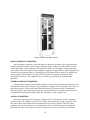
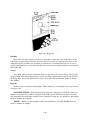
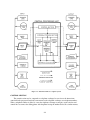
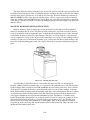
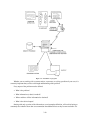
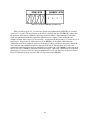
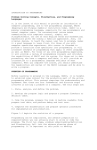
printing text. Under the word processing software control, you generally enter the text on the keyboard
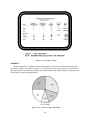
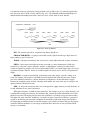
and it is printed on a display screen as shown in figure 3-8. At that point, you may store it on disk or tape,
print it on a printer, or change (edit) it. Using the edit functions you can add or delete words, characters,
lines, sentences, or paragraphs. You can rearrange text; for example, move a paragraph or block of
information to another place in the same document or even move it to a different document. Word
processing is particularly useful for text documents that are repetitive or that require a lot of revisions. It
saves a lot of rekeying.
Figure 3-8.—Word processing example.
Other features and software often available with a word processing software package include:
spelling checkers, mailing list programs, document compilation programs, and communications
programs.
Spelling checker software helps find misspelled words but not misused words. It scans the text
matching each word against a dictionary of words. If the word is not found in the dictionary, the system
flags the word. You check it. If it is misspelled, you can correct it. You will still have to proofread the
document to see that everything was keyed and that the words are used correctly.
3-23