1
5-2
1. Troubleshooting
Unable to Print
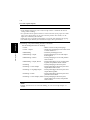
This chapter explains about the troubleshooting procedures for possible
malfunctions. Perform the troubleshooting procedures given below in that order
when the machine is unable to print even if you execute a print command from your
computer.
Troubleshooting
Chapter 5
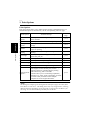
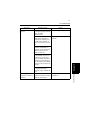
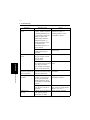
Symptom
Possible Cause
Action
A message
appears on the
computer
screen, saying
something to
the effect that
“no printer is
connected” or
“no paper is
loaded.”
An error is present in
the machine.
Check the control panel of the
machine: If an error is displayed,
identify the error and take the
necessary action by referring to the
“Error List” on page 5-8.
The network cable is
disconnected.
Check that the network cable is
connected properly to the
computer and controller.
Printing does
not start despite
the completion
of printing
setup on the
computer.
An error is present in
the machine.
Check the control panel of the
machine: If an error is displayed,
identify the error and take the
necessary action by referring to the
“Error List” on page 5-8.
The network cable is
disconnected.
Check that the network cable is
connected properly to the
computer and controller.
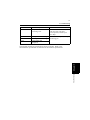
The printer driver
selected for printing is
not for the controller.
Check the printer name.
A print job yet to be
processed is loaded in
the machine, causing
the printer to wait.
Refer to the Job List on the
machine control panel to check for
print order.