1
Chapter 1
Overview of Performance Optimization Function
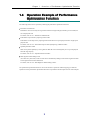
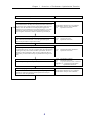
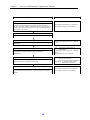
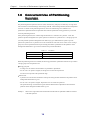
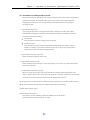
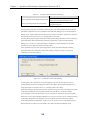
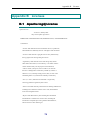
Operation flow
Reference
Monitoring and analyzing the load state of a node
Monitor and analyze the load status of a node by using the
performance monitoring function and the performance analysis
function, and check whether a bottleneck exists on node resources. If
a bottleneck is found, analyze business on the node and determine
the business to be moved.
“Performance Monitoring User’s Manual”
“Performance Analysis User’s Manual”
Adding a node
Add a node.
Binding a pool to the added node
Bind a pool in which a Work Disk for Optimization is placed to the
added node.
Preparing a Work Disk for Optimization
Bind a logical disk that will be a Work Disk for Optimization in the
bound pool, and add the attribute of the Work Disk for
Optimization.
Replacing
Execute replacement, handling the prepared Work Disk for
Optimization as the destination of movement.
“Configuration Setting Tool User’s Manual
(GUI)”
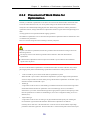
“Placement of Work Disks for
Optimization”
“Configuration Setting Tool User’s Manual
(GUI)”
“LD Administrator User’s Manual”
2.3.2
1.5.4 “Performance Tuning”
3.2
“Operation on Screen”
4.1
“Logical Disk Movement Command”
Appendix A “Command of Performance
Optimization Function”
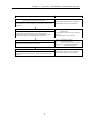
Verifying performance of the logical disk after replacement
Verify that the replacement produces the expected result by using
the performance monitoring function and the performance analysis
function.
10
“Performance Monitoring User’s Manual”
“Performance Analysis User’s Manual”