1
4344R12.qxd
03/09/99 11:09
Page 1
GARDINER TECHNOLOGY
G A R
800
D T E C
Series
Installation
Instructions
4344R12.qxd
03/09/99 11:09
Page 1
Contents
GARDTEC 800 Series
Contents
1 INTRODUCTION ............................................................3
2 SYSTEM OVERVIEW .....................................................4
Codes .............................................................4
Zones .............................................................6
User Names ...................................................7
Keypads .........................................................8
Up-Loading / Down-Loading...........................8
3 SYSTEM INSTALLATION ................................................9
Planning the System ......................................9
Control Panel Mounting ..................................10
Keypad Mounting ...........................................10
4 WIRING CONNECTIONS ................................................15
Mains Supply Connections .............................15
Keypad Wiring ................................................16
Keypad Jumper Options .................................19
ACE Receiver Wiring & Jumper Options ........21
Output Connections........................................22
Zone Connections (4 Wire) ............................32
Zone Connections (2 Wire) ............................34
Zone Connections (2 Wire EOL) ....................36
Zone Expander Cards ....................................39
Zone Expander Card Ident & Zone Allocation 41
Output Expander Modules (OPX)...................46
ID Expanders..................................................47
Engineers RKP Connection............................48
Printer Connection..........................................49
5 AREAS & ZONES ........................................................50
Understanding Areas......................................50
Zone Type Terminology .................................53
6 PROGRAMMING ...........................................................54
Quick Programming Guide .............................55
Understanding Part/Test/Chime .....................68
Program Orders..............................................69
7 GARDTEC 840 SPECIFICATION & RECORDS ...................72
8 MISCELLANEOUS .........................................................77
Resetting to Factory Defaults .........................77
Engineer Reset After an Alarm.......................78
Using Point ID ................................................79
New Log Events .............................................80
Digi Functions Programming with Point ID .....81
Tone Security Option......................................81
Page 1
4344R12.qxd
03/09/99 11:09
Page 2
GARDTEC 800 Series
IMPORTANT!
Input:
AC230V +/-10% ~50Hz 200mA Max. 49W Max
Nominal Temp Range: 0 - 50°C
Gardtec 800 Series Metal Versions
For Indoor Use Only
Gardtec 800 Series Plastic Versions
For Indoor Use Only
This equipment is intended only for use as a Security Alarm Control Panel. Adequate ventilation
away from heat and humidity must be provided. The unit must be fixed securely to a nonflammable surface using suitable fixings.
All mains wiring must be to BS7671 (1992) IEEE wiring regulations (or appropriate international
regulatory standards). See Mains Supply Connection section within this manual for more
detailed instructions.
All wiring must be protected from sharp or jagged edges.
All Low voltage (alarm) wiring must be to the appropriate international regulatory standards and
comply to good wiring practice.
Replacement fuses should be of the same type and rating conforming to IEC 127.
1 INTRODUCTION
The Gardtec 800 Series of control panels consists of two main parts, The master
control panel and the keypad(s). The master control panel is a blank end station if the
metal version is used or, the keypad may be mounted on board if the polycarbonate
version is used with standard type keypads. Various zone wiring modes may be used
taking the maximum number of zones available on any one system to 80 zones with 3
areas for the Gardtec 840, 32 zones for the Gardtec 816 and 16 zones for the Gardtec
800. Zone expansion is via flexible zone expander cards on all models except the
Gardtec 800.
Ample room is provided within the master control panel housing for all the system
wiring, Mains connections, Digicom, Modem or Red-Care communicator (fitting inside
the metal version only) and a 7Ah SLA battery.
Uploading/Downloading capabilities are possible on all models within the range
through the Gardtec 800 Series Modem and the Gardtec Remote Software Package
for a P.C. Facility is also provided for direct connection to a P.C via the Gardtec 800
Series Modem Patch Lead.
The capabilities of the Gardtec 800 Series of control panels are endless and we
strongly recommend that all the manuals (both engineer and user) are read and
understood before any installation of the system is carried out. You will find that a little
time spent now understanding the Gardtec 800 Series will prove to be a great time
saver for the future.
It must be stressed that the Gardtec 840 is one system that is capable of being
split into three areas. Under no circumstances should you regard it as three
separate systems.
The maximum current draw from the unit for all output combinations must not exceed 1Amp.
The unit is intended for use with a suitable re-chargeable lead acid battery permanently
connected to the appropriate terminals.
All documentation and manuals must be thoroughly read by suitably qualified installation
personnel prior to installation.
The unit has no user serviceable parts inside. Internal access should only be by suitably qualified personnel.
Gardtec 800 Series Metal Versions
The unit must be Earthed. It is the responsibility of the installation engineer to ensure that the
earth connection to the unit lid is good on completion of the installation or after service.
Any references to Area Setting or Area
Functions contained in this manual relate to
the Gardtec 840 ONLY.
Gardtec 800 Series Plastic Versions
Provision is provided for an earth connection within the mains input connector block, this connection is for protection of the wiring only and is not functional for the unit.
Page 2
Page 3
4344R12.qxd
03/09/99 11:09
Page 4
2 SYSTEM OVERVIEW
System Overview
GARDTEC 800 Series
Area Codes (Controlling Specific Areas)
Codes
The Gardtec 840 is capable of accepting up to 47 user codes (7 for 800/816) plus 1
engineer code. Each of the user codes is allocated a code type (with the exception of
user 1 that is always Master) at the time the code is programmed. Ten code types plus
engineer are available, these are:Type Number
0
1
2
3
4
5
6
7
8
9
Code Type (840)
Set Only
Main
Area 1 User
Master
Cleaner
Area 2 User
Area 3 User
Main Area 1
Main Area 2
Main Area 3
Code Type (800/816)
Set Only
Main
User
Master
Cleaner (816 only)
Duress (816 only)
Note 1: User 1 will always be Master.
Note 2: 800/816 have no area facilities.
A full list of options that are available for the code types are given in the user manual.
As a general guide for this section the codes for the Gardtec 840 are split into two
groups, Global and Area codes. Codes allocated to these groups are as follows:Global Codes (Controlling All Areas).
Master
Main
Set Only
Engineer
Cleaner
Area 1
Area 2
Area 3
Main Area 1
Main Area 2
Main Area 3
(Area 0)
These area codes will only control their specific areas. Area codes are 'low level codes'
and have no user options, they will however allow for the part setting of each area.
Areas 1 to 3 may have up to 3 part sets suites (groups of zones). If part set 1 is used
zones programmed into the part 1 suite will be removed (omitted), if part set 2 is used
zones programmed into the part 2 suite will be removed and if part set 3 is used zones
programmed into both part 1 and part 2 suites will be removed.
It should be noted that the zones programmed into a part set suite are programmed by
the engineer and not the user.
To set an area simply enter the required area code (Press YES if a Main Area Code is
used) and exit the area.
To part set an area enter the area code followed by NO and the part set number
required (1, 2 or 3). If Main Area type code is used enter code followed by part set
number.
To unset an area enter the area code.
Cleaner Code (part set 0)
If any area is set, entering a global code (not Set Only or Cleaner) will unset all areas
The Cleaner code or part set 0 acts in a different way to the other area codes. To set
the system and remove the cleaner zones start to set the system followed by YES 0
This will set the system or area and remove the cleaner zones.
If all areas are unset, entering a global code followed by YES (or code then NO YES if
Engineer code is used) will give the option to set all areas.
If a cleaner code is now entered the cleaner zones will also be set.
The global codes with the exception of Set Only also have other options. More details
of these options are given in the user manual.
If a cleaner code is entered when the system is fully set or area set only the cleaner
zones will be unset.
It should be noted that any entry/exit zones that are removed or unset via the cleaner
code or part set 0 will chime when violated. This is to prevent other users straying into
protected areas without warning.
More details of codes and using the system are given in the relevant sections of this
manual, and in the user manuals.
Page 4
Page 5
4344R12.qxd
03/09/99 11:09
Page 6
GARDTEC 800 Series
System Overview
System Overview
GARDTEC 800 Series
Zone Allocation to Areas
Zone Expansion
Whilst within the zone programming section zones may be allocated to areas. This
may be one single area or multiple (common) areas.
An expansion path is available through zone expander boards. Each expander board
being programmable for 4 x four wire zones, 8 x two wire zones or 8x two wire EOL
zones. Up to eight expander boards may be fitted to a Gardtec 840 giving a total of
eighty zones when configured as 2 wire or 2 wire EOL zones, and up to two expander
boards on the 816 giving a maximum of 32 zones. Each expander board and the
control panel zones may use differing wiring configurations.
If a zone is allocated to more than one area it is then a common area zone
and the following logic is applied:If any area that is assigned to the zone is unset then the zone is not active.
Expander cards may be fitted in locations away from the master control panel.
If all areas that are assigned to a zone are set then the zone is active.
More details of zone options are given in the relevant sections in this manual.
If any area that is assigned to the zone is in exit then the zone is also in exit
(zone type will still apply).
If any area that is assigned to the zone is in entry then the zone is also in
entry (zone type will still apply).
Zones
The control panel is supplied with 8 four wire zones (two wires for zone & two wires for
tamper).
ID Zone Expansion
As an alternative to ZEX expansion up to two ID expander boards may be fitted. Each
ID expander board will accept up to 30 standard ID biscuits/devices. ID biscuits may
be used with all standard detection devices. This system allows either single leg or ring
wiring using standard alarm cable, detectors may, if required be ‘teed’ of the leg or
ring. This expansion method can offer considerable savings of cable and labour
One ID expander card may be plugged on to the control panel PCB (not with onboard
RKP) with the other remote. Alternatively both ID expander may be mounted remote
from the control panel.
If required this configuration may be programmed for 16 two wire zones. In this case,
two zones should be reserved for global tampers and the remaining 14 zones are then
programmable for the desired zone types.
Zone Descriptions
The control panel zones may also be programmed as 16 EOL (End Of Line resistor)
zones. This configuration gives the highest possible zone wiring security and a
maximum of ten detectors may be wired on to each zone when this option is selected.
Resistors required for EOL operation are supplied with the control panel.
Up to sixteen characters may be used for zone descriptions on the LCD keypad. The
description that you allocate to a zone will also be applied to the tamper of that zone. If
the cause of an alarm is through a zone tamper the description will be shortened to 13
characters on the display, the last three characters being replaced with <space>T!
When using EOL zones each detector has a 6K8 resistor in parallel with the alarm
contacts and there is a 4K7 resistor in series with the two zone wires. This gives both
alarm and tamper protection from a single pair of wires. To make full use of this
security feature the 4K7 resistor must be fitted to the furthest most point in the loop.
The zone descriptor is displayed whilst viewing the cause of an alarm, viewing the log,
if a zone is violated during exit and when programming zone descriptors
User Names
Each user (with the exception of the engineer) may be allocated a user name of up to
nine characters. This name will be shown if the system is being set with a master or
main code type and whilst viewing the log.
Page 6
Page 7
4344R12.qxd
03/09/99 11:09
Page 8
System Overview
GARDTEC 800 Series
3 SYSTEM INSTALLATION
Keypads
The Gardtec 800 Series of control panels may be operated via any of the Gardtec 800
Series range of keypads. Several types of keypad are currently available: Standard or
Contour 32 character LCD, Standard or Contour twin seven segment LED, and twin
seven segment LED compact. Standard keypads will also require a remote housing if
not fitted onto the main control panel. This housing may be fitted in any one of three
orientations
The Gardtec 800 Series is also ACE and MiniACE compatible. ACE allows for the
setting, part setting, unsetting and resetting (if programmed) of the system via InfraRed remote control keyfobs. ACE is available as a stand alone receiver or built into a
RKP
LCD, LED and ACE keypads may be mixed on the same system allowing for total
flexibility in control of the system. A maximum of eight keypads/ACE units may be fitted
to the Gardtec 840 (four for 800/816).
Uploading/Downloading & Remote System Management
The Gardtec 800 Series is capable of uploading and downloading from both a primary
location and secondary location (e.g Laptop computer), this helps reduce maintenance
costs should there be a need to update the system program or a customer on site
having difficulties.
This uploading/downloading capability has the ability to allow for complete Remote
System Management.
Planning The System
Time should be taken to plan the system. Because the master control panel may be a
blank end station it may be looked upon as an engineer box requiring no attention from
the end user. When choosing a location for the master control panel consideration
should be given to the following:The routing of cables, e.g detection, sounders, mains, telephone line, keypads etc.
Area aesthetics in view of the above.
Future access by service personnel.
Consideration also needs to be given as to the positioning of the remote keypads,
wiring for the keypads may be 'star' or 'daisy chain' format (see Keypad Wiring for
more details). When choosing locations for remote keypads the following points should
be observed:The proximity of the keypad to the entry/exit point(s).
The operation of the keypad.
The readability of the display.
The wiring route to the keypad.
Where ACE units are used a clear line of sight from the transmitter to the receiver at a
distance no greater than 3 metres *(1metre for MiniACE).
The metal version of the master control panel has ample trunking and conduit entries
at the top and the bottom of the housing, in addition to these entries there is also a
5mm stand-off to allow for side cable entries
Page 8
Page 9
4344R12.qxd
03/09/99 11:09
Page 10
System Installation
GARDTEC 800 Series
System Installation
GARDTEC 800 Series
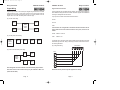
Fig 1 Polycarbonate Case with Onboard Keypad Mounting Details
Control Panel Mounting
Remove the two lid securing screws (single screw on polycarbonate version see Fig1)
then (pushing in side buttons on polycarbonate version) pull the lid forwards and lift clear
of the lid securing lip. Store the lid in a safe place.
Offer the base to the wall and using it as a template mark the four fixing point noting (on
the metal version) that the lid securing lip should be at the bottom.
Store the base in a safe place then drill the wall. Under no circumstances should you
drill through the base.
Before mounting the base to the wall remove any trunking or conduit entries that you
require as knockouts.
Mount the base to the wall using 30mm No.10 screws and suitable rawl plugs.
After the installation has been completed refit the lid and secure with the retaining
screw(s).
Keypad Mounting
The standard Gardtec 800 Series keypad is available with a 32 character LCD display
or with a twin seven segment LED display. All these keypads require the Gardtec 800
Series RKP Housing Part No. 01-063 unless the keypad is to be mounted within the
polycarbonate control panel (see Fig 1). Contour keypads are supplied as a complete
unit for remote mounting.
This housing has been designed to allow mounting in one of three positions. These are:With the hinged flap to the left.
(See Fig 2a.)
Use fixing points A, B, D, E
placing edge of board under tab F
With the hinged flap to the right.
(See Fig 2b.)
With the hinged flap to the bottom. (See Fig 3.)
Use fixing points A, C, D, E
Use fixing points A, B, D, E
placing edge of board under
tab G
The base of the housing should be fixed to the wall using 25mm x No.8 screws and
suitable rawl plugs in three positions.
After the keypad has been mounted in the base, the correct spring (supplied with the
keypad) should be pushed onto the tamper switch (see Figs 2 & 3 for spring details).
Before replacing the cover move the ident jumper to the correct position.
Provided that the panel is mounted horizontally the keypad may also be mounted
onboard the polycarbonate control panel (see Fig1) by removing the keypad blanking
plate in the control panel cover. It should be noted that any zone expanders, ID
expanders or output expanders cannot be fitted onboard if this option is chosen.
Page 10
Page 11
4344R12.qxd
03/09/99 11:09
Page 12
GARDTEC 800 Series
System Installation
GARDTEC 800 Series
System Installation
A second style of keypad known as the Gardtec 800 Series compact LED keypad is
also available. To mount this keypad remove the bottom flap securing screw and
remove the bottom flap by pulling it forwards and downwards in one movement. The
front of the keypad (including the PCB) may now be removed moving the two retaining
clips inwards and lifting the cover clear of the base (see Fig 4.)
Fig 2a. Flap to left Standard RKP with Housing Base
Fig 4. Gardtec 800 Series LED Compact.
A
D
F
Use one of the longer
springs (supplied) on the
tamper switch
E
B
G
C
Fig 2b. Flap to right Standard RKP with Housing Base
1
2
3
4
5
6
7
8
NO
9
0
YES
EOL DOUT
D IN
0V
+12V
EE+
EE-
TMP+
Retaining Clips
The base should be fastened to the wall in three positions using 30mm x No.6 screws
and suitable rawl plugs.
G
E
C
B
Use the shorter spring
(supplied) on the tamper
switch
F
D
Fig 4a Contour RKP
A
Fig 3. Flap to bottom Standard RKP with Housing Base
F
D
E
G
A
Use one of the longer
springs (supplied) on the
tamper switch
B
Lower Flap to reveal single cover fixing screw
C
Page 12
Page 13
4344R12.qxd
03/09/99 11:09
Page 14
GARDTEC 800 Series
System Installation
A stand alone ACE receiver is also available. This receiver will allow for the setting,
part setting, unsetting, resetting (if programmed) and activation of alert keys 1 & 3.
To mount the ACE receiver remove the front retaining screw of the receiver that is
situated on the underside of the unit, pull the bottom edge of the cover forwards and
upwards in one movement. The PCB may now be removed by unclipping it at the
bottom edge and lifting clear of the base.
4 WIRING CONNECTIONS
With the exception of the mains wiring all
interconnections should be made with multicore 7/.02 alarm cable.
Good wiring practice should be observed throughout the installation and the following
tips may prove useful.
Never run alarm cables parallel to mains cables, telephone cables or any
other cables that may be carrying inductive loads
Fig 5. ACE Receiver
Whenever you have to cross mains cables with alarm cables ensure that you
do so at 90°
Whenever possible wire the mains connection for the control panel back to
the consumer unit via a 3A unswitched fused spur.
Never tap into ring main circuits that have fridges/freezers on them.
Never tap into lighting circuits that have fluorescent lighting units on them.
The base should be fixed to the wall in three positions using 30mm x No.6 screws and
suitable rawl plugs.
It should be noted that the ACE receiver may only be used as keypad ident 1 or 2.
The new Contour range of stylish remote keypads are also available for the full
Gardtec 800 Series range of control panels. These keypads are designed to be fitted
remote from the main control panel and both the LED and LCD versions are available
with MiniACE as standard.
Mains Supply Connection
The mains connection for the Gardtec 800 Series should be as shown in Fig 6.
Fig 6.
Warning the Gardtec 800 Series control panels MUST BE EARTHED.
Fig 5a MiniACE
Mains (Twin & Earth)
Connection Colours
Live
=
Neutral =
Earth
=
Consumer Unit
Red
Black
Copper
Yellow/Green sleeving should be
used for Copper Earth Conductor
3A Unswitched
Fused Spur
Page 14
Page 15
Control Panel Mains
Terminal Block
4344R12.qxd
03/09/99 11:09
Page 16
GARDTEC 800 Series
Wiring Connections
GARDTEC 800 Series
Wiring Connections
Keypad Wiring
Keypad Terminal Connections
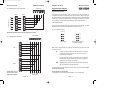
Keypads may be wired in 'Star' format (each keypad being wired back to the master
control panel) see Fig 7a, or 'Daisy Chain' format (from the control panel to the first
keypad then onto the second keypad etc) see Fig 7b. It is also possible to wire the
keypads with a mix of 'Star' and 'Daisy Chain' formats see Fig 8.
Some keypads that are compatible with other Gardiner Technology control panels may
have additional markings as well as the Gardtec 800 Series legends. These additional
markings are disregarded within this manual.
Fig 7a. 'Star' format wiring.
They may also have three extra terminals marked as follows:E/E -VE
RKP 1
E/E +VE
RKP 3
Master
Control
Panel
TMP+
RKP 2
These terminals are not applicable to the Gardtec 800 Series therefore the two
factory fitted links to these terminals should be left in place, the links are as
follows:-
RKP 4
E/E-VE is linked to E/E+VE
Fig 7b. 'Daisy Chain' format wiring.
Master
Control
Panel
RKP 1
TMP+
RKP 2
RKP 3
RKP 4
is linked to 0V
The keypad port on the master control panel is situated on the bottom edge of the PCB
towards the right hand side. Wiring to the RKP(s) is terminal to terminal as shown in
the following illustrations.
Control Panel
Fig 9. Single RKP wiring.
Fig 8. Mix of 'Star' and 'Daisy Chain' wiring.
12V
0V
CLK
DATA DATA
A
B
RKP
RKP 3
RKP 4
Master
Control
Panel
OV
RKP 2
DATAB DATAA CLK
RKP 1
12V
SPKR
Note: All keypads need to be numbered via the onboard ident jumper switches.
Note: ACE receivers count as RKPs and may only be numbered as RKP 1 or 2
(unless built into RKP).
Page 16
NOTE: RKP terminal positions may differ (dependent on model)
Page 17
SPKR
4344R12.qxd
03/09/99 11:09
Page 18
Wiring Connections
GARDTEC 800 Series
Fig 10. Multiple RKPs 'Daisy Chain' format.
Wiring Connections
GARDTEC 800 Series
Keypad Jumper Options
Control Panel
Keypad Numbering (ident)
12V
0V
CLK
RKP 1
RKP 2
DATA DATA
A
B
SPKR
DATAB DATAA CLK
DATAB DATAA CLK
LCD and LED versions
OV
OV
12V
12V
SPKR
SPKR
To other RKPs
All keypads must have the ident jumper in position in order that the system can
recognise the keypad it is communicating with. This information is written to the log as
the system is set and unset. If greater than four RKPs are required on the 840 the Multi
Keypad option should be programmed to On, two keypads may then share the same
ident. It should be noted that LCD & LED RKPs may not share the same ident.
Four jumper links are fitted on the LCD and LED versions of the keypad. On earlier
Standard keypads the legend was slightly different as shown in Fig 12.
Fig 12. Keypad ident legends.
KEYPAD No.
NOTE: RKP terminal positions may differ (dependent on model)
Control Panel
Fig 11. Multiple RKPs 'Star' format.
12V
CLK
DATA DATA
A
B
DATAB DATAA CLK
RKP 1
0V
A4
JP1
3
A3
JP2
2
A2
JP3
1
A1
JP4
SPKR
Early Legend
Standard/Contour Legend
(Use left hand legend)
Note: Contour keypads fitted with ACE have two additional jumpers for the ACE
functions, these are:-
OV
US
12V
SPKR
This jumper is the user select. With the jumper link removed each
ACE key fob will occupy one user code from the system, this is
termed as high security mode.
With the jumper link in position the ACE will occupy one user code
from the system but up to fourteen key fobs may be programmed
into the ACE, this is normal security mode.
DATAB DATAA CLK
RKP 2
4
NVM
OV
With this jumper in position the NVM contents will be cleared when
the unit is powered up. All codes will be lost
12V
The ident jumper should be positioned across the pins in one of the positions before
the system is powered up.
SPKR
Gardtec 800 Series Compact RKP
The keypad ident on the compact RKP is through JP 1 to JP 4 respectively.
NOTE: RKP terminal
positions may differ
(dependent on model)
To other RKPs
Page 18
Page 19
4344R12.qxd
03/09/99 11:09
Page 20
GARDTEC 800 Series
Wiring Connections
Wiring Connections
GARDTEC 800 Series
JP 5 to JP8 (applicable to later multi-purpose keypads only)
ACE Receiver Wiring & Jumper Options
Note: some of these jumpers may not be fitted on versions without ACE
ACE is also available as a stand alone receiver. The wiring for the receiver is the same
as for the RKP(s) with the exception that the speaker wiring terminal on the ACE is
marked as SP- and not SPKR.
JP 5 (ACE User Select) ACE units only
This jumper is the user select. With the jumper link removed each ACE key fob will
occupy one user code from the system, this is termed as high security mode.
With the jumper link in position the ACE will occupy one user code from the system but
up to fourteen key fobs may be programmed into the ACE, this is normal security
mode.
JP 6 (Reset) ACE units only
The ACE has a Non-Volatile Memory (NVM). If power is applied to the unit with this
jumper in position, the memory contents will be erased. When the unit is first powered
up, this jumper should be in position for at least 5 seconds. After this initial period the
jumper link should be removed.
If a reset of the ACE is required (all fobs to be deleted) this jumper link should be
refitted and the unit re-powered.
JP 7 (Panel Type Select)
This jumper selects the keypad as Gardtec 580 or Gardtec 800 series. With the
jumper in position the keypad will be Gardtec 580 compatible. With the jumper
removed the keypad will be Gardtec 800 Series compatible.
JP 8 (EOL)
This jumper is the End Of Line jumper and is applicable to the Gardtec 350+ and
Gardtec 580 only. This jumper MUST BE REMOVED when used with the Gardtec
800 Series.
Note: Instructions for how to program keyfobs to the ACE and using ACE are
contained within the LED user manual
The ACE receiver is link selectable as unit No.1 or unit No.2 and it is permissible to
have two units sharing the same ident.
Five options are available that are selected with jumper links.These options are as
follows.
JP1 (US)
This jumper is the user select. With the jumper link removed each ACE key fob will
occupy one user code from the system, this is termed as high security mode.
With the jumper link in position the ACE will occupy one user code from the system but
up to fourteen key fobs may be programmed into the ACE, this is normal security
mode.
JP2 (RP)
This jumper is only used when the ACE is fitted to the Gardtec 800 Series control
panels and is used to select the ACE ident as 1 or 2 . This ident should be viewed as
the RKP ident. With the jumper off the ACE will be remote device two, with the jumper
fitted the ACE will be device number one.
JP3 (PN)
This jumper is used to select the panel type when ACE is used with the Gardtec 350+
or Gardtec 580 control panels. The jumper has no use when used with the Gardtec
800 Series and should be left in position.
JP4 (RST)
The ACE has a Non-Volatile Memory (NVM). If power is applied to the unit with this
jumper in position, the memory contents will be erased. When the unit is first powered
up, this jumper should be in position for at least 5 seconds. After this initial period the
jumper link should be removed.
If a reset of the ACE is required (all fobs to be deleted) this jumper link should be
refitted and the unit re-powered.
JP5 (EOL)
This jumper is the End Of Line jumper and is applicable to the Gardtec 350+ and
Gardtec 580 only. This jumper MUST BE REMOVED when used with the Gardtec
800 Series.
Note: Ensure all links are in desired position before powering up the ACE.
Page 20
Page 21
4344R12.qxd
03/09/99 11:09
Page 22
GARDTEC 800 Series
Wiring Connections
Output Connections
The output connections for the Gardtec 800 Series are situated along the bottom edge
of the main PCB in the master control panel.
Warning:It should be noted that the total output current available for the Gardtec 800
Series is 1 Amp. Any attempt to draw a total current greater than this could
result in serious damage to the control panel that is not covered by the
manufacturers warranty.
Below is a description of each terminal. The order given is the same as the terminal
order on the PCB looking from left to right.
Output Terminal Descriptions
RELAY COMM
A 24V 1Amp *1 changeover relay is provided on the Gardtec 816/840 PCB. This relay
is fully programmable (refer to Programmable Options Description). The relay contacts
are voltage free. This terminal is the common connection (see Fig. 13).
GARDTEC 800 Series
Wiring Connections
BATT + & Factory fitted Sealed Lead Acid battery connections. The Gardtec 840 is suitable for
the installation of all the popular sizes of alarm batteries. Suggested sizes would be:12V 1.2Ah
Suitable only for the smallest installations.
12V 2.0Ah
Suitable only for small installations.
12V 3.0Ah
Suitable for small to medium size installations.
12V 7.0Ah
Suitable for all installations.
Reference should be made to current policies to determine the actual battery capacity
requirements for your system. As a general rule:-
Calculate the total quiescent current draw of the system including
control panel, RKPs, communicator, detectors and any other
auxiliary equipment then use this in the equation shown:Quiescent Current x 8 hours = Minimum Battery Size
N/O
Normally Open connection for onboard relay (see Fig. 13).
The actual size of the battery should be made up to the nearest size available.
N/C
Normally Closed connection for onboard relay (see Fig. 13).
K/S
Keyswitch input. If required the Gardtec 816/840 may be operated by a keyswitch.
Operation is by applying 12V to this terminal (see Fig. 14). The mode of operation is
dependent on how the keyswitch option is programmed (refer to Programmable
Options Description and also see Remote Reset).
Fig. 13 Onboard Relay Operation
Note:- The Gardtec840 may be programmed to use zones for keyswitch setting.
Relay
Comm
Relay
Comm
Fig. 14 Keyswitch Connection
Note:
Keyswitch
N/O
N/C
Relay De-Energised
(Normal)
N/O
N/C
Relay Energised
(Activated)
Keyswitch type may be
Normal (Open/Close)
or Biased (Momentary)
or Locked (keypads
lock when used)
See also Remote Reset
* 1 No attempt should be made to exceed the stated current and the 1 Amp
maximum current draw from the control panel must be taken into consideration.
12v K/S
Page 22
Page 23
4344R12.qxd
03/09/99 11:09
Page 24
GARDTEC 800 Series
Wiring Connections
ZONE KEYSWITCH OPTION
Up to eight zones may be allocated as zone keyswitches. This option is carried out via
the ‘Program Zone Type’ option. Either Normal or Biased keyswitches may be used
and the correct option for the keyswitch you are using should be chosen during
programming.
Wiring for the keyswitch should be across the AZ pair of the zone, the TZ pair of the
zone may be used in the normal manner.
In order for this keyswitch option to operate there must be a User code allocated for
the area that the keyswitch is intended to control, e.g if allocated to control area 2 then
an area 2 code needs to be programmed on to the system.
In order that the keyswitch operations are recorded to the log in the correct manner we
would suggest that the highest user codes (e.g 45 - 47 for 3 keyswitches) are used.
The following example shows a typical format for the user names.
User Name (example)
DOOR KEY
STORES KEY
SALES
or
or
or
or
User Name(example)
MARY KEY
FRED KEY
HARRY KEY
Area
Area 1
Area 2
Area 3
User No.
User 47
User 46
User 45
GARDTEC 800 Series
Wiring Connections
REMOTE RESET
(Note This option may use the Linefault or KS terminal). The Line Fault or the K/S
terminal (dependant on option 127 Remote Reset Source) also doubles as the Remote
Reset input (normally found on Red-Care STUs sometimes termed as Remote Signal
Path). To use this feature the 'REMOTE RESET' option should be programmed to ON
(option 39). After an alarm the control panel will reset when 12V is applied to this
terminal.
The feature allows the use of RedCare units with Remote Reset even when a Modem
is connected. It should be noted that the triggers for the RedCare should be from the
P.A, D1 & D2 terminal. Do not use the 12Hr terminal as this doubles as a data
connection for the Modem.
The Remote Reset feature may also be used to auto-reset the control panel after an
alarm. This must only be used on non BS 4737 systems when the panel is being used
for purposes other than security. The auto-reset is achieved by leaving the factory
fitted link in position and turning the 'REMOTE RESET' (option 39) ON
PA
This terminal is the Digicom output for PA (Personal Attack)and would normally be
connected to channel 2 of a communicator. The output is open collector and has a
1
Because the Gardtec 840 reads the list of users from high to low the log will show for
example Set MARY KEY A1 hh/mm/dd/mm. If User numbers are not reserved or
allocated then the system will use the first code available (reading high to low) for that
particular area set.
Space has been made at the start of the User manual to give indication to an end
user of what user codes, if any have been reserved for this purpose. Please take
time to fill in this section for end user reference.
2
maximum current sink of 50mA* *
12HR
This terminal is the Digicom output for 12HR (Alarm )and would normally be connected
1 2
to channel 3. The output is open collector and has a maximum current sink of 50mA* *
If the ProDigi or Modem are not used PA & 12Hr are programmable under the option
D3 & D4
0V (DIGI)
0V (-VE) connection to a Digital communicator or Red-Care STU
12V (DIGI)
12V (+VE) connection to a Digital communicator or RED-Care STU. The output from
1
this terminal is protected by the GARD fuse (315mA)* on the main PCB.
LINE FAULT
This is the Line Fault input terminal. The terminal should be held @12V by the
communicator and swing to 0V to produce a Line Fault condition on the control panel.
If Line Fault is not used the factory fitted link to 12V should be left in place.
1
Note:
To activate this terminal the programmable option 'DIGICOM TYPE' must
be programmed to 'NORMAL'.
* No attempt should be made to exceed the stated current and the 1 Amp
maximum current draw from the control panel must be taken into consideration.
Note:
If the Gardiner Technology ProDigi or Modem is to be used on serial
comms (plugged into the main PCB) the factory fitted link from this
terminal to 12V MUST be removed.
Page 24
* Some Digicoms may require a 6K8 pull-up resistor fitting between this output
and 12V
2
Page 25
4344R12.qxd
03/09/99 11:09
Page 26
GARDTEC 800 Series
Wiring Connections
D1 & D2
These terminals are digicom outputs that are fully programmable by the engineer (see
Programmable Options Description for more details). The outputs are open collector
1
Wiring Connections
GARDTEC 800 Series
Fig. 16 ProDigi or Gardtec 840 Modem Wiring.
2
and have a maximum current sink of 50mA* * . On systems only using two channels
or systems using the ProDigi or Modem D1 & D2 are free for other uses.
Note:
The start polarity is of the Digicom port is programmable by the
engineer.
Fig. 15 Typical Digicom Wiring
0V
12V
LINE PA 12HR D1
FAULT
ALARM
D2
Gardtec 840
Main PCB
If the Gardtec Modem is
used
basic
system
configuration is available by
defaulting the system using
5, 5, YES, NO. Further
details are given in the
Gardtec Modem manual.
Gardtec 840
Main PCB
Gardtec 840
6K8
6K8
6K8
ProDigi
or
Gardtec Modem
6K8
Communicator
SK3
For example
D.A.C 4 or
Red-Care
3GSTU
BLUE STU
Home STU
Note:
Note:
0V
12V
2
3
1
CHANNELS
4
Modem will give 8 channels and leave D1, D2 & D3 (PA term) free for
other uses
For a ProDigi program Digicom Type to Gardiner
For Modem Mod+FF or MOD+PID
D1 should be programmed for FIRE
(Chan1)
D2 should be programmed for OPEN/CLOSE
(Chan4)
Program Digicom Type to NORMAL
6K8 resistors provide Pull-Up for open collector outputs
1
* No attempt should be made to exceed the stated current and the 1 Amp
maximum current draw from the control panel must be taken into consideration.
Remove link from 12V & Line Fault Terminals before connecting
ProDigi/Modem
Both the ProDigi and Gardtec Modem can be programmed direct from the
Gardtec 840
Modem Patch Lead
If the Gardtec 800 Series Modem patch lead is to be used for direct connection to a PC
or Lap-Top It should be connected to SK3. The factory fitted link between 12V &
Line Fault must be removed. Full instructions on use of the Gardtec 800 Series
Modem Patch lead are supplied with the unit.
2
* Some Digicoms may require a 6K8 pull-up resistor fitting between this output
and 12V
Page 26
Page 27
4344R12.qxd
03/09/99 11:09
Page 28
GARDTEC 800 Series
Wiring Connections
SW+ LATCH
This terminal is high (+12V) when the system is set and low (0V) when the system is
unset. Typical use for this terminal would be the latch signal for PIRs and Shockgards
1
etc. A maximum sink of 50mA *
DET RESET
This +VE supply terminal is provided for the types of detectors that require the removal
of power to reset them. In the default mode the 12V supply from this terminal will pulse
off for three seconds during the exit time. The terminal is also programmable for other
uses (see Programmable Options Description for more details). A maximum current
1
draw of 50mA* is available.
STROBE + | This pair of terminals provide power for the strobe light during and after an alarm. The
1
negative terminal is switched. A maximum current of 1Amp* can be switched with
these terminals.
BELL + | This pair of terminals provide power for the bell during an alarm. The negative terminal
Wiring Connections
GARDTEC 800 Series
RKP 12V
This terminal provides the +12V supply for the keypads and ACE units (see Keypad
1
Wiring for more detail). A maximum current draw of 0.5Amp*
terminal.
is available from this
RKP 0V
This terminal is the 0V supply for the keypads and ACE units (see Keypad Wiring for
more detail).
CLK
This terminal is the Clock connection for the keypads and ACE units (see Keypad
Wiring for more detail).
DATA A
This terminal is the Data A connection for the keypads and ACE units (see Keypad
Wiring for more detail).
DATA B
This terminal is the Data B connection for the keypads and ACE units (see Keypad
Wiring for more detail).
1
is switched. A maximum current draw of 1Amp* is available from these terminals.
The positive terminal also provides the positive hold off for the SAB.
SPKR & SP+
These terminals are connected to any extension speakers (min impedance 16 Ohm)
that are fitted. The SP+ is the common and SPKR is the output of the amplifier driver.
In SCB mode (see Programmable Options Description), the terminals stand at + & -.
The negative terminal will change state to positive for the duration of the alarm.
The SPKR terminal is also connected to the SPKR (speaker terminal) on the RKP(s).
It should be noted that the operation of the bell is influenced by the
programmable options Bell Delay, Bell Ring Time and Number of Arms (see
Programmable Options Descriptions for more details).
The current drawn by any extension speakers needs to be calculated in the total
system current. The current drawn by a 16 Ohm speaker would typically be 300mA.
Fig. 17 Single Speaker
BELL HOLD This terminal is the negative tamper feed and also provides the negative Hold Off for
the SAB.
SPKR
SP+
Fig. 18 Twin Speakers (wired in series)
SPKR
SP+
The terminal has a factory fitted link fitted to the SAB TMP terminal in order to keep the
bell tamper clear. This link should be removed as the bell wiring is connected.
SAB TMP
This terminal is the tamper return from the Bell Box. If unused the factory fitted link to
Bell Hold- should be left in place.
Note:
1
Minimum speaker impedance is 16 Ohm
1
* No attempt should be made to exceed the stated current and the 1 Amp
maximum current draw from the control panel must be taken into consideration..
* No attempt should be made to exceed the stated current and the 1 Amp
maximum current draw from the control panel must be taken into consideration..
Page 28
Page 29
4344R12.qxd
03/09/99 11:09
Page 30
GARDTEC 800 Series
Wiring Connections
Fig. 19 Typical output wiring
Wiring Connections
GARDTEC 800 Series
Fig. 20 Traditional bell box wiring.
STROBE
+
BELL
-
+
-
BELL SAB
HOLD- TMP
AUX 12V
Gardtec
800 Series
N/O
Door locks, Additional
N/C
Sounders etc.
RELAY
COMM
N/C Microswitch
+
BATT
Strobe Light
-
K/S
Keyswitch
0V
AUX 12V
Siren/Bell
12V
DIGI
Fig. 21 Novagard wiring
LINE
FAULT
STROBE
+
-
BELL
+
-
BELL SAB
HOLD- TMP
PA
800 Series
Gardtec
Digital Communicator
12HR
ALARM
or
Red-Care STU
D1
D2
Program panel
for Bell Tamper
Ring
SW+
DET
LATCH RESET
Latch signal for
Gardscan MX+ PIRs,
Shockgards etc.
Programmable SW+ Output
+
STROBE
-
STROBE
+
Strobe Light
-
-
SUPPLY
NOVAGARD
1E, 2+T, 2D,
3, 3PD, 3PC, 3A, 3B,
3C, 4, 4B, 4D, 4Q
& Encapsulated SAB/Strobe
F
R
BELL
TAMP TAMP SWFEED RET
Note: Terminal positions may change dependent on model.
+
Fig. 22a Novagard X wiring
BELL
-
SAB
SAB
BELL
TMP
HOLD-
+
BELL
0V
+12V
LATCH
-
SW+
S-
SET+
STROBE
-
BELL
HOLD-
Module
+
SAB
TMP
0V
RKP 3
RKP /ACE 2
RKP
12V
RKP /ACE 1
CLK
RKP 4
etc.
A
DATA
B
DATA
SPKR
+
Extension Speaker
-
SP+
BATTERY
R
T1
T2
TMP
REAR
12V
BELL
RET
TAMPER
SUPPLY
SW-
Note: Terminal positions changed for clarity
Page 30
Page 31
STR
SW-
4344R12.qxd
03/09/99 11:09
Page 32
GARDTEC 800 Series
Wiring Connections
Fig. 22b Novagard Delta & Novagard Metal wiring.
DETECTOR
BELL
HOLD-
SUPPLY
+
+
Normally Closed Tamper Pair
- LOOP
-
ALARM
+
Normally Closed Alarm Pair
-
BATTERY
Normally Closed Tamper Pair
ALARM
+
AZ4
ZONE 4
Normally Closed Alarm Pair
-
+ LOOP
Single Pressure Pad
- LOOP
-
Note: Terminal positions changed for clarity
TZ3
ZONE 3
+
TAMPER
Double Contact
AZ3
+ LOOP
Single Contact
TZ2
TAMPER
+
SUPPLY
BAT+
Normally Closed Alarm Pair
-
SW-
BAT-
AZ2
SW-
0V
TZ1
ALARM
+ LOOP
ZONE 3
12V
Normally Closed Tamper Pair
- LOOP
ZONE 2
BELL
AZ1
TAMPER
ZONE 2
TMPR
Normally Closed Alarm Pair
+ LOOP
ZONE 1
STR
- Supply
+
ALARM
ZONE 1
+ Supply
Single Passive Infra-Red
BELL
+
-
BELL
-
12V
SAB
TMP
Fig. 23 Typical 4 Wire Configuration
+
STROBE
Wiring Connections
GARDTEC 800 Series
Normally Open Device
+
TAMPER
ZONE 4
TZ4
- LOOP
AZ5
ZONE 5
+
ALARM
+ LOOP
- LOOP
-
ALARM
+
AZ7
ZONE 7
If unset doorbell is required allocate chime to the
ET zone.
TZ7
-
ALARM
+
Setting Mode should be programmed for ET
Exit terminator zone must be AZ zone
Normally Closed Alarm Pair
-
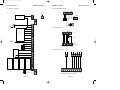
Typical wiring of various detectors is given in Fig. 23
Normally Open Push Button
+
TAMPER
-
Page 32
Normally Closed Tamper Pair
TZ8
ZONE 8
- LOOP
Page 33
(if required)
AZ8
+ LOOP
Exit Terminator Button
- LOOP
ZONE 8
Note:
If exit terminator is required program zone as ET
+
TAMPER
-
+ LOOP
ZONE 7
If pressure pads or other normally open devices, are to be used the AZ zone should be
shorted to the TZ zone by the device in order to activate the AZ zone.
TZ6
ZONE 6
It is not advisable to connect normally open devices
onto a TZ loop
+
TAMPER
and the factory fitted link can be removed from the
zone terminals.
-
Each zone is fully programmable. Details of the zone options available are given in the
section 'Programmable Options Description'. Each alarm zone is marked as AZx and is
a positive loop, each tamper zone is marked as TZx and is a negative loop.
AZ6
To use the 4 wire option the control panel should be programmed for 8 (4 WIRE)
in the programming section 'PROGRAM ZONE WIRING' (option No.50).This is the
default setting.
+
ZONE 6
-
- LOOP
ALARM
AZ zones are +ve
TZ zones are -ve
To comply with BS4737 alarm and tamper loops
should be oposite polarity
Any unused zones may be programmed to off
TZ5
ZONE 5
Note:
+
TAMPER
-
+ LOOP
Three wiring methods are possible for the zones located on the main PCB in the
Gardtec 840 control panel. The first is 4 wire or normal type wiring, if this default
option is chosen 8 double pole zones are available (8 alarm zones and 8 tamper
zones).
Normally Closed Tamper Pair
-
Zone Connections
(control panel 4 Wire option)
4344R12.qxd
03/09/99 11:09
Page 34
GARDTEC 800 Series
Wiring Connections
Zone Connections
(control panel 2 Wire option)
Fig. 24 Typical 2 Wire Configuration
+
AZ1
ZONE 1
Normally Closed Alarm Pair
+ LOOP
-
ALARM
+
ZONE 9
TZ1
Normally Closed Alarm Pair
- LOOP
-
ALARM
+
ZONE 2
AZ2
+ LOOP
Normally Open Pressure Pad
-
When this wiring option is programmed zones AZ1 to AZ8 are zones 1 to 8 inclusive,
all AZ zones are positive loops.
- Supply
Single Passive Infra-Red
(Use TZ8 zone for tamper)
ALARM
To use the 2 wire option the control panel should be programmed for
16 (2 WIRE) in the programming section 'PROGRAM ZONE WIRING' (option
No.50)
+ Supply
12V
SUPPLY
+
DETECTOR
The second wiring method is Two Wire. This option will give sixteen zones available
from the control panel PCB.
Wiring Connections
GARDTEC 800 Series
(To Detector Supply -ve)
TZ2
- LOOP
-
ALARM
+
ZONE 3
AZ3
+ LOOP
-
ALARM
+
ZONE 11
- LOOP
-
ALARM
+
zone terminals.
+
ALARM
-
ALARM
+
ZONE 5
-
ALARM
+
TZ5
+ LOOP
-
ALARM
+
AZ6
- LOOP
ZONE 6
TZ6
- LOOP
-
ALARM
+
-
ALARM
+
+
AZ8
Normally Closed Tamper Contacts
for all TZ zones (9-15)
-
ALARM
+
Normally Close Tamper Contacts
for all AZ zones (1-7)
TZ8
-
- LOOP
Exit Terminator Button
(if required)
TZ7
ALARM
+ LOOP
ZONE 16
Exit terminator zone must be AZ zone
Setting Mode should be programmed for ET
To detector -ve supply
- LOOP
ZONE 8
If unset doorbell is required allocate chime to the
ET zone.
Normally Open Push Button
+ LOOP
ZONE 15
Note:
If exit terminator is required program zone as ET
AZ7
ZONE 7
Page 34
+
ZONE 14
-
+ LOOP
ALARM
It is not advisable to connect normally open devices
onto a TZ loop
AZ5
- LOOP
ZONE 13
Typical wiring of various detectors is given in Fig.24
TZ4
It should be noted that in order to comply with the requirements of BS 4737 zones and
tampers should be of opposite polarity. This means that when using the 2 wire wiring
option one AZ zone (e.g zone 8, AZ8) should be programmed as 24Hr and used as a
global tamper for all TZ zones, and one TZ zone (e.g zone 16, TZ8) should be
programmed as 24Hr and used as a global tamper for all the AZ zones.
and the factory fitted link can be removed from the
-
+ LOOP
ZONE 12
Any unused zones may be programmed to off
AZ4
ZONE 4
Note:
AZ zones are +ve
TZ zones are -ve
To comply with BS4737 alarm and tamper loops
should be oposite polarity
TZ3
Zone 9 on terminals TZ1
Zone 10 on terminals TZ2
Zone 11 on terminals TZ3
Zone 12 on terminals TZ4
Zone 13 on terminals TZ5
Zone 14 on terminals TZ6
Zone 15 on terminals TZ7
Zone 16 on terminals TZ8
ALARM
ZONE 10
Single Pressure Pad
(Pressure Pads on AZ Zones
use TZ8 for tamper)
+
Because the 2 wire option has been selected the TZ terminals are also programmable
as zones. The zone numbering for the TZ zones will be as follows:-
Single Contact
(Use AZ8 for tamper)
Page 35
4344R12.qxd
03/09/99 11:09
Page 36
GARDTEC 800 Series
Wiring Connections
Fig. 25 Typical 2 Wire EOL Configuration
Single Passive Infra-Red
ALARM
ALARM
+
-
ALARM
+
Normally Open Pressure Pad
-
6K8
(To Detector Supply -ve)
Only)
6K8
4K7
TZ2
- LOOP
-
ALARM
+
Multiple Contacts
Maximum of 10 detectors per loop using EOL
-
+ LOOP
All Normally Closed Contacts
Note:
AZ3
ZONE 3
Single Pressure Pad
(Pressure Pads on AZ Zones
4K7
+
ZONE 10
Single Contact
6K8
6K8
ALARM
Normally Closed Alarm Pair
4K7
AZ2
Zone 9 on terminals TZ1
Zone 10 on terminals TZ2
Zone 11 on terminals TZ3
Zone 12 on terminals TZ4
Zone 13 on terminals TZ5
Zone 14 on terminals TZ6
Zone 15 on terminals TZ7
Zone 16 on terminals TZ8
6K8
- LOOP
ZONE 2
Normally Closed Alarm Pair
4K7
TZ1
ZONE 9
+ LOOP
Because the 2 wire EOL option has been selected the TZ terminals are also
programmable as zones. The zone numbering for the TZ zones will be as follows:-
6K8
+ LOOP
-
When this wiring option is programmed zones AZ1 to AZ8 are zones 1 to 8 inclusive.
AZ1
ZONE 1
To use the 2 wire EOL option the control panel should be programmed for
16 (2 WIRE EOL) in the programming section 'PROGRAM ZONE WIRING' (option
No.50)
- Supply
+
The third wiring method is Two Wire EOL (End Of Line resistor). This option will give
sixteen zones available from the control panel PCB.
+ Supply
-
SUPPLY
12V
DETECTOR
+
Zone Connections
(control panel 2 Wire EOL option)
Wiring Connections
GARDTEC 800 Series
Note:
6K8 = Blue, Grey, Red with gold tolerance band
-
- LOOP
All unused zones should have factory fitted link removed
and replaced with the 4K7 EOL Resistor.
AZ4
-
+ LOOP
- Bypass Resistor
Note:
+
ALARM
ZONE 4
Resistor Colour Codes Are:4K7 = Yellow, Purple, Red with gold tolerance band - EOL Resistor
TZ3
ZONE 11
+
ALARM
It is not advisable to fit normally open devices
onto TZ loops.
+
ALARM
ZONE 5
AZ5
ALARM
+
ALARM
+
ZONE 13
TZ5
+ LOOP
-
ALARM
+
ZONE 6
AZ6
- LOOP
-
Typical wiring of various detectors is given in Figs.25 to 29
- LOOP
-
EOL wiring will give the best possible wiring security as it will not allow any bridging or
cutting of the zone loop
ZONE 12
TZ4
Up to 10 detectors may be used on each loop. A 6K8 resistor is connected across the
alarm pair of each detector and a 4K7 resistor is connected in series with the loop at
the furthest most point.
-
ALARM
+
ZONE 14
TZ6
+ LOOP
- LOOP
-
ALARM
+
If unset doorbell is required allocate chime to the
ET zone.
AZ7
ZONE 7
Note:
If exit terminator is required program zone as ET
-
+ LOOP
Exit terminator zone must be AZ zone
+
TZ7
ALARM
ZONE 15
Setting Mode should be programmed for ET
- LOOP
-
ALARM
+
To detector -ve supply
Normally Open Push Button
+ LOOP
-
ALARM
+
Exit Terminator Button
(if required)
-
- LOOP
6K8
TZ8
ZONE 16
Page 36
AZ8
ZONE 8
4K7
Page 37
4344R12.qxd
03/09/99 11:09
Page 38
GARDTEC 800 Series
Wiring Connections
Wiring Connections
GARDTEC 800 Series
Zone Expander Cards
Fig. 26
Fig. 27
Double Detector
Single Detector
Gardscan, Shockgard etc.
+
-
Alarm
Alarm
TMP
Two types of zone expander cards are available, the Gardtec 816 Expander Card that
may only be used on the 816 and the Gardtec 840 Expander that may be used on the
816/840.
Gardscan, Shockgard etc.
TMP
+
Alarm
-
Alarm
TMP
4K7 Resistor
4K7 Resistor
6K8 Resistor
6K8 Resistor
+
+
Aux
Up to eight zone expander cards may be fitted to the Gardtec 840 and two on the 816
control panel. If required one of these expander cards may be plugged directly onto the
the main PCB, the other expander cards then being wired to the plug-on card as
shown in Fig. 30. Four cores are required for interconnection of the zone
expanders. If Output Expanders are to be used (840 only) on the same leg as
zone expanders an extra core will be required.
TMP
Alarm
-
Alarm
TMP
TMP
Fig. 30a Gardtec 840 Expander Card Wiring 'Daisy Chain' Format
840
Expander1 (Plugged on)
Expander2
Expander3
Alarm
Zone
840
To Others
Wire Link
12V
0V
SAD 1
SCLK
6K8 Resistor
+
Aux
Fig. 28
Alarm
Zone
Fig. 29
Double Contact
Alarm
Alarm
Use Two Silver
Alarm
Any Brass Screw
Screws For Alarm
For Tamper
Alarm
12V
0V
SAD 1
SCLK
Fig. 30b Gardtec 816 Expander Card Wiring ‘Daisy Chain’ Format
Expander1 (Plugged on)
Single Contact
TMP
12V
0V
SAD 1
SCLK
Alarm
Use Two Silver
Any Brass Screw
Screws For Alarm
Expander2
TMP
For Tamper
4K7 Resistor
4K7 Resistor
6K8 Resistor
6K8 Resistor
12V
0V
SADIN
SCLK
12V
0V
SADIN
SCLK
The expander cards may also be wired back to the onboard expander card in 'Star'
format (each expander card wired back individually).
Alarm
Use Two Silver
Alarm
Zone
Screws For Alarm
Alternatively all the zone expander cards may be wired to the main PCB via an
optional zone expander cable Part No. 01-094. If the 816 Expander Cards are being
used two expander cables will be required. When using the zone expander cable the
following colours should be used (see Figs 31a, 31b).
6K8 Resistor
Alarm
Zone
If Output expanders are used ( 840 only) all SAD 2 connections should be
interconnected. If the expanders are remote from the main PCB a second expander
cable will be required to plug onto PCB EXP2 socket. The SAD2 connection on this
second cable is the yellow core.
Page 38
Page 39
4344R12.qxd
03/09/99 11:09
Page 40
GARDTEC 800 Series
Wiring Connections
Fig. 31a Gardtec 840 Zone Expanders remote from panel (inc Cable Colours)
1
Zone Expander Card Ident & Zone Allocation
16
8
16
8
8
4
4
0
0
0
0
0
0
0
0
A1-A8
A1-A8
A1-A8
A1-A8
A1-A8
A1-A8
A1-A8
T1-T8
A9-A16
T1-T8
A9-A16
T1-T8
A9-A16
T1-T8
A17-A20 A21-A24
A9-A12
A17-20
A9-A12
A13-A16
T17-20
T9-T12
A9-A12 T9-T12
Expander
Cable
Plug to
EXP 1
Red
12V
12V
Black
0V
0V
Yellow
SADOUT
SADOUT
Blue
SCLK
SCLK
Red
Black
T9-T12
Blue
A13-A16
Yellow
T9-T12
Expander
Cable
Plug to
EXP 2
A9-A12
1
816 Expander
Card(2)
Zone Numbering
ZEX 1 Zones
AZ1-AZ4 TZ1-TZ4
8
8
4
1
816 Expander
Card(1)
Onboard Zones
AZ1-AZ8 TZ1-TZ8
16
0
Fig. 31b Gardtec 816 Zone Expanders remote from panel (inc Cable Colours)
Note: Two Zone Expander Cables Required.
Zone Wiring
No. of No.of
No. of
O/B
ZEX1
ZEX2
Zones Zones Zones
8
A17-A20 T17-20
A17-A20 T17-T20
A17-A20 T17-T20
A9-16
A9-A12
A25-A28 T25-T28
A9-A16
A1-A8
T1-T8
A17-A20 A21-A24
A9-A12 A13-A16
A1-A8
4
A1-A8
A9-A16
A17-A20 A21-A24
4
4
4
A1-A8
T1-T8
A13-A16 A17-A20
0
16
8
4
A1-A8
A9-A16
A9-A12
A21-A24 A25-A28
16
8
8
8
A1-A8
T1-T8
A17-A20 T17-T20
T1-T8
16
0
8
A1-A8
A9-A16
A1-A8
8
0
8
A1-A8
4
16
4
8
4
8
4
8
16
SCLK
A17-A20 A21-A24
SCLK
A13-A16
Blue
A9-A12
SAD 1
T1-T8
SAD 1
A1-A8
Yellow
8
0V
8
0V
8
Black
The panel and each individual card may be programmed as four wire, two wire or two
wire EOL wiring modes. The zone allocation for the different modes is given below.
A25-A28 A29-A32
12V
A17-A20 A21-24
12V
A9-A16
Red
A1-A8
Only two cards may be fitted to the 816. If 840 cards are used only ident 1&2
should be used.
8
840 Expander
Card(2)
8
840 Expander
Card(1)
16
Expander
Cable
Plug to
EXP 1
Wiring Connections
GARDTEC 800 Series
Note: In all above examples max cable run is 150 metres
Page 41
ZEX 2 Zones
Z1-AZ4 TZ1-TZ4
A13-A16 T13-T16
Page 40
A21-A24 T21-T24
Note:
The expander cable plug MUST be plugged in to the main PCB EXP socket with
the red wire to pin 1.
If required expander cards may be mounted in a remote expander box Part No 02-066
These expander boxes are ideal housings when the expander cards are to be mounted
away from the control panel.
4344R12.qxd
03/09/99 11:09
Page 42
GARDTEC 800 Series
Wiring Connections
Zone Expander Card Ident & Zone Allocation
Each of the 840 expander cards has eight pairs of ident pins labelled EXP1 to EXP8. It
is essential that the expander cards have the correct ident set. The jumper (supplied
with the unit in position 1) should be moved to the desired ident before the system is
powered up. No two zone expander cards should share the same ident.
Wiring Connections
GARDTEC 800 Series
Expander Card 2 (Jumper in position 2 840 only)
4 Wire Mode
2 Wire Mode
2 Wire EOL Mode
Zone 31
Zone 32
Zone 33
Zone 34
Tamper Zone 31
Tamper Zone 32
Tamper Zone 33
Tamper Zone 34
Zone 31
Zone 32
Zone 33
Zone 34
Zone 35
Zone 36
Zone 37
Zone 38
Zone 31
Zone 32
Zone 33
Zone 34
Zone 35
Zone 36
Zone 37
Zone 38
4 Wire
(giving 4 zones and 4 tamper loops per card)
AZE1
AZE2
AZE3
AZE4
TZE1
TZE2
TZE3
TZE4
2 Wire
(giving 8 two wire zones per card)
Note: All AZE zones are +ve and all TZE zones are -ve.
2 Wire EOL
(giving 8 two wire EOL zones per card)
As with the control panel zones 3 wiring methods are available for the expander cards.
These are:-
Expander Card 3 (Jumper in position 3 840 only)
Each expander may be programmed individually (through the control panel) for the
wiring mode you wish to use. Any unused expander cards may be programmed to Off.
To simplify the counting of zones for the Gardtec 840 when expanders are used
the panel should be viewed as unit 1, therefore the first expander becomes unit
2. All zones on unit 2 begin with a 2 (ie.zone 21 is on the second unit as it begins
with a 2). The second expander is unit 3, all zones on unit 3 begin with a 3, and
so on.....
Zones are allocated to each card with respect to the jumper position as follows:Expander Card 1 (Jumper in position 1 840 only)
AZE1
AZE2
AZE3
AZE4
TZE1
TZE2
TZE3
TZE4
2 Wire Mode
2 Wire EOL Mode
Zone 41
Zone 42
Zone 43
Zone 44
Tamper Zone 41
Tamper Zone 42
Tamper Zone 43
Tamper Zone 44
Zone 41
Zone 42
Zone 43
Zone 44
Zone 45
Zone 46
Zone 47
Zone 48
Zone 41
Zone 42
Zone 43
Zone 44
Zone 45
Zone 46
Zone 47
Zone 48
Note: All AZE zones are +ve and all TZE zones are -ve.
4 Wire Mode
2 Wire Mode
2 Wire EOL Mode
Zone 21
Zone 22
Zone 23
Zone 24
Tamper Zone 21
Tamper Zone 22
Tamper Zone 23
Tamper Zone 24
Zone 21
Zone 22
Zone 23
Zone 24
Zone 25
Zone 26
Zone 27
Zone 28
Zone 21
Zone 22
Zone 23
Zone 24
Zone 25
Zone 26
Zone 27
Zone 28
Note: All AZE zones are +ve and all TZE zones are -ve.
AZE1
AZE2
AZE3
AZE4
TZE1
TZE2
TZE3
TZE4
4 Wire Mode
Expander Card 4 (Jumper in position 4 840 only)
AZE1
AZE2
AZE3
AZE4
TZE1
TZE2
TZE3
TZE4
4 Wire Mode
2 Wire Mode
2 Wire EOL Mode
Zone 51
Zone 52
Zone 53
Zone 54
Tamper Zone 51
Tamper Zone 52
Tamper Zone 53
Tamper Zone 54
Zone 51
Zone 52
Zone 53
Zone 54
Zone 55
Zone 56
Zone 57
Zone 58
Zone 51
Zone 52
Zone 53
Zone 54
Zone 55
Zone 56
Zone 57
Zone 58
Note: All AZE zones are +ve and all TZE zones are -ve.
Page 42
Page 43
4344R12.qxd
03/09/99 11:09
Page 44
GARDTEC 800 Series
Wiring Connections
Expander Card 5 (Jumper in position 5 840 only)
AZE1
AZE2
AZE3
AZE4
TZE1
TZE2
TZE3
TZE4
Wiring Connections
GARDTEC 800 Series
Expander Card 8 (Jumper in position 8 840 only)
4 Wire Mode
2 Wire Mode
2 Wire EOL Mode
Zone 61
Zone 62
Zone 63
Zone 64
Tamper Zone 61
Tamper Zone 62
Tamper Zone 63
Tamper Zone 64
Zone 61
Zone 62
Zone 63
Zone 64
Zone 65
Zone 66
Zone 67
Zone 68
Zone 61
Zone 62
Zone 63
Zone 64
Zone 65
Zone 66
Zone 67
Zone 68
AZE1
AZE2
AZE3
AZE4
TZE1
TZE2
TZE3
TZE4
4 Wire Mode
2 Wire Mode
2 Wire EOL Mode
Zone 91
Zone 92
Zone 93
Zone 94
Tamper Zone 91
Tamper Zone 92
Tamper Zone 93
Tamper Zone 94
Zone 91
Zone 92
Zone 93
Zone 94
Zone 95
Zone 96
Zone 97
Zone 98
Zone 91
Zone 92
Zone 93
Zone 94
Zone 95
Zone 96
Zone 97
Zone 98
Note: All AZE zones are +ve and all TZE zones are -ve.
Note: All AZE zones are +ve and all TZE zones are -ve.
Expander Card 6 (Jumper in position 6 840 only)
Note: Wiring configurations may differ on each zone expander card to suit your
requirements. For example the control panel may be programmed as 4 Wire,
Expander 1 as 2 Wire and Expander 3 as 2 Wire EOL etc.
AZE1
AZE2
AZE3
AZE4
TZE1
TZE2
TZE3
TZE4
4 Wire Mode
2 Wire Mode
2 Wire EOL Mode
Zone 71
Zone 72
Zone 73
Zone 74
Tamper Zone 71
Tamper Zone 72
Tamper Zone 73
Tamper Zone 74
Zone 71
Zone 72
Zone 73
Zone 74
Zone 75
Zone 76
Zone 77
Zone 78
Zone 71
Zone 72
Zone 73
Zone 74
Zone 75
Zone 76
Zone 77
Zone 78
Note: All AZE zones are +ve and all TZE zones are -ve.
Expander Card 7 (Jumper in position 7 840 only)
AZE1
AZE2
AZE3
AZE4
TZE1
TZE2
TZE3
TZE4
4 Wire Mode
2 Wire Mode
2 Wire EOL Mode
Zone 81
Zone 82
Zone 83
Zone 84
Tamper Zone 81
Tamper Zone 82
Tamper Zone 83
Tamper Zone 84
Zone 81
Zone 82
Zone 83
Zone 84
Zone 85
Zone 86
Zone 87
Zone 88
Zone 81
Zone 82
Zone 83
Zone 84
Zone 85
Zone 86
Zone 87
Zone 88
Note: All AZE zones are +ve and all TZE zones are -ve.
Page 44
Page 45
4344R12.qxd
03/09/99 11:09
Page 46
GARDTEC 800 Series
Wiring Connections
Wiring Connections
GARDTEC 800 Series
Output Expander Modules (OPX)
ID Expanders
Up to four output expander modules may be fitted to the Gardtec 840 control panel.
These modules may, if required be wired in a chain of zone expanders or on a
separate leg(s). The zone expanders only require four cores for interconnection,
if Output Expanders are used on the same leg five cores will be required (see
page 38).
The Gardtec 840 ID Expander card allows thirty detectors to be fitted on a four wire
run using industry standard ID biscuits or ID compatible devices. Two ID expander
cards can be fitted to the control panel. The control panel zones may still be programmed as 'Normal (4 wire)', 'Two Wire' or 'Two Wire EOL. When used to full capacity this allows the Gardtec 840 to have up to 16 control panel zones plus 60 ID zones.
Two types of module are available:Four open collector outputs. Max current sink 350mA each.
Four change over relays. Contact rating 1A 12V (resistive).
Each ID expander may be wired back to the control panel with standard alarm four
core cable.
Each Output Expander (OPX) has a bank of four jumper switches labelled OPX1 to
OPX4. The output allocation is as follows:Jumper Position
Output No (LCD)
Output No (LED)
Wiring Configurations
Several configurations may be used for wiring the ID expanders to the control panel,
these are:One ID Expander onboard the control panel PCB.
The expander is simply plugged across the molex pins marked as EXP1 and EXP2
OPX1
OPX1
OPX1
OPX1
OP1
OP2
OP3
OP4
1
2
3
4
One ID Expander remote from the control panel PCB.
This will require a Remote Expander cable (Part No. 01-094). This cable is plugged on
to EXP1 with the Red wire to pin 1 and is wired to the ID Expander.
OPX2
OPX2
OPX2
OPX2
OP1
OP2
OP3
OP4
5
6
7
8
One ID Expander onboard the control panel PCB and one ID Expander remote
from the PCB.
The first module is plugged across the molex pins on the control panel PCB marked as
EXP1 and EXP2. The second module is then wired to the first.
OPX3
OPX3
OPX3
OPX3
OP1
OP2
OP3
OP4
9
10
11
12
OPX4
OPX4
OPX4
OPX4
OP1
OP2
OP3
OP4
13
14
15
16
Fig 32 ID Biscuit Wiring Diagram
L+
Full wiring details are
supplied with the ID Expander
Board
Zone No’s 21 - 50 are on ID
card 1 (SAD1)
Yellow
ID Biscuit
Tamper
Switch
White
N/C alarm
Relay Contacts
Zone No’s 51 - 80 are on ID
card 2 (SAD2)
Blue
Notes: If required, two expander cards may be configured on the same ident to
enable duplication of outputs.
L-
Fig33 Detector Using Wired ID Biscuit
Blue
Yellow
ID Biscuit
When using any devices that consume current, consideration MUST be
given to the overall current available from the control panel.
Blue
White
+
Additional PSUs may be connected to the EXT PSU terminals on the
transistorised version. If this option is used the PSU (JP6) jumper
should be moved to the EXT position.
Fig34 Wired ID Biscuit for Contact/PA
White
-
TAMPER
Reed Switch
(PA / Contact)
ALARM
Supply+
SupplyL-
Supply+
Supply-
The invert link on the card will invert all the outputs of the card.
Page 46
L+
L+
L-
Page 47
Yellow
4344R12.qxd
03/09/99 11:09
Page 48
GARDTEC 800 Series
Wiring Connections
Wiring Connections
GARDTEC 800 Series
Engineers RKP Connection
Printer Connection
To aid installation and programming an Engineers LCD RKP is available (part No. 02069) that may be plugged directly onto the main PCB of the control panel. The
engineers RKP may be configured as RKP 1 to 4 and will be supplied from the factory
as RKP1. In this configuration it will work in tandem with RKP 1 on the system. It
should be noted that if the system RKP1 is a keypad with twin seven segment LED
display the engineers RKP will need to be reconfigured to an unused ident or one that
is occupied by an LCD RKP.
The Gardtec 816/840 has an RS232 port that may be connected to a standard serial
printer, to facilitate this two printer leads are available from Gardiner Technology.
The engineers RKP should be connected to the plug on the main PCB marked SK2
ENG RKP. The connector is 'keyed' and will only fit in one orientation, the use of force
should be avoided to prevent damage to the plug/socket.
Printer Cable No. 1
Part No 01-091
Connects from PCB direct to printer
Printer Cable No. 2A
Part No 01-092
Connects from PCB to chassis mounting
DIN socket (to be mounted on panel
case).
Printer Cable No. 2B
Part No 01-093
DIN plug to printer
The printer should be capable of being set to the following:Baud Rate
1200
Data Bits
8
Parity
None
Stop Bits
4
Carriage Return
None
Note:
The printer should have its own power supply. Under no circumstances
should the power for the printer be drawn from the control panel.
The printer may be used in one of three modes:1)
For printing the Event Log (user or engineer function). Pressing 1 whilst
viewing the Event Log will start the printer (refer to user manual for more
details).
2)
For printing the Program Review (engineer function). Pressing 1 whilst in the
engineer option Program Review will start the printer.
3)
For Real Time Printing. When Real Time Printing is programmed to ON each
event that is written to the log will also be sent to the printer.
This option needs to be set ON from within the engineer programming mode
(option 96) and may be overridden by the user by using the online/offline
function on the printer.
Page 48
Page 49
4344R12.qxd
03/09/99 11:09
Page 50
5 AREAS & ZONES
Areas & Zones
GARDTEC 800 Series
Fig. 35 Typical Area Layout
Area Options are only applicable to the Gardtec 840
Understanding Areas
This section is intended to simplify the complicated subject of Areas and Area Codes.
It is recommended that you read this section and understand it in its entirety before
moving on to the programming section.
Zones situated in
Area3:Zone 5
Zone 6
Area 3
Stores
Typical zone programming to allow for the areas shown in Fig. 35 would be:Zone No.
Cover For
Area Allocation
1
Entry/Exit
Sales Office Door
Area 1
2
Access
Sales Office PIR
Area 1
3
Entry/Exit
Distribution Door
Area 2
4
Access
Distribution PIR
Area 2
5
Entry/Exit
Stores Door
Area 3
6
Access
Stores PIR
Area 3
7
Entry/Exit
Reception Door
Areas 1, 3
8
Access
Reception PIR
Areas 1, 3
9
Access
Corridor PIR
Areas 1, 3
Because zones 7, 8 & 9 are allocated to more than one area they will automatically
be classed as a common area by the system. The zones within the common area
will only be set when all areas on the system that contain these common area zones
are set.
Zones situated in
Area1:Zone 1
Zone 2
Area 1
Sales Office
Zones situated in
Area2:Zones situated in
Common Area:Zone 7
Zone 8
Zone 9
Common Area
Corridor & Reception
Zone Type
As can be seen in Fig. 32 Area 2 (Distribution) does not use the common area and
therefore does not need to have the common area zones allocated to it. Setting and
unsetting Area 2 will have no effect on the common area.
In the example shown each area would have its own RKP with the possibility of a
fourth in the reception as a master RKP.
Consideration should be given to the zone types that are going to be used bearing in
mind that the common area may already have been unset by an area user code,
therefore entry points to other areas would also need to be programmed as entry/exit.
Page 50
Page 51
Zone 3
Zone 4
Area 2
Distribution
4344R12.qxd
03/09/99 11:09
Page 52
GARDTEC 800 Series
Areas & Zones
Areas & Zones
GARDTEC 800 Series
The User codes that are allocated to the system shown in Fig. 35 are:-
Zone Type Terminology
User No.
User Type
Functions Available
Each zone has a default type that may be re-programmed. Below is an explanation of
the terminology used for zone types.
1
Master
Set/Area Sets/Part Set/Unset
Remove Zones
Test Zones
View Log
Change Chime
Change User Codes
Change Time/Date
2
Area 1
Set/Part Set/Unset Area 1
3
Area 2
Set/Part Set/Unset Area 2
4
Area 3
Set/Part Set/Unset Area 3
Note: User codes are programmed via a master level code (factory default 5678).
Note: Part Sets will only be available if they have been programmed by the
engineer.
12 Hour
Zone active when Control Panel is Set.
Access
Will allow to pass through on exit.
Will allow to pass through on entry only if E/E is opened first.
24 Hour
Internal Sounder if Unset.
Full alarm if Set.
Remains active in Engineer Programming Mode.
Entry/Exit (or E/E)
Zone used as last exit point (will terminate exit time if setting mode is set to
E/E or Time+E/E).
Will start E/E time if opened when Control Panel is Set
Part E/E
As Access if Control Panel is Full Set
As Entry/Exit if Control Panel is Part Set
Note: Reset will be available on the code level programmed by the engineer.
In the event that an area does not have a code allocated to it (e.g area 1 code has
been deleted) any other area code setting the system will also set the area without a
code. This is to ensure that no areas can be left unset unintentionally.
Panic
24Hour Personal Attack (or Panic Attack). Active if Control Panel is Set,
Unset or in Engineer Programming Mode . May only be tested via Engineer
code if programmed as testable.
Care should be taken by the engineer when allocating part sets so they do not overlap
into other areas.
Alert
The cleaner area acts in a different way to other areas. The cleaner area is set up
within the Test/Part/Chime programming sequence. Cleaner zones will then be
removed from the system when a Part/Area 0 is used. The different ways that a
cleaner code operates are:-
Fire
With system unset
Cleaner code will fully set the system.
With full system set
Cleaner code will unset only the cleaner zones.
With system part set 0
Cleaner code will set the remainder of the system.
With any one or more
areas set
Internal Sounder Only, Recorded to Log when Unset
Recorded to Log when SET
Will give Fire alarm when activated (pulsed sounders) with Control Panel Set
or Unset.
Remains active in Engineer Programming Mode.
ET
Exit terminator. Used for final setting of the system. Exit Mode must be
programmed for ET or Time + ET.
Monitor
Cleaner code will set the cleaner zones.
Page 52
Will write to the log once only in any one set or unset unless chime is
allocated then all activations are written to the log.
Page 53
4344R12.qxd
03/09/99 11:09
Page 54
6 PROGRAMMING
Programming
GARDTEC 800 Series
Programming Guide
Gardtec 800 Series Programming
Due to the vast range of features available on the Gardtec 800 Series control
panel we strongly advise that an LCD keypad is used for programming.
To program the Gardtec 800 Series the engineer must first enter the programming
routine by entering the engineer code (factory default 1234), LCD displays will then
show:-
Note: Throughout this section all reference to settings and defaults applicable to
LED only displays are given within brackets e.g ( ).
Gardtec 800 Series Programming Guide
Do you want to . .
Use ENGNR. Mode ?
Option No/
Description
(LED displays will show ' En ' flashing),
Available Options
1
Default
Bell
As Expander Mode (Option 83)
Relay Mode
(00)
Press YES to enter into the programming routine.
2
LCD displays will then show:Program . . . .
Zones ?
00 - 23 Hours
___
3
(00)
00 - 59 Minutes
If you are using an LCD keypad two methods may be used to access the various
programmable options.
Method 1
At any point during programming where three underscores are shown in the top right
hand corner of the screen, you may enter the number of the option (given in the
section Quick Programming Guide) you wish to program followed by YES. The
program will then move direct to that option.
4
(00)
00 - 23 Hours
5
(00)
00 - 59 Minutes
6
7
PA Mode
This is the header of the Zone programming routine, all zone programming options are
accessed through this header. If you do not wish to program anything under the zone
header pressing NO will move to the next header. For example pressing NO on the
display above will move to the next header shown below:-
00
Minutes
Timer1
Turn Off
Time (Min)
(00)
(00) Testable
8
(01) Non-Testable
NonTestable
Only applies to Test when accessed from Engineer Code
Method 2
The programming routine is structured with a series of headers for example:___
00
Hours
Timer1
Turn Off
Time (Hrs)
PA Test
Program . . . .
Setting Modes ?
00
Minutes
Timer1
Turn On
Time (Min)
(LED displays will show a static ' E - ')
Program . . . .
Zones ?
00
Hours
Timer1
Turn On
Time (Hrs)
(00) Silent
(01) Bells if Linefault
(03) Bells Always
(02) Bells Only
0-9
5
(5)
0-9
5
Entry/Exit
Level
___
10
Details of the available headers and the options available under each header can be
found in the section Gardtec 800 Series Program Orders.
Page 54
Part Set
Sounders
Bells
Only
(02)
Chime Level
9
(01)
(5)
(00) Always Audible (01) Silent If Part 1
(03) Silent If Part 3 (04) Always Silent
(02) Silent If Part 2
Always
Audible
(00)
Page 55
4344R12.qxd
03/09/99 11:09
Page 56
GARDTEC 800 Series
Programming
Gardtec 800 Series Programming Guide
Gardtec 800 Series Programming Guide
Option No/
Description
11
Available Options
00 - 99 Seconds
12
(03)
00 - 99 Seconds
30
Seconds
[A1] Full Set
Exit Time
13
(30)
00 - 99 Seconds
30
Seconds
[A1] Part1
Exit Time
14
(30)
00 - 99 Seconds
30
Seconds
[A1] Part2
Exit Time
15
(30)
00 - 99 Seconds
30
Seconds
[A1] Part3
Exit Time
16
[A1] Full Set
Mode
17
[A1] Part1
Set Mode
18
[A1] Part2
Set Mode
19
[A1] Part3
Set Mode
20
Alert 1
Mode
21
Alert 2
Mode
22
Keyswitch/
No of RKPs
Default
03
Seconds
Final Set
Delay
(30)
(00) Exit Terminator Button
(02) Time + Entry/Exit Door
(01) Entry/Exit Door
(03) Time
(00) Exit Terminator Button
(02) Time + Entry/Exit Door
(01) Entry/Exit Door
(03) Time
(00) Exit Terminator Button
(02) Time + Entry/Exit Door
(01) Entry/Exit Door
(03) Time
(00) Exit Terminator Button
(02) Time + Entry/Exit Door
(01) Entry/Exit Door
(03) Time
(00) Fire
(03) Off
(02) Alert
(01) P.A
Option No/
Description
23
No. Of
Bell Arms
24
[Area1] Bell
Ring Time
25
26
Bell
Type
27
Time
28
Entry
Time 1
Time
29
(03)
Entry
Time 2
Time
30
Digi
Start Delay
Time
31
(03)
D1 Output
Mode
Off
(03)
(01) P.A
(02) Alert
Off
(03)
Note: This feature must be enabled using option No.57
(Right Digit LED)
1 - 4 Number of Keypads
No K/S
1 Keypad
(01)
Page 56
00 - 99 Minutes
33
Digi Output
Start
(99)
20
Minutes
Note: If this option is programmed to 0 the Bell will not activate
Note: Local environmental legislation should be checked
00 - 99 Minutes
(20)
00
Minutes
Note: Bell delay is overridden in the event of a linefault
(01) SAB
(00)
SAB
(01)
Note: All Gardiner Technology Bell Boxes (including SCB types) should
use the (01) SAB setting.
(00) Off
(01) On
On
(01)
00 - 99 Seconds
30
Seconds
(30)
00 - 99 Seconds
10
Seconds
(10)
00 - 99 Seconds
00
Seconds
Note: Digi Start Delay applies to Part Set system
(00) Off
(01) Zone Tamper
(03) Alert
(04) Fire
(06) Open/Close (07) Panic
(09) Alarm B
(10) Alarm Abort
(12) Watchdog
(13) Mains Fail
(15) Area 2 Alarm (16) Area 3 Alarm
(18) O/C Area 2 (19) O/C Area 3
(21) Alrm B Area1 (22) Alarm B Area2
(24) Alrm Abort A1(25) Alarm Abort A2
(27) Panic Area 1 (28) Panic Area 2
(30) Fire Area 1 (31) Fire Area 2
(02) General Tamper
(05) Part-Set
(08) Alarm
(11) 12V Power Fail
(14) Area 1 Alarm
(17) O/C Area 1
(20) O/C Cleaner
(23) Alarm B Area 3
(26) Alarm Abort A3
(29) Panic Area 3
(32 Fire Area 3
(00)
Off
(00)
Off
32
D2 Output
Mode
(Left Digit LED)
(00) No Keyswitch
(01) Biased Keyswitch
(02) Normal Keyswitch
(03) Locked
Note: If this option is programmed to 0 the Bell will not activate
(00) SCB
Default
99
Activations
Bell Tamper
Ring
(03)
(03)
Available Options
00 - 99 Activations
[Area1] Bell
Delay Time
Note: This feature must be enabled using option No.56
(00) Fire
(03) Off
Programming
GARDTEC 800 Series
As D1 Output Mode (Option 31)
(00) Positive Start (01) Negative Start
Note: All Digi outputs (including D1 D2) are open collector outputs with
10 Ohm resistor in series, some Digis may require 6K8 pullups
Page 57
(00)
Negative
Start
(01)
4344R12.qxd
03/09/99 11:09
Page 58
GARDTEC 800 Series
Programming
Gardtec 800 Series Programming Guide
Gardtec 800 Series Programming Guide
Option No/
Description
34
Digi Type
Available Options
(00) None
(01) Gardiner
(02) Normal
Default
(03) Mod+FF
(00) None
(04) Mod+PID
(01) Gardiner
(02) Normal
(03) Mod+FF
(00) None
(04) Mod+PID
(01) Gardiner
(05) Mod+FF
(02) Normal
(03) Point ID
00 - 09
45
(02)
Internal
Sounder
Mode
46
[Area1]
Alarm
Reset
47
Activations
(05)
Key Beep
Volume
Option No/
Description
Normal
Note: In all cases. Factory fitted link between 12V & Linefault terminals must
be removed if Modem or ProDigi is being used or programmed.
35
Tamper
Reset
48
36
(00) Off
Off
(00)
Multi
Keypad
37
(01) On
00 - 99 Minutes
01
Minutes
(01)
Remote
Reset
40
Linefault
Sounders
41
Linefault
In Exit
42
1234
(1234)
(00) Remote Reset Off
(01) Remote Reset On
Note: If Remote reset is used in conjunction with RedCare the Remote
Reset line to the panel should be connected to Line Fault source terminal
that has been selected via option 127
(00)
Always
Off
(00) Detect In Exit (01)Ignore In Exit
Ignore
In Exit
Note: Detect In Exit will prevent setting of system if a Linefault is present.
Ignore In Exit will only warn.
(01)
(01) Limited
(02) Exit/Set
Linefault
Log
43
Off
(00) 24Hr
(01) Always Off
(02) On If Set
(03) On If Unset (04) FLT If Off
(05) Beep If Off
Note: If Modem or ProDigi is used on shared line program Linefault
Sounders to On If Set or Off.
(00) Off
(00) Off
(01) On
(01)
Limited
Zone
Re-Arm
On
44
(00)
Page 58
Enter zone
No. followed
by YES to
gain access
to zones.
When
finished use
0 to escape
52
Pulse
Off
Note: The term Sensor Output refers to the DET RESET terminal.
51
Zone Types,
Zone
Remove,
Zone
D/Knock
Test/
Part Sets/
Cleaner
(01)
As Output Expander Modes (Option 83)
Onboard
Zone
Wiring
(01)
Duress
Mode
Sensor
Output
Mode
49
50
4 - 6 Digits
Engineer
Code
39
Backlight
Mode
Available Options
(00) Constant
(01) Timed
Default
Constant
(00)
Note: The term Internal Sounder refers to the Speaker Output
(00) Any Code
(01) Master Code
(03) Engineer Code
(05) Main Code
(02) Anti-Code
(04) Engineer + Anti-Code
(00) Any Code
(01) Master Code
(03) Engineer Code
(05) Main Code
(02) Anti-Code
(04) Engineer + Anti-Code
(00) Off
(01) On If Key pressed
(02) On In E/E or if Keypressed
Master
Code
(01)
Any
Code
(00)
(03) Always On
On in
E/E or if
Keypress
(02)
Turn this option On when more than 4 keypads are used
D/Knock
Time
Window
38
Programming
GARDTEC 800 Series
(00) Off
(01) On
On
(01)
Note: This option determines zone rearm after an alarm
(00) 8 (4 Wire)
(01) 16 (EOL)
(02) 16 (2 Wire)
8 (4 Wire)
(00)
Note: Refer to options 72, 75 & 76 for programming Zone Expanders &
Zone Expander Wiring Modes for 816 & 840
(Left Digit LED)
(Right Digit LED)
Zone1
E/E
(0) 12Hr
(0) Removable
Non-Rem
(1)Entry/Exit
(1) Non-Removable
(2) Access
(2) Removable D/Knock
Zone2
(3) Panic
(3) Non-Removable D/Knock
Access
(4) 24Hr
(4) Off
Non-Rem
(5) Fire
(5) Normal Key Zone
(6) Alert
(6) Biased Key Zone
Z1 (11)
(7) Exit Terminator Button
Z2 (21)
(8) Part Entry/Exit
All
(9) Monitor
Note: Expansion wiring needs to be programmed first via option numbers 72 to 82 Others
12Hr
Note: Refer to option 52 for zone attributes.
Non-Rem
Note: Refer to option 71 for Area and Chime attributes.
(Left Digit LED)
(0) Full Set
(1) Part 1 Set
(2) Part 2 Set
(3) Part 3 Set (Parts 1&2)
(4) Full Set + Cleaner
(5) Part 1 Set + Cleaner
(6) Part 2 Set + Cleaner
(7) Part 3 Set (1&2) + Cleaner
(Right Digit LED)
(0) Off Test
(1) On Test
Prompt for LED is n- Enter zone
No YES then setting YES
For LED Chime & FWT is via
option 71
For LCD screens press NO to initial screen, then enter zone No followed by YES or
NO to add or remove zone in Test or Part screens.
Page 59
(01)
Off Test
(00)
4344R12.qxd
03/09/99 11:09
Page 60
GARDTEC 800 Series
Programming
Gardtec 800 Series Programming Guide
Option No/
Description
53
Available Options
(00) Off
54
Off
00 - 99 Weeks
This option should be used in conjunction with option 53
(00) Off
(00) Off
Enable Alert
1 Keys 1&3
57
(01) On
(01) On
(01) On
Note: Use option 21 to select mode of Alert 1 Keys
58
As Option 31 (D1 Output Mode)
59
Digi Channel
4 Mode
60
Digi Channel
5 Mode
61
Digi Channel
6 Mode
62
Digi Channel
7 Mode
63
Digi Channel
8 Mode
64
Comms in
Part Alrm/
Restore/
Abort
On
66
Entry/Exit
Zone in
Part Set
Off
67
(00)
Engineer
Code
Lock-In
Off
Off
(00)
For LCD use YES key to move to desired channel and the NO key to
change the setting for the selected channel.
As Option 31 (D1 Output Mode)
For LCD use YES key to move to desired channel and the NO key to
change the setting for the selected channel.
As Option 31 (D1 Output Mode)
(00)
Off
Off
(00)
For LCD use YES key to move to desired channel and the NO key to
change the setting for the selected channel.
As Option 31 (D1 Output Mode)
Off
(00)
For LCD use YES key to move to desired channel and the NO key to
change the setting for the selected channel.
As Option 31 (D1 Output Mode)
Off
(00)
For LCD use YES key to move to desired channel and the NO key to
change the setting for the selected channel.
As Option 31 (D1 Output Mode)
Off
For LCD use YES key to move to desired channel and the NO key to
change the setting for the selected channel.
(Left Digit LED)
(0) Restore Off / Part Alarm Comms Off
(1) Restore On / Part Alarm Comms Off
(2) Restore Off / Part Alarm Comms On
(3) Restore On / Part Alarm Comms On
Default
Once in test mode with LCD display will show the number of channels
available press the corresponding number keys to activate and again to
restore, (the number of channels shown is dependant on the type of
communicator programmed e.g 4 for Normal Digi, 8 for Modem or ProDigi
69
Auto
Part Set
70
Part Set
Bells
71
Area
Programming
Chime &
Forced Walk
Test
Allocation
For LED
Only
Displays
Zone
Expansion
Type
(00) Entry/Exit zones are Entry/Exit in Part Set
(01) Entry/Exit zones are 12Hr in Part Set
73
Map ID
Devices On
SAD 1
Entry/Exit
in Part Set
(00)
This option determines how ALL E/E zones will act in Part-Set(s)
(00) Unlocked
(01) Locked
Note: Caution should be used with this option, once the engineer
code has been locked-in it may only be unlocked/changed by use
of the programmed code.
DEFAULTING THE PANEL WILL NOT UNLOCK THE CODE.
(00) Off
(01) Full Set Only
(03) Any Set
Unlocked
(00)
Off
(00)
Note: If this option is used the strobe will confirm the final setting of the
system.
(00) Off
(01) On
Note: To use this option the setting mode must be programmed to Time +
E/E. If the E/E door is opened/closed during the exit period the system
will full set, if not the system will part set 1.
(00)
(00) Off
(01)
(01) On
Note: If part set bells are programmed to OFF no bell output will be given
when the system is PART-SET.
(Left Digit LED)*1
(Right Digit LED)*2
(0) Area 1
(0) FWT Off - Chime Off
(1) Area 2
(1) FWT Off - Chime On
(2) Areas 1+2
(3) Area 3
(4) Areas 1+3
(2) FWT On - Chime Off
(5) Areas 2+3
(3) FWT On - Chime On
(6) Areas 1+2+3
*1Note: With LCD this option will appear the same as option 51
Off
On
Area 1
FWT Off
Chime Off
(00)
*2Note: With LCD chime is via the Part/Test/Chime option 52.
(00) 816 ZEX
(01) 840 ZEX
816 ZEX
(00)
Note: 816 may use 816 or 840 Zone Expanders
(00) 840 ZEX
(01) ID
Note: 840 may use 840 or ID Zone Expanders
(Right Digit LED) Abort Time
Restore Off
0 - 9 x 20 Secs
Part Alrm
e.g 1=20 Secs 2=40 Secs........... Comms On
Abort=60
Secs
(23)
Page 60
68
Strobe
Setting
Conformation
72
(00)
Available Options
Once in test mode with LED display will show C- press the number keys
corresponding to the desired channel to activate and again to restore.
Note: No access to test mode with an outstanding Alarm
Note: With both types of display use the 0 key to escape test mode.
(01)
(00)
Enable Alert
2 Keys 7&9
Digi Channel
1 Mode
65
Digi
Test Mode
(00)
Note: Use option 20 to select mode of Alert 1 Keys
(00) Off
Option No/
Description
00
Weeks
Zone
Log Limit
56
Default
This option should be used in conjunction with option 54
No. Weeks
to Service
55
(01) On
Gardtec 800 Series Programming Guide
(00)
Service
Timer
Programming
GARDTEC 800 Series
Press YES to Auto-Map Devices on SAD1
Press NO to Manually Map Devices on SAD1
Page 61
ZEX
(00)
4344R12.qxd
03/09/99 11:09
Page 62
GARDTEC 800 Series
Programming
Gardtec 800 Series Programming Guide
Option No/
Description
74
Map ID
Devices On
SAD 2
75
ZEX 1
Wiring
76
ZEX 2
Wiring
77
ZEX 3
Wiring
78
ZEX 4
Wiring
79
ZEX 5
Wiring
80
ZEX 6
Wiring
81
ZEX 7
Wiring
82
ZEX 8
Wiring
Available Options
Gardtec 800 Series Programming Guide
Default
Press YES to Auto-Map Devices on SAD2
(00) 4 (4Wire)
(01) 8 (EOL)
(02) 8 (2 Wire)
(03) Off
Note: This option determines the wiring method for ZEX 2.
Each ZEX may use a different wiring method.
If 840 Zex ensure correct ident is selected on the ZEX
(00) 4 (4Wire)
(01) 8 (EOL)
(02) 8 (2 Wire)
(03) Off
Note: This option determines the wiring method for ZEX 3.
Each ZEX may use a different wiring method.
Ensure correct ident is selected on the ZEX
(00) 4 (4Wire)
(01) 8 (EOL)
(02) 8 (2 Wire)
(03) Off
Note: This option determines the wiring method for ZEX 4.
Each ZEX may use a different wiring method.
Ensure correct ident is selected on the ZEX
(00) 4 (4Wire)
(01) 8 (EOL)
(02) 8 (2 Wire)
(03) Off
Note: This option determines the wiring method for ZEX 5.
Each ZEX may use a different wiring method.
Ensure correct ident is selected on the ZEX
(00) 4 (4Wire)
(01) 8 (EOL)
(02) 8 (2 Wire)
(03) Off
Note: This option determines the wiring method for ZEX 6.
Each ZEX may use a different wiring method.
Ensure correct ident is selected on the ZEX
(00) 4 (4Wire)
(01) 8 (EOL)
(02) 8 (2 Wire)
(03) Off
Note: This option determines the wiring method for ZEX 7.
Each ZEX may use a different wiring method.
Ensure correct ident is selected on the ZEX
(00) 4 (4Wire)
(01) 8 (EOL)
(02) 8 (2 Wire)
(03) Off
Note: This option determines the wiring method for ZEX 8.
Each ZEX may use a different wiring method.
Ensure correct ident is selected on the ZEX
Option No/
Description
Available Options
(800 & 816
options are
referred
from options
1 & 44)
Press NO to Manually Map Devices on SAD2
(00) 4 (4Wire)
(01) 8 (EOL)
(02) 8 (2 Wire)
(03) Off
Note: This option determines the wiring method for ZEX 1.
Each ZEX may use a different wiring method.
If 840 Zex ensure correct ident is selected on the ZEX
Programming
GARDTEC 800 Series
Off
(03)
83
Output
Expander
Modes (840)
Off
(03)
Off
(03)
Off
(03)
Off
(03)
A1
For LED
Prompt is nEnter output
No. 1-16 then
YES. To
change
setting press
NO then
enter new A2
setting then
YES
For LCD
Press NO
Choose area
option then
use NO to A3
scroll to
required
setting.
Off
(03)
All
Off
(00) Pulse-Off
(03) Alarm
(06) Pulse-On-Set
(09) Mains Fail
(12) Latch
(15) E/E
(18) Alarm-B
(21) Panic
(24) Power-Fail
(27) O/C Cleaner
(01) Pulse-On
(04) After Alarm
(07) Part-Set
(10) Bell
(13) Any Digi
(16) Timed On/Off
(19) Alarm Abort
(22) Gen. Tamper
(25) Watchdog
(28) Any Closed
(02 Set)
(05) Unset
(08) Walk-Test
(11) Strobe
(14) Int. Sndr
(17) Alert
(20) Fire
(23) Zone Tamper
(26) Set Cleaner
(29) Off
(00) Off
(16) Pulse On A1
(37) Walktest A1
(55) Int Sounder A1
(76) Zone Alert A1
(33) O/C A1
(52) Alarm Abort A1
(04) Latch A1
(20) Set A1
(74) Part Set A1
(44) E/E A1
(77) Fire Zone A1
(25) Alarm A1
(79) Zone Tamper A1
(12) Pulse Off A1
(29) After Alarm A1
(41) Pulse @ Set A1
(75) Bell A1
(78) Panic Zone A1
(48) Alarm B A1
(00) Off
(17) Pulse On A2
(38) Walktest A2
(56) Int Sounder A2
(82) Zone Alert A2
(32) O/C A2
(53) Alarm Abort A2
(05) Latch A2
(21) Set A2
(80) Part Set A2
(45) E/E A2
(83) Fire Zone A2
(26) Alarm A2
(85) Zone Tamper A2
(13) Pulse Off A2
(30) After Alarm A2
(42) Pulse @ Set A2
(81) Bell A2
(84) Panic Zone A2
(49) Alarm B A2
(00) Off
(18) Pulse On A3
(39) Walktest A3
(57) Int Sounder A3
(88) Zone Alert A3
(35) O/C A3
(54) Alarm Abort A3
(06) Latch A3
(22) Set A3
(86) Part Set A3
(46) E/E A3
(89) Fire Zone A3
(27) Alarm A3
(91) Zone Tamper A3
(14) Pulse Off A3
(31) After Alarm A3
(43) Pulse @ Set A3
(87) Bell A3
(90) Panic Zone A3
(50) Alarm B A3
(00) Off
(62) Alarm B All
(60) Closed All
(63) Abort All
(61) Alarm All
(09) Timed 1
(73) Closed Any
(28) After Alarm
(07) Int Sounder
(10) Alert
(24) Alarm
(66) O/C Cleaner
(68) Zone Tamper
(03) Any Latch
(71) Watchdog
(58) Timed 2
(11) Pulse Off
(36) Walktest
(08) E/E
(64) Any fire
(47) Alarm B
(23) Set Cleaner
(69) Part Set
(19) Any Set
(72) Mains Fail
Any (00) Off
(59) Timed 3
(15) Pulse On
(40) Pulse @ Set
(01) Bell
(65) Any Panic
(51) Alarm Abort
(67) General Tamper
(02) Strobe
(70) Power Fail
(03)
Off
(03)
84
00 - 23 Hrs
Various
dependant
on option
00
Hours
Timer 2
Turn On
Time (Hrs)
Page 62
Default
(00)
Page 63
4344R12.qxd
03/09/99 11:09
Page 64
GARDTEC 800 Series
Programming
Gardtec 800 Series Programming Guide
Gardtec 800 Series Programming Guide
Option No/
Description
85
Available Options
00 - 59 Mins
86
(00)
00 - 23 Hours
00
Hours
Timer 2
Turn Off
Time (Hrs)
87
(00)
00 - 59 Mins
00
Minutes
Timer 2
Turn Off
Time (Mins)
88
(00)
00 - 23 Hours
00
Hours
Timer 3
Turn On
Time (Hrs)
89
(00)
00 - 59 Mins
00
Minutes
Timer 3
Turn On
Time (Mins)
90
(00)
00 - 23 Hours
00
Hours
Timer 3
Turn Off
Time (Hrs)
91
(00)
00 - 59 Mins
00
Minutes
Timer 3
Turn Of
Time (Mins)
92
(00)
(00) Full
(01) Set/Unset Only
(02) None
Select
Status
Display
93
Default
00
Minutes
Timer 2
Turn On
Time (Mins)
On
Custom
Display
(LCD Only)
Off
97
View Event
Log
95
101
Area 2
Alarm Reset
Mode
102
Area 3
Alarm Reset
Mode
(01) On
Page 64
(00) Any Code
(01)Master Code
(03) Engineer Code
(05) Main
(02)Anti-Code
(04) Engineer + Anti
(00) Any Code
(01)Master Code
(03) Engineer Code
(05) Main
(02)Anti-Code
(04) Engineer + Anti
Digi
Channel 2
Mode
106
108
Off
109
Area 2
Bell Delay
Time
(01)
Panic
(07)
As Option 31 (D1 Output Mode)
Alarm
(08)
For LCD use YES key to move to desired channel and the NO key to
change the setting for the selected channel.
As Option 31 (D1 Output Mode)
For LCD use YES key to move to desired channel and the NO key to change
the setting for the selected channel.
Only available when ProDigi is not used. Now available with Modem.
Panic
As Option 31 (D1 Output Mode)
For LCD use YES key to move to desired channel and the NO key to change
the setting for the selected channel.
Only available when ProDigi is not used. Now available with Modem.
Alarm
0 - 99 Minutes
(07)
(08)
20
Minutes
(20)
0 - 99 Minutes
20
Minutes
Area 3
Bell Ring
Time
(00)
Master
Code
For LCD use YES key to move to desired channel and the NO key to
change the setting for the selected channel.
104
Digi
Channel 3
Mode
Master
Code
(01)
As Option 31 (D1 Output Mode)
Area 2
Bell Ring
Time
ZONE xx
(00) Off
Whilst printing 1 = printer On/Off
103
Digi D4
(12Hr Term)
Mode
Applicable to LCD Displays Only
Real Time
Print
Whilst printing 1 = printer On/Off
99
107
Zone
Descriptors
(LCD Only)
Whilst viewing NO key to view previous event YES key for next event
Whilst viewing with LCD press 5 to show user number instead of name
Whilst viewing with LED press 3 to view Time / Date
7 = Last event of previous day 9 = First event of next day 0 = Escape
Print
Programmed
Settings
105
Applicable to LCD Displays Only
Default
98
Digi D3
(PA Term)
Mode
Off
Available Options
Print Event
Log
Full
94
96
Option No/
Description
(00)
Applicable to LCD Displays Only
Custom
Text
(LCD Only)
Programming
GARDTEC 800 Series
(20)
0 - 99 Minutes
00
Minutes
(00)
Page 65
4344R12.qxd
03/09/99 11:09
Page 66
GARDTEC 800 Series
Programming
Gardtec 800 Series Programming Guide
Option No/
Description
110
Available Options
0 - 99 Minutes
111
Area 2
Full Set
Exit Mode
112
Area 2
Part 1
Exit Mode
113
Area 2
Part 2
Exit Mode
114
Area 2
Part 3
Exit Mode
115
Area 3
Full Set
Exit Mode
116
Area 3
Part 1
Exit Mode
117
Area 3
Part 2
Exit Mode
118
Area 3
Part 3
Exit Mode
119
(00) Exit Terminator
(03) Time
(00) Exit Terminator
(03) Time
(00) Exit Terminator
(03) Time
(00) Exit Terminator
(03) Time
(01) E/E
(01) E/E
Time
(02) Time + E/E
Time
(03)
(01) E/E
(02) Time + E/E
Time
(03)
(01) E/E
(02) Time + E/E
Time
(03)
(00) Exit Terminator
(03) Time
(01) E/E
(00) Exit Terminator
(03) Time
(01) E/E
(00) Exit Terminator
(03) Time
(01) E/E
(00) Exit Terminator
(03) Time
(02) Time + E/E
(03)
(02) Time + E/E
Time
(03)
(02) Time + E/E
Option No/
Description
122
Available Options
0 - 99 seconds
30
Seconds
Area 2
Part 3
Exit Time
123
(30)
0 - 99 seconds
30
Seconds
Area 3
Full Set
Exit Time
124
(30)
0 - 99 seconds
30
Seconds
Area 3
Part 1
Exit Time
125
(30)
0 - 99 seconds
30
Seconds
Area 3
Part 2
Exit Time
126
(30)
0 - 99 seconds
30
Seconds
Area 3
Part 3
Exit Time
127
Default
(30)
(00) LF
(01) KSW
LF
(00)
Remote
Reset
Source
Time
(03)
(02) Time + E/E
Time
(03)
(01) E/E
(02) Time + E/E
Time
(03)
0 - 99 seconds
129
FWT
Bypass
Time
130
LCD 00 - 90 Minutes in ten minute increments
LED (01) 10 Minutes (02) 20 Minutes (03) 30 Minutes (04) 40 Minutes
(05) 50 Minutes (06) 60 Minutes (07) 70 Minutes (08) 80 Minutes
(09) 90 Minutes
(00) Off
(01) All Sets
(30)
0 - 99 seconds
30
Seconds
(30)
0 - 99 seconds
30
Seconds
Area 2
Part 2
Exit Time
(30)
Page 66
(02) Full Set Only
00
Minutes
(00)
Off
(00)
FWT
Mode
30
Seconds
Area 2
Part 1
Exit Time
121
Default
(00)
Area 2
Full Set
Exit Time
120
Gardtec 800 Series Programming Guide
00
Minutes
Area 3
Bell Delay
Time
Programming
GARDTEC 800 Series
Page 67
4344R12.qxd
03/09/99 11:09
Page 68
GARDTEC 800 Series
Programming
Programming
GARDTEC 800 Series
Understanding Part/Test/Chime
Program Orders
Part Sets
Three Part Set modes are available on all models. These are Part1, Part 2 & Part3.
As previously mentioned an alternative to entering option numbers with an LCD
keypad is to scroll through the programmable options using the YES and NO keys.
Part Set 1 may consist of a suite of zones that have been programmed as Part1 by the
engineer.
To do this enter the engineer code followed by YES,
the display will show:-
Program . . . .
Zones ?
___
Part Set 2 may consist of a suite of zones that have been programmed as Part2 by the
engineer.
Pressing the NO key will move to the next header;
Part Set 3 combines all zones in Part1 & Part2 to form the third Part Set. This requires
no additional programming by the engineer other than Part1 & Part2 programming.
Note:
Zones programmed into a Part Set will be removed (omitted) from the
system when that Part Set is used.
Test
Zones programmed as Test will not activate the system when it is set. Activations of
test zones when the system is set will record to the log and will show ‘Test Fail’ when
the system is unset.
Test should only be used for zones that will not be activated when the system is set.
Do not use test on any E/E or Entry Route zones.
Pressing the YES key whilst viewing a header will enter into the options under that
header;
Pressing 0 will escape back one step (except when a numeric entry is required).
Below is given a complete list of headers (Shown in Bold Underline), with the options
available below it.
Note: Exact menu options will depend upon panel type
Headers & Options
Headers & Options
Program Zones
Note:
After a zone has been put on test it will be automatically taken off test
after 20 successful Set / Unset operations.
Chime
Any number of zones may be programmed as chime by the engineer. Chime is usually
used as a low level warning when the system is unset that someone has entered a
protected area.
Chime may be turned On and Off by the end user as required
If Exit Terminators are fitted to the system the Exit Terminator zone may be
programmed for chime thus doubling as a door bell.
Walk (Forced Walk Test)
When FWT is used the zones programmed as Walk must be walk tested before the
system will start to set. FWT Mode (option 130) must be programmed to ‘All Sets’ or
‘Full Set Only’ for FWT to operate. A FWT Bypass time is available via option 129. This
allows up to 90 minutes between the system being unset and then set without having
to walk test the system again.
Page 68
Entry Times
Zone Types
Zone Descriptors
Zone Wiring
Zone Test/Part/Chime/Cleaner/Walk
Zone Double Knock/Arm/Log
Zone E/E Mode
Walk On/Off (FWT)
Walk Bypass Time (FWT)
Setting Modes
Setting For Full Sets
Setting For Part 1 Sets
Setting For Part 2 Sets
Setting For Part 3 Sets
Setting Delay
Setting Sounders
Setting Conformation
Auto Part Set
Entry Time 1
Entry Time 2
Bells / Sounders
Bell Type/No Arms
Bell Delay
Bell & Sounder Ring
Bell Tamper Mode
Bell For Part Set
Keypad / Keyswitch
Keypad Alert 1 Keys
Keypad Alert 2 Keys
Number of Keypads
Multi Keypad Option
Keyswitch Type
Keypad Backlight Mode
Page 69
4344R12.qxd
03/09/99 11:09
Page 70
GARDTEC 800 Series
Programming
Programming
GARDTEC 800 Series
Headers & Options
Headers & Options
Headers & Options
Headers & Options
Digicom
Custom Screens
Event Log
Status Display
Custom Display
Custom Text
View Event Log
Print Event Log
Sounder Levels
Type or Test
Start Delay
Channels
Digicom Functions
(Digigard / ProDigi /Modem)
Chime Level
Entry/Exit Level
Key Beep Level
Outputs
Line Fault Modes
Line Fault Sounders
Line Fault Mode in Exit
Line Fault Log Mode
Panic / Duress
PA Mode
Testable / Non-Testable
Duress On/Off
Relay / Timers
Onboard Relay Mode
Timer 1 On Time
Timer 1 Off Time
Timer 2 On Time
Timer 2 Off Time
Timer 3 On Time
Timer 3 Off Time
Sensor Output (Det Reset)
Expander 1 O/P1
1 For LED
Expander 1 O/P2
2 For LED
Expander 1 O/P3
3 For LED
Expander 1 O/P4
4 For LED
Expander 2 O/P1
5 For LED
Expander 2 O/P2
6 For LED
Expander 2 O/P3
7 For LED
Expander 2 O/P4
8 For LED
Expander 3 O/P1
9 For LED
Expander 3 O/P2
10 For LED
Expander 3 O/P3
11 For LED
Expander 3 O/P4
12 For LED
Expander 4 O/P1
13 For LED
Expander 4 O/P2
14 For LED
Expander 4 O/P3
15 For LED
Expander 4 O/P4
16 For LED
Engineer Code
Engineer Code
Engineer Code Locked/Unlocked
Reset Modes
Service
Alarm 1 Reset
Alarm 2 Reset
Alarm 3 Reset
Tamper Reset
Remote Reset On/Off
Remote Reset Source
Alarm Restore (Immediate)
Abort Time
Service Timer On/Off
Time To Next Service
Service Tel No.
Review
Review
Print Settings
Page 70
Page 71
4344R12.qxd
03/09/99 11:09
Page 72
7 SPECIFICATION & RECORDS
Number Of Keypads
Gardtec 800 Series Specification
230V a.c +/- 10% @ 50Hz
Max Loop Resistance
2K (not with E.O.L)
Loop Delay Time
300 milliseconds
FUSES
Bell
R.K.P
Aux
Gard
Mains
4 Normal
or
Unless otherwise stated
Power Input
Specification & Records
GARDTEC 800 Series
8 using Multi Option
ACE compatible
Yes
Onboard Relay Rating
Zone Descriptors
24V 1A S.P.C.O
16 Characters
(last 3 omitted with tamper)
1A Quick Blow
500mA Quick Blow
1A Anti-surge
315mA Quick Blow
200mA Anti-surge
Max No of Users
7 + Engineer
Default Codes All
Eng 1234 User 5678
Low Voltage Output
13.8 Regulated
Code Length
4, 5 or 6 Digits
Battery Sizes
12V 1.2A, 2.0A, 3.0A, 7.0A
User Names
9 Characters
Construction
3mm Polycarbonate
or
1.2mm Mild Steel
Custom Screen
32 Characters
Log Size
155 Event Log
31 Event Modem Log
Complies With
Conforms with
BS 4737 Parts 1 & 2
CE tested
EMC Directive 89/336/EEC & LVD Directive 73/23/EEC
Number Of Zones
(Standard)
8 (4 Wire), 16 (E.O.L or 2 Wire)
Expandable To
16 (4 Wire), 32 (EOL or 2 Wire)
47 + Engineer
324 Event Log
63 Event Modem Log
376 Event Log
256 Event Modem Log
Time & Date
Log & Display
Non-Volatile Memory
Yes
40 (4 Wire), 80 (E.O.L or 2 Wire)
Quiescent Currents
Expansion Type
Expander Cards with 4 (4 Wire)
Zones or 8 (E.O.L or 2 Wire)
Zones Per Card
or
ID Expander Cards (Max2)
30 ID zones per Expander
(Panel zones as normal)
Page 72
Control Panel
LED RKP
LCD RKP
Zone Expander Card
Output Expander Card
Digigard Communicator
ProDigi Communicator
Gardtec 840 Modem
Gardtec Speech Dialler
80mA @ 12V d.c
40mA @ 12V d.c
30mA @ 12V d.c
10mA @ 12V d.c (Max 8 Per System)
40mA @ 12V d.c (Max 4 Per System
15mA @ 12V d.c
80mA @ 12V d.c
80mA @ 12V d.c
80mA @ 12V d.c
Page 73
4344R12.qxd
03/09/99 11:09
Page 74
GARDTEC 800 Series
Specification & Records
System Settings Record
Zone No.
Example
1
2
3
4
5
6
7
8
9
10
11
12
13
14
15
16
17
18
19
20
21
22
23
24
25
26
27
28
29
30
31
32
33
34
35
36
37
38
39
40
41
42
43
Descriptor
Living Room
Area(s)
1&2
Loop Ohm V @ Sensor
14 AZ 4 TZ
13.2V
Page 74
Part Info
A1 P1
Specification & Records
GARDTEC 800 Series
Zone No.
44
45
46
47
48
49
50
51
52
53
54
55
56
57
58
59
60
61
62
63
64
65
66
67
68
69
70
71
72
73
74
75
76
77
78
79
80
81
82
83
84
85
86
87
88
91
92
Descriptor
Area(s)
Loop Ohm V @ Sensor
Page 75
Part Info
4344R12.qxd
03/09/99 11:09
Page 76
GARDTEC 800 Series
Specification & Records
Zone No.
93
94
95
96
97
98
Descriptor
Aux Current (mA)
Area(s)
Loop Ohm V @ Sensor
8 MISCELLANEOUS
Part Info
Resetting to Factory Defaults
When resetting the Gardtec 800 Series to factory defaults several levels of resetting
are available, these are:-
Bell Current (mA)
Customer Name:-
Contact Name:-
Tel No:Modem No:Customer Address:-
Fax No:-
a)
Pressing 1, 9, YES, NO during initial power up will revert the Master Code
and Engineer Code (not locked engineer code) back to factory defaults.
b)
Pressing 3, 7, YES, NO during initial power up will revert all system settings
back to defaults with the exception of the User Names and Zone Descriptors.
c)
Pressing 4, 6, YES, NO during initial power up will revert all system settings
back to factory defaults.
d)
Pressing 5, 5, YES, NO during initial power up will revert all system settings to
factory defaults and will also set the comms options up for Gardtec Remote.
ie Modem On; No Return. For commissioning systems for use with
Gardtec Remote use this option.
RKP Current (mA)
To effect a reset of the factory defaults:Other:-
Service Due Dates
Completed Date
1)
Remove all power from the system for at least ten seconds
2)
Apply power to the control panel (mains power)
the display will show:(Display will differ dependant on panel)
GardTec 840 v 1.0
Signature
3)
Whilst this display is showing (the first eight
seconds) press the keys shown in a, b or c
for the reset required, the display will show:-
Please Wait
This may show for several minutes.
4)
The display will then show:-
< < < < UN-SET > > > >
01 Jan 00: 00: 01
Temporary access may be gained to the factory defaults by removing Lk1 on the main
PCB, the link must be replaced before any programming is commenced, this option will
have no effect if the engineer code is locked.
Should the EEprom or E2 be changed on the main PCB we would recommend
that a full reset is carried out (4, 6, YES, NO)
Page 76
Page 77
4344R12.qxd
03/09/99 11:09
Page 78
GARDTEC 800 Series
Miscellaneous
Engineer Reset After An Alarm
Appendix 1
If a system is programmed for engineer reset it will be necessary for the engineer to
attend the system. After the engineer has confirmed the integrity system the system
should be reset as follows:1)
After the system has been Unset, enter the
engineer code, the display will show:Do you want to . .
Use ENGNR. Mode ?
2)
Press NO, the display will show:Do you want to . .
SET the System ?
3)
Enter the engineer code again to abort the
setting, the display will show:< < < < UN-SET > > > >
01 Jan 00: 00: 01
5)
The system is now Unset.
Using Point ID
The ProDigi Communicator or Gardtec 800 Series Modem from Gardiner Technology
may, if required be used to allow Point ID communication with the Gardtec 840. When
used in this mode the ProDigi/Modem will use the Ademco Point ID Protocol.
Point ID allows for the transmission of zone and detector types to be transmitted along
with the alarm information. This qualifies as sequential verification as recommended by
the 1995 ACPO policy.
To use Point ID the ProDigi/Modem should be connected to the Gardtec 840 via the
serial lead that is supplied with it (this is shown in Fig 16 on page 25).
Press YES, the display will show:Exit Now ! 1 2 3 C
All Zones On 28
4)
Miscellaneous
GARDTEC 800 Series
To use the communicator in Point ID mode and program the relevant functions, the
control panel needs to be told that it is to use the ProDigi as a Point ID communicator.
This is done via option 34 in the engineer options (Digicom Type), which should be
changed to:Digicom Type.....
= Point ID or Mod+PID for the Modem
If using an LED type keypad to select Point ID:With the display showing E- press 34 followed by YES
Then press NO 03 (or 04 for Modem) followed by YES
It should be noted that although you are able to turn on the Point ID function via an
LED keypad you will not be able to program the Digicom functions unless you are
working via an LCD keypad. This allows for a pre-programmed ProDigi to be fitted onto
an existing system with LED only keypads.
When using the ProDigi or Modem with the Gardtec 800 Series control panel you
will be able to use the ProDigi as a Point ID communicator or fast format
communicator. It is not possible to use both formats at the same time.
Page 78
Page 79
4344R12.qxd
03/09/99 11:09
Page 80
Miscellaneous
GARDTEC 800 Series
New Log Events
Two new log events have been added with the implementation of Point ID these are:Alarm Abort
The LCD display will show "Alarm Abort" along with the time and date whilst the LED
will show " AA "
Test Call
The LCD display will show "Test Call Sent" along with the time and date whilst the LED
display will show " tC "
Engineer Code Entered
New Log Event of Engineer Code Entered has been added
to all models.
Digi Functions
Programming With Point ID
All normal Digi functions should be programmed as usual with the exception of the
following items that have no function with Point ID protocol.
Access to programming the Point ID event actions is gained through the "Program
Channels " options. After D1 & D2 and the polarity options have been programmed the
following new options will be presented for programming.
O/C Channel Select
Note:
Input Mapping and Polarity
All these options are defaulted to off and should be turned on as
required.
Set
Alrm
Unset
PA
24Hr
E/E
12Hr
Bat
Tamp
AC
LF
Alert
Fire
W/D
Duress
Zone Remove
Alrm-Restore
AC-Restore
LF-Restore
After-Alarm
Abort-Call
Miscellaneous
GARDTEC 800 Series
Restore Report Channel Select
580 Re-mapping
Tone Security Option
The option of Tone Security has been added to the ProDigi. This option is only
applicable when the ProDigi is being used in Point ID mode. When the option is set to
'Tone Security = High' a tone test will occur after any command is used (e.g Set,
Unset, Code Entry). This is in addition to the Tone Test using the Tone Test Time
option.
If the After Alarm option is turned on Point ID reports for all options are sent
regardless of whether they are turned on or off following the first alarm event. This will
continue until an Set/Unset event takes place. Note: Alrm=On must be programmed for
this option to work.
Note:
Options that are turned on will send messages regardless of alarm status.
Note:
Power-Fail refers to Aux Fuse fail and will reported as Lo-Batt to the central
station.
Note:
Part-Sets will be reported as Armed Stay to the central station
Note:
Output Module tampers will be reported as Expansion Module Tamper to the
central station.
Page 80
Page 81
4344R12.qxd
03/09/99 11:09
Page 82
GARDINER TECHNOLOGY
Gardiner Technology Ltd
Queensway, Rochdale, OL11 1TQ. United Kingdom
Tel: 01706 510000 Fax: 01706 510100
International Tel: + 44 1706 510000 Fax: + 44 1706 510100
Internet: http://www.gardiner-technology.com
e-mail: [email protected]
Technical Support: 01706 510200
Technical Support Fax: 01706 510204
PR4344 Rev1.3W