1
4344R12.qxd
03/09/99 11:09
Page 64
GARDTEC 800 Series
Programming
Gardtec 800 Series Programming Guide
Gardtec 800 Series Programming Guide
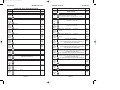
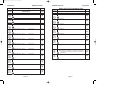
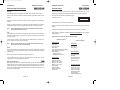
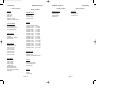
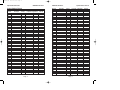
Option No/
Description
85
Available Options
00 - 59 Mins
86
(00)
00 - 23 Hours
00
Hours
Timer 2
Turn Off
Time (Hrs)
87
(00)
00 - 59 Mins
00
Minutes
Timer 2
Turn Off
Time (Mins)
88
(00)
00 - 23 Hours
00
Hours
Timer 3
Turn On
Time (Hrs)
89
(00)
00 - 59 Mins
00
Minutes
Timer 3
Turn On
Time (Mins)
90
(00)
00 - 23 Hours
00
Hours
Timer 3
Turn Off
Time (Hrs)
91
(00)
00 - 59 Mins
00
Minutes
Timer 3
Turn Of
Time (Mins)
92
(00)
(00) Full
(01) Set/Unset Only
(02) None
Select
Status
Display
93
Default
00
Minutes
Timer 2
Turn On
Time (Mins)
On
Custom
Display
(LCD Only)
Off
97
View Event
Log
95
101
Area 2
Alarm Reset
Mode
102
Area 3
Alarm Reset
Mode
(01) On
Page 64
(00) Any Code
(01)Master Code
(03) Engineer Code
(05) Main
(02)Anti-Code
(04) Engineer + Anti
(00) Any Code
(01)Master Code
(03) Engineer Code
(05) Main
(02)Anti-Code
(04) Engineer + Anti
Digi
Channel 2
Mode
106
108
Off
109
Area 2
Bell Delay
Time
(01)
Panic
(07)
As Option 31 (D1 Output Mode)
Alarm
(08)
For LCD use YES key to move to desired channel and the NO key to
change the setting for the selected channel.
As Option 31 (D1 Output Mode)
For LCD use YES key to move to desired channel and the NO key to change
the setting for the selected channel.
Only available when ProDigi is not used. Now available with Modem.
Panic
As Option 31 (D1 Output Mode)
For LCD use YES key to move to desired channel and the NO key to change
the setting for the selected channel.
Only available when ProDigi is not used. Now available with Modem.
Alarm
0 - 99 Minutes
(07)
(08)
20
Minutes
(20)
0 - 99 Minutes
20
Minutes
Area 3
Bell Ring
Time
(00)
Master
Code
For LCD use YES key to move to desired channel and the NO key to
change the setting for the selected channel.
104
Digi
Channel 3
Mode
Master
Code
(01)
As Option 31 (D1 Output Mode)
Area 2
Bell Ring
Time
ZONE xx
(00) Off
Whilst printing 1 = printer On/Off
103
Digi D4
(12Hr Term)
Mode
Applicable to LCD Displays Only
Real Time
Print
Whilst printing 1 = printer On/Off
99
107
Zone
Descriptors
(LCD Only)
Whilst viewing NO key to view previous event YES key for next event
Whilst viewing with LCD press 5 to show user number instead of name
Whilst viewing with LED press 3 to view Time / Date
7 = Last event of previous day 9 = First event of next day 0 = Escape
Print
Programmed
Settings
105
Applicable to LCD Displays Only
Default
98
Digi D3
(PA Term)
Mode
Off
Available Options
Print Event
Log
Full
94
96
Option No/
Description
(00)
Applicable to LCD Displays Only
Custom
Text
(LCD Only)
Programming
GARDTEC 800 Series
(20)
0 - 99 Minutes
00
Minutes
(00)
Page 65