1
3
Connection Diagram
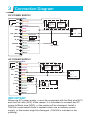
DC POWER SUPPLY
COM
AC2
AC 1/DC +
OPEN
D_ IN
ALARM -
D0
D1
GND
-
Orange
Purple
K-
Magnetic
Lock or
Fail-Safe
Lock
Fail-secure
lock
+
Pink
In4004
NC
Blue
In4004
NO
K+
GND
Red
Yellow
+12~24V
Exit Button
DC Power Supply
Brown
+
Door Contact
Grey
DC Alarm
Green
White
Black
AC POWER SUPPLY
COM
AC2
AC1/ DC+
OPEN
D _ IN
ALARMD0
D1
GND
-
Orange
Purple
K-
Magnetic
Lock or
Fail-Safe
Lock
Fail-secure
lock
+
Pink
K+
AC 2
Red
Yellow
AC 1
Exit Button
AC 12~24V
AC Power Supply
Brown
Grey
In4004
NC
Blue
In4004
NO
Door Contact
Green
+
-
DC Alarm
+
DC Power
White
Black
IMPORTANT
When use AC power supply, it must be connected with the Red wire(AC1)
and the Pink wire (AC2) of the reader. It is forbidden to connect the AC
power to Black wire (GND), or the reader will be damaged. Install a
1N4004 or equivalent diode is needed when use a common power
supply, or the reader might be damaged. (1N4004 is included in the
packing).