1
Chapter 2. Planning for IBM Cloud Manager with OpenStack
Review the following information for planning to install and using IBM Cloud Manager with OpenStack.
The information includes hardware and software requirements for the various IBM Cloud Manager with
OpenStack components.
IBM Cloud Manager with OpenStack prerequisites
Review the following information for planning to install and using IBM Cloud Manager with OpenStack.
The information includes hardware and software requirements for the various IBM Cloud Manager with
OpenStack components.
IBM Cloud Manager with OpenStack hardware prerequisites
This section describes hardware prerequisites for various platforms and components that IBM Cloud
Manager with OpenStack supports.
The information provided is a general guideline and actual requirements can vary from installation to
installation. Specific sizings should be done to meet your installation requirements.
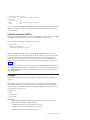
The IBM Cloud Manager with OpenStack server is supported on the following platforms:
v Intel x86-64 (Linux)
v POWER6®, POWER7®, or POWER8™ (PowerLinux™)
v z/VM systems (IBM z/Architecture®)
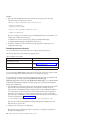
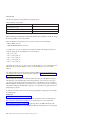
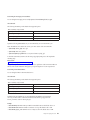
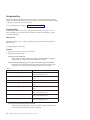
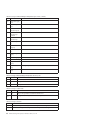
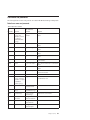
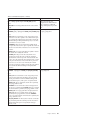
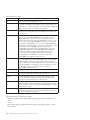
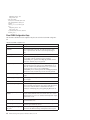
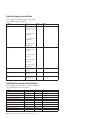
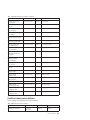
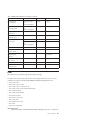
This table describes both the minimum hardware requirements and recommended minimum production
hardware requirements for the IBM Cloud Manager with OpenStack deployment server, controller,
database, and compute node components.
The minimum requirements listed indicate the absolute minimum hardware levels needed when running
with only 5-10 concurrent users.
The recommended minimum production requirements are recommendations to support a small cloud. As
with any software solution, hardware needs to be properly sized for a specific customer scenario.
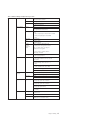
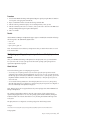
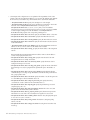
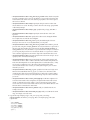
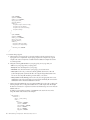
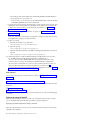
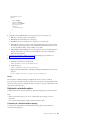
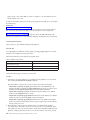
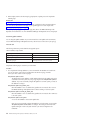
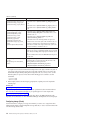
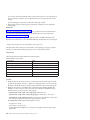
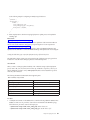
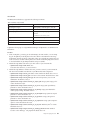
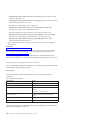
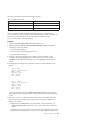
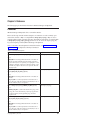
Table 2. Minimum hardware requirements
Component
Minimum hardware requirements
Recommended minimum hardware
production requirements
IBM Cloud Manager with OpenStack
deployment server 1
v 4 CPUs
v 8 CPUs
v Free disk space: 4 GB for
/opt/ibm/cmwo
v 25 GB free disk space
v 8 GB physical memory
v Free disk space: 4.5 GB of
temporary space while installing
v Chef server: 5.0 GB of free disk
space in /opt; 5.0 GB of free disk
space in /var.
v 4 GB physical memory
© Copyright IBM Corp. 2012, 2014
7