1
Feature Manual - ECAP
Feature Description
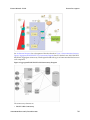
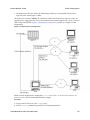
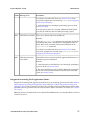
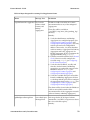
• SLAN to ECAP for Q.752 accounting information
• IPSM to NMS for alarms monitoring
• ECAP Connectivity
• Ethernet to EAGLE SLAN for Q.752 accounting information retrieval
• Ethernet to NMS for alarm transfer
• Ethernet to Aggregator for XML data transfer
• Aggregator Connectivity
• LAN to ECAP for Q.752 accounting information in XML data format. See MSU to XML Field
Mapping for more details.
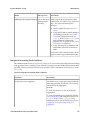
Integrated Accounting Feed Considerations
Some considerations for optimal ECAP performance are listed below.
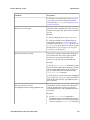
• Because of the nature of the EAGLE 5 ISS and its SLAN subsystem, no other application requiring
SLAN copied MSUs may operate simultaneously with the SLAN card.
• If over 50% of the message traffic consists of MSUs that are greater than 200 bytes, then the ECAP
server is not able to reach the 5000 MSUs/second process rate.
• If an SLAN link is cancelled and later activated (using EAGLE 5 ISS commands canc-dlk and
act-dlk), it can take up to 10 minutes for the link to come back up on its own. To bring the link
up immediately, restart the ECAP processes using the Process Control menu option within ecapcfg.
• Never set the date and time of day on the ECAP server backwards while the ECAP processes are
running. This includes setting the time manually or by configuring an NTP server. If the time needs
to be set backwards, first route traffic away from the ECAP server by cancelling the associated
SLAN DLK link. Then stop the ECAP process.
• Changing the DWI value from a higher number to a lower number (i.e., from 15 to 1) should be
avoided, if possible, especially during high traffic periods.
910-5784-001 Revision B, December 2009
21