1
Feature Manual - ECAP
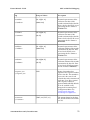
Condition
Maintenance
Resolution
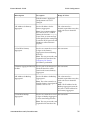
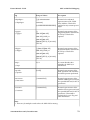
3. Perform a network health check (see Network
Check). If not successful, configure the ECAP
network using platcfg (see Configuring ECAP
Network Interfaces).
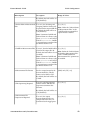
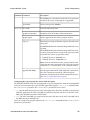
Data files are zero length
The ECAP disk is probably full. This causes the
filename to be generated, but no data is stored in
the file.
Remedy:
1. Check available disk space (see Disk Check).
2. Verify that FileMover and FileScrubber are
periodically running (see Crontab Check) and
configured correctly via ecapcfg. If not, re-run
ecapcfg to set up the processes and/or start the
ECAP processes (see Configuring the Integrated
Accounting Feed Application).
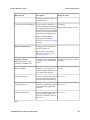
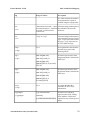
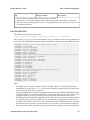
Data file contains no records
The data file contains standard data header but
no record entries. This occurs when no MSU
records are received from EAGLE 5 ISS.
There are no SLAN cards in the IS-NR state.
Remedy:
1. Use the rept-stat-slan command to verify
that the EAGLE 5 ISS SLAN subsystem is IS-NR
and is sending MSU packets to ECAP. Refer to
the Commands Manual for information on the
rept-stat-slan command.
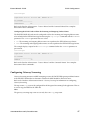
2. Verify gateway screens are properly configured
(see Configuring Gateway Screening). The EAGLE
5 ISS SLAN card will only copy MSUs that have
been screened.
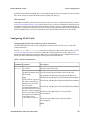
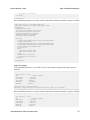
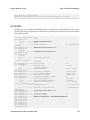
Data file contains no tag for
incominglinksetname/outgoinglinksetname
The data file contains standard data file header
with the record entries, but the tag entry for
incominglinksetname and outgoinglinksetname
is missing.
Remedy:
1. Use the rtrv-ss7opts command to
determine whether the SLANLSN parameter
on EAGLE 5 ISS is set to ON. This parameter
can be set using the chg-ss7opts command.
910-5784-001 Revision B, December 2009
62