1
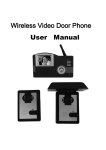
KW-137MC Features And Parts
Parts(Optional
(Optional Door Camera)
OPERATION GUIDE
The Operation For The Indoor Unit
1
1. Power On/Off
1.1 Power On
2
9
8
3
On the power, the unit will enter the stand-by status
automatically.
Off the power, press “on” button(Pic. A), the unit will
sound “Di” and enter the stand-by status and the LED
will light
Pic. A
1.2 Power Off
4
Under the stand-by mode, press the “off” button(Pic. A)
for 5 seconds, the unit will sound “Di Di Di” and enter
the power off status and the LED of no bother, power
and working status will turn off.
5
6
Pic. B
2. Call Remind
7
2.1. Outdoor Unit 1 Call The Indoor Unit
10
1.
2.
3.
4.
5.
6.
7.
8.
9.
10.
Screws to fix panel
CCD camera(B&W/Color)
White light/IR light
Speaker
Room No. and night light
Call button
Microphone
Imbedded assembling box
Camera angle adjusting button
Connecting port
The indoor unit will display the image of outdoor unit 1
automatically when the outdoor unit 1 calls, and the
LED of outdoor unit 1 will light, the LED of working
status will glitter and the unit will under chord ring seect status(See P8 point 7), the selected melody is for
Door 1.
2.2 Outdoor unit 2 call the indoor unit(more than 1 outdoor unit)
The indoor unit will display the image of outdoor unit 2
automatically when the outdoor unit 2 calls, and the
LED of outdoor unit 2 will light, the LED of working
status will glitter and the melody for Door 2 is the next
melody of Door 1.
2.3 Indoor unit call indoor unit(more than 1 indoor unit)
The LED of working status will glitter and the indoor
unit will sound “Du Du” when the indoor unit calls
indoor unit. (no ring under no bother status)
3. Talk/Stop
Remark
The indoor unit is connectable to any outdoor unit with 4-wire from
our company.
Top Way Technology
6
3.1 Call To Talk
When the indoor unit is called, please see “P7 point
2.1”, press “talk” button(Pic. B) to enter talking status, the unit and the calling unit can talk.
Top Way Technology
7