1
The difference: straight computer connection or Home Network
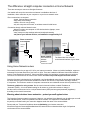
There are two ways to connect to Georgina Connects:
Our installer will set up the connection to whatever is available at the time of
installation, direct connection to your computer or to your home network router.
Direct connection to a computer:
- simple, fast low latency connection
- easy setup, basic settings
- reliable, not much can go wrong
- only one computer can connect, no wireless network inside house
Connection through a Home Network router:
- allows more than one computer or Wifi wireless device (laptops, smart
phones) to connect
- many routers can drop settings and need occasional resetting
- not part of your Internet service, not installed or supported by ILS
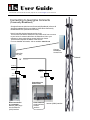
Direct connection
to a computer
network
cables
network
cables
J-box
(POE)
Home network:
wired interfaces,
wireless
interface
J-box
(POE)
The Subscriber Unit connects
to the Internet interface of your router
Using Home Network routers
The monthly service fee you pay to ILS is for your Internet connection. It does not include installation, support or
maintenance of private networks of your home or office. There are hundreds of different Home/Office network
routers. Even between the dozens of Linksys and Dlink models, the interfaces, prompts and terms used vary.
The source for instructions is the router's user manual. ILS does not provide support for these devices.
Georgina Connects is designed to be an affordable, very fast broadband connection for homes and small offices.
We have different types of connections available for medium size offices or corporations with large numbers
of computers. The maximum number of computers connected to one residential account is three (business: five).
The basic guideline for using routers: Set the router's Internet interface to obtain IP address to
Automatic (DHCP) – this is the default setting for all routers so you should not have to change it.
Set the router's wireless service for a unique Network name (SSID) and encrypted password (keyphrase)
according to the router's instructions.
Warning about wireless home networks – protect yourself against crime
The Georgina Connects network is protected. However, your wireless Home Network may be wide open to credit
card and identity theft, access for predators and other criminals. It is important to understand that
any activity committed under your connection happens under the name of the account holder.
Please read your Terms and Conditions about re-distributing your internet connection.
All traffic through the CommunityBroadband and ILS networks are monitored and the origin of all packets
can be traced to the account holder.