1
5.3
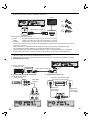
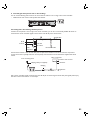
HDMI Video / Audio Connection
(Supports up to 1080i(*1), 1080p(*2), 1080p/24(*3) resolution.)
Your TV
✔
HDMI cable (not supplied)
HDMI IN
No analog audio connection required.
(*1)
1080i
1080p
1080p/24
(*2)
(*3)
•
•
•
•
: Outputs video data with a frame rate of 30 frames per second.
: Outputs video data with a frame rate of 60 frames per second.
: Outputs video data with a frame rate of 24 frames per second.
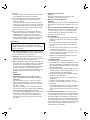
Do not tilt the connector when inserting it into the HDMI jack, and make sure the shapes of the jack and the
connector are matched.
When connected to an HDCP incompatible display device, the picture will not be displayed properly.
Use an HDMI cable with the HDMI logo (a certified HDMI cable) for this connection.
High Speed HDMI cable (also known as HDMI category 2 cable) is recommended for better compatibility.
To enjoy Blu-ray 3D™ video, connect this unit to a 3D capable TV using a 3D compatible HDMI cable.
5.4
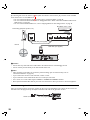
Connection to an Audio System
• When you change the connections, all devices should be turned off.
• When making connections with external devices, please refer to their user manuals for additional setup help.
■ HDMI Audio Connection
AV receiver/amplifier with
an HDMI input jack
HDMI IN
HDMI cable (not supplied)
■ 2-Channel Analog Audio Connection
Stereo system with analog
audio input jacks
AUDIO IN
R
Audio cable
(supplied)
■ Digital Audio Connection
AV receiver / amplifier with a digital
audio optical /coaxial input jack
DIGITAL AUDIO INPUT
OPTICAL
DIGITAL AUDIO INPUT
COAXIAL
L
Digital audio
optical cable
(not supplied)
18
Digital audio
coaxial cable
(not supplied)
EN