1
SYSTEM INTERCONNECTION - continued
Referencing - System Delays
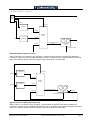
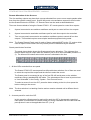
The delay through the Golden DaVE system is illustrated in the timing diagram on the next page.
With no option (OPT) card the minimum delay which is possible is 185 pixels (about 14µs), but as
the diagram shows, with a DVE card fitted a delay of over 2 frames is easily achievable!
Because all inputs have frame synchronisers, a source cannot be set outside the source window; if
a source is delayed (shifted to the right) beyond the end of the window, the whole diagram moves
one frame to the right, so the source is now at the left hand edge of the window, and the input
synchroniser is inserting a frame of delay.
To minimise lip-sync problems, it is usually preferred to minimise the delay through a switcher. If
the OPT card is fitted, the desired Border Gen Delay must be set in the Configure-SystemSystem Delays sub-menu, before making timing adjustments since it affects the processing delay.
Refer to the User Manual.
For example if the Border Gen Delay is set to 10 lines, the processing delay will be 10 lines +
33us. If the sources are set 11 lines in advance of the output, this will allow for the processing
delay. The sources will be at the right hand end of the source window in the diagram, and the
delay through the input synchronisers will be 64 - 33 = 31us. If the switcher and sources are locked
to a common reference (method (a) above), set the Genlock V Phase to 11 to achieve this. If the
sources are genlocked to the Ref Sync Output of the switcher (method (b) above), set the Sync
V-Phase control to 11 lines advance: 625 - 11 = 614 in 625-line standards or 525 - 11 = 514 in 525line standards. If the DVE option is fitted the delay will now be 1 frame +11 lines. It can be reduced
to 11 lines for paths which do not pass through a DVE by setting the DVE Delay in the ConfigureSystem-System Delays sub-menu to minimum; in this case there will be a time jump when a DVE
is selected or de-selected.
Page 12
SD1512 Installation Manual - Issue 8, Rev 1
S&W Production & Post Production