1
Designing, Developing and Deploying Applications
Once installed, we launched the TOAD product. At first, we found the TOAD environment somewhat confusing. After a
little familiarization and adjustment, we were up and running. The primary features most developers will want to use are the
Schema Browser, the SQL Editor, and the Procedure Editor. These features can be accessed with the toolbar or the
appropriate menu item under the “Database” menu. Each of these features will launch a new MDI window. The Schema
Browser provides a hierarchical display of all database objects. The SQL Editor provides a window where SQL statements are
executed. And PL/SQL programs can be edited within the Procedure Editor.
TOAD will not permit you to open a file unless you are already connected to a database. This can be very annoying, especially
for developers who frequently do off-line editing, such as on a laptop or at home.
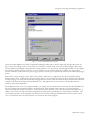
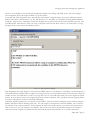
In the Procedure Editor, each opened file will appear as a new tab in the current Procedure Editor window (Figure 12). Note
that a database connection must be active and Procedure Editor must be activated in order to open a file on the file system.
Users should also be aware that clicking the “X” (Close) button for the Procedure Editor window will close all files in that
Procedure Editor window. To close an individual file only, the user should right-click on the editor portion of the window.
This will bring up the context menu, at which time the user should choose "Close File/Tab".
Figure 12 – TOAD Procedure Editor
TOAD’s Procedure Editor will display a hierarchy of all programming units within the source, as shown on the left-hand side
of Figure 12. When a subroutine is selected, TOAD will immediately navigate to the selected subroutine. One drawback for
any modem users: it seems as though TOAD recreates this list each time the user activates a file. One of our test
environments accessed a database over a modem line. In this environment, we found that there could be wait times of 10
seconds simply to switch between multiple files that had already been opened. However, in normal LAN configurations, this
should not be a concern.
Paper 244 / Page 14