1
Designing, Developing and Deploying Applications
In the following sections we will provide our thumbnail overview of each product and what we see as its strong and weak
points.
SQL*PLUS
We chose to use SQL*Plus as a benchmark for all our product comparisons. We chose this environment as our benchmark
because it is an essentially free environment (distributed with the database) that is installed by the database administrator, as
part of the instance installation. When we use this environment for PL/SQL development, we use SQL*Plus as a compilation
tool and a text editor as the PL/SQL code generation tool. We use a separate text editor for PL/SQL development as the line
editing support provided within SQL*Plus is inferior to most freeware editors. A free text editor like PFE (Programmer’s File
Editor) includes standard functions like find and replace, automatic line numbering, and text indentation features that are not
included with the line editor built into SQL*Plus.
Over the course of time we developed a procedure in which we ended each trigger, package, function, or procedure with the
SQL*Plus SHOW ERRORS command. The SHOW ERRORS command will reveal the line number and column position of
each error along with a plain text error message. Without this command SQL*Plus will just return a rather cryptic message like
“Warning: Package created with compilation errors”. One last issue is that the given error line number is the PL/SQL block
line number which does not necessarily agree with the file line number. Line number discrepancies can occur if the file
contains SQL*Plus commands or even blank lines prior to the start of the PL/SQL block.
The SQL*Plus environment provides little help with tuning and debugging PL/SQL code. In this environment the developer
must perform sophisticated tuning by either memorizing the required commands or consulting other Oracle manuals and then
manually entering the commands to generate explain plans or tkprof data. High level statistics are available through the
SQL*Plus SET TIMING command. SQL*Plus does not provide a simple way by which the developer can single step
through the code, set break points, or examine or set intermediate data values. However, this type of debugging support can
be found in all of the other tools we reviewed.
Finally, the PL/SQL development help system is not directly linked to the SQL*Plus environment. Therefore context
sensitive help is not available. When we needed to find information about a particular PL/SQL command, our only option
was to start a separate process and then drill down to the desired Oracle PL/SQL reference documentation.
For the very experienced developer this tool set combination can be functional in situations where not a lot of work is being
done. It is also “free” and, as we noted earlier, usually installed and configured by someone else, a plus if you are not planning
on doing much work in the environment or do not have the freedom or time to install another product.
ORACLE PROCEDURE BUILDER
We reviewed the Oracle Procedure Builder version that is distributed with the Internet Developer Suite. If you would like to
purchase this product, visit the Oracle Store on the web. This environment is a significant step forward from the previously
described SQL*Plus environment. Among the many improvements is a GUI integrated development environment from
which one can navigate through the Oracle database objects and then bring a desired PL/SQL object into a built in PL/SQL
editor. This object navigation interface is, appropriately enough, referred to as the Navigator window.
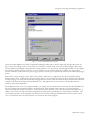
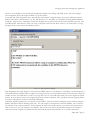
The integrated PL/SQL editor includes many features including a compiler, an error locator which places the cursor on the
offending line, and a syntax palette (Figure 1) which can be used to insert standard PL/SQL constructs directly into your
code. This tool has support for the many language extensions that are native to the old Developer 6i product suite but not
supported outside of that environment. These extensions include PL/SQL library support and a number of custom packages
like text_io, ole2, dde, and exec_sql among others.
Paper 244 / Page 2