1
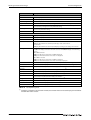
A.2.3
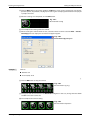
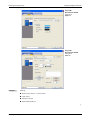
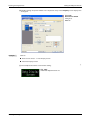
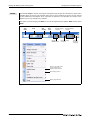
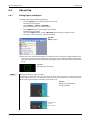
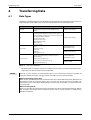
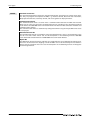
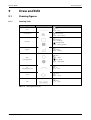
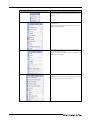
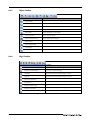
View Toolbar
Icon and Name
Description
Snap
Snap movement of the cursor is set
Zoom
Screen display magnification rate/shrinkage rate is set.
Zoom In
Screen display magnification of the screen editor can be zoomed in by 10%
increments.
Zoom Out
Screen display magnification of the screen editor can be zoomed out by 10%
increments.
Grid Spacing
Grid spacing of the screen editor is set.
Grid color
Grid color of the screen editor is set.
ON Image/OFF Image
Screen is switched to the display of device ON Image/device OFF Image.
Device
Switches the display type of devices (display or non-display).
Device of System Label
Switches the display type of a device assigned to a system label (display or
non-display).
Object ID
Switches the display type of object IDs (display or non-display).
Layer: Front
Displays the front layer only.
Layer: Back
Displays the back layer only.
Layer: Front and Back
Displays the overlaid front and back layers.
Language Switching Preview
The preview column No. of the language switching is set.
Tab. A-4: Description of View toolbar
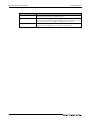
A.2.4
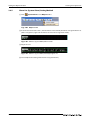
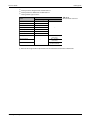
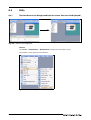
Screen Toolbar
Icon and Name
Description
New
Creates a new screen.
Open
Opens closed screens.
Previous Screen
Opens a screen of which screen No. is smaller by one than that of the screen
currently being edited.
Next Screen
Opens a screen of which screen No. is larger by one than that of the screen
currently being edited.
open Closed Screen
When opening screens with or button, switches the display type of the
closed screens (opening or closing the closed screens).
Background Pattern Color
Sets the color of screen background pattern of screen.
Background Pattern
Sets the back ground pattern of screen.
Background Color
Sets the back ground color of screen.
Preview
Displays a preview window of screen.
Tab. A-5: Description of Screen toolbar
GT Designer3 Beginner's Manual
A-7