1
Chapter 3 Network Configuration
OD1300UME01-1.3
3.1 Overview
Network configuration is a basic module of the SifoWorks system. This
module allows administrators to set up the system to connect to the
network and provide network related services. Administrators must
complete the system’s network configurations according to their actual
network requirements.
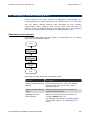
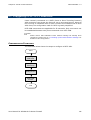
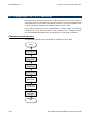
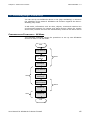
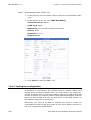
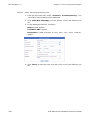
To connect SifoWorks to your network correctly, you must first set up the
basic network settings to configure the device’s virtual ports, VLAN, IP
addresses and routes. Please refer to “3.2 Setting up the Basic Network
Settings” for more information.
The remaining sections also describes the procedures to set up SifoWorks
to provide NAT, DHCP services, DNS and DDNS services, IP-MAC binding
mechanism and manage the device’s ARP tables. You can also set up the
device to connect to external networks via PPPoE.
3.2 Setting up the Basic Network Settings
This operation guides you through configuring the device’s virtual ports,
VLANs, IP addresses and routes necessary to connect SifoWorks correctly
in your network.
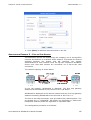
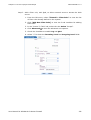
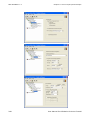
Virtual Ports
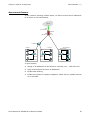
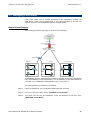
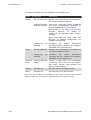
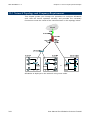
SifoWorks supports up to three virtual ports: Virtual Port 1, Virtual Port 2
and Virtual Port 3. These are not physical ports on the device but are
logical ports used to facilitate the management of the device’s data ports.
Assigning physical data ports to virtual ports allow you to easily manage
the ports when defining filter rules. Filter rules incoming and outgoing
interfaces are defined using virtual ports, thus allowing you to map
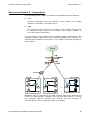
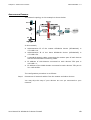
multiple physical ports to a single rule. For example, the physical ports
FE0-FE2 are assigned to VPort1 while FE3-FE5 are assigned to VPort2. To
define a filter rule that matches traffic sent from FE0-FE2 to FE3-FE5,
simply select the incoming interface to be VPort1 and the outgoing
interface to be VPort2.
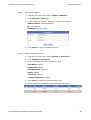
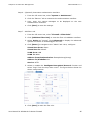
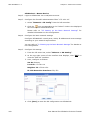
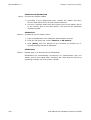
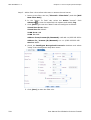
SifoWorks supports 3 virtual ports: Virtual Port 1 (VPort1), Virtual Port 2
(VPort2) and Virtual Port 3 (VPort3). All physical data ports (FE0-FE7)
must be assigned to one of the 3 virtual ports. Each data port can only be
assigned to a single virtual port. Each virtual port can contain multiple
data ports.
User Manual for SifoWorks D-Series Firewall
43