1
2.1.3. Display Scaling
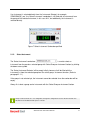
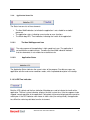
To create readability from great distance, the Attention Scan application supports scaling the
size of the data field in two ways. Either by selection of the Font directly
Enlarge and Diminish Font buttons the appearance can be changed.
or by using the
Figure 8 Scaling example
2.1.4. Start a New Instance
Since the Attention Scan application will show one instrument at the time, it can be started
multiple times. This is done by clicking the ‘Start New Instance’
button.
Please note that more instances mean a higher load on the field bus. It could lead to low responsiveness or
timeout errors. Using many instances defeats the purpose of the application, since this will degrade the
overall performance
Attention Scan Instruction Manual
9