1
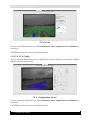
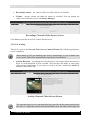
WebCCTV User Manual 47 Record this camera – the camera will be recorded if the box is checked. Volume – storage volume on which the camera is recorded. You can change the volume for each camera (see 3.3.4 Storage Manager) Recordings (Network Video Server) Screen Click Next to enter the next NVS Camera Wizard screen. 1.8.1.3.6 Activity This tab is a part of the Network Video Server Camera Wizard. The following parameters can be configured: When adding a NVS, the Masking and Activity functionality is only available after server restart. This will be automatically requested by a notification. Activity Detection – by enabling Activity Detection, only images where movement is above a certain threshold will be recorded. This increases the ability to store more video footage significantly. If you want to record at all time, uncheck the AD/VCA checkbox in the Video tab. Activity (Network Video Server) Screen The current activity level is represented by the green line on the control panel below the video. To adjust the activity detection threshold, move the slider on the right side Version 6.0 Series