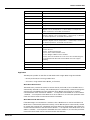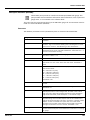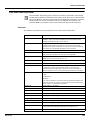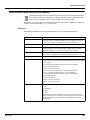
1
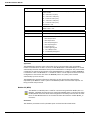
Dispatch and Fuels Accounting
IOM039GVAE2513
8203 Remote Terminal Unit
8203 — Dual RS-485 MODBUS
Communication Interface Module
RTU Firmware Version : RTU3_xx
Installation and Operations Manual
Automation Solutions for oil & gas, defense and aviation applications
+24V
+5V
CPU
COMM
+15V
I/O
-15V
ERROR
8203
Copyright
All rights reserved. Printed in the United States of America.
Except as permitted under the United States Copyright Act of 1976, no part of this publication
may be reproduced, stored in a retrieval system or transmitted in any form or by any means electronic, mechanical, photocopying, recording, or otherwise - without the prior written
permission of the Publisher:
Varec, Inc.
5834 Peachtree Corners East
Norcross (Atlanta), Georgia 30092
Phone: (770) 447-9202
Fax: (770) 662-8939
Trademarks Acknowledged
Varec, Inc. recognizes all other trademarks. Trademarks of other products mentioned in this
manual are held by the companies producing them.
Microsoft® is a registered trademark of Microsoft Corporation.
Acrobat® is a registered trademark of Adobe Systems Incorporated.
MODBUS® is a registered trademark of Modicon, Inc.
TIWAY® is a registered trademark of Texas Instruments Corporation
HART® interface is a registered trademark of HART Communications Foundation
Delrin is a registered trademark of E. I. du Pont de Nemours Co. (Inc.), Wilmington, DL
Dow Corning RTV 737 is a registered trademark of Dow Corning Inc., Midland MI
Loctite is a registered trademark of Loctite Corp., Newington, CT
Teflon is a registered trademark of E. I. du Pont de Nemours Co. (Inc.), Wilmington, DL
Viton is a registered trademark of E. I. Du Pont de Nemours Co. (Inc.), Wilmington, DL
FuelsManager® is a registered trademark of Varec, Inc. Copyright 2004
8130 RTU8130® is a registered trademark of Varec, Inc. Copyright 2003
TankGate™ is a trademark of Varec, Inc. 2003
TankView® is a registered trademark of Varec, Inc. Copyright 2003
Varec® is a registered trademark of Varec, Inc. Copyright 2003
All other product and service names mentioned are the trademarks of their respective
companies.
Disclaimer of Warranties
The contract between the Seller and the Buyer states the entire obligation of the Seller. The
contents of this instruction manual shall not become part of or modify any prior or existing
agreement, commitment, or relationship between the Seller and Buyer. There are no express or
Varec, Inc.
i
Remote Terminal Unit
implied warranties set out in this instruction manual. The only warranties that apply are those
in the existing contract between the Seller and Buyer.
The 8201 RTU has not been tested by Varec under all possible operational conditions, and Varec
may not have all the data relative to your application. The information in this instruction manual
is not all inclusive and does not and cannot take into account all unique situations.
Consequently, the user should review this product literature in view of his or her application. If
you have any further questions, please contact Varec for assistance.
Limitations of Seller's Liability
In the event that a court holds that this instruction manual created some new warranties, Seller's
liability shall be limited to repair or replacement under the standard warranty clause. In no case
shall the Seller's liability exceed that stated as Limitations of Remedy in the contract between
the Seller and Buyer.
Use of parts that are not manufactured or supplied by Varec voids any warranty and relieves
Varec of any obligation to service the product under warranty. Varec recommends the use of
only Varec manufactured or supplied parts to maintain or service the 8201 RTU.
Terms of Use
The information provided in this document is provided "as is" without warranty of any kind.
Varec, Inc. disclaim all warranties, either express or implied, including the warranties of
merchantability and fitness for a particular purpose. In no event shall Varec, Inc. or its suppliers
be liable for any damages whatsoever including direct, indirect, incidental, consequential, loss
of business profits or special damages, even if Varec, Inc. or its suppliers have been advised of
the possibility of such damages.
This manual is solely intended to describe product installation and functions and should not be
used for any other purpose. It is subject to change without prior notice. This manual was
prepared with the highest degree of care. However, should you find any errors or have any
questions, contact one of our service offices or your local sales agent.
ii
Installation and Operations Manual
8203
Safety Precaution Definitions
Caution! Damage to equipment may result if this precaution is disregarded.
Warning! Direct injury to personnel or damage to equipment which can cause injury to
personnel may result if this precaution is not followed.
Safety Precautions
Read this manual carefully and make sure you understand its contents before using this product.
Follow all instructions and safety guidelines presented in this manual when using this product.
If the user does not follow these instructions properly, Varec cannot guarantee the safety of the
system.
Note Comply with all applicable regulations, codes, and standards. For safety precautions,
the user should refer to the appropriate industry or military standards.
Caution! Electrical Hazard! Read and understand static and lightning electrical protection
and grounding described in API 2003. Make certain that the installation, operation, and
maintenance conforms with the practice set forth therein.
Warning! Striking the product with a metal object could cause a spark to occur. When
removing or replacing the product in flammable or hazardous liquid storage areas, take
necessary measures to protect it from impact.
Warning! Sparks or static charge could cause fire or explosion! Mechanical connections,
worker activity and worker clothing may accumulate electrostatic charges. Care should be
used in flammable environments to avoid the hazard.
Varec, Inc.
iii
Remote Terminal Unit
iv
Installation and Operations Manual
Remote Terminal Unit
1
Overview . . . . . . . . . . . . . . . . . . . . . . . . . . . . . . . . . . . . . . . . . . . . . . . . . . . . . . . . 1
Features . . . . . . . . . . . . . . . . . . . . . . . . . . . . . . . . . . . . . . . . . . . . . . . . . . . . . . . . . . . 1
General . . . . . . . . . . . . . . . . . . . . . . . . . . . . . . . . . . . . . . . . . . . . . . . . . . . . . . . 1
Applications . . . . . . . . . . . . . . . . . . . . . . . . . . . . . . . . . . . . . . . . . . . . . . . . . . . . 1
Specifications . . . . . . . . . . . . . . . . . . . . . . . . . . . . . . . . . . . . . . . . . . . . . . . . . . . . . . . 1
Memory . . . . . . . . . . . . . . . . . . . . . . . . . . . . . . . . . . . . . . . . . . . . . . . . . . . . . . . 1
DC Power Requirements . . . . . . . . . . . . . . . . . . . . . . . . . . . . . . . . . . . . . . . . . . . 2
AC Power Requirements . . . . . . . . . . . . . . . . . . . . . . . . . . . . . . . . . . . . . . . . . . . 2
Physical . . . . . . . . . . . . . . . . . . . . . . . . . . . . . . . . . . . . . . . . . . . . . . . . . . . . . . . 2
Environmental. . . . . . . . . . . . . . . . . . . . . . . . . . . . . . . . . . . . . . . . . . . . . . . . . . . 2
Digital Inputs . . . . . . . . . . . . . . . . . . . . . . . . . . . . . . . . . . . . . . . . . . . . . . . . . . . 2
Analog Inputs . . . . . . . . . . . . . . . . . . . . . . . . . . . . . . . . . . . . . . . . . . . . . . . . . . . 3
Analog Outputs . . . . . . . . . . . . . . . . . . . . . . . . . . . . . . . . . . . . . . . . . . . . . . . . . . 3
Intelligent Communications Interfaces . . . . . . . . . . . . . . . . . . . . . . . . . . . . . . . . . . 3
Gas Tube Protection . . . . . . . . . . . . . . . . . . . . . . . . . . . . . . . . . . . . . . . . . . . . . . 3
Field Maintenance . . . . . . . . . . . . . . . . . . . . . . . . . . . . . . . . . . . . . . . . . . . . . . . . 4
I/O Expansion Modules . . . . . . . . . . . . . . . . . . . . . . . . . . . . . . . . . . . . . . . . . . . . . . . 4
2
Hardware and Software . . . . . . . . . . . . . . . . . . . . . . . . . . . . . . . . . . . . . . . . . . 7
Hardware Description. . . . . . . . . . . . . . . . . . . . . . . . . . . . . . . . . . . . . . . . . . . . . . . . . 7
Hardware Block Diagram . . . . . . . . . . . . . . . . . . . . . . . . . . . . . . . . . . . . . . . . . . . . . . 8
Software Description . . . . . . . . . . . . . . . . . . . . . . . . . . . . . . . . . . . . . . . . . . . . . . . . . 8
Software Features . . . . . . . . . . . . . . . . . . . . . . . . . . . . . . . . . . . . . . . . . . . . . . . . . . . 9
Real-Time / Multitasking Executive . . . . . . . . . . . . . . . . . . . . . . . . . . . . . . . . . . . . 9
Real-Time Clock . . . . . . . . . . . . . . . . . . . . . . . . . . . . . . . . . . . . . . . . . . . . . . . . . 9
Automatic Fault Recovery . . . . . . . . . . . . . . . . . . . . . . . . . . . . . . . . . . . . . . . . . . 9
Firmware . . . . . . . . . . . . . . . . . . . . . . . . . . . . . . . . . . . . . . . . . . . . . . . . . . . . . 10
Communications . . . . . . . . . . . . . . . . . . . . . . . . . . . . . . . . . . . . . . . . . . . . . . . . 10
Protocols . . . . . . . . . . . . . . . . . . . . . . . . . . . . . . . . . . . . . . . . . . . . . . . . . . . . . 10
I/O Scanning Task. . . . . . . . . . . . . . . . . . . . . . . . . . . . . . . . . . . . . . . . . . . . . . . 11
Point Executive . . . . . . . . . . . . . . . . . . . . . . . . . . . . . . . . . . . . . . . . . . . . . . . . . 11
Database Manager . . . . . . . . . . . . . . . . . . . . . . . . . . . . . . . . . . . . . . . . . . . . . . 11
System Tasks . . . . . . . . . . . . . . . . . . . . . . . . . . . . . . . . . . . . . . . . . . . . . . . . . . 12
3
Installation. . . . . . . . . . . . . . . . . . . . . . . . . . . . . . . . . . . . . . . . . . . . . . . . . . . . . . 13
General Safety Guidelines . . . . . . . . . . . . . . . . . . . . . . . . . . . . . . . . . . . . . . . . . . . . 13
Installation Safety Guidelines . . . . . . . . . . . . . . . . . . . . . . . . . . . . . . . . . . . . . . . . . . 13
Installation . . . . . . . . . . . . . . . . . . . . . . . . . . . . . . . . . . . . . . . . . . . . . . . . . . . . . . . . 14
Mounting the 8130 RTU . . . . . . . . . . . . . . . . . . . . . . . . . . . . . . . . . . . . . . . . . . . 15
Mounting the Enclosure . . . . . . . . . . . . . . . . . . . . . . . . . . . . . . . . . . . . . . . . . . . 16
Wiring Up Power . . . . . . . . . . . . . . . . . . . . . . . . . . . . . . . . . . . . . . . . . . . . . . . . 16
Grounding . . . . . . . . . . . . . . . . . . . . . . . . . . . . . . . . . . . . . . . . . . . . . . . . . . . . 16
Installing Communications . . . . . . . . . . . . . . . . . . . . . . . . . . . . . . . . . . . . . . . . . 17
Configuring I/O Expansion Modules . . . . . . . . . . . . . . . . . . . . . . . . . . . . . . . . . . 18
Varec, Inc.
v
Recommended Maintenance Procedure . . . . . . . . . . . . . . . . . . . . . . . . . . . . . . . . . 18
4
Configuration . . . . . . . . . . . . . . . . . . . . . . . . . . . . . . . . . . . . . . . . . . . . . . . . . . . 21
Motherboard Description . . . . . . . . . . . . . . . . . . . . . . . . . . . . . . . . . . . . . . . . . . . . . 21
Power Supply . . . . . . . . . . . . . . . . . . . . . . . . . . . . . . . . . . . . . . . . . . . . . . . . . . 23
MOVs and Gas Tubes . . . . . . . . . . . . . . . . . . . . . . . . . . . . . . . . . . . . . . . . . . . . 25
Switches and Indicators . . . . . . . . . . . . . . . . . . . . . . . . . . . . . . . . . . . . . . . . . . . 25
Communications . . . . . . . . . . . . . . . . . . . . . . . . . . . . . . . . . . . . . . . . . . . . . . . . 28
8130 RTU Communications Cable. . . . . . . . . . . . . . . . . . . . . . . . . . . . . . . . . . . . . . 30
5
Model 8203 Dual RS-485 Communication Interface . . . . . . . . . . . . . . 31
Features . . . . . . . . . . . . . . . . . . . . . . . . . . . . . . . . . . . . . . . . . . . . . . . . . . . . . . . . . . 31
Description . . . . . . . . . . . . . . . . . . . . . . . . . . . . . . . . . . . . . . . . . . . . . . . . . . . . . . . . 31
ID DIP Switch (SW1) . . . . . . . . . . . . . . . . . . . . . . . . . . . . . . . . . . . . . . . . . . . . . 32
LED Indicators (D1-D4) . . . . . . . . . . . . . . . . . . . . . . . . . . . . . . . . . . . . . . . . . . . 33
Field wiring terminal block (J2,J4) . . . . . . . . . . . . . . . . . . . . . . . . . . . . . . . . . . . . 33
Surge/Shield Ground Connector (J3) . . . . . . . . . . . . . . . . . . . . . . . . . . . . . . . . . . 34
Network terminating resistor jumpers (W4 & W5) . . . . . . . . . . . . . . . . . . . . . . . . . 34
Hardware Interface. . . . . . . . . . . . . . . . . . . . . . . . . . . . . . . . . . . . . . . . . . . . . . . . . . 34
Modbus . . . . . . . . . . . . . . . . . . . . . . . . . . . . . . . . . . . . . . . . . . . . . . . . . . . . . . 34
TIWAY Interface . . . . . . . . . . . . . . . . . . . . . . . . . . . . . . . . . . . . . . . . . . . . . . . . 35
MG5000 . . . . . . . . . . . . . . . . . . . . . . . . . . . . . . . . . . . . . . . . . . . . . . . . . . . . . . 36
Digital Hydrocarbon Probes . . . . . . . . . . . . . . . . . . . . . . . . . . . . . . . . . . . . . . . . 36
Software Interface . . . . . . . . . . . . . . . . . . . . . . . . . . . . . . . . . . . . . . . . . . . . . . . . . . 37
TIWAY . . . . . . . . . . . . . . . . . . . . . . . . . . . . . . . . . . . . . . . . . . . . . . . . . . . . . . . 37
Modbus . . . . . . . . . . . . . . . . . . . . . . . . . . . . . . . . . . . . . . . . . . . . . . . . . . . . . . 37
MG5000 . . . . . . . . . . . . . . . . . . . . . . . . . . . . . . . . . . . . . . . . . . . . . . . . . . . . . . 37
Digital Hydrocarbon Probes . . . . . . . . . . . . . . . . . . . . . . . . . . . . . . . . . . . . . . . . 37
Model 8203: Dual RS-485 Communication Interface Assignment Chart . . . . . . . . . 37
6
8130 RTU Software Blocks . . . . . . . . . . . . . . . . . . . . . . . . . . . . . . . . . . . . . . 39
Description . . . . . . . . . . . . . . . . . . . . . . . . . . . . . . . . . . . . . . . . . . . . . . . . . . . . . . . . 39
Database Organization. . . . . . . . . . . . . . . . . . . . . . . . . . . . . . . . . . . . . . . . . . . . . . . 40
Point Format . . . . . . . . . . . . . . . . . . . . . . . . . . . . . . . . . . . . . . . . . . . . . . . . . . . 40
Parameter Description . . . . . . . . . . . . . . . . . . . . . . . . . . . . . . . . . . . . . . . . . . . . 40
Gathering Point Data . . . . . . . . . . . . . . . . . . . . . . . . . . . . . . . . . . . . . . . . . . . . . . . . 42
Standard Request-Response Format . . . . . . . . . . . . . . . . . . . . . . . . . . . . . . . . . 42
Change of State Format . . . . . . . . . . . . . . . . . . . . . . . . . . . . . . . . . . . . . . . . . . . 42
Scanners . . . . . . . . . . . . . . . . . . . . . . . . . . . . . . . . . . . . . . . . . . . . . . . . . . . . . . . . . 43
Output Registers . . . . . . . . . . . . . . . . . . . . . . . . . . . . . . . . . . . . . . . . . . . . . . . . . . . 44
Modbus Communications. . . . . . . . . . . . . . . . . . . . . . . . . . . . . . . . . . . . . . . . . . . . . 44
Modbus Master . . . . . . . . . . . . . . . . . . . . . . . . . . . . . . . . . . . . . . . . . . . . . . . . . 44
vi
Installation and Operations Manual
Remote Terminal Unit
Modbus Slave . . . . . . . . . . . . . . . . . . . . . . . . . . . . . . . . . . . . . . . . . . . . . . . . . . 44
Inherent 8130 RTU Software Blocks . . . . . . . . . . . . . . . . . . . . . . . . . . . . . . . . . . . . 45
Analog Alarm Point (AAL) . . . . . . . . . . . . . . . . . . . . . . . . . . . . . . . . . . . . . . . . . 46
Analog Inputs (AI) . . . . . . . . . . . . . . . . . . . . . . . . . . . . . . . . . . . . . . . . . . . . . . . 48
Analog Functions (AIFUNC) . . . . . . . . . . . . . . . . . . . . . . . . . . . . . . . . . . . . . . . . 50
Analog Status (AISTAT) . . . . . . . . . . . . . . . . . . . . . . . . . . . . . . . . . . . . . . . . . . . 51
Alarm Selector (ALSEL) . . . . . . . . . . . . . . . . . . . . . . . . . . . . . . . . . . . . . . . . . . . 53
Byte Register (BREG) . . . . . . . . . . . . . . . . . . . . . . . . . . . . . . . . . . . . . . . . . . . . 54
Clock (CLK) . . . . . . . . . . . . . . . . . . . . . . . . . . . . . . . . . . . . . . . . . . . . . . . . . . . 54
Command Activator (CMNDR) . . . . . . . . . . . . . . . . . . . . . . . . . . . . . . . . . . . . . . 55
Communications (COM) . . . . . . . . . . . . . . . . . . . . . . . . . . . . . . . . . . . . . . . . . . 57
Coded Register (CREG) . . . . . . . . . . . . . . . . . . . . . . . . . . . . . . . . . . . . . . . . . . 58
Digital Alarm (DAL) . . . . . . . . . . . . . . . . . . . . . . . . . . . . . . . . . . . . . . . . . . . . . . 59
Digital Input (DI) . . . . . . . . . . . . . . . . . . . . . . . . . . . . . . . . . . . . . . . . . . . . . . . . 60
Diagnostic (DIAG) . . . . . . . . . . . . . . . . . . . . . . . . . . . . . . . . . . . . . . . . . . . . . . . 63
Digital Output (DO) . . . . . . . . . . . . . . . . . . . . . . . . . . . . . . . . . . . . . . . . . . . . . . 64
Double Word Register (DREG) . . . . . . . . . . . . . . . . . . . . . . . . . . . . . . . . . . . . . . 65
Emulator (EMU) . . . . . . . . . . . . . . . . . . . . . . . . . . . . . . . . . . . . . . . . . . . . . . . . 65
EMU Gateway (EMUGW). . . . . . . . . . . . . . . . . . . . . . . . . . . . . . . . . . . . . . . . . . 67
Floating Point Register (FPREG) . . . . . . . . . . . . . . . . . . . . . . . . . . . . . . . . . . . . 68
Gateway Block (GWBLK) . . . . . . . . . . . . . . . . . . . . . . . . . . . . . . . . . . . . . . . . . . 68
(HSCAN) . . . . . . . . . . . . . . . . . . . . . . . . . . . . . . . . . . . . . . . . . . . . . . . . . . . . . 70
I/O Configuration (IO) . . . . . . . . . . . . . . . . . . . . . . . . . . . . . . . . . . . . . . . . . . . . 70
Integer Register (IREG) . . . . . . . . . . . . . . . . . . . . . . . . . . . . . . . . . . . . . . . . . . . 71
Modbus Gateway (MODGW) . . . . . . . . . . . . . . . . . . . . . . . . . . . . . . . . . . . . . . . 71
Modbus I/O (MFIO) . . . . . . . . . . . . . . . . . . . . . . . . . . . . . . . . . . . . . . . . . . . . . . 73
Pulse Totalizer (PTOT) . . . . . . . . . . . . . . . . . . . . . . . . . . . . . . . . . . . . . . . . . . . 74
Pump Status/Control (PUMP) . . . . . . . . . . . . . . . . . . . . . . . . . . . . . . . . . . . . . . . 77
Scaler Point (SCALER) . . . . . . . . . . . . . . . . . . . . . . . . . . . . . . . . . . . . . . . . . . . 82
Signal Selector (SIGSEL) . . . . . . . . . . . . . . . . . . . . . . . . . . . . . . . . . . . . . . . . . . 83
System Information (SYS) . . . . . . . . . . . . . . . . . . . . . . . . . . . . . . . . . . . . . . . . . 85
Event Timer/Counter (TIMER) . . . . . . . . . . . . . . . . . . . . . . . . . . . . . . . . . . . . . . 86
Tag Register (TREG) . . . . . . . . . . . . . . . . . . . . . . . . . . . . . . . . . . . . . . . . . . . . . 88
Unsigned Long Integer Register (ULREG) . . . . . . . . . . . . . . . . . . . . . . . . . . . . . . 88
Valve Status/Control (VALVE) . . . . . . . . . . . . . . . . . . . . . . . . . . . . . . . . . . . . . . 88
Comm Watchdog (WDOG) . . . . . . . . . . . . . . . . . . . . . . . . . . . . . . . . . . . . . . . . . 92
7
Software Blocks . . . . . . . . . . . . . . . . . . . . . . . . . . . . . . . . . . . . . . . . . . . . . . . . 95
Varec Average Temperature Converter (AT4530) . . . . . . . . . . . . . . . . . . . . . . . . . . 97
Parameters . . . . . . . . . . . . . . . . . . . . . . . . . . . . . . . . . . . . . . . . . . . . . . . . . . . 97
Application . . . . . . . . . . . . . . . . . . . . . . . . . . . . . . . . . . . . . . . . . . . . . . . . . . . . 99
Saab Data Acquisition Unit (DAU) . . . . . . . . . . . . . . . . . . . . . . . . . . . . . . . . . . . . . 101
Parameters . . . . . . . . . . . . . . . . . . . . . . . . . . . . . . . . . . . . . . . . . . . . . . . . . . 101
Application . . . . . . . . . . . . . . . . . . . . . . . . . . . . . . . . . . . . . . . . . . . . . . . . . . . 104
GSI Model 2000 Modbus Interface (GSIMB) . . . . . . . . . . . . . . . . . . . . . . . . . . . . . 105
Parameters . . . . . . . . . . . . . . . . . . . . . . . . . . . . . . . . . . . . . . . . . . . . . . . . . . 105
Varec, Inc.
vii
Application . . . . . . . . . . . . . . . . . . . . . . . . . . . . . . . . . . . . . . . . . . . . . . . . . . . 106
Varec Multi-Function Transmitter (MBMFT) . . . . . . . . . . . . . . . . . . . . . . . . . . . . . . 107
Parameters . . . . . . . . . . . . . . . . . . . . . . . . . . . . . . . . . . . . . . . . . . . . . . . . . . 107
Application . . . . . . . . . . . . . . . . . . . . . . . . . . . . . . . . . . . . . . . . . . . . . . . . . . . 110
Varec Modbus Level Transmitter (MBTX) . . . . . . . . . . . . . . . . . . . . . . . . . . . . . . . 113
Parameters . . . . . . . . . . . . . . . . . . . . . . . . . . . . . . . . . . . . . . . . . . . . . . . . . . 113
Application . . . . . . . . . . . . . . . . . . . . . . . . . . . . . . . . . . . . . . . . . . . . . . . . . . . 116
Modbus I/O (MFIO) . . . . . . . . . . . . . . . . . . . . . . . . . . . . . . . . . . . . . . . . . . . . . . . . 117
Parameters . . . . . . . . . . . . . . . . . . . . . . . . . . . . . . . . . . . . . . . . . . . . . . . . . . 117
Application . . . . . . . . . . . . . . . . . . . . . . . . . . . . . . . . . . . . . . . . . . . . . . . . . . . 118
Modbus Floating Point Register (MFPREG) . . . . . . . . . . . . . . . . . . . . . . . . . . . . . 119
Parameters . . . . . . . . . . . . . . . . . . . . . . . . . . . . . . . . . . . . . . . . . . . . . . . . . . 119
Application . . . . . . . . . . . . . . . . . . . . . . . . . . . . . . . . . . . . . . . . . . . . . . . . . . . 120
MTG Tank Gauge Interface (MG5000) . . . . . . . . . . . . . . . . . . . . . . . . . . . . . . . . . 121
Parameters . . . . . . . . . . . . . . . . . . . . . . . . . . . . . . . . . . . . . . . . . . . . . . . . . . 121
Application . . . . . . . . . . . . . . . . . . . . . . . . . . . . . . . . . . . . . . . . . . . . . . . . . . . 124
Modbus Integer Register (MIREG). . . . . . . . . . . . . . . . . . . . . . . . . . . . . . . . . . . . . 125
Parameters . . . . . . . . . . . . . . . . . . . . . . . . . . . . . . . . . . . . . . . . . . . . . . . . . . 125
Application . . . . . . . . . . . . . . . . . . . . . . . . . . . . . . . . . . . . . . . . . . . . . . . . . . . 126
Modbus Scanner (MSCAN) . . . . . . . . . . . . . . . . . . . . . . . . . . . . . . . . . . . . . . . . . . 127
Parameters . . . . . . . . . . . . . . . . . . . . . . . . . . . . . . . . . . . . . . . . . . . . . . . . . . 127
Application . . . . . . . . . . . . . . . . . . . . . . . . . . . . . . . . . . . . . . . . . . . . . . . . . . . 128
Rosemount RAPTOR RTG (RAPTOR) . . . . . . . . . . . . . . . . . . . . . . . . . . . . . . . . . 129
Parameters . . . . . . . . . . . . . . . . . . . . . . . . . . . . . . . . . . . . . . . . . . . . . . . . . . 129
Saab REX Radar Tank Gauge (REX) . . . . . . . . . . . . . . . . . . . . . . . . . . . . . . . . . . 133
Parameters . . . . . . . . . . . . . . . . . . . . . . . . . . . . . . . . . . . . . . . . . . . . . . . . . . 133
Application . . . . . . . . . . . . . . . . . . . . . . . . . . . . . . . . . . . . . . . . . . . . . . . . . . . 135
Micropilot Interface (RG7000) . . . . . . . . . . . . . . . . . . . . . . . . . . . . . . . . . . . . . . . . 137
Parameters . . . . . . . . . . . . . . . . . . . . . . . . . . . . . . . . . . . . . . . . . . . . . . . . . . 137
Application . . . . . . . . . . . . . . . . . . . . . . . . . . . . . . . . . . . . . . . . . . . . . . . . . . . 138
Saab Radar Tank Gauge (RTG) . . . . . . . . . . . . . . . . . . . . . . . . . . . . . . . . . . . . . . 139
Parameters . . . . . . . . . . . . . . . . . . . . . . . . . . . . . . . . . . . . . . . . . . . . . . . . . . 139
Application . . . . . . . . . . . . . . . . . . . . . . . . . . . . . . . . . . . . . . . . . . . . . . . . . . . 141
Varec 6000 Servo Gauge (SG6000) . . . . . . . . . . . . . . . . . . . . . . . . . . . . . . . . . . . 143
Parameters . . . . . . . . . . . . . . . . . . . . . . . . . . . . . . . . . . . . . . . . . . . . . . . . . . 143
Application . . . . . . . . . . . . . . . . . . . . . . . . . . . . . . . . . . . . . . . . . . . . . . . . . . . 147
Varec 4590 Tank Side Monitor (TM4590) . . . . . . . . . . . . . . . . . . . . . . . . . . . . . . . 149
Parameters . . . . . . . . . . . . . . . . . . . . . . . . . . . . . . . . . . . . . . . . . . . . . . . . . . 149
Application . . . . . . . . . . . . . . . . . . . . . . . . . . . . . . . . . . . . . . . . . . . . . . . . . . . 151
Ronan X76CTM (X76CTM) . . . . . . . . . . . . . . . . . . . . . . . . . . . . . . . . . . . . . . . . . . 153
Parameters . . . . . . . . . . . . . . . . . . . . . . . . . . . . . . . . . . . . . . . . . . . . . . . . . . 153
viii
Installation and Operations Manual
Remote Terminal Unit
Application . . . . . . . . . . . . . . . . . . . . . . . . . . . . . . . . . . . . . . . . . . . . . . . . . . . 154
8
Using ViewRTU . . . . . . . . . . . . . . . . . . . . . . . . . . . . . . . . . . . . . . . . . . . . . . . . 155
System Requirements . . . . . . . . . . . . . . . . . . . . . . . . . . . . . . . . . . . . . . . . . . . . . . 155
Installing ViewRTU . . . . . . . . . . . . . . . . . . . . . . . . . . . . . . . . . . . . . . . . . . . . . . . . . 155
Executing ViewRTU . . . . . . . . . . . . . . . . . . . . . . . . . . . . . . . . . . . . . . . . . . . . . . . . 155
ViewRTU window . . . . . . . . . . . . . . . . . . . . . . . . . . . . . . . . . . . . . . . . . . . . . . 157
The ViewRTU Menu Bar . . . . . . . . . . . . . . . . . . . . . . . . . . . . . . . . . . . . . . . . . . . . 158
The File Menu. . . . . . . . . . . . . . . . . . . . . . . . . . . . . . . . . . . . . . . . . . . . . . . . . 158
The Point Menu . . . . . . . . . . . . . . . . . . . . . . . . . . . . . . . . . . . . . . . . . . . . . . . 159
The Config Menu . . . . . . . . . . . . . . . . . . . . . . . . . . . . . . . . . . . . . . . . . . . . . . 161
The Communications Menu . . . . . . . . . . . . . . . . . . . . . . . . . . . . . . . . . . . . . . . 164
The Options Menu . . . . . . . . . . . . . . . . . . . . . . . . . . . . . . . . . . . . . . . . . . . . . 166
The Help Menu . . . . . . . . . . . . . . . . . . . . . . . . . . . . . . . . . . . . . . . . . . . . . . . . 168
Using ViewRTU . . . . . . . . . . . . . . . . . . . . . . . . . . . . . . . . . . . . . . . . . . . . . . . . . . . 168
Overview . . . . . . . . . . . . . . . . . . . . . . . . . . . . . . . . . . . . . . . . . . . . . . . . . . . . 169
Configuring Single Points . . . . . . . . . . . . . . . . . . . . . . . . . . . . . . . . . . . . . . . . . 169
Modifying Values. . . . . . . . . . . . . . . . . . . . . . . . . . . . . . . . . . . . . . . . . . . . . . . 172
Configuring Multiple Points . . . . . . . . . . . . . . . . . . . . . . . . . . . . . . . . . . . . . . . . 176
Creating and Editing Connections . . . . . . . . . . . . . . . . . . . . . . . . . . . . . . . . . . . 182
9
Using Tank Gauge Configurator . . . . . . . . . . . . . . . . . . . . . . . . . . . . . . . 185
Executing the Tank Gauge Configurator . . . . . . . . . . . . . . . . . . . . . . . . . . . . . . . . 185
ViewRTU window . . . . . . . . . . . . . . . . . . . . . . . . . . . . . . . . . . . . . . . . . . . . . . 186
The Tank Gauge Configurator Menu Bar . . . . . . . . . . . . . . . . . . . . . . . . . . . . . . . . 187
The File Menu. . . . . . . . . . . . . . . . . . . . . . . . . . . . . . . . . . . . . . . . . . . . . . . . . 187
The Point Menu . . . . . . . . . . . . . . . . . . . . . . . . . . . . . . . . . . . . . . . . . . . . . . . 188
The Config Menu . . . . . . . . . . . . . . . . . . . . . . . . . . . . . . . . . . . . . . . . . . . . . . 189
The Communications Menu . . . . . . . . . . . . . . . . . . . . . . . . . . . . . . . . . . . . . . . 192
The Options Menu. . . . . . . . . . . . . . . . . . . . . . . . . . . . . . . . . . . . . . . . . . . . . . 194
The Help Menu . . . . . . . . . . . . . . . . . . . . . . . . . . . . . . . . . . . . . . . . . . . . . . . . 195
Using Tank Gauge Configurator. . . . . . . . . . . . . . . . . . . . . . . . . . . . . . . . . . . . . . . 196
Configuring Tank Gauge Configurator Points . . . . . . . . . . . . . . . . . . . . . . . . . . . 196
Configuring Multiple Tank Gauge Configurator Points . . . . . . . . . . . . . . . . . . . . . 201
Entering Tank Gauge Configurator Point Data . . . . . . . . . . . . . . . . . . . . . . . . . . 201
The Options Menu. . . . . . . . . . . . . . . . . . . . . . . . . . . . . . . . . . . . . . . . . . . . . . 205
10 Local Diagnostic Interface . . . . . . . . . . . . . . . . . . . . . . . . . . . . . . . . . . . . . 207
LDI Environment. . . . . . . . . . . . . . . . . . . . . . . . . . . . . . . . . . . . . . . . . . . . . . . . . . . 208
LDI Screen . . . . . . . . . . . . . . . . . . . . . . . . . . . . . . . . . . . . . . . . . . . . . . . . . . . 208
LDI Keypad . . . . . . . . . . . . . . . . . . . . . . . . . . . . . . . . . . . . . . . . . . . . . . . . . . 208
Navigating the LDI. . . . . . . . . . . . . . . . . . . . . . . . . . . . . . . . . . . . . . . . . . . . . . 209
Help Screens . . . . . . . . . . . . . . . . . . . . . . . . . . . . . . . . . . . . . . . . . . . . . . . . . 209
Varec, Inc.
ix
LDI Functions . . . . . . . . . . . . . . . . . . . . . . . . . . . . . . . . . . . . . . . . . . . . . . . . . . . . . 209
Entering a Password . . . . . . . . . . . . . . . . . . . . . . . . . . . . . . . . . . . . . . . . . . . . 209
Adding a Point . . . . . . . . . . . . . . . . . . . . . . . . . . . . . . . . . . . . . . . . . . . . . . . . 210
Deleting a Point . . . . . . . . . . . . . . . . . . . . . . . . . . . . . . . . . . . . . . . . . . . . . . . 210
Editing a Point . . . . . . . . . . . . . . . . . . . . . . . . . . . . . . . . . . . . . . . . . . . . . . . . 211
Listing Points . . . . . . . . . . . . . . . . . . . . . . . . . . . . . . . . . . . . . . . . . . . . . . . . . 212
Edit Tags . . . . . . . . . . . . . . . . . . . . . . . . . . . . . . . . . . . . . . . . . . . . . . . . . . . . 212
Update Mode . . . . . . . . . . . . . . . . . . . . . . . . . . . . . . . . . . . . . . . . . . . . . . . . . . . . . 213
Configuring Update Mode . . . . . . . . . . . . . . . . . . . . . . . . . . . . . . . . . . . . . . . . 213
Viewing Update Mode . . . . . . . . . . . . . . . . . . . . . . . . . . . . . . . . . . . . . . . . . . . 215
Tank Mode . . . . . . . . . . . . . . . . . . . . . . . . . . . . . . . . . . . . . . . . . . . . . . . . . . . . . . . 215
11 Troubleshooting . . . . . . . . . . . . . . . . . . . . . . . . . . . . . . . . . . . . . . . . . . . . . . . 217
Troubleshooting the 8130 RTU Motherboard. . . . . . . . . . . . . . . . . . . . . . . . . . . . . 217
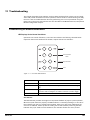
LED Displays Under Normal Conditions. . . . . . . . . . . . . . . . . . . . . . . . . . . . . . . 217
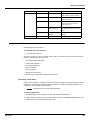
LED Displays Under Abnormal Conditions . . . . . . . . . . . . . . . . . . . . . . . . . . . . . 218
Using the 8130 RTU icons . . . . . . . . . . . . . . . . . . . . . . . . . . . . . . . . . . . . . . . . . . . 219
Performing a Hard Reset. . . . . . . . . . . . . . . . . . . . . . . . . . . . . . . . . . . . . . . . . 219
8130 RTU Motherboard Power Adjustments and Verification . . . . . . . . . . . . . . . . 220
Power Supply Adjustment . . . . . . . . . . . . . . . . . . . . . . . . . . . . . . . . . . . . . . . . 220
Supply Voltage Verification. . . . . . . . . . . . . . . . . . . . . . . . . . . . . . . . . . . . . . . . 220
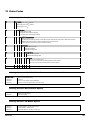
12 Order Codes . . . . . . . . . . . . . . . . . . . . . . . . . . . . . . . . . . . . . . . . . . . . . . . . . . . 223
8130 Remote Terminal Unit . . . . . . . . . . . . . . . . . . . . . . . . . . . . . . . . . . . . . . . . . . 223
Ordering Structure 8130 RTU NEMA 4 Enclosure for use in Class I Div 2 areas . 223
Ordering Structure Miscellaneous Options. . . . . . . . . . . . . . . . . . . . . . . . . . . . . . . 223
Ordering Structure I/O Module Options . . . . . . . . . . . . . . . . . . . . . . . . . . . . . . . . . 223
Ordering Structure Expansion Modules . . . . . . . . . . . . . . . . . . . . . . . . . . . . . . . . . 224
x
Installation and Operations Manual
1
Overview
The 8130 RTU is a member of Varec’s complete line of industrial control systems and products.
The 8130 RTU is primarily designed for applications where a cost-effective control system is
needed for remote collection of field data and control of equipment.
The 8130 RTU is ideally suited for Tank Farm, Terminal, Pipeline, and Refinery applications. It is
an effective solution used in SCADA or stand-alone programmable control unit applications.
Features
General
• Complete Computer Control System
• Division II certified system (FM, CSA) (consult factory and Control Drawing)
• Inputs are reported to Host Computer by Exception or Scanned Poll
• Built-in Software Function Library
• Surge Protection Conforming to ANSI/IEEE C37.90a-1974
• Host Communication via RS-232, RS-485, radio, modem or fiber optic link
• Industry Standard Protocols: HART, Modbus, LON, TIWAY
• Stand-Alone Programmable Control
• Built-in Operator Interface
• Variety of I/O Interfaces: AI, AO, DI, DO
• Quick-Disconnect I/O Terminations
• Modular Construction for Optimum Expandability
• Non-Volatile Database, CMOS Memory
• Optional Battery Backup for Uninterrupted Operation
• Intrusion Alarm, Power Fail Monitoring
Applications
• Low, Low-Low, High and High-High alarms
• Pressure, temperature, level, and flow
• Bottom sediment & water (BS&W)
• Pump status & control
• Valve status & control
• Emergency shut-off
• Leak Detection
• Local indication & alarms
Specifications
Memory
• 16-Bit Microprocessor and Support Circuitry
Varec, Inc.
1
Overview
• 516K bytes Program Memory
• 128K bytes Non-Volatile Database Memory
DC Power Requirements
• 5 DC VOLT (worst case), 2 A
• 15 VOLT (worst case), 75 mA
• Combined total (worst case), 12.25 Watts
• 24 VOLT (nominal per active Digital Output), 60 mA
• 24 VOLT (nominal per active Digital Input), 2 mA
• 24 VOLT (maximum per Analog Input),
• 25 mA VOLT (maximum per Analog Output), 22 mA
• Combined total (worst case), 26.7 Watts
AC Power Requirements
• 120 VAC, 400 mA
• 240 VAC, 200 mA
Host/Slave Communications
• Selectable Data Rate, 1200 to 19200 Baud
• RS-232 or RS-485 communications
• RS-485 Maximum Cable Length (24 AWG), 4000 Feet
• RS-485 Maximum Cable Length (18 AWG), 10000 Feet
• RS-485 Maximum Multi-dropped Units, 32
Physical
• 8130 RTU Case: 16"H x 9 1/2"W x 2 1/2"D
• Enclosure: 24"H x 20"W x 6 5/8"D, NEMA 4
Environmental
• Operating Temperature: -40°F to 158°F; -40°C to 70°C
• Storage Temperature: -40°F to 212°F; -40°C to 100°C
• Humidity: 5% to 95% RH non-condensing
• Recommended Enclosure: NEMA 4/12
Digital Inputs
• Maximum Quantity: 32
• Isolation Voltage: 4000 VAC
• Operating Voltage: 24 VDC, 120 VAC or 240 VAC
Digital Outputs
• Maximum Quantity: 32
• Isolation Voltage: 4000 VAC
2
Installation and Operations Manual
Remote Terminal Unit
• Operating Voltage: 24 VDC, 120 VAC or 240 VAC
Analog Inputs
• Maximum Quantity: 32
• Operating Voltage (Single-ended): 0-+10 Volts, ±5 Volts or ±10 Volts
• Operating Voltage (Differential): 0-+10 Volts, ±5 Volts or ±10 Volts
• Resolution: 12 bits
• Throughput Accuracy: ±0.012%
• Sample Rate per channel: 160 msec
• Surge Protection Clamping (max): +28 Volts
• Maximum Input Voltage (1 msec): 1500 Volts peak
• Maximum Input Current (1 msec): 15 Amps peak
• Surge Response Time: 1 picosecond
Analog Outputs
• Maximum Quantity: 32
• Operating Voltage (Single-ended): 0-+10 Volts, ±5 Volts or ±10 Volts
• Operating Voltage (Differential): 0-+10 Volts, ±5 Volts or ±10 Volts
• Resolution: 16 bits
• Sample Rate per channel: 500 msec
• Surge Protection Clamping (max): +28 Volts
• Maximum Input Voltage (1 msec): 1500 Volts peak
• Maximum Input Current (1 msec): 15 Amps peak
• Surge Response Time: 1 picosecond
Intelligent Communications Interfaces
• Tank Gauge communications via intelligent expansion modules
• Microprocessor-based
• Automatically scans for level, temperature and interface level
• Industry Standard Protocols: Modbus, TIWAY, LON, RACKBUS
• Tank Gauge Interfaces:
• Varec
• Whessoe Varec
• Varec
• Enraf
• L&J
• Saab
• MTS
• GSI
• Texas Instruments
• Barton Instruments,
• Veeder Root
Varec, Inc.
3
Overview
Gas Tube Protection
A surge ground is used to provide surge protection for I/O and communications by using a
combination of Gas Discharge Tubes and Transzorbs. To eliminate surge transients, gas
discharge tubes augment the standard on-board surge protection by providing a conductive
ground.
Gas tube protection is the standard for Analog Inputs, RS-485 Communications, Tank Gauge
Interfaces and Input power. Surge Protection including Gas Discharge Tubes is provided on the
following interfaces:
• AC Input
• DC Power Input
• RS-485 Communications
• Model 8203 Dual RS-485 Communication Interface
• Model 8205 16-Channel Analog Input
• Model 8207 8-Channel Analog Output
• Model 8208 TIWAY Interface
• Model 8210 Varec Mark/Space Interface
• Model 8211 Current Loop Interface
• Model 8212 Saab Interface
• Model 8213 V1 Interface (Varec)
• Model 8214 Enraf Interface
• Model 8215 L&J Tankway Interface
• Model 8216 LON Interface (Barton Instruments)
Other features of gas tube protection are listed below:
• Gas Discharge Tube Surge Breakdown, 1200 Volts max
• Gas Discharge Tube DC Breakdown, 500 Volts max
• Maximum Surge Current (10 x 1000 usec), 300 Amps peak
• Maximum Surge Current (10 x 50 usec), 1500 Amps peak
• Impulse Life (300A, 10 x 1000 usec), 80 to 400 Surges
Field Maintenance
Field maintenance of the 8130 RTU is simplified by several built-in features. The modular design
of the computer control system, in conjunction with quick-disconnect connectors, allows for
on-site replacement of questionable components.
A dedicated RS-232 port is also provided for use in diagnostic testing or local programming.
Normally, a laptop computer is used for this function.
I/O Expansion Modules
4
Installation and Operations Manual
Remote Terminal Unit
The 8130 RTU can interface to a variety of field devices and intelligent instrumentation via
expansion modules. Many diverse products are available to serve a variety of needs. The
available expansion modules are listed below:
• Model 8201 16-Channel Digital In-/Out
• Model 8203 Dual RS-485 Communication Interface
• Model 8204 8-Channel Multi-Function
• Model 8205 16-Channel Analog Input
• Model 8207 8-Channel Analog Output
• Model 8208 TIWAY Interface
• Model 8210 Varec Mark/Space Interface
• Model 8211 Current Loop Interface
• Model 8212 Saab Interface
• Model 8213 V1 Interface (Varec)
• Model 8214 Enraf Interface
• Model 8215 L&J Tankway Interface
• Model 8216 LON Interface (Barton Instruments)
• Model 8217 Dual RS-232 Interface
Varec, Inc.
5
Overview
6
Installation and Operations Manual
2
Hardware and Software
In addition to the Input/Output functions of the 8130 RTU, several other standard features are
provided. These features include a “watch dog” timer, real-time clock, a real-time multi-tasking
executive, a built-in software library, data-scanning routines and database management.
The 8130 RTU is designed to be supported by a full range of I/O interfaces. Through these
interfaces the 8130 RTU can connect to virtually every type of signal encountered in industrial
environments. The 8130 RTU can also interface to Host systems using a variety of system
protocols.
Hardware Description
The 8130 RTU consists of an enclosure, power supply, pluggable termination points, highperformance 16-bit microcomputer, communication subsystems and a full complement of
analog and digital input/output circuitry.
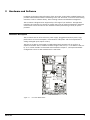
The basic 8130 RTU is constructed as a Motherboard with connectors for up to four I/O
expansion modules. The I/O modules are either single-sized (4.5" by 5.1") or double-sized (4.5"
by 10.3"). These modules are described and illustrated in Chapter 5, I/O Expansion Module
Configuration. The 8130 RTU motherboard is seen below.
Figure 2-1:
Varec, Inc.
8130 RTU Motherboard
7
Hardware and Software
Hardware Block Diagram
A 8130 RTU hardware functional block diagram is shown below. This diagram shows the
relationship between major subsystems and components in the 8130 RTU.
Figure 2-2:
8130 RTU Functional Block Diagram
The heart of the 8130 RTU is an Intel 80C188EB microprocessor operating at 18.432 MHz.
Designed specifically for real-time embedded applications, the µP includes timer/counters, an
interrupt controller, and chip-select circuitry. It also includes 2 serial channels that are
designated as COM0 and COM3. A separate serial communications controller is used for COM1
and COM2.
Microprocessor peripherals assist in performing on-board I/O functions, as well as providing
RAM and PROM. The Boot system is resident in PROM of the µP peripherals.
Program memory is stored in “flash memory” that allows field upgrades of firmware through the
communications channels. The database is stored in up to 64K of nonvolatile RAM. Scratch data,
tables and stacks are stored in RAM.
Software Description
The 8130 RTU software platform is based on a real-time, multi-tasking operating system. The
software consists of I/O scanning functions for data acquisition, a database/database manager
and communication functions for data transfer. The software incorporates a variety of protocols
allowing the 8130 RTU to interface as a master or slave device.
8
Installation and Operations Manual
Remote Terminal Unit
Figure 2-3:
Software Block Diagram
Software Features
Real-Time / Multitasking Executive
The operation of the 8130 RTU is based on a highly reliable, field-proven real-time multitasking executive. It provides task switching based on real-time events and interrupts, message
passing and task priorities. Its capabilities also include timed suspension of tasks, queue
handlers and interrupt processing tasks.
Real-Time Clock
Integral to the real-time executive is the system’s real-time clock. All timed events of the 8130
RTU are coordinated by this clock. In addition to the real-time executive interaction, all field
data scanning is coordinated by the real-time clock. Digital Inputs are scanned at a rate of 20
msec, while Analog Inputs are scanned at a 160 msec rate. Both analog and digital field data are
held in temporary storage for later processing by an input task.
Automatic Fault Recovery
The 8130 RTU has a watchdog timer that is periodically strobed by the microprocessor. Should
the processor suffer a lapse due to hardware or software failure, the watchdog timer will time
out and all Outputs will be disabled. The 8130 RTU will then be reset and normal operation will
resume.
Varec, Inc.
9
Hardware and Software
Firmware
The 8130 RTU firmware is implemented using “Flash RAM” technology. The firmware can be
updated via the Host communications interface. This capability allows for future field
installation of product enhancements. As new features are released, the user can download new
firmware using the ViewRTU program without having to replace PROMS. Refer to Chapter 7,
Using ViewRTU for a description of the firmware download feature.
Communications
There are four communications tasks - one for each of the four communication channels. COM
ports 0 through 3 are used to interface to external devices or host systems. Refer to Chapter 4
for the location of these ports.
COM0
COM 0 is an RS-232 port normally used in diagnostic testing or local programming.
COM1 and COM2
COM 1 and 2 can be configured for communications to Host systems using a variety of
protocols. For COM 1 and 2 the communication interfaces include the following:
• RS-485 for use in multi-drop configurations
• RS-232 for flexibility in configuring other types of communications links such as radio and
fiber optic interfaces
• RTS/CTS lines are available for hardware handshaking.
COM3
COM 3, the fourth COM port, is used for parallel processor communications. These
communications are used when an intelligent module such as the Model 8203 or 8210 has been
attached to the motherboard. Refer to the individual intelligent module manuals for more
information.
Protocols
The 8130 RTU is fully compatible with FuelsManager® software. It is also compatible with a
variety of other Host systems including through Modbus protocols. Several types of protocols
are available for assignment to the communication ports. As seen in the table below, most of
the devices can be assigned interchangeably as the Master or Slave.
Master
Slave
8130 RTU (with the 8203, 8208,
8210, 8211, 8212, 8213, 8214
8215, 8216, or 8217)
8130 RTU (with FuelsManager® or
ViewRTU)
TIWAY
Modbus
Modbus
For example, if FuelsManager® is used with the 8130 RTU, then FuelsManager® is the master
and the 8130 RTU is the slave. The 8130 RTU is the master when intelligent I/O expansion
modules are used.
The default communication settings for the COM ports are as follows:
10
Installation and Operations Manual
Remote Terminal Unit
COM Port
Protocol
Baud Rate
Data Bits
Parity
Stop Bits
COM0
8130 RTU Slave
9600
8
N
1
COM1
8130 RTU Slave
19200
8
N
1
COM3
8130 RTU Slave
19200
8
N
1
COM4
8130 RTU Slave
24000
8
N
1
I/O Scanning Task
The I/O Scanning and Control Task are dedicated to the scanning of field input data from analog,
digital and pulse sources.
Type of Data Source
I/O Expansion Module
Analog data
Models 8204 and 8205
Digital data
Model 8201 and 8204
Pulse data
Model 8204
The input data is stored in arrays that are subsequently accessed by the Point Executive.
Point Executive
The Point Executive handles processing of the built-in 8130 RTU software blocks that are
configured by the user. There are two levels of points as listed below:
• Low-Level Point processing task: e.g. Analog/ Digital Input and Output processing
• High-Level Point processing task: e.g. Totalizers, Alarms, etc.
Each level executes independently of the other level. These tasks perform filtering, timed holdoff determination and conversion of the data before it is permanently stored in the database.
When it has been determined that a change of state has occurred, other tasks within the system
are notified of the change.
Output processing involves receiving notifications of change from the Remote Communications
tasks or Local Interface. Once received, the desired output is read from the database, converted
to the corresponding field data and then written to the appropriate output. In the case of pulsed
Digital Outputs, they are deactivated after the preset time.
Database Manager
The Database Manager is a collection of programs and data. The Database Manager allows the
8130 RTU system executive to access data from the database in an organized and programindependent manner. It resides in non-volatile RAM.
The Database Manager also contains a Database Dictionary. This dictionary describes how the
database is organized and also provides information describing how data should be presented
to the operator.
After power-up or system reset, a CRC verification of each point in the database is performed.
If the CRC does not have a match for the point, then it is disabled and a flag is set indicating
that the point is invalid.
Varec, Inc.
11
Hardware and Software
System Tasks
System tasks include the Calendar Task, which manages Time and Date functions. Other system
tasks include utility routines for checksum calculations, diagnostics, start-up and initialization.
12
Installation and Operations Manual
3
Installation
Before attempting installation, review the Safety Precautions below. Installation and
maintenance personnel should become familiar with any hazards present as well as any agency
requirements before working with any equipment.
General Safety Guidelines
The 8130 RTU is certified to be used in Division II, Class I, Group A - D hazardous locations.
The user should follow safety guidelines provided by the Occupational Safety and Health
Administration (OSHA) for additional protection. Information may be obtained from the
following sources:
• National Electric Code (NEC)
• National Fire Protection Association (NFPA)
• Instrument Society of America (ISA)
• Factory Mutual Research Corporation (FM)
• Underwriters’ Laboratories Incorporated (UL)
• Canadian Standards Association (CSA)
When in doubt about the safety of an area, the user should check with the local safety
authorities. Always observe warning signs posted in the area and all labels on equipment.
Installation Safety Guidelines
Never attempt to make voltage measurements within the 8130 RTU in the field.
Maintenance should be performed only by authorized personnel.
Always turn off the power before removing the case cover.
Before installing/repairing any wiring to the 8130 RTU, make sure that the power is turned off
at the main circuit breaker or switch. The power switch should be locked in the OFF position and
labeled to prevent other personnel from turning the power on during installation.
Before turning on power when installation is complete, make sure the cover of the 8130 RTU
case is in place and tightly closed. NEVER REMOVE ANY COVERS WITHOUT FIRST TURNING OFF
THE POWER.
To prevent shock hazards, the housing of all units should be properly grounded in accordance
with the National Electric Code. A grounding conductor should be wired to the grounding
terminal provided on the 8130 RTU.
In some applications, a substantial amount of heat is produced by other equipment inside or
outside the enclosure. To assist in air circulation, place blower fans inside the enclosure.
To prevent excessive heat, several steps can be taken. For most applications, normal convection
cooling will keep the device components in the enclosure within the operating range. Proper
spacing of components within the enclosure is usually sufficient for heat dissipation.
Caution should be exercised when entering any area that is posted or otherwise assumed to
contain hazardous gases. Always follow the guidelines provided by the Occupational Safety and
Health Administration for your own protection.
Varec, Inc.
13
Installation
Caution Do not bring in unfiltered outside air. It may introduce harmful contaminants that
could damage the 8130 RTU and components.
Caution Never perform maintenance with power applied.
Installation
Standard systems are shipped with the motherboard and any optional modules not installed, so
the 8130 RTU installation procedure includes the installation of these individual components.
8130 RTU installation includes the following steps:
1.
Mounting the 8130 RTU
2.
Mounting the Enclosure
3.
Wiring up Power
4.
Grounding the 8130 RTU
5.
Installing Communications
6.
Configuring I/O Expansion Modules
DC power
connections (J2)
4 slotted mounting
holes to
accommodate
installation
AC power
connection (J3)
Intrusion alarm
connector
Module
cover
I/O expansion
module
Communications
connections for
optional HART®
interface (J4)
Figure 3-1:
14
I/O expansion
module
RS-232-COM0 – 2
communications
connections (J5-J7)
RS-485 COM 1 and 2
communications
connections (J8-J10)
8130 RTU with Two Communications Boards
Installation and Operations Manual
Remote Terminal Unit
Mounting the 8130 RTU
Before mounting the 8130 RTU, make certain that the enclosure can house the 8130 RTU. Refer
to the dimensional drawing below (all dimensions are in inches).
15.5"
(394)
2.0"
(51)
5.0"
2.6"
(127)
9.0"
(46)
(66)
3.7"
(93)
Primary dimensions shown in inches
(secondary dimensions in millimeters)
2.6"
(66)
3.7"
(93)
9.5"
(241)
Figure 3-2:
8130 RTU Dimension Drawing
Supplied in the enclosure is a hardware kit for mounting the 8130 RTU Main Circuit Board. The
Subpanel has tapped mounting holes to accommodate installation of the 8130 RTU.
Mounting the 8130 RTU inside the enclosure.
• Mount the 8130 RTU onto the subpanel using the 6-32” x 0.5" panhead screws.
• Select the appropriate Unit address on SW1, the Device ID DIP Switch.
Switch SW1 sets the 8130 RTU’s one byte, binary address (0-255). Switch SW1-1 is the most
significant bit (MSB) while switch SW1-8 is the least significant bit (LSB). When a switch is in the
ON or CLOSED position, the resulting bit is a one.
Varec, Inc.
15
Installation
Figure 3-3:
Switch SW-1 setting for ID 1
Mounting the Enclosure
The recommended standard housing for the 8130 RTU is a NEMA TYPE 4 enclosure. This
enclosure is suitable for both indoor and outdoor applications.
Wiring Up Power
The user has the option of either connecting to AC or DC power.
Wiring 120 or 220 VAC Power
The 8130 RTU is powered by an isolation transformer with a 24 volt regulator.
1.
Remove cover.
2.
Connect the two power leads to terminals L and N of connector J3.
3.
Ensure that a ground connection is connected to the G terminal ground of connector J3.
4.
Install cover.
Wiring 24 VDC Power
1.
Connect +24V to terminal 8 of connector J2.
2.
Connect +24V Common to terminal 7 of connector J2.
3.
Connect earth ground to the G terminal ground of connector J3.
Grounding
To allow use in harsh industrial environments, the 8130 RTU incorporates ANSI/IEEE surge
protection. In solid-state control systems, grounding helps limit the effects of noise due to
electromagnetic interference (EMI) and provides additional surge protection when high voltage
switching circuits are connected to the unit. The grounding path for the 8130 RTU and its
enclosure is provided by the equipment grounding connector.
Grounding connector
• The 8130 RTU enclosure is supplied with a ground bar at the base of the unit.
• A 14 AWG copper wire should be connected between this ground bar and a good earth
ground before connecting any other wires.
• The resistance from the 8130 RTU ground to the grounding electrode must not exceed 1
ohm. Additional ground wires should be connected as required for each I/O module.
Caution All applicable codes and ordinances must be observed when wiring the 8130 RTU.
16
Installation and Operations Manual
Remote Terminal Unit
Installing Communications
RS-232 Communications
To install the RS-232 communication option, connect an RS-232 cable to connector J5 (COM0),
J6 (COM1), or J7 (COM2).
Note When using COM1 and COM2, jumper blocks W6 and W7 must be set for RS-232
mode. See the Model 8217 Dual RS-232 Interface manual for more details.
RS-485 Communications
To install the RS-485 communications option, connect a single twisted wire pair to J8 (COM1)
or J10 (COM2).
Note When using COM1 and COM2, jumper blocks W6 and W7 must be set for RS-485
mode. For more information, see the “Communications” section on page 28.
Figure 3-4:
RS-485 Communications Connections
Power-Up
Before the field cables are attached, perform an initial system verification.
Initial system verification
• Connect the power cable to power connector P1, then connect an RS-232 cable from a PC
with ViewRTU to J5 (COM0).
• Power up the unit.
The CPU indicator should flicker, and the PC should display the sign-on message that provides
the software version number, the date and time it was created. If the CPU indicator is not
Varec, Inc.
17
Installation
flickering or the PC does not display the sign-on message, turn off system power and proceed
with the Troubleshooting and Calibration chapter.
Establishing Host Communications
When the main system power is turned on, the Host communications status is set to On-line by
default. The 8130 RTU then waits for a valid poll from the Host computer. If the communication
cable is installed and the Host is running, a communications link is established. Verify this
condition with a hand-held terminal or ViewRTU.
Verifying Host Communications
Display the COM Point and verify that an On-line condition is indicated.
Configuring I/O Expansion Modules
The 8130 RTU is supported by a full range of I/O interfaces. I/O expansion modules are available
for connection to almost every type of signal encountered in industrial applications.
+24V
+5V
CPU
COMM
+15V
I/O
-15V
ERROR
Channel 1
Channel 17
Channel 16
Channel 32
Figure 3-5:
Example of a Module Installation
Refer to the Configuration & I/O Expansion Module Configuration chapters (4 and 5) for
procedures.
Note Before configuring any I/O expansion modules, 8203, 8208, 8210, 8211, 8212,
8213, 8214, 8215, 8216, and 8217 the dip switch must be set equal to the number to which
it is connected on the 8130 RTU (i.e. P1, P2, etc.).
Note Before configuring any I/O expansion modules, each module must always be
installed with the terminal blocks facing outward.
Recommended Maintenance Procedure
The following standard procedure can be used for repairing the 8130 RTU:
Replacing a defective component or module
18
1.
Turn off main power.
2.
Open the enclosure door. Remove the case cover of the 8130 RTU.
Installation and Operations Manual
Remote Terminal Unit
Varec, Inc.
3.
Replace the defective component or module.
4.
Replace and tighten the case cover.
5.
Turn on power and test with Hand Held terminal or main computer.
6.
Close the enclosure door.
19
Installation
20
Installation and Operations Manual
4
Configuration
The 8130 RTU is supported by a full range of I/O interfaces. I/O expansion modules are available
for connection to almost every type of signal encountered in industrial environments. Since
wiring to field devices depends on the I/O expansion module, the procedure will vary for each
device. The basic 8130 RTU is constructed as a Motherboard with connectors for up to four I/O
expansion modules.
Note Refer to the 8130 RTU Installation chapter for guidelines and procedures for using
the 8130 RTU in a hazardous location.
Note The channel numbering will usually be the same regardless of the I/O expansion
board. Channel 1 begins with the top left connector and Channel 17 begins with the top
right connector.
The I/O modules are either single-sized (4.5" by 5.1") or double-sized (4.5" by 10.3"). The I/O
expansion modules are listed below:
• Model 8201 16-Channel Digital In-/Out module (contacts, relays)
• Model 8203 Dual RS-485 Communication Interface module (Modbus, MTS, PetroSense)
• Model 8204 8-Channel Multi-Function module (contacts, relays, Pulse Totalizer, Analog
inputs)
• Model 8205 16-Channel Analog Input module (4-20 mA, 1-5V)
• Model 8207 8-Channel Analog Output module (4-20 mA, 0-20 mA, 1-5V)
• Model 8208 TIWAY Interface module (Texas Instruments (IT-111, IT-121, IT-150)
• Model 8210 Varec Mark/Space Interface module (Mark/Space Micro 4-wire Model 1800,
Model 1900, Model 4000, 2900 FTT)
• Model 8211 Current Loop Interface module (Whessoe Bus Protocol, GPE Protocol)
• Model 8212 Saab TRL/2 Interface module
• Model 8213 V1 Interface module (Varec TGM 3000, TGM 4000, Varec SG6000)
• Model 8214 Enraf Interface module (Enraf 811, 802/812, 854, 873)
• Model 8215 L&J Tankway Interface module (MCG 1000, MCG 1500, MCG 2000)
• Model 8216 LON Interface module (Barton Instruments Series 3500)
• Model 8217 Dual RS-232 Interface module
Configuration instructions for each I/O expansion board can be found in the following relevant
chapters.
Motherboard Description
The motherboard description is broken into three sections. Each section identifies the location
of the components on the motherboard. When necessary, a brief description of the component
is provided. These sections are listed below:
• Power Supply
• Switches and Indicators
• Communications
Varec, Inc.
21
Configuration
Channels 17 - 32
I/O Expansion
Connectors
(P3 & P4)
Channels 1 - 16
I/O Expansion
Connectors
(P1 & P2)
Figure 4-1:
22
8130 RTU Motherboard
Installation and Operations Manual
Remote Terminal Unit
DC Input/Output Power terminal block (J2)
Field voltage adjustment pot (R101)
Unit AC Power terminal block (J3)
AC Power fuse
(500 mA 250V 5x20 mm) (F1, F4)
AC Power selection jumpers
(120/220 VAC)
Field +24 VDC fuse
(2A 250V TR5) (F2)
Unit +24 VDC fuse
(2A 250V TR5) (F3)
Figure 4-2:
Motherboard Power Supply Components
Power Supply
• Field voltage adjustment pot (R101)
• DC Input/Output Power terminal block (J2)
• Unit AC Power terminal block (J3)
• Unit +24 VDC fuse (2A 250V TR5) (F3)
• Field +24 VDC fuse (2A 250V TR5) (F2)
• AC Power fuse (500 mA 250V 5x20 mm) (F1, F4)
• AC Power selection jumpers (120/220 VAC)
Field Voltage adjustment pot (R101)
The field voltage is one of two power supplies found in the power supply subsystem. This
component is used for setting and calibrating 24 VDC field voltage. This supply provides field
power for Digital Outputs, Digital Inputs and Analog current loops. It is rated at 1.2 Amps.
DC Input / Output Power terminal block (J2)
The DC power terminal block is used when powering the unit from a DC source or battery
backup. This terminal block can also be used when external equipment must be powered from
the 8130 RTU’s internal power supply. The triple output power supply provides +5, +15 and 15 Volts. These are rated 2.0, 0.4 and 0.4 Amps, respectively. Each supply is enabled by a
jumper. The DC Power terminal block is shown below:
Varec, Inc.
23
Configuration
W104
Figure 4-3:
W105
W106
DC Input Voltage Terminal Block
The 8130 RTU can be equipped with an optional battery backup system and a built-in recharge
circuit. This backup system allows the 8130 RTU to continue to operate for up to 8 hours if AC
input power fails.
Figure 4-4:
8130 RTU Battery Connection
Unit AC Input Power terminal block (J3)
The Unit AC power terminal block is used to provide 110/220 VAC to the unit. The AC Input
Power terminal block is shown in the figure below.
24
Installation and Operations Manual
Remote Terminal Unit
Figure 4-5:
AC Input Terminal Block
AC Power Selection Jumpers (120/240 VAC)
The AC Power Selection jumpers are used to select 120/240 VAC for unit power
Figure 4-6:
120/240 VAC Configurations
MOVs and Gas Tubes
When changing an 8130 RTU from 120 VAC to 240 VAC or vice versa, the surge protection
components (MOVs 2102 – 2104 and Gas Tubes GT101 & GT102) must be changed to match
the input voltage.
Switches and Indicators
Note Troubleshooting methods using switches and indicators are discussed in the Troubleshooting chapter of this manual.
• Reset push-button [RESET] (SW2)
• Unit ID DIP Switch (SW1)
• Intrusion Alarm Connections terminal [INTRUSION] (J1)
• LED indicators
Reset push-button (SW2)
The RESET Switch is used to re-initialize the system hardware by causing it to go to a known
starting state. This switch may be pressed at any time; however, it will do the following:
• Re-initialize System Hardware
• Clear Scratch Memory
• Verify Database and Re-initialize if Invalid
Varec, Inc.
25
Configuration
• Reset All Timers and Schedules
• Enable Communications
Intrusion Alarm Connections terminal [INTRUSION] (J1)
LED indicators
Reset push-button [RESET] (SW2)
Unit ID DIP Switch (SW1)
Figure 4-7:
Switches and Indicators Components on the 8130 RTU Motherboard
Hard Reset
A special form of Reset is available for occasions when the battery backed-up data base must
be re initialized. This type of reset, the Hard Reset, can be performed before a database is
downloaded from a host PC.
Caution The Hard Reset should be used as a last resort if the 8130 RTU is not functioning.
A Hard reset clears the installed database.
For the Hard Reset procedure, refer to the Troubleshooting and Calibration chapter.
Unit ID DIP Switch (SW1)
The DIP switch is used for setting the 8130 RTU Unit Address, which is used in Host-8130 RTU
communications. The Unit Address is a binary value, with switch 8 as the Least Significant Bit
(LSB).
26
Installation and Operations Manual
Remote Terminal Unit
Figure 4-8:
8130 RTU DIP Switch Setting - Showing a Value of 7
Intrusion Alarm Connections terminal (J1)
This terminal is used to connect to a switch on the 8130 RTU enclosure door. The door switch,
or Intrusion Detection Alarm, is composed of a set of contacts connected to a lever-actuated
switch.
The switch is mounted so that the opening of the enclosure door will generate a contact closure.
This contact is attached to a built-in Digital Channel dedicated to Intrusion Detection.
Caution The status of the Intrusion Alarm is available in the DIAG software block. Refer to
the 8130 RTU Software Blocks chapter for more information.
LED indicators
Run
Communications
Online
Output Enabled
Error
Figure 4-9:
8130 RTU LED Indicators
Run LED
The RUN LED provides the single most important feedback of proper system operation. When
the system functions properly, the RUN Indicator is constantly flashing.
If this indicator goes to a steady state condition, either on or off, some malfunction has
occurred. In addition, relative processor utilization can be determined by observing the RUN
Indicator duty cycle. Under normal conditions, the RUN Indicator flashes once every second.
Communications On-line LED
The Communications On-line LED provides communication line status. The On-line LED will
toggle each time a valid message is received.
Varec, Inc.
27
Configuration
Output Enable LED
The Output Enable LED indicates the 8130 RTU Motherboard is communicating with the I/O
modules.
Error LED
The Error LED indicates that either a CPU or memory fault has occurred.
Voltage LED
The +24V, +5V, +15V -15V Led indicate that the corresponding voltage signals are present.
Communications
The Communications installation requires connection of the appropriate communication cable
to one of six connectors. The available options include the RS-232 and RS-485
communications.
• COM1 jumper block (W6)
• COM2 jumper block (W7)
• COM0 (J5)
• COM1 (RS-232) (J6)
• COM2 (RS-232) (J7)
• COM1 (RS-485) (J8)
• Surge ground (J9)
• COM2 (RS-485) (J10)
28
Installation and Operations Manual
Remote Terminal Unit
COM1 jumper block (W6)
COM2 jumper block (W7)
COM2 (RS-485) (J10)
Surge ground (J9)
COM0 (J5)
COM1 (RS-232) (J6)
COM1 (RS-485) (J8)
COM2 (RS-232) (J7)
Figure 4-10: Communication Components of the 8130 RTU Motherboard
COM1 and 2 jumper blocks (W6, W7)
W6 and W7 determine whether RS-232 or RS485 is used. For RS-232, there are two different
settings. One setting is used if hardware handshaking (RTS/CTS) is required. The other setting
eliminates the need for hardware handshaking. Use RTS/CTS when a modem or signal converter
is involved and requires RTS/CTS to operate. If the connection is direct using RS-232, jumper
RTS to CTS. Refer to the following jumper block diagrams. These jumper settings are used for
both COM1 and COM2.
TxD
TxD
TxD
RxD
RxD
RxD
RTS
RTS
RTS
CTS
CTS
CTS
RS-232
(RTS jumpered to CTS)
RS-232
with RTS/CTS handshaking
RS-485
Figure 4-11: Jumper Block Configurations for COM1 and COM2
Varec, Inc.
29
Configuration
COM0 (J5)
COM0 is an RS-232 port for use in diagnostic testing or local programming. The protocol
defaults to 8130 RTU Slave at the 9600 baud, 8 data bits, and no parity. COM0 is typically
connected to a PC running ViewRTU.
COM1 & 2 (RS-232) (J6, J7)
RS-232 is one of the two types of high-speed serial communications channels available to
interface to Host or Slave systems using a variety of industry standard protocols. Both COM1 and
COM2 may be used simultaneously for increased throughput and redundancy.
RS-232 can be used for flexibility in configuring other types of communications links. Other
variations of RS-232 communications interfaces include radio, modem and fiber optic
interfaces. The channels may also connect to different hosts using a variety of protocols. For I/
O expansion, one channel can be used for peer-to-peer communications with other 8130 RTU’s
or master/slave communications to remote I/O.
COM1 & 2 (RS-485) (J8, J10)
RS-485 is the other type of high-speed serial communications channels available to interface to
Host or Slave systems. Both channels may be used simultaneously for increased throughput and
redundancy.
The RS-485 can be used in multi-drop configurations.
Surge ground (J9)
The surge ground is used to provide surge protection for RS-485 communications by using a
combination of Gas Discharge Tubes and Transzorbs. Refer to Chapter 1 for more information
about gas discharge tubes.
8130 RTU Communications Cable
The layout for the RS-232 cable between the PC and the 8130 RTU is described in the following
table:
30
PC Connector
DB-9 Female
8130 RTU Connector
DB-9 Male
PIN
Signal
-
PIN
Signal
2
Received Data
-
3
Transmitted Data
3
Transmitted Data
-
2
Received Data
5
Signal Ground
-
5
Signal Ground
Installation and Operations Manual
5
Model 8203 Dual RS-485 Communication Interface
Features
• Dual high-speed communications channels
• Optically isolated
• Up to 32 devices per channel
• ANSI/IEEE surge protection
• Communications with Varec SG6000 Servo gauges using Modbus protocol
• Communications with Varec Model 4000 MSTX, Model 4200 MBMFT and Model 2900 FTT
using Modbus protocol
• Communications with MG5000 using MTS Protocol
• Communications with FCI Digital Hydrocarbon Probe DHC-485
• Communications with Texas Instruments IT-111, IT-121, IT-150 and IT-160 tank gauges
using TIWAY or CIM protocol
The Model 8203 can communicate with a variety of devices. There are several versions that use
different firmware. One version is available to communicate using the Modbus protocol. Other
versions communicate to magnetostrictive probes and leak detection devices.
+24V
+5V
Module 1
CPU
COMM
+15V
I/O
-15V
ERROR
Module 3
Module 2
Module 4
Figure 5-1:
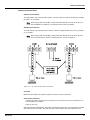
RTU with four Model 8203 Dual RS-485 Communication Interface Modules
Four daughter boards are shown installed on the RTU. The channel order and number of the
8203 depend upon the placement on the motherboard. Note that the order starts from the top
left and ends at the bottom right. Each board contains two communication channels.
As seen in the above diagram, Modules 1 & 2 are always located on the left side of the
motherboard. Modules 3 & 4 are found on the right side.
Description
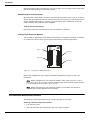
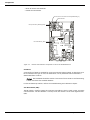
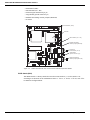
The components of the 8203 are illustrated in the following figure. This section explains how
to connect field wiring and how to configure jumper settings.
Varec, Inc.
31
Model 8203 Dual RS-485 Communication Interface
• ID DIP Switch (SW1)
• LED indicators (D1 – D4)
• Field wiring terminal block (J2, J4)
• Surge/Shield ground connector (J3)
• Network terminating resistor jumpers (W4 & W5)
• Firmware
ID DIP Switch (SW1)
Firmware
LED indicators (D1 – D4)
Network terminating
resistor jumpers (W4 & W5)
Field wiring
terminal block (J2, J4)
Surge/Shield
ground connector (J3)
Network terminating
resistor jumpers (W4 & W5)
Figure 5-2:
Model 8203 Dual RS-485 Communication Interface Expansion Module
ID DIP Switch (SW1)
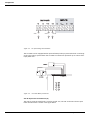
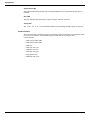
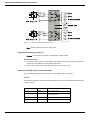
The ID DIP Switch is a binary switch that sets the unit ID number (1-4). The switch is set
according to its location on the motherboard. Set to “1” for P1, “2” for P2, “3” for P3, and “4” for
P4. Refer to the figure below:
32
Installation and Operations Manual
Remote Terminal Unit
Figure 5-3:
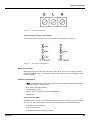
ID DIP Switch Settings
LED Indicators (D1-D4)
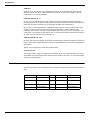
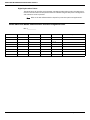
The LEDs indicate the status of the Model 8203.
Figure 5-4:
Model 8203 LED Indicators
LED
Function
D1
Indicates CPU activity
D2
Indicates communications between
the RTU and the Model 8203
D3
A transmission is being sent
D4
A response is being received
Field wiring terminal block (J2,J4)
Caution Connect the ground terminal (J2) to a good earth ground before connecting ANY
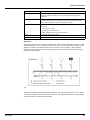
other wires. Refer to the Surge/Shield Ground Connector (J3) section.
The Model 8203 has 3 termination points per channel. The following schematic illustrates the
terminal channels of the COM channels:
Varec, Inc.
33
Model 8203 Dual RS-485 Communication Interface
W4
DATA
DATA
SIGNAL COMMON
COM Channel A
G
G
W5
SURGE GND
DATA
DATA
SIGNAL COMMON
COM Channel B
Figure 5-5:
Note
Model 8203 COM Channels Schematic
Refer to table at the end of this section.
Surge/Shield Ground Connector (J3)
Caution This ground connection is important for system safety.
Surge/Shield Ground
1.
Connect a 14 AWG copper wire between the ground terminal (J3) and a good earth ground.
Perform this step before connecting ANY other wires.
2.
Verify that the resistance in this connection does not exceed 1 ohm.
Network terminating resistor jumpers (W4 & W5)
Verify that the network terminating resistor jumpers (W4 & W5) are installed.
Firmware
The firmware determines which protocol the Model 8203 will use. The following table shows the
protocol options:
34
Firmware Version
Protocol
Software Blocks
TIx_xx
TIWAY
TI111, TI121, TI150
MODx_xx
Modbus
MIREG, MFREG, MBMFT, MBTX, RTG,
SG6000, MG5000
MTSx_xx
DDA
MG5000
DHPx_xx
FCI
DHP
Installation and Operations Manual
Remote Terminal Unit
Hardware Interface
Modbus
The following diagram shows how to use the Model 8203 with Modbus devices such as the Varec
MBMFT and MSTX.
Power Supply
VAREC
Model 4200 HIU
or
Model 4100 MFT
VAREC
Model 4000 ATT
Common +48 VDC
VAREC
Model 2900FTT
T82
B- 1
B-
9
B+
6
B+ 2
B+ 10
C1
5
EIA485+ 3
EIA485- 11
C2
4
4
EIA485-
Earth
Gnd
EIA485+
12
B-
Terminate with bias resistor
120 ohm on farthest device
from the RTU if required.
Switch selectable on N2900.
3
2
1
Figure 5-6:
Model 8203 Modbus Application
TIWAY Interface
The following diagram illustrates the TIWAY application of the Model 8203. In this example,
channel A of the Model 8203 is connected to a mixture of TI-111, TI-121, and TI-150 tank
gauge transmitters.
Varec, Inc.
35
Model 8203 Dual RS-485 Communication Interface
IT-160
Figure 5-7:
IT-150
IT-121
IT-111
Model 8203 TIWAY Application
The last transmitter on the communication network should be terminated. Refer to the
transmitter user’s manual for more information.
MG5000
MG5000 compatible tank gauges are connected according to the following diagram:
Power Supply
24 - 26 VDC
Common
Cable
Shield
+24 VDC
16-24 AWG or Heavier
Twisted Pair cable
with Shield
Safety
Barrier
Cable
Shield
24v Comm on
RX/TX6
24v Comm on
Safety
Barrier
RX/TXRX/TX-
5
4
RX/TX+
Safety
Barrier
Ca ble
Shield
+24 v
Earth
Gnd.
+24 v
RX/TX+
RX/TX+
3
2
Tank side
Earth Gnd.
1
Non-Hazardous
Location
Figure 5-8:
36
Hazardos
Location
Tank side
Earth Gnd.
DDA
Compatible
Probe
DDA
Compatible
Probe
Model 8203 MG5000 Application
Installation and Operations Manual
Remote Terminal Unit
Digital Hydrocarbon Probes
The following diagram shows how to connect the Model 8203 to DHP-485 probes.
Power Supply
Common
+12 VDC
Non Hazardous
Location
Hazardous
Location
Safety Barrier
Data A
Data B
6
5
PWR
GND
SHLD
4
Data A
Data B
SHLD
GND
PWR
*
2
DHP-485
Probe
2
4
1
DHP-485
Probe
1
5
3
Connection Chart (Female)
3
Signal
Data A
Data B
Power
Ground
Shield
Figure 5-9:
Pin#
1
2
3
4
5
Color
White
Green
Red
Black
Yellow
* Pin configuration
Viewed from mating end of
female connector
Model 8203 Digital Hydrocarbon Probes Application
Software Interface
TIWAY
The Model 8203 is used as a TIWAY interface in conjunction with TI111, TI121, and TI150 points.
These points provide access to the Tank Gauge Transmitter commands, allowing configuration
of gauge parameters.
V-Memory is mapped to the Dynamic parameters of each point, and C-Memory is mapped to
the Config parameters of each point. V-Memory is routinely scanned by the Model 8203, and CMemory is downloaded whenever a parameter is modified in ViewRTU or by the Host system.
Modbus
The Model 8203 can be used as a Modbus interface in conjunction with MIREG, MFPREG, MBMFT,
HIU, SG6000, TM4590 and MBTX points.
Each type of point needs some addressing information along with communications parameters
in order to provide access to device data using the Modbus protocol.
MG5000
The Model 8203 communicates using the DDA protocol when MG5000 points are defined. Level,
temperature, and water level data are available. Configuration and diagnostics are provided
through the MG5000 point.
Varec, Inc.
37
Model 8203 Dual RS-485 Communication Interface
Digital Hydrocarbon Probes
The Model 8203 will interface to the FCI DHP-485 Digital Hydrocarbon Probe using DHP points.
Chemical Concentration and temperature data are available using the DHP points. Configuration
and calibration are also possible.
Note
Refer to the RTU Software Blocks chapter for point description and applications.
Model 8203: Dual RS-485 Communication Interface Assignment Chart
RTU #_____________
Module
Channel
I/O Port
Connector
Terminal
1
1
P1
J2
4/5/6
1
2
P1
J4
1/2/3
2
1
P2
J2
4/5/6
2
2
P2
J4
1/2/3
3
1
P3
J4
4/5/6
3
2
P3
J2
1/2/3
4
1
P4
J4
4/5/6
4
2
P4
J2
1/2/3
38
Service or Description
Installation and Operations Manual
6
8130 RTU Software Blocks
This chapter describes the Software Blocks that the user can configure using the ViewRTU
program. Software Blocks are subprograms used to perform various functions within the 8130
RTU. Each Software Block contains all the logic, constants and data to perform a particular
function. For example, the AI Software Block scans the Model 8205 and converts the digital data
from the A/D converter to a floating point value. The PTOT Software Block counts pulses from
a Model 8204 and calculates the rate and provides a running total. The VALVE software block
can be configured to control a valve using a Model 8201 or Model 8204. Other Software Blocks
are used to configure I/O scanning and communications to external systems. Every system
function of the 8130 RTU is accessible via a Software Block. The user only has to add Software
Blocks using ViewRTU and then configure a few parameters in order to perform a desired
function.
The purpose of this chapter is to explain the parameters of each software Block. This chapter
does not explain the procedures used to configure the Software Blocks. Refer to the following
‘Using ViewRTU’ chapter for Software Block configuration procedures.
Description
The user can configure pre-defined subprograms known as Software Blocks. These software
blocks program the 8130 RTU to perform various tasks, such as scaling an analog input value,
or scanning level, temperature and status information from a tank gauge. More than 75
functions are available.
Points are the individual instances of software blocks. At the I/O level, a Point is needed to
manage the operation of each input, output or communications channel. I/O can be Simple or
Intelligent. Digital Input (DI) and Analog Input (AI) points are examples of Simple I/O. Intelligent
I/O always involves digital communications with an external micro-processor based system.
Intelligent I/O uses a COM point and a protocol handler in order to communicate with the
external system. Examples include Varec 1900 (MSTX) and Whessoe Varec Intelligent Tank
Gauge (ITG) points. In both cases the user configures the Config parameters and is provided real
time data through the Dynamic parameters.
Points can be interconnected in order to perform complex functions. For example, a PUMP point
interfaces to multiple input and output sources (DI, AI, or DO points) in order to monitor and
control a pump. The PUMP point can also interface to an Event/Timer (TIMER) point, which can
then be used to totalize the pump runtime. Many point descriptions contain an Interfacing to
Other Points section that describes how to make these connections.
The Series 8130 RTU contains over 75 built-in software functions depending on the I/O
expansion modules installed. Some of these functions are listed below:
• Tank Gauge Scanning
• Protocol Gateway
• Flow measurement/totalization
• Intelligent I/O to other systems
• Digital and Analog alarms
• Analog Scaling
• Pump and Valve control
• Timing/Counting
These functions can be implemented by configuring a Software Block using ViewRTU.
Varec, Inc.
39
8130 RTU Software Blocks
Database Organization
Point Format
Data parameters in the 8130 RTU are addressed using a “Type.Number.Parameter” format. For
example, “AI.02.Value” refers to Analog Input #2’s IEEE floating point value. This format and
corresponding fields are described below.
The TYPE field represents the Point Type. There are many different point Types in the 8130 RTU,
referred to generically as 8130 RTU Software Blocks. Some of the point types include the AI
(Analog Inputs), DO (Digital Outputs), and SYS (System) point types. Each Type performs a
different function.
The NUMBER field represents the instance of the point type. For example, the AI point may have
up to 32 instances, which are addressed using the NUMBER field. Each instance shares the same
data structure definition, yet each point has unique data values. In the case of the AI software
block, each point manages a single input channel.
The PARAMETER field represents the items in the data structure of the point type. Examples of
parameters include Value, Status, PntRef and RawValue. This field is explained in greater detail
in the following section.
Parameter Description
Each parameter is defined by its Parameter Class and Data Type. The following subsections
describe Parameter Classes, Parameter Data Formats and Common Parameters.
Parameter Classes
Each parameter, such as Value or Channel, is classified as one of the following classes:
Parameter Class
Description
Config
Configuration parameters such as channel numbers, tags, descriptions, ranges,
operating modes, point references, constants for formulas and timing information.
Dynamic
Real-time data such as the value or the status. Dynamic data is calculated or
measured during point execution scans, which occur every 250 msec.
Command
Output command data.
Constant
Weights & Measures parameter.
Scratch
Temporary data that is typically hidden from the user.
System
System data (should not be changed by the user).
The user-related parameters are the Config, Command and Dynamic parameters. These
parameters are available in the Edit Point window of ViewRTU. The remaining parameters are
internal to the Software Block.
ViewRTU inserts default values for the Config parameters when the point is first defined. It is
usually only necessary to fill in a few configuration parameters, such as channel numbers, to
configure references and to configure links to other points.
Parameter Data Formats
Data is stored in the 8130 RTU as one of the following formats:
40
Installation and Operations Manual
Remote Terminal Unit
Data Format
Description
Byte
8-bit value (-127 to 128).
Unsigned Byte
8-bit value (0 to 255).
Coded
Unsigned Integer representing a digital state such as ‘On,’ ‘Off,’
‘Open,’ ‘Closed,’ etc.
Integer
16-bit value (-32766 to 32767).
Unsigned Integer
16-bit value (0 to 65535).
IEEE floating point
32-bit value with mantissa and exponent.
Time
Unsigned Long Integer representing the number of milliseconds
since Jan. 1, 1970.
Tag
ASCII character strings, variable in length. Used for Tag and
Description parameters.
Point Reference
Reference to a point parameter. Format is TYPE.NUMBER.PARAM
where
TYPE is AI, DI, DO, etc.
NUMBER is point number, 0-255.
PARAM is the parameter of interest, such as Value or Command.
For example: AI.00.Value.
Unsigned Long Integer
32-bit value (0 to 4,294,967,295).
Pointer
32-bit value representing a pointer to another parameter or
memory location.
Long Integer
32-bit value.
Integer (Hex format)
Integer in Hex (0x0000 to 0xFFFF).
Time HH:MM:SS
Unsigned Long Integer representing the number of milliseconds
since midnight.
Time MM/DD/YY
Unsigned Long Integer representing the number of milliseconds
since Jan. 1, 1970.
Unsigned Long Integer (Hex format)
Unsigned Long Integer in Hex (0x00000000 to 0xFFFFFFFF).
Common Parameters
The following parameters are found in almost all point types. These parameters are described
below.
PntCheckSum Parameter
The PntCheckSum is a CRC-16 checksum of the Configuration Parameters of a point. Most
points have the PntCheckSum parameter; a few like the CLK (Clock) Point, DIAG (Diagnostics)
Point, and the register points (BREG, IREG, and DREG) do not. Any time a Configuration
Parameter is changed, the 8130 RTU re-calculates the checksum. The PntCheckSum is used at
initialization to validate each point in the database.
PntStatus Parameter
The PntStatus parameter gives information about point execution. Refer to the information
provided for each Software Block about the particular use of the PntStatus parameter.
Elapse Parameter
The Elapse parameter usually indicates the time of the last point execution. It is used as the
basis for automatic Change of State notifications.
Varec, Inc.
41
8130 RTU Software Blocks
Value Parameter
The Value parameter indicates the real-time value of the point. In the case of DI points, the Value
represents a Coded value (i.e., On, Off, Opened, Closed, etc.) AI points represent the Value in an
IEEE floating point format. In most cases, the Value parameter is one of the most important
parameters for a point.
Level & Temp Parameters
The Level & Temp parameters indicate the real-time tank level and temperature of the tank
gauge point. There are many Software Blocks available in the 8130 RTU associated with tank
gauge communications, including Software Blocks for every major tank gauge manufacturer.
Gathering Point Data
For Host to 8130 RTU communications, there are two primary methods for gathering point data.
These methods are listed below:
Standard Request-Response Format
The Host issues scan requests, and the 8130 RTU responds with the data.
The Scan method has the advantage of being deterministic the response time to a particular
request will always be the same.
This method has the limitation that if there are many points defined in the 8130, it often takes
several requests to obtain all of the data. Most of the time data has not changed since the last
request, so this results in inefficiencies in update times. This situation is often the case in
systems where there are many digital points that do not change frequently.
Change of State Format
The Host issues scan requests based on a Change of State basis. Some systems refer to this as
Event Mode. The 8130 RTU keeps track of the items that have changed since the last Host
request. The Host can issue a single request of ‘tell me what has changed since my last request.’
The 8130 RTU will respond with the results, which include addressing information about the
data. In a typical system, this results in a significant improvement in the throughput rate for
data.
The Change of State method has the advantage of being very efficient, only the data that has
changed is reported to the Host.
Change of State-Related Parameters
In order to support the Change of State method, many points have additional configuration
parameters included.
Parameter
Description
Value
One of the parameters which will be returned to a Change of State request by the
Host. Most Software Blocks are designed so that the Value parameter is the main
parameter of interest.
Report
Is used for Change of State processing only.
Causes automatic notification to the Host (in response to a Change of State
Request) when the Value Changes State. Valid values are High, Low or No.
Report=No disables notification. Points with Report = High have higher priority
than points with Report = Low.
42
Installation and Operations Manual
Remote Terminal Unit
Parameter
Description
Maxtime
Is used for Change of State processing only.
Specifies the maximum time (in secs) between automatic Change of State data
being sent to the Host in response to a Change of State Request. When the
Maxtime period expires, the Value is forced to appear as if it has changed even if
is has not, ensuring that data is sent to the host periodically. Setting Maxtime to 0
disables this option. The maximum is 255 seconds.
Deadband,
LevelDeadband,
TempDeadband
Affects the Change of State processing. It allows users to filter out insignificant
changes, freeing the communications link to send other data.
Note Not all Host protocols support the Change of State method. The 8130 RTU Slave protocol used with FuelsManager supports either method. The 8130 RTU Master protocol used
to communicate with other 8130 RTU’s or intelligent communication modules (such as the
Model 8203 or Model 8210) also supports both methods.
Note The Modbus protocol is Scan-based. Therefore, the Report and Maxtime parameters
have no meaning.
Scanners
Scanners are tasks in the 8130 RTU that continuously scan the I/O hardware and store the data
in tables.
For Simple I/O, low level point tasks such as the AI, DI and PTOT points continually execute, read
data and perform filtering and conversion algorithms. For example, the Analog Input scanner
(referred to as AISCAN) reads data from the A/D converter on the Model 8205 every 20 msec
and stores the raw data in an array. The AI point executes every 250 msec and uses some or all
of the data in the raw data in order to calculate the Value parameter. Likewise, the DI and PTOT
points use information collected by the DISCAN task.
For Intelligent I/O, a protocol handler associated with a COM point scans the remote system
based upon addressing and timing information provided by the user. For example, the RSCAN
point interfaces to Intelligent I/O modules such as the Model 8210 Mark/Space Interface to
gather data for MSTX and WV2046 points. On the Model 8210, a MSSCAN point manages the
scanning of the tank gauge transmitters and provides status information.
In ViewRTU, the AI, DI and PTOT points are represented by the following symbols:
Figure 6-1:
AI, DI, and PTOT Symbols
The data in the scan tables is not directly accessible to the user. Refer to the Analog Alarm Point
(AAL) and Digital Alarm Point (DAL) sections for more information on how to use scanner data.
Varec, Inc.
43
8130 RTU Software Blocks
Output Registers
Output Registers are used to control operation of Analog and Digital outputs. The Digital Output
(DO) is used to effect a state change on an output channel.
In ViewRTU, the DO point is represented by the symbol:
Figure 6-2:
DO Symbol
Modbus Communications
The 8130 RTU is capable of communicating with Modbus compatible devices. It is possible to
communicate with both Modbus Masters and Slave devices. The 8130 RTU is flexible, allowing
communications with devices that strictly comply with the Modicon Modbus protocol, as well as
devices with more advanced Modbus implementations such as Honeywell’s APM-SIO.
There are two protocol handlers available with the 8130 RTU. The Modbus Master protocol
handler performs scanning of Modbus slave devices. The Modbus Master may reside on the
8130 RTU Motherboard (COM 0, COM 1 or COM 2), or it may run on the Model 8203 Dual RS485 Interface Module. The Modbus Slave protocol handler responds to read and write requests
from a Modbus master system. It is available only on the 8130 RTU Motherboard. A detailed
description of the Modbus Master and Modbus Slave protocol handlers follows.
Modbus Master
When connecting to slave devices using the 8130 RTU Motherboard (COM 0, COM 1 or COM 2),
the Modbus Master protocol handler is enabled by setting the Protocol parameter of a COM point
to Modbus Master. For the Model 8203 Dual RS-485 Interface, the Modbus Master is
automatically enabled. An MSCAN point is automatically created to provide user access to the
operation of the protocol handler. The Modbus Master protocol handler uses Modbus Integer
Register Software Blocks (MIREG) and Modbus Floating Point Register points (MFPREG) to scan
data from Modbus slave devices. Each MIREG and MFPREG point is responsible for
communicating to a slave device. For each slave device being scanned, there must be a
corresponding MIREG or MFPREG point. Multiple points may be used to scan a single device.
The user specifies data addresses and block sizes for requesting data from slave devices. The
MIREG and MFPREG points are processed sequentially and data is requested from the slave
device.
In addition to the generic MIREG and MFPREG Software Blocks, there are Software Blocks that are
customized for Modbus communications to specific devices. These include the MBMFT, MBTX
and RTG Software Blocks.
Modbus Slave
The Modbus Slave protocol handler is enabled by setting the Protocol parameter of a COM point
to Modbus Slave. The Modbus Slave protocol handler responds to requests from Modbus
masters. A MODGW point is automatically created to provide user access to the operation of the
protocol handler. The MODGW point also provides dynamic information about the
communications requests from the Modbus master.
44
Installation and Operations Manual
Remote Terminal Unit
The Modbus Slave protocol handler is flexible, allowing the user to set options for handling
several aspects of Modbus communications. The Modbus Slave uses the GWBLK Gateway Block
as a lookup table for data addresses.
The Gateway Block allows the user to specify data address and point reference combinations.
This allows the 8130 RTU to be used with an existing system that is already configured. The user
defines a GWBLK point and specifies which parameter in the 8130 RTU will be used for a
particular address. When a request from a master is received, the Modbus Slave protocol handler
will first search for any GWBLK points and determine if the data address of the request is
specified in one of the GWBLK points. If the data address is contained in a GWBLK point, then
the corresponding point reference is used to provide the data for the reply to the master.
Inherent 8130 RTU Software Blocks
The following sections describe in detail each of the listed points that are embedded in every
8130 RTU. Each section provides instructions on configuring the software block and the
applications of the software block.
• Analog Alarm (AAL)
• Analog Inputs (AI)
• Analog Functions (AIFUNC)
• Analog Status (AISTAT)
• Alarm Selector (ALSEL)
• Byte Register (BREG)
• Clock (CLK)
• Command Activator (CMNDR)
• Communications (COM)
• Coded Register (CREG)
• Digital Alarm (DAL)
• Digital Input (DI)
• Diagnostic (DIAG)
• Digital Output (DO)
• Double Word Register (DREG)
• Floating Point Register (FPREG)
• Gateway Block (GWBLK)
• I/O Configuration (IO)
• Integer Register (IREG)
• Modbus Gateway (MODGW)
• Modbus I/O Module (MFIO)
• Pulse Totalizer (PTOT)
• Pump Status/Control (PUMP)
• Scaler Point (SCALER)
• Signal Selector (SIGSEL)
• System Information (SYS)
• Event Timer/Counter (TIMER)
• Tag Register (TREG)
• Unsigned Long Integer Register (ULREG)
• Valve Status/Control (VALVE)
Varec, Inc.
45
8130 RTU Software Blocks
• Comm Watchdog (WDOG)
Analog Alarm Point (AAL)
The Analog Alarm point monitors a floating point value from an AI or any other point
type that produces a floating point value. The point activates an output if an alarm
condition is detected.
Parameters
The database parameters used by the AAL point are listed and described below.
46
Configuration Parameters
Function
Tag
A Tag can contain 15 bytes of data and can include any printable ASCII
character. Tags can be used to identify points indicating the use of the
point such as “High Temp Alarm” or “Hi Level Alarm.” The default tag is
set to “AAL.00."
Description
The point description can contain 30 bytes of data and can include any
printable ASCII character. Descriptions can be used as information
relevant to any aspect of the point, such as its use, location, operating
information, etc. The default description is set to “AAL.00”
PntRef
Input point reference for the AAL point to monitor. The AAL point
interfaces to floating point data values.
ControlRef
Control reference for controlling the operation of the AAL point. The
ControlRef is be used to enable/disable the output point link of the AAL
point.
OutputLink
Output point Link for the AAL point to control. The AAL point outputs an
ON or OFF value.
LoLo
Trip point associated with an alarm condition (Value) of LowLow
Low
Trip point associated with an alarm condition of Low
High
Trip point associated with an alarm condition of High
HiHi
Trip point associated with an alarm condition of HighHigh
Hysteresis
Is used to determine change in alarm state. The RefValue must be in the
normal range by an amount more than the Hysteresis for a return to
normal to occur
HoldOff
Holdoff time used for determining an alarm condition. The RefValue
must be in the alarm range for a period of time greater than the HoldOff
for an alarm to occur.
Report
Causes automatic notification to the Host (in response to a Change of
State Request) when the Value Changes State. Parameter value can be
High, Low or No. Report=No disables notification. Points with Report =
High will be sent before points with Report = Low. The default is High.
Maxtime
Specifies the maximum time (in secs) between automatic Change of
State data being sent to the Host in response to a Change of State
Request. Report must be set to either Low or High for the Value
parameter to be sent in response to a Change of State Request. A value
of 0 disables this option. Non-zero values cause responses to be sent
even if the value has not changed since the last message. The maximum
is 255 seconds. The default is 60.
Dynamic Parameters
Function
ResetCmd
A Reset command will deactivate the output. Any change in the Value
will re-trigger alarm processing.
Value
Coded value representing the alarm condition. Value can be either Alarm
or Normal.
Installation and Operations Manual
Remote Terminal Unit
Dynamic Parameters
Function
RefValue
Floating Point value of the PntRef parameter used to determine the Value
parameter
OutputCmd
Current command sent to the OutputLink point
Control
This parameter is used to enable/disable the ControlRef’s ability to
control the AAL output value
State
Hexadecimal value indicating which, if any, alarms are active
0x0001 Low Detected
0x0002 Low Holdoff Passed
0x0010 LoLo Detected
0x0020 LoLo Holdoff Passed
0x0100 High Detected
000200 High Holdoff Passed
0x1000 HiHi Detected
0x2000 HiHi Holdoff Passed
DetectTime
The time the last alarm state occurred
PntStatus
Byte value indicating status of point Values are:
0: No error
15: Invalid Type for PntRef
16 Invalid Number for PntRef
17 Invalid Param for PntRef
19: PntRef point does not exist
25: PntRef is not defined
Elapse
Time of the last Change of State
PntCheckSum
CRC-16 Checksum for point's static Configuration Parameters
Application
The AAL point continually monitors the value of the PntRef and then places the data in the
RefValue parameter. The RefValue is then compared to the LoLo, Low, High and HiHi parameters.
The Value parameter is set according to the following criteria:
RefValue
Value
RefValue <= LoLo
LowLow
LoLo >
RefValue <= Low
Low
Low >
RefValue < High
Normal
High >=
RefValue < HiHi
High
RefValue >= HiHi
HighHigh
The HoldOff is used to determine if an alarm state will occur. When the RefValue first exceeds
the alarm limit, a timer is initiated. If the RefValue returns to the normal range before the timer
expires, the alarm is “held off." If the RefValue remains in the alarm range for a period greater
than the HoldOff value, the alarm state is then set to the appropriate alarm status.
Note
To disable the alarm holdoff, set the Holdoff value to 00:00:00.
The Hysteresis is used to determine when the Value in alarm status is returned to Normal status.
In order for the Value to return to Normal or to change from higher or lower alarm states, the
alarm trip point minus the RefValue must be greater than the Hysteresis parameter. This means
that the RefValue must be within the range defined as normal by the amount equal to the
Varec, Inc.
47
8130 RTU Software Blocks
Hysteresis. Setting the Hysteresis value to 0 returns the status to Normal whenever the RefValue
is within normal range.
The Control parameter can be used to disable alarm processing. When the Control parameter is
set to Enable, alarm processing is enabled. If Control is Disable, then the Value is set to Normal
and no alarm processing is done. The ControlRef parameter may be used to automatically
update the Control parameter based upon another software block.
The following example graph illustrates the use of the RefValue, LoLo, Low, High, HiHi, Holdoff
and Hysteresis parameters.
Figure 6-3:
Application of the AAL point
1.
The RefValue goes into the Hi range but does not pass the Holdoff parameter. The alarm is
“held off.”
2.
The RefValue remains in the Hi range longer than the defined Holdoff parameter. The alarm
state is then set to High.
3.
The RefValue dips into the normal range, but the amount does not equal or exceed the Hysteresis parameter.
4.
The RefValue returns to the normal range, but this time the amount exceeds the Hysteresis
parameter. The status returns to Normal.
Interfacing to Other Points
The AAL point can be used in conjunction with almost any point that produces a floating point
data value. Typical examples are the Analog Input (AI) and TankGate points. The typical
OutputLink is a Digital Output (DO) point. The ControlRef can be any type of point that produces
a parameter value of Enable and Disable. Typical examples are Digital Input (DI) and Digital
Converter (DICONV) points. The AAL point is not limited to these types of points and can be used
to solve a variety of problems.
Analog Inputs (AI)
The Analog Input point interfaces to analog input signals such as temperatures,
pressures, flow rates, and levels. The AI point converts the raw data from the A/D or
V/f converter into an IEEE floating point format. A software filtering algorithm may be
applied to condition noisy signals. The AI point can be used with the Model 8204 MultiFunction Module or the Model 8205 16 Channel Analog Input Module.
48
Installation and Operations Manual
Remote Terminal Unit
Parameters
The database parameters used by the AI point are listed and described below.
Configuration Parameters
Function
Tag
A Tag can contain 15 bytes of data and can include any printable ASCII
character. Tags can be used to identify points indicating the use of the
point such as “High Temp Alarm” or “Hi Level Alarm.” The default tag is
set to “AI.00.”.
Description
The point description can contain 30 bytes of data and can include any
printable ASCII character. Descriptions can be used as information
relevant to any aspect of the point, such as its use, location, operating
information, etc. The default description is set to “AI.00”
Channel
Physical Channel (1-32). A value of 0 disables data scanning for the
channel. For multi-channel devices, this is the first channel of the
channel sequence. The default is to match the Point Name, i.e., AI.00 =
Channel 1.
Mode
Value Conversion Mode:
0: Value is IEEE Real calculated using Offset & Scale (default)
1: Value is Integer calculated using SYS point parameters AinBias &
AinScale
2: 0-10 Volt Range
3: 0-5 Volt Range
Varec, Inc.
Offset
Offset value used in IEEE floating point conversion of RawValue to Value.
The default is 0.
Scale
Scale value used in the IEEE floating point conversion of RawValue to
Value. The default is 100.
ValueMin
ValueMin can be used to clamp the Value to a minimum value. First, the
Value is calculated using the Offset and Scale parameters. If the resultant
value is less than the ValueMin, the Value is set to the ValueMin.
Normally, you should set the ValueMin to the same value as the Offset.
ValueMax
ValueMax can be used to clamp the Value to a minimum value. First, the
Value is calculated using the Offset and Scale parameters. If the resultant
value is greater than the ValueMax, the Value is set to the ValueMax.
Normally, you should set the ValueMax to the same value as the Scale.
Threshold
The Theshold can be used to force the Value to the ValueMin. First, the
Value is calculated using the Offset and Scale parameters. Then the
ValueMin and ValueMax are applied. If the Value is less than the
Threshold, then the Value is set to the ValueMin.
Deadband
Change of State Deadband. When the Value changes by the amount
specified by the Deadband, a Change of State will occur and the data will
be transmitted to the Host. The Default is 2.
Filter
Input Filter Constant. Specifies the number of samples to use in the Rate
calculation. Valid values are 1-10. The default is 1.
Report
Causes automatic notification to the Host (in response to a Change of
State Request) when the Value Changes State. Parameter value can be
High, Low or No. No disables notification. Points with Report = High will
be sent before points with Report = Low. The default is High.
Maxtime
Specifies the maximum time (in secs) between automatic Change of
State data being sent to the Host in response to a Change of State
Request. Report must be set to either Low or High for the Value
parameter to be sent in response to a Change of State Request. A value
of 0 disables this option. Non-zero values cause responses to be sent
even if the value has not changed since the last message. The maximum
is 255 seconds. The default is 240.
49
8130 RTU Software Blocks
Dynamic Parameters
Function
Value
IEEE Floating Point based upon the point's Offset & Scale parameters or
Integer conversion of RawValue scaled based upon SYS point's AinBias
and AinScale parameters. Mode determines either Floating Point or
Integer.
RawValue
12 bit raw data value from the A/D converter.
PntStatus
Byte value indicating status of point. Values are:
0: No Error
1: Overrange
2: Underrange
3: Configuration change
4: Configuration checksum error
Elapse
Time of the last Change of State.
PntCheckSum
CRC-16 Checksum for point's static Configuration Parameters.
Application
The Analog Scanner runs every 20 msec and reads the value from the A/D converter. The Analog
Scanner data is stored in an array which is then analyzed periodically by the AI point.
The Filter is applied to the Analog Scanner data array. For example, if the Filter is set to 3, then
3 successive readings are averaged when the Value is calculated.
Interfacing to Other Points
The AI is often used as the input source (a Reference) for other point application programs. The
Analog Alarm (AAL), Analog Totalizer (ATOT), Analog Status (AISTAT) and Min/Max/Average
(SIGSEL) points are examples of points that use AI point data to calculate other data values or
effect control. The Value and the RawValue are the parameters calculated by the AI point which
can be used as input in other points.
50
Installation and Operations Manual
Remote Terminal Unit
Analog Functions (AIFUNC)
The Analog Function Point monitors a floating point value from an AI or any other point
type that produces a floating point value and calculates a rate of change. Additionally,
the AIFUNC point records the daily high and low values as well as the time of high and
low occurrence.
Parameters
The database parameters used by the AIFUNC point are listed and described below.
Varec, Inc.
Configuration Parameters
Function
Tag
A Tag can contain 15 bytes of data and can include any printable ASCII
character. Tags can be used to identify points indicating the use of the
point such as “High Temp Alarm” or “Hi Level Alarm.” The default tag is
set to “AIFUNC.00.”.
PntRef
Input point reference for the AIFUNC point to monitor. The AIFUNC point
interfaces to floating point data values.
W0-W3
Weight values to factor into the last four samples.
Deadband
Change of State Deadband. When the Value changes by the amount
specified by the Deadband, a Change of State will occur and the data will
be transmitted to the Host. The default value is 0.1.
Report
Causes automatic notification to the Host (in response to a Change of
State Request) when the Value Changes State. Parameter value can be
High, Low or No. No disables notification. Points with Report = High will
be sent before points with Report = Low. The default is High.
Maxtime
Specifies the maximum time (in secs) between automatic Change of
State data being sent to the Host in response to a Change of State
Request. Report must be set to either Low or High for the Value
parameter to be sent in response to a Change of State Request. A value
of 0 disables this option. Non-zero values cause responses to be sent
even if the value has not changed since the last message. The maximum
is 65525 seconds. The default is 60.
Interval
Interval for scanning of the PntRef. The interval parameter is presented
in HH:MM:SS format. The default is 5 seconds.
Filter
Input Filter Constant. Specifies the number of samples to use in the Rate
calculation. Valid values are 1-10. The default is 0.
Dynamic Parameters
Function
ResetCmd
ResetCmd is used to issue a reset. This command returns the value in
Value to 0. A reset also resets the rate and High and Low values.
Value
Calculated floating point value of the rate of change of the RefValue.
DailyHighVal
High value for the day of parameter value defined in the PntRef.
TimeOfHigh
Time that the DailyHighVal occurred.
DailyLowVal
Low value for the day of parameter value defined in the PntRef.
TimeOfLow
Time that the DailyLowVal occurred.
MonthlyHigh
High value for the month of parameter value defined in the PntRef.
TimeOfMHigh
Time that the MonthlyHigh occurred.
MonthlyLow
Low value for the month of parameter value defined in the PntRef.
TimeOfMLow
Time that the DailyLowVal occurred.
DayEnd
Time when the daily registers are reset.
51
8130 RTU Software Blocks
Dynamic Parameters
Function
MonthEnd
Time when the monthly registers are reset.
RefValue
Floating Point value of the PntRef parameter used to determine the Value
parameter.
PntStatus
Byte value indicating status of point Values are:
0: No error
15: Invalid Type for PntRef
16: Invalid Number for PntRef
17: Invalid Param for PntRef
19: PntRef point does not exist
25: PntRef is not defined
Elapse
Time of the last Change of State.
PntCheckSum
CRC-16 Checksum for point's static Configuration Parameters.
Application
The AIFUNC point continually monitors the value of the PntRef reference and stores the data
locally in RefValue. It then calculates a Rate of Change based upon the last 10 readings. The
ScanInterval parameter determines the frequency at which readings are taken from the Pntref.
The rate is calculated as a weighted sum, with the most recent readings having a higher weight.
In addition to the Rate of Change calculation, the AIFUNC point records the high and low values
of the day as well as the times at which they occur. The times are reset at midnight.
Interfacing to Other Points
The AIFUNC point can be used in conjunction with almost any point that produces a floating
point data value. Typical examples are the Analog Input (AI) and Tank (TANK).
The Rate of Change value can be used as input into an Analog Alarm point (AAL). This point
provides a means to predict when tank fill or refill operation will be complete.
The daily high and low values are available for historical information.
Analog Status (AISTAT)
The Analog Status Point monitors a floating point value from an AI or any other point
type that produces a floating point value and calculates a coded value indicating a digital
status such as High, Low or Normal.
Parameters
The database parameters used by the AISTAT point are listed and described below.
52
Configuration Parameters
Function
Tag
A Tag can contain 15 bytes of data and can include any printable ASCII
character. Tags can be used to identify points indicating the use of the
point such as “High Temp Alarm” or “Hi Level Alarm.” The default tag is
set to “AISTAT.00”.
Description
The point description can contain 30 bytes of data and can include any
printable ASCII character. Descriptions can be used as information
relevant to any aspect of the point, such as its use, location, operating
information, etc. The default description is set to “AISTAT.00”
PntRef
Input point reference for the AISTAT point to monitor. The AISTAT point
interfaces to floating point data values.
Installation and Operations Manual
Remote Terminal Unit
Configuration Parameters
Function
TripLow
Low Trip value. If the PntRef value is less than or equal to the TripLow
value, then the Value parameter will be set to ValueLow.
TripHigh
High Trip value. If the PntRef value is greater than or equal to the
TripHigh value, then the Value parameter will be set to ValueHigh.
ValueNormal
If the PntRef Value (RefValue) is between the TripLow and TripHigh
parameters, then the Value parameter will be set to the ValueNormal
value. The default is Normal.
ValueLow
If the PntRef Value (RefValue) is less than or equal to the TripLow
parameter value, then the Value parameter will be set to the ValueLow
value. The default is Low.
ValueHigh
If the PntRef Value (RefValue) is greater than or equal to the TripHigh
parameter value, then the Value parameter will be set to the ValueHigh
value. The default is High.
Report
Causes automatic notification to the Host (in response to a Change of
State Request) when the Value Changes State. Parameter value can be
High, Low or No. Report=No disables notification. Points with Report =
High will be sent before points with Report = Low. The default is High.
Maxtime
Specifies the maximum time (in secs) between automatic Change of
State data being sent to the Host in response to a Change of State
Request. Report must be set to either Low or High for the Value
parameter to be sent in response to a Change of State Request. A value
of 0 disables this option. Non-zero values cause responses to be sent
even if the value has not changed since the last message. The maximum
is 255 seconds. The default is 60.
Dynamic Parameters
Function
Value
Represents status of the point in coded format. Typical values are Low,
High or Normal. The result can be set to any valid coded data value by
changing the ValueLow, ValueHigh and ValueNormal parameters.
RefValue
Floating Point value of the PntRef parameter used to determine the Value
parameter
PntStatus
Byte value indicating status of point Values are:
0: No error
15: Invalid Type for PntRef
16: Invalid Number for PntRef
17: Invalid Param for PntRef
19: PntRef point does not exist
25: PntRef is not defined
Elapse
Time of the last Change of State
PntCheckSum
CRC-16 Checksum for point's static Configuration Parameters
Application
The AISTAT point continually monitors the value of the PntRef reference and stores the data
locally in RefValue. It then compares RefValue to TripLow and TripHigh in order to determine
whether the Value is set to Low, High or Normal. The user can override the result by changing
the values of the ValueLow, ValueHigh and ValueNormal parameters.
Interfacing to Other Points
The AISTAT point can be used in conjunction with almost any point that produces a floating
point data value. Typical examples are the Analog Input (AI) and TankGate points. Any of the
tank gauging points can also be used. The result can be passed on to other points that require
a coded data type for input.
Varec, Inc.
53
8130 RTU Software Blocks
For example, the Pump Control point can monitor a Flow Reference (FlowRef) in order to
determine if there is good flow in the system. The FlowRef needs to be a coded value. If a flow
switch is used, then a Digital Input (DI) point can be used directly. However, if a flow transmitter
that provides a 4-20 mA signal is used, then a means is required to determine the flow status
(i.e. Normal, Low or High). An AI point is used to interface to the flow signal. The user can set
the TripLow and TripHigh parameters in the AISTAT point to define the flow status. The AISTAT
can be used with a variety of points that require two or three states in order to function.
Alarm Selector (ALSEL)
TThe Alarm Selector point incorporates multiple input values to produce a single-out
function. Its operation is similar to an 8-input OR gate. The ALSEL value can be used as
a reference value for another point such as a digital alarm. In addition, an ALSEL value
can be used as the input reference to another ALSEL.
Parameters
The database parameters used by the ALSEL point are listed and described below.
54
Configuration Parameters
Function
Tag
A Tag can contain 15 bytes of data and can include any printable ASCII
character. Tags can be used to identify points indicating the use of the
point such as “High Temp Alarm” or “Hi Level Alarm.” The default tag is
set to “ALSEL.00”.
Mode
Operational mode for the ALSEL. Valid choices are Alarm, Low, LowLow,
High, and HiHi.
PntRef1-16
The input point reference for the ALSEL point to monitor. The ALSEL
point interfaces to coded data types.
Report
Causes automatic notification to the Host (in response to a Change of
State Request) when the Value changes State. Parameter value can be
High, Low or No. Report=No disables notification. Points with Report =
High will be sent before points with Report = Low. The default is High.
Maxtime
Specifies the maximum time (in secs) between automatic Change of
State responses being sent to the Host. Report must be set to either Low
or High for the Value parameter to be sent in response to a Change of
State Request. A value of 0 disables this option. Non-zero values cause
responses to be sent even if the value has not changed since the last
message. The maximum is 255 seconds. The default is 60.
Dynamic Parameters
Function
ResetCmd
Command to reset the alarm Value. The Value will be set to Off. This
command can be used to acknowledge the alarm condition and re-arm it
after the alarm condition has returned to Normal.
Value
Coded value representing the alarm condition. Value can be either Alarm
or Normal.
RefValue1-16
Coded value indicating the status of the first input point reference to
ALSEL point to monitor.
AlarmStatus
Indicates alarm conditions for each of the RefValue1-16 parameters. If
RefValue is not Normal, its corresponding bit is set.
OutputEnable
Indicates whether the output is armed or not. When a Reset command is
given, the OutputEnable bits are cleared, thus disabling the alarm.
Installation and Operations Manual
Remote Terminal Unit
Dynamic Parameters
Function
PntStatus
Byte value indicating status of point Values are:
0: No error
15: Invalid Type for PntRef
16: Invalid Number for PntRef
17: Invalid Param for PntRef
19: PntRef point does not exist
25: PntRef is not defined
Elapse
Time of each update.
PntCheckSum
CRC-16 Checksum for point’s static Configuration Parameters.
Application
The ALSEL point executes continuously, monitoring the status of the input references. This point
sets the value of the function output when at least one of the input references matches the
Mode. Each of the modes is explained in the table below.
Mode
Description
Alarm
Any PntRef1-16 value other than Normal will result in Value = Alarm
Low
Any PntRef1-16 value equal to Low or LowLow => Value = Alarm
LoLo
Any PntRef1-16 value equal to LowLow => Value = Alarm
High
Any PntRef1-16 value equal to Hi or HiHi => Value = Alarm
HiHi
Any PntRef1-16 value equal to High => Value = Alarm
If a PntRef is not defined, it is not used in the alarm logic.
Interfacing to Other Points
The ALSEL point is often used in conjunction with an analog alarm point (AAL) or a digital alarm
point (DAL). If an alarm is generated by several sources, these sources can be used as input
references into the ALSEL point. The Value parameter can then be used as the input to a DAL
point. The DAL point will be activated by an alarm from any of the input sources.
Byte Register (BREG)
The Byte Register point provides a byte of storage. It is often used for inter-point
communications where no other means is provided.
Parameters
The database parameters used by the BREG point are listed and described below.
Dynamic Parameters
Function
Value
Byte value
Clock (CLK)
The Clock point provides access to the System Clock. Standard time format is in the
form of MM/DD/YY HH:MM:SS.
Varec, Inc.
55
8130 RTU Software Blocks
Parameters
The database parameters used by the CLK point are listed and described below.
Configuration Parameters
Function
TZ
Time Zone string
Dynamic Parameters
Function
SysTime
System Time in the form MM/DD/YY HH:MM:SS. Writing to this value will
change the system time.
SysTicks
Time if “ticks” format. Ticks are incremented every 10 msec, with the
initial value of 0 equal to Jan. 1, 1970 at 00:00:00
timezone
Time zone relative to GMT. The timezone is entered in seconds.
Example: Eastern Time Zone = 18000; Pacific = 28800
daylight
Daylight Savings Flag
Command Activator (CMNDR)
The Command Activator point permits event based processing. The CMNDR point
continually scans a reference point and based upon the value of the reference, activates
a command.
Parameters
The database parameters used by the CMNDR point are listed and described below.
56
Configuration Parameters
Function
Tag
A Tag can contain 15 bytes of data and can include any printable ASCII
character. Tags can be used to identify the name of the process being
monitored. The default tag is set to “CMNDR.00”.
Description
The point description can contain 30 bytes of data and can include any
printable ASCII character. Descriptions can be used as information
relevant to any aspect of the point, such as its use, location, operating
information, etc. The default description is set to “CMNDR.00”
PntRef
Input point reference for the CMNDR point to monitor. The CMNDR point
interfaces to integer and coded data values.
ControlRef
Control reference for controlling the operation of the CMNDR point. The
ControlRef is be used to enable/disable the processing of the CMNDR
point.
OutputLink
The output link for the OutputCmd.
Value_0 - 7
Coded value used to check for a match. The CMNDR starts comparing
values from Value_0 and if a match is found, the value in the associated
Command parameter is written to the OutputLink. Only the first match is
executed.
Command_0 - 7
Command values for the Value_0-7 parameters in Coded format.
Output_0-7
Output values in Hexadecimal format.
Installation and Operations Manual
Remote Terminal Unit
Configuration Parameters
Function
Mode
Determines whether the Value or the RawValue is used. If Mode=0, the
Value parameter is used and must match one of the Value0-7 values. If a
match is found, then the associated Command is written to the
OutputLink. If Mode=1, then the RawValue is used with the Filter. The
Filter is ANDed with the RawValue and if the result is TRUE, the
Command is executed. For both Mode=0 and Mode=1, only the first
match is executed.
Filter
Used for Mode=1. The Filter is used in conjunction with the RawValue.
The CMNDR point starts with Bit 0 and checks to see if bits are set in
both the Filter and the RawValue.
Report
Causes automatic notification to the Host (in response to a Change of
State Request) when the Value changes State. Parameter value can be
High, Low or No. Report=No disables notification. Points with Report =
High will be sent before points with Report = Low. The default is No.
Maxtime
Specifies the maximum time (in secs) between automatic Change of State
responses being sent to the Host. Report must be set to either Low or
High for the Value parameter to be sent in response to a Change of State
Request. A value of 0 disables this option. Non-zero values cause
responses to be sent even if the value has not changed since the last
message. The maximum is 65535 seconds. The default is 300.
Dynamic Parameters
Function
Value
Coded value representing the state of the PntRef. Value is a coded value.
RawValue
Unsigned Integer value read from the PntRef.
OutputCmd
Output command issued to the OutputLink. The OutputCmd will be one
of the values in the Command array. The OutputCmd is a coded
parameter.
PntStatus
Byte value indicating status of point Values are:
0: No error
15: Invalid Type for PntRef
16: Invalid Number for PntRef
17: Invalid Param for PntRef
19: PntRef point does not exist
25: PntRef is not defined
Control
Used to Enable or Disable the processing of the CMNDR point. The
ControlRef may be used to automate the Control parameter.
Elapse
Time of execution
PntCheckSum
CRC-16 Checksum for point's static Configuration Parameters
Application
The CMNDR point operates by scanning a point reference defined by the PntRef. Depending
upon the Mode, the data is stored locally in either the Value or RawValue parameter. If Mode =
0, the Value parameter is used. The CMNDR searches the Value array and when a match is found,
the corresponding Command is written to the OutputLink. If no match is found, no action is
taken.
If Mode = 1, the RawValue is used. The CMNDR performs a bit comparison of the RawValue with
the Filter. When the logical AND of the RawValue and Filter is found, the corresponding
Command is written to the OutputLink.
The Control parameter can be used to disable processing. When the Control parameter is set to
Enable, or Undefined, processing is enabled. If Control is Disable, no processing is done. The
ControlRef parameter may be used to automatically update the Control parameter based upon
another point reference.
Varec, Inc.
57
8130 RTU Software Blocks
Interfacing to Other Points
The CMNDR point can be used in conjunction with almost any point that produces an integer or
coded data value. An example is the Digital Input (DI) points. The typical OutputLink is a Digital
Output (DO) point, although it could be any coded parameter in the database. The ControlRef
can be any type of point that produces a parameter value of Enable and Disable. Typical
examples are Digital Input (DI) and Digital Converter (DICONV) points. The CMNDR point is not
limited to these types of points and can be used to solve a variety of problems.
Communications (COM)
The Communications point reports the status and controls the operation of the
communications interfaces. COM points are automatically created by the system at
initialization.
Parameters
The database parameters used by the COM point are listed and described below.
Configuration Parameters
Function
Protocol
Protocol handler assigned to the ComPort. Valid values are:
Disabled
8130 RTU Slave
8130 RTU Master
Modbus Slave
Modbus Master
HART Master
Enraf Master
CIU
TSU Slave
Local Diag
Printer
RTU Slave
RTU Master
Enraf Master
HART Master
MODBUS Master
MODBUS Slave
Local Diag
Disabled
Generic Gauge
VR Master
The defaults are:
58
COM 0:
8130 RTU Slave - 9600 Baud
COM 1:
8130 RTU Slave - 19200 Baud
COM 2:
8130 RTU Slave - 19200 Baud
COM 3:
8130 RTU Master
Mode
The Mode parameter is used in conjunction with the Protocol. Different
protocols will use the Mode in different ways, depending on the needs of
the protocol.
ComPort
Communications Port number. Valid values are 0-3. The ComPort
parameter should never be modified by the user.
Installation and Operations Manual
Remote Terminal Unit
Configuration Parameters
Function
BaudRate
Baud Rate for communications to either the Host or Slave system. Valid
values are: 1200, 2400, 2400, 9600, 19200, 24000. Changing the
BaudRate parameter will immediately change the configuration of the
ComPort. The default value is 9600.
ComParams
Defines the number of data bits and the parity used by the . . Examples
include:
8O - 8 Data Bits Odd Parity
8E - 8 Data Bits, Even Parity
8N - 8 Data Bits, No Parity
7O - 7 Data Bits, Odd Parity
7E - 7 Data Bits, Even Parity
7N - 7 Data Bits, No Parity
TI - TIWAY
The default is ‘8N’.
TimeOut
Time in seconds that indicates a time-out of communications. If no Host
or Slave communications is received for the length of time specified by
the TimeOut, the CommStatus parameter will indicate Off Line and
communications failure processing will take place.
ErrCheck
Error checking used by the protocol. Valid values are:
LRC - Longitudinal Redundancy Check
CRC - Cyclical Redundancy Check
RespDelay
Time in milliseconds that 8130 RTU will delay a response to the Host.
The default is 50 msec.
SynchMax
The SynchMax is used by some slave protocols for auto-synchronization
of the BaudRate. The SynchMax is used to determine if the BaudRate is
correct. If the SynchMax is zero, then no synchronization is attempted.
The default is 50 msec.
DirectPort
The DirectPort is used then the Protocol is set to Direct.
Dynamic Parameters
Function
CommStatus
Coded variable indicating the On-line/Offline status of the COM point.
State
Current state of the message being sent/received.
Command
Current command being processed.
Status
Status if the last message.
CommErrors
The number of communication errors.
NumTrans
The number of transactions.
Elapse
Time of the last Change of State.
PntCheckSum
CRC-16 Checksum of point's static Configuration Parameters.
Application
The COM point controls the operation of Host and Slave communications. The Baud Rate,
Communications Parameters and Protocol may be changed by assigning values to the
appropriate parameter. Each Com port is independent of the other and completely flexible in its
use.
For example, the user may configure the system to communicate with a single host redundantly
using the same protocol. Alternatively, the 8130 can communicate to different hosts using
different protocols, allowing the 8130 RTU to act as a bridge. Other options include assigning
one COM point to communicate with a Slave device while communicating to a Host system on
the other.
Varec, Inc.
59
8130 RTU Software Blocks
Interfacing to Other Points
The COM point can be used in conjunction with a Communications Watchdog Point (WDOG) to
provide for shutdown of the Digital and Analog Outputs when a communications failure occurs.
Coded Register (CREG)
The Coded Register point provides two bytes of storage in the 8130 RTU Coded format.
It is often used for inter-point communications where no other means is provided.
Parameters
The database parameters used by the CREG point are listed and described below.
Dynamic Parameters
Function
Value
Coded Value Format (2 bytes)
Digital Alarm (DAL)
The Digital Alarm Point monitors a coded value from a DI, ALSEL or other point and
activates an output if an alarm condition is detected.
Parameters
The database parameters used by the DAL point are listed and described below.
Configuration Parameters
Function
Tag
A Tag can contain 15 bytes of data and can include any printable ASCII
character. Tags can be used to identify points indicating the use of the
point such as “High Temp Alarm” or “Hi Level Alarm.” The default tag is
set to “DAL.00”.
Description
The point description can contain 30 bytes of data and can include any
printable ASCII character. Descriptions can be used as information
relevant to any aspect of the point, such as its use, location, operating
information, etc. The default description is set to “DAL.00”
PntRef
Input point reference for the DAL point to monitor. The DAL point
interfaces to coded data values.
ControlRef
Control reference for controlling the operation of the DAL point. The
ControlRef is be used to enable/disable the output point link of the DAL
point.
OutputLink
Output point Link for the DAL point to control. The DAL point outputs an
ON or OFF value.
Mode
The Mode parameter determines whether the Value or the RawValue is
used.
0 - Use the Value parameter
1 - Use the RawValue and the Filter
60
Filter
If the Mode is 1, then the RawValue and Filter are used. The logical AND
operation of the RawValue and the Filter will cause an alarm condition.
Report
Causes automatic notification to the Host (in response to a Change of
State Request) when the Value Changes State. Parameter value can be
High, Low or No. Report=No disables notification. Points with Report =
High will be sent before points with Report = Low. The default is High.
Installation and Operations Manual
Remote Terminal Unit
Configuration Parameters
Function
Maxtime
Specifies the maximum time (in secs) between automatic Change of
State data being sent to the Host in response to a Change of State
Request. Report must be set to either Low or High for the Value
parameter to be sent in response to a Change of State Request. A value
of 0 disables this option. Non-zero values cause responses to be sent
even if the value has not changed since the last message. The maximum
is 255 seconds. The default is 60.
Dynamic Parameters
Function
ResetCmd
A Reset command will deactivate the output. Any change in the Value
will retrigger alarm processing.
Value
Coded value representing the alarm condition. Value can be either Alarm
or Normal. The Value is derived from the PntRef.
RawValue
The RawValue is the value read from the PntRef. If bits are set in both
the RawValue and the Filter, an alarm condition is detected.
OutputCmd
Current command sent to the OutputLink point
Control
This parameter is used to enable/disable the ControlRef ability to
control the DAL output value
Elapse
Time of the last Change of State
PntCheckSum
CRC-16 Checksum for point's static Configuration Parameters
PntStatus
Byte value indicating status of point Values are:
0: No error
15: Invalid Type for PntRef
16: Invalid Number for PntRef
17: Invalid Param for PntRef
19: PntRef point does not exist
25: PntRef is not defined
Application
The DAL point continually monitors the value of the PntRef reference and stores it locally in
either the Value or RawValue parameters. For Mode = 0, it stores it in the Value parameter. If
the Mode = 1, the PntRef data is stored in the RawValue.
If Mode = 0, and the Value is NORMAL or OFF, then the command to the OutputLink is OFF. If
the value of the PntRef is ALARM or ON, then the command to the OutputLink is ON. Any other
PntRef values are ignored. For Mode = 1, the logical AND operation of the RawValue and the
Filter will result in an alarm.
Interfacing to Other Points
The DAL point can be used in conjunction with almost any point that produces a coded data
value. Typical examples are the Digital Input (DI) and Analog Status (AISTAT) points. Refer to the
following example.
The typical OutputLink is a Digital Output (DO) point; however, the DAL point is not limited to
these types of points and can be used to solve a variety of problems.
Digital Input (DI)
The Digital Input Point interfaces to discrete input signals such as contact closures
and proximity switches. The DI point can convert raw data into a usable format such
as ON/OFF, OPENED/CLOSED, HIGH/LOW or HAND/OFF/AUTO. The DI point can
also latch momentary status changes or perform debounce filtering.
Varec, Inc.
61
8130 RTU Software Blocks
The DI point is typically used when a Model 8201 16 Channel Digital I/O Module or a Model 8204
8 Channel Multi-Function Module is present.
Parameters
The database parameters used by the DI point are listed and described below:
Configuration Parameters
Function
Tag
A Tag can contain 15 bytes of data and can include any printable ASCII
character. Tags can be used to identify points indicating the use of the point
such as “High Temp Alarm” or “Hi Level Alarm.” The default tag is set to
“DI.00”.
Description
The point description can contain 30 bytes of data and can include any
printable ASCII character. Descriptions can be used as information relevant
to any aspect of the point, such as its use, location, operating information,
etc. The default description is set to “DI.00”
Channel
Physical Channel (1-32). A value of 0 disables data scanning for the channel.
For multi-channel devices, this is the first channel of the channel sequence.
The default is to match the Point Name, i.e., DI.00 = Channel 1.
ChanQuan
Total number of physical channels assigned to the point (0-16). The default
is 1.
Value_0
Allows for conversion of the RawValue parameter to a coded symbol value
such as Off or Normal. Value_0 corresponds to the desired Value when
RawValue=0. The user may choose from any predefined coded value. The
default is Off.
Value_1
Allows for conversion of the RawValue parameter to a coded symbol value
such as On or Alarm. Value_1 corresponds to the desired Value when
RawValue=1. The user may choose from any predefined coded value. The
default is On.
Value_2
Similar to Value_0 and Value_1. Value_2 corresponds to the desired Value
when RawValue=2. In this case, the ChanQuan parameter must be set to 2 in
order to define 4 states.
An example would be a Valve with two limit switches where the states would
be Trans, Opened, Closed and Invalid. The default is Undefined.
62
Value_3
Similar to Value_0 & Value_1. Value_3 corresponds to the desired Value
when RawValue=3. In this case, the ChanQuan parameter must be set to 2 in
order to define 4 states. The default is Undefined.
Reverse
Causes the sensing inputs to change from Normally-Open to NormallyClosed. When set to Yes, the inputs are treated as Normally-Closed contacts.
When set to No, the inputs are treated as Normally-Open contacts. Default is
No.
Latch
Causes the input to be treated as a latching contact. When set to Yes,
momentary digital inputs are latched. Each time a contact closure (or
opening if Reverse = Yes) is sensed, Value will toggle. Default is No.
Filter
Specifies the number of consecutive identical samples received before the
Value is allowed to change. The Filter parameter allows for contact debounce
and can be used to prevent a spurious reading from causing a Change Of
State. The default is 2.
Report
Causes automatic notification to the Host (in response to a Change of State
Request) when the Value changes State. Parameter value can be High, Low or
No. Report=No disables notification. Points with Report = High will be sent
before points with Report = Low. The default is High.
Maxtime
Specifies the maximum time (in secs) between automatic Change of State
responses being sent to the Host. Report must be set to either Low or High
for the Value parameter to be sent in response to a Change of State Request.
A value of 0 disables this option. Non-zero values cause responses to be
sent even if the value has not changed since the last message. The
maximum is 255 seconds. The default is 60.
Installation and Operations Manual
Remote Terminal Unit
Dynamic Parameters
Function
Value
Coded string representing the current converted RawValue of the channel(s)
assigned to the point. Other points use Value as input for higher level
processing.
RawValue
Binary number representing the current value of the channel(s) assigned to
the point. The Raw Value is calculated using the Filter parameter. Some
points use the RawValue instead of the Value parameter.
PntStatus
Byte value indicating status of point Values are:
0: No error
3: Configuration change
4: Configuration checksum error
6: Value changed but did not pass Filter criteria
Elapse
Time of the last Change of State
PntCheckSum
CRC-16 Checksum for point's static Configuration Parameters
Application
The DI point executes once every 250 milliseconds and converts Digital Scanner data to coded
value data (ON/OFF, etc.). The Digital Scanner runs every 20 msec and reads the status of the
digital I/O modules. The Digital Scanner data is stored in an array which is then analyzed
periodically by the DI point. The following graph shows the relationship between the Digital
Scanner and the DI point:
Figure 6-4:
Application of the DI point
The Filter is applied to the Digital Scanner data array. For example, if the Filter is set to 3, then
3 successive readings must be the same in order for a Change of State to occur. The following
graph shows the use of the Filter parameter:
Varec, Inc.
63
8130 RTU Software Blocks
Figure 6-5:
DI Point: Change of State diagram
Reading an Entire I/O Module
An entire I/O module can be read by a single point by setting the ChanQuan parameter to 16.
In this case the Value parameter will be Undefined and the RawValue parameter will represent
the hexadecimal value of the I/O data. Note that the status of a Digital Output (DO) point can be
read as a Digital Input.
Mapping Multiple Points
It is sometimes useful to map multiple DI points to a single channel. For example, one DI point
may be used to read the status of a pump and convert the data to ON/OFF using the Value_0
and Value_1 parameters. This data would then be made available to a PUMP point.
A second DI point can be assigned to read the same channel and convert the data to ENABLE/
DISABLE by changing the Value_0 and Value_1 parameters. This data can then be used as a
control parameter for a totalizer, allowing totalization to take place only when the pump is
running.
Interfacing to Other Points
The DI is often used as the input source (a Reference) for other point application programs. The
Digital Alarm (DAL), Hand/Off/Auto (HOA), Pump Control (PUMP) and Valve Control (VALVE)
points use DI point data to calculate other data values or effect control. The Value and the
RawValue are the parameters calculated by the DI point and can be used as input in other points.
In some cases it might be necessary to re-define the Value_0 - Value_3 parameters as required
by the other application point. For example, the DAL point looks for a NORMAL/ALARM
condition and controls a Digital Output point accordingly.
Diagnostic (DIAG)
The Diagnostic point monitors built-in onboard functions such as the Unit Temperature,
the Unit Current, Field Power and the Intrusion alarm. The DIAG point also provides the
parameters list for the Front Panel Display when COM 0 is configured as the Local
Diagnostic port.
64
Installation and Operations Manual
Remote Terminal Unit
Parameters
The database parameters used by the DIAG point are listed and described below.
Configuration Parameters
Function
Mode
Determines how the Local Diagnostic Interface will operate. Values are
1. Normal Mode (Full Access)
2. Update Mode
3. Tank Mode
LevelUnits
Units used on Local Display Unit. E=Englist (ft-in-16ths), M=Metric. The
default value is E.
PntRef1
Point References to database parameters that are displayed in update
mode when the Local Diagnostic Display is connected to a COM port. Up
to 8 references may be used. Refer to Chapter 6 for more information on
the Local Diagnostic mode
PntRef8
UpdateRate
The UpdateRate parameter is used in conjunction with the PntRef1PntRef8 parameters in the Local Diagnostic mode. The default value is
10 seconds.
Dynamic Parameters
Function
Command
Diagnostic command to issue to the 8130 RTU.
Value_0 to Value_3
Command data used with the Command parameter.
UnitTemp
Floating point value of the built-in temperature monitor presented in
degrees F.
UnitCurrent
Floating point value of the built-in current monitor presented in mA.
FieldCurrent
Floating point value of the built-in current monitor presented in mA
InputPower
Indicates whether the 8130 RTU is operating from AC or DC power.
Intrusion
Coded data value of the state of the built-in intrusion alarm (either
Normal or Alarm).
Elapse
Time of the last Change of State
Application
The Diagnostic point periodically scans the 8-bit A/D converter on the 8130 RTU motherboard
and converts the data into floating point values. It also scans the state of the Intrusion Alarm.
The values calculated include the Unit Temperature, and both the Unit and Field Currents (of the
24VDC supply). The range on the Unit Temperature is -13°F to 212°F. The range on the Unit and
Field Currents is 0 to 1100 mA. The Unit Current will include the values of the Field Current and
the current required to operate the motherboard and I/O module circuitry.
The DIAG point also allows the user to specify up to 8 parameters that will be displayed on the
Front Panel Display when one of the COM ports is configured in the Local Diag mode. Typically,
COM 0 is used for this purpose. Refer to Chapter 8 Local Diagnostics Interface for more
information on this mode of operation.
Digital Output (DO)
The Digital Output Point interfaces to digital output signals such as pumps, valves,
annunciators, or any other type of actuators. The DO point is used to provide access
to the output registers of a Model 8201 16 Channel Digital I/O Module or a Model
8204 Multi-Function Module.
Varec, Inc.
65
8130 RTU Software Blocks
Parameters
The database parameters used by the DO point are listed and described below:
Configuration Parameters
Function
Tag
A Tag can contain 15 bytes of data and can include any printable ASCII
character. Tags can be used to identify points indicating the use of the
point such as “High Temp Alarm” or “Hi Level Alarm.” The default tag is
set to “DO.00”.
Description
The point description can contain 30 bytes of data and can include any
printable ASCII character. Descriptions can be used as information
relevant to any aspect of the point, such as its use, location, operating
information, etc. The default description is set to “DO.00”
Channel
Physical Channel (1-32). For multi-channel devices, this is the first
channel of the channel sequence. The default is to match the Point
Name, i.e., DO.00 = Channel 1.
ChanQuan
Total number of physical channels assigned to the point (0-8).
Value_0
Value_0 corresponds to the command to de-activate an output The user
may choose from any predefined coded value. The default is Off.
Value_1
Value_1 corresponds to the command to activate an output The user may
choose from any predefined coded value. The default is On.
ContactType
Determines how the output valve should be set (opened or closed). The
default value is NO (Normally Open).
Pulse
Time in tenths of a second that output will remain active, after which it
de-activates. A value of 0 disables pulsing the output, i.e., the output
remains active until Value is changed. The default is set to 0.
CommFailValue
Determines the state of the Value parameter. Is used in case of a
communication failure. A Communications Watchdog point (WDOG) must
be configured to activate this feature.
Report
Causes automatic notification to the Host (in response to a Change of
State Request) when the Value changes State. Parameter value can be
High, Low or No. Report=No disables notification. Points with Report =
High will be sent before points with Report = Low. The default is No.
Maxtime
Specifies the maximum time (in secs) between automatic Change of
State data being sent to the Host in response to a Change of State
Request. Report must be set to either Low or High for the Value
parameter to be sent in response to a Change of State Request. A value
of 0 disables this option. Non-zero values cause responses to be sent
even if the value has not changed since the last message. The maximum
is 255 seconds. The default is 0.
Dynamic Parameters
Function
Value
Coded value representing the output value of the channels assigned to
the point
RawValue
Binary number that represents the current value of the channel(s)
assigned to the point.
PntStatus
Byte value indicating status of point Values are:
0: No error
3: Configuration change
4: Configuration checksum error
66
Elapse
Time of the last Change of State
PntCheckSum
CRC-16 Checksum for point's static Configuration Parameters
Installation and Operations Manual
Remote Terminal Unit
Application
The DO point provides an interface to the Model 8201 16 Channel Digital Input/Output Module
and the Model 8204 8 Channel Multi-Function Module. The DO point executes by exception. In
this mode, an output is driven whenever another point or when the user issues a command.
In some cases, the user may want the output to de-activate if the 8130 RTU goes offline. The
Communications Watchdog point (WDOG) can be configured to notify DO points to revert to a
default value when the 8130 RTU goes offline. The CommFailValue sets the value to set the
Value parameter to when the 8130 RTU goes offline. This feature is activated by the WDOG point.
If no WDOG point exists, then the output will not be changed by an offline condition (the default
mode).
Interfacing to Other Points
The DO point is often used as the destination (a Link) for other point application programs. The
Pump Control (PUMP), Valve Control (VALVE) and Digital Alarm (DAL) points are examples of
points that send commands to the DO point.
Double Word Register (DREG)
The Double Word Register point provides four bytes of storage. It is often used for interpoint communications where no other means is provided.
Parameters
The database parameters used by the DREG point are listed and described below.
Dynamic Parameters
Function
Value
Double Word (4 bytes) value
Emulator (EMU)
The Emulator point allows the to emulate a Whessoe-Varec Model 6820 Tank
Scanning Unit (TSU). This point provides access for level, temperature data, and
gauge status information from any type of tank gauge interface supported by the
8203 Dual RS-485 Communications Interface Module.
Parameters
The database parameters used by the EMU point are listed and described below:
Configuration Parameters
Function
Tag
The point description can contain 30 bytes of data and can include any
printable ASCII character. Descriptions can be used as information
relevant to any aspect of the point, such as its use, location, operating
information, etc. The default description is set to “EMU.00”.
LevelUnits
Specifies the engineering units for the level data.
F: feet, m: Millimeters
M: Meters
I: Inches
P: ft-in-16ths
The LevelUnits need to match the units specified during the gauge
setup.
Varec, Inc.
67
8130 RTU Software Blocks
Configuration Parameters
TempUnits
Function
Specifies the engineering units for the temperature data.
TempUnitsSpecifies the engineering units for the temperature data.
F: Fahrenheit
C: Celsius
The TempUnits needs to match the units specified during the gauge
setup.
DensityUnits
Specifies the engineering units for the density data.
DensityUnitsSpecifies the engineering units for the density data.
K: kg/m3
A: API
L=lbs/cu ft
The DensityUnits needs to match the units specified during the gauge
setup.
Offset
Specifies the offset to the first address.
PntRef1 - 20
Input point reference for the EMU point to monitor. The PntRef
parameter is set to the Level parameter for the tank gauge point. The
temperature will be read at the same time as the level. The EMU point
interfaces tank gauge interface points:
WV1900 - Whessoe-Varec Model 1900
Dynamic Parameters
Function
PntStatus
Byte value indicating status of point Values are:
Dynamic ParametersFunction
PntStatusByte value indicating status of point Values are:
0: No error
15: Invalid Type for PntRef
16: Invalid Number for PntRef
17: Invalid Param for PntRef
19: PntRef point does not exist
25: PntRef is not defined
PntCheckSum
CRC-16 Checksum for point's static Configuration parameters.
Application
The Emulator point (EMU) provides a communication interface between older tank gauging
system and point blocks within the 8203 Dual RS-485 Communications Interface Module .
Currently, the 8203 Dual RS-485 Communications Interface Module can emulate a Whessoe
Varec Model 6810 Tank Scanning Unit (TSU).
The EMU point associates a tank gauge point with an address to by used by TankView. EMU.0
provides point references for TankView System Addresses 1-50. EMU.1 is associated with
System Addresses 51-100. A EMU Gateway (EMUGW) point is automatically created when the
protocol for a COM point is set to TSU Slave.
EMU Gateway (EMUGW)
The EMU Gateway point is used to manage scanning functions for the EMU point.
Statistics are maintained for the communications between the Series 8130 and the
tank gauging software (TankView or System IV). Special firmware is required on the
8203 Dual RS-485 Communications Interface Module to support the emulation
functions.
68
Installation and Operations Manual
Remote Terminal Unit
Parameters
The database parameters used by the EMUGW point are listed and described below:
Configuration Parameters
Protocol
Function
Protocol to emulate. Valid values are:
TSU Slave
ID
Address to respond to
Mode
Operational Mode
BaudRate
Baud Rate used to communicate with TankView. The default is 1200.
ComParams
Defines the number of data bits and the parity used by the com port.
Examples include:
ID: Address to respond to
Mode: Operational Mode
BaudRate: Baud Rate used to communicate with TankView
ComParamsDefines the number of data bits and the parity used by the
com port. Examples include:
8O - 8 Data Bits Odd Parity
8E - 8 Data Bits, Even Parity
8N - 8 Data Bits, No Parity
7O - 7 Data Bits, Odd Parity
7E - 7 Data Bits, Even Parity
7N - 7 Data Bits, No Parity
The default is ‘7E’ or 7 data bits, even parity.
LevelConvert
Determines the units in which the level data will be displayed. F: feet, M:
Millimeters. If no value is specified, no conversion will be performed.
TempConvert
Determines the units in which the temperature data will be displayed. F:
Fahrenheit, C: Celsius. If no value is specified, no conversion will be
performed.
DensityConvert
Determines the units in which the density data will be displayed. A: API,
L: lbs/cu ft, K: kgs/m3. If no value is specified, no conversion will be
performed.
Dynamic Parameters
Function
Message
Hex representation of the request sent by the host
Command
Current Command
Addr
Displays the tank number of the currently selected tank.
LevelRef
The reference point for level and temperature data for the tank currently
requested by TankView
Flags
Hex value representing the operational status
NumRequests
Number of requests from TankView or Entis
NumComErrors
Number of errors
Elaspe
Time of last request
PntCheckSum
CRC-16 Checksum for point’s static Configuration Parameters.
Application
The EMUGW point is automatically created when the TankView (TSU Slave) protocol is initiated.
In order to use the TSU Slave protocol, set the Protocol parameter of the COM point to TSU Slave.
At that time, an EMUGW and an EMU point will be created to provide a user interface for
Varec, Inc.
69
8130 RTU Software Blocks
configuration and control of communications with TankView or System IV. The baud rate and
data link parameters are set in the COM point as well. The default is 9600, 8 data bits, No parity.
The EMUGW point keeps track of the number of requests and number of errors associated with
the EMU Slave protocol. The current tank number (ID) and the point associated with the tank
number (LevelRef) are updated as requests from TankView are processed. The PntRefs correlate
to the SYS ADR parameter in TankView or IDs in System IV.
Floating Point Register (FPREG)
The Floating Register point provides four bytes of storage in IEEE floating point format.
It is often used for inter-point communications where no other means is provided.
Parameters
The database parameters used by the FPREG point are listed and described below.
Dynamic Parameters
Function
Value
Real (4 bytes) value
Gateway Block (GWBLK)
The Gateway Block point is used for compatibility with Modbus Master devices. The
8130/8130 RTU has no fixed Modbus register map. Rather, the user configures a GWBLK
to function as a look-up table. The GWBLK point lets the user specify which point
references will respond to data addresses in the request from a Host. The GWBLK point
contains a cross-reference table for database parameters and data addresses.
Parameters
The database parameters used by the GWBLK point are listed and described below.
Configuration Parameters
Function
Tag
A Tag can contain 15 bytes of data and can include any printable ASCII
character. Tags can be used to identify points indicating the use of the
point such as “Modbus Slave” or “Register Value1.” The default tag is set
to “GWBLK.00”
Protocol
Protocol that the GWBLK point is used with. Valid values are Modbus
Slave. If not set, the 8130 RTU assumes the protocol is Modbus.
ComPort
Bit mask to enable address referencing. If a bit corresponding to the . ,
then address referencing is enabled for the channel. The default is 0xFF
(all COM ports)
DataMode
Integer HEX value that controls the data returned to a Modbus Host
0: Use parameter values
0x01: Convert to Integer
0x02: Return 0xFF if the data is invalid.
0x04: Convert to Integer using only the Scale
If the DataMode is 0x01, the PntRef data will be converted to an integer
using the Offset, Scale, ValueMin and ValueMax. If the DataMode is
0x04, the Scale parameter is used to convert to an integer. It is possible
to set multiple bits.
RegSet
70
Register set size.
Installation and Operations Manual
Remote Terminal Unit
Configuration Parameters
Function
Offset
Input range Offset used for scaling the output to an integer value when
DataMode=0.
Scale
Input range Scale used for scaling the output to an integer value. When
DataMode=0.
ValueMin
Output range Offset used for scaling the output to an integer value when
DataMode=0.
ValueMax
Output range Scale used for scaling the output to an integer value when
DataMode=0.
CommFailValue
Value to set all of the output registers to when there is a
communications or other failure. The CommFailValue works in
conjunction with the Filter values. If the PntStatus of the PntRef has bits
set that match the Filter, the reference value is declared invalid and the
output value will be set to the CommFailValue. This mode is overridden
by DataMode = 0x02.
Addr1
Addr1 is the Data Address and PntRef1 is the corresponding database
parameter that will be used for a response. The default Size is 1. See the
discussion below for more detail on the Size parameter.
PntRef1
Size1
Filter1
Addr10
PntRef10
The Filter is used to determine if the data is valid. The PntStatus of the
point specified by the PntRef is read and if there are bits set that match
the Filter, the source data is considered invalid. The output registers will
be set to the value determined by the CommFailValue.
Size10
Filter10
Dynamic Parameters
Function
PntStatus
Byte value indicating status of point Value:
0: No error
PntCheckSum
CRC-16 Checksum of point's static Configuration Parameters
Application
The GWBLK point is a look-up table used by the Modbus Slave protocol handler. Up to sixteen
address-point reference pairs may be used per GWBLK point. Multiple GWBLK points may be
used if necessary. The Addr parameter specifies the data address. The corresponding PntRef
parameter specifies the database parameter for the request. The Gateway Block point allows the
user to use the 8130 RTU easily in retro-fit applications. It is not necessary to re-configure an
existing MMI or Host system. The user can configure the 8130 RTU to match the addresses used
in the Host system.
When the Modbus Slave protocol handler receives a request, it searches the GWBLK points to
determine if any of the Addr parameters match the request. If a match is found, the data
referenced by the PntRef parameter will be used for the response.
There are three data modes: DataMode=0, which returns the data in the default format, and
DataMode=1, which returns the data in an integer format. DataMode=1 will scale IEEE floating
point data to an integer value, using the Offset, Scale, ValueMin and ValueMax parameters. If
DataMode = 4, the data will be scaled to an integer by multiplying the data value times the Scale
parameter.
The DataMode can also control if the data is changed to 0xFF if the data is invalid. The Filter
parameter is compared to the PntStatus of the PntRef parameter. If bits in the PntStatus match
bits in the Filter, the data is considered invalid and the a read from a modbus host will result in
the data being set to 0xFF.
When Block Read or Write requests are received, then the way in which the Modbus Slave
protocol handler responds is determined by the Size parameter.
Varec, Inc.
71
8130 RTU Software Blocks
Size Parameter
A range of addresses can be specified by setting the Size parameter. This sets the indexing
mode to Number Indexing, which means that Block Read/Write requests from the Hosts are
handled by stepping through the points number by number. For example, if Addr1 is 100, and
PntRef1 is DI.00.RawValue, then a Block Read to address 100 with a length of 8 will return the
values, DI.00.RawValue, DI.01.RawValue, .. DI.07.RawValue.
I/O Configuration (IO)
The I/O Configuration point provides information about the I/O configuration of the
8130 RTU. The IO point also allows the user to issue reset commands to certain
modules.
Parameters
The database parameters used by the IO point are listed and described below.
Configuration Parameters
Function
ChanMode
The ChanMode parameter determines whether AI, DI, AO and DO points
are addressed starting at 0 or 1. The default is 1, i.e., all physical
channels are addressed starting with 1.
IOPort1-IOPort4
I/O Module connected to the I/O expansion ports P1 - P4. At
initialization, the 8130 RTU will interrogate each port to determine which
I/O Modules are present. If 0, then no device was found. Valid values
include the following:
8201 - 16 Channel Digital In-/Out
8203 - Dual RS-485 Communication Interface
8204 - 8-Channel Multi-Function
8205 – 16-Channel Analog Input
8207 - 8-Channel Analog Output
8208 – TIWAY Interface
8210 - Varec Mark/Space Interface
8211 - Current Loop Interface
8212 - Saab Interface
8213 – V1 Interface (Varec)
8214 - Enraf Interface
8215 - L&J Tankway Interface
8216 - LON Interface (Barton Instruments)
8217 - Dual RS-232 Interface
Dynamic Parameters
Function
IOStatus1-IOStatus4
Status word for each port. The bits are defined as follows:
0x0200 - High Queue Change of State
0x0100 - Low Queue Change of State
0x0080 - Dynamic Change of State
0x0040 - Config Change of State
0x0008 - Module startup error
0x0004 - Module database is empty
0x0002 - Module configuration has changed
0x0001 - Module is no longer responding
72
IOCommand1-IOCommand4
Command to Reset a particular module.
PntStatus
Byte value indicating status of point.
Installation and Operations Manual
Remote Terminal Unit
Dynamic Parameters
Function
PntCheckSum
CRC-16 Checksum for point's static Configuration Parameters
Application
The IO point provides status and configuration information for I/O modules used with the 8130
RTU. The IO point is created automatically at startup. The IO point then interrogates each port
to determine modules are present. In many cases, the presence of a module will also cause the
automatic creation of scanner points.
Integer Register (IREG)
The Integer Register point provides two bytes of storage. It is often used for inter-point
communications where no other means is provided.
Parameters
The database parameters used by the IREG point are listed and described below.
Dynamic Parameters
Functions
Value
Integer (2 bytes) value
Modbus Gateway (MODGW)
The Modbus Gateway provides dynamic and statistical information for the
communications between the 8130 RTU and the Modbus masters.
Parameters
The database parameters used by the MODGW point are listed and described below.
Configuration Parameters
Function
ID
Slave Address that the Modbus Slave protocol handler will respond to.
The default is to match the Unit Address of the 8130 RTU.
Mode
Operational Mode. The Mode is a hex value, with individual bits
controlling various aspects of the operation of the Modbus Slave
protocol handler. The bits have the following meanings:
0x01 – Set Param Indexing mode
0x02 - Integer Swap mode
0x04 – Swap CRC bytes
0x20 – Wonderware Mode
0x80 - Ignore any trailing nulls in the request
The default is 0.
BaudRate
Varec, Inc.
Baud Rate for communications to the Host system. Valid values are:
1200, 2400, 4800, 9600 and 19200. Changing the BaudRate parameter
will immediately change the configuration of the ComPort. The default is
19200.
73
8130 RTU Software Blocks
Configuration Parameters
Function
ComParams
Defines the number of data bits and the parity used by the . . Valid
values include:
8N - 8 data bits, No parity
8O - 8 data bits, Odd parity
8E - 8 data bits, Even parity
7O - 7 data bits, Odd parity
7E - 7 data bits, Even parity
The default is ‘8N’.
DetectTime
Modbus 8130 RTU Mode character timer (in 1/100s of a second). The
default value is 100.
Dynamic Parameters
Function
Message
Current request message, displayed in hex format
Command
Current command. Values include:
1 - Read Output Status
2 - Read Input Status
3 - Read Output Registers
4 - Read Input Registers
5 - Force Single Coil
6 - Preset Single Register
15 - Force Multiple Coils
16 - Preset Multiple Registers
Addr
Data Address for current request.
Elapse
Time of the last request from the master.
PntCheckSum
CRC-16 Checksum of point's static Configuration Parameters.
Application
The MODGW point provides status information for the communications with any Modbus
masters used with the 8130 RTU. On the 8130 RTU Motherboard, the MODGW point is created
automatically whenever the Modbus Slave protocol is defined for a COM point. The point number
created will correspond to the ComPort such that MODGW.09 is created for COM 0, MODGW.10
is created for COM 1 and MODGW.11 is created for COM 2. Use the Upload command from the
Config Menu to retrieve the data from the MODGW point or any other points created
automatically by the 8130 RTU.
The MODGW point provides information about the current command and data address
requested by the Modbus master system. The MODGW provides assurance that requests are
being received and processed.
Modbus I/O (MFIO)
The Modbus I/O Module point is used for communicating with Allen Bradley Flex I/O
Modules. The MFIO point lets the user specify what Modbus data is read from the Allen
Bradley Module and it also allows data configuration. The MFIO point executes on either
the 8130 RTU Motherboard or on the 8203 Dual RS-485 Interface module (MODx_xx
firmware).
Parameters
The database parameters used by the MFIO point are listed and described below.
74
Installation and Operations Manual
Remote Terminal Unit
Configuration Parameters
Function
Tag
A Tag can contain 15 bytes of data and can include any printable ASCII
character. Tags can be used to identify points indicating the use of the
point such as “Modbus Slave” or “Register Value1.” The default tag is set
to “MFIO.00”
Module
Physical address (1-4) of the Model 8203 used to interface to the slave
device. A value of 0 will use the 8130 RTU Motherboard. A value of 255
is undefined.
Chan
Physical channel number the Allen Bradley is connected to. On the Model
8203 the Chan can be set to 1 or 2. On the 8130 RTU Motherboard, the
Chan can be set to 0, 1 or 2. The default value is 0.
BaudRate
Baud Rate for communications to the Slave device. Valid values are:
1200, 2400, 4800, 9600 and 19200 . The default is 19200.
ComParams
Defines the number of data bits and the parity used by the . . Valid
values include:
8N - 8 data bits, No parity
8O - 8 data bits, Odd parity
8E - 8 data bits, Even parity
7O - 7 data bits, Odd parity
7E - 7 data bits, Even parity
The default is 8N.
ID
Physical Address of the Allen Bradley Module.
ReadCmd
Command used to Read data from the Allen Bradley. Usually 3 or 4.
Default is 3.
WriteCmd
Command used to Write data to the Allen Bradley. Usually 5 or 6. Default
is 6.
Addr1
Data Address and Size. This is the register data read from the Allen
Bradley Module. Addr1 is the register start address. The Size1 parameter
determines how many values are read. Default is 8. The values can be
seen in the Value1-8 parameters. Consult the Allen Bradley
documentation for more information.
Size1
Addr2
Value_2
Addr3
Value_3
Addr4
These parameters are used to send data to the Configuration Registers
of the Allen Bradley Module. They are written to the Allen Bradley as
soon as communication is established. AddrX determines the Address of
the point, while Value_X is the actual data written to AddrX. For more
information on the configuration registers, consult the Allen Bradley
documentation.
Value_4
Varec, Inc.
Offset
Input range offset used for scaling the input values.
Scale
Input range scale used for scaling the input values.
ValueMin
Output range offset used for scaling the output values.
ValueMax
Output range scale used for scaling the output values.
Report
Causes automatic notification to the Host (in response to a Change of
State Request) when a value changes. Parameter value can be High, Low
or No. Report = No disables automatic notification. Points with Report =
High will be sent before points with Report = Low. The default is No.
Maxtime
Specifies the maximum time (in secs) between automatic Change of
State responses being sent to the Host. Report must be set to either Low
or High for the Value parameter to be sent in response to a Change of
State Request. A value of 0 disables this option. Non-zero values cause
responses to be sent even if the value has not changed since the last
message. The maximum is 65535 seconds. The default is 600.
75
8130 RTU Software Blocks
Configuration Parameters
Function
Watchdog
Enables the watchdog task on the Motherboard. The watchdog task
monitors the MFIO point on the Model 8203 or Model 8217 and verifies
it is scanning for gauges.
Dynamic Parameters
Function
Value1
Analog Value 1
Value2
Analog Value 2
Value3
Analog Value 3
Value4
Analog Value 4
Value5
Analog Value 5
Value6
Analog Value 6
Value7
Analog Value 7
Value8
Analog Value 8
PntStatus
Byte value indicating status of point. Values are:
0x0000: No Error
0x0001: No Response From Device.
Elapse
Time of last scan.
PntCheckSum
CRC-16 Checksum for point’s static Configuration Parameters
Application
The MFIO point continually scans the Allen Bradley Flex I/O device, using the ID parameter. The
Module and Chan determine which Model 8203 Module and Channel are used for
communications to the Allen Bradley. Module=1 corresponds to the Model 8203 set to address
1, etc. If the Module parameter is set to 0, the MFIO point will use one of the communications
channels on the 8130 RTU Motherboard. An MFIO point is needed for each device connected to
the 8130 RTU. Up to 8 Registers can be read with each MFIO point. The BaudRate and
ComParams values must match the communications parameter of the Allen Bradley module.
Each point can read up to 8 consecutive register values, and write to 3 configuration addresses.
The ReadCmd parameter determines the command to read data and the WriteCmd parameter
is the command used for write operations. The Addr1 and Size1 parameters determine the read
register values, while the Addr2-4 and Value2-4 determine the configuration values that can be
written to the Allen Bradley. Set the Addr1 and Size1 parameters to read the data from the
device. The response will be placed in the Value1-Value8 parameters. For example, if Addr1 =
1000 and Size1 = 6, then the MFIO point will read 6 values and place the data in Value1- Value6.
Likewise, if configuration data needs to be set, Addr2 - Addr4 sets the address to be written to,
and Value_2 – Value_4 is the data written to that address. For example, if Addr2 = 1201 and
Value_2 is 0x2222, a value of 0x2222 will be placed in the register address 1201.
Pulse Totalizer (PTOT)
The Pulse Totalizer counts pulse totals from discrete input sources such as the Model
8201 Digital Input/Output Module or the Model 8204 8-Channel Multi-Function
Module.
Parameters
The database parameters used by the PTOT point are listed and described below.
76
Installation and Operations Manual
Remote Terminal Unit
Configuration Parameters
Function
Tag
A Tag can contain 15 bytes of data and can include any printable ASCII
character. Tags can be used to identify points indicating the use of the
point such as “Flow Meter” or “kW usage meter.” The default tag is set to
“PTOT.00”.
Description
The point description can contain 30 bytes of data and can include any
printable ASCII character. Descriptions can be used as information
relevant to any aspect of the point, such as its use, location, operating
information, etc. The default description is set to “PTOT.00”
Module
The input source of the pulses to be counted. Valid values are:
8201 – Model 8201 16 Channel Digital I/O Module
8204 – Model 8204 8 Channel Multi-Function Module
Channel
The physical input Channel (1-32). The default is to match the Point
Name, i.e., PTOT.00 = Channel 1.
Port
The selected I/O port. This field is reserved for compatibility with
existing Series 8150 FID systems and is ignored by the 8130 RTU.
Mode
Rate calculation mode. 0 will calculate the Rate parameter using changes
in the Value and the time interval between scans. 1 will use the hardware
registers and the real time interrupt to calculate the Rate. The default is
1. The Mode parameter only applies if the Module is the Model 8204.
Period
Totalization time period. Valid values are:
One Hour
Eight Hours
One Day
One Week
The default is One Day.
Factor
Scaling factor, which allows for conversion of one set of units to another.
For example, if the RefValue is gal/min, and the totalized value needs to
be represented in barrels, a value may be entered into the Factor
parameter which allows the conversion of gal/min to barrel/min. The
Factor is applied prior to totalization. The default is 1.0.
ContactType
Specifies whether contact is Normally Open or Normally Closed. Valid
values are NO or NC. If Normally Open (NO), counting takes place on
contact closures. The default is NO. The ContactType only applies if the
Module is 8201.
IntPeriod
The integration time period (in msecs) used for the Rate calculation. For
example, if the IntPeriod is set to 2500, then the Rate is calculated every
2.5 seconds. A longer IntPeriod yields a more accurate and stable Rate.
The default is 5000 (5 seconds)
TimeUnits
Time Units used for the Rate calculation. Valid values are
Seconds
Minutes
Hours
DAYS.
The TimeUnits parameter allows the used to set the time units for the
Rate. For example, if the desired units for the Rate is GPM (gallons per
minute), then set the TimeUnits to Minutes. The default is Seconds.
Report
Varec, Inc.
Causes automatic notification to the Host (in response to a Change of
State Request) when the Value changes State. Parameter value can be
High, Low or No. Report=No disables notification. Points with Report =
High will be sent before points with Report = Low. The default is No.
77
8130 RTU Software Blocks
Configuration Parameters
Function
Maxtime
Specifies the maximum time (in secs) between automatic Change of
State data being sent to the Host in response to a Change of State
Request. Report must be set to either Low or High for the Value
parameter to be sent in response to a Change of State Request. A value
of 0 disables this option. Non-zero values cause responses to be sent
even if the value has not changed since the last message. The maximum
is 255 seconds. The default is 60.
Dynamic Parameters
Function
ResetCmd
ResetCmd is used to issue a reset. This command set the Value to 0.
Value
The totalized value for the current Period. If the Period is One Hour, then
the channel will be totalized for one hour.
RawValue
The current scan total
State
The current input value of the channel
PrevValue
The previous period total
Rate
The rate of change of the pulse inputs. The Rate is determined using the
IntPeriod, TimeUnits and Mode.
ResetTime
The period reset time
PntStatus
Byte value indicating status of point Values are:
0 - No Error
Elapse
Time of the last Change of State
PntCheckSum
CRC-16 Checksum for point's static Configuration Parameters.
Application
The PTOT point executes once a second, monitoring the value of the channel and storing the
data locally in RawValue. This is added to the Value, which represents the total number of pulses
accumulated during the Period. The Factor parameter may be used to introduce a scaling factor.
For example, if each pulse is 1/100th of gallon, set the Factor to .01 and the Value will represent
the total number of gallons totalized.
Rate represents the rate of change of the input. The Rate is calculated using the IntPeriod, the
TimeUnits and the Mode. If the Mode is 0, then the Rate is calculated by software, using the
RawValue and the Elapse parameter. If the Mode is 1, then the Rate is calculated using the
hardware registers in the Model 8204 and the real time clock. The IntPeriod specifies how often
the Rate calculation is performed. The longer the IntPeriod, the more accurate and stable the
Rate will be. The TimeUnits parameter allows the user to specify whether the Rate is per second,
minute, hour or day.
When the Period expires, the Value is shifted into PrevValue and Value is reset to 0 and
totalization is re-initiated.
Interfacing to Other Points
The PTOT is often used as the input source (a Reference) for other point application programs.
The Analog Alarm (AAL), Analog Status (AISTAT) and Min/Max/Average (SIGSEL) points are
examples of points that use PTOT point data to calculate other data values or effect control.
Pump Status/Control (PUMP)
The Pump Status/Control point provides interface logic for use in common pump
control applications. A number of operating conditions are considered, including
vibration, flow rate, suction/discharge pressure and bearings/winding temperature.
78
Installation and Operations Manual
Remote Terminal Unit
Parameters
The database parameters used by the PUMP point are listed and described below.
Varec, Inc.
Configuration Parameters
Function
Tag
A Tag can contain 15 bytes of data and can include any printable ASCII
character. Tags can be used to identify points indicating the use of the
point such as “Pump Control 1” or “PMP01.” The default tag is set to
“PUMP.00”.
Description
The point description can contain 30 bytes of data and can include any
printable ASCII character. Descriptions can be used as information
relevant to any aspect of the point, such as its use, location, operating
information, etc. The default description is set to “PUMP.00”
ValueRef
The pump status reference. This parameter must be defined in order for
the PUMP point to operate. This is normally a DI point, although it can be
any type of point that produces an On or Off value.
StartLink
The output Link for Start command. Normally a DO point is specified.
StopLink
The output Link for Stop command. Normally a DO point is specified.
HOARef
The Hand/Off/Auto reference. This parameter is used to enable or
disable pump control as determined by the status of a Hand/Off/Auto
switch. Normally a HOA point is used for this purpose, although any type
of point that produces a value of Auto can be specified. The pump is
only allowed to run if the value defined by the HOARef (the HOAValue) is
Auto. If the pump is running and the HOAValue changes from Auto to
anything else, the pump will be shut down. If the HOARef is not
specified, then the PUMP point will operate as determined by other
constraints. Note that defining the HOARef means that all constraints
(VibrationRef, TempRef, PressRef, FlowRef, AlarmRef, TotalRef) are active
only if the HOAValue is Auto.
VibrationRef
The Vibration status reference. This parameter is used for shutdown/
lockout logic. Normally a DI point is used for this, although any type of
point that produces a value of Normal can be specified. The value
referenced by the VibrationRef is stored locally in the VibValue
parameter. If the value of the VibrationRef is Normal, then the pump will
be allowed to run. If the value of the VibrationRef is anything other than
Normal (such as High or Alarm), the Command will be Stop and the
pump will be shut down. If the VibrationRef is not specified, then the
PUMP point will operate based upon other constraints.
TempRef
The Winding/Bearing temperature status reference. This parameter is
used for shutdown/lockout logic. Normally a DI point is used for this,
although any type of point that produces a value of Normal can be
specified. For example, an AISTAT point can be used if the signal
originates from an Analog Input point. If the value of the TempRef is
Normal, then the pump will be allowed to run. If the value of the
TempRef is anything other than Normal (such as High or Alarm), the
Command will be Stop and the pump will be shut down. If the TempRef
is not specified, then the PUMP point will operate based upon other
constraints.
PressRef
The Suction Pressure status. This parameter is used for shutdown/
lockout logic. Normally a DI point is used for this, although any type of
point that produces a value of Normal can be specified. For example, an
AISTAT point can be used if the signal originates from an Analog Input
point. If the value of the PressRef is Normal, then the pump will be
allowed to continue to run. If the value of the PressRef is anything other
than Normal (such as High, Low or Alarm), the Command will be Stop
and the pump will be shut down. If the FlowRef is not specified, then the
PUMP point will operate based upon other constraints. The PressDelay is
used to holdoff the logic decision so that startup conditions may
stabilize.
79
8130 RTU Software Blocks
80
Configuration Parameters
Function
FlowRef
The Flow status reference. This parameter is used for shutdown/lockout
logic. Normally a DI point is used for this, although any type of point
that produces a value of Normal can be specified. For example, an
AISTAT point can be used if the signal originates from an Analog Input
point. If the value of the FlowRef is Normal, then the pump will be
allowed to continue to run. If the value of the FlowRef is anything other
than Normal (such as High, Low or Alarm), the Command will be Stop
and the pump will be shut down. If the PressRef is not specified, then the
PUMP point will operate based upon other constraints. The FlowDelay is
used to holdoff the logic decision so that startup conditions may
stabilize.
AlarmRef
The AlarmRef allows the user to specify a reference to a DAL, AAL or
other point that provides a coded value indicating an alarm status. The
value specified by the AlarmRef is stored locally in the AlarmValue
parameter. If the pump is running, an AlarmValue equal to anything
other than Normal will shut the pump down. If the AlarmRef is not
specified, then the PUMP point will operate based upon other
constraints.
TotalRef
The TotalRef is a reference to a ATOT, PTOT or other point that provides
a flow total value. The value specified by the TotalRef is stored locally in
the FlowTotal parameter. When used in conjunction with the
FlowSetPoint, the PUMP point can use a flow total to control pump
operation. The PUMP point will issue a Reset command to the TotalRef to
reset the ATOT or PTOT Value parameter to 0 when a pump Start
command is issued.
ControlRef
The ControlRef is a reference to a point that provides a coded value of
Enable and Disable. A DI point can be configured for this purpose, as
well as a number of other point types. The value specified by the
ControlRef is stored locally in the Control parameter. If the Control
parameter is Enable, then the pump is allowed to start in response to a
Start command. The user may also set the Control parameter is desired.
StatusDelay
The StatusDelay is the amount of time to wait before checking the
ValueRef (the pump status) to see if the pump started. The data
referenced by the ValueRef is stored locally in the Value parameter. After
a Start command is issued, the PUMP point will wait the amount of time
specified by the StatusDelay and check the ValueRef to ensure that the
pump started properly. If the Value is anything other than On, then the
pump will be stopped.
PressDelay
The amount of time after a Start command that the PressValue status is
checked. The PressValue is derived from the PressRef reference.
Normally, if the PressValue is not Normal, the pump will be stopped.
Setting the PressDelay will hold off the shutdown decision immediately
after a Start in order to allow the system to stabilize in the cases where
flow switches are used. If the PressRef is not specified or if the
PressDelay is 00:00:00, this feature is disabled.
FlowDelay
The amount of time after a Start command that the FlowValue status is
checked. The FlowValue is derived from the FlowRef reference. Normally,
if the FlowValue is not Normal, the pump will be stopped. Setting the
FlowDelay will hold off the shutdown decision immediately after a Start
in order to allow the system to stabilize. If the FlowRef is not specified or
if the FlowDelay is 00:00:00, this feature is disabled.
TimeToStop
The TimeToStop parameter can be used as a condition for determining
when to stop the pump. The TimeToStop is added to the CommandTime
and at that time the pump will be stopped. The CommandTime is set
when a Start Command is issued. This feature is useful to command the
pump to run for a specific period, or can be used in conjunction with
other parameters as a secondary means for pump shutdown. Setting the
TimeToStop parameter to 00:00:00 disables this feature.
Installation and Operations Manual
Remote Terminal Unit
Configuration Parameters
Function
FlowSetPoint
The FlowSetPoint parameter sets a flow totalization goal, which
determines when the pump is stopped. The FlowTotal is continually
monitored and when the FlowTotal is greater than or equal to the
FlowsetPoint, the pump is stopped. The TotalRef must be configured in
order for this feature to work. Set the FlowSetPoint to 0 to disable this
feature.
Report
Causes automatic notification to the Host (in response to a Change of
State Request) when the Value Changes State. Parameter value can be
High, Low or No. Report=No disables notification. Points with Report =
High will be sent before points with Report = Low. The default is High.
Maxtime
Specifies the maximum time (in secs) between automatic Change of
State data being sent to the Host in response to a Change of State
Request. Report must be set to either Low or High for the Value
parameter to be sent in response to a Change of State Request. A value
of 0 disables this option. Non-zero values cause responses to be sent
even if the value has not changed since the last message. The maximum
is 255 seconds. The default is 120.
Dynamic Parameters
Function
Command
Pump Command. Valid values are Start and Stop.
Control
The Control parameter enables or disables operation of the pump.
Value
The current Pump status specified by the ValueRef.
AlarmStatus
If the pump is shut down due to an alarm condition, the AlarmStatus will
be set to Alarm. Refer to the OpCondition for a more information. If the
pump was stopped by the operator, or stopped due to the FlowSetPoint
or the TimeToStop, the AlarmStatus will be Normal. The AlarmStatus is
available for use as a reference to other Software Blocks.
CommandTime
Time of the last command. The CommandTime is used with the
PressDelay, FlowDelay and StatusDelay parameters.
OpCondition
The current operating condition. Valid values are:
0: Pump Off
1: Vibration Alarm Shutdown
2: High Temp Alarm Shutdown
3: Pressure Alarm Shutdown
4: Flow Alarm Shutdown
5: Pump Start Initiated
6: HOA is not in Auto
7: Control is disabled
8: Pump Start Timeout
9: Pump Running
10: General Alarm Shutdown
Varec, Inc.
AlarmControl
The AlarmControl parameter is an output of the PUMP point that is either
Enable or Disable. The AlarmControl can be used as a ControlRef
parameter in a DAL point to control the alarm operation. For example,
the AlarmStatus would be the PntRef parameter for the DAL point. The
AlarmControl could be assigned to the DAL point’s ControlRef in order
to enable and disable the alarm processing of the DAL point.
HOAValue
The current Hand/Off/Auto status as specified by the HOARef. If the
HOARef is entered, then the pump is only allowed to run if the HOAValue
is Auto.
VibValue
The current vibration status as specified by the VibrationRef. If the
VibrationRef is entered, then the pump will run only if the VibValue is
Normal.
81
8130 RTU Software Blocks
Dynamic Parameters
Function
TempValue
The current temperature status as specified by the TempRef. If the
TempRef is entered, then the pump will run only if the TempValue is
Normal.
PressValue
The Pressure status as specified by the PressRef. If the PressRef is
defined, then a check is made after a Start command to determine if the
pressure is valid. The check is made after the PressDelay has timed out.
The pump will continue to run only of the PressValue is Normal. If the
Pressure signal originates from an Analog Input (or other type of point
producing an analog value), then use an AISTAT point to convert the
signal to a Low/High/Normal status.
FlowValue
The flow status as specified by the FlowRef. If the FlowRef is defined,
then a check is made after a Start command to determine if the flow is
valid. The check is made after the FlowDelay has timed out. The pump
will continue to run only of the FlowValue is Normal. If the Flow signal
originates from an Analog Input (or other type of point producing an
analog value), then use an AISTAT point to convert the signal to a Low/
High/Normal status.
AlarmValue
The value specified by the AlarmRef parameter. The AlarmValue will
cause a pump shutdown if it is not Normal. If the AlarmRef is not
defined, then the AlarmValue is not used in the control logic.
FlowTotal
The flow total as specified by the TotalRef. If the TotalRef is specified,
then the value of the parameter referenced will be stored in the
FlowTotal. This can be used in conjunction with the FlowSetPoint in
order to control the operation of the pump.
PntStatus
Byte value indicating status of point Values are:
0: No error
15: Invalid Type for PntRef
16: Invalid Number for PntRef
17: Invalid Param for PntRef
19: PntRef point does not exist
25: PntRef is not defined
Elapse
Time of the last Change of State
PntCheckSum
CRC-16 Checksum for point's static Configuration Parameters
Application
The PUMP point provides status monitoring and control of commonly encountered pump
applications. The PUMP point provides interface logic for Hand/Off/Auto switches, Bearing/
Winding temperature monitoring, Vibration monitoring, as well as flow and pressure
monitoring. Any or all of these signals may be specified for use with the PUMP point. If a signal
is not present, it can be set to Undefined and it will be ignored.
The PUMP point allows the user to enter a Start or Stop by changing the Command parameter.
This causes an On or Off value to be written to the parameter specified by the OutputLink. The
PUMP point can also perform monitoring of other pump related parameters such as temperature,
pressure and flow. If any of these parameters are outside of defined limits, then the pump is
shut down.
Pump operation can also be determined by setting a flow total setpoint so that when the flow
total is achieved, the pump is stopped. The PUMP point also includes a mode where the pump
is command to run for a specified period of time.
Interfacing to Other Points
Note The ValueRef must be entered. If no status feedback is available, then define a DI
point and assign it to the same channel as the DO point used for the OutputLink. This will
allow the PUMP point to monitor the output command status.
82
Installation and Operations Manual
Remote Terminal Unit
The OutputLink is usually a DO point which is connected to the pump starter. Entering a
Command of Start will cause the pump to start if no interlocks prevent operation. A Stop
command will stop the pump.
The PUMP point provides for several interlocks. The VibrationRef may be entered which allows
for shutdown of the pump if a vibration switch is activated. A DI point is usually used for this
purpose. The VibValue needs to be Normal in order for the pump to operate. Set the Value_0
and Value_1 parameters of the DI point to Normal and Alarm. Alternatively, the Value_0 and
Value_1 parameters can be set to Normal and High (as long as one state is defined as Normal
the other state can be any valid coded value).
The bearings or winding temperature may also be monitored. The TempRef may be specified
which will enable shutting down the pump if a temperature switch is activated. A DI point can
be used, or if an analog input signal is used to measure the temperature, then a AISTAT point
is used. The TempValue needs to be Normal in order for the pump to operate. For a DI based
TempRef, set the Value_0 and Value_1 parameters to Normal and Alarm. If an AI point is used
to measure the temperature, then use an interposing AISTAT point to set trip points for high and
low operation. Set the TripHigh or TripLow parameter values to specify the valid operating
range.
To check proper operation after a pump start, a FlowRef may be defined which will check for
valid flow after a delay period (specified by FlowDelay). The FlowRef may be either a DI point, or
an AISTAT point in the case of time-varying signals. The FlowValue needs to be Normal in order
for the pump to continue to operate. If using a DI point, set the Value_0 and Value_1 parameters
to Normal and Alarm, respectively. If an analog or pulse signal is used to measure flow, then use
an interposing AISTAT point. Set the TripHigh or TripLow parameter values to specify the valid
operating range.
A general purpose AlarmRef parameter is also included, which allows for an additional shutdown
condition. The AlarmRef may be a DI or DAL point, or an AAL or AISTAT point in the case of timevarying signals. The FlowValue needs to be Normal in order for the pump to continue to operate.
If using a DI point, set the Value_0 and Value_1 parameters to Normal and Alarm, respectively.
If an analog or pulse signal is used to measure flow, then use an interposing AISTAT point. Set
the TripHigh or TripLow parameter values to specify the valid operating range.
The suction or discharge pressure may also be checked. The PressRef may be defined which will
check for valid pressure after a delay period (specified by PressDelay). The PressRef may be
either a DI point, or an AISTAT point in the case of time-varying signals. The PressValue needs
to be Normal in order for the pump to continue to operate. If using a DI point, set the Value_0
and Value_1 parameters to Normal and Alarm, respectively. If an analog signal is used to
measure pressure, then use an interposing AISTAT point to define valid operating conditions.
The PUMP point can be configured to operate based upon achieving a flow total by specifying a
TotalRef. In this case the operator sets the FlowSetPoint and issues a pump Start command. The
PUMP point will then issue a Reset command to the TotalRef, start the pump and allow it to run
until the FlowTotal equals the FlowSetPoint.
The PUMP point has a mode where the operation is controlled based upon the pump runtime.
The user sets the TimeTostop and the pump will run until the period expires. This mode can be
used independently, or in conjunction with the FlowSetPoint.
The AlarmStatus and AlarmControl are available as outputs to other types of points, such as a
DAL point. The AlarmStatus and AlarmControl parameters can be used by the DAL point to
activate an output to indicate and alarm condition exists.
The PUMP point is one of the most sophisticated Software Blocks in the 8130 RTU. It can interact
with several other points in order to construct a complex control strategy.
Varec, Inc.
83
8130 RTU Software Blocks
Scaler Point (SCALER)
The Generic Scaling point allows the user to perform math functions in the 8130 RTU.
The SCALER point monitors one or more database reference values and performs an
equation in the form:
Value = Ax + By + Cz + K
A, B, C & K are user entered constants.
x, y & z are inputs from other database points.
Parameters
The database parameters used by the SCALER point are listed and described below.
Configuration Parameters
Function
Tag
A Tag can contain 15 bytes of data and can include any printable ASCII
character. Tags can be used to identify points indicating the use of the
point such as “Eng Converter”. The default tag is set to “SCALER.00”.
PntRef1
The PntRef parameters determine the input source for the SCALER point
to monitor. Up to three references may be specified. RefValue1 is the X
term, PntRef2 is the Y term, and PntRef3 is the Z term. If a reference is
not specified, then it is not used in the equation.
PntRef2
PntRef3
A
Constant that is multiplied with RefValue1. The default value is 1.
B
Constant that is multiplied with RefValue2. The default value is 1.
C
Constant that is multiplied with RefValue3. The default value is 1.
K
Constant K. The default value is 0.
Deadband
Change of State deadband. The default value is 0.1.
Report
Causes automatic notification to the Host (in response to a Change of
State Request) when the Value changes State. Parameter value can be
High, Low or No. Report=No disables notification. Points with Report =
High will be sent before points with Report = Low. The default is No.
Maxtime
Specifies the maximum time (in secs) between automatic Change of
State responses being sent to the Host. Report must be set to either Low
or High for the Value parameter to be sent in response to a Change of
State Request. A value of 0 disables this option. Non-zero values cause
responses to be sent although the value may have not changed since the
last message. The default is 60.
Dynamic Parameters
Function
Value
Output value for the SCALER point.
Value = Ax + By + Cz + K.
x corresponds the RefValue1, y is RefValue2, and z is RefValue3.
RefValue1
RefValue2
RefValue1 - 3 are the values of the PntRef1 - 3 parameter references.
The references can be to any point that produces a floating point value.
RefValue3
Value1
84
Value parameter converted to Integer format.
Installation and Operations Manual
Remote Terminal Unit
Dynamic Parameters
Function
PntStatus
Byte value indicating status of point Values are:
0: No error
15: Invalid Type for PntRef
16: Invalid Number for PntRef
17: Invalid Param for PntRef
19: PntRef point does not exist
25: PntRef is not defined
Elapse
Time the SCALER point last executed.
PntCheckSum
CRC-16 Checksum for point's static Configuration Parameters
Application
The SCALER point allows the user to perform simple math functions such as conversion of units.
The SCALER point takes the value from user specified database references, multiplies each by a
constant and adds the three product terms. A constant K may also be factored in. The SCALER
point works in conjunction with parameters that are in floating point format.
Interfacing to Other Points
The SCALER point is often used as the input source (a Reference) for other point application
programs. The Tank (TANK), Modbus Floating Point Register (MFPREG), and Modbus Integer
Register (MIREG) points are examples of points that can use the SCALER point data to calculate
other data values.
Signal Selector (SIGSEL)
The Signal Selector Point monitors multiple floating point values from AI or other points
and calculates the Minimum, Maximum or Average value.
Parameters
The database parameters used by the SIGSEL point are listed and described below.
Varec, Inc.
Configuration Parameters
Function
Tag
A Tag can contain 15 bytes of data and can include any printable ASCII
character. Tags can be used to identify points indicating the use of the
point such as “High Temp Alarm” or “Hi Level Alarm.” The default tag is
set to “SIGSEL.00”.
Mode
Operational mode for the SIGSEL. Valid choices are Minimum, Maximum,
and Average. The default value is Average.
ValueMin
Minimum Reference Value. If the value is less than the ValueMin, it will
be ignored. The default value is -100.
ValueMax
Maximum Reference Value. If the value is more than the ValueMax, it will
be ignored. The default value is 200.
PntRef1-8
Input point reference for the SIGSEL point to monitor. The SIGSEL point
interfaces to floating point data values.
LevelRef
If defined, the LevelRef is an input point reference used to enable or
disable the use of the Value1-8 data associated with PntRef1-8. Level18 are used to define the level for PntRef1-8.
Level1-8
Level1-8 are constants used with the LevelRef to qualify the use of the
Value1-8 when calculating the Minimum, Maximum and Average value.
85
8130 RTU Software Blocks
Configuration Parameters
Function
Deadband
Change of State Deadband. The default value is 0.2.
Report
Causes automatic notification to the Host (in response to a Change of
State Request) when the Value changes State. Parameter value can be
High, Low or No. Report=No disables notification. Points with Report =
High will be sent before points with Report = Low. The default is No.
Maxtime
Specifies the maximum time (in secs) between automatic Change of State
data being sent to the Host in response to a Change of State Request.
Report must be set to either Low or High for the Value parameter to be
sent in response to a Change of State Request. A value of 0 disables this
option. Non-zero values cause responses to be sent even if the value has
not changed since the last message. The maximum is 255 seconds. The
default is 60.
Dynamic Parameters
Function
Value
Floating point value representing the Minimum, Maximum or Average
(set by the Mode parameter) of the PntRef values.
RefValue1-8
Floating Point value of a PntRef parameter used to determine the Value
parameter
Level
Level value read from the LevelRef parameter.
StausFlag
Bit status that displays the current reference values being used to
determine the output value.
ErrorCode
Error Code. 0 means no errors, otherwise an error code will be
displayed.
PntStatus
Byte value indicating status of point Values are:
0: No error
15: Invalid Type for PntRef
16: Invalid Number for PntRef
17: Invalid Param for PntRef
19: PntRef point does not exist
25: PntRef is not defined
Elapse
Time of the last Change of State
PntCheckSum
CRC-16 Checksum for point's static Configuration Parameters
Application
The SIGSEL point continually monitors the value of the PntRef1 – PntRef8 references and stores
the data locally in RefValue1 – RefValue8. If the Mode is set to Average, then the average of the
RefValues is calculated. If the Mode is set to Maximum, then the maximum value is calculated
and stored in Value. If the Mode is set to Minimum, then the minimum value is calculated and
stored in Value. If a PntRef is not defined, then it is ignored.
The LevelRef parameter can be used to qualify the RefValue1 – RefValue8 parameters in the
calculation. The Level1 – Level8 constants represent levels associated with the PntRef1 – PntRef8
parameters. If the Level read from the LevelRef is above a particular level constant (Level1Level8) constant, then the associated reference value (RefValue1 –RefValue8) is included in the
calculation.
The SIGSEL point is useful when multiple sources of input are available and the user wants to
effect control based upon the average, minimum or maximum of those values. An example is a
Bulk Storage Tank where there are several temperature sensors. The user can perform volume
correction calculations and use the average of three or four sensors. The LevelRef is defined as
the tank level associated with a tank gauge interface point. The Level constants (Level1-Level8)
define the heights of the temperature sensors installed on the tank. The temperature values
86
Installation and Operations Manual
Remote Terminal Unit
(RefValue1-RefValue8) are used in the calculation if their Level constant (Level1-Level8) is below
the current Level value.
Interfacing to Other Points
The SIGSEL point can be used in conjunction with any points that produce floating point data
values. Typical examples are the Analog Input (AI) and TankGate points.
System Information (SYS)
The System Information Point lists the hardware and software specifications of the
system. Other information includes the hardware version and any connected devices.
Parameters
The database parameters used by the SYS point are listed and described below.
Varec, Inc.
Configuration Parameters
Function
RTUTag
8130 RTUTag can contain 15 bytes of data and can include any printable
ASCII character.
DBFile
The database file name. DBFile is the name of the RCF database
configuration file.
DBVer
The database version.
AutoDetect
Enable/Disable auto detection of I/O modules installed on the 8130 RTU.
Default is Disable.
PntEnable
Disable/Enable execution of points. Default is Enable.
AlgEnable
Disable/Enable execution of algorithms. Default is Enable.
OutputEnable
Disable/Enable Outputs. Default is Enable.
AIScanEnable
Disable/Enable Analog Input scanning. Default is Enable.
DIScanEnable
Disable/Enable Digital Input scanning. Default is Enable.
Override
Communication failure override. Default is Enable.
Dynamic Parameters
Function
UnitAddr
The 8130 RTU Unit Address (SW1).
DBPnts
The number of database points defined.
DBSize
The size of the database in bytes.
DBChanging
The initial time of database modification.
DBChanged
The completion time of database modification.
DBChangeTime
The time of last database modification.
SysVer
The Firmware version.
SysCheckSum
The System Checksum.
HardVer
The PCB hardware version.
PSDVer
The programmable logic version.
HART
HART Modem circuit is present.
NumResets
Records the number of resets that have occurred.
RAMSize
Size of installed system scratch memory (kilobytes).
NOVRAMSize
Size of installed system nonvolatile database memory (kilobytes).
87
8130 RTU Software Blocks
Dynamic Parameters
Function
FlashSize
Size of installed system program memory (kilobytes).
PntCheckSum
CRC-16 Checksum for point's static Configuration Parameters.
Event Timer/Counter (TIMER)
The Event Timer/Counter point provides counting and timing functions. The TIMER
point has four timers. Each timer counts events of a reference point to a user-specified
comparator. The TIMER point is useful for counting pump and valve operations.
Parameters
The database parameters used by the TIMER point are listed and described below.
88
Configuration Parameters
Function
Tag
A Tag can contain 15 bytes of data and can include any printable ASCII
character. Tags can be used to identify points indicating the use of the
point such as “Pump Cycles” or “# Valve Ops.” The default tag is set to
“TIMER.00”.
Description
The point description can contain 30 bytes of data and can include any
printable ASCII character. Descriptions can be used as information
relevant to any aspect of the point, such as its use, location, operating
information, etc. The default description is set to “TIMER.00”.
PntRef
Point reference for timing and counting functions. Any point which
produces a coded data type can be used.
Compare0
Compare0 specifies the values to be timed or counted. This value should
represent valid states of the PntRef. For example, if the PntRef is a
pump, then Compare0 and Compare1 can be set to On and Off in order
to calculate the pump runtime.
AlarmTime0
AlarmTime0 specifies the amount of time before Compare0 is in alarm.
The AlarmTime is used with the TimeUnits parameters.
Compare1
Compare1 specifies the values to be timed or counted. This value should
represent valid states of the PntRef. For example, if the PntRef is a
pump, then Compare0 and Compare1 can be set to On and Off in order
to calculate the pump runtime.
AlarmTime1
AlarmTime1 specifies the amount of time before Compare1 is in alarm.
The AlarmTime is used with the TimeUnits parameters.
Compare2
Compare2 specifies the values to be timed or counted. This value should
represent valid states of the PntRef. For example, if the PntRef is a
pump, then Compare0 and Compare1 can be set to On and Off in order
to calculate the pump runtime.
AlarmTime2
AlarmTime2 specifies the amount of time before Compare2 is in alarm.
The AlarmTime is used with the TimeUnits parameters.
Compare3
Compare3 specifies the values to be timed or counted. This value should
represent valid states of the PntRef. For example, if the PntRef is a
pump, then Compare0 and Compare1 can be set to On and Off in order
to calculate the pump runtime.
AlarmTime3
AlarmTime3 specifies the amount of time before Compare3 is in alarm.
The AlarmTime is used with the TimeUnits parameters.
TimeUnits
The TimeUnits is used in conjunction with the AlarmTime0-3
parameters to determine the status of the Alarm0-3 parameters.
Installation and Operations Manual
Remote Terminal Unit
Configuration Parameters
Function
Period
Totalization time period. Valid values are:
One Hour
Eight Hours
One Day
One Week
The default is One Day.
Report
Causes automatic notification to the Host (in response to a Change of
State Request) when the Value Changes State. Parameter value can be
High, Low or No. Report=No disables notification. Points with Report =
High will be sent before points with Report = Low. The default is No.
Maxtime
Specifies the maximum time (in secs) between automatic Change of
State data being sent to the Host in response to a Change of State
Request. Report must be set to either Low or High for the Value
parameter to be sent in response to a Change of State Request. A value
of 0 disables this option. Non-zero values cause responses to be sent
even if the value has not changed since the last message. The maximum
is 65525 seconds. The default is 240.
Dynamic Parameters
Function
ResetCmd
ResetCmd is used to issue a reset. This command returns the value in
Value to 0.
RefValue
The value of the parameter specified by PntRef.
Value0-Value3
Value0-Value3 are the current values for each timer. This value is in
HH:MM:SS format. For example, Value0 will accumulate whenever the
value specified by the PntRef matches the Compare0 value. This timer
will continue to run until the PntRef and Compare0 no longer match.
Value0 is reset when the Period expires.
PrevValue0-3
PrevValue0-3 are the previous period timer totals. When the Period
expires, Value0-3 will be copied into PrevValue0-3
Counter0-3
Counter0-3 are the number of transitions counted for each timer
PrevCounter0-3
The number of transitions for the previous Period. When the Period
expires, Counter0-3 will be copied into PrevCounter0-3
Alarm0-3
The status of each timer. If the Value for each timer is greater than the
AlarmTime, the Alarm parameter will be set to Alarm.
ResetTime
The next Period reset time
PntStatus
Byte value indicating status of point Values are:
0: No error
15: Invalid Type for PntRef
16: Invalid Number for PntRef
17: Invalid Param for PntRef
19: PntRef point does not exist
25: PntRef is not defined
Elapse
Time of the last Change of State
PntCheckSum
CRC-16 Checksum for point's static Configuration Parameters
Application
The TIMER point allows the user to count and/or time events. Alarms, Pump Control operations,
Valve operations and Digital status changes are all examples of events that the TIMER point can
time.
The user specifies a PntRef which is stored locally in RefValue. Up to four values to compare are
also specified. If the RefValue equals one of the Compare parameters, the Value for that timer
Varec, Inc.
89
8130 RTU Software Blocks
increments. At the transition from false to true for a timer, the Counter for the timer is
incremented. After the time designated by the Period elapses, the Value and Counter parameters
are stored to PrevValue0-3 and Counter0-3.
The AlarmTime0-3 is used to set time-out values for each of the four timers. The TimeUnits
parameter is used to determine whether the AlarmTime is in Minutes, Hours, or Days.
Interfacing to Other Points
The PntRef specifies which point the TIMER point will time. The point parameter being
referenced must be in coded data format.
Tag Register (TREG)
The Tag Register point provides four bytes of storage in the character format. It is often
used for inter-point communications where no other means is provided.
Parameters
The database parameters used by the TREG point are listed and described below.
Dynamic Parameters
Function
Value
30 character text string
Unsigned Long Integer Register (ULREG)
The Unsigned Long Integer Register point provides four bytes of storage. It is often used
for inter-point communications where no other means is provided.
Parameters
The database parameters used by the ULREG point are listed and described below.
Dynamic Parameters
Function
Value
Unsigned Long integer (4 bytes) value
Valve Status/Control (VALVE)
The Valve Status/Control point provides interface logic for use in common valve control
applications. The VALVE point parameters include a maximum transition time and
reserve coastdown.
Parameters
The database parameters used by the VALVE point are listed and described below.
90
Configuration Parameters
Function
Tag
A Tag can contain 15 bytes of data and can include any printable ASCII
character. Tags can be used to identify points indicating the use of the
point such as “Valve 1” or “VCP01.” The default tag is set to “VALVE.00”.
Installation and Operations Manual
Remote Terminal Unit
Varec, Inc.
Configuration Parameters
Function
Description
The point description can contain 30 bytes of data and can include any
printable ASCII character. Descriptions can be used as information
relevant to any aspect of the point, such as its use, location, operating
information, etc. The default description is set to “VALVE.00”.
OpenedRef
The ‘Opened Status’ limit switch reference. Either this parameter or the
ClosedRef must be defined in order for the VALVE point to operate. This
is normally a DI point, although it can be any type of point that includes
a RawValue of 0 or 1.
ClosedRef
The ‘Closed Status’ limit switch reference. Either this parameter or the
OpenedRef must be defined in order for the VALVE point to operate.
This is usually a DI point, although it can be any type of point that
includes a RawValue of 0 or 1.
HOARef
The Hand/Off/Auto reference. This parameter is used to enable or
disable valve control as determined by the status of a Hand/Off/Auto
switch. Normally a HOA point is used for this purpose, although any type
of point that produces a value of Auto can be specified. The valve is only
allowed to operate if the value defined by the HOARef is Auto. If the
HOARef is not specified, then the VALVE point will operate as determined
by other constraints.
PositionRef
Reference to an AI or similar point that provides a position feedback.
This can be used in conjunction with the SetPoint parameter to control
the valve using a position setpoint. The value referenced by the
PositionRef is stored locally in the ValvePosition.
Mode
Sets Operating mode of the Valve. Valid values are Hold or Stop.
DataMode
Sets the Operating Condition Offset.
CoastDown
The reverse command coastdown This allows the user to set a timer that
is used in the case of a Reverse command. The value is specified in
HH:MM:SS format. The default is 10 seconds.
TransTimeOut
The transition time maximum. This causes a Stop command to be issued
if the valve is in transition (either Opening or Closing) longer than the
TransTimeOut. The value is specified in HH:MM:SS format. The default is
2 minutes.
OpenLink
The output link for Open commands. Normally a DO point is specified.
CloseLink
The output link for Close commands. Normally a DO point is specified.
Reverse
Reverses the operation of the valve. An Open command will close the
valve and a Close command with open the valve. This parameter can be
set to Yes or No. The default value is No.
Report
Causes automatic notification to the Host (in response to a Change of
State Request) when the Value Changes State. Parameter value can be
High, Low or No. Report=No disables notification. Points with Report =
High will be sent before points with Report = Low. The default is High.
Maxtime
Specifies the maximum time (in secs) between automatic Change of
State data being sent to the Host in response to a Change of State
Request. Report must be set to either Low or High for the Value
parameter to be sent in response to a Change of State Request. A value
of 0 disables this option. Non-zero values cause responses to be sent
even if the value has not changed since the last message. The maximum
is 255 seconds. The default is 120.
Dynamic Parameters
Function
Command
Valve Command. Valid values are Open, Close, Stop and Reverse.
SetPoint
If the PositionRef is defined, then the user can enter a position setpoint
and the VALVE point will drive the valve to the SetPoint.
LastCommand
Last command issued
CommandTime
Time of last command
91
8130 RTU Software Blocks
Dynamic Parameters
Function
Value
Valve status. This parameter is derived by using the OpenedRef and
ClosedRef to produce one of 4 states:
Opened - Valve is fully opened
Closed
- Valve is fully closed
Opening - Valve is in transition from Closed to Opened
Closing
OpCondition
- Valve is in transition from Opened to Closed
The current operating condition. Valid values are:
0: Normal
1: Valve time-out
2: Unauthorized movement
3: HOA is not in Auto
4: Reversing direction
5: Open command in progress
6: Close command in progress
7: Valve Stop command issued
HOAValue
The current Hand/Off/Auto status as specified by the HOARef. If the
HOARef is entered, then the valve is only allowed to operate if the
HOAValue is Auto.
ValvePosition
Value of the parameter referenced by the PositionRef. The ValvePosition
can be used in conjunction with the SetPoint is order to control the valve.
PntStatus
Byte value indicating status of point Values are:
0: No error
15: Invalid Type for PntRef
16: Invalid Number for PntRef
17: Invalid Param for PntRef
19: PntRef point does not exist
25: PntRef is not defined
Elapse
Time of the last Change of State
PntCheckSum
CRC-16 Checksum for point's static Configuration Parameters
Application
The VALVE point provides status monitoring and control of commonly encountered valve
applications. The VALVE point provides interface logic for Hand/Off/Auto switches, as well as
reverse coastdown and transition timers. Any or all of these parameters or signals may be
specified for use with the VALVE point. If a signal or parameter is not present, it can be set to
Undefined and it will be ignored.
The VALVE point allows the user to enter an Open, Close, Reverse or Stop by changing the
Command parameter. Entering a Command of Open will cause valve to open. Likewise, a
Command of Close will cause the valve to close.
The Command parameter causes an On or Off value to be written to the parameter specified by
the OpenLink and ClosedLink parameters. A Stop command will immediately stop the valve. The
valve will not change position until a new command is issued. A Reverse command will reverse
the last command. In this case a CoastDown timer can be specified that will cause the VALVE
point to wait before issuing the opposite command as the last operator command. The user can
specify a value for the TransTimeOut, which will cause a Stop command to be issued if the valve
is in the Opening or Closing state to long, indicating a possible stuck valve.
In addition to Open & Close commands, the user can enter a SetPoint command which will cause
the VALVE point to drive the outputs until the setpoint is achieved. The PositionRef must be
defined for this feature to function.
92
Installation and Operations Manual
Remote Terminal Unit
Interfacing to Other Points
Either the OpenRef or ClosedRef must be entered. If only one is specified, then the valid states
for the Value parameter will be Opened or Closed. If both are available, both can be used to
determine transitional status. If no status feedback is available, then define a DI point and assign
it to the same channel as the OpenLink. This will allow the VALVE point to monitor the output
command status.
The OpenLink is usually a DO point which is connected to the valve actuator via a Model 8201
16 Channel Digital I/O Module or a Model 8204 8 Channel Multi-Function Module. Entering a
Command of Open will cause valve to open. Likewise, a Command of Close will cause the valve
to close.
The PositionRef is usually an AI point, although any Software Block that produced an IEEE
floating point value indicating the valve position (0-100%) can be used.
Comm Watchdog (WDOG)
The Communications Watchdog point allows the user to enable communications failure
processing for the 8130 RTU. The WDOG point monitors one or more database reference
values and if it is determined that the Host is not communicating, comm failure
processing can be initiated. The WDOG point typically monitors the COM points.
Comm Failure processing affects AO and DO points. AO and DO points have a parameter called
the CommFailValue. When the WDOG point signals all the AO and DO points that
communications has failed, they respond by setting their output to the CommFailValue. If the
CommFailValue is 0 or Undefined, then no action will take place for that particular point.
Parameters
The database parameters used by the WDOG point are listed and described below.
Varec, Inc.
Configuration Parameters
Function
Tag
A Tag can contain 15 bytes of data and can include any printable ASCII
character. Tags can be used to identify points indicating the use of the
point such as “Comm Watchdog”. The default tag is set to “WDOG.00”.
Description
The point description can contain 30 bytes of data and can include any
printable ASCII character. Descriptions can be used as information
relevant to any aspect of the point, such as its use, location, operating
information, etc. The default description is set to “WDOG.00”
Mode
Operating Mode. If Mode = 1, then all of the RefValues defined must be
‘Offline’ in order for Comm Fail processing to take place. Use this in the
case of redundant comm links to the host. If Mode = 2, then any of the
RefValues defined can be ‘Offline’ in order for Comm Fail processing to
occur.
TimeOut
Amount of time that the Offline condition exists before the notifications
to turn off outputs are sent. The default is 30 seconds.
PntRef1-PntRef4
The PntRef parameters determine the input source for the WDOG point
to monitor. Up to four references may be specified. The Mode parameter
determines how the WDOG point responds. The PntRef must be to a
point that produces a coded value. The typical reference is to
COM.xx.CommStatus. Other point types may be used with the main
criteria since the value ‘Offline’ is state defined for comm fail
processing.
93
8130 RTU Software Blocks
Dynamic Parameters
Function
CommStatus
Communications status. The CommStatus is determined by the
RefValues and the Mode parameter. If Mode = 1, then all of the
RefValues must be Offline in order for comm fail processing to occur. If
Mode = 2, then any of the RefValues can be offline for comm fail
processing.
Control
If the Control is set to Disable, then the WDOG point is disabled and no
comm fail processing will take place.
RefValue1-RefValue4
RefValue1 - 4 are the values of the PntRef1 - 4 parameter references.
The references can be to any point that produces a coded value.
Furthermore, the only value that has any meaning is a value of ‘Offline’.
A DI, CREG or other point type can be configured to produce a coded
value.
PntStatus
Byte value indicating status of point Values are:
0: No error
15: Invalid Type for PntRef
16: Invalid Number for PntRef
17: Invalid Param for PntRef
19: PntRef point does not exist
25: PntRef is not defined
Elapse
Time the WDOG point last executed.
PntCheckSum
CRC-16 Checksum for point's static Configuration Parameters
Application
The WDOG point is the means a user has to turn off outputs if the 8130 RTU goes offline. The
WDOG point monitors a COM or other point and if the CommStatus goes to Offline, the WDOG
point will notify all the DO and AO points. The DO and AO points then determine individually
what their response to the offline condition will be. The DO and AO points can either ignore the
notification and do nothing or set their output to the value specified in the CommFailValue.
94
Installation and Operations Manual
7
Software Blocks
This chapter describes the Software Blocks that are included in the 8130 Remote Terminal Unit
(RTU). The Software Blocks are listed in alphabetical order by acronym.
Varec, Inc.
95
Software Blocks
96
Installation and Operations Manual
Remote Terminal Unit
Varec Average Temperature Converter (AT4530)
The AT4530 point provides an interface to the Varec AT4530 temperature
transmitter. This point provides average temperature and individual temperature
element data. Other information, such as point and transmitter status, is also
available in this software block. The AT4530 point can execute on a Model 8203
Modbus (MODx_xx firmware), a Model 8211 (WB3_20 firmware), a Model 8213
(V1x_xx firmware), or a Model 8217 Modbus (RMDx_xx firmware). The AT4530 point does not
communicate directly to Prothermo device. All communication must be made via a SG6000x
ProServo or a Tank Side Monitor (TM4590).
Parameters
The database parameters used by the AT4530 point are listed and described below:
Config Parameters
Function
WMSeal
Coded Value that enables Weights & Measures password protection
Tag
A Tag can contain 15 bytes of data and can include any printable ASCII
character. Tags can be used to identify points indicating the use of the
point such as “Tank 22.” The default tag is set to “AT4530.00”.
Module
The Module parameter determines where the AT4530 point will execute.
The AT4530 point can be used with either a Model 8203, a Model 8213,
or a Model 8217. Valid values are 1-4. A value of 255 disables scanning.
Chan
Communications channel to which the gauge is connected. For a Model
8213, Chan is 1 through 4. For a Model 8203 or a Model 8217, Chan is
either 1 or 2.
ID
The Device ID of the SG6000 Servo or TM4590 Tank Side Monitor
connected to the Prothermo
Mode
Parameter used to control the operation of the AT4530 point. It has
different meanings, depending on whether the Model 8203 or the Model
8213 is used:
Model 8203 or Model 8217: Reserved for Future Use
Model 8213:
0x0200: NMT is connected to an TM4590
BaudRate
Model 8203 or Model 8217: Valid values are: 1200, 2400, 4800, 9600
and 19200. The default is 9600.
Model 8213:Sets the V1 protocol pulse width. If the ClockRate is set to
00, then the pulse width is approx. 303 uS (1/3300 BPS). The default is
99
Comms Params
Defines the number of data bits and the parity used by the AT4530.
Examples include:
8N - 8 data bits, No parity
8O - 8 data bits, Odd parity
8E - 8 data bits, Even parity
7O - 7 data bits, Odd parity
7E - 7 data bits, Even parity
The default is 8N.
Varec, Inc.
95
Config Parameters
Function
TempUnits
Specifies the engineering units for the temperature data.
F: Fahrenheit
C: Celsius
The TempUnits needs to match the units specified during the gauge
setup. The Temp can be converted from Metric to English (or vice-versa)
by setting the TempConvert parameter in the appropriate V1SCAN or
MSCAN point.
96
TempDeadband
The TempDeadband is used to set the Change Of State deadband for
temperature. The default is.25 degrees.
FastScanMode
Places the AT4530 point in the Fast Scan mode. Values are Enable or
Disable.
Report
Causes automatic notification to the Host (in response to a Change of
State Request) when the Level, Temp, Position changes. Parameter value
can be High, Low or No. Report=No disables automatic notification.
Points with Report = High will be sent before points with Report = Low.
The default is High.
Maxtime
Specifies the maximum time (in secs) between automatic Change of State
responses being sent to the Host. Report must be set to either Low or
High for the Value parameter to be sent in response to a Change of State
Request. A value of 0 disables this option. Non-zero values cause
responses to be sent even if the value has not changed since the last
message. The maximum is 65535 seconds. The default is 240.
Watchdog
Enables the watchdog task on the Motherboard. The watchdog task
monitors the AT4530 point on the Model 8203, Model 8213, or Model
8217 and verifies it is scanning for gauges.
Dynamic Parameters
Function
AvgTemp
IEEE Floating point value representing the average temperature. The data
is returned in the format specified during the configuration of the gauge.
The AvgTemp can be converted from Metric to English (or vice-versa) by
setting the TempConvert parameter of the appropriate V1SCAN or
RKSCN point.
Vaportemp
Floating point value representing the gas temperature. The data is
returned in the format specified during the configuration of the gauge.
The Temperature can be converted from Metric to English (or vice-versa)
by setting the TempConvert parameter of the appropriate V1SCAN or
MSCAN point.
Temp1-Temp16
Floating point value representing the product temperature at various
levels. The data is returned in the format specified during the
configuration of the gauge. Temp1-Temp10 can be converted from
Metric to English (or vice-versa) by setting the TempConvert parameter
of the WBSCAN.
AverageNum
Number of active temperature elements.
Level
Level Data from SG6000X.
ErrorCode
Error Code. Refer to the NMT manual for further explanation.
Status
Hart Command 48 Status. Refer to manufacturer for additional
information.
DiagCode
Diagnostic code
CustodyMode
Weights and Measures Status
DeviceStatus
4590 TM4590 Internal Status
Elapse
Time of last scan.
Interval
Amount of time (in HR:MIN:SEC) between scans of the gauge
Installation and Operations Manual
Remote Terminal Unit
Dynamic Parameters
Function
PntStatus
Byte value indicating status of point. Values are: 0x0000: No Error
0x0001: Gauge is offline
0x0002: Data is invalid
0x0004: Command Timeout
0x8000: Gauge did not response to last request (pre-fail)
PntCheckSum
CRC-16 Checksum for point’s static Configuration Parameters.
WMCheckSum
Weights and Measures Checksum. This parameter is calculated when the
WMSeal parameter is set to enable.
Application
The temperature transmitter (AT4530) point must communicate via a SG6000 Servo Tank Gauge
or a Tank Side Monitor (TM4590). All communication parameters such as ID, Module, Chan,
BaudRate, etc., must be set to communicate to the Servo or TM4590. Once communication is
established through the Servo or TM4590, the AT4530 point then automatically retrieves all
data. The AT4530 point can operate using one of three protocols:
V1 Protocol
Using V1 Protocol, Prothermo temperature transmitters are connected to a SG6000 Servo tank
gauge or a Tank Side Monitor (TM4590). The Servo or TM4590 is connected to a Model 8213 V1
Interface Module. The Model 8213 is automatically detected at startup, and a V1SCAN point is
automatically created to manage the scanning task. The Module and Chan parameters determine
which Model 8213 will be used, and to which channel on the 8213 Servo/TM4590/Prothermo is
connected. The ID must match the Device ID of the Servo or TM4590.
Modbus Protocol
Using Modbus Protocol, Prothermo temperature transmitters are connected to a SG6000 Servo
tank gauge or a Tank Side Monitor (TM4590). The Servo or TM4590 is connected to a Model
8203 Modbus Interface Module. The Model 8203 is automatically detected at startup, and a
MSCAN point is automatically created to manage the scanning task. The Module and Chan
parameters determine which Model 8203 will be used, and to which channel on the 8203 Servo/
TM4590/Prothermo is connected. The ID must match the Device ID of the Servo or TM4590.
General
All three interface methods provide a software interface to the Varec AT4530. Scanning begins
when the Module is assigned. The TempUnits must match the engineering units of the AT4530
temperature transmitter. Conversion from Metric to English (or vice-versa) can be performed by
setting the TempConvert parameters in the V1SCAN or RKSCN point associated with the AT4530
point.
Varec, Inc.
97
98
Installation and Operations Manual
Remote Terminal Unit
Saab Data Acquisition Unit (DAU)
The Saab Data Acquisition Unit point provides an interface to Saab Model 2100 Data
Acquisition Units. The DAU point interfaces to Saab DAUs using Modbus through a Saab
FCU. The 8203 Dual RS-485 Communications Interface Module is used to connect to
the FCU. The 8212 Saab (TRL/2) Communications Interface Module is used to directly
connect to the DAU over the TRL/2 bus.
Parameters
The database parameters used by the DAU point are listed and described below:
Configuration Parameters
Function
Tag
A Tag can contain 15 bytes of data and can include any printable ASCII
character. Tags can be used to identify the name of the tank being
monitored. The default tag is set to “DAU.00”.
Description
The point description can contain 30 bytes of data and can include any
printable ASCII character. Descriptions can be used as information
relevant to any aspect of the point, such as its use, location, operating
information, etc. The default description is set to “DAU.00”
Module
Physical address (1-4) of the Model 8212 or Model 8203 used to
interface to the slave device. A value of 255 is undefined.
Chan
Physical channel number to which the DAU is connected. On the Model
8212 or Model 8203, the Chan can be set to 1 or 2.
ID
Physical Address of the Data Acquisition Unit (0-999).
Addr
FCU Address (if Mode = 0x02)
Mode
Operational Mode. Values are:
0x01: Swap Mode
0x02: Communication via FCU
0x04: Read REX Temperature
0x08: FCU - Read 0x8000 Data Addresses
0x10: SAAB Swap Mode
0x80: ASCII Mode
BaudRate
Baud Rate for communications to the DAU device. Valid values are: 1200,
2400, and 4800.
ComParams
Defines the number of data bits and the parity used by the COM port.
Valid values include:
8N - 8 data bits, No parity
8O - 8 data bits, Odd parity
8E - 8 data bits, Even parity
7O - 7 data bits, Odd parity
7E - 7 data bits, Even parity
The default is 8N.
TempUnits
Specifies the engineering units for the temperature data read from the
DAU.
F: Fahrenheit
C: Celsius
The TempUnits needs to match the units specified during the DAU setup.
The default is C
Varec, Inc.
97
Configuration Parameters
Function
TempConvert
Determines the units in which the temperature data will be displayed.
F: Fahrenheit
C: Celsius
If no value is specified, no conversion will be performed. The default is C
TempDeadband
Specifies the amount of change in the Temp that must occur for the level
to be updated each Change of State period. The default is 0.25.
TempInterleave
Temperature Interleave. Determines how often the temperature is read
from the DAU. The default is 10, which means that every tenth scan of
the DAU, the temperatures will be read.
Report
Causes automatic notification to the Host (in response to a Change of
State Request) when the Value changes State. Parameter value can be
High, Low or No. Report=No disables notification. Points with Report =
High will be sent before points with Report = Low. The default is High.
Maxtime
Specifies the maximum time (in secs) between automatic Change of
State responses being sent to the Host. Report must be set to either Low
or High for the Value parameter to be sent in response to a Change of
State Request. A value of 0 disables this option. Non-zero values cause
responses to be sent even if the value has not changed since the last
message. The maximum is 65535 seconds. The default is 600.
Watchdog
Enables the Motherboard watchdog task for the DAU point. The
watchdog task monitors the DAU point and verifies it is scanning for
devices. If the DAU point stops execution, the PntStatus will be set to
0x4000 to indicate a failure.
Dynamic Parameters
Function
Temp1-Temp14
Floating point value representing the temperature of each temp sensor
configured.
TempFilter
Temp in Liquid parameter. Bits 0 – 13 indicate if Temp sensors 1 – 14
are submerged in liquid. Bit 14 indicates a System Error. Bit 15 indicates
a Temp calibration error.
0x0001: Temp 1 is in Liquid
0x0002: Temp 2 is in Liquid
0x0004: Temp 3 is in Liquid
0x0008: Temp 4 is in Liquid
0x0010: Temp 5 is in Liquid
0x0020: Temp 6 is in Liquid
0x0040: Temp 7 is in Liquid
0x0080: Temp 8 is in Liquid
0x0100: Temp 9 is in Liquid
0x0200: Temp 10 is in Liquid
0x0400: Temp 11 is in Liquid
0x0800: Temp 12 is in Liquid
0x1000: Temp 13 is in Liquid
0x2000: Temp 14 is in Liquid
0x4000: System Error
0x8000: Temp Calibration error
98
Installation and Operations Manual
Remote Terminal Unit
Dynamic Parameters
Function
TempStatus
Temp status parameter (blocked). This parameter indicates the blocked
status of each temperature sensor.
0x0001: Temp 1 blocked
0x0002: Temp 2 blocked
0x0004: Temp 3 blocked
0x0008: Temp 4 blocked
0x0010: Temp 5 blocked
0x0020: Temp 6 blocked
0x0040: Temp 7 blocked
0x0080: Temp 8 blocked
0x0100: Temp 9 blocked
0x0200: Temp 10 blocked
0x0400: Temp 11 blocked
0x0800: Temp 12 blocked
0x1000: Temp 13 blocked
0x2000: Temp 14 blocked
0x4000: Legal NMI-temperature
0x8000: NMI approved DAU
TempDiagCode
Temp diagnostic code parameter. This parameter indicates the error
status of each temperature sensor.
0x0001: Temp 1 error
0x0002: Temp 2 error
0x0004: Temp 3 error
0x0008: Temp 4 error
0x0010: Temp 5 error
0x0020: Temp 6 error
0x0040: Temp 7 error
0x0080: Temp 8 error
0x0100: Temp 9 error
0x0200: Temp 10 error
0x0400: Temp 11 error
0x0800: Temp 12 error
0x1000: Temp 13 error
0x2000: Temp 14 error
0x4000: Master (set if using an FCU and DAU does not respond)
0x8000: Temp average error. No temperature sensor is in liquid.
AvgTemp
Floating point value representing the average tank temperature. This
value is the average of all sensors below the liquid level.
PntStatus
Integer HEX value indicating status of point. Values are:
0x0001: DAU Not Responding
0x0010: No response (set if using an FCU and DAU does not respond)
0x4000: Failure of the Model 8203. This bit is set if the Watchdog task
on the Motherboard determines that the Model 8203 has stopped
updating.
Varec, Inc.
Elapse
Time of the last scan
PntCheckSum
CRC-16 Checksum for point's static Configuration Parameters
99
Application
The DAU point provides an interface to Saab Data Acquisition Units (DAU) using two methods:
• Directly to the TRL/2 bus using a Model 8212
• Via an FCU, using a Model 8203
Model 8212 TRL/2 Interface
The Model 8212 provides the means to connect directly to the TRL/2 bus. The Model 8212 is
automatically detected at startup, and an MSCAN point is automatically created to manage the
scanning task. The Module and Chan determine which Module and Channel are used for
communications to the slave device. Module = 1 corresponds to the Model 8212 set to address
1, Module = 2 corresponds to the Model 8212 set to address 2, etc. The Chan parameter must
match the channel used to communicate with the Saab DAU.
Model 8203 Dual RS-485 Interface
If the Data Acquisition Units are connected to a Saab FCU, then a Model 8203 is used to read
data. The Model 8203 is automatically detected at startup, and an MSCAN point is automatically
created to manage the scanning task. The Module and Chan determine which Module and
Channel are used for communications to the slave device. Module = 1 corresponds to the Model
8203 set to address 1, Module = 2 corresponds to the Model 8203 set to address 2, etc. The
Chan parameter must match the channel used to communicate with the Saab DAU.
An DAU point is needed for each DAU connected to the 8130 RTU. The ID must match the unit
address of the Saab DAU. Scanning begins when the Module is assigned. The BaudRate and
ComParams values must match the communications parameters of the Data Acquisition Unit.
The communications parameters are set as each DAU point is processed.
The DAU point works in conjunction with the Modbus Master protocol handler. MSCAN points
are automatically created and the user only has to set the Module, Chan, BaudRate, ComParams
and ID parameters in order to establish communications with the Saab DAU.
The Mode parameter determines whether the DAU point reads the data from the Saab FCU’s
holding registers. If the Mode is 0x02, then the data is read from the holding registers. The Addr
parameter determines the FCU address and the ID is not used. If the Mode is 0, then the FCU
sends the request to the DAU and sends the response back to the 8130 RTU. The ID is used and
the Addr parameter is ignored. This mode is sometimes referred to as “pass-through’ mode.
100
Installation and Operations Manual
8203
GSI Model 2000 Modbus Interface (GSIMB)
The GSI Model 2000 Modbus (GSIMB) point provides an interface to GSI Modbus transmitters.
The point provides both level and temperature data. Information such as point and gaugestatus,
is also available in this point block.
Parameters
The database parameters used by the GSIMB point are listed and described below:
Config/Constant Parameters
Function
Tag
A Tag can contain 15 bytes of data and can include any printable ASCII
character. Tags can be used to identify the name of the tank being
monitored. The default tag is set to “RTG.00”.
ID
Physical Address of the tank gauge transmitter (0-999).
Chan
Communications channel to which the gauge is connected. For an 8203
Dual RS-485 Communications Interface Module Chan is either 1 or 2.
BaudRate
8203 Dual RS-485 Communications Interface Module: Valid values are:
2400, 4800, and 9600. The default is 9600.
ComParams
Defines the number of data bits and the parity used by the com port.
Valid values include:
8N - 8 data bits, No parity
8O - 8 data bits, Odd parity
8E - 8 data bits, Even parity
7O - 7 data bits, Odd parity7E - 7 data bits, Even parity
The default is 8N.
LevelDeadband
The LevelDeadband sets the deadband for the Change of State mode.
The default is 0.
LevelOffset
Specifies the amount of offset to add to the Level. The default is 0.
TempMode
F: Fahrenheit
C: Celcius
Varec, Inc.
TempDeadband
The TempDeadband is used to set the Change Of State deadband for
temperature. The default is .25 degrees.
TempOffset
Specifies the amount of offset to add to the Temp. The default is 0.
Report
Causes automatic notification to the Host (in response to a Change of
State Request) when the Level, Temp, Position changes. Parameter value
can be High, Low or No. Report=No disables automatic notification.
Points with Report = High will be sent before points with Report = Low.
The default is High.
Maxtime
Specifies the maximum time (in secs) between automatic Change of
State responses being sent to the Host. Report must be set to either Low
or High for the Value parameter to be sent in response to a Change of
State Request. A value of 0 disables this option. Non-zero values cause
responses to be sent even if the value has not changed since the last
message. The maximum is 65535 seconds. The default is 600.
Dynamic Parameters
Function
Level
IEEE Floating point value representing the tank level. The data is returned
in the format specified during the configuration of the gauge.
101
Remote Terminal Unit
Dynamic Parameters
Function
Temp
Floating point value representing the product temperature. The data is
returned in the format specified during the configuration of the gauge.
PntStatus
Byte value indicating status of point. Values are:
0x0000: No Error
0x0001: No Response from transmitter
0x0002: Data is invalid
0x0004: Command Timeout
0x8000: Gauge did not response to last request (pre-fail)
GaugeStatus
Byte value indicating status of the gauge. Refer to the transmitter manual
for details on the GaugeStatus.
Reserved
Reserved.
Reserved2
Reserved Value (32 bit Register 0048)
Elapse
Time of the last scan
Interval
Amount of time (in HR:MIN:SEC) between scans of the gauge
PntCheckSum
CRC-16 Checksum for point’s static Configuration Parameters.
Application
The GSIME point provides an interface to GSI Model 2000 Tank Gauge Transmitters. Tank gauges
are connected directly to a 8303 Dual RS-485 Communications Interface Module. The ID must
match the unit address of the GSI transmitter and the Baud Rate must match the Baud Rate of
the gauge.
The DataMode must match the engineering units of the gauge. Conversion from Metric to
English (or vice-versa) can be performed be setting the LevelConvert and the TempConvert
parameters in the MODSCAN point associated with the GSIMB point. The Level can be offset by
entering a value for the LevelOffset parameter. The LevelOffset is added to the Level after any
conversion have be performed. Likewise, the TempOffset can be used to provide a temperature
offset.
102
Installation and Operations Manual
Remote Terminal Unit
Varec Multi-Function Transmitter (MBMFT)
The Varec Model 4200 Tank Gauge point provides an interface to Varec 4200 MBMFT
Multi-Function Transmitters. The Model 4200 MBMFT can communicate using a
number of different protocols, including Mark/Space and Modbus. The MBMFT point
interfaces to Model 4200 MBMFTs using Modbus. This point provides level,
temperature, density and volume data. Point and gauge status information is also available in
this point block. The MBMFT point executes on either the 8130 RTU Motherboard, on the Model
8203 Dual RS-485 Interface module (MODx_xx firmware), or the Model 8217 (RMDx_xx
firmware).
Parameters
The database parameters used by the MBMFT point are listed and described below:
Configuration Parameters
Function
Tag
A Tag can contain 15 bytes of data and can include any printable ASCII
character. Tags can be used to identify the name of the tank being
monitored. The default tag is set to “MBMFT.00”.
Module
Physical address (1-4) of the Model 8203 used to interface to the slave
device. A value of 0 will use the 8130 RTU Motherboard. A value of 255
is undefined.
Chan
Physical channel number the MBMFT is connected to. On the Model 8203
or the Model 8217, the Chan can be set to 1 or 2. On the 8130 RTU
Motherboard, the Chan can be set to 1 or 2.
BaudRate
Baud Rate for communications to the Slave device. Valid values are:
1200, 2400, 2400, 9600 and 19200. The BaudRate is set prior to
scanning the device. The default is 9600
ComParams
Defines the number of data bits and the parity used by the COM port.
Valid values include:
8N - 8 data bits, No parity
8O - 8 data bits, Odd parity
8E - 8 data bits, Even parity
7O - 7 data bits, Odd parity
7E - 7 data bits, Even parity
The default is ‘8O’.
Varec, Inc.
ID
Physical Address of the tank gauge transmitter (0-999).
Mode
Operation Mode. Valid values are: 0x80: Swap Mode. Swap the order of
integer and floating point values.
LevelOffset
Specified the amount of offset to add to the Level. The default is 0.
TempOffset
Specified the amount of offset to add to the Temperature. The default is
0.
LevelDeadband
Specifies the amount of change in the Level that must occur for the level
to be updated each Change of State period. The default is 0.
TempDeadband
Specifies the amount of change in the Temp that must occur for the
temperature to be updated each Change of State period. The default is
0.25.
Report
Causes automatic notification to the Host (in response to a Change of
State Request) when the Value changes State. Parameter value can be
High, Low or No. Report=No disables notification. Points with Report =
High will be sent before points with Report = Low. The default is High.
103
Configuration Parameters
Function
Maxtime
Specifies the maximum time (in secs) between automatic Change of State
responses being sent to the Host. Report must be set to either Low or
High for the Value parameter to be sent in response to a Change of State
Request. A value of 0 disables this option. Non-zero values cause
responses to be sent even if the value has not changed since the last
message. The maximum is 65535 seconds. The default is 600.
Watchdog
Enables the watchdog task on the Motherboard. The watchdog task
monitors the MBMFT point on the Model 8203 and verifies it is scanning
for gauges. If the Model 8203 fails, the 0x0010 and the 0x0001 bits of
the PntStatus will be set to indicate the failure.
Dynamic Parameters
Function
Command
The Command parameter allows you to issue a single command to the
gauge. Valid commands include:
Cancel
Clear Mods
Restart
Save to EEPROM
Calibrate
Enc Battery Off
104
LevelRef
Calibration Level. The LevelRef provides a means to calibrate the level in
the tank gauge transmitter. Set the LevelRef and then issue a Calibrate
command.
Mass
Floating point value representing the Effective Mass (32 bit Register
0025).
NetMass
Floating point value representing the True Mass (32 bit Register 0026).
Density
Floating point value representing the Density (32 bit Register 0027).
CorrDensity
Floating point value representing the Standard Density (32 bit Register
0028).
Reserved
Reserved
Level
Floating point value representing the Tank Level (32 bit Register 0030).
WaterLevel
Floating point value representing the Water Level (32 bit Register 0031).
GrossVolume
Floating point value representing the Product Volume (32 bit Register
0032).
NetVolume
Floating point value representing the Standard Product Volume (32 bit
Register 0033).
WaterVolume
Floating point value representing the Water Volume (32 bit Register
0034).
Ullage
Floating point value representing the Remaining Volume (32 bit Register
0035).
Temp
Floating point value representing the Product Temperature (32 bit
Register 0036).
AmbientTemp
Floating point value representing the Ambient Temperature (32 bit
Register 0037).
Tb
Floating point value representing the Bottom Temperature (32 bit
Register 0038)
Tm
Floating point value representing the Middle Temperature (32 bit
Register 0039)
Tt
Floating point value representing the Top Temperature (32 bit Register
0040)
Installation and Operations Manual
Remote Terminal Unit
Dynamic Parameters
Function
TimeToFill
Floating point value representing the Time to Fill (32 bit Register 0041)
FlowRate
Floating point value representing the Flow Rate (32 bit Register 0042)
RoofMass
Floating point value representing the Roof Mass (32 bit Register 0043)
HeadPress
Floating point value representing the Head Pressure (32 bit Register
0044)
Pb
Floating point value representing the Bottom Pressure (32 bit Register
0045)
Pm
Floating point value representing the Middle Pressure (32 bit Register
0046)
AvlInventory
Floating point value representing the Available Inventory (32 bit Register
0047)
Reserved2
Reserved Value (32 bit Register 0048)
FlowPeriod
Floating point value representing the Flow Period (32 bit Register 0049)
RTD1
Floating point value representing the RTD Resistance (32 bit Register
0050)
Current
Floating point value representing the 4-20 mA Current (32 bit Register
0051)
AlarmStatus
Integer value indicating the Alarm Status (Integer Register 76). Values
are:
0x0001: Critical Low Level
0x0002: Advisory Low Level
0x0004: Advisory High Level
0x0008: Critical High Level
0x0010: Unauthorized Mass Movement
0x0020: Standard Density Alarm
0x0040: Critical Zone Alarm
0x0080: Critical Low Temperature
0x0100: Critical High Temperature
0x0200: Hardware Alarm Input 1
0x0400: Hardware Alarm Input 2
0x0800: Reserved
0x1000: Reserved
0x2000: Reserved
0x4000: Advisory Low Temperature
0x8000: Advisory High Temperature
Varec, Inc.
Alarm0
Reserved (Integer Register 77).
Alarm1
Reserved (Integer Register 78).
105
Dynamic Parameters
Function
StatusFlag
Integer value indicating the System Diagnostics (Integer Register 79).
Values are:
0x0001: Top Transmitter Failure
0x0002: Top Transmitter Communication Failure
0x0004: Middle Transmitter Failure
0x0008: Middle Transmitter Communication Failure
0x0010: Bottom Transmitter Failure
0x0020: Bottom Transmitter Communication Failure
0x0040: Bad Product Temperature
0x0080: RTD Resistance out of range
0x0100: Bad Level
0x0200: HART Encoder Communication Failure
0x0400: Pb < Pm
0x0800: Pb < Pt
0x1000: Pm < Pt
0x2000: Pb uncovered
0x4000: Pm uncovered
0x8000: Reserved
GaugeStatus
Integer value indicating the MBMFT Status (Integer Register 80). Values
are:
0x0001: Offline Mode
0x0002: Constant Data Modified
0x0004: Not Calculating Density
0x0008: Level out of Strap Table Range
0x0010: RTD not immersed
0x0020: Not Calculating
0x0040: Constant data incomplete or incorrect
0x0080: Calculation Error
0x0100: API Correction Error
0x0200: Reserved
0x0400: CPU Board Failure
0x0800: Reserved
0x1000: Water Level Sensor Failure
0x2000: Communications Board Failure
0x4000: Level Mismatch
0x8000: HART Encoder Battery Low
PntStatus
Byte value indicating status of point. Values are:
0x0001: Gauge Not Responding
0x0010: Failure of the Model 8203. This bit is set if the Watchdog task
on the Motherboard determines that the Model 8203 has stopped
updating.
0x4000: Aux Switch status
0x8000: High Level Switch status
Elapse
Time of the last scan
PntCheckSum
CRC-16 Checksum for point's static Configuration Parameters
Application
The MBMFT point provides an interface to Varec Model 4200 Multi-Function Transmitters that
operate in Modbus mode. Model 4200 MBMFTs are connected directly to a Model 8203 Dual RS106
Installation and Operations Manual
Remote Terminal Unit
485 Interface Module. The Model 8203 or the Model 8217 is automatically detected at startup,
and an MSCAN point is automatically created to manage the scanning task. The Module and
Chan determine which Model 8203 Module and Channel are used for communications to the
slave device. Module = 1 corresponds to the Model 8203 set to address 1, Module = 2
corresponds to the Model 8203 set to address 2, etc. If the Module parameter is set to 0, the
MBMFT point will use one of the communications channels on the 8130 RTU Motherboard. The
Chan parameter must match the channel used to communicate with the Model 4200 MBMFT. An
MBMFT point is needed for each device connected to the 8130 RTU. The ID must match the unit
address of the Model 4200 MBMFT. Scanning begins when the Module is assigned. The BaudRate
and ComParams values must match the communications parameters of the slave device. The
communications parameters are set as each MBMFT point is processed. This allows slaves with
different baud rates and data link settings to exist on the same bus (this practice is allowed but
not recommended).
The MBMFT point works in conjunction with the Modbus Master protocol handler. If a Model
8203 or Model 8217 Dual RS-485 Interface Module fitted with the Modbus Master firmware,
MSCAN points are automatically created and the user only has to set the Module, Chan,
BaudRate, ComParams and ID parameters in order to establish communications with the Model
4200 MBMFT. If one of the two RS-485 communications on the 8130 RTU Motherboard is used,
then the Modbus Master protocol handler for that channel must be started. The default protocol
for COM 0, 1 and 2 after a “hard reset” is 8130 RTU Slave, which is the protocol used to
communicate with ViewRTU and FuelsManager. In order to change the protocol, set the Protocol
parameter in the COM point to Modbus Master. Use the Upload command in ViewRTU’s Config
menu to upload the MSCAN point that manages the Modbus Master protocol handler. The
protocol will be automatically rescheduled after a power up or a “soft reset”.
Varec, Inc.
107
108
Installation and Operations Manual
Remote Terminal Unit
Varec Modbus Level Transmitter (MBTX)
The Modbus Level Transmitter (MBTX) point provides an interface to Varec 2900 Float
and Tape (2900 FTT) and 4000 Advanced Technology Transmitters (MSTX). The 2900
FTT and Model 4000 MSTX can communicate using a number of different protocols,
including Mark/Space and Modbus. The MBTX point interfaces to 2900 FTT and Model
4000 MSTXs using Modbus. For the Mark/Space version of the 2900 FTT and 4000 MSTX, use a
MSTX point. The MBTX point provides both level and temperature data. Point and gauge status
information is also available in this point block. The MBTX point executes on either the 8130
RTU Motherboard or on the Model 8203 Dual RS-485 Interface module (MODx_xx firmware).
Parameters
The database parameters used by the MBTX point are listed and described below:
Configuration Parameters
Function
Tag
A Tag can contain 15 bytes of data and can include any printable ASCII
character. Tags can be used to identify the name of the tank being
monitored. The default tag is set to “MBTX.00”.
Module
Physical address (1-4) of the Model 8203 used to interface to the slave
device. A value of 0 will use the 8130 RTU Motherboard. A value of 255
is undefined.
Chan
Physical channel number the MSTX is connected to. On the Model 8203,
the Chan can be set to 1 or 2. On the 8130 RTU Motherboard, the Chan
can be set to 1 or 2.
BaudRate
Baud Rate for communications to the Slave device. Valid values are:
1200, 2400, 2400 and 9600. The BaudRate is set prior to scanning the
device. The default is 9600
ComParams
Defines the number of data bits and the parity used by the COM port.
Valid values include:8N - 8 data bits, No parity
8O - 8 data bits, Odd parity
8E - 8 data bits, Even parity
7O - 7 data bits, Odd parity
7E - 7 data bits, Even parity
The default is 8O.
ID
Physical Address of the tank gauge transmitter (0-999).
Mode
Operational Mode: Valid values are:
0x01: Swap Mode – Swap integers
The default is 0x00.
LevelUnits
Specifies the engineering units for the level data read from the MBTX.
F: Feet
M: Meters
The LevelUnits needs to match the units specified during the gauge
setup. Default is F
LevelConvert
Determines the units in which the level data will be displayed.
F: Feet
M: Meters
Default is F
Varec, Inc.
109
Configuration Parameters
Function
TempUnits
Specifies the engineering units for the temperature data read from the
MBTX.
F: Fahrenheit
C: Celsius
The TempUnits needs to match the units specified during the gauge
setup. The default is F.
TempConvert
Determines the units in which the temperature data will be displayed.
F: Fahrenheit
C: Celsius
If no value is specified, no conversion will be performed. The default is F.
TempDeadband
Specifies the amount of change in the Temp that must occur for the
temperature to be updated each Change of State period. The default is
0.25.
LevelOffset
Specifies the amount of offset to add to the Level. The default is 0.
TempOffset
Specifies the amount of offset to add to the Temp. The default is 0.
LevelDeadband
Specifies the amount of change in the Level that must occur for the level
to be updated each Change of State period. The default is 0.
TempDeadband
Specifies the amount of change in the Temp that must occur for the
temperature to be updated each Change of State period. The default is
0.25.
Report
Causes automatic notification to the Host (in response to a Change of
State Request) when the Value changes State. Parameter value can be
High, Low or No. Report=No disables notification. Points with Report =
High will be sent before points with Report = Low. The default is High.
Maxtime
Specifies the maximum time (in secs) between automatic Change of
State responses being sent to the Host. Report must be set to either Low
or High for the Value parameter to be sent in response to a Change of
State Request. A value of 0 disables this option. Non-zero values cause
responses to be sent even if the value has not changed since the last
message. The maximum is 65535 seconds. The default is 600.
Watchdog
Enables the watchdog task on the Motherboard. The watchdog task
monitors the MBTX point on the Model 8310 and verifies it is scanning
for gauges. If the Model 8203 fails, the 0x4000 and the 0x0001 bits of
the PntStatus will be set to indicate the failure.
Dynamic Parameters
Function
Command
MBTX Command. Valid values are:
Calibrate: Calibrate the MSTX
Cancel: Cancel (4000 ATT only)
Clear Mods: Clear Modifications (4000 ATT only)
Enc Battery Off: Turn off Encode Battery (4000 ATT only)
Restart: Restart MSTX (4000 ATT only)
Save to EEPROM: Save the MSTX database to EEPROM (4000 ATT only)
110
Level
Floating point value representing the tank level (Floating point Register
0). The Level will be presented in decimal feet.
Temp
Floating point value representing the tank temperature (Floating point
Register 1). The Temperature will be presented in Fahrenheit.
RTD1
Floating point value representing the RTD resistance, represented in
Ohms (Floating point Register 2).
Installation and Operations Manual
Remote Terminal Unit
Dynamic Parameters
Function
AlarmStatus
Integer value indicating the Alarm Status (Integer Register 5). Values are:
0x0001: Critical Low Level
0x0002: Advisory Low Level
0x0004: Advisory High Level
0x0008: Critical High Level
0x0010: Critical Low Temperature
0x0020: Advisory Low Temperature
0x0040: Advisory High Temperature
0x0080: Critical High Temperature
0x0100: Hardware Input 1
0x0200: Hardware Input 2
GaugeStatus
Integer value indicating status of the gauge (Integer Register 6). Values
are:
0x0001: Bad Level
0x0002: Bad Temp
0x0004: Bad EE
0x0008: Bad EE Checksum
0x0010: Bad RAM
0x0020: Bad EEPROM
0x0040: Local Modifications
0x0080: No Calculation
0x0100: CFG Error
0x0200: Calc Error
0x0400: Bad CPU Board
0x0800: Bad Comm Board
0x1000: Low Encoder Battery
LevelRef
Calibration Level. The LevelRef provides a means to calibrate the level in
the Model 4000 MSTX. Set the LevelRef and then issue a Calibrate
command.
PntStatus
Integer HEX value indicating status of point. Values are:
0x0001: Gauge Not Responding
0x0008: Bad Level
0x0010: Bad Temp
0x0020: Bad EE
0x0040: Bad EE Checksum
0x0080: Bad RAM
0x0100: Bad EEPROM
0x0200: Local Modifications
0x0400: No Calculation
0x0800: CFG Error
0x1000: Calc Error
0x2000: Bad CPU Board
0x4000: Bad Comm Board
0x8000: Low Encoder Battery
Varec, Inc.
Elapse
Time of the last scan
PntCheckSum
CRC-16 Checksum for point's static Configuration Parameters
111
Application
The MBTX point provides an interface to Varec Model 4000 Advanced Technology Transmitters
(MSTX) that operate in Modbus mode. Model 4000 Tank gauge transmitters are connected
directly to a Model 8203 Dual RS-485 Interface Module. The Model 8203 is automatically
detected at startup, and an MSCAN point is automatically created to manage the scanning task.
The Module and Chan determine which Model 8203 Module and Channel are used for
communications to the slave device. Module = 1 corresponds to the Model 8203 set to address
1, Module = 2 corresponds to the Model 8203 set to address 2, etc. If the Module parameter is
set to 0, the MBTX point will use one of the communications channels on the 8130 RTU
Motherboard. The Chan parameter must match the channel used to communicate with the
Model 4000 MSTX. An MBTX point is needed for each device connected to the 8130 RTU. The ID
must match the unit address of the Model 4000 MSTX. Scanning begins when the Module is
assigned. The BaudRate and ComParams values must match the communications parameters of
the Model 4000 MSTX. The communications parameters are set as each MBTX point is
processed. This allows slaves with different baud rates and data link settings to exist on the
same bus (this practice is allowed but not recommended).
The MBTX point works in conjunction with the Modbus Master protocol handler. If a Model 8203
Dual RS-485 Interface Module fitted with the Modbus Master firmware, MSCAN points are
automatically created and the user only has to set the Module, Chan, BaudRate, ComParams and
ID parameters in order to establish communications with the Model 4000 MSTX. If one of the
two RS-485 communications on the 8130 RTU Motherboard is used, then the Modbus Master
protocol handler for that channel must be started. The default protocol for COM 0, 1 and 2 after
a “hard reset” is 8130 RTU Slave, which is the protocol used to communicate with ViewRTU and
FuelsManager. In order to change the protocol, set the Protocol parameter in the COM point to
Modbus Master. Use the Upload command in ViewRTU’s Config menu to upload the MSCAN
point that manages the Modbus Master protocol handler. The protocol will be automatically
rescheduled after a power up or a “soft reset”.
The MBTX point scans the following Modbus data from the Model 4000 MSTX:
Command
Address
Data
# of Registers
65
0
Level, Temp
2 Floating point
4
5
AlmStat, DiagStat
2 Integers
65
21
Level Reference
1 Floating point
It is possible to calibrate the MSTX from the MBTX point. Set the LevelRef to the desired level in
the tank. Issue a Calibrate command (set the Command parameter to Calibrate). The Level will
be offset by the LevelRef.
112
Installation and Operations Manual
Remote Terminal Unit
Modbus Floating Point Register (MFPREG)
The Modbus Integer Register point is used to scan Modbus compatible slave devices.
The user can scan up to four blocks of data, allowing access to a total of 64 register
values. When the Protocol parameter of a COM point is set to Modbus Master, the
MFPREG point is used to read Floating Point values. The MFPREG point executes on
either the 8130 RTU Motherboard or on the Model 8203 Dual RS-485 Interface module
(MODx_xx firmware).
Parameters
The database parameters used by the MFPREG point are listed and described below:
Configuration Parameters
Function
Tag
A Tag can contain 15 bytes of data and can include any printable ASCII
character. Tags can be used to identify points indicating the use of the
point such as “Modbus Slave” or “Register Value1.” The default tag is set
to “MFPREG.00”
Module
Physical address (1-4) of the Model 8203 used to interface to the slave
device. A value of 0 will use the 8130 RTU Motherboard. A value of 255 is
undefined.
Chan
Physical channel number the slave device is connected to. On the Model
8203, the Chan can be set to 1 or 2. On the 8130 RTU Motherboard, the
Chan can be set to 0, 1 or 2.
BaudRate
Baud Rate for communications to the Slave device. Valid values are:
1200, 2400, 2400, 9600 and 19200. The BaudRate is set prior to
scanning the device
ComParams
Defines the number of data bits and the parity used by the COM port.
Valid values include:
8N - 8 data bits, No parity
8O - 8 data bits, Odd parity
8E - 8 data bits, Even parity
7O - 7 data bits, Odd parity
7E - 7 data bits, Even parity
The default is ‘8N’.
Varec, Inc.
ID
Slave Address of the device to be scanned.
Mode
HEX byte value for the Operational Mode: 0x01 – Swap mode
ReadCmd
Command to use to Read data from the slave device
WriteCmd
Command to use to Write data to the slave device
Data Address and Block Size
pairs
Data Address and Block Size pairs. The MFPREG point will read data from
the slave device, starting at Addr1 and request Size1 registers. Up to
four blocks may be defined. If the Size is zero, then no read operation is
performed. The data is returned to the Value array.
Report
Causes automatic notification to the Host (in response to a Change of
State Request) when the Value Changes State. Parameter value can be
High, Low or No. No disables notification. Points with Report = High will
be sent before points with Report = Low. The default is High.
115
Configuration Parameters
Function
Maxtime
Specifies the maximum time (in secs) between automatic Change of State
data being sent to the Host in response to a Change of State Request.
Report must be set to either Low or High for the Value parameter to be
sent in response to a Change of State Request. A value of 0 disables this
option. Non-zero values cause responses to be sent even if the value has
not changed since the last message. The maximum is 65535 seconds.
The default is 600.
Dynamic Parameters
Function
Value0
Register values from slave device. Value0 will always correspond to the
first register read from the slave device using the Addr1 and Size1
parameters. The user can read up to 64 registers from the slave device.
The meaning of the Value array depends upon the definition of the
blocks.
Value63
PntStatus
Byte value indicating status of point Values are:
0x0000: No Error
0x0001: No Response from Device
Elapse
Time of the last request from the master
PntCheckSum
CRC-16 Checksum of point's static Configuration Parameters
Application
The MFPREG point continually scans Modbus slave devices, using the ID parameter. The Module
and Chan determine which Model 8203 Module and Channel are used for communications to
the slave device. Module = 1 corresponds to the Model 8203 set to address 1, etc. If the Module
parameter is set to 0, the MFPREG point will use one of the communications channels on the
8130 RTU Motherboard. An MFPREG point is needed for each device connected to the 8130 RTU.
Up to 64 registers may be read with each MFPREG point. Multiple MFPREG points can be used
with a single slave device if necessary. The BaudRate and ComParams values must match the
communications parameters of the slave device. The communications parameters are set as
each MFPREG point is processed. This allows slaves with different baud rates and data link
settings to exist on the same bus (not recommended).
A total of four blocks may be read or written. The ReadCmd determines the command to read
data and the WriteCmd is the command used for write operations. The Addr and Size parameters
determine the addresses. Set the Addr1 and Size1 parameters to read a data block from the slave
device. The response will be placed in the Value0 - Value63 parameters. For example, if Addr1
= 100 and Size1 = 10, then the MFPREG point will read 10 register values and place the data in
Value0 - Value9. If a second block is defined, then the data response will start in Value10. If the
Size is 0, then that block is disabled.
The Mode parameter can be used to swap the byte order of the floating point values.
116
Installation and Operations Manual
MTG Tank Gauge Interface (MG5000)
The MG5000 Tank Gauge (MG5000) point provides an interface to MTS
Magnetostrictive Tank Gauges and MTS Systems Corporation Level Plus Direct Digital
Access Gauges. The MG5000 Tank Gauges consist of magnetostrictive level and RTD
temperature sensors providing highly accurate digital output data. This data is
transmitted over an EIA-485 communication data bus which allows multi-drop connection,
eliminating the requirement for individual cable runs to each gauge.
The MG5000 point provides product level, product water interface level, and temperature data,
as well as gauge status information. Configuration and diagnostic information is also available
from the MG5000, and can be modified if necessary.
The MG5000 point can execute on the Model 8203 Dual RS-485 Interface module. The Model
8203 provides 2 EIA-485 data busses which can interface to a maximum of 16 MG5000 gauges
per bus. An MG5000 point is needed for each tank being monitored. An MG5000 point is needed
for each tank being monitored.
Note: There are two types of MTG Tank Gauge Interfaces available--DDA and MTS. The type of
gauge determines the type of firmware required. The DDA type gauge uses MTSX_XX firmware.
The Modbus type gauge uses MODX_XX firmware.
Parameters
The database parameters used by the MG5000 point are listed and described below:
Configuration Parameters
Function
Tag
A Tag can contain 15 bytes of data and can include any printable ASCII
character. Tags can be used to identify the name of the tank being
monitored The default tag is set to the number, i.e., point 0 =
“MG5000.00”.
Description
The point description can contain 30 bytes of data and can include any
printable ASCII character. Descriptions can be used as information
relevant to any aspect of the point, such as its use, location, operating
information, etc. The default description is set to “MG5000.00”
Module
Physical address (1-4) of the Model 8203 used to interface to the
MG5000. A value of 255 is undefined.
Chan
Model 8203 channel.
ID
DDA: Physical Address (0xC0-0xFF). The default is 0xC0.
Modbus: Physical Add (0x01 to 0xF7.
LevelUnits
Specifies the engineering units for the level data.
F: feet
m: Millimeters
M: Meters
I: Inches
The LevelUnits needs to match the units specified during the gauge
setup. The Level can be converted from Metric to English (or vice-versa)
by setting the LevelConvert parameter in the appropriate MSCAN or
RKSCN point. The default is I.
LevelConvert
Determines the units in which the level data will be displayed.
F: Feet
M: Meters
Default is F.
Varec, Inc.
117
Configuration Parameters
Function
TempUnits
Specifies the engineering units for the temperature data.
F: Fahrenheit
C: Celsius
The TempUnits needs to match the units specified during the gauge
setup. The Temp can be converted from Metric to English (or vice-versa)
by setting the TempConvert parameter in the appropriate MSCAN or
RKSCN point. The default is F.
TempConvert
Determines the units in which the temperature data will be displayed.
F: Fahrenheit
C: Celsius
If no value is specified, no conversion will be performed. The default is F.
LevelOffset
Specifies the amount of offset to add to the Level. The default is 0.
TempOffset
Specifies the amount of offset to add to the Temperature. The default
is 0.
ScanCmd
Sets the type of command used to poll the transmitter. Valid commands
are (for DDA only):
L: Product level
I: Product water interface level
T: Average temperature of the product
R: Individual RTD temperature
If ‘R’ is used the transmitter will only be scanned for individual RTD
temperatures.
The default is ‘LIT’, which scans the product, interface level and
temperature.
Resolution
Sets the precision to which the gauge will calculate level and
temperature. Valid values are:
Minimum: Level to 0.1 inch and Temperature to 1.0 degree resolution
Normal: Level to 0.01 inch and Temperature to 0.2 degree resolution
Maximum: Level to 0.001 inch and Temperature to 0.02 degree
resolution
The default is Normal.
118
WaitResp
This is a floating point number which scales the time period calculated
for the MG5000 gauge to respond after performing level and
temperature calculations. If the gauge is slow in performing calculations
and responding, this value can be incremented to avoid time-outs. The
default is 1.0 which represents 100%.
TempDeadband
Change of state temperature deadband value. If the temperature
changes by a value greater than or equal to the TempDeadband, a
Change of State occurs and the host is automatically notified. If the
temperature change is less than the TempDeadband, then no Change of
State occurs. The TempDeadband does not effect the Temp value read,
only the automatic notification to the Host system. The default is 0.25.
LevelDeadband
Change of state level deadband value. If the level changes by a value
greater than or equal to the LevelDeadband, a Change of State occurs
and the host is automatically notified. If the level change is less than the
LevelDeadband, then no Change of State occurs. The LevelDeadband
does not effect the Level value read, only the automatic notification to
the Host system. The default is 0.
Report
Causes automatic notification to the Host (in response to a Change of
State Request) when the Value Changes State. Parameter value can be
High, Low or No. Report=No disables notification. Points with Report =
High will be sent before points with Report = Low. The default is High.
Installation and Operations Manual
Remote Terminal Unit
Configuration Parameters
Function
Maxtime
Specifies the maximum time (in secs) between automatic Change of State
data being sent to the Host in response to a Change of State Request.
Report must be set to either Low or High for the Value parameter to be
sent in response to a Change of State Request. A value of 0 disables this
option. Non-zero values cause responses to be sent even if the value has
not changed since the last message. The maximum is 65535 seconds.
The default is 120.
Watchdog
Enables the Motherboard watchdog task for the MG5000 point. The
watchdog task monitors the MG5000 point and verifies it is scanning for
gauges. If the MG5000 point stops execution, the PntStatus will be set to
0x4000 to indicate a failure.
Dynamic Parameters
Function
TestCmd
MG5000 test commands. Valid commands are:
0x02: Change gauge address
0x41: RAM Read / Write Test
0x42: ROM data checksum test
0x44: EEPROM Data Checksum Test
0x45: Counter Integrity Test
0x46: Analog Converter Test
0x47: Communication Hardware Test
0x48: Waveguide Driver / Amplifier / Comparator Test
Once these test are completed the ReplyData parameter will display an
‘OK’, ‘ABCDE...’, or an error code ‘Exxx.’
ReadCmd
MG5000 High level memory read commands. Valid commands are:
0x4B: Read number of floats and number of RTDs.
0x4C: Read gradient control variable.
0x4D: Read float zero position data.
0x4E: Read RTD position data.
0x4F: Read factory serial number and software version data
0x50: Read firmware control code
0x51: Read hardware control code
Once these test are completed the ReplyData parameter will display the
data transmitted from the MG5000 gauge.
WriteCmd
MG5000 High level memory write commands. These commands are used
in conjunction with the WriteData parameter to write data to the MG5000
gauge. The data must first be written in the proper format to the
WriteData parameter, then the WriteCmd can be executed. Valid
commands are:
0x55: Write number of floats and number of RTDs.
0x56: Write gradient control variable.
0x57: Write float zero position data.
0x58: Write float zero position data using MG5000 calibrate mode.
0x59: Write RTD position data.
0x5A: Write firmware control code
0x5B: Write hardware control code
0x5E: Write (update) reference magnet position
Once these test are completed the ReplyData parameter will display the
written data. The WriteStatus parameter will display ‘OK’ if the write was
completed successfully, or an error code ‘Exxx.’
CmdStatus
Varec, Inc.
Coded value indicating the status of the current command being issued
to the tank.
119
Dynamic Parameters
Function
ReplyData
The reply from issuing a TestCmd, ReadCmd, or WriteCmd is given in the
ReplyData
WriteData
The data to be written to the MG5000 gauge issuing a WriteCmd is given
in the WriteData
WriteStatus
Value indicating the status of the WriteCmd being issued to the gauge.
Level
Floating point value representing the product level measured by the
MG5000. The value is in feet if the LevelConvert parameter of the
associated MTSCAN point is ‘F’. To convert to meters, set the
LevelConvert parameter of the MTSCAN point to ‘M’. The default is
decimal feet.
WaterLevel
Floating point value representing the product water interface level. The
value is in feet if the LevelConvert parameter of the associated MTSCAN
point is ‘F’. To convert to meters, set the LevelConvert parameter of the
MTSCAN point to ‘M’. The default is decimal feet.
Temp
Floating point value representing the product average temperature
calculated by the MG5000. The value is in degrees Fahrenheit if the
TempConvert parameter of the associated MTSCAN point is ‘F’. To
convert to Celsius, set the TempConvert parameter of the MTSCAN point
to ‘C’.
RTD1
Floating point value representing the temperature measured by the
MG5000 from RTD1. The value is in degrees Fahrenheit if the
TempConvert parameter of the associated MTSCAN point is ‘F’. To
convert to Celsius, set the TempConvert parameter of the MTSCAN point
to ‘C’.
RTD2
Floating point value representing the temperature measured by the
MG5000 from RTD2.
RTD3
Floating point value representing the temperature measured by the
MG5000 from RTD3.
RTD4
Floating point value representing the temperature measured by the
MG5000 from RTD4.
RTD5
Floating point value representing the temperature measured by the
MG5000 from RTD5.
PntStatus
Integer HEX value indicating status of point. Values are:
0: No Error
0x0001: Gauge not responding
0x0002: Data from gauge is invalid (CRC or Parity error)
0x0004: Invalid command
0x4000: Failure of the Model 8203. This bit is set if the Watchdog task
on the Motherboard determines that the Model 8203 has stopped
updating.
ErrorCode
Displays MG5000 Error Codes. The format is ‘E’ followed by the code
number (Exxx).
Elapse
Time of last scan.
PntCheckSum
Database Checksum for point's static Configuration Parameters.
Application
The MG5000 point continually scans data from an associated MTS Systems Corporation
(MG5000) Gauge. Each MG5000 point corresponds to a gauge connected to the Model 8203
Dual RS-485 Interface Module programmed with the MTSx_xx series firmware (or the MODX_XX
series firmware in the case of the Modbus gauge).
120
Installation and Operations Manual
Remote Terminal Unit
In order to communicate with a gauge, the ID, Chan, and Module have to be assigned values.
The ID is the MG5000 gauge address. Valid values for the DDA ID are 0xC0-0xFF. Valid values
for the Modbus ID are 0x01 to 0xF7. The Chan parameter refers to which channel of the Model
8203 Dual RS-485 Interface Module or 8130 RTU the MG5000 is connected. Valid values for the
Chan are 1-2. The Module parameter refers to Model 8203 Dual RS-485 Interface Module or to
which the MG5000 is connected. Valid values for the Module are 1-4 for a Model 8203.
Varec, Inc.
121
122
Installation and Operations Manual
Remote Terminal Unit
Modbus Integer Register (MIREG)
The Modbus Integer Register point is used to scan Modbus compatible slave devices.
The user can scan up to four blocks of data, allowing access to a total of 64 register
values. When the Protocol parameter of a COM point is set to Modbus Master, the
MIREG point is used to read Integer values. The MIREG point executes on either the
8130 RTU Motherboard or on the Model 8203 Dual RS-485 Interface module (MODx_xx
firmware).
Parameters
The database parameters used by the MIREG point are listed and described below:
Configuration Parameters
Function
Tag
A Tag can contain 15 bytes of data and can include any printable ASCII
character. Tags can be used to identify points indicating the use of the
point such as “Modbus Slave” or “Register Value1.” The default tag is set
to “MIREG.00”
Module
Physical address (1-4) of the Model 8203 used to interface to the slave
device. A value of 0 will use the 8130 RTU Motherboard. A value of 255
is undefined.
Chan
Physical channel number the slave device is connected to. On the Model
8203, the Chan can be set to 1 or 2. On the 8130 RTU Motherboard, the
Chan can be set to 0, 1 or 2.
BaudRate
Baud Rate for communications to the Slave device. Valid values are:
1200, 2400, 2400, 9600 and 19200. The BaudRate is set prior to
scanning the device
ComParams
Defines the number of data bits and the parity used by the COM port.
Valid values include:
8N - 8 data bits, No parity
8O - 8 data bits, Odd parity
8E - 8 data bits, Even parity
7O - 7 data bits, Odd parity
7E - 7 data bits, Even parity
The default is ‘8N’.
ID
Slave Address of the device to be scanned.
Mode
HEX byte value for the Operational Mode: 0x01 – Swap mode
ReadCmd
Command to use to Read data from the slave device
WriteCmd
Command to use to Write data to the slave device
Addr1
Data Address and Block Size pairs. The MIREG point will read data from
the slave device, starting at Addr1 and request Size1 registers. Up to
four blocks may be defined. If the Size is zero, then no read operation is
performed. The data is returned to the Value array.
Size1
Addr2
Size2
Addr3
Size3
Addr4
Size4
Report
Varec, Inc.
Causes automatic notification to the Host (in response to a Change of
State Request) when the Value Changes State. Parameter value can be
High, Low or No. No disables notification. Points with Report = High will
be sent before points with Report = Low. The default is No.
123
Configuration Parameters
Function
Maxtime
Specifies the maximum time (in secs) between automatic Change of
State data being sent to the Host in response to a Change of State
Request. Report must be set to either Low or High for the Value
parameter to be sent in response to a Change of State Request. A value
of 0 disables this option. Non-zero values cause responses to be sent
even if the value has not changed since the last message. The maximum
is 65535 seconds. The default is 600.
Dynamic Parameters
Function
Value0
Register values from slave device. Value0 will always correspond to the
first register read from the slave device using the Addr1 and Size1
parameters. The user can read up to 64 registers from the slave device.
The meaning of the Value array depends upon the definition of the
blocks.
Value63
PntStatus
Byte Value indicating status of point. Values are:
0x0000: No Error
0x0001: No Response from Device
Elapse
Time of the last request from the master
PntCheckSum
CRC-16 Checksum of point's static Configuration Parameters
Application
The MIREG point continually scans Modbus slave devices, using the ID parameter. The Module
and Chan determine which Model 8203 Module and Channel are used for communications to
the slave device. Module = 1 corresponds to the Model 8203 set to address 1, etc. If the Module
parameter is set to 0, the MIREG point will use one of the communications channels on the 8130
RTU Motherboard. An MIREG point is needed for each device connected to the 8130 RTU. Up to
64 registers may be read with each MIREG point. Multiple MIREG points can be used with a single
slave device if necessary. The BaudRate and ComParams values must match the communications
parameters of the slave device. The communications parameters are set as each MIREG point is
processed.
A total of four blocks may be read or written. The ReadCmd determines the command to read
data and the WriteCmd is the command used for write operations. The Addr and Size parameters
determine the addresses. Set the Addr1 and Size1 parameters to read a data block from the slave
device. The response will be placed in the Value0 - Value63 parameters. For example, if Addr1
= 100 and Size1 = 10, then the MIREG point will read 10 register values and place the data in
Value0 - Value9. If a second block is defined, then the data response will start in Value10. If the
Size is 0, then that block is disabled.
The Mode parameter can be used to swap the byte order of integers.
124
Installation and Operations Manual
Remote Terminal Unit
Modbus Scanner (MSCAN)
The Modbus Scanner point provides dynamic and statistical information for the
communications between the 8130 RTU and the Modbus compatible slave devices. For
the 8130 RTU Motherboard, the MSCAN point is automatically created when the
Protocol parameter of a COM point is set to Modbus Master. When using the Model
8203 Dual RS-485 Interface, the MSCAN point is created when the Motherboard detects the
Model 8203. It is not necessary to add an MSCAN point.
Parameters
The database parameters used by the MSCAN point are listed and described below:
Configuration Parameters
Function
Module
The I/O Module the MSCAN point is associated with. A value of 0
represents the 8130 RTU Motherboard. Module = 1,2,3 or 4 represents
Model 8203 Modules with addresses 1-4. The MSCAN point is created
automatically and the Module is set by the system. The Module
parameter is automatically set and should not be changed.
Chan
The physical channel (J2 or J4) used on the Model 8203. One MSCAN
point is created automatically for each channel by the system. The Chan
parameter is set in each MSCAN point and should not be changed.
For more information about the Model 8203 COM channels, see section
2.2.3 on page 10.
MaxRetry
Value between 1-10 indicating the number of times the scanner will
retry a request to a slave device. Default is 2.
Timeout
Time (in milliseconds) that a Device must respond to a request. Default
is 2000.
ScanDelay
Time in milliseconds for the delay between scans. The default is 500.
BaudRate
Baud Rate for communications to the slave device. Valid values are:
1200, 2400, 4800, 9600 and 19200.
LevelConvert
Determines the units in which the level data will be displayed.
F: Feet
M: Meters
Default is F.
TempConvert
Determines the units in which the temperature data will be displayed.
F: Fahrenheit
C: Celsius
If no value is specified, no conversion will be performed. The default is F.
DensityConvert
Determines the units in which the density data will be displayed.
A: API
L: lbs/cu ft
K: kgs/m3.
If no value is specified, no conversion will be performed.
The default setting for this point is A.
Varec, Inc.
Dynamic Parameters
Function
ScanCmd
Enable allows the 8130 to scan the Modbus devices for data. Disable will
stop data scanning.
ID
Address of slave device.
125
Dynamic Parameters
Function
Cmd
Current command. Values include:
1 - Read Output Status
2 - Read Input Status
3 - Read Output Registers
4 - Read Input Registers
5 - Force Single Coil
6 - Preset Single Register
15 - Force Multiple Coils
16 - Preset Multiple Registers
Pnt
Point currently being scanned. This is usually an MIREG or MFPREG point.
NumRequests
Number of scan requests since the last reset
NumTrans
Number of completed transactions
NumComErrors
Number of requests with communications or context errors.
NumTimeouts
Number of requests that did not receive a response.
NumScanList
Number of devices in the Scan List
PntCheckSum
CRC-16 Checksum of point's static Configuration Parameters
Application
The MSCAN point provides status information for the communications with any Modbus devices
used with the 8130 RTU. For the 8130 RTU Motherboard, the MSCAN point is created
automatically whenever the Modbus Master protocol is defined for a COM point. For the Model
8203, the MSCAN point is created at initialization when the Motherboard detects the Model
8203. The point number created will correspond to the following table:
Module
Point Number
Model 8203 - Module 1
1Chan
MSCAN.01
1Chan 2
MSCAN.02
Model 8203 - Module 2
Chan 1
MSCAN.03
Chan 2
MSCAN.04
Model 8203 - Module 3
Chan 1
MSCAN.05
Chan 2
MSCAN.06
Model 8203 - Module 4
Chan 1
MSCAN.07
Chan 2
MSCAN.08
8130 RTU Motherboard - Module 0
COM 0
MSCAN.09
COM 1
MSCAN.10
COM 2
MSCAN.11
Use the Upload command from the Config Menu to retrieve the data from the MSCAN point or
any other points created automatically by the 8130 RTU.
The Modbus Master protocol handler works in conjunction with MIREG and MFPREG points. The
Module and Chan parameters of the MIREG and MFPREG points must correspond with a Modbus
126
Installation and Operations Manual
Remote Terminal Unit
Master protocol handler. For example, if the 8130 RTU Motherboard COM 1 is set to Modbus
Master, then the MIREG point Module parameter must be set to 0 (to indicate the Motherboard
and not a Model 8203) and the Chan parameter must be set to 1. The Modbus Master protocol
handler sequential processes the MIREG and MFPREG points, issuing data requests according to
the ID, Addr and Size parameters. The MSCAN point simply reports the activity of the Modbus
Master protocol handler, giving information about the current request and total number of
requests and errors.
The NumRequests parameter gives the total number of requests attempted, while the NumTrans
gives the number of completed transactions. The ID represent the current device address being
scanned. The Pnt parameter is the Tag of the point being scanned.
Varec, Inc.
127
128
Installation and Operations Manual
8203
Rosemount RAPTOR RTG (RAPTOR)
The Rosemont RAPTOR RTG (RAPTOR) Radar Gauge point provides an interface to
Rosemont RAPTOR Radar Gauges. The RAPTOR point interfaces to Saab 3900 Series
RAPTORs using Modbus. If communicating directly to the gauge, the RAPTOR point
executes on the Model 8212 Saab TRL/2 Interface. The RAPTOR point can also be used
with a Saab FCU.
Parameters
The database parameters used by the RAPTOR point are listed and described below:
Config Parameters
Function
Tag
A Tag can contain 15 bytes of data and can include any printable ASCII
character. Tags can be used to identify the name of the tank being
monitored. The default tag is set to “RAPTOR.00”.
Description
The point description can contain 30 bytes of data and can include any
printable ASCII character. Descriptions can be used as information
relevant to any aspect of the point, such as its use, location, operating
information, etc. The default description is set to “RAPTOR.00”.
WMSeal
Coded Value that enables Weights & Measures password protection
Module
Not used.
Chan
Communications channel to which the gauge is connected. For an 8212,
Chan is either 1 or 2.
ID
Physical Address of the tank gauge transmitter (0-999).
Addr
FCU Address (if Mode = 0x02)
LevelUnits
Specifies the engineering units for the level data read from the REX.
m or M: levels in 1/10th millimeter
s or S: levels in 1/16th inch
The LevelUnits needs to match the units specified during the gauge
setup. The Level can be converted from Metric to English (or vice-versa)
by setting the LevelConvert parameter. Default is m.
LevelConvert
Determines the units in which the level data will be displayed.
f: feet
m: millimeters
Default is m. If no value is specified, no conversion will be performed.
Note the LevelUnits must be set properly. If the LevelUnits and the
LevelConvert are the same, no conversion is performed.
TempUnits
Specifies the engineering units for the temperature data read from the
Raptor.
F: Fahrenheit
C: Celsius
The TempUnits needs to match the units specified during the gauge
setup. The Temp can be converted from Metric to English (or viceversa) by setting the TempConvert parameter.
The default is C.
TempConvert
Determines the units in which the temperature data will be displayed.
F: Fahrenheit
C: Celsius
If no value is specified, no conversion will be performed. The default is
C.
AI1LowRange
Varec, Inc.
Analog Input #1 Low Range.
135
Remote Terminal Unit
Config Parameters
Function
AI1HighRange
Analog Input #1 High Range
AI2LowRange
Analog Input #2 Low Range.
AI2HighRange
Analog Input #2 High Range
ValueMin
Minimum Analog Input Integer Value
ValueMax
Maximum Analog Input Integer Value
LevelDeadband
Specifies the amount of change in the Level that must occur for the level
to be updated each Change of State period.
The default is 0.
Mode
Parameter used to control the operation of the point.
0x02: Communication via FCU
TempInterleave
Temperature Interleave Factor determines how often the temperature is
read. The default is 10, which means that with every tenth scan of the
REX, the temperature is read.
BaudRate
Baud Rate for communications to the Slave device.
Valid values are: 1200, 2400, 4800, and 9600. The default is 4800.
ComParams
Defines the number of data bits and the parity used by the com port.
Valid values include:
8N - 8 data bits, No parity
8O - 8 data bites, Odd parity
8E - 8 data bits, Even parity
7O - 7 data bits, Odd parity7E - 7 data bits, Even parity
The default is 8N.
136
Report
Causes automatic notification to the Host (in response to a Change of
State Request) when the value changes state. Parameter value can be
High, Low or No. Report=No disables automatic notification. Points with
Report = High will be sent before points with Report = Low. The default
is High.
MaxTime
Specifies the maximum time (in secs) between automatic Change of
State responses being sent to the Host. Report must be set to either Low
or High for the Value parameter to be sent in response to a Change of
State Request. A value of 0 disables this option. Non-zero values cause
responses to be sent even if the value has not changed since the last
message. The maximum is 65535 seconds. The default is 600.
Watchdog
Enables the watchdog task on the Motherboard. The watchdog task
monitors the Raptor point on the Model 8212 and verifies it is scanning
gauges. If the Model 8212 fails, the 0x4000 and the 0x0001 bits of the
PntStatus will be set to indicate the failure.
Dynamic Parameters
Function
Level
IEEE Floating point value representing the tank level. The data is returned
in the format specified during the configuration of the gauge.
Installation and Operations Manual
8203
Dynamic Parameters
Function
GaugeStatus
Integer value indicating status of the gauge (Integer Register 6). Values
are:
0x0001: Hart Input 1 error
0x0002: Hart Input 2 error
0x0004: Hart Input 3 error
0x0008: Not Used
0x0010: Analog Input 1 Error
0x0020: Analog Input 2 Error
0x0040: Analog Input 2 Error
0x0080: RTG Communications Failure
0x0100: LPG verify copy
0x0200: Not Used
0x0400: Not Used
0x0800: Presentation level = M.I.P. level
0x1000: NMI-approved RTG
0x2000: NMI legal level (#-inverted). Not NMI = 0.
0x4000: Master, FCU set to 1 if REX does not answer
0x8000: Valid level
Varec, Inc.
Rate
Level Rate.
TankLevel
Value read from gauge.
Ullage
Ullage.
Analog1 through Analog2
Analog Currents (1 and 2).
Temp1 through Temp14
Floating point value representing the product temperature at various
levels. The data is returned in the format specified during the
configuration of the gauge. Temp1-Temp14 can be converted from
Metric to English (or vice-versa) by setting the TempConvert parameter.
TempFilter
16-Bit Status Code that determines if a temperature element is in liquid.
(Register 19). For example, Bit 0 = 1 means Temp 1 is in liquid. For
further explanation, see the REX documentation.
TempStatus
16-Bit Code that determines the Blocked status of the temperature
elements. Register 1A). For example, Bit 0 = 1, means Temp 1 is Blocked.
For further explanation, see the REX documentation.
TempDiagCode
16-Bit Error Code that determines the status of the temperature
elements. Register 1B). For example, Bit 0 = 1, means Temp 1 is in Error.
For further explanation, see the REX documentation.
Temp
Floating point value representing the average temperature of the
product. The data is returned in the format specified during the
configuration of the gauge.
137
Remote Terminal Unit
Dynamic Parameters
PntStatus
Function
Byte value indicating status of point. Values are:
0x0001: No Response from device
0x0002: Device Error (Reg2 Bit7)
0x0004: Device Warning (Reg2 Bit1)
0x0008:
0x0010: No Response from RTG or DAU (when using FCU for Comm)
0x0020: Invalid Level (Reg2 Bit15 - Inverse)
0x0040: Invalid Avg Temperature (Register27 Bit15) - Not Supported in
the RTG
0x0080:
0x0100: Analog1 Error (Reg2 Bit4 or Reg29 Bit0)
0x0200: Analog2 Error (Reg2 Bit5 or Reg29 Bit2)
0x0400: Hart Slave1 Error (Reg2 Bit6 or Reg42 Bit0) - Not Supported in
the RTG
0x1000: W&M Seal is Enabled
0x2000:
0x4000: Module Failure
0x8000:
Elapse
Time of the last scan
PntCheckSum
CRC-16 Checksum for point’s static Configuration Parameters.
WMCheckSum
Weights and Measures Checksum. This parameter is calculated when the
WMSeal parameter is set to enable.
The RAPTOR point provides an interface to Rosemont Radar Tank Gauges (RAPTOR) using the
TRL/2 bus using the Model 8212 TRL/2 Interface.
Model 8212 TRL/2 Interface
The Model 8212 provides the means to connect directly to the TRL/2 bus. The Model 8212 is
automatically detected at start up, and an MSCAN point is automatically created to manage the
scanning task.
The user only has to set the Chan, BaudRate, ComParams, and ID parameters in order to
establish communications with the RAPTOR. The Chan determines which Channel is used for
communications to the slave device. The Chan parameter must match the channel used to
communicate with the RAPTOR.
The RAPTOR point can also be used to communicate with the Rosemont FCU (Field
Communication Unit) by setting the mode parameter to 0x02 and setting the Addr parameters.
Weights & Measures Protection
The RAPTOR point can be sealed when used in a Weights & Measures application. Only certain
parameters can be sealed.
These parameters will be shown in blue (CONSTANT parameters) when unlocked and will be
grayed out when locked. To seal the point, set the WMSeal to Enable. Note that FuelsManager
must be active in order to seal or unseal a point.
138
Installation and Operations Manual
Saab REX Radar Tank Gauge (REX)
The Saab REX Radar Gauge point provides an interface to Saab REX Radar Gauges. The
REX point interfaces to Saab 3900 Series REXs using Modbus. If communicating directly
to the gauge, the REX point executes on the Model 8212 Saab TRL/2 Interface. The REX
point can also be used with a Saab FCU. The Model 8203 Dual RS-485 Interface
(MODx_xx firmware) can be used to read tank data from the Saab FCU.
Parameters
The database parameters used by the REX point are listed and described below:
Configuration Parameters
Function
Tag
A Tag can contain 15 bytes of data and can include any printable ASCII
character. Tags can be used to identify the name of the tank being
monitored. The default tag is set to “REX.00”.
Description
The point description can contain 30 bytes of data and can include any
printable ASCII character. Descriptions can be used as information
relevant to any aspect of the point, such as its use, location, operating
information, etc. The default description is set to “REX.00”.
WMSeal
Coded value that enables Weights & Measures password protection.
Module
Physical address (1-4) of the Model 8212 or Model 8203 used to
interface to the slave device. A value of 255 is undefined.
Chan
Physical channel number the REX is connected to. On the Model 8212 or
Model 8203, the Chan can be set to 1 or 2.
ID
Physical Address of the tank gauge transmitter (0-999).
Addr
FCU Address (if Mode = 0x02)
LevelUnits
Specifies the engineering units for the level data. F: feet, m: Millimeters,
s: sixteenths of inches. The LevelUnits needs to match the units specified
during the gauge setup. The Level can be converted from Metric to
English (or vice-versa) by setting the LevelConvert parameter.
LevelConvert
F: feet
m: Millimeters.
M: Meters
If no value is specified, no conversion will be performed. Note that the
LevelUnits must be set properly. If the LevelUnits and the LevelConvert
are the same, no conversion is performed.
TempUnits
Specifies the engineering units for the temperature data read from the
REX.
F: Fahrenheit
C: Celsius
The TempUnits needs to match the units specified during the gauge
setup. The default is C.
TempConvert
Determines the units in which the temperature data will be displayed.
F: Fahrenheit
C: Celsius
If no value is specified, no conversion will be performed. The default is
C.
Varec, Inc.
AI1LowRange
Analog Input #1 Low Range.
AI1HighRange
Analog Input #1 High Range
139
Configuration Parameters
Function
AI2LowRange
Analog Input #2 Low Range.
AI2HighRange
Analog Input #2 High Range
AI3LowRange
Analog Input #3 Low Range.
AI3HighRange
Analog Input #3 High Range
ValueMin
Minimum Analog Input Integer Value
ValueMax
Maximum Analog Input Integer Value
LevelDeadband
Specifies the amount of change in the Level that must occur for the level
to be updated each Change of State period. The default is 0.1.
Mode
Operational Mode. Values are:
0x02: Communication via FCU
TempInterleave
Temperature Interleave Factor. Determines how often the temperature is
read. The default is 10, which means that every tenth scan of the REX,
the temperatures will be read.
BaudRate
Baud Rate for communications to the Slave device. Valid values are:
1200, 2400, 4800 and 9600. The default is 4800.
ComParams
Defines the number of data bits and the parity used by the COM port.
Valid values include:
8N - 8 data bits, No parity
8O - 8 data bits, Odd parity
8E - 8 data bits, Even parity
7O - 7 data bits, Odd parity
7E - 7 data bits, Even parity
The default is 8N.
140
Report
Causes automatic notification to the Host (in response to a Change of
State Request) when the Value changes State. Parameter value can be
High, Low or No. Report=No disables notification. Points with Report =
High will be sent before points with Report = Low. The default is High.
Maxtime
Specifies the maximum time (in secs) between automatic Change of State
responses being sent to the Host. Report must be set to either Low or
High for the Value parameter to be sent in response to a Change of State
Request. A value of 0 disables this option. Non-zero values cause
responses to be sent even if the value has not changed since the last
message. The maximum is 65535 seconds. The default is 600.
Watchdog
Enables the watchdog task on the Motherboard. The watchdog task
monitors the REX point on the Model 8212 and verifies it is scanning for
gauges. If the Model 8212 fails, the 0x4000 and the 0x0001 bits of the
PntStatus will be set to indicate the failure.
Dynamic Parameters
Function
Level
Floating point value representing the tank level. The Level will be
presented in decimal feet.
GaugeStatus
Gauge Status
Rate
Level Rate
TankLevel
Tank Level
Ullage
Ullage
Analog1
Analog Current 1
Analog2
Analog Current 2
Analog3
Analog Current 3
Installation and Operations Manual
Remote Terminal Unit
Dynamic Parameters
Function
Temp6
Temperature 6
Temp5
Temperature 5
Temp4
Temperature 4
Temp3
Temperature 3
Temp2
Temperature 2
Temp1
Temperature 1
TempFilter
16-Bit Status Code that determines if a temperature element is in liquid.
(Register 19). For example Bit 0 = 1 means Temp 1 is in liquid. For
further explanation, see the REX documentation.
TempStatus
16-Bit Code that determines the Blocked status of the temperature
elements. (Register 1A). For example Bit 0 = 1 means Temp 1 is Blocked.
For further explanation, see the REX documentation.
TempDiagCode
16-Bit Error Code that determines the status of the temperature
elements. (Register 1B). For example Bit 0 = 1 means Temp 1 is in Error.
For further explanation, see the REX documentation.
Temp
Average Temperature
PntStatus
Byte value indicating status of point. Values are:
0x0000: No error
0x0001: Gauge Not Responding
0x0010: FCU is offline (if Mode =0x02)
0x1000: Weights & Measure Seal is Enabled
0x4000: Failure of the Model 8212. This bit is set if the Watchdog task
on the Motherboard determines that the Model 8212 has stopped
updating.
Elapse
Time of the last scan
PntCheckSum
CRC-16 Checksum for point's static Configuration Parameters
WMCheckSum
CRC-16 Checksum for point's static Configuration Parameters
Application
The REX point provides an interface to Saab Radar Tank Gauges (REX) using two methods:
• Directly to the TRL/2 bus using a Model 8212
• Via an FCU, using a Model 8203 (MODx_xx firmware)
Model 8212 TRL/2 Interface
The Model 8212 provides the means to connect directly to the TRL/2 bus. The Model 8212 is
automatically detected at startup, and an MSCAN point is automatically created to manage the
scanning task. The Module and Chan determine which Module and Channel are used for
communications to the slave device. Module = 1 corresponds to the Model 8212 set to address
1, Module = 2 corresponds to the Model 8212 set to address 2, etc. The Chan parameter must
match the channel used to communicate with the Saab REX.
Model 8203 Dual RS-485 Interface
If the REX Gauges are connected to a Saab FCU, then a Model 8203 is used to read data. The
Model 8203 is automatically detected at startup, and an MSCAN point is automatically created
to manage the scanning task. The Module and Chan determine which Module and Channel are
used for communications to the slave device. Module = 1 corresponds to the Model 8203 set to
address 1, Module = 2 corresponds to the Model 8203 set to address 2, etc. The Chan parameter
must match the channel used to communicate with the Saab REX.
Varec, Inc.
141
An REX point is needed for each device connected to the 8130 RTU. The ID must match the unit
address of the Saab REX. Scanning begins when the Module is assigned. The BaudRate and
ComParams values must match the communications parameters of the Radar Tank Gauge. The
communications parameters are set as each REX point is processed.
The REX point works in conjunction with the Modbus Master protocol handler. MSCAN points are
automatically created and the user only has to set the Module, Chan, BaudRate, ComParams and
ID parameters in order to establish communications with the Saab REX.
The Mode parameter determines whether the REX point reads the data from the Saab FCU’s
holding registers. If the Mode is 0x02, then the data is read from the holding registers. The Addr
parameter determines the FCU address and the ID is not used. If the Mode is 0, then the FCU
sends the request to the REX and sends the response back to the 8130 RTU. The ID is used and
the Addr parameter is ignored. This mode is sometimes referred to as “pass-through’ mode.
Weights & Measures Protection
The REX point can be sealed when used in a Weights & Measures application. Only certain
parameters can be sealed. These parameters will be shown in blue (CONSTANT parameters)
when unlocked and will be greyed out when locked. To seal the point, set the WMSeal to Enable.
Note that FuelsManager must be active in order to seal or unseal a point.
142
Installation and Operations Manual
Remote Terminal Unit
Micropilot Interface (RG7000)
The RG7000 point provides an interface to the Micropilot FMR radar gauge. This
point provides level and interface information. Other information, such as point and
gauge status, is also available in this software block.
This point does not communicate directly to the FMR radar gauge. All communication must be
made via a Tank Side Monitor (TM4590).
Parameters
The database parameters used by the RG7000 point are listed and described below:
Config/Constant Parameters
Function
WMSeal
Coded parameter value that enables Weights & Measures password
protection.
Tag
A Tag can contain 15 bytes of data and can include any printable ASCII
character. Tags can be used to identify points indicating the use of the
point such as “Tank 22.” The default tag is set to “RG7000.00”.
Module
The Module parameter determines where the RG7000 point will execute.
The RG7000 point can be used with a Model 8203. Valid values are 1-4.
A value of 255 disables scanning.
Chan
Communications channel to which the gauge is connected. For a Model
8203 Chan is either 1 or 2.
ID
The Device ID of the TM4590 connected to the RG7000 radar.
BaudRate
Baud Rate for communications to the Slave device.
Valid values are: 1200, 2400, 4800, 9600 and 19200. The default is
9600.
ComParams
Defines the number of data bits and the parity used by the COM port.
Valid values include:
8N - 8 data bits, No parity
8O - 8 data bits, Odd parity
8E - 8 data bits, Even parity
7O - 7 data bits, Odd parity
7E - 7 data bits, Even parity
The default is 8N.
Varec, Inc.
Mode
Parameter used to control the operation of the RG7000 point. Default is
0x0000.
LevelDeadband
The LevelDeadband sets the deadband for the Change of State mode.
The default is 0.
Report
Causes automatic notification to the Host (in response to a Change of
State Request) when a Value Changes State. Parameter values can be
High, Low or No. Report=No disables notification. Points with Report=
High will be sent before points with Report = Low. Default is High.
Maxtime
Specifies the maximum time (in secs) between automatic Change of State
responses being sent to the Host. Report must be set to either Low or
High for the Value parameter to be sent in response to a Change of State
Request. A value of 0 disables this option. Non-zero values cause
responses to be sent even if the value has not changed since the last
message. The maximum is 65535 seconds. The default is 240.
Watchdog
Enables the watchdog task on the Motherboard. The watchdog task
monitors the RG7000 point on the Model 8203 and verifies it is scanning
for gauges.
143
Dynamic Parameters
Function
Level
IEEE Floating point value representing the corrected tank level. The data
is returned in the format specified during the configuration of the gauge.
Status
Hart Command 48 Status. Refer to manufacturer for additional
information.
Level1
Floating point value representing the uncorrected tank level.
Ullage
Measured Distance. Distance from radar to product.
CustodyMode
Weights & Measures Status
MediaType
Dielectric constant (DC) of the product.
Device Status
TM4590 Internal Status
Elapse
Time of last scan.
Interval
Amount of time (in HR:MIN:SEC) between scans of the gauge
PntStatus
Byte value indicating status of point. Values are:
0x0000: No Error
0x0001: No Response from Device
0x1000: W&M Seal is enabled
0x4000: Failure of the Model 8203. This bit is set if the Watchdog task
on the Motherboard determines that the Model 8203 has stopped
updating.
PntCheckSum
CRC-16 Checksum for point’s static Configuration Parameters.
WMChecksum
Weights & Measures Checksum. This parameter is calculated when the
WMSeal parameter is set to Enable.
Application
The Micropilot Radar (RG7000) point must communicate via a Tank Side Monitor (TM4590). All
communication parameters such as ID, Module, Chan, BaudRate, etc., must be set to
communicate to the TM4590. Once communication is established through the TM4590, the
RG7000 point then automatically retrieves all data.
Modbus Protocol
Using the Modbus Protocol, RG7000s are connected to a Model 8203 Dual RS-485 Module
configured with Modbus firmware (MODx_xx). The Model 8203 is automatically detected at
startup, and a MSCAN point is automatically created to manage the scanning task. The Module
and Chan parameters determine which Model 8203 will be used, and to which channel on the
8203 the tank gauge is connected. The ID must match the Device ID of the Tank Side Monitor
(TM4590) connected to the RG7000. Scanning begins when the Module is assigned.
Weights & Measures Protection
The RG7000 point can be sealed when used in a Weights & Measures application. Only certain
parameters can be sealed. These parameters will be shown in blue (CONSTANT parameters)
when unlocked and will be greyed out when locked. To seal the point, set the WMSeal to Enable.
Note that FuelsManager must be active in order to seal or unseal a point.
144
Installation and Operations Manual
Remote Terminal Unit
Saab Radar Tank Gauge (RTG)
The Saab Radar Tank Gauge point provides an interface to Saab Radar Tank Gauges.
The RTG point interfaces to Saab 2920, 2930, 2940, 2960, 3920. 3930, 3940 and 3960
RTGs using Modbus. The RTG point executes on the Model 8212 Saab TRL/2 Interface.
The RTG point can also be used with a Saab FCU. The Model 8203 Dual RS-485
Interface (MODx_xx firmware) can be used to read tank data from the Saab FCU.
Parameters
The database parameters used by the RTG point are listed and described below:
Configuration Parameters
Function
Tag
A Tag can contain 15 bytes of data and can include any printable ASCII
character. Tags can be used to identify the name of the tank being
monitored. The default tag is set to “RTG.00”.
Description
The point description can contain 30 bytes of data and can include any
printable ASCII character. Descriptions can be used as information
relevant to any aspect of the point, such as its use, location, operating
information, etc. The default description is set to “RTG.00”.
WMSeal
Coded value that enables Weights & Measures password protection.
Module
Physical address (1-4) of the Model 8212 or Model 8203 used to
interface to the slave device. A value of 255 is undefined.
Chan
Physical channel number the RTG is connected to. On the Model 8212 or
Model 8203, the Chan can be set to 1 or 2.
ID
Physical Address of the tank gauge transmitter (0-999).
Addr
FCU Address (if Mode = 0x02)
LevelUnits
Specifies the engineering units for the level data. F: feet, m: Millimeters,
s: sixteenths of inches. The LevelUnits needs to match the units
specified during the gauge setup. The Level can be converted from
Metric to English (or vice-versa) by setting the LevelConvert parameter.
LevelConvert
Determines the units in which the level data will be displayed.
F: feet
m: Millimeters.
M: Meters
If no value is specified, no conversion will be performed. Note that the
LevelUnits must be set properly. If the LevelUnits and the LevelConvert
are the same, no conversion is performed.
Varec, Inc.
AILowRange
Analog Input #1 Low Range.
AIHighRange
Analog Input #1 High Range
AI2LowRange
Analog Input #2 Low Range.
AI2HighRange
Analog Input #2 High Range
AI3LowRange
Analog Input #3 Low Range.
AI3HighRange
Analog Input #3 High Range
ValueMin
Minimum Analog Input Integer Value
ValueMax
Maximum Analog Input Integer Value
LevelDeadband
Specifies the amount of change in the Level that must occur for the level
to be updated each Change of State period. The default is 0.1.
Mode
Operational Mode. Values are:0x02: Communication via FCU
145
Configuration Parameters
Function
BaudRate
Baud Rate for communications to the Slave device. Valid values are:
1200, 2400, 4800 and 9600. The default is 4800.
ComParams
Defines the number of data bits and the parity used by the COM port.
Valid values include:
8N - 8 data bits, No parity
8O - 8 data bits, Odd parity
8E - 8 data bits, Even parity
7O - 7 data bits, Odd parity
7E - 7 data bits, Even parity
The default is 8N.
Report
Causes automatic notification to the Host (in response to a Change of
State Request) when the Value changes State. Parameter value can be
High, Low or No. Report=No disables notification. Points with Report =
High will be sent before points with Report = Low. The default is High.
Maxtime
Specifies the maximum time (in secs) between automatic Change of
State responses being sent to the Host. Report must be set to either Low
or High for the Value parameter to be sent in response to a Change of
State Request. A value of 0 disables this option. Non-zero values cause
responses to be sent even if the value has not changed since the last
message. The maximum is 65535 seconds. The default is 600.
Watchdog
Enables the watchdog task on the Motherboard. The watchdog task
monitors the RTG point on the Model 8212 and verifies it is scanning for
gauges. If the Model 8212 fails, the 0x4000 and the 0x0001 bits of the
PntStatus will be set to indicate the failure.
Dynamic Parameters
Function
Level
Floating point value representing the tank level. The Level will be
presented in decimal feet.
GaugeStatus
Integer value indicating status of the gauge (Integer Register 6). Values
are:
0x0001: Bad Level
0x0002: Bad Temp
0x0004: Bad EE
0x0008: Bad EE Checksum
0x0010: Bad RAM
0x0020: Bad EEPROM
0x0040: Local Modifications
0x0080: No Calculation
0x0100: CFG Error
0x0200: Calc Error
0x0400: Bad CPU Board
0x0800: Bad Comm Board
0x1000: Low Encoder Battery
146
Rate
Level Rate
TankLevel
Tank Level
Ullage
Ullage
Analog1
Analog Current 1
Analog2
Analog Current 2
Analog3
Analog Current 3
Installation and Operations Manual
Remote Terminal Unit
Dynamic Parameters
Function
PntStatus
Byte value indicating status of point. Values are:
0x0000: No error
0x0001: Gauge Not Responding
0x0010: FCU is offline (if Mode =0x02)
0x1000: Weights & Measure Seal is Enabled
0x4000: Failure of the Model 8212. This bit is set if the Watchdog task
on the Motherboard determines that the Model 8212 has stopped
updating.
Elapse
Time of the last scan
WMCheckSum
Weights and Measures Checksum. This parameter is calculated when the
WMSeal parameter is set to enable.
PntCheckSum
CRC-16 Checksum for point's static Configuration Parameters
Application
The RTG point provides an interface to Saab Radar Tank Gauges (RTG) using two methods:
• Directly to the TRL/2 bus using a Model 8212
• Via an FCU, using a Model 8203 (MODx_xx firmware)
Model 8212 TRL/2 Interface
The Model 8212 provides the means to connect directly to the TRL/2 bus. The Model 8212 is
automatically detected at startup, and an MSCAN point is automatically created to manage the
scanning task. The Module and Chan determine which Module and Channel are used for
communications to the slave device. Module = 1 corresponds to the Model 8212 set to address
1, Module = 2 corresponds to the Model 8212 set to address 2, etc. The Chan parameter must
match the channel used to communicate with the Saab RTG.
Model 8203 Dual RS-485 Interface
If the Radar Tank Gauges are connected to a Saab FCU, then a Model 8203 is used to read data.
The Model 8203 is automatically detected at startup, and an MSCAN point is automatically
created to manage the scanning task. The Module and Chan determine which Module and
Channel are used for communications to the slave device. Module = 1 corresponds to the Model
8203 set to address 1, Module = 2 corresponds to the Model 8203 set to address 2, etc. The
Chan parameter must match the channel used to communicate with the Saab RTG.
An RTG point is needed for each device connected to the 8130 RTU. The ID must match the unit
address of the Saab RTG. Scanning begins when the Module is assigned. The BaudRate and
ComParams values must match the communications parameters of the Radar Tank Gauge. The
communications parameters are set as each RTG point is processed.
The RTG point works in conjunction with the Modbus Master protocol handler. MSCAN points
are automatically created and the user only has to set the Module, Chan, BaudRate, ComParams
and ID parameters in order to establish communications with the Saab RTG.
The Mode parameter determines whether the RTG point reads the data from the Saab FCU’s
holding registers. If the Mode is 0x02, then the data is read from the holding registers. The Addr
parameter determines the FCU address and the ID is not used. If the Mode is 0, then the FCU
sends the request to the RTG and sends the response back to the 8130 RTU. The ID is used and
the Addr parameter is ignored. This mode is sometimes referred to as “pass-through’ mode.
Weights & Measures Protection
The RTG point can be sealed when used in a Weights & Measures application. Only certain
parameters can be sealed. These parameters will be shown in blue (CONSTANT parameters)
Varec, Inc.
147
when unlocked and will be greyed out when locked. To seal the point, set the WMSeal to Enable.
Note that FuelsManager must be active in order to seal or unseal a point.
148
Installation and Operations Manual
Remote Terminal Unit
Varec 6000 Servo Gauge (STG) Interface (SG6000)
The SG6000 point provides an interface to Varec 6000 Servo Tank Gauge transmitter.
This point provides level, temperature, interface and density data. Other information,
such as point and gauge status, is also available in this software block.
The SG6000 point can execute on a Model 8203 (MODx_xx firmware), a Model 8211 (WB3_20
firmware), or on a Model 8213 (V1_x_xx firmware).
Parameters
The database parameters used by the SG6000 point are listed and described below:
Config/Constant Parameters
Function
Tag
A Tag can contain 15 bytes of data and can include any printable ASCII
character. Tags can be used to identify points indicating the use of the
point such as “Tank 22.” The default tag is set to “SG6000.00”.
WMSeal
Coded value that enables Weights & Measures password protection.
Module
The Module parameter determines where the SG6000 point will execute.
The SG6000 point can be used with either a Model 8203 or a Model
8213. Valid values are 1-4. A value of 255 disables scanning.
Chan
Communications channel to which the gauge is connected. For a Model
8213, Chan is 1 through 4. For a Model 8203 Chan is either 1 or 2.
ID
The Device ID of the SG6000 Servo.
Mode
Parameter used to control the operation of the SG6000 point. It has
different meanings, depending on whether the Model 8203 or the Model
8213 is used:
8203 Dual RS-485 Modbus Communications Interface Module:
0x0002- SG6000 Odd Parity
0x0400 - SG6000 Even Parity
0x0100 - SG6000 Read Density from Average Profile Density
0x1000 - SG6000 Density Profile flag - clear for Modbus
8213 Dual RS-485 Modbus Communications Interface Module:
0x8000: MDP Protocol
0x4000: DX Protocol
0x0002: Ignore S Command
0x0001: Ignore R Command
LevelUnits
Specifies the engineering units for the level data.
F: feet
m: Millimeters
M: Meters
I: Inches
The LevelUnits needs to match the units specified during the gauge
setup. The Level can be converted from Metric to English (or vice-versa)
by setting the LevelConvert parameter in the appropriate V1SCAN or
MSCAN point.
Varec, Inc.
103
Config/Constant Parameters
Function
TempUnits
Specifies the engineering units for the temperature data.
F: Fahrenheit
C: Celsius
The TempUnits needs to match the units specified during the gauge
setup. The Temp can be converted from Metric to English (or vice-versa)
by setting the TempConvert parameter in the appropriate V1SCAN or
RKSCN point.
DensityUnits
Specifies the engineering units for the density data.
K: kg/m3
A: API
L = lbs/cu ft
The DensityUnits needs to match the units specified during the gauge
setup. The Density can be converted from Metric to English (or viceversa) by setting the DensityConvert parameter in the appropriate
V1SCAN or RKSCN point.
LevelDeadband
The LevelDeadband sets the deadband for the Change of State mode.
The default is 0.
TempDeadband
The TempDeadband is used to set the Change of State deadband for the
temperature. The default is.25 degrees.
FastScanMode
Places the SG6000 point in the Fast Scan mode. Values are Enable or
Disable.
BaudRate
Model 8203: The default is 19200.
Model 8213: Sets the V1 protocol pulse width. If the ClockRate is set to
00, then the pulse width is approx. 303 uS (1/3300 BPS). The default is
99
104
Filter
Determines how many samples must be within a deadband, specified by
the LevelFilter, before the Level is accepted. Used only on the Model
8213. Values can be 0-7.
LevelFilter
In conjunction with the Filter, determines the reasonableness of the
Level value. Data is stored in a temporary buffer. The number of samples
is determined by the Filter parameter. A check is made each time a new
reading is made by comparing the values in the temporary buffer. If the
data changes by a value less than the LevelFilter, it is considered to be
reasonable and it is accepted into the Level. Used only on the Model
8213.
Report
Causes automatic notification to the Host (in response to a Change of
State Request) when the Level, Temp, Position changes. Parameter value
can be High, Low or No. Report=No disables automatic notification.
Points with Report = High will be sent before points with Report = Low.
The default is High.
Maxtime
Specifies the maximum time (in secs) between automatic Change of
State responses being sent to the Host. Report must be set to either Low
or High for the Value parameter to be sent in response to a Change of
State Request. A value of 0 disables this option. Non-zero values cause
responses to be sent even if the value has not changed since the last
message. The maximum is 65535 seconds. The default is 240.
Watchdog
Enables the watchdog task on the Motherboard. The watchdog task
monitors the SG6000 point on the Model 8203 or Model 8213 and
verifies it is scanning for gauges.
Installation and Operations Manual
Remote Terminal Unit
Dynamic Parameters
Function
Command
The Command parameter allows the user to issue a single command to
the gauge. Valid commands include:
Bottom: Commands the gauge to find and follow the tank bottom
Bottom Density: Commands the gauge to perform a measurement of the
bottom density
Download: Writes data from the WriteData parameter to the matrix
location specified by the Page, VPos and HPos parameters
Mid In Level: Commands the gauge to find and follow the middle
interface level
Middle Density: Commands the gauge to perform a measurement of the
middle density
Follow Level: Commands the gauge to find and follow the product
interface level
Raise: Causes the servo to raise
Reset: Performs a power up reset of the gauge
Stop: Stops the servo from raising or lowering
Applaud: Reads data from the matrix location specified by the Page,
VPos and HPos parameters and displays the data in the ReplyData
parameter
Upper Int Level: Commands the gauge to find and follow the water
interface level
Upper Density: Commands the gauge to perform a measurement of the
upper density
Varec, Inc.
Group
When reading/writing matrix items the Group parameter determines the
Matrix page.
VPos
When reading/writing matrix items the VPos parameter determines the
vertical matrix position or Mode number.
HPos
When reading/writing matrix items the HPos parameter determines the
horizontal matrix position or Item number.
WriteData
The data used in issuing a Download Command is retrieved form the
WriteData parameter
ReplyData
The reply data from issuing an Upload Command is stored in the
ReplyData parameter
CmdStatus
The status of the Command. The SG6000 point will acknowledge receipt
of the command by setting the CmdStatus to Start. When the command
has finished, the CmdStatus will be Complete. If it is not possible to
perform the command, the CmdStatus will be Error.
Level
IEEE Floating point value representing the tank level. The data is
returned in the format specified during the configuration of the gauge.
The Level can be converted from Metric to English (or vice-versa) by
setting the LevelConvert parameter of the appropriate V1SCAN or RKSCN
point.
Position
Floating point value representing the position of the displacer. The data
is returned in the format specified during the configuration of the gauge.
The Position can be converted from Metric to English (or vice-versa) by
setting the LevelConvert parameter of the appropriate V1SCAN or RKSCN
point.
Temp
Floating point value representing the product temperature. The data is
returned in the format specified during the configuration of the gauge.
The Temp can be converted from Metric to English (or vice-versa) by
setting the TempConvert parameter of the appropriate V1SCAN or
RKSCN point.
105
Dynamic Parameters
Function
UpperIntLevel
Floating point value representing the upper interface level. This data is
obtained with a Upper Int Level command. The UpperIntLevel can be
converted from Metric to English (or vice-versa) by setting the
LevelConvert parameter of the appropriate V1SCAN or RKSCN point.
MidIntLevel
Floating point value representing the water level. This data is obtained
with a Mid Int Level command. The MidIntLevel can be converted from
Metric to English (or vice-versa) by setting the LevelConvert parameter of
the appropriate V1SCAN or RKSCN point.
BottomLevel
Floating point value representing the tank bottom. This data is obtained
with a Bottom command. The BottomLevel can be converted from Metric
to English (or vice-versa) by setting the LevelConvert parameter of the
appropriate V1SCAN or RKSCN point.
UpperDensity
Floating point value representing the upper interface level. This data is
obtained with a Upper Density command. The UpperDensity can be
converted from Metric to English (or vice-versa) by setting the
DensityConvert parameter of the appropriate V1SCAN or RKSCN point.
MiddleDensity
Floating point value representing the upper interface level. This data is
obtained with a Middle Density command. The MiddleDensity can be
converted from Metric to English (or vice-versa) by setting the
DensityConvert parameter of the appropriate V1SCAN or RKSCN point.
BottomDensity
Floating point value representing the upper interface level. This data is
obtained with a Bottom Density command. The BottomDensity can be
converted from Metric to English (or vice-versa) by setting the
DensityConvert parameter of the appropriate V1SCAN or RKSCN point.
DensityTemp
The temperature when a density measurement was made using a Bottom
Density, Middle Density or Upper Density command.
Elapse
Time of last scan.
Interval
Amount of time (in HR:MIN:SEC) between scans of the gauge
DiagCode
Diagnostic code
GaugeStatus
Coded value indicating status of the gauge. The GaugeStatus can have
the following values:
Upper Int Level - Searching or following the upper interface level
Mid Int Level - Searching or following the middle interface level
Bottom - Searching or following the bottom
Following Level - Displacer is following product level
Calibration Act – Automatic gauge calibration is in progress
Bottom Density – Measuring the Bottom Density
Middle Density – Measuring the Middle Density
Upper Density – Measuring the Upper Density
Raising – The displacer is raising
Stopped – The displacer is stopped
Rel Over Tens – The displacer cable tension has exceeded the maximum
value
PntStatus
Byte value indicating status of point. Values are:
8203 and 8213:
0x0000: No Error
0x0001: Gauge is offline
8211 Only:
0x0010: Device Not Responding
0x0020: CRC Error
0x0040: Invalid Command
0x0080: This bit is set if the Watchdog task on the Motherboard
determines that the Model 8211 has stopped updating.
106
Installation and Operations Manual
Remote Terminal Unit
Dynamic Parameters
Function
PntCheckSum
CRC-16 Checksum for point’s static Configuration Parameters.
WMChecksum
Weights & Measures Checksum. This parameter is calculated when the
WMSeal parameter is set to Enable.
Application
The SG6000 point can operate using multiple protocols:
V1 Protocol
Using V1 Protocol, Servo tank gauges are connected to a Model 8213 V1 Interface Module. The
Model 8213 is automatically detected at startup, and a V1SCAN point is automatically created
to manage the scanning task. The Module and Chan parameters determine which Model 8213
will be used, and to which channel on the 8213 the tank gauge is connected. The ID must match
the Device ID of the SG6000.
General
Both interface methods provide a software interface to the Varec SG6000. Scanning begins when
the Module is assigned. The LevelUnits and TempUnits must match the engineering units of the
gauge. Conversion from Metric to English (or vice-versa) can be performed by setting the
LevelConvert and the TempConvert parameters in the V1SCAN or MSCAN point associated with
the SG6000 point.
Commands can be issued to the gauge by setting the Command parameter. The user may raise
or lower the servo, or read/write information from the gauge’s internal data matrix.
Gauge Commands
The SG6000 point provides access to the Servo’s gauge commands, allowing configuration of
gauge parameters and control of the servo motor and displacer.
Configuration of the SG6000 Servo is accomplished using the Group, VPos, HPos, WriteData,
ReadData, CmdStatus and Command parameters. To upload data from the Servo, set the Group,
VPos, and HPos parameters to the matrix position of the data item you are interested in. Set the
Command parameter to Upload to read data from the Servo. The response will be written into
the ReplyData parameter.
To download data to the Servo, set the Group, VPos, and HPos parameters to the matrix position
of the data item you are interested in. Set the WriteData to the value you want to download. Set
the Command parameter to Download to write data to the Servo. Note that in order to Download
certain parameters to the Servo, the Access Code must be set to the appropriate level (i.e., 50
or 51).
After the Upload or Download command is issued, the CmdStatus will first go to Start, to indicate
the operation is under way. When the operation is finished, the CmdStatus will be Complete. If
it is not possible to perform the operation, the CmdStatus will go to Error.
Varec, Inc.
107
SG6000.00: Varec 6000 Servo Gauge (STG)
SG6000
Issue gauge
command
Figure 7-1:
SG6000x Servo Tank Point Edit Dialog
Weights & Measures Protection
The SG6000 point can be sealed when used in a Weights & Measures application. Only certain
parameters can be sealed. These parameters will be shown in blue (CONSTANT parameters)
when unlocked and will be greyed out when locked. To seal the point, set the WMSeal to Enable.
Note that FuelsManager must be active in order to seal or unseal a point.
108
Installation and Operations Manual
Remote Terminal Unit
Varec 4590 Tank Side Monitor (TM4590)
The TM4590 point provides an interface to the Varec TM4590 Tank Side Monitor. This
point provides level, temperature, interface and density data. Other information, such
as point and gauge status, is also available in this software block. The TM4590 can
communicate using a number of different protocols, including V1, Modbus & Whessoe
Bus. The TM4590 point can execute on a Model 8203 (MODx_xx firmware), a Model 8213
(V1_x_xx firmware) or a Model 8211 (WBx_xx firmware).
Parameters
The database parameters used by the TM4590 point are listed and described below:
Config/Constant Parameters
Function
WMSeal
Coded parameter value that enables Weights & Measures password
protection.
Tag
A Tag can contain 15 bytes of data and can include any printable ASCII
character. Tags can be used to identify points indicating the use of the
point such as “Tank 22.” The default tag is set to “TM4590.00”.
Module
The Module parameter determines where the TM4590 point will execute.
The TM4590 point can be used with a Model 8203, a Model 8213 or a
Model 8211. Valid values are 1-4. A value of 255 disables scanning.
Chan
Communications channel to which the gauge is connected. For a Model
8213, Chan is 1 through 4. For a Model 8203 or 8211 Chan is either 1 or
2.
ID
The Device ID of the TM4590.
BaudRate
Baud Rate for communications to the Slave device.
Model 8203: Valid values are: 1200, 2400, 4800, 9600 and 19200. The
default is 9600.
Model 8211: Valid values are: 1200, 2400.
Model 8213: Sets the V1 protocol pulse width. If the BaudRate is set to
00, then the pulse width is approx. 303 uS (1/3300 BPS). Any value
larger than 99 will be interpreted as 99.
ComParams
Defines the number of data bits and the parity used by the COM port.
Valid values include:
8N - 8 data bits, No parity
8O - 8 data bits, Odd parity
8E - 8 data bits, Even parity
7O - 7 data bits, Odd parity
7E - 7 data bits, Even parity
The default is 8N.
Varec, Inc.
109
Config/Constant Parameters
Function
Mode
Parameter used to control the operation of the TM4590 point. It has
different meanings, depending on
whether the 8303 Dual RS-485 Communications Interface Module is
used.
8303 Dual RS-485 Communications Interface Module:
0x0010: Use old NMS operational status codes
8211 Current Loop (Whessoe Bus) Interface Module:
• Mode 0: Task 1, Task 36, Task 17, Task 30
• Mode 0x01: Task 1 only
• Mode 0x02: Task 36 only
• Mode 0x04: Task 17 only
• Mode 0x08: Task 30 only
110
LevelDeadband
The LevelDeadband sets the deadband for the Change of State mode.
The default is 0.
TempDeadband
The TempDeadband is used to set the Change of State deadband for the
temperature. The default is .25 degrees.
FastScanMode
Places the TM4590 point in the Fast Scan mode. Values are Enable or
Disable.
Filter
The Filter parameter is used in conjunction with the LevelFilter
parameter to determine the reasonableness of the Level value. Level data
is stored in a temporary buffer. A check is made each time a new reading
is made by comparing the values in the temporary buffer. If the data is
within the LevelFilter value of all the values in the buffer, the data is
considered to be reasonable and it is accepted into the Level parameter.
The number of samples stored in the temporary buffer is determined by
the Filter parameter. This parameter is only used on the Model 8213.
Values can be 0-7.
LevelFilter
The Filter parameter is used in conjunction with the LevelFilter
parameter to determine the reasonableness of the Level value. Level data
is stored in a temporary buffer. A check is made each time a new reading
is made by comparing the values in the temporary buffer. If the data is
within the LevelFilter value of all the values in the buffer, the data is
considered to be reasonable and it is accepted into the Level parameter.
The number of samples stored in the temporary buffer is determined by
the Filter parameter. This parameter is only used on the Model 8213.
This parameter has the same units as the Level parameter.
Report
Causes automatic notification to the Host (in response to a Change of
State Request) when a Value Changes State. Parameter values can be
High, Low or No. Report=No disables notification. Points with Report=
High will be sent before points with Report = Low. Default is High.
Maxtime
Specifies the maximum time (in secs) between automatic Change of
State responses being sent to the Host. Report must be set to either Low
or High for the Value parameter to be sent in response to a Change of
State Request. A value of 0 disables this option. Non-zero values cause
responses to be sent even if the value has not changed since the last
message. The maximum is 65535 seconds. The default is 600.
Watchdog
Enables the watchdog task on the Motherboard. The watchdog task
monitors the TM4590 point on the Model 8203, Model 8213 or Model
8211 and verifies it is scanning for gauges.
Installation and Operations Manual
Remote Terminal Unit
Dynamic Parameters
Function
Level
IEEE Floating point value representing the tank level. The data is
returned in the format specified during the configuration of the gauge. If
using V1 or Whessoe Bus, The Level can be converted from Metric to
English (or vice-versa) by setting the LevelConvert parameter of the
appropriate V1SCAN or WBSCAN point.
Level1
Floating point value representing the uncorrected Tank Level.
Temp
Floating point value representing the product temperature. The data is
returned in the format specified during the configuration of the gauge. If
using V1 or Whessoe Bus, Temp can be converted from Metric to English
(or vice-versa) by setting the TempConvert parameter of the appropriate
V1SCAN or WBSCAN point.
TopPress
Floating Point value representing the Top Pressure
MidPress
Floating Point value representing the Middle Pressure
BotPress
Floating Point value representing the Bottom Pressure
Density
Floating point value representing the density. If using V1, the Density
can be converted from Metric to English (or vice-versa) by setting the
DensityConvert parameter of the appropriate V1SCAN point.
Water Level
Floating point value representing the Bottom Water level
AmbientTemp
Outside Air Temperature.
Device Status
TM4590 Internal Status. See the TM4590 documentation for more
information.
Analog1
4 to 20 mA value%
VaporTemp
Air/Gas Temperature
Value
Digital Inputs Value.
GaugeStatus
Coded value indicating status of the gauge. The GaugeStatus can have
the following values:
Upper Int Level - Searching or following the upper interface level.
Mid Int Level - Searching or following the middle interface level.
Bottom - Searching or following the bottom.
Following Level - Displacer is following product level.
Calibration Act – Automatic gauge calibration is in progress.
Bottom Density – Measuring the Bottom Density.
Middle Density – Measuring the Middle Density.
Upper Density – Measuring the Upper Density.
Raising – The displacer is raising.
Stopped – The displacer is stopped.
Rel Over Tens – The displacer cable tension has exceeded the maximum
value.
Varec, Inc.
CustodyMode
Weights & Measures Status
Elapse
Time of last scan.
Interval
Amount of time (in HR:MIN:SEC) between scans of the gauge
111
Dynamic Parameters
Function
PntStatus
Byte value indicating status of point. Values are:
8203 & 8213:
0x0000: No Error
0x0001: No Response from Device
0x0002: Data Invalid
0x1000: W&M Seal is enabled
0x4000: Failure of the Model 8203 or Model 8213. This bit is set if the
Watchdog task on the Motherboard determines that the Model 8203, or
8213 has stopped updating.
0x8000: No Response (first pass)
8211 Only:
0x0000: No Error
0x0010: Device Not Responding
0x0020: CRC Error
0x0040: Invalid Command
0x0080: This bit is set if the Watchdog task on the Motherboard
determines that the Model 8211 has stopped updating.
PntCheckSum
CRC-16 Checksum for point’s static Configuration Parameters.
WMChecksum
Weights & Measures Checksum. This parameter is calculated when the
WMSeal parameter is set to Enable.
Application
The Varec Tank Side Monitor can operate with a variety of protocols including: L&J Tankway,
Modbus, V1, Mark/Space, or Whessoe Bus. However the TM4590 point is only used when
communicating via V1, Modbus or Whessoe Bus. When using L&J Tankway, an LJ1000, LJ1500,
or LJ2000 point is used to communicate to the TM4590. When using Mark/Space, an MSTX point
is used. For more information on these other communications protocols, please consult the
Varec 8210 or 8215 manuals.
V1 Protocol
Using V1 Protocol, TM4590s are connected to a Model 8213 V1 Interface Module. The Model
8213 is automatically detected at startup, and a V1SCAN point is automatically created to
manage the scanning task. The Module and Chan parameters determine which Model 8213 will
be used, and to which channel on the 8213 TM4590 is connected. The ID must match the Device
ID of the TM4590.
Modbus Protocol
Using Modbus Protocol, TM4590s are connected to a Model 8203 Dual RS-485 Module
configured with Modbus firmware (MODx_xx). The Model 8203 is automatically detected at
startup, and a MSCAN point is automatically created to manage the scanning task. The Module
and Chan parameters determine which Model 8203 will be used, and to which channel on the
8203 TM4590 is connected. The ID must match the Device ID of the TM4590.
Whessoe Bus Protocol
Using Whessoe Bus Protocol, TM4590s are connected to a Model 8211 Current Loop Module
configured with Whessoe Bus firmware (WBx_xx). The Model 8211 is automatically detected at
startup, and a WBSCAN point is automatically created to manage the scanning task. The Module
and Chan parameters determine which Model 8211 will be used, and to which channel on the
8211 the TM4590 is connected. The ID must match the Device ID of the TM4590.
112
Installation and Operations Manual
Remote Terminal Unit
General
All three interface methods provide a software interface to the Varec TM4590. Scanning begins
when the Module is assigned. The LevelUnits and TempUnits must match the engineering units
of the gauge. Conversion from Metric to English (or vice-versa) can be performed by setting the
LevelConvert and the TempConvert parameters in the V1SCAN or WBSCAN point associated with
the TM4590 point.
Weights & Measures Protection
The TM4590 point can be sealed when used in a Weights & Measures application. Only certain
parameters can be sealed. These parameters will be shown in blue (CONSTANT parameters)
when unlocked and will be greyed out when locked. To seal the point, set the WMSeal to Enable.
Note that FuelsManager must be active in order to seal or unseal a point.
Varec, Inc.
113
114
Installation and Operations Manual
8203
Ronan X76CTM (X76CTM)
The X76CTM point provides an interface to the Ronan X76CTM tank monitoring system. This
point provides both level and temperature data. Information such as volume, leak rate, point
and gauge status, is also available in this point block.
Parameters
The database parameters used by the X76CTM point are listed and described below:
Config Parameters
Function
Tag
A Tag can contain 15 bytes of data and can include any printable ASCII
character. Tags can be used to identify points indicating the use of the
point such as “Tank 22.” The default tag is set to “X76CTM.00”.
Description
The point description can contain 30 bytes of data and can include any
printable ASCII character. Descriptions can be used as information
relevant to any aspect of the point, such as its use, location, operating
information, etc. The default description is set to “X76CTM.00”.
Module
Valid values 1-4. Default value is 255.
Chan
Communications channel to which the gauge is connected. For an 8203
Dual RS-485 Communications Interface Module Chan is either 1 or 2.
BaudRate
8203 Dual RS-485 Communications Interface Module: Valid values are:
2400, 4800, and 9600. The default is 9600.
ComParams
Defines the number of data bits and the parity used by the com port.
Valid values include:
8N - 8 data bits, No parity
8O - 8 data bits, Odd parity
8E - 8 data bits, Even parity
7O - 7 data bits, Odd parity7E - 7 data bits, Even parity
The default is 8N.
ID
Ronan System Modbus Address
cTankNumber
Tank Number in the Ronan System
LevelConvert
Determines the units in which the level data will be displayed.
F: Feet
m: millimeters
Default is I.
TempConvert
Determines the units in which the temperature data will be displayed.
F: Fahrenheit
C: Celsius
If no value is specified, no conversion will be performed. The default is F.
Varec, Inc.
TempDeadband
The TempDeadband is used to set the Change Of State deadband for
temperature. The default is .25 degrees.
LevelDeadband
The LevelDeadband sets the deadband for the Change of State mode.
The default is 0.001.
Report
Causes automatic notification to the Host (in response to a Change of
State Request) when the Level, Temp, Position changes. Parameter value
can be High, Low or No. Report=No disables automatic notification.
Points with Report = High will be sent before points with Report = Low.
The default is High.
155
Remote Terminal Unit
Config Parameters
Function
Maxtime
Specifies the maximum time (in secs) between automatic Change of State
responses being sent to the Host. Report must be set to either Low or
High for the Value parameter to be sent in response to a Change of State
Request. A value of 0 disables this option. Non-zero values cause
responses to be sent even if the value has not changed since the last
message. The maximum is 65535 seconds. The default is 240.
Watchdog
Enables the watchdog task on the Motherboard. The watchdog task
monitors the X76CTM point on the 8203 Dual RS-485 Communications
Interface Module and verifies it is scanning for gauges. If the 8203 Dual
RS-485 Communications Interface Module fails, the 0x0010 and the
0x0001 bits of the PntStatus will be set to indicate the failure.
Dynamic Parameters
Function
Level
IEEE Floating point value representing the tank level. The data is returned
in inches during the configuration of the gauge.
WaterLevel
Floating point value representing the product water interface level. Level
is returned in inches.
GrossVolume
Floating point value representing the Product Volume. Units are gallons.
TotalGVolume
Units are gallons.
Temp
Floating point value representing the product temperature. The data is
returned in the format specified during the configuration of the gauge.
NetVolume
Floating point value representing the Standard Product Volume. Units are
gallons.
LeakRate
Units are gallons per hour (gph).
Value
Last Leak test rate in gallons per hour (gph).
Last_Stop
Time of last test.
StatusFlag
Tank Status. A field with different flags that correspond to tank alarms.
Consult X76CTM manual for data.
PntStatus
Byte value indicating status of point. Values are:
0x0000: No Error
0x0001: Gauge is offline
0x0002: Data is invalid
0x0004: Command Timeout
0x8000: Gauge did not response to last request (pre-fail)
Elapse
Time of the last scan
PntCheckSum
CRC-16 Checksum for point’s static Configuration Parameters.
Application
The X76CTM point provides an interface to Ronan X76CTM Continuous Tank Monitor. The
Ronan system is connected directly to a 8303 Dual RS-485 Communications Interface Module.
The ID must match the unit address of the X76CTM.
The Baud Rate must match the Baud Rate of the interface. The individual tank data address is
entered in the cTankValue field. Conversion from Metric to English (or vice-versa) can be
performed be setting the LevelConvert and the TempConvert parameters.
156
Installation and Operations Manual
8
Using ViewRTU
This chapter describes the software used to configure the 8130 RTU. This chapter describes
each of the menus found in the menu bar. Additionally, the chapter describes the system
requirements and the installation procedure. Use this chapter in accordance with the 8130 RTU
Software Blocks section.
ViewRTU software, a Microsoft Windows application, is designed to configure and view data
points in the 8130 RTU. ViewRTU is a utility program that can be used for configuration,
diagnostics, data acquisition and control. Because ViewRTU follows the Windows standard, the
user that is familiar with Windows is able to learn the program quickly. ViewRTU supports the
Windows standard of selecting commands from a series of pull-down menus. If the user is not
familiar with Windows-based programs, then refer to the Microsoft Windows manual for basic
instruction.
System Requirements
The minimum requirements needed to run the ViewRTU application are listed below:
• 386/486/Pentium Personal Computer
• Microsoft Windows NT, 2000, XP, or Windows 7
• 96 MB RAM
• 2 MB free disk space
• 1 Com Port
Installing ViewRTU
To install the ViewRTU application, follow the steps listed below.
Installing ViewRTU
1.
Insert the CD into the CDROM or DVDROM drive.
2.
Select the drive that contains the disk from the Windows File Manager.
3.
Double click on the SETUP.EXE file. The setup program prompts the user for the drive and
directory used to install the software.
4.
Select the drive and type in the directory name. Once the drive and directory are selected,
the setup program copies all of the files to the chosen destination.
5.
When all of the files have been copied to the destination, the setup program automatically
builds a program group with corresponding program items in the Windows Program Manager.
Executing ViewRTU
This section describes how to start up the ViewRTU program. The components of
the window are also described in this section.
Varec, Inc.
101
Using ViewRTU
Execute the ViewRTU program
1.
Select the ViewRTU program group from the Windows Program Manager.
2.
Double-click on the icon to execute the ViewRTU application.
If more than one 8130 RTU definition file (DVR) exists, the following dialog box is
displayed.
Figure 8-1: ViewRTU Version Selection Dialog
Each version file contains setup information that matches the firmware in the 8130 RTU.
This information allows a single version of ViewRTU to configure multiple versions of the
8130 RTU. For example, MSTG1_00.DVR is a definition file that is compatible with 8130
RTU firmware version 1.00. Select the version that matches the version of firmware in the
8130 RTU. Note that you can determine the firmware version by viewing the SysVer
parameter of the SYS point.
3.
Choose the desired version and select OK.
If only one 8130 RTU definition file (DVR) exists, the main window appears instead. The
main window is seen below.
When the ViewRTU program is opened, a new file appears in the window. The components
of this window are explained below.
102
Installation and Operations Manual
Remote Terminal Unit
Figure 8-2: Main ViewRTU Window with Descriptions
ViewRTU Window
This main window allows the user to configure the 8130 RTU. The ViewRTU window contains the
standard Windows components such as the Application Control menu, minimize/maximize icon
buttons, title bar, and menu bar.
The System Status Area
Displays the system version as well as general information about the configuration file. The
8130 RTU file name is found in both the System Status area and the title bar.
The Toolbar
Contains several icons used to execute frequently used commands found in the menu bar. In
the menu description below, each appears next to its associated menu option.
The Spreadsheet Summary
Lists all the point types and corresponding number defined in the file. The Spreadsheet Mode
can be used as a quick method for creating and editing the contents of each point by doubleclicking the desired point type. The parameters listed in the Spreadsheet summary directly
correlate with each defined point.
Point Icon Selection Area
All the point icons are displayed in the Point Icon Selection Area. Point icons are visual
representations of various software functions. When a new file is opened, several default point
icons are displayed in the Point Icon Selection Area. These points are described in the 8130 RTU
Software Blocks chapter.
Varec, Inc.
103
Using ViewRTU
The ViewRTU Menu Bar
This section describes all the menus found in the ViewRTU menu bar. The icons found in the
Toolbar are shown next to each associated menu option. This section primarily describes the
functionality of each menu option. ViewRTU applications are presented in the Application
section at the end of the chapter.
The File Menu
The File menu allows the user to create, open, and save configuration files. This menu also
allows the user to save the current configuration to a different file name
Figure 8-3: The File Menu
New
The user is able to create a new configuration file by clicking the New icon from the
tool bar or by selecting New from the File menu. When selected, a dialog box appears
displaying a list of configuration definition files. The user selects the desired file from
this list.
Open
The user is able to select an existing configuration file by clicking the Open icon from
the tool bar, or by selecting Open from the File menu. When selected, a dialog box
appears displaying a list of configuration files. All configuration files are identified by
the RCF extension. Once a file is selected, the point configuration data of the selected
file is displayed. If the directory is empty, the user has the option of creating a new file by typing
in the file name.
Save
The user is able to save the opened configuration file by clicking the Save icon from the
tool bar or by selecting Save from the File menu. The user can save the file anytime the
configuration has changed. If the file exists in the directory, the configuration is stored
to the disk using the current file name. If the file has not been saved before or the name
does not exist in the directory, the user is prompted to enter a configuration file name.
Save As
The Save As option is used to save the currently opened file under a different name. When
selected, a dialog box appears prompting the user to enter a file name. If the selected file name
already exists, the user has the option of overwriting the file. Otherwise, the user can create a
separate file containing all the current configuration data of the present file. If the user chooses
to create a separate file, the current file is automatically closed. Only one file may be open at a
time.
104
Installation and Operations Manual
Remote Terminal Unit
Exit
The Exit option is used to close the ViewRTU application. If the current configuration file has not
been saved, the user is prompted to save the file or cancel the option.
The Point Menu
Figure 8-4: The Point Menu
Add
The user is able to add a point to the current configuration. The user is able to add a
point by clicking the Add Point icon from the tool bar or by selecting Add from the Point
menu. The Select Point to Add dialog box appears:
Figure 8-5: Dialog Viewed when Adding a New Point
Select Point to Add Dialog Box
This dialog box displays a list of available point types, the point number, quantity and the
corresponding point icon. The point icon is then added to the Point Icon Selection Area if it does
not already exist. The Point Type lists the currently selected point. The user can select the
desired point by selecting the point from the scroll list.
The Point Number defaults to “0” if the point type has just been defined. The maximum number
of points entered depends on the selected point type. Once entered, the point quantity is
displayed in the Summary Spreadsheet.
Multiple points of the selected type may be created simultaneously by entering the number in
the Quantity edit box.
Edit
This option is used to modify the contents of a selected point. The user is able to edit
an existing point by clicking the Edit icon from the toolbar or by selecting Edit Point
from the Point menu. The Select Point to Edit dialog box appears:
Varec, Inc.
105
Using ViewRTU
Figure 8-6: Edit Point Selection Dialog
Edit Point Selection Dialog
This dialog box displays a list of defined point types and corresponding point numbers. The
point icon is also displayed for identification as well as the tag, if a tag has been assigned.
Once a point is selected, the Edit Point dialog box appears:
Figure 8-7: Edit Point Dialog
Edit Point Dialog
This dialog box contains all dynamic and configurable field information. The user is able to edit
point data. Exiting this dialog box returns the user to the main window.
Note
Several other methods can be used to display the Edit Point dialog box. These methods and other information are explained in greater detail in the Application section.
Delete
This option lets the user delete one point at a time. The user is able to delete an
existing point by clicking the delete icon from the toolbar or by selecting Delete Point
from the Point menu. The Select Point to Delete dialog appears:
106
Installation and Operations Manual
Remote Terminal Unit
Figure 8-8: Point Deletion Dialog
Point deletion dialog
This dialog box displays a list of defined point types and corresponding point numbers. The
point icon is also displayed for identification as well as the tag, if a tag has been assigned.
The user selects the point type and the corresponding number to be deleted.
The Config Menu
Figure 8-9: The Configuration Menu
Download Database to RTU
The Download Database to RTU option is used to download configuration data to the 8130 RTU.
The following dialog box appears:
Figure 8-10: Dialog used to Download 8130 RTU Data
Click the Download to download data to the 8130 RTU
Varec, Inc.
107
Using ViewRTU
Upload Database from 8130 RTU
The Upload option is used to upload configuration data from the 8130 RTU. The following dialog
box appears:
Figure 8-11: Dialog used to Upload 8130 RTU Data
Click the Upload icon to download data from the 8130 RTU. Once the upload is complete, the
main window changes to display the uploaded configuration.
Spreadsheet
The Spreadsheet option is used to configure, download, and upload point data points in
spreadsheet mode.
Figure 8-12: Spreadsheet Mode Edit Window
Password
The user can use the Password option to gain access to a protected file.
Once a password has been assigned, the user must enter the password when attempting to edit
the 8130 RTU configuration file. This password is only entered once in the duration of the
ViewRTU program.
To enter the password
108
1.
Select Config and click Password.
2.
Click the edit box in the Password dialog. Type in the password.
3.
Click OK.
Installation and Operations Manual
Remote Terminal Unit
Figure 8-13: Configuration Password Dialog
Modify Password
The user can use the Modify Password function to protect all Tank Gauge Configuration files by
issuing and changing a password.
Creating a Password
1.
Select Config and click Password. The Change Password dialog appears.
2.
In the New Password edit box, enter the password. If no password currently exists, leave
the Old Password field blank.
3.
In the Retype New Password edit box, confirm the entry by reentering the password.
4.
Click OK.
Figure 8-14: Change Password Dialog
Note
Make sure that you write down the password and store it in a secure place.
Changing the Password
1.
Select Config and click Modify Change Password. The Change Password dialog appears, as
illustrated in ‘creating a password’.
2.
In the Old Password edit box, enter the current password.
3.
In the New Password edit box, enter the new password.
4.
In the Retype New Password edit box, confirm the entry by reentering the new password.
5.
Click OK.
Note
Varec, Inc.
Make sure that you write down the password and store it in a secure place.
109
Using ViewRTU
The Communications Menu
Figure 8-15: The Communications Menu
PC Setup
The PC Setup option allows the user to define the communications channel and data rate
characteristics of the communications port. When selected, the following dialog box appears.
This example dialog box contains the default settings for communications setup.
Figure 8-16: Port Communications Setup Dialog
Port Communications Setup dialog
This dialog box allows the user to enter the specifications of the 8130 RTU’s communication
port. When OK is selected, the setup data is stored as the default setup next time ViewRTU is
executed.
Status
The Status option is provided so the user is able to observe communications data. The following
dialog box appears when this option is selected.
110
Installation and Operations Manual
Remote Terminal Unit
Figure 8-17: Communications Diagnostics Dialog
Connect
The Connect option is used when the user needs to search for a specific 8130 RTU. The following
dialog box appears when the option is selected.
Figure 8-18: 8130 RTU Search Dialog
8130 RTU Search Dialog
This dialog box lists the address, description and current status of each 8130 RTU. From this
dialog box the user can select an 8130 RTU and establish communications with the selected
8130 RTU.
Varec, Inc.
111
Using ViewRTU
The Options Menu
Figure 8-19: The Options Menu
Convert Configuration Files
The Convert Configuration Files option is used once the Download Firmware option has been
executed. This option converts configuration files from one version to another. When selected,
the following dialog box appears.
Figure 8-20: Convert ViewRTU Versions Dialog
Convert ViewRTU Versions Dialog
This dialog box allows the user to convert a file. The user has the option of first analyzing the
effects of converting the file. A script file can also be selected to alter the behavior of the
conversion. Script files are provided on the upgrade disk.
112
Installation and Operations Manual
Remote Terminal Unit
Export All
The Export All option allows the user to export all of the database in the 8130 RTU. Each point
type is exported to a file in the CSV file format. For example, the Analog Input points are all
exported to the file ‘AI.CSV’. This means that the user can not specify each file name as the data
is exported. The user does have the ability to specify the directory to export the data to. The
user must create and then select the subdirectory for the export operation. We suggest that you
organize the directories with names corresponding to the 8130 RTU address. If you have two
8130 RTU’s, use the Windows File Manager program to create subdirectories \VIEWRTU\RTU1
and \VIEWRTU\RTU2. All of the files for 8130 RTU #1 should be written to \VIEWRTU\RTU1;
8130 RTU #2’s data would go to \VIEWRTU\RTU2 and so on.
The exported data can be edited using a spreadsheet program such as Microsoft Excel, or a
database program like Microsoft Access. Many programs can read and write data in the CSV file
format. You can make backups of your RCF file by exporting the data in the CSV file format.
The exported data can be read back with the Import All option. The Spreadsheet Mode also has
an option to import CSV file data.
Import All
The Import All option allows the user to import the entire 8130 RTU database. Each point type
must have been exported previously in order to import data. This can be accomplished using
the Export All option, or by point type using the Spreadsheet Mode. The data is read from files
in the CSV file format. For example, all of the Analog Input points are imported from the file
‘AI.CSV’. The user must select the subdirectory to import the data from.
The CSV file data can also be imported using the Spreadsheet mode.
View I/O List
The View I/O List option allows the user to create a list of the I/O points connected to the 8130
RTU. The list is limited by listing points that have the Chan or Module parameters. These
parameters are always used in cases where I/O is involved. The list is created by writing to the
file ‘POINTLST.TXT’ and launching the Notepad program. The user can print this file using
Notepad, or exit and return to ViewRTU.
Set Time in 8130 RTU
The Set Time in 8130 RTU option sets the time in the CLK point to the same time as the PC
running ViewRTU.
Configure Tank Gauges
The Configure Tank Gauges Option opens the Tank Gauge Configuration subsystem. See the
Using Tank Gauge Configuration section for more information.
Edit Strap Tables
The Edit Strap Tables Option lets the user enter and modify strap table data. See the Application
section of this chapter for more information on editing strap tables.
Create Strap Table HEX File
The Create Strap Table HEX File option saves the strap tables in a HEX format. HEX files can then
be written to a PROM, for storage in the 8130 RTU. When you select Create Strap Table HEX File,
the Save As dialog appears.
Varec, Inc.
113
Using ViewRTU
Figure 8-21: Save As (HEX) Dialog
Simulator
The Simulator option allows the user to write simulation scripts which will write data to the 8130
RTU database.
The Help Menu
Figure 8-22: The Help Menu
Contents
The Contents option opens the table of contents of the ViewRTU on-line help.
Index
The Index option opens the index for the ViewRTU online system. This index lists all the help
screens contained in the help system.
About V8130 RTU
The About 8130 RTU option displays a dialog box describing the copyright information and the
application version number.
Using ViewRTU
By using ViewRTU, the user is able to define or modify sub-programs called Software Blocks.
Software blocks are used to configure the 8130 RTU.
114
Installation and Operations Manual
Remote Terminal Unit
Note
Refer to the 8130 RTU Software Blocks chapter for specific examples. The chapter
provides a description of the parameters for each point as well as examples of the
connections to other points.
8130 RTU software blocks are functions that the user can configure to perform various tasks.
Software Blocks are available to scan data from a slave device, control a pump, serve data to
other Host systems or perform calculations. Each function type contains both the code and data
necessary to perform the function. Software Blocks are identified by their type (example: AI, DI,
LJ2000 and PUMP). Points are individual instances of software blocks. Each point must be added
and then configured. Adding a point makes the point available for configuration. All defined
points appear in both the Point Icon Selection area and the Spreadsheet Summary in the main
window.
Configuring the point involves entering configuration parameters. In some cases, connections
to other points are required in order to perform a task. Creating connections involves setting
references to allow data to be transferred between points.
Overview
An outline of the section is listed below:
Configuring Single Points
This section describes the method used to configure individual points including:
• Adding a Point
This section describes how to define a point from the Main window.
• Entering Point Data
This section describes how to enter the point’s parameters. Parameters are entered from
the Edit Point Window.
• Modifying Strap Tables
This section describes how to modify strap tables in ViewRTU.
Configuring Multiple Points
This section describes the spreadsheet mode. The principles involved in point configuration are
the same, but the methods are slightly different.
• Adding Multiple Points
This section describes how to define a point from either the Main window or the
Spreadsheet Mode window.
• Entering Point Data
This section describes how to enter a point’s parameters. Parameters are entered from the
Spreadsheet Mode window.
Creating and Editing Connections
This section describes how to create connections between various points. Points may be used
to retrieve and/or deliver data from other points.
Configuring Single Points
Configuring the point involves entering configuration parameters. In some cases, connections
between points must also be required in order to perform a function. All of these steps can be
implemented from the Point Connections window. To display the Point Connections window,
follow one of the methods listed below:
Varec, Inc.
115
Using ViewRTU
Adding a Point
The user is able to add a point or point type by clicking the Add Point icon from the
toolbar or by selecting Add from the Point menu.Once the point is added, the user is
then able to configure the point. Defined point types appear in the Point Icon Selection
Area and in the Spreadsheet Summary of the main window.
Entering Point Data
This section describes how to configure the parameters of any point. Each point has its own Edit
Point window that requires some degree of configuration. Both the configuration and dynamic
attributes of the point are found in the Edit Point Window. From this window, the user is able to
view and edit database parameters.
Several methods can be used to display this window depending on the user’s current location in
the program:
• If in the Main window, select Edit from the Point menu. Select the desired point type and
corresponding point number.
• If in the main window, double-right click on the point icon.
• If in the Point Connections window, double-left click on the focus point icon.
• If in the Point Connections window, double-right click on a point icon other than the focus
point icon.
The following example window appears.
Figure 8-23: Edit (Digital) Point Dialog
Edit (Digital) Point Dialog
This window is used to view and modify the Dynamic and Configuration parameters of the
selected point. The Edit Point window is identified by the Point Description and associated
current Point Number listed at the top of the window.
116
Installation and Operations Manual
Remote Terminal Unit
This window contains two list boxes and a series of icons. The top list box contains the
configuration parameters of the point, while the bottom list box contains Dynamic and
Command parameters.
The first column contains the name of the parameter and the second column contains
descriptions of the parameters. The third column of the Configuration parameters section
contains the default data. The user can change a value by double-clicking an entry and entering
the new variable. If a 8130 RTU is connected and on-line, the third column of the Dynamic
parameters will update in real-time.
Edit Point Window Icons
The user is able to perform a series of functions from selecting the icons found in the bottom
of the Edit Point window. Each icon is described below.
Minimize
The Minimize icon creates a “mini window” of selected parameters. This icon enables the user
to observe relationships between dynamic parameters and how the changes affect the point.
Clicking the Minimize shrinks the window so that only one or more selected list box parameters
are displayed. The user may have multiple minimize windows opened simultaneously. This
capability is useful for testing and debugging.
Minimizing the Edit Point Window
1.
Highlight by single-clicking the left mouse button on one or more parameters.
2.
Click on the Minimize icon. A following example window appears:
Figure 8-24: Edit Point Dialog Minimized
Note
Parameters can be edited in the minimized mode by double-clicking the right mouse
button on the desired selection.
• To maximize the window, click on the maximize icon or click on the Application
Control menu of the window and select the Maximize menu option.
Connections
The Connections icon allows the user to switch back to the Point Connections dialog box.
Next
The Next icon allows the user to step through the list of points. The user is able to view the Edit
Point window of the following point number. Selecting Next at the end of the point number list
wraps to the beginning.
Previous
The Previous icon allows the user to step through multiple points of a point type. The user is
able to view the data in the Edit Point window of the previous point. Selecting Previous at the
first point number wraps to the last point number of the list.
Varec, Inc.
117
Using ViewRTU
Examine
The Examine icon is used to go to the Point Connections window of the reference point in the
list box.
Opening a point connection window
1.
Highlight the desired reference data parameter from the Edit Point window.
2.
Click the Examine button.
The user is taken to that reference point’s Point Connections window.
Exit
The Exit icon exits the current point configuration and returns the user to the main menu.
Download
The Download icon allows the user to download the entire point data to the 8130 RTU.
Upload
The Upload icon allows the user to upload the entire point data from the 8130 RTU.
Modifying Values
Figure 8-25: Edit Point Dialog (Adding a Value)
To modify a value
• Double-click the desired parameter to enter a new value. The following example Modify
Point dialog box appears.
118
Installation and Operations Manual
Remote Terminal Unit
Figure 8-26: Edit Point Parameter Value Dialog
Edit Point Parameter Value Dialog
From this dialog box, the user is able to enter a value for the selected parameter. The dialog box
varies according to the selected parameter. In some dialog boxes the user is able to enter the
name or data directly in the edit box. Other dialogs contain a scroll list from which the user
selects a value. The new value can then be downloaded to the 8130 RTU or stored locally if the
8130 RTU is offline.
Modifying a Reference
There are two ways to modify a reference. One method is performed from the Edit Point window,
and the other method is performed from the Point Connections window. For convenience, both
methods are listed below:
To modify a Reference
1.
In the Edit Point Window double-click the desired reference parameter to enter a new value.
The following dialog box appears.
2.
In the Point Connections Window drag and drop the point icon onto the PntRef. The following dialog box appears.
Figure 8-27: Edit Point Parameter Reference Dialog
Edit point parameter reference dialog
This dialog box is used to select a new point reference, corresponding point reference number,
and/or parameter. If displayed from the Edit Point window, the selection lists the default value.
If displayed from the Point Connections window, the most consistent value is selected as the
default.
Varec, Inc.
119
Using ViewRTU
Only valid references appear in the list boxes contained in this dialog box. The new reference
can then be downloaded to the 8130 RTU or stored locally if the 8130 RTU is off-line.
To Modify Strap Tables
To modify strapping tables in ViewRTU, the user will select Edit Strap Tables from the Options
menu. The Modify Strap Tables dialog appears.
Figure 8-28: Edit Strap Table Dialog
Edit Strap Table Dialog
This dialog box allows you modify tank gauge strap tables.
Level Units
The user can convert the level units of the strap table by selecting one of the options in the Level
Units list. The system asks you to confirm your selection.
Volume Units
The user can convert the volume units of the strap table by selecting one of the options in the
Volume Units list. The system asks you to confirm your selection.
Add/Replace
The Add/Replace icon lets the user add a new strap table entry or replace an entry with modified
data. To create a new entry, enter the table information in the Level and Volume fields and click
Add/Replace. The system creates an entry with the information you entered. To change an
existing entry, select the table entry from the list window and enter the new information in the
Level and Volume fields. Then click Add/Replace. The system replaces the entry with the revised
data.
120
Installation and Operations Manual
Remote Terminal Unit
Delete
The Delete icon allows the user delete strap table entries. Select the entry and click Delete. The
system removes the strap table entry from the list box.
Import
The Import icon allows the user import a strap table from a file. The import file must exist in the
correct format with a “.TST” or “.CSV” extension. The “.TST” files are used by FuelsManager.
To import a strap table
1.
Click Import. The Open dialog appears.
Figure 8-29: Open Dialog
2.
Select or enter the file name and click OK. The system returns you to the Edit Strap Table
dialog displaying the imported information.
Export
The Export icon allows the user export the strap table from the Edit Strap Table dialog to a file.
To export the strap table
1.
Click Export. The Save As dialog appears.
Figure 8-30: Save As Dialog
Varec, Inc.
121
Using ViewRTU
2.
Enter a file name and click OK. The file name must have a “.TST” or “.CSV” extension so you
can import the file at another time. The system saves the file and returns you to the Edit
Strap Table dialog.
Check
The Check icon allows the user confirm that the strap table has a valid data format. If the strap
table is in the correct format, it displays the following check dialog.
If a problem exists in the strap table format, it displays the following check dialog and takes you
to the entry that has the problem.
Configuring Multiple Points
The spreadsheet mode is one of the methods used to configure points. This method is the most
beneficial when editing and viewing multiple points of the same type. Spreadsheets of each
defined point are found in the Spreadsheet Summary section in the main window.
There are some differences between the regular and spreadsheet methods. First, the user is not
able to view the Point Connections window in Spreadsheet Mode. This mode is used mainly for
viewing and entering point data. Second, the spreadsheet focuses on points of a single type; it
does not offer a “big picture” view of multiple point types.
Adding Multiple Points
The user is able to add a point by using the same method used to add single points.
The user can click on the Add Point icon from the toolbar or by selecting Add from the
Point menu in the Main window. Once the point is added, the user is then able to define
the point. Defined points appear in the Point Icon Selection Area and in the Spreadsheet
Summary of the Main window.
Note
The user can add a point by selecting Add from the Point menu in the Spreadsheet
Mode window. This menu is described later in the section.
Adding Multiple Points
• Double-click on the desired point type in the Spreadsheet Summary. The following example
Spreadsheet Mode window appears.
Figure 8-31: Spreadsheet Mode Window
Note
122
Refer to the following Entering Point Data section for a description of the Spreadsheet Mode window.
Installation and Operations Manual
Remote Terminal Unit
Entering Point Data
This section explains the window used to configure multiple points of a single point type. When
the user double-clicks on a point type, the following example dialog box appears:
Figure 8-32: Spreadsheet Mode: Entering Point Parameter Data
Spreadsheet Mode
This window displays a list of all the point numbers of a selected point type. The user is able to
add, configure, and edit points. The user is able to select and enter the parameters for each
point or group of points. The user can also export/import files and control the selection of
displayed parameters.
Compare this window to the Edit Point window (see Figure 6-7 on page 6.8). The two windows
contain the same parameters. In the spreadsheet mode, the user is able to view and modify all
the points of the selected type. In the Edit Point window, the user steps through a window for
each point number using the Next and Previous icons.
The left two columns, D and U are used to download and upload, respectively, the information
found in the corresponding row(s). The third column lists the point numbers. The Spreadsheet
Mode menu bar contains menus used to perform various functions to one or more points. Each
of the Spreadsheet Mode menus is described below.
The Point Menu
This menu contains the same menu options found in the main window’s menu bar. Refer to The
Point Menu section for a description of the menu options.
Varec, Inc.
123
Using ViewRTU
Figure 8-33: Spreadsheet Mode: The Point Menu
This option is useful for creating, deleting and editing points without having to exit out of the
Spreadsheet mode.
The Edit Menu
Figure 8-34: Spreadsheet Mode: The Edit Menu
Copy
The Copy option allows the user to copy data from a one or more selected cells.
1.
Select one or more cells to copy. To select one or more rows, click on the number(s). To
select one or more columns, click on the parameter(s).
2.
Select the Copy option from the Edit menu. The selected cells outline changes from black
to red.
Note
To undo the Copy option, press the Esc key. Pressing the Esc key removes the selection outline from the selected cells.
Paste
The Paste option allows the user to paste the copied group of cells (red outline) to the currently
selected group of cells (black outline).
124
Installation and Operations Manual
Remote Terminal Unit
1.
Select the cells on which the copied cells will be pasted.
2.
Select the Paste option from the Edit menu.
Figure 8-35: Spreadsheet Mode: Copying and Pasting Point Parameter Data Rows
Note
If the number of rows and columns in both selections do not match, the extra copied
cells are truncated. Incompatible cells containing different data types are not copied;
instead a warning is displayed.
Paste & Dnld
The Paste & Dnld option is very similar to the Paste menu selection. The only difference is that
the Paste & Dnld selection downloads the updated data parameters.
Set Value
The Set Value option allows the user to enter or select a value for a parameter.
Varec, Inc.
1.
Click on the desired cell or column.
2.
Select Set Value from the Edit menu. The Modify Value dialog box appears:
125
Using ViewRTU
Figure 8-36: Spreadsheet Mode: Editing Point Parameter Values
3.
Enter or select a value from the scroll list.
Set Value (with Auto Increment)
This option can also be used for numeric parameters such as channels to auto increment the
value. Follow the procedure below:
1.
Click each desired cell or column.
2.
Select Set Value from the Edit menu. The following dialog box appears:
Figure 8-37: Spreadsheet Mode: Editing Point Parameter Values using Auto Increment
Each value in the column is incremented by one for the range of rows selected. All cells that are
selected and match the data type of the value are set to the value.
126
Installation and Operations Manual
Remote Terminal Unit
The Options Menu
Figure 8-38: Spreadsheet Mode: The Options Menu
Import
The Import option allows the user to import a point or group of points that match the current
point type. The imported file is named according to the point type with the ‘CSV’ file extension.
Export
The Export option allows the user to export a selected point or all the points that match the
current point type to the default directory. The export file is saved in a file named according to
the point type with the ‘CSV’ file extension
Note
The user is able to change the source directory in the INI file.
View
The View option allows the user to display selected parameter types. Selecting this option
displays the following View Point Parameters dialog box.
Figure 8-39: Spreadsheet Mode: Viewing Selected Parameter Types Dialog
The user is able to select any combination of parameter types. The user is able to select any
combination of classifications. The classifications are described briefly below.
Varec, Inc.
127
Using ViewRTU
.
Parameter Type
Description
Dynamic
Real-time data such as status
Config
General specifications such as tag and description
Constant
Data that does not change and/or can not be changed
Scratch
Temporary data that is typically hidden from the user
Command
Output command data
System
System data (should not be changed by the user)
Note
The default View setting is the Config parameter type.
Hide Row/Col
The Hide Row/Col option allows the user to hide selected rows or columns.
Note
The Copy and Paste operations do not affect hidden rows and columns.
1.
Select one or more rows or columns.
2.
Select the Hide Row/Col option from the Options menu.
The selected rows or columns are indicated by a ‘+’ in the row or column buttons heading. The
following dialog box illustrates this feature.
Figure 8-40: Spreadsheet Mode: Hiding Columns
The user can unhide a row or column by clicking the associated ‘+’. To unhide all the rows/
columns, the user can select the Unhide All option from the Options menu.
Unhide All
The Unhide All option allows the user to reveal all of the rows or columns that are currently
hidden.
Creating and Editing Connections
Several methods can be used to display this window depending on the user’s current location in
the program. These methods are listed below:
• If in the Main window, double-left click the point icon.
128
Installation and Operations Manual
Remote Terminal Unit
• If in the Edit Point window, click the Connections icon.
• If in the Point Connections window, double-left click a point icon other than the focus point
to view the Point Connections window for the selected point.
Note
If multiple points exist, a selection window is displayed showing all the available
points.
Figure 8-41: Edit Point Selection Window
Displaying the Point Connections window.
• Double-click one of the icons to display the Point Connections window. The following
example Point Connections window appears.
Figure 8-42: Point Connections Window
Varec, Inc.
129
Using ViewRTU
Point Connections Window
This graphic display visually illustrates the reference connections of the focus point. From this
display, the user is able to select reference points, create connections between these points, and
enter configuration parameters.
The point icons located in the Icon Bar utilize the drag-and-drop features of Windows. The user
is able to connect the output data of one point to the input of another point.
The connections are made through point references and links. Not all points have references,
but any parameter of a point can be referenced. Some references are incompatible with some
types of data. The program can determine if a reference is valid, but it cannot determine if the
reference is meaningful.
The Input Data parameters, which are located on the left side of the software block, are
references. The Output Data parameters, which are located on the right side, are most
commonly referenced by other points.
To create a Connection:
1.
Select the desired point icon from the Icon Bar and drag it onto the desired data parameter.
If the point dropped does not exist, then the user needs to define the point as described in
the previous section. The same configuration process is used to define the point.
If multiple points exist, the user is prompted to select the point number.
If the point dropped already contains a reference to another input reference, a dialog box
appears inquiring whether or not to overwrite the existing reference.
2.
130
The point icon appears to the right or left of the selected arrow.
Note
Double-left clicking a focus point icon allows the user to view the point’s Edit Point
window.
Note
Double-left clicking the input source or the output destination icon allows the user
to step through each corresponding Point Connections window, if applicable.
Note
Double-right clicking the input source or the output destination icon allows the user
to view the point’s Edit Point window.
Installation and Operations Manual
9
Using Tank Gauge Configurator
This chapter describes how to configure tank gauges using the Tank Gauge Configurator. This
chapter describes each of the menu items and gives user applications.
The Tank Gauge Configurator runs as a subsystem of ViewRTU. You can use the Tank Gauge
Configurator to configure and control tank settings from a workstation.
Like ViewRTU, the Tank Gauge Configurator follows Windows standards, so the user that is
familiar with Windows will be able to learn the program quickly. ViewRTU supports the Windows
standard of selecting commands from a series of pull-down menus. If the user is not familiar
with Windows-based programs, refer to the Microsoft Windows manual for basic instruction.
Executing the Tank Gauge Configurator
This section describes how to start up the Tank Gauge Configurator from the ViewRTU program.
The components of the window are also described in this section. To execute the Tank Gauge
Configurator program, follow the steps below.
Execute the Tank Gauge Configurator program
If needed, double-click on the ViewRTU icon to execute ViewRTU. If more than one 8130 RTU
definition file (DVR) exists, the system prompts you to select which file to use. See the Using
ViewRTU section for more information on opening ViewRTU.
• If needed, select a DVR file and click OK. The ViewRTU window appears.
• Click Options and select Configure Tank Gauges. If more than one Tank Definition File (TDF)
file exists, the system prompts you to select which one you want to use.
• If needed, select a TDF file and click OK. The Tank Gauge Configurator window appears.
Varec, Inc.
131
Using Tank Gauge Configurator
Figure 9-1:
Main Tank Gauge Configurator Window with Descriptions
ViewRTU window
This main window allows the user to perform the commands necessary to configure the Tank
Gauge. It contains Windows components such as the Application Control menu, title bar and
menu bar.
The System Status Area
The System Status area displays the system version as well as general information about the
configuration file. The Tank Gauge file name is found in both the System Status area and the
title bar.
The Toolbar
The Toolbar contains several button icons used to execute frequently used commands found in
the menu bar. In the menu description below, each appears next to its associated menu option.
The Spreadsheet Summary
The Spreadsheet Summary lists all the tank gauge configuration point types and corresponding
number defined in the file. You can use this summary as a quick method for creating and editing
the contents of each point by double-clicking on the desired point type. The parameters listed
in the Spreadsheet summary directly correlate with each defined point.
Point Icon Selection Area
All the tank gauge configuration point icons are displayed in the Point Icon Selection Area. Point
icons are visual representations of the tank gauge configuration point settings.
132
Installation and Operations Manual
Remote Terminal Unit
The Tank Gauge Configurator Menu Bar
This section describes all the menus found in the Tank Gauge Configurator menu bar. The
button icons found in the Toolbar are shown next to each associated menu option. This section
primarily describes the functionality of each menu option.
The File Menu
The File menu allows the user to create, open, and save configuration files. This menu also
allows the user to save the current configuration to a different file name.
Figure 9-2:
File Menu
New
The user is able to create a new configuration file by clicking on the New button from
the toolbar or by selecting New from the File menu. When selected, a dialog box appears
displaying a list of configuration definition files. The user selects the desired file from
this list.
Open
The user is able to select an existing configuration file by clicking on the Open button
from the toolbar, or by selecting Open from the File menu. When selected, a dialog box
appears displaying a list of configuration files. All Tank Gauge configuration files are
identified by the TCF extension. Once a file is selected, the point configuration data of
the selected file is displayed. If the directory is empty, the user has the option of creating
a new file by typing in the file name.
Save
The user is able to save the opened configuration file by clicking on the Save button from
the toolbar, or by selecting Save from the File menu. The user can save the file any time
the configuration has changed. If the file exists in the directory, the configuration is
stored to disk using the current file name. If the file has not been saved before or the
name does not exist in the directory, the user is prompted to enter a configuration file
name.
Save As
The Save As option is used to save the currently opened file under a different name. When
selected, a dialog box appears prompting the user to enter a file name. If the selected file name
already exists, the user has the option of overwriting the file. Otherwise, the user can create a
separate file containing all the current configuration data of the present file. If the user chooses
to create a separate file, the current file is automatically closed. Only one file may be open at a
time.
Varec, Inc.
133
Using Tank Gauge Configurator
Exit
The Exit option is used to close the ViewRTU application. If the current configuration file has not
been saved, the user is prompted to save the file or cancel the option.
The Point Menu
Figure 9-3:
Point Menu
Edit
The user is able to edit an existing point by clicking on the Edit button from the toolbar
or by selecting Edit Point from the Point menu. This option is used to modify the contents
of a selected point. When selected, the following dialog box appears:
Figure 9-4:
Edit Point Selection Dialog
This dialog box displays a list of defined point types and corresponding point numbers. The
point icon is also displayed for identification as well as the tag, if a tag has been assigned.
Once a point is selected, the Edit Point dialog box appears:
134
Installation and Operations Manual
Remote Terminal Unit
Figure 9-5:
Edit Point Dialog
Edit Point Dialog
This dialog box contains all dynamic and configurable field information. The user is able to edit
point data. Exiting this dialog box returns the user to the main window.
Note Several other methods can be used to display the Edit Point dialog box. These methods and other information are explained in greater detail in the Application section.
The Config Menu
Figure 9-6:
Configuration Menu
Download All
The Download option is used to download all the configuration data to the tank gauge. The
following dialog box is displayed:
Varec, Inc.
135
Using Tank Gauge Configurator
Figure 9-7:
Dialog used to Download 8130 RTU Data
To download all the data to the tank gauge, the user selects the Download button. The system
transmits all the tank gauge configuration data to the tank gauge.
Figure 9-8:
Download Tank Gauge Data Dialog Showing Finished Download
Password
The user can use the Password option to gain access to a protected file.
Once a password has been assigned, the user must enter the password when attempting to edit
the 8130 RTU configuration file. This password is only entered once in the duration of the Tank
Gauge Configurator program.
To enter the password
1.
136
Select Config and click on Password.
Installation and Operations Manual
Remote Terminal Unit
2.
Click on the edit box in the Password dialog. Type in the password.
3.
Click on OK.
Figure 9-9:
Configuration Password Dialog
Change Password
The user can use the Change Password function to protect all Tank Gauge Configuration files by
issuing and changing a password.
To create a password
1.
Select Config and click on Password. The Change Password dialog appears.
2.
In the New Password edit box, enter the password. If no password currently exists, leave
the Old Password field blank.
3.
In the Retype New Password edit box, confirm the entry by reentering the password.
4.
Click on OK.
Figure 9-10: Change Password Dialog
Note
Make sure that you write down the password and store it in a secure place.
To change the password
1.
Select Config and click on Modify Change Password. The Change Password dialog appears,
as illustrated in ‘creating a password’.
2.
In the Old Password edit box, enter the current password.
3.
In the New Password edit box, enter the new password.
4.
In the Retype New Password edit box, confirm the entry by reentering the new password.
5.
Click on OK.
Note
Varec, Inc.
Make sure that you write down the password and store it in a secure place.
137
Using Tank Gauge Configurator
The Communications Menu
Figure 9-11: Communications Menu
Setup
The Setup option allows the user to define the communications channel and data rate
characteristics of the communications port. When selected, the following dialog box appears.
This example dialog box contains the default settings for communications setup.
Figure 9-12: Port Communications Setup Dialog
Port Communications Setup Dialog
This dialog box allows the user to enter the specifications of the 8130 RTU’s communication
port. When OK is selected, the setup data is stored as the default setup next time ViewRTU or
Tank Gauge Configuration is executed.
Status
The Status option is provided so the user is able to observe communications data. The following
dialog box appears when this option is selected.
138
Installation and Operations Manual
Remote Terminal Unit
Figure 9-13: Communications Diagnostics Dialog
Connect
The Connect option is used when the user needs to search for a specific 8130 RTU. The following
dialog box appears when the option is selected.
Figure 9-14: 8130 RTU Search Dialog
8130 RTU Search Dialog
This dialog box lists the address, description and current status of each 8130 RTU. From this
dialog box the user can select an 8130 RTU and establish communications with the selected
8130 RTU.
Varec, Inc.
139
Using Tank Gauge Configurator
The Options Menu
Figure 9-15: Options Menu
Export All
The Export All option allows the user to export the entire tank gauge Configurator database.
Each point type is exported to a file in the CSV file format. The user must create and then select
the subdirectory for the export operation.
The exported data can be edited using a spreadsheet program such as Microsoft Excel, or a
database program like Microsoft Access. Many programs can read and write data in the CSV file
format. You can make backups of your TCF file by exporting the data in the CSV file format.
The exported data can be read back with the Import All option. The Spreadsheet Mode also has
an option to import CSV file data.
Figure 9-16: Download 8130 RTU Firmware Dialog
Import All
The Import All option allows the user to import all of the Tank Gauge’s database information
from a file. Each point type must have been exported previously in order to import data. This
can be accomplished using the Export All option, or by point type using the Spreadsheet Mode.
The data is read from files in the CSV file format. For example, all of the Unit points are imported
from the file ‘UNIT.CSV’. The user must select the subdirectory to import the data from. The CSV
file data can also be imported using the Spreadsheet mode.
140
Installation and Operations Manual
Remote Terminal Unit
Figure 9-17: Convert ViewRTU Versions Dialog
Note The Tank Gauge Configurator does not export strap tables to these CSV files. Use
the Strap Table Export feature to save strap tables in CSV file format.
Exit Tank Gauge Configurator
The Exit Tank Gauge Configurator option allows the user to exit the Tank Gauge Configurator
and return to the ViewRTU application.
The Help Menu
Figure 9-18: Help Menu
Contents
The Contents option allows the user to access the windows on-line help file table of contents.
Index
The Index option allows the user to search or browse through topics in the help file.
About 8130 RTU
The About 8130 RTU option displays a dialog box describing the copyright information and the
application version number.
Varec, Inc.
141
Using Tank Gauge Configurator
Using Tank Gauge Configurator
The Configuring Tank Gauge Configurator Point section describes the method used to configure
individual points, including:
• Adding a Tank Gauge Configurator Point
• Entering Tank Gauge Configurator Point Data
The Configuring Multiple Tank Guage Configurator Points describes the spreadsheet, including:
• Adding Multiple Tank Guage Configurator Points
• Entering Tank Guage Configurator Point Data
The principles involved in point configuration are the same, but the methods are slightly
different.
Configuring Tank Gauge Configurator Points
Configuring a tank gauge configurator point involves entering configuration parameters.
Adding a Tank Gauge Configurator Point
The user is able to add a point or point type by clicking on the Add Point button from the toolbar
or by selecting Add from the Point menu.
Once the point is added, the user is then able to configure the point. Defined point types appear
in the Point Icon Selection Area and in the Spreadsheet Summary of the main window.
In most cases there is no need to add additional points.
Entering Tank Gauge Configurator Point Data
This section describes how to configure the parameters of any tank gauge Configurator point.
Each point has its own Edit Point window that requires some degree of configuration. Both the
configuration and dynamic attributes of the point are found in the Edit Point Window. From this
window, the user is able to view and edit database parameters.
Several methods can be used to display this window depending on the user’s current location in
the program:
• If in the Main window, select Edit from the Point menu. Select the desired point type and
corresponding point number.
• If in the main window, double-right click on the point icon.
The following example window appears.
142
Installation and Operations Manual
Remote Terminal Unit
Figure 9-19: Edit (Digital) Point Dialog
Edit Point Dialog
This window is used to view and modify the tank gauge configuration and header parameters of
the selected point. The Edit Point window is identified by the Point Description and associated
current Point Number listed at the top of the window.
This window contains two list boxes and a series of buttons. The top list box contains the
configuration parameters of the point, while the bottom list box contains header parameters.
The first column contains the name of the parameter and the second column contains
descriptions of the parameters. The third column of the Configuration parameters section
contains the default data. The user enters these values.
Edit Point Window Buttons
The user is able to perform a series of functions from selecting the buttons found in the bottom
of the Edit Point window. Each button is described in the table below.
Varec, Inc.
Button
Function
Next
The Next button allows the user to step through the list of points. The user is able to
view the Edit Point window of the following point number. Selecting Next at the end of
the point number list wraps to the beginning.
Previous
The Previous button allows the user to step through multiple points of a point type. The
user is able to view the data in the Edit Point window of the previous point. Selecting
Previous at the first point number wraps to the last point number of the list.
Download
The Download button allows the user to download the entire point data to the tank
gauge.
Upload
The Upload button allows the user to upload the entire point data to the tank gauge.
143
Using Tank Gauge Configurator
Button
Function
Examine
The Examine button is used to open files that are either uploaded to the tank gauge, or
downloaded from the tank gauge.
Opening a Edit Point window:
•
Highlight the file parameter from the Edit Point window.
•
Click on the Examine button.
The system opens the Windows Notepad and displays the file.
Exit
The Exit button exits the current point configuration and returns the user to the main
menu.
To modify a value
1.
In the Configure Tank Gauge window double-click the desired parameter to open the
parameter for modification. The following window Modify value appears.
Figure 9-20: Modify Value Window
2.
144
Enter the new parameter and click store.
Installation and Operations Manual
Remote Terminal Unit
Figure 9-21: Edit Point Parameter Value Dialog
In this dialog box, the user is able to enter a value for the selected parameter. The dialog box
varies according to the selected parameter. In some dialog boxes, the user is able to enter the
name or data directly in the edit box. Other dialogs contain a list from which the user selects a
value. The new value can then be downloaded to the 8130 RTU or stored locally if the 8130 RTU
is offline.
To Modify Strap Tables
To modify strapping tables, the user will double-click the Strap Table entry in the Edit Point
dialog. The Modify Strap Tables dialog appears.
Figure 9-22: Edit Strap Table Dialog
Edit Strap Table Fields
This dialog box lets you modify tank gauge strap tables.
• Level Units
Varec, Inc.
145
Using Tank Gauge Configurator
The user can convert the level units of the strap table by selecting one of the options in the
Level Units list. The system asks you to confirm your selection.
• Volume Units
The user can convert the volume units of the strap table by selecting one of the options in
the Volume Units list. The system asks you to confirm your selection.
• Add/Replace
The Add/Replace button lets the user add a new strap table entry or replace an entry with
modified data. To create a new entry, enter the table information in the Level and Volume
fields and click Add/Replace. The system creates an entry with the information you
entered. To change an existing entry, select the table entry from the list window and enter
the new information in the Level and Volume fields. Then click Add/Replace. The system
replaces the entry with the revised data.
• Delete
The Delete button lets the user delete strap table entries. Select the entry and click Delete.
The system removes the strap table entry from the list box.
• Import
The Import button lets the user import a strap table from a file. The import file must exist
in the correct format with a “.TST” or “.CSV” extension. The “.TST” files are used by
FuelsManager.
• Export
The Export button lets the user export the strap table from the Edit Strap Table dialog to a
file.
• Check
The Check button lets the user confirm that the strap table has a valid data format. If the
strap table is in the correct format, it displays the following check dialog.
If a problem exists in the strap table format, it displays the following check dialog and
takes you to the entry that has the problem.
To import a strap table
1.
Click Import. The Open dialog appears.
Figure 9-23: Open Dialog
2.
146
Select or enter the file name and click OK. The system returns you to the Edit Strap Table
dialog displaying the imported information.
Installation and Operations Manual
Remote Terminal Unit
To export the strap table
1.
Click Export. The Save As dialog appears.
Figure 9-24: Save As Dialog
2.
Enter a file name and click OK. The file name must have a “.TST” or “.CSV” extension so you
can import the file at another time. The system saves the file and returns you to the Edit
Strap Table dialog.
Configuring Multiple Tank Gauge Configurator Points
The spreadsheet mode is one of the methods used to configure points. This method is the most
beneficial when editing and viewing multiple points of the same type. Spreadsheets of each
defined point are found in the Spreadsheet Summary section in the main window.
There are some differences between the regular and spreadsheet methods. First, the user is not
able to view the Point Connections window in Spreadsheet Mode. This mode is used mainly for
viewing and entering point data. Second, the spreadsheet focuses on points of a single type; it
does not offer a “big picture” view of multiple point types.
Adding Multiple Points
The user is able to add a point by using the same method used to add single points. The user
can click on the Add Point icon or button from the toolbar or by selecting Add from the Point
menu in the Main window. Once the point is added, the user is then able to define the point.
Defined points appear in the Point Icon Selection Area and in the Spreadsheet Summary of the
Main window.
Note The user can add a point by selecting Add from the Point menu in the Spreadsheet
Mode window. This menu is described later in the section.
To add Multiple Points
1.
Varec, Inc.
Double-click on the desired point type in the Spreadsheet Summary. The following example
Spreadsheet Mode window appears.
147
Using Tank Gauge Configurator
Figure 9-25: Spreadsheet Mode Window
Note Refer to the following Entering Tank Gauge Configurator Point Data section for a
description of the Spreadsheet Mode window.
Entering Tank Gauge Configurator Point Data
This section explains the window used to configure multiple points of a single point type. When
the user double-clicks on a point type, the following example dialog box appears:
Spreadsheet Mode: Entering Point Parameter Data
Spreadsheet Mode
This window displays a list of all the point numbers of a selected point type. The user is able to
add, configure, and edit points. The user is able to select and enter the parameters for each
point or group of points. The user can also export/import files and control the selection of
displayed parameters.
This window is similar to the Edit Point window. The two windows contain the same parameters.
In the spreadsheet mode, the user is able to view and modify all the points of the selected type.
In the Edit Point window, the user steps through a window for each point number using the Next
and Previous buttons.
The left two columns, D and U are used to download and upload, respectively, the information
found in the corresponding row(s). The third column lists the point numbers.
Spreadsheet Mode: The Point Menu
This menu contains the same menu options found in the main window’s menu bar. Refer to The
Point Menu section for a description of the menu options.
148
Installation and Operations Manual
Remote Terminal Unit
Figure 9-26: Spreadsheet Mode: Point Menu
This option is useful for creating, deleting and editing points without having to exit out of the
Spreadsheet mode.
Spreadsheet Mode: The Edit Menu
Figure 9-27: Spreadsheet Mode: The Edit Menu
Copy
The Copy option allows the user to copy data from a one or more selected cells.
To use Copy:
1.
Select one or more cells to copy. To select one or more rows, click on the number(s). To
select one or more columns, click on the parameter(s).
2.
Select the Copy option from the Edit menu. The selected cells outline changes from black
to red.
Note To undo the Copy option, press the Esc key. Pressing the Esc key removes the selection outline from the selected cells.
Paste
The Paste option allows the user to paste the copied group of cells (red outline) to the currently
selected group of cells (black outline).
To use Paste:
1.
Varec, Inc.
Select the cells on which the copied cells will be pasted.
149
Using Tank Gauge Configurator
2.
Select the Paste option from the Edit menu.
Note If the number of rows and columns in both selections do not match, the extra copied
cells are truncated. Incompatible cells containing different data types are not copied;
instead a warning is displayed.
Figure 9-28: Spreadsheet Mode: Copying and Pasting Point Parameter Data Rows #1 was Copied onto Rows
#2.
Paste & Dnld
The Paste & Download option is very similar to the Paste menu selection.
Set Value
The Set Value option allows the user to enter or select a value for a parameter.
To use Set Value:
1.
Click on the desired cell or column.
2.
Select Set Value from the Edit menu. The Modify Value dialog box appears:.
Figure 9-29: Spreadsheet Mode: Editing Point Parameter Values
3.
Enter or select a value from the scroll list.
Set Value (with Auto Increment)
This option can also be used for numeric parameters such as channels to auto increment the
value. Follow the procedure below.
To use Set Value with Auto Increment:
1.
150
Click on each desired cell or column.
Installation and Operations Manual
Remote Terminal Unit
2.
Select Set Value from the Edit menu. The following dialog box appears:
Figure 9-30: Spreadsheet Mode: Editing Point Parameter Values using Auto Increment
3.
Each value in the column is incremented by one for the range of rows selected. All cells that
are selected and match the data type of the value are set to the value.
The Options Menu
Figure 9-31: Spreadsheet Mode: The Options Menu
Import
The Import option allows the user to import a point or group of points that match the current
point type. The imported file is named according to the point type with the ‘CSV’ file extension.
Export
The Export option allows the user to export a selected point or all the points that match the
current point type to the default 8130 RTU directory. The export file is saved in a file named
according to the point type with the ‘CSV’ file extension
Note
The user is able to change the source directory in the ViewRTU.INI file.
Hide Row/Col
The Hide Row/Col option allows the user to hide selected rows or columns.
Varec, Inc.
151
Using Tank Gauge Configurator
Note
The Copy and Paste operations do not affect hidden rows and columns.
1.
Select one or more rows or columns.
2.
Select the Hide Row/Col option from the Options menu.
The selected rows or columns are indicated by a ‘+’ in the row or column buttons heading. The
following dialog box illustrates this feature.
Figure 9-32: Spreadsheet Mode: Hiding Columns
The user can unhide a row or column by clicking on the associated ‘+’. To unhide all the rows/
columns, the user can select the Unhide All option from the Options menu.
Unhide All
The Unhide All option allows the user to reveal all of the rows or columns that are currently
hidden.
152
Installation and Operations Manual
10 Local Diagnostic Interface
The LDI is typically a small, menu-driven terminal with an alphanumeric keypad you can use to
alter database points in the 8130 RTU from a field location. You can also use a hand-held
terminal or notebook PC with the LDI. Just connect the device to the correct 8130 RTU COM port
to gain access to the LDI.
With the LDI you can change the 8130 RTU in the following ways:
• Add Points: Add points to the database.
• Delete Points: Delete points from the database.
• Edit Points: Edit points in the database by point.
• Edit Tags: Edit points in the database by tag. With this function, you can only edit the points
that have tags. Set the point tags in ViewRTU.
• Enter Password: Enter a Level 1 or Level 2 password to allow you to make changes to the
database.
The LDI also lets you view points in the 8130 RTU in the following ways:
• List Points: List all points in the database.
• Update Mode: Continuously list database points you specify in ViewRTU. Select the points
and set the update rate in ViewRTU, Internal Diagnostics (DIAG.00).
• Tank Mode: Displays data from TANK points
The following diagram maps out the process for performing 8130 RTU functions with the LDI.
The following diagram provides an overview of the LDI menus and their functions.
LDI Title Screen
Add Point
Select Point
Type
Delete Point
Select Point
Type
Enter number
to add
Enter number
to delete
LDI adds the
point to the
RTU
LDI deletes the
point from the
RTU
Edit Point
Select Point
Type
List Point
Edit Tags
LDI Lists all
existing RTU
points
Select Tag
Enter number
to edit
Edit point data*
Edit point data*
LDI changes
the point in the
RTU
Update Mode
LDI lists the
points you
specified in
ViewRTU's
DIAG.00.
Tank Mode
Help
Password
Limits your
LDI functions
to tanks only.
LDI displays
help screens
Enter your
level 1 or level
2 password.
LDI grants or
denies ability
to change
database
LDI changes
the RTU point
* The Edit Tags menu gives you access to the same data as Edit Point. But with Edit Tags, you can only
edit points that contain an existing tag.
Figure 10-1: Overview of the LDI Menus
Varec, Inc.
153
Local Diagnostic Interface
LDI Environment
LDI Screen
The LDI Screen is a small, 4X20 character screen that displays menus, database points and help.
When you first activate the LDI, it displays the title screen. This screen shows the 8130 RTU
version number. To display the main menu from the title screen, press any key on the keypad.
H Help
P Enter Password
Select Mode: P
Enter Password:
Figure 10-2: LDI Main Menu Screen
LDI Keypad
You can select menu options and enter data with the LDI keypad. The LDI keypad contains 30
keys, with 27 containing secondary functions. These secondary functions include numbers,
punctuation and other characters.
To enter a secondary function, press <SHIFT> before pressing the key. For example, to enter
the number 1, press <SHIFT> then <H>.
F1
F2
F3
F4
A
B
C
D
/
F
E
(
1
2
3
G
H
I
J
*
)
4
5
6
K
L
M
N
O
-
#
7
8
9
P
Q
R
S
T
+
,
=
0
.
U
V
W
X
Y
Z
SHIFT
SPACE
ENTER
BKSP
Figure 10-3: LDI Keypad
There are cases when the LDI will only accept numbers as valid entry. In these cases, you do not
have to press <SHIFT>. The LDI accepts the number value of the keys you press.
154
Installation and Operations Manual
Remote Terminal Unit
1
Secondary Function
H
Primary Function
Figure 10-4: Primary and Secondary Functions
Navigating the LDI
There are a few basic functions to remember when navigating through the LDI system.
• To scroll through menu options or lists, press <ENTER>
• To go back 1 choice, screen or step, press <BKSP>.
• To return to the previous menu, press <ESC>.
• To continue after receiving an error message, press <ENTER>
Help Screens
There are help screens that exist in the LDI. These screens review some of the information in
this document and provide an overview of the LDI and its functions. To reach these screens,
press <H> from the main menu. Press <ENTER> to scroll through the help screens.
LDI Functions
The LDI lets you perform many tasks to the 8130 RTU. The LDI is ideal for simple additions,
deletions, updates and edits. You can do them out in the field, without a PC. However, for more
complicated changes, we suggest that you use the ViewRTU software.
Entering a Password
To make database changes in the LDI, you must have either the Level 1 or Level 2 password.
Without a password, you can only view the 8130 RTU data.
• Level 1 gives you full access to the 8130 RTU database. The LDI will prompt you to confirm
your database changes before making them.
• Level 2 gives you full access to the 8130 RTU database. The LDI immediately makes the
database changes as you enter them.
To enter an LDI password
1.
From the main menu, press <P>. The system prompts you to enter a password.
2.
Enter your Level 1 or Level 2 password and press <ENTER>.
H Help
P Enter Password
Select Mode: P
Enter Password:
Figure 10-5: Main Menu
Varec, Inc.
155
Local Diagnostic Interface
• If the password is incorrect the LDI beeps and displays “Access Denied.”
• If the password is correct the LDI returns you to the main menu.
Adding a Point
You can create an 8130 RTU point with the LDI, just as you can in ViewRTU. To add a point to
the 8130 RTU using the LDI Interface:
Adding a Point
1.
From the main menu, press <A>. The point type menu appears.
1 SYS
3 DIAG
5 IO
Add Pnt
2 COM
4 CLK
6 DI
Type:
Figure 10-6: Add Point Type
2.
Press <Enter> to scroll through the point types.
3.
Select the point type you want to add to the database by pressing its corresponding number
from the menu and pressing <ENTER>. The LDI prompts you for the number of the point
to add.
3 DIAG 4 CLK
5 IO
6 DI
Add Pnt Type:6
# to add: DI.
Figure 10-7: Numbering the Point
4.
Enter the number and press <ENTER>.
• If you entered a valid number, the LDI adds the point to the 8130 RTU database and
displays “Point Added” on the LDI screen.
• If you entered an invalid number, the LDI rejects the number and returns you to the
Point Types screen.
• If you only have Level 1 LDI security, the LDI prompts you to confirm the change. Press
<Y> to proceed or <N> to cancel the edit.
5.
Enter the point data.
Note Unlike ViewRTU, the LDI does not automatically configure a new point with any
default settings. So after adding a point with the LDI, be sure to enter all important point
data with the Edit Point function.
Deleting a Point
You can delete an existing point from the 8130 RTU database by using the Delete Point function.
To delete a point from the 8130 RTU database using the LDI Interface:
156
Installation and Operations Manual
Remote Terminal Unit
Delete a point from the 8130 RTU database
1.
From the LDI main menu, press <D>. The Point type menu appears.
2.
Select the point type you want to delete by pressing its corresponding number and pressing
<ENTER>. The LDI prompts you for the point number to delete.
3 DIAG 4 CLK
5 IO
6 DI
Del Pnt Type: 6
# to del: DI.
Figure 10-8: Delete Point Type
3.
Enter the point number and press <ENTER>.
• If you only have Level 1 LDI security, the LDI prompts you to confirm the change. Press
<Y> to proceed or <N> to cancel the edit.
4.
The system deletes the point and displays “Point Deleted.”
• If you entered an invalid entry, or the point cannot be deleted, the LDI displays an error
message. Press <ENTER> to return to the point type menu.
Editing a Point
The LDI lets you edit point data in the 8130 RTU database, just as you can in ViewRTU. You can
also use this function just after adding a point, since the LDI does not configure the point with
the ViewRTU default settings.
To edit a point that already exists in the 8130 RTU database using the LDI Interface:
Edit a point in the 8130 RTU database
1.
From the main menu, press <E>. The point type menu appears.
2.
Press <ENTER> to scroll through the point types.
3.
Select the point type you want to edit by pressing the point type’s corresponding number,
then pressing <ENTER>. The system prompts you for the number to edit.
3 DIAG
4 CLK
5 IO
6 DI
Edit Pnt Type: 6
# to edit: DI.
Figure 10-9: Edit Point Type
4.
Enter the point number you want to edit and press <ENTER>. The point data appears.
5.
Press <ENTER> to scroll through the point data. The data will update in real time.
6.
To change the point, type over the existing data and press <ENTER>.
• If you entered an invalid entry, the LDI screen displays “Invalid Value.” Press <ENTER>
and enter the change again.
Varec, Inc.
157
Local Diagnostic Interface
• If you only have Level 1 LDI security, the LDI prompts you to confirm the change. Press
<Y> to proceed or <N> to cancel the edit.
7.
The LDI changes the point.
Listing Points
You can get a list of all the 8130 RTU points by using the LDI List Points function. This function
lists each point. It also shows a point’s tag if one exists. To list points using the LDI screen:
Viewing a list of all points
1.
From the main menu, press <L>. The system lists the 8130 RTU database points.
DI.0:
DI.2:
DI.4:
DI.6:
Pump1
Pump3
Pump Backup
Reserve Pump
Figure 10-10:Point List
2.
Press <ENTER> to scroll through the points. If a tag exists, the LDI displays it with the point.
Edit Tags
From the LDI, you can edit points in the 8130 RTU by referring to their tag. To change an existing
tag:
Edit points via their Tag
1.
From the main menu, press <T>. The LDI screen lists the existing tags.
1
2
3
#
Pump1
Pump2
Pump3
to edit:
Figure 10-11:Tag List
158
2.
Press <ENTER> to scroll through the tags.
3.
When the tag you want to edit appears on the screen, press the number to the left of the
tag you want to change. The tag information appears. From this screen you can change
point data just as you can when you edit a point.
Installation and Operations Manual
Remote Terminal Unit
Pump1
DI.0
Value
Off
Figure 10-12:Tag Information
4.
Press <ENTER> to scroll through the tag point’s data.
5.
When the information you want to change appears, enter the new information in its place
and press <ENTER>.
Update Mode
In ViewRTU, you can configure the LDI to continuously display certain points. To program which
points you want the LDI to display, use the ViewRTU Internal Diagnostics (DIAG.00) software
block.
Configuring Update Mode
Before you can set the LDI to Update Mode, you must configure the ViewRTU Internal Diagnostics
(DIAG.00) software block to reflect the data you want to show. To configure the LDI to
continuously display points, use ViewRTU to do the following:
Using ViewRTU to continuously display points
1.
Varec, Inc.
Double-right-click on the Internal diagnostics (DIAG.00) icon. The Edit Point dialog box
appears.
159
Local Diagnostic Interface
Figure 10-13:Edit Point Dialog
2.
Double-click on a PntRef row. The Modify Reference dialog box appears.
Figure 10-14:Modify Reference Dialog
3.
Choose the point you want the LDI to display by selecting the type.number.parameter values from the pull-down menus.
4.
When you finish making your selection, press Download. The LDI adds the point to the
CONFIG window in the Edit Point dialog.
5.
Repeat this process until you have entered all the points you want the LDI to list.
To set the update rate:
1.
160
From the Internal Diagnostics, Edit Point dialog box, double-click on the UpdateRate row.
The Modify Value dialog box appears, displaying the current update rate.
Installation and Operations Manual
Remote Terminal Unit
Figure 10-15:Modify Value Dialog
2.
Enter a new update rate and click Download.
Viewing Update Mode
To set the LDI to list the points you entered in ViewRTU’s Internal Diagnostics, press <U> from
the LDI main menu to activate the Update Mode. The LDI screen lists the points you entered in
ViewRTU Internal Diagnostics.
Pump1
DI.0
Value
Off
Figure 10-16:Points Entered with ViewRTU Diagnostics
To return to the main menu while in Update Mode, press <ESC>.
Tank Mode
You can set the LDI to Tank Mode if you only want to view, add, and edit tank information. Tank
Mode works just like Edit Point, but limits LDI use to tank points only.
1.
To set the LDI to Tank Mode, press <T> from the main menu. The LDI lists the tank points.
1
2
3
#
TANK.00
TANK.01
TANK.02
to edit:
Figure 10-17:Tank Points
2.
Varec, Inc.
From this point, the LDI works just like Edit Point, but here you are only working with tank
points.
161
Local Diagnostic Interface
162
Installation and Operations Manual
11 Troubleshooting
This chapter describes the procedures used to isolate hardware faults. Three icons and eight
status Led provide verification of correct operation. If the 8130 RTU is not functioning normally,
the user is able to troubleshoot the device by performing one or more procedures using the
three icons. These icons and indicators are also described in the Motherboard & I/O Expansion
Module Configuration chapter.
Troubleshooting the 8130 RTU Motherboard
LED Displays Under Normal Conditions
Operations are normal if the Run, I/O and On-line indicators are flashing. the table below
represents the normal conditions for the Run, Output and On-line indicators.
Run
Communications
Online
Output Enabled
Error
Figure 11-1: 8130 RTU LED Indicators
Indicator
Condition
Run
Flashes once every second.
Communications
Toggles when the system is receiving data. Idle when not transmitting
data.
I/O
Toggles occasionally if intelligent I/O modules are installed. Every
transaction with an intelligent I/O module causes the I/O LED to toggle
Error
On if a non-recoverable error has occurred
Run Indicator
The RUN Indicator provides the single most important feedback of proper system operation.
When the system functions properly, the RUN Indicator is constantly flashing at a 1Hz rate. If
this indicator ever goes to a steady state condition, either on or off, some malfunction has
occurred. In addition, relative processor loading can be determined by observing the RUN
Indicator duty cycle. Under normal conditions, this indicator flashes once every second.
Varec, Inc.
163
Troubleshooting
If the Run LED is flashing rapidly (10 Hz), the 8130 RTU is in Boot mode, indicating the 8130
RTU firmware is either corrupt or nonexistent.
Communications Indicator
The Communications indicator provides communication line status. When it is toggling, the
system is exchanging data. As the system receives a valid message from the Host, this indicator
toggles. If the indicator is idle, the system is off-line.
I/O Indicator
When this LED is toggling, the system is exchanging data between the 8130 RTU and any
intelligent I/O module.
LED Displays Under Abnormal Conditions
The table below lists the abnormal conditions of the four indicator lights. From this table the
user should be able to pinpoint the cause and derive a solution to the problem.
Run
Communications
Online
Output Enabled
Error
Figure 11-2: 8130 RTU LED Indicators under Abnormal Conditions
Indicator
Condition
Cause
Solution
Run
Does not flash
(even after hard
reset)
Bad database
Perform Hard Reset then reload
database
Flashes rapidly
No firmware or
firmware is corrupt
Bad main circuit
board
Replace main circuit board
Check jumper settings for
memory on motherboard
Download the firmware again
Steady ON/OFF
164
system failure
Installation and Operations Manual
Remote Terminal Unit
Indicator
Condition
Cause
Solution
Communication
Steady state
DIP switch setting
Check unit ID DIP switch setting:
set ID number and reset system
COM point
Check COM point with diagnostics
terminal or ViewRTU
COM parameters
Verify time-out, baud, and
protocol parameters have the
correct values set
bad
communications
Check for bad communication
line, modem board or main circuit
board *
wrong jumper
settings
Check W6 & W7 for proper
settings
bad fuse
Check fuse at F2
+24
OFF
Using the 8130 RTU icons
Reinitializing System Hardware
To reinitialize the system hardware:
1.
Press the RESET Switch.
This action causes it to go to a known starting state. This switch may be pressed at any time;
however, the following will also occur:
• Reinitialize System Hardware
• Clear Working Memory
• Reinitialize Data Base
• Reset All Timers
• Disable Outputs
• Enable Communications
• Present Sign-on Message to Diagnostic Terminal
Performing a Hard Reset
A special form of Reset is available for occasions when the battery backed-up database must be
reinitialized. A Hard Reset should be performed before a database is downloaded from the
portable PC or hand-held terminal display.
Caution A Hard Reset clears the installed database.
To perform a Hard Reset:
Varec, Inc.
1.
Simultaneously press the Reset, On-line and Output Enable buttons.
2.
Release Reset. Continue pressing other buttons until the red ERROR LED light comes ON.
3.
Release the Online and Output Enable button.
165
Troubleshooting
1
2 Seconds
CPU
2
CPU
Se lf
Tes t
Sequence
Error
3
Figure 11-3: 8130 RTU Hard Reset
The Hard Reset should be used as a last resort if the 8130 RTU is not functioning. A Hard Reset
clears the installed database.
8130 RTU Motherboard Power Adjustments and Verification
Power Supply Adjustment
To adjust the power supply:
1.
Measure +24V power supply voltage across pin 19 (+) and pin 1 (common) of P1.
2.
Adjust (R101) until the value equals +24.00V.
Supply Voltage Verification
Verify that the supply voltages at Power Connector P1 are as described in the following table:
Pin Numbers
Voltage
Pin 19 (+) and Pin 1 (common)
+24V
Pin 39 (+) and Pin 1 (common)
+24V
Pin 21 (+) and Pin 1 (common)
+5V
Pin 40 (+) and Pin 1 (common)
+15V
Pin 20 (+) and Pin 16 (common)
-15V
If +24 voltages is out of tolerance, adjust the power supply potentiometer (R101).
166
Installation and Operations Manual
Remote Terminal Unit
Figure 11-4: Refer to the Figure below for P1 Pin Assignments:
Varec, Inc.
167
Troubleshooting
168
Installation and Operations Manual
12 Order Codes
8130 Remote Terminal Unit
10
Power Supply
0
Power supply 90 - 130 Vac 50/60 Hz
20
1
Power supply 220 - 240 Vac 50/60 Hz
2
Power supply 18 - 36 Vdc
Host Emulation
0
Additional options not used
2
TSU emulation (Varec Tankview Systems)
3
CIU emulation (Enraf model 858 CIU interface)
30
Special Field Communications
0
Additional options not used
4
Varec Matrix communication (Interfaces to Varec Matrix devices, 1600/1700) and requires 8210, 8201 & 8204 modules)
5
MODBUS master commuincation (uses RTU motherboard communications ports)
6
CIU communication (Interfaces to existing Enraf 858 CIU devices)
60
Calculations
0
Additional options not used
7
Hybrid tank calculations
8
Hydrostatic tank calculations
70
Strapping Tables
0
Additional options not used
9
Embedded tank strapping tables
80
Approvals
0
For use in non-hazardous areas
1
FM Cl.I Div. 2 Gr. A,B,C,D T3C (3015423) Optional enclosure required.
2
CSA Cl.I Div.2 Gr. A,B,C,D (LR 40894) Optional enclosure required.
N8130-
Complete product designation
Ordering Structure 8130 RTU NEMA 4 Enclosure for use in Class I Div 2 areas
Enclosure Type
140061213
140061562
140061564
140061566
20x24x8
24x20x8
24x24x6
24x20x8
in. with 48VDC supply
in.
in. with 24VDC supply and Modem
in. with Front Panel Display, no Power Supply
Ordering Structure Miscellaneous Options
280061489
Modem Only (specify type)
Front Panel Display
Ordering Structure I/O Module Options
450061357
450061358
450061368
Varec, Inc.
DC Output Module 3-60 VDC Normally Open
AC Input Module 0-140VAC 8mA
AC Output Module 24-140VAC Normally Open
169
Order Codes
450061369
450061387
450061388
450061389
450061390
450061621
450061582
450061491
450061574
450061623
DC Input Module 3-32 VDC 18mA
AC Input Module 90-140 VAC
AC Output Module 12-140 VAC Normally Open
DC Input Module 10-32 VDC
DC Output Module 5-60 VDC Normally Open
AC Input Module 240 VAC
AC Output Module 240 VAC Normally Open
Analog Input Module 4-20mA (use with 8204 only)
OPTO 22 #G4ODC5R5 Normally Closed
High Speed Pulse Input Module 1-5VDC
Ordering Structure Expansion Modules
Module
N8201N8203-
N8204N8205N8207N8208N8210-
N8211-
N8212N8213N8214N8215N8216N8217-
16-Channel Digital In-/Out
Dual RS-485 Communication Interface
Option 2 - Modbus™ protocol
Option 3 - DDA protocol
Option 4 - Petrosense Probe protocol
8-Channel Multi-Function Module
16-Channel Analog Input Module
Option 1 - Class 1 Div. 2 Hazardous location certification
8-Channel Analog Output
TIWAY Interface
Varec Mark/Space Interface
Option 1 - Mark/Space Micro 4-wire
(1800/1900/4000)
Matrix (1600/1700)
Current Loop Interface
Option 1- Whessoe Bus protocol
Option 2 - GPE protocol
Saab Interface
V1 Interface (Varec)
Enraf Interface
L&J Tankway Interface
LON Interface (Barton Instruments)
Dual RS-232 Interface
Option
Slots
2
1
1
1
1
2
1
1
1
1
1
1
1
1
1
1
Product designation
See control panel installation detail on facing page.
170
Installation and Operations Manual
Remote Terminal Unit
Varec, Inc.
171
Order Codes
172
Installation and Operations Manual
Document Code
IOM039GVAE2513
Varec, Inc. • 5834 Peachtree Corners East, Norcross (Atlanta), GA 30092 USA
Tel: +1 (770) 447-9202 • Fax: +1 (770) 662-8939
www.varec.com
© 2006 Varec, Inc. All Rights Reserved. This document is for information purposes only. Varec, Inc. makes no warranties, express or implied, in this summary. The names
of actual companies and products mentioned herein may be the trademarks of their respective owners.