1
iSCSI GbE to SAS/SATA II
RAID Subsystem
User Manual
Revision 1.1
iSCSI GbE to SAS/SATA II RAID Subsystem
Table of Contents
Preface ................................................................................................................................ 6
Before You Begin ............................................................................................................. 7
Safety Guidelines ............................................................................................................................................................7
Controller Configurations ...........................................................................................................................................7
Packaging, Shipment and Delivery ......................................................................................................................7
Chapter 1
Introduction ................................................................................................. 9
1.1
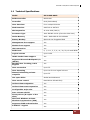
Technical Specifications ...................................................................................................................................... 11
1.2
Terminology ............................................................................................................................................................ 13
1.3
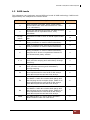
RAID Levels .............................................................................................................................................................. 15
1.4
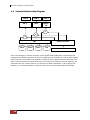
Volume Relationship Diagram ......................................................................................................................... 16
Chapter 2
2.1
Main Components ................................................................................................................................................ 17
2.1.2
Disk Trays ................................................................................................................................................. 18
2.1.2.2
LCD Front Panel ..................................................................................................................................... 19
Controller Module Panel ............................................................................................................................ 22
Power Supply / Fan Module (PSFM) ............................................................................................................. 24
2.3.1
2.4
Rear View ......................................................................................................................................................... 21
Controller Module ................................................................................................................................................ 22
2.2.1
2.3
Front View ........................................................................................................................................................ 17
2.1.2.1
2.1.2
2.2
Identifying Parts of the RAID Subsystem ...........................................17
PSFM Panel ...................................................................................................................................................... 24
Checklist before Starting ................................................................................................................................... 25
Chapter 3
Getting Started with the Subsystem....................................................27
3.1
Connecting the iSCSI RAID Subsystem to the Network ....................................................................... 27
3.2
Powering On ........................................................................................................................................................... 27
3.3
Disk Drive Installation ......................................................................................................................................... 28
3.3.1
Installing a SAS Disk Drive in a Disk Tray .......................................................................................... 28
3.3.2
Installing a SATA Disk Drive (Dual Controller Mode) in a Disk Tray ...................................... 31
3.4
iSCSI Introduction ................................................................................................................................................. 34
Chapter 4
2
Quick Setup ...............................................................................................36
User Manual
iSCSI GbE to SAS/SATA II RAID Subsystem
4.1
Management Interfaces...................................................................................................................................... 36
4.1.1
Serial Console Port ....................................................................................................................................... 36
4.1.2
Remote Control – Secure Shell ............................................................................................................... 36
4.1.3
LCD Control Module (LCM) ...................................................................................................................... 37
4.1.4
Web GUI ........................................................................................................................................................... 39
4.2
How to Use the System Quickly ..................................................................................................................... 41
4.2.1
Quick Installation .......................................................................................................................................... 41
4.2.2
Volume Creation Wizard ............................................................................................................................ 44
Chapter 5
Configuration ............................................................................................47
5.1
Web GUI Management Interface Hierarchy............................................................................................... 47
5.2
System Configuration .......................................................................................................................................... 49
5.2.1
System Setting ............................................................................................................................................... 49
5.2.2
Network Setting............................................................................................................................................. 50
5.2.3
Login Setting................................................................................................................................................... 51
5.2.4
Mail Setting ..................................................................................................................................................... 52
5.2.5
Notification Setting ...................................................................................................................................... 53
5.3
iSCSI Configuration .............................................................................................................................................. 54
5.3.1
NIC ...................................................................................................................................................................... 55
5.3.2
Entity Property................................................................................................................................................ 58
5.3.3
Node................................................................................................................................................................... 59
5.3.4
Session ............................................................................................................................................................... 62
5.3.5
CHAP Account ................................................................................................................................................ 63
5.4
Volume Configuration ......................................................................................................................................... 64
5.4.1
Physical Disk.................................................................................................................................................... 64
5.4.2
RAID Group ..................................................................................................................................................... 67
5.4.3
Virtual Disk....................................................................................................................................................... 70
5.4.4
Snapshot ........................................................................................................................................................... 75
5.4.5
Logical Unit...................................................................................................................................................... 78
5.4.6
Example ............................................................................................................................................................. 79
5.5
Enclosure Management ...................................................................................................................................... 84
5.5.1
Hardware Monitor ........................................................................................................................................ 84
5.5.2
UPS...................................................................................................................................................................... 86
5.5.3
SES....................................................................................................................................................................... 88
User Manual
3
iSCSI GbE to SAS/SATA II RAID Subsystem
5.5.4
5.6
Hard Drive S.M.A.R.T. Support ................................................................................................................. 88
System Maintenance ........................................................................................................................................... 90
5.6.1
System Information ...................................................................................................................................... 90
5.6.2
Event Log.......................................................................................................................................................... 91
5.6.3
Upgrade ............................................................................................................................................................ 92
5.6.4
Firmware Synchronization ......................................................................................................................... 93
5.6.5
Reset to Factory Default ............................................................................................................................ 93
5.6.6
Import and Export ........................................................................................................................................ 94
5.6.7
Reboot and Shutdown................................................................................................................................ 94
5.7
Home/Logout/Mute ............................................................................................................................................. 95
5.7.1
Home ................................................................................................................................................................. 95
5.7.2
Logout ............................................................................................................................................................... 95
5.7.3
Mute ................................................................................................................................................................... 95
Chapter 6
Advanced Operations .............................................................................. 96
6.1
Volume Rebuild ..................................................................................................................................................... 96
6.2
RG Migration........................................................................................................................................................... 98
6.3
VD Extension .........................................................................................................................................................100
6.4
Snapshot / Rollback ...........................................................................................................................................101
6.4.1
Create Snapshot Volume .........................................................................................................................102
6.4.2
Auto Snapshot..............................................................................................................................................103
6.4.3
Rollback ...........................................................................................................................................................104
6.5
Disk Roaming........................................................................................................................................................105
6.6
VD Clone ................................................................................................................................................................106
6.7
SAS JBOD Expansion .........................................................................................................................................112
6.7.1
Connecting JBOD ........................................................................................................................................112
6.7.2
Upgrade Firmware of JBOD ..................................................................................................................116
6.8
MPIO and MC/S ..................................................................................................................................................117
6.9
Trunking and LACP.............................................................................................................................................119
6.10
Dual Controllers ................................................................................................................................................121
6.10.1
Perform I/O .................................................................................................................................................121
6.10.2
Ownership....................................................................................................................................................122
6.10.3
Controller Status .......................................................................................................................................122
6.11
4
QReplica (Optional) .........................................................................................................................................124
User Manual
iSCSI GbE to SAS/SATA II RAID Subsystem
Chapter 7
Troubleshooting .................................................................................... 134
7.1
System Buzzer ......................................................................................................................................................134
7.2
Event Notifications .............................................................................................................................................134
Appendix ....................................................................................................................... 142
A.
Certification list......................................................................................................................................................142
B.
Microsoft iSCSI initiator .....................................................................................................................................146
User Manual
5
iSCSI GbE to SAS/SATA II RAID Subsystem
Preface
About this manual
This manual provides information regarding the quick installation and hardware
features of the RAID subsystem. This document also describes how to use the
storage management software. Information contained in the manual has been
reviewed for accuracy, but not for product warranty because of the various
environment/OS/settings. Information and specifications will be changed without
further notice.
This manual uses section numbering for every topics being discussed for easy and
convenient way of finding information in accordance with the user’s needs. The
following icons are being used for some details and information to be considered in
going through with this manual:
NOTES:
These are notes that contain useful information and tips
that the user must give attention to in going through
with the subsystem operation.
IMPORTANT!
These are the important information that the user must
remember.
WARNING!
These are the warnings that the user must follow to avoid
unnecessary errors and bodily injury during hardware and
software operation of the subsystem.
CAUTION:
These are the cautions that user must be aware to
prevent damage to the equipment and its components.
Copyright
No part of this publication may be reproduced, stored in a retrieval system, or
transmitted in any form or by any means, electronic, mechanical, photocopying,
recording or otherwise, without the prior written consent.
Trademarks
All products and trade names used in this document are trademarks or registered
trademarks of their respective holders.
Changes
The material in this document is for information only and is subject to change without
notice.
6
User Manual
iSCSI GbE to SAS/SATA II RAID Subsystem
Before You Begin
Before going through with this manual, you should read and focus to the following
safety guidelines. Notes about the subsystem’s controller configuration and the
product packaging and delivery are also included.
Safety Guidelines
To provide reasonable protection against any harm on the part of the user and to
obtain maximum performance, user is advised to be aware of the following safety
guidelines particularly in handling hardware components:
Upon receiving of the product:
Place the product in its proper location.
To avoid unnecessary dropping out, make sure that somebody is around for
immediate assistance.
It should be handled with care to avoid dropping that may cause damage to the
product. Always use the correct lifting procedures.
Upon installing of the product:
Ambient temperature is very important for the installation site. It must not
exceed 30◦C. Due to seasonal climate changes; regulate the installation site
temperature making it not to exceed the allowed ambient temperature.
Before plugging-in any power cords, cables and connectors, make sure that the
power switches are turned off. Disconnect first any power connection if the power
supply module is being removed from the enclosure.
Outlets must be accessible to the equipment.
All external connections should be made using shielded cables and as much as
possible should not be performed by bare hand. Using anti-static hand gloves is
recommended.
In installing each component, secure all the mounting screws and locks. Make
sure that all screws are fully tightened. Follow correctly all the listed procedures
in this manual for reliable performance.
Controller Configurations
This RAID subsystem supports dual controller configuration.
Packaging, Shipment and Delivery
Before removing the subsystem from the shipping carton, you should visually
inspect the physical condition of the shipping carton.
Unpack the subsystem and verify that the contents of the shipping carton are all
there and in good condition.
Exterior damage to the shipping carton may indicate that the contents of the
carton are damaged.
If any damage is found, do not remove the components; contact the dealer where
you purchased the subsystem for further instructions.
User Manual
7
iSCSI GbE to SAS/SATA II RAID Subsystem
The shipping package contains the following:
iSCSI RAID Subsystem Unit
Two (2) power cords
Two (2) Ethernet LAN cables
Two(2) LC-LC Fibre Optical Cables
Two (2) External null modem cable
One(1) Controller Module Plate Cover
One(1) PSFM Plate Cover
User Manual
NOTE: If any damage is found, contact the dealer or vendor for assistance.
8
User Manual
iSCSI GbE to SAS/SATA II RAID Subsystem
Chapter 1 Introduction
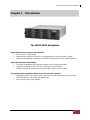
The iSCSI RAID Subsystem
Unparalleled Performance & Reliability
Front-end 4 x 10Gb iSCSI
Supports 802.3ad port trunking, Link Aggregation Control Protocol (LACP)
High data bandwidth of system architecture by powerful 64-bit RAID processor
Unsurpassed Data Availability
The RAID 6 capability provides the highest level of data protection
Supports snapshot-on-the-box w/o relying on host software
Supports Microsoft Windows Volume Shadow Copy Services (VSS)
Exceptional Manageability Menu-driven front panel display
Management GUI via serial console, SSH telnet, Web and secure web (HTTPS)
Event notification via Email and SNMP trap
Menu-driven front panel display
User Manual
9
iSCSI GbE to SAS/SATA II RAID Subsystem
Features
Front-end 4 x 10Gb ports support independent access, fail-over and loadbalancing
(802.3ad port trunking, LACP)
Supports iSCSI jumbo frame
Supports Microsoft Multipath I/O (MPIO)
Supports RAID levels 0, 1, 0+1, 3, 5, 6, 10, 30, 50, 60 and JBOD
Local N-way mirror: Extension to RAID 1 level, N copies of the disk
Global and dedicated hot spare disks
Write-through or write-back cache policy for different application usage
Supports greater than 2TB per volume set (64-bit LBA support)
Supports manual or scheduling volume snapshot (up to 32 snapshots)
Snapshot rollback mechanism
On-line volume migration with no system down-time
Online volume expansion
Instant RAID volume availability and background initialization
Supports S.M.A.R.T, NCQ and OOB Staggered Spin-up capable drives
10
User Manual
iSCSI GbE to SAS/SATA II RAID Subsystem
1.1 Technical Specifications
Model
EP-3164D-GAS3
RAID Controller
iSCSI-SAS
Controller
Dual (Redundant)
Host Interface
Four 10Gb/s Ethernet
Disk Interface
SAS 3Gb or SATA II
SAS expansion
4x mini SAS (3Gb/s)
Processor Type
Intel IOP342 64-bit (Chevelon dual core)
Cache Memory
4GB ~ 8GB DDR-II ECC SDRAM
Battery Backup
Optional Hot Pluggable BBM
Management Port support
Yes
Monitor Port support
Yes
UPS connection
Yes
RAID level
0, 1, 0+1, 3, 5, 6, 10, 30, 50, 60 and JBOD
Logical volume
Up to 1024
iSCSI Jumbo frame support
Yes
Supports Microsoft Multipath I/O
(MPIO)
802.3ad Port Trunking, LACP
Support
Yes
Yes
Host connection
Up to 32
Host clustering
Up to 16 for one logical volume
Manual/scheduling volume
snapshot
Up to 32
Hot spare disks
Global and dedicated
Host access control
Read-Write & Read-Only
Online Volume migration
Yes
Online Volume sets expansion
Yes
Configurable stripe size
Yes
Auto volume rebuild
Yes
N-way mirror (N copies of the
disk)
Yes
Microsoft Windows Volume
Shadow Copy Services (VSS)
Yes
Supports CHAP authentication
Yes
S.M.A.R.T. support
Yes
User Manual
11
iSCSI GbE to SAS/SATA II RAID Subsystem
Snapshot rollback mechanism
support
Yes
Platform
Rackmount
Form Factor
3U
# of Hot Swap Trays
16
Tray Lock
Yes
Disk Status Indicator
Access / Fail LED
Backplane
SAS / SATA II Single BP
# of PS/Fan Modules
500W x 2 w/PFC
# of Fans
4
Power requirements
AC 90V ~ 264V Full Range, 10A ~ 5A, 47Hz
~ 63Hz
Relative Humidity
10% ~ 85% Non-condensing
Operating Temperature
10°C ~ 40°C (50°F ~ 104°F)
Physical Dimension
566(L) x 482(W) x 131(H) mm
Weight (Without Disk)
22.5 Kg
12
User Manual
iSCSI GbE to SAS/SATA II RAID Subsystem
1.2 Terminology
The document uses the following terms:
RAID
Redundant Array of Independent Disks. There are different
RAID levels with different degree of data protection, data
availability, and performance to host environment.
PD
The Physical Disk belongs to the member disk of one specific
RAID group.
RG
Raid Group. A collection of removable media. One RG consists
of a set of VDs and owns one RAID level attribute.
VD
Virtual Disk. Each RD could be divided into several VDs. The
VDs from one RG have the same RAID level, but may have
different volume capacity.
LUN
Logical Unit Number. A logical unit number (LUN) is a unique
identifier which enables it to differentiate among separate
devices (each one is a logical unit).
GUI
Graphic User Interface.
RAID cell
When creating a RAID group with a compound RAID level, such
as 10, 30, 50 and 60, this field indicates the number of
subgroups in the RAID group. For example, 8 disks can be
grouped into a RAID group of RAID 10 with 2 cells, 4 cells. In
the 2-cell case, PD {0, 1, 2, 3} forms one RAID 1 subgroup and
PD {4, 5, 6, 7} forms another RAID 1 subgroup. In the 4-cells,
the 4 subgroups are PD {0, 1}, PD {2, 3}, PD {4, 5} and PD
{6,7}.
WT
Write-Through cache-write policy. A caching technique in which
the completion of a write request is not signaled until data is
safely stored in non-volatile media. Each data is synchronized in
both data cache and accessed physical disks.
WB
Write-Back cache-write policy. A caching technique in which the
completion of a write request is signaled as soon as the data is
in cache and actual writing to non-volatile media occurs at a
later time. It speeds up system write performance but needs to
bear the risk where data may be inconsistent between data
cache and the physical disks in one short time interval.
RO
Set the volume to be Read-Only.
DS
Dedicated Spare disks. The spare disks are only used by one
specific RG. Others could not use these dedicated spare disks
for any rebuilding purpose.
GS
Global Spare disks. GS is shared for rebuilding purpose. If some
RGs need to use the global spare disks for rebuilding, they could
get the spare disks out from the common spare disks pool for
such requirement.
User Manual
13
iSCSI GbE to SAS/SATA II RAID Subsystem
DG
DeGraded mode. Not all of the array’s member disks are
functioning, but the array is able to respond to application read
and write requests to its virtual disks.
SCSI
Small Computer Systems Interface.
SAS
Serial Attached SCSI.
S.M.A.R.T.
Self-Monitoring Analysis and Reporting Technology.
WWN
World Wide Name.
HBA
Host Bus Adapter.
SES
SCSI Enclosure Services.
NIC
Network Interface Card.
BBM
Battery Backup Module
iSCSI
Internet Small Computer Systems Interface.
LACP
Link Aggregation Control Protocol.
MPIO
Multi-Path Input/Output.
MC/S
Multiple Connections per Session
MTU
Maximum Transmission Unit.
CHAP
Challenge Handshake Authentication Protocol. An optional
security mechanism to control access to an iSCSI storage
system over the iSCSI data ports.
iSNS
Internet Storage Name Service.
SBB
Storage Bridge Bay. The objective of the Storage Bridge Bay
Working Group (SBB) is to create a specification that defines
mechanical, electrical and low-level enclosure management
requirements for an enclosure controller slot that will support a
variety of storage controllers from a variety of independent
hardware vendors (“IHVs”) and system vendors.
Dongle
Dongle board is for SATA II disk connection to the backplane.
14
User Manual
iSCSI GbE to SAS/SATA II RAID Subsystem
1.3 RAID Levels
The subsystem can implement several different levels of RAID technology. RAID levels
supported by the subsystem are shown below.
RAID Level
Description
Min. Drives
0
Block striping is provide, which yields higher
performance than with individual drives. There
is no redundancy.
1
1
Drives are paired and mirrored. All data is 100%
duplicated on an equivalent drive. Fully
redundant.
2
N-way
mirror
Extension to RAID 1 level. It has N copies of the
disk.
N
3
Data is striped across several physical drives.
Parity protection is used for data redundancy.
3
5
Data is striped across several physical drives.
Parity protection is used for data redundancy.
3
6
Data is striped across several physical drives.
Parity protection is used for data redundancy.
Requires N+2 drives to implement because of
two-dimensional parity scheme
4
Mirroring of the two RAID 0 disk arrays. This
level provides striping and redundancy through
mirroring.
4
10
Striping over the two RAID 1 disk arrays. This
level provides mirroring and redundancy
through striping.
4
30
Combination of RAID levels 0 and 3. This level is
best implemented on two RAID 3 disk arrays
with data striped across both disk arrays.
6
50
RAID 50 provides the features of both RAID 0
and RAID 5. RAID 50 includes both parity and
disk striping across multiple drives. RAID 50 is
best implemented on two RAID 5 disk arrays
with data striped across both disk arrays.
6
60
RAID 60 provides the features of both RAID 0
and RAID 6. RAID 60 includes both parity and
disk striping across multiple drives. RAID 60 is
best implemented on two RAID 6 disk arrays
with data striped across both disk arrays.
8
The abbreviation of “Just a Bunch Of Disks”.
JBOD needs at least one hard drive.
1
0+1
JBOD
User Manual
15
iSCSI GbE to SAS/SATA II RAID Subsystem
1.4 Volume Relationship Diagram
LUN 1
VD 1
LUN 2
LUN 3
VD 2
QSnap
VD
+
+
+
Cache Volume
RG
PD 1
PD 2
PD 3
DS
RAM
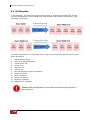
This is the design of volume structure of the iSCSI RAID subsystem. It describes the
relationship of RAID components. One RG (RAID group) consists of a set of VDs (Virtual
Disk) and owns one RAID level attribute. Each RG can be divided into several VDs. The
VDs in one RG share the same RAID level, but may have different volume capacity. All
VDs share the CV (Cache Volume) to execute the data transaction. LUN (Logical Unit
Number) is a unique identifier, in which users can access through SCSI commands.
16
User Manual
iSCSI GbE to SAS/SATA II RAID Subsystem
Chapter 2 Identifying Parts of the RAID Subsystem
The illustrations below identify the various parts of the subsystem.
2.1 Main Components
2.1.2 Front View
User Manual
17
iSCSI GbE to SAS/SATA II RAID Subsystem
2.1.2.1 Disk Trays
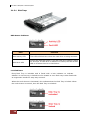
HDD Status Indicator
Part
Function
HDD Activity LED
This LED will blink blue when the hard drive is being accessed.
HDD Fault LED
Green LED indicates power is on and hard drive status is good
for this slot. If hard drive is defective or failed, the LED is Red.
LED is off when there is no hard drive.
Lock Indicator
Every Disk Tray is lockable and is fitted with a lock indicator to indicate
whether or not the tray is locked into the chassis or not. Each tray is also fitted with
an ergonomic handle for easy tray removal.
When the Lock Groove is horizontal, this indicates that the Disk Tray is locked. When
the Lock Groove is vertical, then the Disk Tray is unlocked.
18
User Manual
iSCSI GbE to SAS/SATA II RAID Subsystem
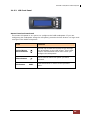
2.1.2.2 LCD Front Panel
Smart Function Front Panel
The smart LCD panel is an option to configure the RAID subsystem. If you are
configuring the subsystem using the LCD panel, press the Select button to login and
configure the RAID subsystem.
Parts
Function
Up and Down
Arrow buttons
Use the Up or Down arrow keys to go through
the information on the LCD screen. This is also
used to move between each menu when you
configure the subsystem.
Select button
This is used to enter the option you have
selected.
Exit button
EXIT
Press this button to return to the previous
menu.
User Manual
19
iSCSI GbE to SAS/SATA II RAID Subsystem
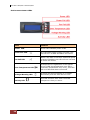
Environment Status LEDs
Parts
Function
Power LED
Green LED indicates power is ON.
Power Fail LED
If a redundant power supply unit fails, this
LED will turn to RED and alarm will sound.
Fan Fail LED
When a fan fails or the fan’s rotational speed
is below 1500RPM, this LED will turn red and
an alarm will sound.
Over Temperature LED
If temperature irregularities in the system
occurs (HDD slot temperature over 65°C,
Controller temperature over 70°C), this LED
will turn RED and alarm will sound.
Voltage Warning LED
An alarm will sound warning of a voltage
abnormality and this LED will turn red.
Activity LED
This LED will blink blue when the RAID
subsystem is busy or active.
20
User Manual
iSCSI GbE to SAS/SATA II RAID Subsystem
2.1.2 Rear View
1. Controller Module
The subsystem has one or two controller modules.
2. Power Supply Unit 1 ~ 2
Two power supplies (power supply 1 and power supply 2) are located at the rear of the
subsystem. Each PSFM has one Power Supply and two Fans. The PSFM 1 has Power#1,
Fan#1 and Fan#2. The PSFM 2 has Power#2, Fan#3 and Fan#4.
Turn on the power of these power supplies to power-on the subsystem. The “power”
LED at the front panel will turn green.
If a power supply fails to function or a power supply was not turned on, the “
Power fail LED will turn red and an alarm will sound.
User Manual
”
21
iSCSI GbE to SAS/SATA II RAID Subsystem
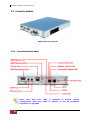
2.2 Controller Module
RAID Controller Module
2.2.1 Controller Module Panel
Note: Only data port LAN1 is available in default system
configuration. Data port LAN2 is optional. It can be purchased
separately for upgrade.
22
User Manual
iSCSI GbE to SAS/SATA II RAID Subsystem
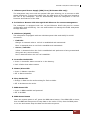
1. Uninterrupted Power Supply (UPS) Port (APC Smart UPS only)
The subsystem may come with an optional UPS port allowing you to connect an APC
Smart UPS device. Connect the cable from the UPS device to the UPS port located at
the rear of the subsystem. This will automatically allow the subsystem to use the
functions and features of the UPS.
2. R-Link Port: Remote Link through RJ-45 Ethernet for remote management
The subsystem is equipped with one 10/100 Ethernet RJ45 LAN port for remote
configuration and monitoring. You use web browser to manage the RAID subsystem
through Ethernet.
3. LAN Ports (Gigabit)
The subsystem is equipped with two LAN data ports LAN1 and LAN2) for iSCSI
connection.
Link LED:
Orange Æ Asserted when a 1G link is established and maintained.
Blue Æ Asserted when a 10G link is establish and maintained.
Access / fail LED:
Yellow Æ Asserted when the link is established and packets are being transmitted
along with any receive activity.
Red Æ Asserted when the link can't establish.
4. Controller Health LED
Green Æ Controller status normal or in the booting.
Red Æ Other than above status.
5. Master/Slave LED
Green Æ Master controller.
Off Æ Slave controller.
6. Dirty Cache LED
Orange Æ Data on the cache waiting for flush to disks.
Off Æ No data on the cache.
7. BBM Status LED
Green Æ BBM installed and powered
Off Æ No BBM
8. BBM Status Button
When the system power is off, press the BBM status button, if the BBM LED is Green,
then the BBM still has power to keep data on the cache. If not, then the BBM power
is ran out and cannot keep the data on the cache anymore.
User Manual
23
iSCSI GbE to SAS/SATA II RAID Subsystem
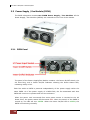
2.3 Power Supply / Fan Module (PSFM)
The RAID subsystem contains two 500W Power Supply / Fan Modules. All the
Power Supply / Fan Modules (PSFMs) are inserted into the rear of the chassis.
2.3.1 PSFM Panel
The panel of the Power Supply/Fan Module contains: the Power On/Off Switch, the
AC Inlet Plug, and a Power On/Fail Indicator showing the Power Status LED,
indicating ready or fail.
Each fan within a PSFM is powered independently of the power supply within the
same PSFM. So if the power supply of a PSFM fails, the fan associated with that
PSFM will continue to operate and cool the enclosure.
When the power cord connected from main power source is inserted to the AC
Power Inlet, the power status LED becomes RED. When the switch of the PSFM is
turned on, the LED will turn GREEN. When the Power On/Fail LED is GREEN, the
PSFM is functioning normally.
24
User Manual
iSCSI GbE to SAS/SATA II RAID Subsystem
NOTE: Each PSFM has one Power Supply and two Fans. The PSFM 1
has Power#1, Fan#1 and Fan#2. The PSFM 2 has Power#2, Fan#3
and Fan#4. When the Power Supply of a PSFM fails, the PSFM need
not be removed from the slot if replacement is not yet available. The
fan will still work and provide necessary airflow inside the enclosure.
NOTE: After replacing the Power Supply Fan Module and turning on
the Power On/Off Switch of the PSFM, the Power Supply will not
power on immediately. The Fans in the PSFM will spin-up until the
RPM becomes stable. When Fan RPM is already stable, the RAID
controller will then power on the Power Supply. This process takes
more or less 30 seconds. This safety measure helps prevent possible
Power Supply overheating when the Fans cannot work.
2.4 Checklist before Starting
Before starting, check or prepare the following items.
; Check “Certification list” in Appendix A to confirm the hardware setting is fully
supported.
; Read the latest release note before upgrading. Release note accompanies with its
released firmware.
; A host with a 10GbE NIC or 10GbE iSCSI HBA.
; CAT 5e, or CAT 6 network cables for management port. FC cable for iSCSI data
ports.
; Prepare storage system configuration plan.
; Prepare management port and iSCSI data ports network information. When using
static IP, please prepare static IP addresses, subnet mask, and default gateway.
; 10GbE LAN switches (recommended). Or 10GbE LAN switches with VLAN / LACP /
Trunking (optional).
; CHAP security information, including CHAP username and secret (optional).
; Setup the hardware connection before power on servers. Connect console cable,
management port cable, and iSCSI data port cables in advance.
; In addition, installing an iSNS server is recommended.
; Power on first, and then power on hosts and iSNS server.
; Host server is suggested to logon the target twice (both controller 1 and
controller 2), and then MPIO should be setup automatically.
NOTE: iSNS server is recommended for dual controller system.
User Manual
25
iSCSI GbE to SAS/SATA II RAID Subsystem
For better data service availability, all the connections among host servers, GbE switches,
and the dual controllers are recommended as redundant as below.
26
User Manual
iSCSI GbE to SAS/SATA II RAID Subsystem
Chapter 3 Getting Started with the Subsystem
3.1 Connecting the iSCSI RAID Subsystem to the Network
To connect the iSCSI unit to the network, insert the network cable that came with the
unit into the network port (LAN1) at the back of iSCSI unit. Insert the other end into a
Gigabit BASE-T Ethernet connection on your network hub or switch. You may connect
the other network ports if needed.
For remote management of iSCSI RAID subsystem, use another network cable to
connect the R-Link port to your network.
3.2 Powering On
1. Plug in the power cords into the AC Power Input Socket located at the rear of the
subsystem.
NOTE: The subsystem is equipped with redundant, full range
power supplies with PFC (power factor correction). The system will
automatically select voltage.
2. Turn on each Power On/Off Switch to power on the subsystem.
3. The Power LED on the front Panel will turn green.
User Manual
27
iSCSI GbE to SAS/SATA II RAID Subsystem
3.3 Disk Drive Installation
This section describes the physical locations of the hard drives supported by the
subsystem and give instructions on installing a hard drive. The subsystem supports
hot-swapping allowing you to install or replace a hard drive while the subsystem is
running.
3.3.1 Installing a SAS Disk Drive in a Disk Tray
1. Unlock the Disk Trays using a flat-head screw driver by rotating the Lock Groove.
2. Press the Tray Open button and the Disk Tray handle will flip open.
Tray
Open
Button
3. Pull out an empty disk tray.
28
User Manual
iSCSI GbE to SAS/SATA II RAID Subsystem
4. Place the hard drive in the disk tray. Turn the disk tray upside down. Align the
four screw holes of the SAS disk drive in the four Hole A of the disk tray. To
secure the disk drive into the disk tray, tighten four screws on these holes of the
disk tray. Note in the picture below where the screws should be placed in the disk
tray holes.
Tray Hole A
NOTE: All the disk tray holes are labelled accordingly.
User Manual
29
iSCSI GbE to SAS/SATA II RAID Subsystem
5. Slide the tray into a slot.
6. Press the lever in until you hear the latch click into place. The HDD Fault LED will
turn green when the subsystem is powered on and HDD is good.
7. If necessary, lock the Disk Tray by turning the Lock Groove.
30
User Manual
iSCSI GbE to SAS/SATA II RAID Subsystem
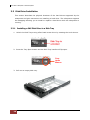
3.3.2 Installing a SATA Disk Drive (Dual Controller Mode) in a Disk Tray
1. Remove an empty disk tray from the subsystem.
2. Prepare the dongle board and two screws.
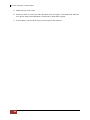
3. Place the dongle board in the disk tray. Turn the tray upside down. Align the two
screw hole of the dongle board in the two Hole D of the disk tray. Tighten two
screws to secure the dongle board into the disk tray.
User Manual
31
iSCSI GbE to SAS/SATA II RAID Subsystem
Tray Hole D
NOTE: All the disk tray holes are labelled accordingly.
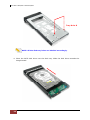
4. Place the SATA disk drive into the disk tray. Slide the disk drive towards the
dongle board.
32
User Manual
iSCSI GbE to SAS/SATA II RAID Subsystem
5. Turn the disk tray upside down. Align the four screw holes of the SATA disk drive
in the four Hole C of the disk tray. To secure the disk drive into the disk tray,
tighten four screws on these holes of the disk tray. Note in the picture below
where the screws should be placed in the disk tray holes.
Tray Hole C
NOTE: All the disk tray holes are labelled accordingly.
6. Insert the disk tray into the subsystem.
User Manual
33
iSCSI GbE to SAS/SATA II RAID Subsystem
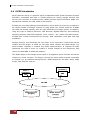
3.4 iSCSI Introduction
iSCSI (Internet SCSI) is a protocol which encapsulates SCSI (Small Computer System
Interface) commands and data in TCP/IP packets for linking storage devices with
servers over common IP infrastructures. iSCSI provides high performance SANs over
standard IP networks like LAN, WAN or the Internet.
IP SANs are true SANs (Storage Area Networks) which allow few of servers to attach to
an infinite number of storage volumes by using iSCSI over TCP/IP networks. IP SANs
can scale the storage capacity with any type and brand of storage system. In addition,
using any type of network (Ethernet, Fast Ethernet, Gigabit Ethernet) and combining
operating systems (Microsoft Windows, Linux, Solaris, …etc.) within the SAN network.
IP-SANs also include mechanisms for security, data replication, multi-path and high
availability.
Storage protocol, such as iSCSI, has “two ends” in the connection. These ends are the
initiator and the target. In iSCSI we call them iSCSI initiator and iSCSI target. The
iSCSI initiator requests or initiates any iSCSI communication. It requests all SCSI
operations like read or write. An initiator is usually located on the host/server side
(either an iSCSI HBA or iSCSI SW initiator).
The iSCSI target is the storage device itself or an appliance which controls and serves
volumes or virtual volumes. The target is the device which performs SCSI commands
or bridges it to an attached storage device. iSCSI targets can be disks, tapes, RAID
arrays, tape libraries, and etc.
Host 2
(initiator)
iSCSI
HBA
Host 1
(initiator)
NIC
IP SAN
iSCSI device 1
(target)
34
User Manual
iSCSI device 2
(target)
iSCSI GbE to SAS/SATA II RAID Subsystem
The host side needs an iSCSI initiator. The initiator is a driver which handles the SCSI
traffic over iSCSI. The initiator can be software or hardware (HBA). Please refer to the
certification list of iSCSI HBA(s) in Appendix A. OS native initiators or other software
initiators use the standard TCP/IP stack and Ethernet hardware, while iSCSI HBA(s)
use their own iSCSI and TCP/IP stacks on board.
Hardware iSCSI HBA(s) would provide its initiator tool. Please refer to the vendors’
HBA user manual. Microsoft, Linux and Mac provide software iSCSI initiator driver.
Below are the available links:
1. Link to download the Microsoft iSCSI software initiator:
http://www.microsoft.com/downloads/details.aspx?FamilyID=12cb3c1a-15d64585-b385-befd1319f825&DisplayLang=en
Please refer to Appendix D for Microsoft iSCSI initiator installation procedure.
2. Linux iSCSI initiator is also available. For different kernels, there are different iSCSI
drivers. If you need the latest Linux iSCSI initiator, please visit Open-iSCSI project
for most update information. Linux-iSCSI (sfnet) and Open-iSCSI projects merged
in April 11, 2005.
Open-iSCSI website: http://www.open-iscsi.org/
Open-iSCSI README: http://www.open-iscsi.org/docs/README
Features: http://www.open-iscsi.org/cgi-bin/wiki.pl/Roadmap
Support Kernels: http://www.open-iscsi.org/cgi-bin/wiki.pl/Supported_Kernels
Google groups: http://groups.google.com/group/open-iscsi/threads?gvc=2
http://groups.google.com/group/open-iscsi/topics
Open-iSCSI Wiki: http://www.open-iscsi.org/cgi-bin/wiki.pl
3. ATTO iSCSI initiator is available for Mac.
Website: http://www.attotech.com/xtend.html
4. Solaris iSCSI Initiator
Version: Solaris 10 u6 (10/08)
User Manual
35
iSCSI GbE to SAS/SATA II RAID Subsystem
Chapter 4 Quick Setup
4.1 Management Interfaces
There are three management methods to manage the iSCSI RAID subsystem described
as follows:
4.1.1 Serial Console Port
Use NULL modem cable to connect console port.
The console settings are on the following:
Baud rate: 115200, 8 bits, 1 stop bit, no parity, and no flow control.
Terminal type: vt100
Login name: admin
Default password: 00000000
4.1.2 Remote Control – Secure Shell
SSH (secure shell) is required for remote login. The SSH client software is available at
the following web site:
SSHWinClient WWW: http://www.ssh.com/
Putty WWW: http://www.chiark.greenend.org.uk/
Host name: 192.168.10.50 (Please check your DHCP address for this field.)
Login name: admin
Default password: 00000000
NOTE: This iSCSI RAID Series only support SSH for remote
control. For using SSH, the IP address and the password is
required for login.
36
User Manual
iSCSI GbE to SAS/SATA II RAID Subsystem
4.1.3 LCD Control Module (LCM)
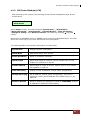
After booting up the system, the following screen shows management port IP and
model name:
192.168.10.50
iSCSI-Model
Press “Enter” button, the LCM functions “System Info.”, “Alarm Mute”,
“Reset/Shutdown”, “Quick Install”, “Volume Wizard”, “View IP Setting”,
“Change IP Config” and “Reset to Default” will rotate by pressing c (up) and d
(down).
When there is WARNING event or ERROR event occurred (LCM default filter), the LCM
shows the event log to give users more detail from front panel.
The following table is the function description of LCM menus.
System Info
Displays System information.
Alarm Mute
Mute alarm when error occurs.
Reset/Shutdown
Reset or shutdown controller.
Quick Install
Quick three steps to create a volume. Please refer to next
chapter for operation in web UI.
Volume Wizard
Smart steps to create a volume. Please refer to next chapter
for operation in web UI.
View IP Setting
Display current IP address, subnet mask, and gateway.
Change IP Config
Set IP address, subnet mask, and gateway. There are 2
selections, DHCP (Get IP address from DHCP server) or set
static IP.
Reset to Default
Reset to default sets password to default: 00000000, and set
IP address to default as DHCP setting.
User Manual
37
iSCSI GbE to SAS/SATA II RAID Subsystem
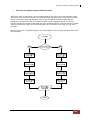
The following is LCM menu hierarchy.
[System Info.]
[Alarm Mute]
[Firmware Version
x.x.x]
[RAM Size
xxx MB]
[cYes
Nod]
[Reset]
[Reset/Shutdown]
[Shutdown]
[Quick Install]
[Volume Wizard]
proIPS
cd
[View IP Setting]
RAID 0
RAID 1
RAID 3
RAID 5
RAID 6
RAID 0+1
xxx GB
[Local]
RAID 0
RAID 1
RAID 3
RAID 5
RAID 6
RAID 0+1
[JBOD x] cd
RAID 0
RAID 1
RAID 3
RAID 5
RAID 6
RAID 0+1
[IP Config]
[Static IP]
[IP Address]
[192.168.010.050]
[IP Subnet Mask]
[255.255.255.0]
[IP Gateway]
[192.168.010.254]
[DHCP]
[Change IP
Config]
[cYes
Nod]
[cYes
Nod]
[Apply
The
Config]
[cYes
Nod]
[Use
default
algorithm]
[Volume
Size]
xxx GB
[Apply
The
Config]
[cYes
Nod]
[new x
disk] cd
xxx BG
Adjust
Volume
Size
[Apply
The
Config]
[cYes
Nod]
[cYes
Nod]
[IP
Address]
[IP Subnet
Mask]
[Static IP]
[IP
Gateway]
[Apply IP
Setting]
[Reset to Default]
38
User Manual
[cYes
Nod]
Adjust IP
address
Adjust
Submask
IP
Adjust
Gateway
IP
[cYes
Nod]
iSCSI GbE to SAS/SATA II RAID Subsystem
CAUTION! Before power off, it is better to execute “Shutdown” to
flush the data from cache to physical disks.
4.1.4 Web GUI
The iSCSI RAID subsystem supports graphical user interface (GUI) to operate the
system. Be sure to connect the LAN cable. The default IP setting is DHCP; open the
browser and enter:
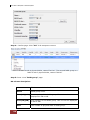
http://192.168.10.50 (Please check the DHCP address first on LCM)
Click any function at the first time; it will pop up a dialog window for authentication.
User name: admin
Default password: 00000000
After login, you can choose the function blocks on the left side of window to do
configuration.
User Manual
39
iSCSI GbE to SAS/SATA II RAID Subsystem
There are seven indicators at the top-right corner.
RAID light:
x
Green Æ RAID works well.
x
Red Æ RAID fails.
Temperature light:
x
Green Æ Temperature is normal.
x
Red Æ Temperature is abnormal.
Voltage light:
x
Green Æ voltage is normal.
x
Red Æ voltage is abnormal.
UPS light:
x
Green Æ UPS works well.
x
Red Æ UPS fails.
Fan light:
x
Green Æ Fan works well.
x
Red Æ Fan fails.
Power light:
x
Green Æ Power works well.
x
Red Æ Power fails.
Dual controller light:
x
Green Æ Both controller1 and controller2 are
present and well.
x
Orange Æ The system is degraded and there is
only 1 controller alive and well.
Return to home page.
Logout the management web UI.
Mute alarm beeper.
40
User Manual
iSCSI GbE to SAS/SATA II RAID Subsystem
4.2 How to Use the System Quickly
4.2.1 Quick Installation
It is easy to use “Quick installation” to create a volume. It uses all available physical
disks to create a RG; the system will calculate maximum spaces on RAID levels
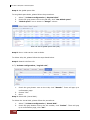
0/1/3/5/6/0+1. “Quick installation” will occupy all residual RG space for one VD,
and it has no space for snapshot and spare. If snapshot is needed, please create
volumes manually, and refer to Section 4.4 for more detail. If some physical disks are
used in other RGs, “Quick installation” cannot be run because the operation is valid
only when all physical disks in this system are free.
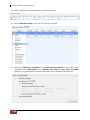
Step 1: Click “Quick installation” menu item. Follow the steps to set up system
name and date/time.
User Manual
41
iSCSI GbE to SAS/SATA II RAID Subsystem
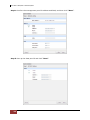
Step2: Confirm the management port IP address and DNS, and then click “Next”.
Step 3: Set up the data port IP and click “Next”.
42
User Manual
iSCSI GbE to SAS/SATA II RAID Subsystem
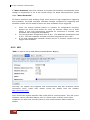
Step 4: Set up the RAID level and volume size and click “Next”.
Step 5: Check all items, and click “Finish”.
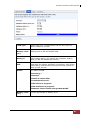
Step 6: Done.
User Manual
43
iSCSI GbE to SAS/SATA II RAID Subsystem
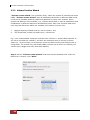
4.2.2 Volume Creation Wizard
“Volume create wizard” has a smarter policy. When the system is inserted with some
HDDs. “Volume create wizard” lists all possibilities and sizes in different RAID levels,
it will use all available HDDs for RAID level depends on which user chooses. When
system has different sizes of HDDs, e.g., 8*200G and 8*80G, it lists all possibilities and
combination in different RAID level and different sizes. After user chooses RAID level,
user may find that some HDDs are available (free status). It gives user:
1.
2.
Biggest capacity of RAID level for user to choose and,
The fewest disk number for RAID level / volume size.
E.g., user chooses RAID 5 and the controller has 12*200G + 4*80G HDDs inserted. If
we use all 16 HDDs for a RAID 5, and then the maximum size of volume is 1200G
(80G*15). By the wizard, we do smarter check and find out the most efficient way of
using HDDs. The wizard only uses 200G HDDs (Volume size is 200G*11=2200G), the
volume size is bigger and fully uses HDD capacity.
Step 1: Select “Volume create wizard” and then choose the RAID level. After the
RAID level is chosen, click “Next”.
44
User Manual
iSCSI GbE to SAS/SATA II RAID Subsystem
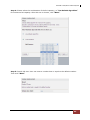
Step 2: Please select the combination of the RG capacity, or “Use default algorithm”
for maximum RG capacity. After RG size is chosen, click “Next”.
Step 3: Decide VD size. User can enter a number less or equal to the default number.
Then click “Next”.
User Manual
45
iSCSI GbE to SAS/SATA II RAID Subsystem
Step 4: Confirmation page. Click “Finish” if all setups are correct. Then a VD will be
created.
Step 5: Done. The system is available now.
NOTE: A virtual disk of RAID 0 is created and is named by system
itself.
46
User Manual
iSCSI GbE to SAS/SATA II RAID Subsystem
Chapter 5 Configuration
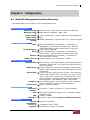
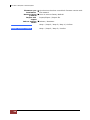
5.1 Web GUI Management Interface Hierarchy
The below table is the hierarchy of the management GUI.
System configuration
System setting
Network settin
g
Login setting
Mail setting
Notification
setting
Æ System name / Date and time / System indication
Æ MAC address / Address / DNS / Port
Æ Login configuration / Admin password / User password
Æ Mail
Æ SNMP / Messenger / System log server / Event log filter
iSCSI configuration
NIC Æ Show information for:(Controller 1/ Controller 2)
Aggregation / IP settings for iSCSI ports / Become
default gateway / Enable jumbo frame / Ping host
Entity property Æ Entity name / iSNS IP
Node Æ Show information for:(Controller 1/ Controller 2)
Authenticate / Change portal / Rename alias/ User
Session Æ Show information for:(Controller 1/ Controller 2)
List connection / Delete
CHAP account Æ Create / Modify user information / Delete
Volume configuration
Physical disk Æ Set Free disk / Set Global spare / Set Dedicated spare /
Upgrade / Disk Scrub / Turn on/off the indication LED /
More information
RAID group Æ Create / Migrate / Activate / Deactivate / Parity check /
Delete / Set preferred owner /Set disk property / More
information
Virtual disk Æ Create / Extend / Parity check / Delete / Set property /
Attach LUN / Detach LUN / List LUN / Set clone / Clear
clone / Start clone / Stop clone / Schedule clone / Set
snapshot space / Cleanup snapshot / Take snapshot /
Auto snapshot / List snapshot / More information
Snapshot Æ Set snapshot space / Auto snapshot / Take snapshot /
Export / Rollback / Delete/ Cleanup snapshot
Logical unit Æ Attach / Detach/ Session
Enclosure management
Hardware Æ Controller 1 / BPL / Controller 2 / Auto shutdown
monitor
UPS Æ UPS Type / Shutdown battery level / Shutdown delay /
Shutdown UPS
SES Æ Enable / Disable
S.M.A.R.T. Æ S.M.A.R.T. information (Only for SATA hard drives)
Maintenance
System Æ System information
information
Event log Æ Download / Mute / Clear
Upgrade Æ Browse the firmware to upgrade
User Manual
47
iSCSI GbE to SAS/SATA II RAID Subsystem
Firmware sync Æ Synchronize the slave controller’s firmware version with
the master’s
hronization
Reset to factor Æ Sure to reset to factory default?
y default
Import and
Import/Export / Import file
export
Reboot and shu Æ Reboot / Shutdown
tdown
Quick installation
Step 1 / Step 2 / Step 3 / Step 4 / Confirm
Volume creation wizard
48
User Manual
Step 1 / Step 2 / Step 3 / Confirm
iSCSI GbE to SAS/SATA II RAID Subsystem
5.2 System Configuration
“System
configuration” is designed for setting up the “System
setting”,
“Network setting”, “Login setting”, “Mail setting”, and “Notification setting”.
5.2.1 System Setting
“System setting” can be used to set system name and date. Default “System
name” is composed of model name and serial number of this system.
Check “Change date and time” to set up the current date, time, and time zone before
using or synchronize time from NTP (Network Time Protocol) server. Click “Confirm” in
System indication to turn on the system indication LED. Click again to turn off.
User Manual
49
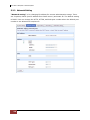
iSCSI GbE to SAS/SATA II RAID Subsystem
5.2.2 Network Setting
“Network setting” is for changing IP address for remote administration usage. There
are 2 options, DHCP (Get IP address from DHCP server) and static IP. The default setting
is DHCP. User can change the HTTP, HTTPS, and SSH port number when the default port
number is not allowed on host/server.
50
User Manual
iSCSI GbE to SAS/SATA II RAID Subsystem
5.2.3 Login Setting
“Login setting” can set single admin, auto logout time and Admin/User password.
The single admin can prevent multiple users access the same controller at the same
time.
1.
Auto logout: The options are (1) Disable; (2) 5 minutes; (3) 30 minutes; (4)
1 hour. The system will log out automatically when user is inactive for a period
of time.
2.
Login lock: Disable/Enable. When the login lock is enabled, the system allows
only one user to login or modify system settings.
Check “Change admin password” or “Change user password” to change admin or
user password. The maximum length of password is 12 characters.
User Manual
51
iSCSI GbE to SAS/SATA II RAID Subsystem
5.2.4 Mail Setting
“Mail setting” can accept at most 3 mail-to address entries for receiving the event
notification. Some mail servers would check “Mail-from address” and need
authentication for anti-spam. Please fill the necessary fields and click “Send test mail”
to test whether email functions are available or working. User can also select which
levels of event logs are needed to be sent via Mail. Default setting only enables ERROR
and WARNING event logs. Please also make sure the DNS server IP is well-setup so the
event notification mails can be sent successfully.
52
User Manual
iSCSI GbE to SAS/SATA II RAID Subsystem
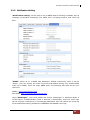
5.2.5 Notification Setting
“Notification setting” can be used to set up SNMP trap for alerting via SNMP, pop-up
message via Windows messenger (not MSN), alert via syslog protocol, and event log
filter.
“SNMP” allows up to 3 SNMP trap addresses. Default community name is set as
“public”. User can choose the event log levels and default setting only enables INFO
event log in SNMP. There are many SNMP tools. The following web sites are for your
reference:
SNMPc: http://www.snmpc.com/
Net-SNMP: http://net-snmp.sourceforge.net/
Using “Messenger”, user must enable the service “Messenger” in Windows (Start Æ
Control Panel Æ Administrative Tools Æ Services Æ Messenger), and then event logs
can be received. It allows up to 3 messenger addresses. User can choose the event log
levels and default setting enables the WARNING and ERROR event logs.
User Manual
53
iSCSI GbE to SAS/SATA II RAID Subsystem
Using “System log server”, user can choose the facility and the event log level. The
default port of syslog is 514. The default setting enables event level: INFO, WARNING
and ERROR event logs.
There are some syslog server tools. The following web sites are for your reference:
WinSyslog: http://www.winsyslog.com/
Kiwi Syslog Daemon: http://www.kiwisyslog.com/
Most UNIX systems have built-in syslog daemon.
“Event log filter” setting can enable event level on “Pop up events” and “LCM”.
“Buzzer” setting can disable buzzer.
The system buzzer features are described as follows:
1.
2.
3.
The system buzzer alarms 1 second when system boots up successfully.
The system buzzer alarms continuously when there is error level event
happened. The alarm will be stopped after mute.
The alarm will be muted automatically when the error situation is resolved.
E.g., when RAID 5 is degraded and alarm sounds immediately, after user
changes/adds one physical disk for rebuilding, and when the rebuilding is done,
the alarm will be muted automatically.
5.3 iSCSI Configuration
“iSCSI configuration” is designed for setting up the “Entity Property”, “NIC”,
“Node”, “Session”, and “CHAP account”.
54
User Manual
iSCSI GbE to SAS/SATA II RAID Subsystem
5.3.1 NIC
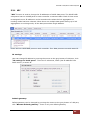
“NIC” function is used to change the IP addresses of iSCSI data ports. The iSCSI RAID
subsystem has two 10GbE ports on each controller to transmit data. Each of them must
be assigned to one IP address in multi-homed mode unless the link aggregation or
trunking mode has been selected. When there are multiple data ports setting up in link
aggregation or trunking mode, all the data ports share single address.
There are four iSCSI data ports on each controller. Four data ports are set with static IP.
IP settings:
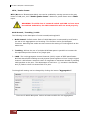
User can change IP address by moving the mouse to the gray button of LAN port, click
“IP settings for iSCSI ports”. There are 2 selections, DHCP (Get IP address from
DHCP server) or static IP.
Default gateway:
Default gateway can be changed by moving the mouse to the gray button of LAN port,
click “Become default gateway”. There is only one default gateway.
User Manual
55
iSCSI GbE to SAS/SATA II RAID Subsystem
MTU / Jumbo frame:
MTU (Maximum Transmission Unit) size can be enabled by moving mouse to the gray
button of LAN port, click “Enable jumbo frame”. Maximum jumbo frame size is 3900
bytes.
WARNING! The MTU size of network switch and HBA on host must
be enabled. Otherwise, the LAN connection will not work properly.
Multi-homed / Trunking / LACP:
The following is the description of multi-homed/trunking/LACP.
1. Multi-homed: Default mode. Each of iSCSI data port is connected by itself and is
not set to link aggregation and trunking. This function is also for Multipath
functions. Selecting this mode can also remove the setting of Trunking/LACP at the
same time.
2. Trunking: defines the use of multiple iSCSI data ports in parallel to increase the
link speed beyond the limits of any single port.
3. LACP: The Link Aggregation Control Protocol (LACP) is part of IEEE specification
802.3ad that allows bundling several physical ports together to form a single logical
channel. LACP allows a network switch to negotiate an automatic bundle by sending
LACP packets to the peer. The advantages of LACP are: (1) increase in bandwidth,
and (2) failover when link status fails on a port.
Trunking/LACP setting can be changed by clicking the button “Aggregation”.
There are 2 iSCSI data ports. Select at least two NICs for link aggregation.
56
User Manual
iSCSI GbE to SAS/SATA II RAID Subsystem
For example, LAN1 and LAN2 are set to Trunking mode. To remove Trunking/LACP
setting, check the gray button of LAN port, click “Delete link aggregation”. Then it
will pop up a message to confirm.
Ping host:
User can ping the corresponding host data port from the target, click “Ping host”.
A user can ping host from the target to make sure the data port connection is well.
User Manual
57
iSCSI GbE to SAS/SATA II RAID Subsystem
5.3.2 Entity Property
“Entity property” is used to view the entity name of the iSCSI RAID subsystem, and
setup “iSNS IP” for iSNS (Internet Storage Name Service). iSNS protocol allows
automated discovery, management and configuration of iSCSI devices on a TCP/IP
network. Using iSNS, it requires that an iSNS server be setup in the SAN. Add an iSNS
server IP address into iSNS server lists in order that iSCSI initiator service can send
queries.
58
User Manual
iSCSI GbE to SAS/SATA II RAID Subsystem
5.3.3 Node
“Node” can be used to view the target name for iSCSI initiator. The iSCSI RAID
subsystem supports up to 32 multinodes. There are 32 default nodes created for each
controller.
CHAP:
CHAP is the abbreviation of Challenge Handshake Authorization Protocol. CHAP is a
strong authentication method used in point-to-point for user login. It’s a type of
authentication in which the authentication server sends the client a key to be used for
encrypting the username and password. CHAP enables the username and password to
transmitting in an encrypted form for protection.
To use CHAP authentication, please follow these steps:
1. Select one of 32 default nodes from one controller.
2. Check the gray button of “OP.” column, click “Authenticate”.
3. Select “CHAP”.
User Manual
59
iSCSI GbE to SAS/SATA II RAID Subsystem
4.
Click “OK”.
5.
Go to “/ iSCSI configuration / CHAP account” page to create CHAP account.
Please refer to next section for more detail.
Check the gray button of “OP.” column, click “User”.
Select CHAP user(s) which will be used. It’s a multi option; it can be one or more. If
choosing none, CHAP cannot work.
6.
7.
8.
9.
Click “OK”.
In “Authenticate” of “OP” page, select “None” to disable CHAP.
60
User Manual
iSCSI GbE to SAS/SATA II RAID Subsystem
Change portal:
Users can change the portals belonging to the device node of each controller.
1.
2.
3.
4.
Check the gray button of “OP.” column next to one device node.
Select “Change portal”.
Choose the portals for the controller.
Click “OK” to confirm.
Rename alias:
User can create an alias to one device node.
1.
2.
3.
4.
5.
Check the gray button of “OP.” column next to one device node.
Select “Rename alias”.
Create an alias for that device node.
Click “OK” to confirm.
An alias appears at the end of that device node.
NOTE: After setting CHAP, the initiator in host/server should be
set the same CHAP account. Otherwise, user cannot login.
User Manual
61
iSCSI GbE to SAS/SATA II RAID Subsystem
5.3.4 Session
“Session” can display iSCSI session and connection information, including the
following items:
1.
2.
3.
4.
5.
6.
7.
8.
9.
10.
TSIH (target session identifying handle)
Host (Initiator Name)
Controller (Target Name)
InitialR2T(Initial Ready to Transfer)
Immed. data(Immediate data)
MaxDataOutR2T(Maximum Data Outstanding Ready to Transfer)
MaxDataBurstLen(Maximum Data Burst Length)
DataSeginOrder(Data Sequence in Order)
DataPDUInOrder(Data PDU in Order)
Detail of Authentication status and Source IP: port number.
Check the gray button of session number, click “List connection”. It will list all
connection(s) of the session.
62
User Manual
iSCSI GbE to SAS/SATA II RAID Subsystem
5.3.5 CHAP Account
“CHAP account” is used to manage CHAP accounts for authentication. This iSCSI
RAID subsystem allows creation of many CHAP accounts.
To setup CHAP account, please follow these steps:
1.
2.
Click “Create”.
Enter “User”, “Secret”, and “Confirm” secret again. “Node” can be selected
here or later. If selecting none, it can be enabled later in “/ iSCSI configuration /
Node / User”.
3.
Click “OK”.
4.
Click “Delete” to delete CHAP account.
User Manual
63
iSCSI GbE to SAS/SATA II RAID Subsystem
5.4 Volume Configuration
“Volume configuration” is designed for setting up the volume configuration which
includes “Physical disk”, “RAID group”, “Virtual disk”, “Snapshot”, and
“Logical unit”.
5.4.1 Physical Disk
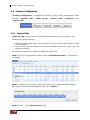
“Physical disk” can be used to view the status of hard drives in the system. The
following are operational tips:
1. Check the gray button next to the number of slot, it will show the functions which
can be executed.
2. Active function can be selected, and inactive functions show up in gray color and
cannot be selected.
For example, set PD slot number 8 to dedicated spare disk.
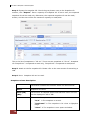
Step 1: Check the gray button of PD 8, select “Set Dedicated spare”, it will link to
next page.
Step 2: Maybe there are some existing RGs which can be assigned dedicate spare
disk. Select which RG will be assigned, then click “Submit”.
Step 3: Done. View “Physical disk” page.
64
User Manual
iSCSI GbE to SAS/SATA II RAID Subsystem
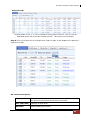
Physical Disk:
Physical disks in slot 1, 2, 3 are created for a RG named “RG-R5”. Slot 4 is set as
dedicated spare disk of the RG named “RG-R5”. The others are free disks.)
Step 4: The unit of size can be changed from (GB) to (MB). It will display the capacity of
hard drive in MB.
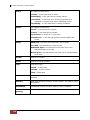
PD column description:
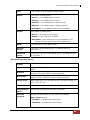
Slot
The position of hard drives. The button next to the number of
slot shows the functions which can be executed.
Size (GB) (MB)
Capacity of hard drive.
RG Name
Related RAID group name.
User Manual
65
iSCSI GbE to SAS/SATA II RAID Subsystem
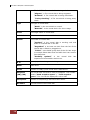
Status
The status of hard drive.
“Online” Æ the hard drive is online.
“Rebuilding” Æ the hard drive is being rebuilt.
“Transition” Æ the hard drive is being migrated or is
replaced by another disk when rebuilding occurs.
“Scrubbing” Æ if the hard drive is being scrubbed.
Health
The health of hard drive.
“Good” Æ the hard drive is good.
“Failed” Æ the hard drive is failed.
“Error Alert” Æ S.M.A.R.T. error alert.
“Read Errors” Æ the hard drive has unrecoverable read
errors.
Usage
RAID Disk. This hard drive has been set to RAID.
Free disk. This hard drive is free for use.
Dedicated Spare. This hard drive has been set to the
dedicated spare of the RG.
Global Spare. This hard drive has been set to a global spare
of all RGs.
Vendor
Hard drive vendor.
Serial
Hard drive serial number.
Type
Hard drive type.
“SATA” Æ SATA disk.
“SATA2” Æ SATA II disk.
“SAS” Æ SAS disk.
Write cache
Hard drive write cache is enabled or disabled. The default is
enabled.
Standby
HDD auto spindown function to save power. The default value
is disabled.
Readahead
Readahead function of HDD. Default value is enabled
Command
Queuing
Command Queue function of HDD. Default value is enabled.
66
User Manual
iSCSI GbE to SAS/SATA II RAID Subsystem
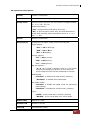
PD operations description:
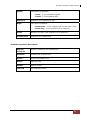
Set Free disk
Make the selected hard drive to be free for use.
Set Global
spare
Set the selected hard drive to global spare of all RGs.
Set Dedicated
spares
Set hard drive to dedicated spare of selected RGs.
Upgrade
Upgrade hard drive firmware.
Disk Scrub
Scrub the hard drive.
Turn on/off
the indication
LED
Turn on the indication LED of the hard drive. Click again to
turn off.
More
information
Show hard drive detail information.
5.4.2 RAID Group
“RAID group” can view the status of each RAID group, create, and modify RAID groups. The
following is an example to create a RG.
Step 1: Click “Create”, enter “Name”, choose “RAID level”, click “Select PD” to
select PD, assign the RG’s “Preferred owner”. Then click “OK”. The “Write Cache”
option is to enable or disable the hard drives’ write cache option. The “Standby” option
is to enable or disable the hard drives’ auto spindown function, when this option is
enabled and hard drives have no access after certain period of time, the hard drives
automatically spin down. The “Readahead” option is to enable or disable the read
ahead function. The “Command queuing” option is to enable or disable the hard
drives’ command queue function.
User Manual
67
iSCSI GbE to SAS/SATA II RAID Subsystem
Step 2: Confirm page. Click “OK” if all setups are correct.
There is a RAID 0 with 4 physical disks, named “RG-R0”. The second RAID group is a
RAID 5 with 3 physical disks, named “RG-R5”
Step 3: Done. View “RAID group” page.
RG column description:
The button includes the function which can be executed.
68
Name
RAID group name.
Total(GB)(MB)
Total capacity of this RAID group. This unit can be
displayed in GB or MB.
Free(GB)(MB)
Free capacity of this RAID group. This unit can be displayed
in GB or MB.
#PD
The number of physical disks in RAID group.
User Manual
iSCSI GbE to SAS/SATA II RAID Subsystem
#VD
The number of virtual disks in RAID group.
Status
The status of RAID group.
“Online” Æ the RAID group is online.
“Offline” Æ the RAID group is offline.
“Rebuild” Æ the RAID group is being rebuilt.
“Migrate” Æ the RAID group is being migrated.
“Scrubbing” Æ the RAID group is being scrubbed.
Health
The health of RAID group.
“Good” Æ the RAID group is good.
“Failed” Æ the hard drive is failed.
“Degraded” Æ the RAID group is not completed. The
reason could be lack of one disk or disk failure.
RAID
The RAID level of the RAID group.
Current
Owner
The owner of the RAID group. The default owner is
controller 1.
Preferred
owner
The preferred owner of the RAID group. The default owner
is controller 1.
RG operations description:
Create
Create a RAID group.
Migrate
Migrate a RAID group. Please refer to next chapter for more
detail.
Activate
Activate a RAID group; it can be executed when RG status
is offline. This is for online roaming purpose.
Deactivate
Deactivate a RAID group; it can be executed when RG
status is online. This is for online roaming purpose.
Parity check
Regenerate parity for the RAID group. It supports RAID 3 /
5 / 6 / 30 / 50 / 60.
Delete
Delete a RAID group.
Set preferred
owner
Set the RG ownership to the other controller.
Set disk
property
Change the disk status of write cache and standby.
Write Cache options:
“Enabled” Æ Enable disk write cache.
“Disabled” Æ Disable disk write cache.
User Manual
69
iSCSI GbE to SAS/SATA II RAID Subsystem
Standby options:
“Disabled” Æ Disable spindown.
“30 sec / 1 min / 5 min / 30 min” Æ Enable hard drive
auto spindown to save power in the period of time.
Read ahead:
“Enabled” Æ Enable disk read ahead. (Default)
“Disabled” Æ Disable disk read ahead.
Command queuing:
“Enabled” Æ Enable disk command queue. (Default)
“Disabled” Æ Disable disk command queue.
More
information
Show RAID group detail information.
5.4.3 Virtual Disk
“Virtual disk” can view the status of each Virtual disk, create, and modify virtual disks.
The following is an example to create a VD.
Step 1: Click “Create”, enter “Name”, select RAID group from “RG name”, enter
required “Capacity (GB)/(MB)”, change “Stripe height (KB)”, change “Block size
(B)”, change “Read/Write” mode, set virtual disk “Priority”, select “Bg rate”
(Background task priority), and change “Readahead” option if necessary. “Erase”
option will wipe out old data in VD to prevent that OS recognizes the old partition. There
are three options in “Erase”: None (default), erase first 1GB or full disk. Last, select
“Type” mode for normal or clone usage. Then click “OK”.
70
User Manual
iSCSI GbE to SAS/SATA II RAID Subsystem
Step 2: Confirm page. Click “OK” if all setups are correct.
Create a VD named “VD-01”, from “RG-R0”. The second VD is named “VD-02”, it’s
initializing.
Step 3: Done. View “Virtual disk” page.
VD column description:
The button includes the functions which can be executed.
Name
Virtual disk name.
Size (GB)
(MB)
Total capacity of the virtual disk. The unit can be displayed
in GB or MB.
Write
The right of virtual disk:
Priority
Bg rate
x
“WT” Æ Write Through.
x
“WB” Æ Write Back.
x
“RO” Æ Read Only.
The priority of virtual disk:
x
“HI” Æ HIgh priority.
x
“MD” Æ MiDdle priority.
x
“LO” Æ LOw priority.
Background task priority:
x
Status
“4 / 3 / 2 / 1 / 0” Æ Default value is 4. The higher
number the background priority of a VD is, the more
background I/O will be scheduled to execute.
The status of virtual disk:
x
“Online” Æ The virtual disk is online.
x
“Offline” Æ The virtual disk is offline.
x
“Initiating” Æ The virtual disk is being initialized.
User Manual
71
iSCSI GbE to SAS/SATA II RAID Subsystem
Type
72
x
“Rebuild” Æ The virtual disk is being rebuilt.
x
“Migrate” Æ The virtual disk is being migrated.
x
“Rollback” Æ The virtual disk is being rolled back.
x
“Parity checking” Æ The virtual disk is being parity
check.
The type of virtual disk:
x
“RAID” Æ the virtual disk is normal.
x
“BACKUP” Æ the virtual disk is for clone usage.
Clone
The target name of virtual disk.
Schedule
The clone schedule of virtual disk.
Health
The health of virtual disk:
x
“Optimal” Æ the virtual disk is working well and
there is no failed disk in the RG.
x
“Degraded” Æ At least one disk from the RG of the
Virtual disk is failed or plugged out.
x
“Failed” Æ the RAID group disk of the VD has single
or multiple failed disks than its RAID level can recover
from data loss.
x
“Partially optimal” Æ the virtual
experienced recoverable read errors.
disk
has
R%
Ratio (%) of initializing or rebuilding.
RAID
RAID level.
#LUN
Number of LUN(s) that virtual disk is attached to.
Snapshot
(GB) (MB)
The virtual disk size that is used for snapshot. The number
means “Used snapshot space” / “Total snapshot
space”. The unit can be displayed in GB or MB.
#Snapshot
Number of snapshot(s) that have been taken.
RG name
The RG name of the virtual disk
User Manual
iSCSI GbE to SAS/SATA II RAID Subsystem
VD operations description:
Create
Create a virtual disk.
Extend
Extend a Virtual disk capacity.
Parity check
Execute parity check for the virtual disk. It supports RAID
3 / 5 / 6 / 30 / 50 / 60.
Regenerate parity:
“Yes” Æ Regenerate RAID parity and write.
“No” Æ Execute parity check only and find mismatches.
It will stop checking when mismatches count to 1 / 10 /
20 / … / 100.
Delete
Delete a Virtual disk.
Set property
Change the VD name, Right, Priority and Bg rate.
Right options:
“WT” Æ Write Through.
“WB” Æ Write Back.
“RO” Æ Read Only.
Priority options:
“HI” Æ HIgh priority.
“MD” Æ MiD priority.
“LO” Æ LOw priority.
Bg rate options:
“4 / 3 / 2 / 1 / 0” Æ Default value is 4. The higher
number the background priority of a VD has, the
more background I/O will be scheduled to execute.
Read ahead:
“Enabled” Æ Enable disk read ahead. (Default)
“Disabled” Æ Disable disk read ahead.
AV-media mode:
x
“Enabled” Æ Enable AV-media mode for optimizing
video editing.
x
“Disabled” Æ Disable AV-media mode. (Default)
Type:
x
“RAID” Æ the virtual disk is normal. (Default)
“Backup” Æ the virtual disk is for clone usage.
Attach LUN
Attach to a LUN.
Detach LUN
Detach to a LUN.
List LUN
List attached LUN(s).
User Manual
73
iSCSI GbE to SAS/SATA II RAID Subsystem
74
Set clone
Set the target virtual disk for clone.
Clear clone
Clear clone function.
Start clone
Start clone function.
Stop clone
Stop clone function.
Schedule clone
Set clone function by schedule.
Set snapshot
space
Set snapshot space for executing snapshot. Please refer
to next chapter for more detail.
Cleanup
snapshot
Clean all snapshot VD related to the Virtual disk and
release snapshot space.
Take snapshot
Take a snapshot on the Virtual disk.
Auto snapshot
Set auto snapshot on the Virtual disk.
List snapshot
List all snapshot VD related to the Virtual disk.
More
information
Show Virtual disk detail information.
User Manual
iSCSI GbE to SAS/SATA II RAID Subsystem
5.4.4 Snapshot
“Snapshot” can view the status of snapshot, create and modify snapshots. Please
refer to next chapter for more detail about snapshot concept. The following is an
example to take a snapshot.
Step 1: Create snapshot space. In “/ Volume configuration / Virtual disk”, move
the mouse pointer to the gray button next to the VD number; click “Set snapshot
space”.
Step 2: Set snapshot space. Then click “OK”. The snapshot space is created.
“VD-01” snapshot space has been created, snapshot space is 15GB, and used 1GB for
saving snapshot index.
Step 3: Take a snapshot. In “/ Volume configuration / Snapshot”, click “Take
snapshot”. It will link to next page. Enter a snapshot name.
User Manual
75
iSCSI GbE to SAS/SATA II RAID Subsystem
Step 4: Expose the snapshot VD. Check the gray button next to the Snapshot VD
number; click “Expose”. Enter a capacity for snapshot VD. If size is zero, the exported
snapshot VD will be read only. Otherwise, the exported snapshot VD can be read /
written, and the size will be the maximum capacity to read/write.
This is the list of snapshots in “VD-01”. There are two snapshots in “VD-01”. Snapshot
VD “SnapVD-01” is exported as read only, “SnapVD-02” is exported as read/write.
Step 5: Attach a LUN for snapshot VD. Please refer to the next section for attaching a
LUN.
Step 6: Done. Snapshot VD can be used.
Snapshot column description:
The button includes the functions which can be executed.
76
Name
Snapshot VD name.
Used (GB)
(MB)
The amount of snapshot space that has been used. The unit
can be displayed in GB or MB.
Status
The status of snapshot:
User Manual
x
“N/A” Æ The snapshot is normal.
x
“Replicated” Æ The snapshot is for clone or QReplica
usage.
x
“Abort” Æ The snapshot is over space and abort.
iSCSI GbE to SAS/SATA II RAID Subsystem
Health
The health of snapshot:
x
“Good” Æ The snapshot is good.
x
“Failed” Æ The snapshot fails.
Exposure
Snapshot VD is exposed or not.
Right
The right of snapshot:
x
“Read-write” Æ The snapshot VD can be read / write.
x
“Read-only” Æ The snapshot VD is read only.
#LUN
Number of LUN(s) that snapshot VD is attached.
Created time
Snapshot VD created time.
Snapshot operation description:
Expose/
Unexpose
Expose / unexpose the snapshot VD.
Rollback
Rollback the snapshot VD.
Delete
Delete the snapshot VD.
Attach
Attach a LUN.
Detach
Detach a LUN.
List LUN
List attached LUN(s).
User Manual
77
iSCSI GbE to SAS/SATA II RAID Subsystem
5.4.5 Logical Unit
“Logical unit” can view, create, and modify the status of attached logical unit number(s)
of each VD.
User can attach LUN by clicking the “Attach”. “Host” must enter with an iSCSI node
name for access control, or fill-in wildcard “*”, which means every host can access the
volume. Choose LUN number and permission, and then click “OK”.
VD-01 is attached to LUN 0 and every host can access. VD-02 is attached to LUN 1 and
only initiator node which is named “iqn.1991-05.com.microsoft:win-r6qrvqjd5m7” can
access.
LUN operations description:
Attach
Attach a logical unit number to a Virtual disk.
Detach
Detach a logical unit number from a Virtual disk.
The matching rules of access control are inspected from top to bottom in sequence. For
example: there are 2 rules for the same VD, one is “*”, LUN 0; and the other is
“iqn.host1”, LUN 1. The other host “iqn.host2” can login successfully because it
matches rule 1.
The access will be denied when there is no matching rule.
78
User Manual
iSCSI GbE to SAS/SATA II RAID Subsystem
5.4.6 Example
The following is an example for creating volumes. Example 1 is to create two VDs and
set a global spare disk.
Example 1
Example 1 is to create two VDs in one RG, each VD uses global cache volume. Global
cache volume is created after system boots up automatically. So, no action is needed
to set CV. Then set a global spare disk. Eventually, delete all of them.
Step 1: Create RG (RAID group).
To create the RAID group, please follow these steps:
1.
Select “/ Volume configuration / RAID group”.
2.
Click “Create”.
3.
Input an RG Name, choose a RAID level from the list, click “Select PD” to
choose the RAID PD slot(s), then click “OK”.
4.
Check the outcome. Click “OK” if all setups are correct.
User Manual
79
iSCSI GbE to SAS/SATA II RAID Subsystem
5.
Done. An RG has been created.
A RAID 5 RG named “RG-R5” with 3 physical disks is created. The total size is 152GB.
Because there is no related VD, free size still remains 152GB.
Step 2: Create VD (Virtual disk).
To create a data user volume, please follow these steps.
1.
Select “/ Volume configuration / Virtual disk”.
2.
Click “Create”.
3.
Input a VD name, choose the RG when VD will be created, enter the VD
capacity, select the stripe height, block size, read/write mode, set priority,
modify Bg rate if necessary, and finally click “OK”.
4.
80
Done. A VD has been created.
User Manual
iSCSI GbE to SAS/SATA II RAID Subsystem
5.
Repeat steps 1 to 4 to create another VD.
Two VDs, “VD-R5-1” and “VD-R5-2”, were created from RG “RG-R5”. The size of “VDR5-1” is 50GB, and the size of “VD-R5-2” is 64GB. There is no LUN attached.
Step 3: Attach LUN to VD.
There are 2 methods to attach LUN to VD.
1.
In “/ Volume configuration / Virtual disk”, move the mouse pointer to the
gray button next to the VD number; click “Attach LUN”.
2.
In “/ Volume configuration / Logical unit”, click “Attach”.
The steps are as follows:
1.
Select a VD.
2.
Input “Host” name, which is a FC node name for access control, or fill-in
wildcard “*”, which means every host can access to this volume. Choose LUN
and permission, and then click “OK”.
3.
Done.
VD-R5-1 is attached to LUN 0. VD-R5-2 is attached LUN 1.
NOTE: The matching rules of access control are from top to bottom
in sequence.
User Manual
81
iSCSI GbE to SAS/SATA II RAID Subsystem
Step 4: Set global spare disk.
To set global spare disks, please follow the procedures.
1.
Select “/ Volume configuration / Physical disk”.
2.
Check the gray button next to the PD slot; click “Set Global spare”.
3.
“Global spare” icon is shown in “Usage” column.
Slot 4 is set as global spare disk (GS).
Step 5: Done. LUNs can be used as disks.
To delete VDs, RG, please follow the steps listed below.
Step 6: Detach LUN from VD.
In “/ Volume configuration / Logical unit”,
1.
Check the gray button next to the LUN; click “Detach”. There will pop up a
confirmation page.
2.
Choose “OK”.
3.
Done.
Step 7: Delete VD (Virtual disk).
To delete the Virtual disk, please follow the procedures:
1.
Select “/ Volume configuration / Virtual disk”.
2.
Check the gray button next to the VD number; click “Delete”. There will pop
up a confirmation page, click “OK”.
82
User Manual
iSCSI GbE to SAS/SATA II RAID Subsystem
3.
Done. Then, the VDs are deleted.
NOTE: When deleting VD, the attached LUN(s) related to this VD
will be detached automatically.
Step 8: Delete RG (RAID group).
To delete the RAID group, please follow the procedures:
1.
Select “/ Volume configuration / RAID group”.
2.
Select a RG which is no VD related on this RG, otherwise the VD(s) on this RG
must be deleted first.
3.
Check the gray button next to the RG number click “Delete”.
4.
There will pop up a confirmation page, click “OK”.
5.
Done. The RG has been deleted.
NOTE: The action of deleting one RG will succeed only when all of
the related VD(s) are deleted in this RG. Otherwise, it will have an
error when deleting this RG.
Step 9: Free global spare disk.
To free global spare disks, please follow the procedures.
1.
Select “/ Volume configuration / Physical disk”.
2.
Check the gray button next to the PD slot; click “Set Free disk”.
Step 10: Done, all volumes have been deleted.
User Manual
83
iSCSI GbE to SAS/SATA II RAID Subsystem
5.5 Enclosure Management
“Enclosure management” allows managing enclosure information including “SES
configuration”, “Hardware monitor”, “S.M.A.R.T.” and “UPS”. For the enclosure
management, there are many sensors for different purposes, such as temperature
sensors, voltage sensors, hard disks, fan sensors, power sensors, and LED status. Due
to the different hardware characteristics among these sensors, they have different
polling intervals. Below are the details of polling time intervals:
1.
Temperature sensors: 1 minute.
2.
Voltage sensors: 1 minute.
3.
Hard disk sensors: 10 minutes.
4.
Fan sensors: 10 seconds . When there are 3 errors consecutively, controller
sends ERROR event log.
5.
Power sensors: 10 seconds, when there are 3 errors consecutively, controller
sends ERROR event log.
6.
LED status: 10 seconds.
5.5.1 Hardware Monitor
“Hardware monitor” can view the information of current voltages and temperatures.
84
User Manual
iSCSI GbE to SAS/SATA II RAID Subsystem
User Manual
85
iSCSI GbE to SAS/SATA II RAID Subsystem
If “Auto shutdown” has been checked, the system will shutdown automatically when
voltage or temperature is out of the normal range. For better data protection, please
check “Auto Shutdown”.
For better protection and avoiding single short period of high temperature triggering
auto shutdown, the RAID controller evaluates multiple conditions for triggering auto
shutdown. Below are the details of when the Auto shutdown will be triggered.
1.
2.
3.
There are several sensors placed on systems for temperature checking.
System will check each sensor for every 30 seconds. When one of these
sensor is over high temperature threshold for continuous 3 minutes, auto
shutdown will be triggered immediately.
The core processor temperature limit is 80℃. The iSCSI NIC temperature limit
is 65℃. The SAS expandor and SAS controller temperature limit is 65℃.
If the high temperature situation doesn’t last for 3 minutes, system will not
trigger auto shutdown.
5.5.2 UPS
“UPS” is used to set up UPS (Uninterruptible Power Supply).
Currently, the system only supports and communicates with APC (American Power
Conversion
Corp.)
smart
UPS.
Please
review
the
details
from
the
website:
http://www.apc.com/.
First, connect the system and APC UPS via RS-232 for communication. Then set up the
shutdown values (shutdown battery level %) when power is failed. UPS in other
companies can work well, but they have no such communication feature with the
system.
86
User Manual
iSCSI GbE to SAS/SATA II RAID Subsystem
UPS Type
Select UPS Type. Choose Smart-UPS for APC, None for
other vendors or no UPS.
Shutdown
Battery Level
(%)
When below the setting level, system will shutdown.
Setting level to “0” will disable UPS.
Shutdown
Delay (s)
If power failure occurred, and system cannot return to
value setting status, the system will shutdown. Setting
delay to “0” will disable the function.
Shutdown
UPS
Select ON, when power is gone, UPS will shut down by
itself after the system shutdown successfully. After power
comes back, UPS will start working and notify system to
boot up. OFF will not.
Status
The status of UPS.
“Detecting…”
“Running”
“Unable to detect UPS”
“Communication lost”
“UPS reboot in progress”
“UPS shutdown in progress”
“Batteries failed. Please change them NOW!”
Battery Level
(%)
Current percentage of battery level.
User Manual
87
iSCSI GbE to SAS/SATA II RAID Subsystem
5.5.3 SES
SES represents SCSI Enclosure Services, one of the enclosure management standards.
“SES configuration” can enable or disable the management of SES.
Enable SES in LUN 0, and can be accessed from every host
The SES client software is available at the following web site:
SANtools: http://www.santools.com/
5.5.4 Hard Drive S.M.A.R.T. Support
S.M.A.R.T. (Self-Monitoring Analysis and Reporting Technology) is a diagnostic tool
for hard drives to deliver warning of drive failures in advance. S.M.A.R.T. provides
users chances to take actions before possible drive failure.
S.M.A.R.T. measures many attributes of the hard drive all the time and inspects the
properties of hard drives which are close to be out of tolerance. The advanced notice of
possible hard drive failure can allow users to back up hard drive or replace the hard
drive. This is much better than hard drive crash when it is writing data or rebuilding a
failed hard drive.
“S.M.A.R.T.” can display S.M.A.R.T. information of hard drives. The number is the
current value; the number in parenthesis is the threshold value. The threshold values
of hard drive vendors are different; please refer to vendors’ specification for details.
S.M.A.R.T. only supports SATA drive. SAS drive does not have. It will show N/A in this
web page.
88
User Manual
iSCSI GbE to SAS/SATA II RAID Subsystem
User Manual
89
iSCSI GbE to SAS/SATA II RAID Subsystem
5.6 System Maintenance
“Maintenance” allows the operations of system functions which include “System
information” to show the system version and details, “Event log” to view system
event logs to record critical events, “Upgrade” to the latest firmware, “Firmware
synchronization” to synchronized firmware versions on both controllers, “Reset to
factory default” to reset all controller configuration values to factory settings, “Import
and export” to import and export all controller configuration to a file, and “Reboot and
shutdown” to reboot or shutdown the system.
5.6.1 System Information
“System information” can display system information, including CPU type, installed
system memory, firmware version, serial numbers of dual controllers, backplane ID, and
system status.
Status description:
Normal
Dual controllers are in normal stage.
Degraded
One controller fails or has been plugged out..
Lockdown
The firmware of two controllers is different or the size of
memory of two controllers is different.
Single
Single controller mode.
90
User Manual
iSCSI GbE to SAS/SATA II RAID Subsystem
5.6.2 Event Log
“Event log” can view the event messages. Check the checkbox of INFO, WARNING, and
ERROR to choose the level of event log display. Click “Download” button to save the
whole event log as a text file with file name “log-ModelName-SerialNumber-DateTime.txt”. Click “Clear” button to clear all event logs. Click “Mute” button to stop alarm
if system alerts.
The event log is displayed in reverse order which means the latest event log is on the
first page. The event logs are actually saved in the first four hard drives; each hard
drive has one copy of event log. For one controller, there are four copies of event logs
to make sure users can check event log any time when there is/are failed disk(s).
NOTE: Please plug-in any of the first four hard drives, then event
logs can be saved and displayed in next system boot up. Otherwise,
the event logs would disappear.
User Manual
91
iSCSI GbE to SAS/SATA II RAID Subsystem
5.6.3 Upgrade
“Upgrade” can upgrade firmware. Please prepare new firmware file named “xxxx.bin”
in local hard drive, then click “Browse” to select the file. Click “Confirm”, it will pop up
a message “Upgrade system now? If you want to downgrade to the previous FW later
(not recommend), please export your system configuration in advance”, click “Cancel”
to export system configuration in advance, then click “OK” to start to upgrade firmware.
When upgrading, there is a progress bar running. After finished upgrading, the system
must reboot manually to make the new firmware took effect.
NOTE: Please contact your vendor for the latest firmware.
92
User Manual
iSCSI GbE to SAS/SATA II RAID Subsystem
5.6.4 Firmware Synchronization
“Firmware synchronization” can synchronize the firmware version when controller 1
and controller 2’s firmware are different. It will upgrade the firmware of slave controller
to master ones no matter what the firmware version of slave controller is newer or older
than master. In normal status, the firmware versions in controller 1 and 2 are the same
as below figure.
5.6.5 Reset to Factory Default
“Reset to factory default” allows user to reset controller to factory default setting.
Reset to default value, the password is: 00000000, and IP address to default DHCP.
User Manual
93
iSCSI GbE to SAS/SATA II RAID Subsystem
5.6.6 Import and Export
“Import and export” allows user to save system configuration values: export, and
apply all configuration: import. For the volume configuration setting, the values are
available in export and not available in import which can avoid confliction / date-deleting
between two controllers which mean if one system already has valuable volumes in the
disks and user may forget and overwrite it. Use import could return to original
configuration. If the volume setting was also imported, user’s current volumes will be
overwritten with different configuration.
1.
2.
Import: Import all system configurations excluding volume configuration.
Export: Export all configurations to a file.
WARNING: “Import” will import all system configurations
excluding volume configuration; the current configurations will be
replaced.
5.6.7 Reboot and Shutdown
“Reboot and shutdown” displays “Reboot” and “Shutdown” buttons. Before
power off, it’s better to execute “Shutdown” to flush the data from cache to physical
disks. The step is necessary for data protection.
94
User Manual
iSCSI GbE to SAS/SATA II RAID Subsystem
5.7 Home/Logout/Mute
In the right-upper corner of web UI, there are 3 individual icons, “Home”, “Logout”,
and “Mute”.
5.7.1 Home
Click “Home” to return to home page
5.7.2 Logout
For security reason, please use “Logout” to exit the web UI. To re-login the system,
please enter username and password again.
5.7.3 Mute
Click “Mute” to stop the alarm when error occurs.
User Manual
95
iSCSI GbE to SAS/SATA II RAID Subsystem
Chapter 6 Advanced Operations
6.1 Volume Rebuild
If one physical disk from a RG, which is set to a protected RAID level (e.g. RAID 3,
RAID 5, or RAID 6), failed or has been unplugged/removed, the status of RG is
changed to degraded mode. The system will search/detect spare disk to rebuild the
degraded RG to become normal/complete. It will detect dedicated spare disk as rebuild
disk first, then global spare disk.
The iSCSI RAID subsystem supports Auto-Rebuild. The following is the scenario:
Take RAID 6 for example:
1.
When there is no global spare disk or dedicated spare disk in the system,
controller will be in degraded mode and wait until (A) there is one disk
assigned as spare disk, or (B) the failed disk is removed and replaced with
new clean disk, then the Auto-Rebuild starts. The new disk will be a spare disk
to the original RG automatically.
If the new added disk is not clean (with other RG information), it would be
marked as RS (reserved) and the system will not start "auto-rebuild".
If this disk is not belonging to any existing RG, it would be FR (Free) disk and
the system will start Auto-Rebuild.
If user only removes the failed disk and plugs the same failed disk in the same
slot again, the auto-rebuild will start running. But rebuilding in the same failed
disk may impact customer data if the status of disk is unstable. It is
recommended for users not to rebuild in the failed disk for better data
protection.
2.
When there is enough global spare disk(s) or dedicated spare disk(s) for the
degraded array, the system starts Auto-Rebuild immediately. And in RAID 6, if
another disk failure occurs during rebuilding, the system will start the above
Auto-Rebuild process as well. Auto-Rebuild feature only works when the status
of RG is "Online". It will not work at “Offline” status. Thus, it will not conflict
with the “Roaming”.
3.
In degraded mode, the status of RG is “Degraded”. When rebuilding, the
status of RG/VD will be “Rebuild”, the column “R%” in VD will display the
ratio in percentage. After completing the rebuilding process, the status will
become “Online”. RG will become complete or normal.
96
User Manual
iSCSI GbE to SAS/SATA II RAID Subsystem
NOTE: “Set dedicated spare” is not available if there is no RG, or if
RG is set to RAID 0 or JBOD, because user can not set dedicated
spare disk to RAID 0 & JBOD.
Sometimes, rebuild is called recover; they are the same meaning. The following table
is the relationship between RAID levels and rebuild.
RAID 0
Disk striping. No protection for data. RG fails if any hard drive
fails or unplugs.
RAID 1
Disk mirroring over 2 disks. RAID 1 allows one hard drive fails or
unplugging. Need one new hard drive to insert to the system and
rebuild to be completed.
N-way
mirror
Extension to RAID 1 level. It has N copies of the disk. N-way
mirror allows N-1 hard drives failure or unplugging.
RAID 3
Striping with parity on the dedicated disk. RAID 3 allows one
hard drive failure or unplugging.
RAID 5
Striping with interspersed parity over the member disks. RAID 5
allows one hard drive failure or unplugging.
RAID 6
2-dimensional parity protection over the member disks. RAID 6
allows two hard drives failure or unplugging. If it needs to rebuild
two hard drives at the same time, it will rebuild the first one,
then the other in sequence.
RAID 0+1
Mirroring of RAID 0 volumes. RAID 0+1 allows two hard drive
failures or unplugging, but at the same array.
RAID 10
Striping over the member of RAID 1 volumes. RAID 10 allows
two hard drive failure or unplugging, but in different arrays.
RAID 30
Striping over the member of RAID 3 volumes. RAID 30 allows
two hard drive failure or unplugging, but in different arrays.
RAID 50
Striping over the member of RAID 5 volumes. RAID 50 allows
two hard drive failures or unplugging, but in different arrays.
RAID 60
Striping over the member of RAID 6 volumes. RAID 40 allows
four hard drive failures or unplugging, every two in different
arrays.
JBOD
The abbreviation of “Just a Bunch Of Disks”. No data protection.
RG fails if any hard drive failures or unplugs.
User Manual
97
iSCSI GbE to SAS/SATA II RAID Subsystem
6.2 RG Migration
To do migration, the total size of RG must be larger or equal to the original RG. It does
not allow expanding the same RAID level with the same hard disks of original RG. Take
examples as following.
The below operations are not allowed when a RG is being migrated. System would reject
these operations:
1.
2.
3.
4.
5.
6.
7.
8.
9.
10.
11.
12.
Add dedicated spare.
Remove a dedicated spare.
Create a new VD.
Delete a VD.
Extend a VD.
Scrub a VD.
Perform another migration operation.
Scrub entire RG.
Take a snapshot.
Delete a snapshot.
Expose a snapshot.
Rollback to a snapshot.
IMPORTANT! RG Migration cannot be executed during rebuild or
VD extension.
98
User Manual
iSCSI GbE to SAS/SATA II RAID Subsystem
To migrate the RAID level, please follow below procedures.
1.
2.
3.
Select “/ Volume configuration / RAID group”.
Check the gray button next to the RG number; click “Migrate”.
Change the RAID level by clicking the down arrow to “RAID 5”. There will be a
pup-up which indicates that HDD is not enough to support the new setting of RAID
level, click “Select PD” to increase hard drives, then click “OK“ to go back to setup
page. When doing migration to lower RAID level, such as the original RAID level is
RAID 6 and user wants to migrate to RAID 0, system will evaluate whether this
operation is safe or not, and appear a warning message of "Sure to migrate to a
lower protection array?”.
4.
Double check the setting of RAID level and RAID PD slot. If there is no problem,
click “OK“.
Finally a confirmation page shows the detail of RAID information. If there is no
problem, click “OK” to start migration. System also pops up a message of
“Warning: power lost during migration may cause damage of data!” to give
user warning. When the power is abnormally off during the migration, the data is in
high risk.
Migration starts and it can be seen from the “status” of a RG with “Migrating”. In
“/ Volume configuration / Virtual disk”, it displays a “Migrating” in “Status”
and complete percentage of migration in “R%”.
5.
6.
A RAID 0 with 3 physical disks migrates to RAID 5 with 4 physical disks.
User Manual
99
iSCSI GbE to SAS/SATA II RAID Subsystem
6.3 VD Extension
To extend VD size, please follow the procedures.
1.
2.
3.
Select “/ Volume configuration / Virtual disk”.
Check the gray button next to the VD number; click “Extend”.
Change the size. The size must be larger than the original, and then click “OK” to
start extension.
4.
Extension starts. If VD needs initialization, it will display an “Initiating” in
“Status” and complete percentage of initialization in “R%”.
NOTE: The size of VD extension must be larger than original.
IMPORTANT! VD Extension cannot be executed during rebuild or
migration.
100
User Manual
iSCSI GbE to SAS/SATA II RAID Subsystem
6.4 Snapshot / Rollback
Snapshot-on-the-box captures the instant state of data in the target volume in a
logical sense. The underlying logic is Copy-on-Write -- moving out the data which
would be written to certain location where a write action occurs since the time of data
capture. The certain location, named as “Snap VD”, is essentially a new VD.which can
be attached to a LUN provisioned to a host as a disk like other ordinary VDs in the
system. Rollback restores the data back to the state of any time which was previously
captured in case for any unfortunate reason it might be (e.g. virus attack, data
corruption, human errors and so on). Snap VD is allocated within the same RG in which
the snapshot is taken, we suggest to reserve 20% of RG size or more for snapshot
space. Please refer to the figure below for the snapshot concept.
IMPORTANT! Snapshot / rollback features need at least 1 GB
controller cache RAM. Please also refer to RAM certification list in
Appendix A.
User Manual
101
iSCSI GbE to SAS/SATA II RAID Subsystem
6.4.1 Create Snapshot Volume
To take a snapshot of the data, please follow the procedures.
1.
Select “/ Volume configuration / Virtual disk”.
2.
Move the mouse pointer to the gray button next to the VD number; click “Set
snapshot space”.
3.
Set up the size for snapshot. The minimum size is suggested to be 20% of VD
size, then click “OK“. It will go back to the VD page and the size will show in
snapshot column. It may not be the same as the number entered because
some size is reserved for snapshot internal usage. There will be 2 numbers in
“Snapshot (MB)” column. These numbers are “Used snapshot space” and
“Total snapshot space”.
4.
There are two methods to take snapshot. In “/ Volume configuration /
Virtual disk”, move the mouse pointer to the gray button next to the VD
number; click “Take snapshot”. Or in “/ Volume configuration /
Snapshot”, click “Take snapshot”.
5.
Enter a snapshot name, then click “OK”. A snapshot VD is created.
6.
Select “/ Volume configuration / Snapshot” to display all snapshot VDs
related to the VD
7.
Move the mouse pointer to the gray button next to the Snapshot VD number;
click “Expose”. Enter a capacity for snapshot VD. If size is zero, the exposed
snapshot VD will be read only. Otherwise, the exposed snapshot VD can be
read / written, and the size will be the maximum capacity to read/write.
8.
Attach a LUN for snapshot VD. Please refer to the previous chapter for
attaching a LUN.
9.
102
Done. It can be used as a disk.
User Manual
iSCSI GbE to SAS/SATA II RAID Subsystem
This is the snapshot list of “VD-01”. There are two snapshots. Snapshot VD “SnapVD01” is exposed as read-only, “SnapVD-02” is exposed as read-write.
10. There are two methods to clean all snapshots. In “/ Volume configuration /
Virtual disk”, move the mouse pointer to the gray button next to the VD
number; click “Cleanup snapshot”. Or in “/ Volume configuration /
Snapshot”, click “Cleanup”.
11. “Cleanup snapshot” will delete all snapshots related to the VD and release
snapshot space.
6.4.2 Auto Snapshot
The snapshot copies can be taken manually or by schedule such as hourly or daily.
Please follow the procedures.
1.
There are two methods to set auto snapshot. In “/ Volume configuration /
Virtual disk”, move the mouse pointer to the gray button next to the VD
number; click “Auto snapshot”. Or in “/ Volume configuration /
Snapshot”, click “Auto snapshot”.
2.
The auto snapshot can be set monthly, weekly, daily, or hourly.
3.
Done. It will take snapshots automatically.
User Manual
103
iSCSI GbE to SAS/SATA II RAID Subsystem
It will take snapshots every month, and keep the last 32 snapshot copies.
NOTE: Daily snapshot will be taken every 00:00. Weekly snapshot
will be taken every Sunday 00:00. Monthly snapshot will be taken
every first day of month 00:00.
6.4.3 Rollback
The data in snapshot VD can rollback to original VD. Please follow the steps.
1.
Select “/ Volume configuration / Snapshot”.
2.
Mouse moves to the gray button next to the Snap VD number which user
wants to rollback the data; click “Rollback”.
3.
Done, the data in snapshot VD will rollback to original VD.
Rollback has some constraints as described in the following:
1.
Minimum RAM size required for enabling rollback is 1GB.
2.
When making a rollback, the original VD cannot be accessed for a while. At the
same time, the system connects to original VD and snapshot VD, and then
starts rollback.
104
User Manual
iSCSI GbE to SAS/SATA II RAID Subsystem
3.
During rollback, data from snapshot VD to original VD, the original VD can be
accessed and the data in VD just like it has finished rollback. At the same time,
the other related snap VD(s) cannot be accessed.
4.
After rollback, the other snapshot VD(s) after the VD which is doing rollback
will be deleted.
IMPORTANT! Before executing rollback, it is better to dismount the
file system for flushing data from cache to disks in OS first. System
sends pop-up message when user executes rollback function.
6.5 Disk Roaming
Physical disks can be re-sequenced in the same system or move all physical disks from
system-1 to system-2. This is called disk roaming. System can execute disk roaming
online. Please follow these steps:
1.
Select “/ Volume configuration / RAID group”.
2.
Check the gray button next to the RG number; click “Deactivate”.
3.
Move all PDs related to the RG to another system.
4.
In the web GUI of the other system, check the gray button next to the RG
number; click “Activate”.
5.
Done.
Disk roaming has some constraints as described in the following:
1.
Check the firmware of two systems first. It is better that both systems have
the same firmware version or newer.
2.
All physical disks of related RG should be moved from system-1 to system-2
together. The configuration of both RG and VD will be kept but LUN
configuration will be cleared in order to avoid conflict with system-2.
User Manual
105
iSCSI GbE to SAS/SATA II RAID Subsystem
6.6 VD Clone
The user can use VD clone function to backup data from source VD to target VD, set up
backup schedule, and deploy the clone rules.
The procedures of VD clone are on the following:
1. Copy all data from source VD to target VD at the beginning (full copy).
2. Use snapshot technology to perform the incremental copy afterwards. Please be fully
aware that the incremental copy needs to use snapshot to compare the data
difference. Therefore, the enough snapshot space for VD clone is very important.
The following contents will take an example of a RAID 5 virtual disk (SourceVD_Raid5)
clone to RAID 6 virtual disk (TargetVD_Raid6).
Start VD clone
1.
Create a RAID group (RG) in advance.
2.
Create two virtual disks (VD) “SourceVD_R5” and “TargetVD_R6”. The raid type of
backup target needs to be set as “BACKUP”.
106
User Manual
iSCSI GbE to SAS/SATA II RAID Subsystem
3.
Here are the objects, a Source VD and a Target VD. Before starting clone process, it
needs to deploy the VD Clone rule first. Click “Configuration”.
4.
There are three clone configurations, describe on the following.
x
Snapshot space:
This setting is the ratio of source VD and snapshot space. The default ratio is 2 to 1.
It means when the clone process is starting, the system will automatically use the
free RG space to create a snapshot space which capacity is double the source VD.
x
Threshold: (The setting will be effective after enabling schedule clone)
User Manual
107
iSCSI GbE to SAS/SATA II RAID Subsystem
The threshold setting will monitor the usage amount of snapshot space. When the
used snapshot space achieves its threshold, system will automatically take a clone
snapshot and start VD clone process. The purpose of threshold could prevent the
incremental copy fail immediately when running out of snapshot space.
For example, the default threshold is 50%. The system will check the snapshot
space every hour. When the snapshot space is used over 50%, the system will
synchronize the source VD and target VD automatically. Next time, when the rest
snapshot space has been used 50%, in other words, the total snapshot space has
been used 75%, and the system will synchronize the source VD and target VD again.
Restart the task an hour later if failed: (The setting will be effective after
enabling schedule clone)
x
When running out of snapshot space, the VD clone process will be stopped because
there is no more available snapshot space. If this option has been checked, system
will clear the snapshots of clone in order to release snapshot space automatically,
and the VD clone will restart the task after an hour. This task will start a full copy.
5.
After deploying the VD clone rule, the VD clone process can be started now. Firstly,
Click “Set clone” to set the target VD at the VD name “SourceVD_R5”.
108
User Manual
iSCSI GbE to SAS/SATA II RAID Subsystem
6.
Select the target VD. Then click “Confirm”.
7.
Now, the clone target “TargetVD_R6” has been set.
8.
Click “Start clone”, the clone process will start.
9.
The default setting will create a snapshot space automatically which the capacity is
double size of the VD space. Before starting clone, system will initiate the snapshot
space.
User Manual
109
iSCSI GbE to SAS/SATA II RAID Subsystem
10. After initiating the snapshot space, it will start cloning.
11. Click “Schedule clone” to set up the clone by schedule.
12. There are “Set Clone schedule” and “Clear Clone schedule” in this page. Please
remember that “Threshold” and “Restart the task an hour later if failed”
options in VD configuration will take effect after clone schedule has been set.
110
User Manual
iSCSI GbE to SAS/SATA II RAID Subsystem
Run out of snapshot space while VD clone
While the clone is processing, the increment data of this VD is over the snapshot space.
The clone will complete, but the clone snapshot will fail. Next time, when trying to start
clone, it will get a warning message “This is not enough of snapshot space for the
operation”. At this time, the user needs to clean up the snapshot space in order to
operate the clone process. Each time the clone snapshot failed, it means that the system
loses the reference value of incremental data. So it will start a full copy at next clone
process.
When running out of snapshot space, the flow diagram of VD clone procedure will be like
the following.
User Manual
111
iSCSI GbE to SAS/SATA II RAID Subsystem
6.7 SAS JBOD Expansion
6.7.1 Connecting JBOD
iSCSI RAID controller suports SAS JBOD expansion to connect extra SAS dual JBOD
controller. When connecting a dual JBOD controller which can be detected in RAID
Subsystem management GUI, it will be displayed in “Show PD for:” under “/ Volume
configuration / Physical disk” menu. For example, Local, JBOD 1, JBOD 2, …etc.
Local means disks located in local RAID subsystem, JBOD 1 means disks located in first
JBOD subsystem, and so on. The hard drives in JBOD can be used as local disks.
112
User Manual
iSCSI GbE to SAS/SATA II RAID Subsystem
“/ Enclosure management / Hardware monitor” can display the hardware status of
SAS JBODs.
User Manual
113
iSCSI GbE to SAS/SATA II RAID Subsystem
114
User Manual
iSCSI GbE to SAS/SATA II RAID Subsystem
“/ Enclosure management / S.M.A.R.T.” can display S.M.A.R.T. information of all
PDs, including Local and all SAS JBODs.
SAS JBOD expansion has some constraints as described in the followings:
1
2
3
4
User can create RAID group among multiple chassis/enclosures; the maximum
number of disks in a single RAID group is 32.
Global spare disk can support all RAID groups which can be located in the different
chassis/enclosure.
When support SATA drives for the redundant JBOD model, the SAS-SATA Bridge
board is required. The SATA Dongle board does not apply to this model.
The following table is the maximum JBOD numbers and maximum HDD numbers
with different chassis/enclosures can be cascaded.
RAID Storage
System
JBOD 24 bays no.
Max HDD no.
JBOD 16 bays no.
Max HDD no.
JBOD 12 bays no.
Max HDD no.
Dual controller
+
Dual JBOD
Single controller
+
Single JBOD
24
16
12
24
16
bays
bays
bays
bays
bays
2
2
2
4
4
4
72
64
60
120
112
108
3
3
3
6
6
6
72
64
60
120
112
108
4
4
4
8
8
8
72
64
60
120
112
108
User Manual
12 bays
115
iSCSI GbE to SAS/SATA II RAID Subsystem
6.7.2 Upgrade Firmware of JBOD
To upgrade the firmware of JBOD subsystem, please follow the steps.
1. Please prepare/download the new JBOD firmware file and save in local hard drive.
2. There is a hidden web page for JBOD firmware upgrade. Please login first to
management Web UI as admin, and then add this URL to the browser.
(http://<Management-IP>/jbod_upg.php), for example:
http://192.168.10.50/jbod_upg.php
3. Choose the JBOD which you want to upgrade.
4. Click “Browse” to select the JBOD firmware file previously saved in local hard
drive. Click “Confirm”.
5. After finished upgrading, the system must be rebooted manually to make the new
firmware take effect.
116
User Manual
iSCSI GbE to SAS/SATA II RAID Subsystem
6.8 MPIO and MC/S
These features come from iSCSi initiator. They can be setup from iSCSI initiator to
establish redundant paths for sending I/O from the initiator to the target.
1.
MPIO: In Microsoft Windows server base system, Microsoft MPIO driver allows
initiators to login multiple sessions to the same target and aggregate the duplicate
devices into a single device. Each session to the target can be established using
different NICs, network infrastructure and target ports. If one session fails, then
another session can continue processing I/O without interruption to the application.
2.
MC/S: MC/S (Multiple Connections per Session) is a feature of iSCSI protocol,
which allows combining several connections inside a single session for performance
and failover purposes. In this way, I/O can be sent on any TCP/IP connection to the
target. If one connection fails, another connection can continue processing I/O
without interruption to the application.
User Manual
117
iSCSI GbE to SAS/SATA II RAID Subsystem
Difference:
MC/S is implemented on iSCSI level, while MPIO is implemented on the higher level.
Hence, all MPIO infrastructures are shared among all SCSI transports, including Fiber
Channel, SAS, etc. MPIO is the most common usage across all OS vendors. The primary
difference between these two is which level the redundancy is maintained. MPIO creates
multiple iSCSI sessions with the target storage. Load balance and failover occurs
between the multiple sessions. MC/S creates multiple connections within a single iSCSI
session to manage load balance and failover. Notice that iSCSI connections and sessions
are different than TCP/IP connections and sessions. The above figures describe the
difference between MPIO and MC/S.
There are some considerations when user chooses MC/S or MPIO for multipathing.
1.
2.
3.
4.
If user uses hardware iSCSI off-load HBA, then MPIO is the only one choice.
If user needs to specify different load balance policies for different LUNs, then MPIO
should be used.
If user installs anyone of Windows XP, Windows Vista or Windows 7, MC/S is the
only option since Microsoft MPIO is supported Windows Server editions only.
MC/S can provide higher throughput than MPIO in Windows system, but it
consumes more CPU resources than MPIO.
118
User Manual
iSCSI GbE to SAS/SATA II RAID Subsystem
6.9 Trunking and LACP
Link aggregation is the technique of taking several distinct Ethernet links to let them
appear as a single link. It has a larger bandwidth and provides the fault tolerance ability.
Beside the advantage of wide bandwidth, the I/O traffic remains operating until all
physical links fail. If any link is restored, it will be added to the link group automatically.
The iSCSI subsystem implements link aggregation as LACP and Trunking.
1.
LACP (IEEE 802.3ad): The Link Aggregation Control Protocol (LACP) is a part of
IEEE specification 802.3ad. It allows bundling several physical ports together to
form a single logical channel. A network switch negotiates an automatic bundle by
sending LACP packets to the peer. Theoretically, LACP port can be defined as active
or passive. iSCSI controller implements it as active mode which means that LACP
port sends LACP protocol packets automatically. Please notice that using the same
configurations between iSCSI controller and gigabit switch.
The usage occasion of LACP:
A. It’s necessary to use LACP in a network environment of multiple switches. When
adding new devices, LACP will separate the traffic to each path dynamically.
2.
Trunking (Non-protocol): Defines the usage of multiple iSCSI data ports in
parallel to increase the link speed beyond the limits of any single port.
The usage occasion of Trunking:
A. This is a simple SAN environment. There is only one switch to connect the
server and storage. And there is no extra server to be added in the future.
B. There is no idea of using LACP or Trunking, uses Trunking first.
C. There is a request of monitoring the traffic on a trunk in switch.
User Manual
119
iSCSI GbE to SAS/SATA II RAID Subsystem
IMPORTANT! Before using trunking or LACP, he gigabit switch
must support trunking or LACP and enabled. Otherwise, host
cannot connect the link with storage device.
120
User Manual
iSCSI GbE to SAS/SATA II RAID Subsystem
6.10 Dual Controllers
6.10.1 Perform I/O
Please refer to the following topology and have all the connections ready. To perform I/O
on dual controllers, server/host should setup MPIO. MPIO policy will keep I/O running
and prevent fail connection with single controller failure.
User Manual
121
iSCSI GbE to SAS/SATA II RAID Subsystem
6.10.2 Ownership
When creating RG, it will be assigned with a prefered owner, the default owner is
controller 1. To change the RG ownership, please follow the procedures.
1. Select “/ Volume configuration / RAID group”.
2. Check the gray button next to the RG name; click “Set preferred owner”.
3. The ownership of the RG will be switched to the other controller.
The RG ownership is changed to the other controller.
6.10.3 Controller Status
There are four statuses described on the following. It can be found in “/ System
maintenance / System information”.
1.
Normal: Dual controller mode. Both of controllers are functional.
2.
Degraded: Dual controller mode. When one controller fails or has been plugged out,
the system will turn to degraded. In this stage, I/O will force to write through for
protecting data and the ownership of RG will switch to good one. For example: if
controller 1 which owns the RG1 fails accidently, the ownership of RG1 will be
switched to controller 2 automatically. And the system and data can keep working
well. After controller 1 is fixed or replaced, The current owner of all RGs will be
asigned back to their prefered owner.
122
User Manual
iSCSI GbE to SAS/SATA II RAID Subsystem
3.
Lockdown: Dual controller mode. The firmware of two controllers is different or the
size of memory of two controllers is different. In this stage, only master controller
can work and I/O will force to write through for protecting data.
4.
Single: Single controller mode. In the stage, the controller must stay in slot A.
Dongle boards for SATA drives are not necessary. The differences between single
and degraded are described on the following. There is no error message for inserted
one controller only. I/O will not force to write through. And there is no ownership of
RG. Single controller mode can be upgraded to dual controller mode, please contact
the distributor for upgradable.
In addition, iSNS server is recommended. It’s important for keeping I/O running
smoothly when RG ownership is switching or single controller is failed. Without iSNS
server, when controller 1 fails, the running I/O from host to controller 1 may fail because
the time which host switches to the new portal is slower than I/O time out. With iSNS
server, this case would not happen.
NOTE: iSNS server is recommended for dual controller system.
User Manual
123
iSCSI GbE to SAS/SATA II RAID Subsystem
6.11 QReplica (Optional)
QReplica function will help users to replicate data easily through LAN or WAN from one
subsystem to another.
The procedures of QReplica are on the following:
1. Copy all data from source VD to target VD at the beginning (full copy).
2. Use Snapshot technology to perform the incremental copy afterwards. Please be fully
aware that the incremental copy needs to use snapshot to compare the data
difference. Therefore, the enough snapshot space for VD clone is very important.
Activate the license key
User needs to obtain a license key and download it to the RAID subsystem to activate
the QReplica function. Each license key is unique and dedicated to a specific subsystem.
It means that the license key for subsystem A cannot be used on another subsystem. To
obtain the license key, please contact sales for assistance.
Setup the QReplica port on the source subsystem
The QReplica uses the last iSCSI port on the controller to replicate the data. When the
iSCSI is configured as QReplica port, it is no longer available for the host to connected
as iSCSI port until it is configured as the normal iSCSI port again.
1. In the operation menu of the last iSCSI port on the controller, select “Enable
QRepica” to set this port as the QReplica port. The last iSCSI port on controller 2
will also be set as the QReplica port automatically at the same time.
124
User Manual
iSCSI GbE to SAS/SATA II RAID Subsystem
2. The setting can be reverted by select “Disable QReplica” in the operation menu.
Create backup VD on the target subsystem
1. Before creating the replication job on the source subsystem, user has to create a
virtual disk on the target subsystem and set the type of the VD as “Backup”.
User Manual
125
iSCSI GbE to SAS/SATA II RAID Subsystem
2. The backup VD needs to be attached to a LUN ID first before creating replication job.
Create replication job on the source subsystem
1. If the license key is activated on the subsystem correctly, a new QReplica tab will be
added on the Web UI. Click “Create” to create a new replication job.
126
User Manual
iSCSI GbE to SAS/SATA II RAID Subsystem
2. Select the source VD which will be replicated to the target subsystem and click
“Next”.
NOTE: If the message displays that there is not enough space for
creation, please refer for the section of Configure the snapshot
space below for solution.
3. Enter the IP address of iSCSI port on controller 1 of the target subsystem. Click
“Next” to continue.
User Manual
127
iSCSI GbE to SAS/SATA II RAID Subsystem
4. The QReplica uses standard iSCSI protocol for data replication. User has to log on the
iSCSI node to create the iSCSI connection for the data transmission. Enter the CHAP
information if necessary and select the target node to log no. Click “Next” to
continue.
5. Choose the backup VD and click “Next”.
128
User Manual
iSCSI GbE to SAS/SATA II RAID Subsystem
6. A new replication job is created and listed on the QReplica page.
Run the replication job
1. Click the “OP” button on the replication job to open operation menu. Click “Start”
to run the replication job.
2. Click “Start” again to confirm the execution of the replication job.
User Manual
129
iSCSI GbE to SAS/SATA II RAID Subsystem
3. User can monitor the replication job from the “Status” information and the progress
is expressed by percentage.
Create multi-path on the replication job
1. Click the “Create multi-path” in the operation menu of the replication job.
2. Enter the IP of iSCSI port on controller 2 of the target subsystem.
130
User Manual
iSCSI GbE to SAS/SATA II RAID Subsystem
3. Select the iSCSI node to log on and click “Next”.
4. Choose the same target VD and click “Next”.
5. A new target will be added in this replication job as a redundancy path.
User Manual
131
iSCSI GbE to SAS/SATA II RAID Subsystem
Configure the replication job to run by schedule
1. Click “Schedule” in the operation menu of the replication job.
2. The replication job can be scheduled to run by day, by week or by month. The
execution time can be configurable per user’s need.
Configure the snapshot space
The QReplica uses Snapshot help user to replicate the data without stop accessing to
the source VD. If the snapshot space is not configured on the source VD in advance, the
subsystem will allocate snapshot space for the source VD automatically when the
replication job is created. The default snapshot space allocated by the subsystem is
double size of the source VD. If the free space of the RG which the source VD resides in
is less than double size of the source VD, the replication job will fail and pops up the
error message.
To prevent this problem, user has to make sure the RG has enough free space for the
snapshot space of source VD, or user has to configure the snapshot space of the source
VD manually before the replication job is created.
132
User Manual
iSCSI GbE to SAS/SATA II RAID Subsystem
1. To configure the snapshot space settings of QReplica, click the “configuration”
button.
There are three settings in the QReplica configuration menu,
The Snapshot space specifies the ratio of snapshot space allocated to the source VD
automatically when the snapshot space is not configured in advance. The default ratio is
2 to 1. It means when the replication job is creating, the subsystem will automatically
use the free space of RG to create a snapshot space which size is double of the source
VD.
The Threshold setting will monitor the utilization of snapshot space. When the used
snapshot space achieves the threshold, the subsystem will automatically take a new
snapshot and start the replication job. The purpose of threshold is to prevent the
incremental copy fail immediately when running out of snapshot space. For example, the
default threshold is 50%, and the system will check the snapshot space every hour.
When the snapshot space is used over 50%, the subsystem will automatically replicate
data from the source VD to the target VD. Next time, when the rest snapshot space has
been used over 50%, in other words, the total snapshot space has been used over 75%,
the subsystem will start the replication job again.
The Restart the task an hour later if failed setting is used when running out of
snapshot space, the replication job will stop because there is no more available snapshot
space. If this option has been check, the subsystem will automatically clear the
snapshots to release snapshot space, and the replication job will restart the task after an
hour.
IMPORTANT! These two settings, Threshold and Restart the task
an hour later if failed, will take effect only when the replication job
is configured to run by schedule.
User Manual
133
iSCSI GbE to SAS/SATA II RAID Subsystem
Chapter 7 Troubleshooting
7.1 System Buzzer
The system buzzer features are listed below:
1.
2.
The system buzzer alarms 1 second when system boots up successfully.
The system buzzer alarms continuously when there is error occurred. The alarm will
be stopped after error resolved or be muted.
The alarm will be muted automatically when the error is resolved. E.g., when RAID
5 is degraded and alarm rings immediately, user changes / adds one physical disk
for rebuilding. When the rebuilding is done, the alarm will be muted automatically.
3.
7.2 Event Notifications
PD events
Level
INFO
WARNING
ERROR
ERROR
ERROR
ERROR
INFO
INFO
WARNING
PD inserted
PD removed
HDD read error
HDD write error
HDD error
HDD IO timeout
PD upgrade
started
PD upgrade
finished
PD upgrade failed
Description
Disk <slot> is inserted into system
Disk <slot> is removed from system
Disk <slot> read block error
Disk <slot> write block error
Disk <slot> is disabled
Disk <slot> gets no response
PD [<string>] starts upgrading firmware process.
PD [<string>] finished upgrading firmware
process.
PD [<string>] upgrade firmware failed.
HW events
Level
Type
WARNING
ERROR
INFO
INFO
INFO
ECC single
ECC multiple
ECC dimm
ECC none
SCSI bus reset
ERROR
ERROR
SCSI host error
SATA enable
device fail
SATA EDMA mem
fail
SATA remap mem
fail
ERROR
ERROR
134
Type
User Manual
Description
Single-bit ECC error is detected at <address>
Multi-bit ECC error is detected at <address>
ECC memory is installed
Non-ECC memory is installed
Received SCSI Bus Reset event at the SCSI Bus
<number>
SCSI Host allocation failed
Failed to enable the SATA pci device
Failed to allocate memory for SATA EDMA
Failed to remap SATA memory io spcae
iSCSI GbE to SAS/SATA II RAID Subsystem
ERROR
ERROR
ERROR
ERROR
ERROR
ERROR
ERROR
INFO
INFO
INFO
INFO
SATA PRD mem
fail
SATA revision id
fail
SATA set reg fail
SATA init fail
SATA diag fail
Mode ID fail
SATA chip count
error
SAS port reply
error
SAS unknown port
reply error
FC port reply error
FC unknown port
reply error
Failed to init SATA PRD memory manager
Failed to get SATA revision id
Failed to set SATA register
Core failed to initialize the SATA adapter
SATA Adapter diagnostics failed
SATA Mode ID failed
SATA Chip count error
SAS HBA port <number> reply terminated
abnormally
SAS frontend reply terminated abnormally
FC HBA port <number> reply terminated
abnormally
FC frontend reply terminated abnormally
EMS events
Level
INFO
ERROR
INFO
ERROR
WARNING
INFO
ERROR
INFO
ERROR
ERROR
WARNING
ERROR
ERROR
Type
INFO
WARNING
ERROR
ERROR
Power install
Power absent
Power restore
Power fail
Power detect
Fan restore
Fan fail
Fan install
Fan not present
Fan over speed
Thermal level 1
Thermal level 2
Thermal level 2
shutdown
Thermal level 2
CTR shutdown
Thermal ignore
value
Voltage level 1
Voltage level 2
Voltage level 2
shutdown
Voltage level 2
CTR shutdown
UPS OK
UPS fail
UPS AC loss
UPS power low
WARNING
SMART T.E.C.
WARNING
SMART fail
ERROR
WARNING
WARNING
ERROR
ERROR
ERROR
Description
Power(<string>) is installed
Power(<string>) is absent
Power(<string>) is restored to work.
Power(<string>) is not functioning
PSU signal detection(<string>)
Fan(<string>) is restored to work.
Fan(<string>) is not functioning
Fan(<string>) is installed
Fan(<string>) is not present
Fan(<string>) is over speed
System temperature(<string>) is higher.
System Overheated(<string>)!!!
System Overheated(<string>)!!! The system will
auto-shutdown immediately.
The controller will auto shutdown immediately,
reason [ Overheated(<string>) ].
Unable to update thermal value on <string>
System voltage(<string>) is higher/lower.
System voltages(<string>) failed!!!
System voltages(<string>) failed!!! The system
will auto-shutdown immediately.
The controller will auto shutdown immediately,
reason [ Voltage abnormal(<string>) ].
Successfully detect UPS
Failed to detect UPS
AC loss for system is detected
UPS Power Low!!! The system will auto-shutdown
immediately.
Disk <slot> S.M.A.R.T. Threshold Exceed
Condition occurred for attribute <string>
Disk <slot>: Failure to get S.M.A.R.T information
User Manual
135
iSCSI GbE to SAS/SATA II RAID Subsystem
WARNING
WARNING
WARNING
RedBoot failover
Watchdog
shutdown
Watchdog reset
Type
INFO
Console Login
INFO
Console Logout
INFO
INFO
INFO
WARNING
Web Login
Web Logout
Log clear
Send mail fail
Description
<username> login from <IP or serial console> via
Console UI
<username> logout from <IP or serial console>
via Console UI
<username> login from <IP> via Web UI
<username> logout from <IP> via Web UI
All event logs are cleared
Failed to send event to <email>.
LVM events
Level
Type
INFO
INFO
INFO
INFO
INFO
INFO
INFO
INFO
RG
RG
RG
RG
VD
VD
VD
VD
INFO
VD read only
INFO
VD write back
INFO
VD write through
INFO
INFO
INFO
INFO
INFO
VD
VD
VD
VD
VD
INFO
INFO
WARNING
INFO
INFO
WARNING
INFO
INFO
VD init started
VD init finished
VD init failed
VD rebuild started
VD rebuild finished
VD rebuild failed
VD migrate started
VD migrate
finished
VD migrate failed
VD scrub started
ERROR
INFO
136
Watchdog timeout reset occurred
RMS events
Level
RedBoot failover event occurred
Watchdog timeout shutdown occurred
User Manual
create OK
create fail
delete
rename
create OK
create fail
delete
rename
extend
attach LUN OK
attach LUN fail
detach LUN OK
detach LUN fail
Description
RG <name> has been created.
Failed to create RG <name>.
RG <name> has been deleted.
RG <name> has been renamed as <name>.
VD <name> has been created.
Failed to create VD <name>.
VD <name> has been deleted.
Name of VD <name> has been renamed to
<name>.
Cache policy of VD <name> has been set as read
only.
Cache policy of VD <name> has been set as
write-back.
Cache policy of VD <name> has been set as
write-through.
Size of VD <name> extends.
VD <name> has been LUN-attached.
Failed to attach LUN to VD <name>.
VD <name> has been detached.
Failed to attach LUN from bus <number>, SCSI
ID <number>, lun <number>.
VD <name> starts initialization.
VD <name> completes initialization.
Failed to complete initialization of VD <name>.
VD <name> starts rebuilding.
VD <name> completes rebuilding.
Failed to complete rebuild of VD <name>.
VD <name> starts migration.
VD <name> completes migration.
Failed to complete migration of VD <name>.
Parity checking on VD <name> starts.
iSCSI GbE to SAS/SATA II RAID Subsystem
INFO
VD scrub finished
INFO
VD scrub aborted
INFO
INFO
INFO
INFO
INFO
INFO
ERROR
INFO
INFO
INFO
INFO
RG migrate started
RG migrate
finished
RG move started
RG move finished
VD move started
VD move finished
VD move failed
RG activated
RG deactivated
VD rewrite started
VD rewrite finished
WARNING
WARNING
WARNING
ERROR
ERROR
ERROR
VD
RG
VD
RG
VD
VD
WARNING
ERROR
Recoverable read
error
Recoverable write
error
Unrecoverable
read error
Unrecoverable
write error
Config read fail
ERROR
Config write fail
ERROR
INFO
CV boot error
adjust global
CV boot global
CV boot error
create global
PD dedicated spare
INFO
WARNING
PD global spare
PD read error
WARNING
PD write error
WARNING
Scrub wrong parity
WARNING
Scrub data
recovered
Scrub recovered
data
WARNING
ERROR
ERROR
INFO
ERROR
WARNING
rewrite failed
degraded
degraded
failed
failed
IO fault
Parity checking on VD <name> completes with
<address> parity/data inconsistency found.
Parity checking on VD <name> stops with
<address> parity/data inconsistency found.
RG <name> starts migration.
RG <name> completes migration.
RG <name> starts move.
RG <name> completes move.
VD <name> starts move.
VD <name> completes move.
Failed to complete move of VD <name>.
RG <name> has been manually activated.
RG <name> has been manually deactivated.
Rewrite at LBA <address> of VD <name> starts.
Rewrite at LBA <address> of VD <name>
completes.
Rewrite at LBA <address> of VD <name> failed.
RG <name> is in degraded mode.
VD <name> is in degraded mode.
RG <name> is failed.
VD <name> is failed.
I/O failure for stripe number <address> in VD
<name>.
Recoverable read error occurred at LBA
<address>-<address> of VD <name>.
Recoverable write error occurred at LBA
<address>-<address> of VD <name>.
Unrecoverable read error occurred at LBA
<address>-<address> of VD <name>.
Unrecoverable write error occurred at LBA
<address>-<address> of VD <name>.
Config read failed at LBA <address>-<address>
of PD <slot>.
Config write failed at LBA <address>-<address>
of PD <slot>.
Failed to change size of the global cache.
The global cache is ok.
Failed to create the global cache.
Assign PD <slot> to be the dedicated spare disk
of RG <name>.
Assign PD <slot> to Global Spare Disks.
Read error occurred at LBA <address><address> of PD <slot>.
Write error occurred at LBA <address><address> of PD <slot>.
The parity/data inconsistency is found at LBA
<address>-<address> when checking parity on
VD <name>.
The data at LBA <address>-<address> is
recovered when checking parity on VD <name>.
A recoverable read error occurred at LBA
<address>-<address> when checking parity on
User Manual
137
iSCSI GbE to SAS/SATA II RAID Subsystem
WARNING
Scrub parity
recovered
INFO
INFO
INFO
INFO
INFO
INFO
INFO
PD freed
RG imported
RG restored
VD restored
PD scrub started
Disk scrub finished
Large RG created
INFO
Weak RG created
INFO
INFO
WARNING
INFO
RG
VD
VD
VD
Snapshot events
Level
Snap mem
WARNING
WARNING
Snap space
overflow
Snap threshold
INFO
INFO
Snap delete
Snap auto delete
INFO
INFO
Snap take
Snap set space
INFO
Snap rollback
started
Snap rollback
finished
Snap quota
reached
Snap clear space
WARNING
INFO
Description
Failed to allocate snapshot memory for VD
<name>.
Failed to allocate snapshot space for VD <name>.
The snapshot space threshold of VD <name> has
been reached.
The snapshot VD <name> has been deleted.
The oldest snapshot VD <name> has been
deleted to obtain extra snapshot space.
A snapshot on VD <name> has been taken.
Set the snapshot space of VD <name> to
<number> MB.
Snapshot rollback of VD <name> has been
started.
Snapshot rollback of VD <name> has been
finished.
The quota assigned to snapshot <name> is
reached.
The snapshot space of VD <name> is cleared
iSCSI events
Level
INFO
INFO
INFO
138
Type
WARNING
INFO
size shrunk
erase finished
erase failed
erase started
VD <name>.
The parity at LBA <address>-<address> is
regenerated when checking parity on VD
<name>.
PD <slot> has been freed from RG <name>.
Configuration of RG <name> has been imported.
Configuration of RG <name> has been restored.
Configuration of VD <name> has been restored.
PD <slot> starts disk scrubbing process.
PD <slot> completed disk scrubbing process.
A large RG <name> with <number> disks
included is created
A RG <name> made up disks across <number>
chassis is created
The total size of RG <name> shrunk
VD <name> finished erasing process.
The erasing process of VD <name> failed.
VD <name> starts erasing process.
User Manual
Type
iSCSI login
accepted
iSCSI login
rejected
iSCSI logout recvd
Description
iSCSI login from <IP> succeeds.
iSCSI login from <IP> was rejected, reason
[<string>]
iSCSI logout from <IP> was received, reason
[<string>].
iSCSI GbE to SAS/SATA II RAID Subsystem
Battery backup events
Level
INFO
BBM start syncing
INFO
BBM stop syncing
INFO
INFO
INFO
BBM installed
BBM status good
BBM status
charging
BBM status fail
BBM enabled
BBM inserted
BBM removed
WARNING
INFO
INFO
INFO
Type
Description
Abnormal shutdown detected, start flushing
battery-backed data (<number> KB).
Abnormal shutdown detected, flushing batterybacked data finished
Battery backup module is detected
Battery backup module is good
Battery backup module is charging
Battery
Battery
Battery
Battery
backup
backup
backup
backup
module is failed
feature is <string>.
module is inserted
module is removed
JBOD events
Level
INFO
Type
WARNING
PD upgrade
started
PD upgrade
finished
PD upgrade failed
INFO
PD freed
INFO
PD inserted
Warning
PD removed
ERROR
ERROR
ERROR
ERROR
INFO
WARNING
WARNING
HDD read error
HDD write error
HDD error
HDD IO timeout
JBOD inserted
JBOD removed
SMART T.E.C
WARNING
SMART fail
INFO
PD dedicated spare
INFO
PD global spare
ERROR
Config read fail
ERROR
Config write fail
WARNING
PD read error
WARNING
PD write error
INFO
Description
JBOD <name> PD [<string>] starts upgrading
firmware process.
JBOD <name> PD [<string>] finished upgrading
firmware process.
JBOD <name> PD [<string>] upgrade firmware
failed.
JBOD <name> PD <slot> has been freed from RG
<name>.
JBOD <name> disk <slot> is inserted into
system.
JBOD <name> disk <slot> is removed from
system.
JBOD <name> disk <slot> read block error
JBOD <name> disk <slot> write block error
JBOD <name> disk <slot> is disabled.
JBOD <name> disk <slot> gets no response
JBOD <name> is inserted into system
JBOD <name> is removed from system
JBOD <name> disk <slot>: S.M.A.R.T. Threshold
Exceed Condition occurred for attribute <string>
JBOD <name> disk <slot>: Failure to get
S.M.A.R.T information
Assign JBOD <name> PD <slot> to be the
dedicated spare disk of RG <name>.
Assign JBOD <name> PD <slot> to Global Spare
Disks.
Config read error occurred at LBA <address><address> of JBOD <name> PD <slot>.
Config write error occurred at LBA <address><address> of JBOD <name> PD <slot>.
Read error occurred at LBA <address><address> of JBOD <name> PD <slot>.
Write error occurred at LBA <address><address> of JBOD <name> PD <slot>.
User Manual
139
iSCSI GbE to SAS/SATA II RAID Subsystem
INFO
PD scrub started
INFO
WARNING
PD scrub
completed
PS fail
INFO
PS normal
WARNING
INFO
FAN fail
FAN normal
WARNING
Volt warn OV
WARNING
Volt warn UV
WARNING
Volt crit OV
WARNING
Volt crit UV
INFO
WARNING
Volt recovery
Therm warn OT
WARNING
Therm warn UT
WARNING
Therm fail OT
WARNING
Therm fail UT
INFO
Therm recovery
System maintenance events
Level
INFO
INFO
INFO
INFO
INFO
INFO
INFO
INFO
INFO
INFO
INFO
WARNING
140
JBOD <name> PD <slot> starts disk scrubbing
process.
JBOD <name> PD <slot> completed disk
scrubbing process.
Power Supply of <string> in JBOD <name> is
FAIL
Power Supply of <string> in JBOD <name> is
NORMAL
Cooling fan of <string> in JBOD <name> is FAIL
Cooling fan of <string> in JBOD <name> is
NORMAL
Voltage of <string> read as <string> in JBOD
<name> is WARN OVER
Voltage of <string> read as <string> in JBOD
<name> is WARN UNDER
Voltage of <string> read as <string> in JBOD
<name> is CRIT OVER
Voltage of <item> read as <string> in JBOD
<name> is CRIT UNDER
Voltage of <string> in JBOD <string> is NORMAL
Temperature of <string> read as <string> in
JBOD <name> is OT WARNING
Temperature of <string> read as <string> in
JBOD <name> is UT WARNING
Temperature of <string> read as <string> in
JBOD <name> is OT FAILURE
Temperature of <string> read as <string> in
JBOD <name> is UT FAILURE
Temperature of <string> in JBOD <name> is
NORMAL
User Manual
Type
System shutdown
System reboot
System console
shutdown
System web
shutdown
System button
shutdown
System LCM
shutdown
System console
reboot
System web
reboot
System LCM
reboot
FW upgrade start
FW upgrade
success
FW upgrade failure
Description
System shutdown.
System reboot.
System shutdown from <string> via Console UI
System shutdown from <string> via Web UI
System shutdown via power button
System shutdown via LCM
System reboot from <string> via Console UI
System reboot from <string> via Web UI
System reboot via LCM
System firmware upgrade starts.
System firmware upgrade succeeds.
System firmware upgrade is failed.
iSCSI GbE to SAS/SATA II RAID Subsystem
ERROR
INFO
IPC FW upgrade
timeout
Config imported
HAC events
Level
Type
Description
INFO
RG owner changed
INFO
INFO
Force CTR write
through
Restore CTR cache
mode
Failover complete
INFO
Failback complete
INFO
ERROR
ERROR
ERROR
ERROR
ERROR
ERROR
ERROR
ERROR
ERROR
INFO
CTR inserted
CTR removed
CTR timeout
CTR lockdown
CTR memory NG
CTR firmware NG
CTR lowspeed NG
CTR highspeed NG
CTR backend NG
CTR frontend NG
CTR reboot FW
sync
The preferred owner of RG <name> has been
changed to controller <number>.
Controller <number> forced to adopt writethrough mode on failover.
Controller <number> restored to previous caching
mode on failback.
All volumes in controller <number> completed
failover process.
All volumes in controller <number> completed
failback process.
Controller <number> is inserted into system
Controller <number> is removed from system
Controller <number> gets no response
Controller <number> is locked down
Memory size mismatch
Firmware version mismatch
Low speed inter link is down
High speed inter link is down
SAS expander is down
FC IO controller is down
Controller reboot, reason [Firmware
synchronization completed]
INFO
System firmware upgrade timeout on another
controller
<string> config imported
Clone events
Level
Type
Description
INFO
INFO
WARNING
INFO
INFO
INFO
WARNING
WARNING
VD clone started
VD clone finished
VD clone failed
VD clone aborted
VD clone set
VD clone reset
Auto clone error
Auto clone no snap
VD <name> starts cloning process.
VD <name> finished cloning process.
The cloning in VD <name> failed.
The cloning in VD <name> was aborted.
The clone of VD <name> has been designated.
The clone of VD <name> is no longer designated.
Auto clone task: <string>.
Auto clone task: Snapshot <name> is not found
for VD <name>.
User Manual
141
iSCSI GbE to SAS/SATA II RAID Subsystem
Appendix
A. Certification list
iSCSI Initiator (Software)
OS
Software/Release Number
Microsoft
Windows
Microsoft iSCSI Software Initiator Release v2.08
Linux
System Requirements:
1. Windows 2000 Server with SP4
2. Windows Server 2003 with SP2
3. Windows Server 2008 with SP2
The iSCSI Initiators are different for different Linux Kernels.
1.
Mac
For Red Hat Enterprise Linux 3 (Kernel 2.4), install linuxiscsi-3.6.3.tar
2. For Red Hat Enterprise Linux 4 (Kernel 2.6), use the build-in
iSCSI initiator iscsi-initiator-utils-4.0.3.0-4 in kernel 2.6.9
3. For Red Hat Enterprise Linux 5 (Kernel 2.6), use the build-in
iSCSI initiator iscsi-initiator-utils-6.2.0.742-0.5.el5 in kernel
2.6.18
ATTO Xtend SAN iSCSI initiator v3.10
System Requirements:
1. Mac OS X v10.5 or later
For ATTO Xtend SAN iSCSI initiator, it is not free. Please contact your local
distributor.
10GbE iSCSI HBA card
Vendor
Chelsio
S310E-CR-C 10GbE Storage Accelerator (PCI-Express 8x, 10GbE,
1 port, SFP+)
10GbE NIC
Vendor
Intel
Intel
Intel
142
Model
User Manual
Model
E10G42AFDA 10 Gigabit AF DA (Intel 82598EB 10GbE controller,
PCI-Express 8x, 10GbE, 2 ports, SFP+)
E10G42BFSR Ethernet Server Adapter X520-SR2 (Intel 82599ES
10GbE controller, PCI-Express 8x, 10GbE, 2 ports, LC Fiber
Optic)
EXPX9502CX4 10 Gigabit CX4 (Intel 82598EB 10GbE controller,
PCI-Express 8x, 10 GbE, 2 ports, CX4)
iSCSI GbE to SAS/SATA II RAID Subsystem
10GbE GBIC
Vendor
Avago
Finisar
AFBR-703SDZ (10 Gb/s SFP transceiver, 850nm)
FTLX8571D3BCV (10 Gb/s SFP transceiver, 850nm)
10GbE Switch
Vendor
Dell
HP
BLADE
Model
Model
PowerConnect 8024F (24x SFP+ 10Gb with 4x Combo Ports of
10GBASE-T)
ProCurve 2910al-24G J9145A (4x 10GbE J9149A CX4 Ports, 24x
10/100/1000 Ports)
RackSwitch G8124 10G (24 x SFP+ 10Gbps Ports)
Hard drive
SAS drives are recommanded on dual controller system. For SATA drivers, QSATA
boards are required.
SAS 3.5”
Vendor
Hitachi
Hitachi
Seagate
Seagate
Seagate
Seagate
Seagate
Seagate
Seagate
Seagate
Seagate
Seagate
Model
Ultrastar 15K147, HUS151436VLS300, 36GB, 15000RPM, SAS 3.0Gb/s,
16M
Ultrastar 15K300, HUS153073VLS300, 73GB, 15000RPM, SAS 3.0Gb/s,
16M (F/W: A410)
Cheetah 15K.4, ST336754SS, 36.7GB, 15000RPM, SAS 3.0Gb/s, 8M
Cheetah 15K.5, ST373455SS, 73.4GB, 15000RPM, SAS 3.0Gb/s, 16M
Cheetah 15K.5, ST3146855SS, 146.8GB, 15000RPM, SAS 3.0Gb/s,
16M
Cheetah 15K.6, ST3450856SS, 450GB, 15000RPM, SAS 3.0Gb/s, 16M
(F/W: 003)
Cheetah NS, ST3400755SS, 400GB, 10000RPM, SAS 3.0Gb/s, 16M
Barracuda ES.2, ST31000640SS, 1TB, 7200RPM, SAS 3.0Gb/s, 16M
(F/W: 0002)
Cheetah NS.2, ST3600002SS, 600GB, 10000RPM, SAS 2.0, 6.0Gb/s,
16M (F/W: 0004)
Cheetah 15K.7, ST3600057SS, 600GB, 15000RPM, SAS 2.0, 6.0Gb/s,
16MB (F/W: 0004)
Constellation ES, ST31000424SS, 1TB, 7200RPM, SAS 2.0 6.0Gb/s,
16MB (F/W: 0005)
Constellation ES, ST32000444SS, 2TB, 7200RPM, SAS 2.0 6.0Gb/s,
16MB (F/W: 0005)
SAS 2.5”
Vendor
Seagate
Model
Savvio 10K.3, ST9300603SS, 300GB, 10000RPM, SAS 2.0, 6.0Gb/s,
16M (F/W: 0003)
User Manual
143
iSCSI GbE to SAS/SATA II RAID Subsystem
Seagate
Savvio 15K.2, ST9146852SS, 147GB, 15000RPM, SAS 2.0, 6.0Gb/s,
16M (F/W: 0002)
Constellation, ST9500430SS, 500GB, 7200RPM, SAS 2.0, 6.0Gb/s, 16M
(F/W: 0001)
Seagate
SATA 3.5”
Vendor
Hitachi
Hitachi
Hitachi
Hitachi
Hitachi
Hitachi
Hitachi
Maxtor
Maxtor
Samsung
Seagate
Seagate
Seagate
Seagate
Seagate
Seagate
Seagate
Seagate
Seagate
Seagate
Seagate
Seagate
Seagate
Seagate
Westem
Westem
Westem
Westem
Westem
Westem
Westem
Westem
Digital
Digital
Digital
Digital
Digital
Digital
Digital
Digital
Westem Digital
144
User Manual
Model
Deskstar 7K250, HDS722580VLSA80, 80GB, 7200RPM, SATA, 8M
Deskstar E7K500, HDS725050KLA360, 500GB, 7200RPM, SATA II, 16M
Deskstar 7K80, HDS728040PLA320, 40GB, 7200RPM, SATA II, 2M
Deskstar T7K500, HDT725032VLA360, 320GB, 7200RPM, SATA II, 16M
Deskstar P7K500, HDP725050GLA360, 500GB, 7200RPM, SATA II, 16M
(F/W: K2A0AD1A)
Deskstar E7K1000, HDE721010SLA330, 1TB, 7200RPM, SATA 3.0Gb/s,
32MB, NCQ (F/W: ST60A3AA)
UltraStar A7K2000, HUA722020ALA330, 2TB, 7200RPM, SATA 3.0Gb/s,
32MB, NCQ (F/W: JKAOA20N)
DiamondMax Plus 9, 6Y080M0, 80GB, 7200RPM, SATA, 8M
DiamondMax 11, 6H500F0, 500GB, 7200RPM, SATA 3.0Gb/s, 16M
SpinPoint P80, HDSASP0812C, 80GB,7200RPM, SATA, 8M
Barracuda 7200.7, ST380013AS, 80GB, 7200RPM, SATA 1.5Gb/s, 8M
Barracuda 7200.7, ST380817AS, 80GB, 7200RPM, SATA 1.5Gb/s, 8M,
NCQ
Barracuda 7200.8, ST3400832AS, 400GB, 7200RPM, SATA 1.5Gb/s,
8M, NCQ
Barracuda 7200.9, ST3500641AS, 500GB, 7200RPM, SATA 3.0Gb/s,
16M, NCQ
Barracuda 7200.11, ST3500320AS, 500GB, 7200RPM, SATA 3.0Gb/s,
32M, NCQ
Barracuda 7200.11, ST31000340AS, 1TB, 7200RPM, SATA 3.0Gb/s,
32M, NCQ
Barracuda 7200.11, ST31500341AS, 1.5TB, 7200RPM, SATA 3.0Gb/s,
32M, NCQ (F/W: SD17)
NL35.2, ST3400633NS, 400GB, 7200RPM, SATA 3.0Gb/s, 16M
NL35.2, ST3500641NS, 500GB, 7200RPM, SATA 3.0Gb/s, 16M
Barracuda ES, ST3500630NS, 500GB, 7200RPM, SATA 3.0Gb/s, 16M
Barracuda ES, ST3750640NS, 750GB, 7200RPM, SATA 3.0Gb/s, 16M
Barracuda ES.2, ST31000340NS, 1TB, 7200RPM, SATA 3.0Gb/s, 32M
(F/W: SN06)
SV35.5, ST3500410SV, 500GB, 7200 RPM, SATA 3.0Gb/s, 16M, NCQ
(F/W: CV11)
Constellation ES, ST31000524NS, 1TB, 7200RPM, SATA 3.0Gb/s, 32M,
NCQ (F/W: SN11)
Caviar SE, WD800JD, 80GB, 7200RPM, SATA 3.0Gb/s, 8M
Caviar SE, WD1600JD, 160GB, 7200RPM, SATA 1.5G/s , 8M
Caviar RE2, WD4000YR, 400GB, 7200RPM, SATA 1.5Gb/s, 16M, NCQ
Caviar RE16, WD5000AAKS, 500GB, 7200RPM, SATA 3.0Gb/s, 16M
RE2, WD4000YS, 400GB, 7200RPM, SATA 3.0Gb/s, 16M
RE2, WD5000ABYS, 500GB, 7200RPM, SATA 3.0Gb/s, 16M, NCQ
RE2-GP, WD1000FYPS, 1TB, 7200RPM, SATA 3.0Gb/s, 16M
RE3, WD1002FBYS, 1000GB, 7200RPM, SATA 3.0Gb/s, 32M, NCQ
(F/W: 03.00C05)
RE4, WD2002FYPS, 2TB, IntelliPower, SATA 3.0Gb/s, 64M, NCQ (F/W:
iSCSI GbE to SAS/SATA II RAID Subsystem
04.05G04)
Westem Digital RE4-GP, WD2002FYPS, 2TB, IntelliPower, SATA 3.0Gb/s, 64M, NCQ
(F/W: 04.01G01)
Westem Digital RE4, WD2003FYYS, 2TB, 7200RPM, SATA 3.0Gb/s, 64M, NCQ
(F/W: 01.01D01)
Westem Digital RE4, WD1003FBYX, 1TB, 7200RPM, SATA 3.0Gb/s, 64M, NCQ
(F/W: 01.01V01)
Westem Digital RE4, WD5003ABYX, 500GB, 7200RPM, SATA 3.0Gb/s, 64M, NCQ
(F/W: 01.01S01)
Westem Digital Raptor, WD360GD, 36.7GB, 10000RPM, SATA 1.5Gb/s, 8M
Westem Digital VelcoiRaptor, WD3000HLFS, 300GB, 10000RPM, SATA 3.0Gb/s, 16M
(F/W: 04.04V01)
SATA 2.5”
Vendor
Seagate
Model
Constellation, ST9500530NS, 500GB, 7200RPM, SATA 3.0Gb/s, 32M
(F/W: SN02)
User Manual
145
iSCSI GbE to SAS/SATA II RAID Subsystem
B. Microsoft iSCSI initiator
Here is the step by step to setup Microsoft iSCSI Initiator. Please visit Microsoft website
for latest iSCSI initiator. This example is based on Microsoft Windows Server 2008 R2.
1.
2.
Connect
Run Microsoft iSCSI Initiator.
Input IP address or DNS name of the target. And then click “Quick Connect”.
146
User Manual
iSCSI GbE to SAS/SATA II RAID Subsystem
3.
Click “Done”.
4.
It can connect to an iSCSI disk now.
User Manual
147
iSCSI GbE to SAS/SATA II RAID Subsystem
5.
MPIO Service
Please run “Server Manager” with below path:
Control Panel\System and Security\Administrative Tools
6.
Click “Feature” and select Add Features.
7.
Please choose the checkbox of Multipath I/O
148
User Manual
iSCSI GbE to SAS/SATA II RAID Subsystem
8.
Install:
9.
Installation succeeded.
User Manual
149
iSCSI GbE to SAS/SATA II RAID Subsystem
Starting iSCSI Initiator
10. Please run “iSCSI initiator” with below path:
Control Panel\System and Security\Administrative Tools
11. Click Æ Discovery tab Æ Discover Portal
12. Input the IP address of controller1
150
User Manual
iSCSI GbE to SAS/SATA II RAID Subsystem
13. Click Discover Portal
14. Input IP address of controller2
User Manual
151
iSCSI GbE to SAS/SATA II RAID Subsystem
15. Please connect ctrl1
16. Choose checkbox of “Enable multipath-path”
152
User Manual
iSCSI GbE to SAS/SATA II RAID Subsystem
17. Please select the IP address for Initiator & Target of controller1
18. Please connect ctrl2.
User Manual
153
iSCSI GbE to SAS/SATA II RAID Subsystem
19. Choose checkbox of “Enable multipath-path”.
20. Please select the IP address for Initiator & Target of controller2.
154
User Manual
iSCSI GbE to SAS/SATA II RAID Subsystem
21. iSCSI initiator install finish.
Setup MPIO
22. Please run “MPIO” with below path:
Control Panel\System and Security\Administrative Tools
User Manual
155
iSCSI GbE to SAS/SATA II RAID Subsystem
23. Click tab of “Discover Multi-Paths”
24. Choose checkbox of “Add support for iSCSI devices
25. Reboot
156
User Manual
iSCSI GbE to SAS/SATA II RAID Subsystem
MC/S
26. If running MC/S, please continue.
27. Select one target name, click “Properties…”.
28. Click “MCS…” to add additional connections.
User Manual
157
iSCSI GbE to SAS/SATA II RAID Subsystem
29. Click “Add…”.
30. Click “Advanced…”.
31. Select Initiator IP and Target portal IP, and then click “OK”.
32. Click “Connect”.
33. Click “OK”.
158
User Manual
iSCSI GbE to SAS/SATA II RAID Subsystem
34. Done.
User Manual
159
iSCSI GbE to SAS/SATA II RAID Subsystem
Disconnect
35. Select the target name, click “Disconnect”, and then click “Yes”.
36. Done, the iSCSI device disconnect successfully.
160
User Manual