1
Installation
3. Installation
3.1 General
Flume is delivered as a gzip compressed tar file plus a ZIP file with a copy of the
documentation and an installation script (plus an additional script to clean an
older version of Flume from your system if necessary).
As of the 2.3.3 release Flume is also delivered as an RPM file for easier
installation and un-installation using the Red Hat Package Manager.
Flume is most easily installed using the root login on your systems. In this
manner it may be configured for use by other users. The supplied configuration
files and installation script are for a standard installation done as root. However,
Flume can be installed, configured, and run without root access. Please contact
[email protected] for instructions on this or a preconfigured package
designed to install in ~/flume of a regular user.
In addition to Flume installation files you need a Flume 2.3 license file. Flume
will not run without a valid license file. You can get a license file from Saratoga
Data Systems, Inc.
NOTE: Other versions of Flume have different license files. Be sure you have a
Flume 2.3 license.
3.2 Installation
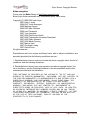
Get all necessary files from Saratoga Data Systems, Inc.
o ftp://public.saratogadata.com/pub/sw/flume_2.3/
o Flume 2.3 User Manual
o Flume 2.3 QuickStart Guide
o *README.txt
o .zip archive with installation script and additional documentation
o .tar.gz with Flume software.
o .sha1sum checksum files for the ZIP and .tar.gz archives.
o flume*.rpm file for RPM based installation
Installation and configuration – on each end
o Run as root for the standard installation.
o Copy all the files to a convenient directory
o New style installation using .rpm (PREFERRED)
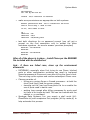
rpm -Uvh flume*.rpm
Copy your license file as supplied by email to
/etc/flume/config.
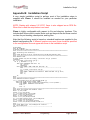
o Old style installation with .tar.gz and .zip
Flume 2.3 User Manual
Proprietary
Page 9 of 54