1
Trouble Shooting
&
FAQ
Congratulations and Thank You
for purchasing the SleuthGear™ Camera!
SleuthGear™ HVR system is an all-in-one DVR and hidden camera. All you need
to do is plug it in, set the time and date, insert an SD card and the system will begin
to record when it detects any motion. The SleuthGear™ HVR system has many advanced features and functions but the best feature is already preset for your quick
set up.
Quick Set up Guide
For your convenience the unit is set at the factory for setting most commonly
used making your set up fast and easy. To see what the factory setting are go to
page 10.
1. Take out the SleuthGear™ and plug it in to any available wall outlet.
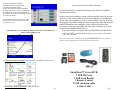
2. Facing the back of the unit locate the Video-Out Jack (See Diagram 1 on page
3) Using the included Video Cable plug cable into the Video-Out Jack. Connect
the other end of the Video Cable to a Television input.
3. Change the video input or auxiliary on your TV. The input select button is usually located on the TV’s remote control or on the front panel of the TV itself,
however, some TV’s may require you to select the video input from the on-screen
menu. Therefore, consult the owner’s manual for the for specific instructions.
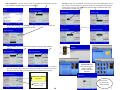
4. When you have a picture on your Television; using the included HVR remote
press the Menu button to enter menu screen.
5. Set up Time and Date Go to system settings press ok select date/time, select
adjust date time put in correct time and date press ok then press esc button. Back
to main menu. Press esc once more to be back at video image
Have you inserted the micro SD card into the Large SD card adapter?
Did you put the SD card in the unit before powering on your
Sleuth Gear unit?
Did you know the unit is set to record motion as one of its default
settings?
Have you downloaded the lasted version of the K-lite codec pack
from www.free-codecs.com?
Make sure you have downloaded the full version.
Do you know how to access the video files on your SD card?
Did you know you can press the play button on the remote control to
play the recorded files back on your Television?
Do you have the proper input selected on your TV to display the
Video from the HVR system?
Having trouble with the unit?
Have you tried restoring the unit to its factory default settings?
This can be done under System Settings in the Sleuth Gear menu.
Have you tried another SD card?
6. Find the SD slot see above diagram put in the SD card and your unit is ready to
record video
7. Set unit in desired location for video surveillance and your finished.
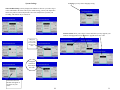
If you wish to change factory default setting you would need to go through the
entire menu and pick your desired selections. See Advanced Features instructions to change default settings beginning on page 5
2
15