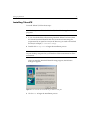
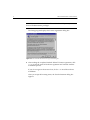
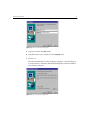
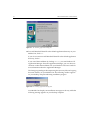
1
Version 1.0 Users Guide Revised 02-05-02 2 Copyright © 2000 by Wavelink Corporation All rights reserved. Wavelink Corporation 6985 South Union Park Avenue Suite 395 Midvale, Utah 84047 Telephone: (801) 255-1777 Fax: (801) 255-9699 WWW: http:\\www.roisys.com Email: [email protected] No part of this publication may be reproduced or used in any form, or by any electrical or mechanical means, without permission in writing from Wavelink Corporation. This includes electronic or mechanical means, such as photocopying, recording, or information storage and retrieval systems. The material in this manual is subject to change without notice. The software is provided strictly on an “as is” basis. All software, including firmware, furnished to the user is on a licensed basis. Wavelink grants to the user a non-transferable and nonexclusive license to use each software or firmware program delivered hereunder (licensed program). Except as noted below, such license may not be assigned, sublicensed, or otherwise transferred by the user without prior written consent of Wavelink. No right to copy a licensed program in whole or in part is granted, except as permitted under copyright law. The user shall not modify, merge, or incorporate any form or portion of a licensed program with other program material, create a derivative work from a licensed program, or use a licensed program in a network without written permission from Wavelink . The user agrees to maintain Wavelink’s copyright notice on the licensed programs delivered hereunder, and to include the same on any authorized copies it makes, in whole or in part. The user agrees not to decompile, disassemble, decode, or reverse engineer any licensed program delivered to the user or any portion thereof. Wavelink reserves the right to make changes to any software or product to improve reliability, function, or design. Wavelink does not assume any product liability arising out of, or in connection with, the application or use of any product, circuit, or application described herein. No license is granted, either expressly or by implication under any Wavelink Corporation, intellectual property rights. Symbol, Spectrum One, and Spectrum24 are registered trademarks of Symbol Technologies, Inc. Table of Contents i Table of Contents Chapter 1: Introduction 1 About This Manual . . . . . . . . . . . . . . . . . . . . . . . . . . . . . . . . . . . . . . . . . . . . . . 1 Manual Assumptions . . . . . . . . . . . . . . . . . . . . . . . . . . . . . . . . . . . . . . . . 1 How to Use This Manual . . . . . . . . . . . . . . . . . . . . . . . . . . . . . . . . . . . . . 1 Manual Conventions . . . . . . . . . . . . . . . . . . . . . . . . . . . . . . . . . . . . . . . . 2 For Further Information . . . . . . . . . . . . . . . . . . . . . . . . . . . . . . . . . . . . . . 3 About Wavelink TelnetCE . . . . . . . . . . . . . . . . . . . . . . . . . . . . . . . . . . . . . . . . 3 Chapter 2: Setting Up TelnetCE 5 Mobile Device Requirements . . . . . . . . . . . . . . . . . . . . . . . . . . . . . . . . . . . . . . 5 Features Available by Device Type . . . . . . . . . . . . . . . . . . . . . . . . . . . . 5 TelnetCE and Wavelink Clients . . . . . . . . . . . . . . . . . . . . . . . . . . . . . . . 6 Installing TelnetCE. . . . . . . . . . . . . . . . . . . . . . . . . . . . . . . . . . . . . . . . . . . . . . . 7 Authorizing TelnetCE . . . . . . . . . . . . . . . . . . . . . . . . . . . . . . . . . . . . . . . . . . . . 14 Chapter 3: Starting Wavelink TelnetCE 16 Chapter 4: Host Connections 17 Configuring a Host Connection. . . . . . . . . . . . . . . . . . . . . . . . . . . . . . . . . . . . 17 Editing a Host Connection . . . . . . . . . . . . . . . . . . . . . . . . . . . . . . . . . . . . . . . . 19 Connecting to a Host . . . . . . . . . . . . . . . . . . . . . . . . . . . . . . . . . . . . . . . . . . . . . 20 Disconnecting from a Host . . . . . . . . . . . . . . . . . . . . . . . . . . . . . . . . . . . . . . . . 20 Chapter 5: Terminal Settings 21 Standard Settings . . . . . . . . . . . . . . . . . . . . . . . . . . . . . . . . . . . . . . . . . . . . . . . . 21 Standard Options . . . . . . . . . . . . . . . . . . . . . . . . . . . . . . . . . . . . . . . . . . . 22 General Options . . . . . . . . . . . . . . . . . . . . . . . . . . . . . . . . . . . . . . . . . . . . 23 Logging Options . . . . . . . . . . . . . . . . . . . . . . . . . . . . . . . . . . . . . . . . . . . . 25 Font Settings . . . . . . . . . . . . . . . . . . . . . . . . . . . . . . . . . . . . . . . . . . . . . . . 26 Scroll Options . . . . . . . . . . . . . . . . . . . . . . . . . . . . . . . . . . . . . . . . . . . . . . 28 Beeps Settings . . . . . . . . . . . . . . . . . . . . . . . . . . . . . . . . . . . . . . . . . . . . . . 30 Scanner Options . . . . . . . . . . . . . . . . . . . . . . . . . . . . . . . . . . . . . . . . . . . . 32 Symbology Options . . . . . . . . . . . . . . . . . . . . . . . . . . . . . . . . . . . . . . . . . 33 Advanced Symbology Options . . . . . . . . . . . . . . . . . . . . . . . . . . . . . . . . 34 Emulator Settings. . . . . . . . . . . . . . . . . . . . . . . . . . . . . . . . . . . . . . . . . . . . . . . . 36 IBMHOST Emulator Settings . . . . . . . . . . . . . . . . . . . . . . . . . . . . . . . . . 36 VTXX Emulator Settings . . . . . . . . . . . . . . . . . . . . . . . . . . . . . . . . . . . . . 39 Wavelink Emulator Settings . . . . . . . . . . . . . . . . . . . . . . . . . . . . . . . . . . 44 Chapter 6: Connection Settings 46 Restoring Default Terminal Settings . . . . . . . . . . . . . . . . . . . . . . . . . . . . . . . . 47 ii WaveLink TelnetCE 1.0 User Manual Chapter 7: Custom Configuration 49 Base Configuration File. . . . . . . . . . . . . . . . . . . . . . . . . . . . . . . . . . . . . . . . . . . 49 External Configuration of Terminal Settings . . . . . . . . . . . . . . . . . . . . 50 External Configuration Files . . . . . . . . . . . . . . . . . . . . . . . . . . . . . . . . . . 52 External Configuration of Host Connections . . . . . . . . . . . . . . . . . . . . 53 Using Configuration File Parameters . . . . . . . . . . . . . . . . . . . . . . . . . . 56 Descriptions of Configuration Parameters . . . . . . . . . . . . . . . . . . . . . . 57 Limiting Terminal Configuration Access . . . . . . . . . . . . . . . . . . . . . . . 68 Creating Keyboard Maps . . . . . . . . . . . . . . . . . . . . . . . . . . . . . . . . . . . . . . . . . 68 Creating a Keyboard Map . . . . . . . . . . . . . . . . . . . . . . . . . . . . . . . . . . . . 68 Commenting a Keyboard Map File . . . . . . . . . . . . . . . . . . . . . . . . . . . . 69 Linking to Other Keyboard Map Files . . . . . . . . . . . . . . . . . . . . . . . . . . 70 An Example of Creating a Keyboard Map . . . . . . . . . . . . . . . . . . . . . . 70 Key Type Definitions . . . . . . . . . . . . . . . . . . . . . . . . . . . . . . . . . . . . . . . . 71 Chapter 8: Host Sessions 73 Working with Multiple Sessions . . . . . . . . . . . . . . . . . . . . . . . . . . . . . . . . . . . 73 Using Special Keys. . . . . . . . . . . . . . . . . . . . . . . . . . . . . . . . . . . . . . . . . . . . . . . 73 Sending Function Keys . . . . . . . . . . . . . . . . . . . . . . . . . . . . . . . . . . . . . . . . . . . 74 Status Messages . . . . . . . . . . . . . . . . . . . . . . . . . . . . . . . . . . . . . . . . . . . . . . . . . 74 Alerts . . . . . . . . . . . . . . . . . . . . . . . . . . . . . . . . . . . . . . . . . . . . . . . . . . 75 Setting View Modes. . . . . . . . . . . . . . . . . . . . . . . . . . . . . . . . . . . . . . . . . . . . . . 76 Setting Fonts . . . . . . . . . . . . . . . . . . . . . . . . . . . . . . . . . . . . . . . . . . . . . . . . . . 76 Changing the Terminal Settings. . . . . . . . . . . . . . . . . . . . . . . . . . . . . . . . . . . . 78 Chapter 9: Menu commands 79 Term Menu . . . . . . . . . . . . . . . . . . . . . . . . . . . . . . . . . . . . . . . . . . . . . . . . . . 79 App Menu . . . . . . . . . . . . . . . . . . . . . . . . . . . . . . . . . . . . . . . . . . . . . . . . . . 80 View Menu . . . . . . . . . . . . . . . . . . . . . . . . . . . . . . . . . . . . . . . . . . . . . . . . . . 80 Sessions Menu . . . . . . . . . . . . . . . . . . . . . . . . . . . . . . . . . . . . . . . . . . . . . . . . . . 81 Keys Menu . . . . . . . . . . . . . . . . . . . . . . . . . . . . . . . . . . . . . . . . . . . . . . . . . . 81 Chapter 10: Troubleshooting 82 General Error Messages . . . . . . . . . . . . . . . . . . . . . . . . . . . . . . . . . . . . . . . . . . 82 Authorization Error Messages . . . . . . . . . . . . . . . . . . . . . . . . . . . . . . . . . . . . . 84 Chapter 11: Extensions 85 EBCDIC Character Sets . . . . . . . . . . . . . . . . . . . . . . . . . . . . . . . . . . . . . . . . . . . 86 Introduction 1 Chapter 1 Introduction Welcome to the Wavelink TelnetCE User Manual. This manual is designed to help you maximize Wavelink TelnetCE for your business. If you are new to Wavelink TelnetCE, it is recommended that you read through this introductory section, which covers the basic principles and components of Wavelink TelnetCE. Then, once you install the software as described in Installing TelnetCE on page 7, read through the rest of the manual to learn more about Wavelink TelnetCE’s capabilities. If you are an experienced user of Wavelink TelnetCE, you might want to skim the Introduction section and then read about how each of the Wavelink TelnetCE components operate. About This Manual This section discusses the assumptions behind this manual, how to use this manual effectively, and the typographical conventions used in this manual. Manual Assumptions Before you use this manual, please be sure you understand the following concepts: • User interface of Microsoft Windows, including how to navigate and access programs and files • Networking basics, such as IP addresses • Basic operations and requirements of the host applications you want to access with TelnetCE. How to Use This Manual The first section of this manual is the Introduction section. Refer to this section if you need a general overview of Wavelink TelnetCE components, or if you require clarification on the typographical conventions used in this manual. The next sections of this manual are Chapter 2, Setting Up TelnetCE on page 5 and Installing TelnetCE on page 7. These sections addresse the hardware and 2 WaveLink TelnetCE 1.0 User Manual software requirements of Wavelink TelnetCE, and take you step-by-step through the installation process. After Chapter 2, Setting Up TelnetCE on page 5 and Installing TelnetCE on page 7 follow several sections that discuss, in detail, the components that comprise Wavelink TelnetCE. Refer to these sections to ensure that Wavelink TelnetCE is maximized for your network. These sections also include additional files you might want to create for Wavelink TelnetCE, such as configuration and keyboard map files, as well as a troubleshooting section to help you quickly identify any system errors that might occur. Manual Conventions This manual uses the following typographical conventions: Courier New Any time you interact with a Wavelink Sentinel option, such as a button, or type specific information into a field, such as a file pathname, that option appears in the Courier New text style. This text style is also used for any keyboard commands that you might need to press. Examples: Click Next to continue. Press CTRL+ALT+DELETE. Bold Any time this manual refers to an option, such as descriptions of different options in a dialog box, that option appears in the Bold text style. Examples: Click Open from the File Menu. The Add button displays a screen that allows you to add new host connections. Introduction 3 Any time this manual refers to another section within the manual, that section appears in the Italic text style. Italics Example: See the Keyboard Maps section for more information. For Further Information We are very interested in improving the Wavelink TelnetCE documentation, and welcome all criticisms and suggestions for improvement. Please direct comments to: Wavelink TelnetCE Documentation 11332 NE 122nd Way / Third Floor Kirkland, WA 98034 Phone: (425) 823-0111 Fax: (425) 823-0143 About Wavelink TelnetCE Wavelink TelnetCE communicates directly with host systems by using the Telnet protocol of the TCP/IP protocol suite. With Wavelink TelnetCE, a user can log on to a Unix host system, a mainframe, or an AS/400, enabling the user’s computer to function as a terminal attached to the host. Wavelink TelnetCE includes the following features and capabilities: Broad Scale Emulation Many products on the market are built to only communicate with a single system. Wavelink TelnetCE, however, includes the most widely-used emulations in a single product—including TN3270, TN5250, VT100, and VT220 terminal emulation. TelnetCE is the only application you need for Mobile Units to access mainframes, AS/400’s, and Unix systems. 4 WaveLink TelnetCE 1.0 User Manual Terminal Display Control Wavelink TelnetCE allows on-the-fly selection of view modes to suit your host applications. The view modes Wavelink TelnetCE includes are Follow Cursor, Fixed, and Watermark. You can also take advantage of built-in TelnetCE or local system resources to control font settings and audio messages. Session Memory When you configure a host, the settings you select are automatically saved as named connections so you can quickly and easily re-connect as soon as you open the program. Extensibility You can seamlessly integrate special hardware support and customized resources into the base emulator product as Wavelink TelnetCE extensions. Extensions that provide the following types of support are available: • Alternate input devices • Scanner integration • Printer integration • Device control • Authentication • Resources (such as the EBCDIC character sets) Integrated Debugging and Monitoring Debugging of your Wavelink TelnetCE sessions is built-in, providing vital data for troubleshooting purposes. Setting Up TelnetCE 5 Chapter 2 Setting Up TelnetCE The base system requirements for the complete Wavelink TelnetCE are minimal. The following chart shows the optimal configuration for the software. Operating System Operating RAM Free RAM Disk Space WinCE 2.11 or higher 16MB 390K Table 2-1: TelnetCE Requirements NOTE You must have a configured TCP/IP network connection before using Wavelink TelnetCE. Mobile Device Requirements Because the capabilities of a mobile device vary widely from unit to unit, some TelnetCE features are unavailable to certain devices. Also, certain devices have different display capabilities, which can result in option screens that appear different from those illustrated in this manual. This section lists which options are available for many mobile devices, as well as which devices have specific display capabilities. NOTE Because there are many types of mobile devices, some device types might not be listed in this section. If you have questions regarding a specific device, please contact your Wavelink sales representative. Features Available by Device Type The following list details the features available to different mobile devices. Symbol PPT 2740 Supports all TelnetCE features and functions. 6 WaveLink TelnetCE 1.0 User Manual Symbol PDT 7240 This device can be configured only through external configuration files. Configuration through a user interface is not supported. This device does not support the Configure option under the Term menu or the Advanced button located on the Edit Connection dialog box. Certain TelnetCE dialog boxes described in this manual are split into two separate boxes for the 7240. These boxes are linked by a Continue button, located on the bottom right corner of the dialog box. Symbol PDT 7540 This device can be configured only through external configuration files. Configuration through a user interface is not supported. This device does not support the Configure option under the Term menu or the Advanced button located on the Edit Connection dialog box. Certain TelnetCE dialog boxes described in this manual are split into two separate boxes for the 7240. These boxes are linked by a Continue button, located on the bottom right corner of the dialog box. TelnetCE and Wavelink Clients The features of TelnetCE are available in several Wavelink Studio and TNCE clients. These clients are: • Symbol PDT7200 • Symbol PDT7500 • Intermec 700 • Unitec PT900 • HandHeld Dolphin 7400 For information on how to configure these clients to connect to your network, see the corresponding client documentation. This documentation is available for download from the Wavelink Web site: www.wavelink.com. Setting Up TelnetCE 7 Installing TelnetCE To install TelnetCE, follow these steps: NOTE Before you install Wavelink TelnetCE, close all other application programs. 1 If you downloaded the self-extracting Wavelink TelnetCE software from the official Wavelink TelnetCE Web site, locate the self-extracting file (represented by an open box icon) in the directory you used to download the file (for example, C:\Windows\Temp). 2 Double-click Setup.exe to begin the installation process. NOTE To install Wavelink TelnetCE, you must install Microsoft ActiveSync on your desktop computer. See your Windows CE documentation for more information. After you start the Wavelink TelnetCE Setup program, the Welcome dialog box appears. Figure 2-1. The Wavelink TelnetCE Install Program Welcome Dialog Box 3 Click Next> to begin the installation process. 8 WaveLink TelnetCE 1.0 User Manual NOTE If you install Wavelink TelnetCE on a Windows NT system, you must have local administrator privileges. The Setup program displays the License Agreement dialog box. Figure 2-2. The Wavelink TelnetCE License Agreement Dialog Box 4 After reading the complete Wavelink TelnetCE License Agreement, click Yes to accept the terms of the license agreement and continue with the installation process. If you do not agree to the terms of use, click No to cancel the software installation. After you accept the licensing terms, the User Information dialog box appears. Setting Up TelnetCE 9 Figure 2-3. The User Information Dialog Box 5 Type your name in the Name field. 6 Type the name of your company in the Company field. 7 Click Next>. The Choose Destination Location dialog box appears. Use this dialog box to set the directory where the Wavelink TelnetCE files will be installed on your desktop computer. Figure 2-4. The Choose Directory Dialog Box 10 WaveLink TelnetCE 1.0 User Manual 8 To accept the default directory, C:\Programs\Microsoft ActiveSync\TelnetCE (shown in the Destination Folder field), click Next>. To manually select a location for the Wavelink TelnetCE files, click Browse. After you click Next>, the Setup Type dialog box appears. In this screen you select your preferred installation type. Figure 2-5. The Setup Type Dialog Box 9 Select one of the three available installation options: Typical, Compact, or Custom. Select the Typical option to install the most common options needed to run and develop Wavelink TelnetCE applications. Select the Compact option to install the minimum options required to run Wavelink TelnetCE. The compact installation saves disk space but does not install the online help. Select the Custom option to install specific components of the Wavelink TelnetCE program. This option opens a dialog box (not shown) in which you can select the desired components to be installed. 10 After you select the type of installation, click Next>. Setting Up TelnetCE 11 The Wavelink TelnetCE Setup program displays the Select Program Folder dialog box. In this screen you determine the Programs menu group in which the Wavelink TelnetCE applications will appear on your Windows computer. Figure 2-6. The Select Program Folder Dialog Box 11 To select the default program folder, Wavelink TelnetCE, click Next>. To create a new program folder, type the name in the Program Folders field. To select an existing program folder, select the desired folder from the Existing Folders list. Once you select a program folder for Wavelink TelnetCE, click Next>. After you select the program folder, the Setup program automatically processes the Application Manager dialog box (not shown), and displays a message to indicate it is retrieving application data from the Mobile Unit. The Installing Applications dialog box immediately appears. 12 WaveLink TelnetCE 1.0 User Manual Figure 2-7. The Installing Applications Dialog Box 12 To install Wavelink TelnetCE in the default application directory on your Mobile Unit, click Yes. If you do not want to install Wavelink TelnetCE in the default application directory, click No. If you cancel the installation by clicking Cancel, you start Windows CE Application Manager. From the Application Manager, you can choose to continue or abort the installation. See your Windows CE Users Guide for more information about the Application Manager. The Setup program begins decompressing the necessary files and copying them into memory on your Mobile Unit. The following window appears on your desktop computer indicating installation progress. Figure 2-8. The Installing Applications Message Box Your Mobile Unit displays an installation message (not shown), while the following message appears on your desktop computer. Setting Up TelnetCE 13 Figure 2-9. The Application Downloading Complete Dialog Box 13 Check to see if a message on your Mobile Unit indicates that additional steps are required to complete the installation. 14 Click OK. The Setup program displays the Setup Complete dialog box, informing you that setup is complete. Figure 2-10. The Setup Complete Dialog Box 15 Click Finish. After the necessary files have been copied in a typical installation, the following commands appear in the Programs menu on your desktop computer under Wavelink TelnetCE. TelnetCE Home Select this hyperlink to go www.Wavelink.com, the official Web site of Wavelink TelnetCE (this requires an existing Internet account and browser). 14 WaveLink TelnetCE 1.0 User Manual Wavelink TelnetCE Help Select this option to run the Wavelink TelnetCE online Help. This online Help is an expanded version of the online Help file that runs on your mobile device. NOTE You must authorize Wavelink TelnetCE before you can use it. See Authorizing TelnetCE on page 14 for more information. Authorizing TelnetCE You must authorize Wavelink TelnetCE before you use it. From the Authorization screen, you can enter the appropriate registration values and upgrade your license for Wavelink TelnetCE. Wavelink TelnetCE automatically opens the Authorization dialog box after the initial installation. You can also open the Authorization dialog box at any time by selecting Authorization from the TelnetCE Term menu. Figure 2-11. The Authorization Dialog Box Wavelink TelnetCE enters default registration values in the Authorization fields. If you accepted these values by clicking Authorize at the time of installation, the Setup program installed Wavelink TelnetCE as a trial version that is limited to 30 days of use. Setting Up TelnetCE 15 To authorize Wavelink TelnetCE beyond the 30-day trial period, you must complete the Authorization dialog box by typing the registration information that you received at the time of your product purchase. Type the correct information in the Licensee Name, Serial Number, Expiration Date, and Authorization Code fields. Click Authorize to complete the authorization process. To determine which emulators are currently licensed, select About from the Help menu. The About dialog box appears. Figure 2-12. The About Dialog Box If the desired emulator is not enabled, your authorization has expired. Contact [email protected] for help obtaining a Wavelink TelnetCE license. 16 WaveLink TelnetCE 1.0 User Manual Chapter 3 Starting Wavelink TelnetCE To start Wavelink TelnetCE, select TelnetCE from the Start menu. NOTE If you installed a trial version of TelnetCE, you start TelnetCE by selecting Programs > TelnetCE from the Start menu. The Wavelink TelnetCE main screen appears. The dimensions and characteristics of this screen are platform-dependent. An example of the main application screen is shown here. Figure 3-1. The TelnetCE Main Application Screen NOTE The main application screen typically includes the name of the Mobile Unit using TelnetCE. Host Connections 17 Chapter 4 Host Connections This section describes how to configure and connect to a host. You must configure a connection before you can communicate with a host. Configuring a Host Connection To configure a host connection: 1 Select Connect from the Term menu located on the main TelnetCE screen. The Connecting to Host dialog box appears. Figure 4-1. The Connecting to Host Dialog Box If the Select Connection field is empty, a message box (not shown) appears informing you that you must create a host entry prior to connecting. Click OK in this message box to return to the Connecting to Host dialog box. 2 Click Add. The Edit Connection dialog box appears. 18 WaveLink TelnetCE 1.0 User Manual Figure 4-2. The Edit Connection Dialog Box 3 In the Connection Name field, type the name for the host connection. This value appears in the Select Connection field after the host connection is created. 4 In the Host field, type the address of the host. This value can be a name that resolves into an IP address or the "dotted quad" IP address—for example, 128.255.1.64. 5 In the Port field, type the TCP/IP port. The default TCP/IP port for Telnet connections is 23. 6 Select the emulator from the Host Type list. Your Wavelink TelnetCE license determines the options that appear in this list. The possible values are: • VTXX for Unix host emulators • TN5250 (AS/400) • TN3270 (mainframe) • Wavelink 7 If you use customized keyboard maps, select the desired keyboard map in the Map list. Otherwise, this value is automatically assigned based on the emulator type. Host Connections 19 See Creating Keyboard Maps on page 68 for more information on creating keyboard maps. 8 If you want to configure terminal settings at this time, click Advanced. By adjusting terminal settings, you can control specific aspects of the emulation. However, it is not necessary to adjust terminal settings to initiate a host connection. If you want to cancel your new host connection, click Delete. NOTE If access to the terminal settings is password protected, you must enter the password before the configuration dialog boxes appear. 9 Click Update to confirm the settings. 10 Close the Edit Connections dialog box. Wavelink TelnetCE creates the new connection. The name of the connection appears in the Select Connection field of the Connecting to Host dialog box. If you want to immediately connect to a host, select the desired host and click Connect. NOTE You can also configure hosts automatically through external configuration. Editing a Host Connection To edit a configured host connection: 1 Select Connect from the Term menu located on the main TelnetCE screen. 2 Select the host connection you want to edit in the Select Connection field. 3 Click Edit. 4 Edit the host connection values. 20 WaveLink TelnetCE 1.0 User Manual 5 Click Update to update the host connection. Then close the dialog box. If you want to delete the host connection, click Delete. Connecting to a Host To connect to a configured host, follow these steps. 1 Select Connect from the Term menu located on the main TelnetCE screen. The Connecting to Host dialog box appears. Figure 4-3. The Connecting to Host Dialog Box 2 Select the desired host from the Select Host field. 3 Click Connect. NOTE If the Select Host field is empty, you must add a host before making a connection. Disconnecting from a Host To disconnect from a host, select Disconnect from the Term menu. This option is grayed out if there are no active host sessions. Terminal Settings 21 Chapter 5 Terminal Settings By adjusting terminal settings, you can control elements such as terminal display, font selection, logging, and audio messages. Because each terminal setting has been pre-set to a default value, it is not necessary to configure terminal settings to initiate a host connection. You can apply these terminal settings at three different levels. Standard Settings These are general settings that apply to all host connections. Emulator Settings These settings are specific to a particular emulation type, such as VTXX or Wavelink. When you change an Emulator setting from its default configuration, it overrides a corresponding Standard setting. Connection Settings These settings apply to a named connection with a specific host. When you change a Connection setting from its default configuration, it overrides corresponding Emulator and Standard settings. Standard Settings Standard settings apply to all emulations. However, when you alter higher-level settings (Emulator or Connection settings) from their defaults, the higher level settings override the corresponding Standard settings. To configure Standard settings: 1 Select Configure > Standard from the Term menu. The Standard Settings dialog box appears. 2 Click the desired tab. The tabs for Standard settings are Standard, General, Logging, Font, Scroll, Beeps, Scanner, and Symbology Options. 3 Select or enter new values in the fields you want to change. 4 If you configure these options on a desktop computer, click Apply. If you configure these options on a Mobile Unit, click OK. 22 WaveLink TelnetCE 1.0 User Manual Standard Options The Standard tab contains basic settings that must apply to all connections and emulations. These settings have no corresponding settings at the Emulator or Connection level. NOTE This option is not available on all devices. See Mobile Device Requirements on page 5 for more information on the options available for your devices. To configure options under the Standard tab: 1 Select Configure > Standard from the Term menu. 2 Click the Standard tab. On this screen you can configure a monochrome display and the number of allowable sessions. Figure 5-1. The Standard Dialog Box The value you enter in the Sessions field determines the maximum number of concurrent sessions Wavelink TelnetCE supports. This number has no internal limit. Terminal Settings 23 To force a monochrome display mode, select the Force B/W check box. Enable this option if colors on a Windows CE device do not display correctly. If you configure these options on a desktop computer, click Apply. If you configure these options on a Mobile Unit, click OK. General Options NOTE This option is not available on all devices. See Mobile Device Requirements on page 5 for more information on the options available for your devices. To configure general options for terminal settings: 1 Follow the procedure for configuring a Standard, Emulator, or Connection setting. 2 Click the General tab. The General tab contains settings that allow you to configure the view mode. The current view mode in Wavelink TelnetCE determines how the emulator screen appears during a host session. Figure 5-2. The General Dialog Box 24 WaveLink TelnetCE 1.0 User Manual You can configure the following options on this screen. View Mode Select the desired view mode. The following view modes are available. Select the Fixed option if you want the display to remain in a fixed location on the host screen. Select the Follow Cursor option if you want the display to “attach” to the cursor on the host screen and follow it around. Select the Watermark option if you want the cursor remains fixed in the center of the emulator screen. The host screen moves in the background. NOTE To adjust specific parameters for each view mode, see Scroll Options on page 28 for more information. Msg Line Specifies the line from the host screen that Wavelink TelnetCE reads to display as the message line on the emulator. The row number must be from 0-24. The default row is 0. The emulator displays the message line each time its contents change. When the contents of the message line are not visible, the line appears in reverse video at the top of the display. Time Type the time, in seconds, that the emulator displays the message line. Auto Reconnect Select this check box if you want the emulator to automatically attempt to reconnect to a host after the host system closes a connection. Hide Menu Select this check box if you want to hide the menu bar during emulation. Choosing this option is recommended should you want more screen space available for the emulated application. V. Scrolling Select this check box to allow your users to navigate the emulated application with the vertical scrollbar. Terminal Settings 25 H. Scrolling Select this check box to allow your users to navigate the emulated application with the horizontal scrollbar. If you configure these options on a desktop computer, click Apply. If you configure these options on a Mobile Unit, click OK. Logging Options You can configure Wavelink TelnetCE to log debugging information for all host sessions. NOTE This option is not available on all devices. See Mobile Device Requirements on page 5 for more information on the options available for your devices. To configure logging options, select the Configure > Standard command from the Term menu. NOTE You can configure these logging options as Standard settings only. The following screen appears. 26 WaveLink TelnetCE 1.0 User Manual Figure 5-3. The Logging Dialog Box The following fields determine the parameters for Wavelink TelnetCE session logging. Enable Logging Select this check box to log all communication between the emulator and the host. Clear on Open Select this check box to clear the log whenever you run Wavelink TelnetCE. File Name Type the complete path including the file name for the log. If you configure these options on a desktop computer, click Apply. If you configure these options on a Mobile Unit, click OK. Font Settings NOTE This option is not available on all devices. See Mobile Device Requirements on page 5 for more information on the options available for your devices. To configure Font settings: Terminal Settings 27 1 Follow the procedure for configuring a Standard, Emulator, or Connection setting. 2 Click the Font tab. Wavelink TelnetCE displays the following screen. Figure 5-4. The Font Dialog Box 3 Type or select values on this screen to control how fonts are displayed by the emulator. You can configure the following options on this screen. Autosize When you enable the Autosize option, Wavelink TelnetCE automatically selects the best available font size to fit the emulator screen. You can restore the default value to this field by selecting a grayed-out check mark. Fixed Width Select the Fixed Width check box to restrict the types of fonts available for display to fixed-width fonts. OEM Select the OEM check box to restrict the types of fonts available for display to OEM fonts. 28 WaveLink TelnetCE 1.0 User Manual Name To select a specific font, select one from the Name list. Size To select a specific font size, select one from the Size list. Weight To choose a specific font weight, select one from the Weight list. Scroll Options Wavelink TelnetCE includes several view modes that determine how the emulator screens appear on the terminal. NOTE This option is not available on all devices. See Mobile Device Requirements on page 5 for more information on the options available for your devices. To configure view mode options: 1 Follow the procedure for configuring a Standard, Emulator, or Connection setting. 2 Click the Scroll tab. NOTE If the Scroll tab does not appear, use the left and right navigation buttons (located below the close window button) to access the tab. Terminal Settings 29 Figure 5-5. The Scroll Settings Dialog Box NOTE To set the view mode that is used by the emulator, see General Options on page 23. The Cursor Zone fields contain configuration options for Follow Cursor mode. When you set Follow Cursor mode as the current view mode, the display conforms to the cursor location, following it around the host screen. Left, Right Determine the left and right border of the cursor zone inside the emulator screen. This distance, measured in characters from the edge of the screen, must be a value from 1-10. When the cursor moves outside the cursor zone border, Wavelink TelnetCE re-adjusts the display, centering the cursor on the emulator screen. The default value is 4 for the left border and 1 for the right border. 30 WaveLink TelnetCE 1.0 User Manual Top, Bottom Determine the top and bottom borders of the cursor zone inside the emulator screen. This distance, measured in rows from the edge of the screen, must be a value from 1-10. When the cursor moves outside the cursor zone border, Wavelink TelnetCE readjusts the display, centering the cursor on the emulator screen. The default value is 0 for the top and bottom border. Vertical, Horizontal Determine the number of rows or columns the emulator screen moves when the cursor crosses a vertical or horizontal edge of the screen. This value can be from 1-24 for the Vert. field and 1-80 for the Horiz. field. When you set the current view mode to Watermark, the cursor attaches to a small portion of the screen, and the host screen appears to move in the background. The Watermark fields determine the position for the cursor on the emulator screen. Left, Right, Top, and Bottom These fields determine the four borders of the watermark zone. This distance is measured in characters. You can switch between view modes during host sessions by selecting Mode > [view mode] from the View menu on the Wavelink TelnetCE main application screen. NOTE When Fixed mode is set as the current view mode, Wavelink TelnetCE positions the display over the upper left corner of the host screen. If you switch to Fixed mode during a host session, the display locks into its current position. If you configure these options on a desktop computer, click Apply. If you configure these options on a Mobile Unit, click OK. Beeps Settings You can configure audio messages issued by a host through the Beeps parameters. Terminal Settings 31 NOTE This option is not available on all devices. See Mobile Device Requirements on page 5 for more information on the options available for your devices. To configure beeps settings: 1 Follow the procedure for configuring a Standard, Emulator, or Connection setting. 2 Click the Beeps tab. The following dialog box appears. NOTE If the Beeps tab does not appear, use the left and right navigation buttons (located below the close window button) to access the tab. Figure 5-6. The Beeps Settings Dialog Box To configure the Mobile Unit to operate without sound, select the Silent Mode option. To configure sounds, select the desired sound either the Bell Sound or Error list. The possible values are either Windows sound names or file names. 32 WaveLink TelnetCE 1.0 User Manual If you configure these options on a desktop computer, click Apply. If you configure these options on a Mobile Unit, click OK. Scanner Options NOTE This option is not available on all devices. See Mobile Device Requirements on page 5 for more information on the options available for your devices. To configure basic scanner options: 1 Follow the procedure for configuring a Standard, Emulator, or Connection setting. 2 Click the Scanner tab. The following dialog box appears. Figure 5-7. The Scanner Dialog Box 3 To enable the use of a scanner, select the Enable Scanner option. Terminal Settings 33 Symbology Options Wavelink TelnetCE includes numerous options that determine how the emulator interprets a scanned barcode based on its symbology. NOTE This option is not available on all devices. See Mobile Device Requirements on page 5 for more information on the options available for your devices. To configure these options: 1 Follow the procedure for configuring a Standard, Emulator, or Connection setting. 2 Click on the Symbology Options tab. The following dialog box appears. Figure 5-8. The Symbology Options Dialog Box This dialog box contains the following options: Symbology Select the type of barcode for which you want to set or modify options from the Symbology list. 34 WaveLink TelnetCE 1.0 User Manual Enable Select this check box if you want to allow the emulator to read the specified symbology. If you do not select this check box, the symbology is disabled. Although you can still scan disabled symbologies, the data is not passed to the emulator. Ret CD Select this check box to return the verified check digit along with the scanned data. This option is disabled by default. Convert Select this check box to convert the scanned data to an alternate symbology. The conversion is based on the currently selected symbology and results in the equivalent label in the new barcode format. Preamble Select this check box to return the preamble (first) character along with the scanned data. This option is valid for 3270 and 5250 emulators. Ret Preamble Select this check box to return the preamble (first) character along with the scanned data. This option is valid for VTXX emulators. Reset This option resets all settings for the currently selected symbology to their default values. Advanced Click Advanced to configure advanced symbology options. Advanced Symbology Options NOTE This option is not available on all devices. See Mobile Device Requirements on page 5 for more information on the options available for your devices. To configure advanced options for a barcode symbology, click Advanced in the Symbology Options tab. Wavelink TelnetCE displays the following dialog box. Terminal Settings 35 Figure 5-9. The Advanced Symbology Options Tab This dialog box contains the following options: Symbology Select the barcode type for which you want to set or modify advanced options from the Symbology list. Preamble Specify the prefix string to include with scanned data based on its symbology in the Preamble field. Postamble Specify the suffix string to include with scanned data based on its symbology in the Postamble field. Min Len Determines the minimum length, in characters, for the currently selected barcode. This value can be any value from 0-255. Max Len Determines the maximum length, in characters, for the currently selected barcode. This value can be any value from 0-255. NOTE You can configure Wavelink TelnetCE to accept a barcode of any length by setting the minimum and maximum length values to 0. Strip Start Determines the number of characters stripped from the beginning of the barcode. The default value is 0. 36 WaveLink TelnetCE 1.0 User Manual Strip End Determines the number of characters stripped from the end of the barcode. The default value is 0. Reset Click Reset to reset all settings for the currently selected symbology to their default values. Basic Click Basic to configure basic symbology options. If you configure these options on a desktop computer, click Apply. If you configure these options on a Mobile Unit, click OK. Emulator Settings Emulator settings affect all host emulators of a specific type, such as IBMHOST, VTXX or Wavelink. If you change Emulator settings from their default values, the Emulator settings override corresponding Standard settings. To configure Emulator settings: 1 Select the Configure > [emulator name] command from the Term menu. The Settings dialog box for the selected emulator appears. 2 Click the desired tab. 3 Select or type new values in the fields you want to change. 4 If you configure these options on a desktop computer, click Apply. If you configure these options on a Mobile Unit, click OK. IBMHOST Emulator Settings To configure IBMHOST Emulator settings, select Configure > IBMHOST from the Term menu. The dialog box for the IBMHOST emulator appears. The terminal settings you configure on these screens apply to TN3270 and TN5250 emulators. Terminal Settings 37 Figure 5-10. IBMHOST Settings Dialog Box The IBMHOST Emulator settings dialog box includes the following tabs: IBMHOST,5250, General, Font, Scroll, Beeps, Scanner, and Symbology Options. IBMHOST Options Under the IBMHOST tab, you can set the following options. Port Determines the default Telnet port for IBM host emulators. Character Set Determines the IBM character set associated with the emulator. NOTE This option is not available on all devices. See Mobile Device Requirements on page 5 for more information on the options available for your devices. If you configure these options on a desktop computer, click Apply. If you configure these options on a Mobile Unit, click OK. 38 WaveLink TelnetCE 1.0 User Manual 5250 Options NOTE This option is not available on all devices. See Mobile Device Requirements on page 5 for more information on the options available for your devices. To configure TN5250 options for the IBMHOST emulator: 1 Select the Configure > IBMHOST command from the Term menu. 2 Select the 5250 tab. The following dialog box appears. Figure 5-11. The 5250 Settings Dialog Box This dialog box contains the following options. Col Separator Dot On the 5250 tab, you determine whether the emulator displays a period or a vertical line between each character when the host system uses a special column format mode. To configure the emulator to display a period, enable the Col Separator Dot check box. Terminal Settings 39 Device With TelnetCE, you can assign Mobile Unit names manually by entering a name for the Mobile Unit in the Device field. If you choose to leave this field at its default setting, a Mobile Unit name is automatically generated when the Mobile Unit first connects to the host. If you configure these options on a desktop computer, click Apply. If you configure these options on a Mobile Unit, click OK. NOTE For information on the remaining tabs (General, Logging, Font, Scroll, and Beeps) see Standard Options on page 22. VTXX Emulator Settings NOTE This option is not available on all devices. See Mobile Device Requirements on page 5 for more information on the options available for your devices. To configure VTXX Emulator settings, select Configure > VTXX from the Term menu. Wavelink TelnetCE displays the dialog box for the VTXX emulator. 40 WaveLink TelnetCE 1.0 User Manual Figure 5-12. The VTXX Settings Dialog Box The VTXX Emulator settings dialog box includes the following tabs: VTXX, General, Login, Font, Scroll, Beeps, Scanner, and Symbology Options. Options found under these tabs (with the exception of the VTXX tab) resemble the Standard setting options. The options available for configuration with the VTXX tab selected are as follows. Local Echo Determines whether TelnetCE echoes characters received from a VTXX host on the emulator screen. Select this check box if the host is not echoing characters. Port Type the default Telnet port for VTXX emulators. The default port is 23. Inbound CR Determines whether the emulator interprets a carriage return from the host as a carriage return or a carriage return/line-feed. Terminal Settings 41 Outbound CR Determines whether the emulator sends a carriage return or a carriage return/line-feed command to the host when it receives a carriage return command from the keyboard. Terminal Type Select DEC-VT100, DEC-VT220, VT100, or VT220 for the terminal type. Control Codes Select either 8-bit or 7-bit control codes. Backspace Determines whether a delete or backspace control character is sent to the host when the Backspace key is pressed. Rows Type the number of rows for the VTXX emulator. If this value exceeds the maximum number of rows on the terminal display, you can use the scroll bars to view hidden portions of the screen. The default value is 25. NOTE Changing this setting may affect the font display size if the Autosize option under the Font tab is enabled. Columns Enter the number of columns for the VTXX emulator. If this value exceeds the maximum number of columns on the terminal display, the scroll bars may be used to view hidden portions of the screen. The default value is 80. NOTE Changing this setting may affect the font display size if the Autosize option under the Font tab is enabled. If you configure these options on a desktop computer, click Apply. If you configure these options on a Mobile Unit, click OK. NOTE See Standard Settings on page 21 for more information on the remaining tabs. 42 WaveLink TelnetCE 1.0 User Manual Login Tab You can configure Wavelink TelnetCE to automatically log on to hosts. NOTE This option is not available on all devices. See Mobile Device Requirements on page 5 for more information on the options available for your devices. To configure login parameters: 1 Follow the procedure for configuring a VTXX Emulator. 2 Click the Login tab. Wavelink TelnetCE displays the following screen. Figure 5-13. The Login Dialog Box Terminal Settings 43 You can configure the following options on this screen. Enable LoginName Select this check box to automatically logon with a specified name to a host. The value you type in the Prompt field under the Enable LoginName check box must match the caption for the login field on the host screen. In the Name field, type the user name which Wavelink TelnetCE will use to logon to the host. The command format for the Name field is "username\r," where "r" is the keycode for a carriage return. Enable LoginPassword Select this check box to automatically send a specified password to a host. The value you type in the Prompt field under the Enable LoginPassword check box must match the caption for the password field on the host screen. Password Type the password that Wavelink TelnetCE will use to logon to the host. The command format for the Password field is "password\r," where "r" is the keycode for a carriage return. NOTE You can use any valid Wavelink TelnetCE escape sequence within the Name and Password fields. If you configure the options under the Login tab on a desktop computer, click Apply. If you configure these options on a Mobile Unit, click OK. 44 WaveLink TelnetCE 1.0 User Manual Wavelink Emulator Settings To configure Wavelink Emulator settings, select Configure > Wavelink from the Term menu. ActiveBridge TelnetCE displays the dialog box for the Wavelink emulator. Figure 5-14. The Wavelink Settings Dialog Box The Wavelink Emulator settings dialog box includes the following tabs: Wavelink, General, Font, Scroll, Beeps, Scanner, and Symbology Option. The options found under these tabs (with the exception of the Wavelink tab) resemble the Standard setting options. NOTE This option is not available on all devices. See Mobile Device Requirements on page 5 for more information on the options available for your devices. The options available for configuration with the Wavelink tab selected are as follows. Rows Type the number of rows on the Mobile Unit display. The default value is 16. Terminal Settings 45 Columns Type the number of columns on the Mobile Unit display. The default value is 21. NOTE If the Font > Auto command under the View menu is enabled, the font will be re-sized automatically to fit altered row and column settings. Dir Type the complete path where Wavelink temporary files will be stored. If you configure these options on a desktop computer, click Apply. If you configure these options on a Mobile Unit, click OK. 46 WaveLink TelnetCE 1.0 User Manual Chapter 6 Connection Settings Connection settings affect a single named connection that has been configured in the Connecting to Hosts dialog box. When you change Connection settings from their defaults, they override corresponding Emulator or Standard settings. To configure Connection settings, take the following steps. 1 Select Connect from the Term menu. The Connecting to Host dialog box appears. Figure 6-1. The Connecting to Host Dialog Box 2 Select the desired connection in the Select Connection field. 3 Click Edit. 4 In the Edit Connection dialog box, click Advanced. The dialog box (not shown) pertaining to the specified emulator appears. These dialog boxes resemble the dialog boxes that appear when you configure Emulator settings. In addition to tabs for the specific emulator type, the following tabs also appear: General, Font, Scroll, Beeps, Scanner Options, and Symbology Options. 5 Select or type new values in the fields you want to change. Connection Settings 47 The values you enter in the fields are specific to the named connection only. 6 If you configure these options on a desktop computer, click Apply. If you configure these options on a Mobile Unit, click OK. NOTE The emulator-specific tabs for Connection settings override corresponding Emulator settings. See Emulator Settings on page 36 for information about configuring these options. The General, Font, Scroll, and Beeps tabs for Connection settings override the corresponding Emulator and Standard settings. See Standard Settings on page 21 for information about configuring these options. Restoring Default Terminal Settings You can restore a default value to a terminal setting so that a lower level setting overrides it. You can restore the default value in specific ways, depending on the field type: • For a field containing a list, select the <default> option, if present. • For a text box, delete the text entry. • For a check box with three possible states, click it so that the check mark appears grayed out. NOTE You may have to click twice depending on the current state of the checkbox. If you configure these options on a desktop computer, click Apply. If you configure these options on a Mobile Unit, click OK. 48 WaveLink TelnetCE 1.0 User Manual NOTE You cannot restore a default value to a list field if it does not have a <default> option. The basic rule for terminal settings, which has no exceptions, takes effect: the highest level setting that has been changed from its default value takes precedence. Custom Configuration 49 Chapter 7 Custom Configuration Wavelink TelnetCE allows you to customize terminal settings and host connections by using external configuration files. These configuration files, with the exception of the base configuration file, can reside either on a mobile device or on a remote server. Wavelink TelnetCE uses the following sequence to determine how to apply terminal and host connection settings: 1 Wavelink TelnetCE applies all default settings. 2 Wavelink TelnetCE then applies all terminal settings entered on the mobile device. These settings are divided into three different levels: Standard, Emulator, and Connection, with each level taking precedence over the previous one. See Chapter 5, Terminal Settings on page 21 for more information. 3 Wavelink TelnetCE then applies the settings from in the base configuration file, TelnetCE.cfg. This base configuration file is the only configuration file that must reside on the mobile device. 4 Wavelink TelnetCE then applies the settings in the applicable external terminal configuration file. There is a separate configuration file for each terminal emulator type: VTXX, IBMHOST, and Wavelink. The settings in a specific terminal configuration file apply only to that terminal type. 5 Wavelink TelnetCE then applies the settings in the applicable host configuration file. There is a separate configuration file for each host connection. The settings in a specific host connection file apply only to that host connection. Base Configuration File Wavelink TelnetCE uses a base configuration file, TelnetCE.cfg, to control external configuration of terminal settings and host connections. This base 50 WaveLink TelnetCE 1.0 User Manual configuration file is a standard text-based file that must reside in the same Windows CE directory as the Wavelink TelnetCE executable. The base configuration file must be named TelnetCE.cfg. A TelnetCE.cfg file is included in all installations and defines the device ID. NOTE You must precede all comments in a configuration file with either the # or ; sign. You can use three types of parameters in the base configuration file: 1 Parameters that allow you to implement multiple configuration files and locate the external configuration files. For several examples that show you how to set these parameters, see External Configuration of Terminal Settings on page 50 and External Configuration of Host Connections on page 53 for more information. 2 Parameters that configure Wavelink TelnetCE, but do not apply to individual terminals. 3 Parameters that configure terminal settings. You can override these parameters by setting the same parameters in a configuration file for an individual terminal or host connection. These parameters will override the same terminal settings modified on the device. NOTE See Using Configuration File Parameters on page 56 for a complete list of the parameters that you can include within the configuration file. External Configuration of Terminal Settings You can create multiple configuration files to configure terminal and host connection settings for a mobile device. You have the option of storing these files either on a mobile device or on a remote server. The ExternalConfigEmulator and ExternalConfigHost parameters in the base configuration file tell Wavelink TelnetCE that these files exist and where they are located. Custom Configuration 51 ExternalConfigEmulator Parameter The ExternalConfigEmulator parameter allows you to assign a configuration file to a specific emulation type by defining its URL or its directory. You must name this file VTXX if the emulation type is VTXX, IBMHOST if the emulation type is TN3270 or TN5250, and Wavelink for the Wavelink Client. If the external terminal configuration file resides on the mobile device, then you must set the ExternalConfigEmulator parameter in the base configuration file to the file location on the mobile device. The following example shows the use of this parameter: ExternalConfigEmulator=\%s.cfg If the external terminal configuration file resides on a remote location, then you must set the ExternalConfigEmulator parameter in the base configuration file to the URL for that file. The following example shows the use of this parameter: ExternalConfigEmulator=http://your.config.emu/ GetEmu.asp?Emu=%s.cfg In these examples, the %s notation is a variable that contains the name of the terminal emulation type. For example, if a mobile device uses the IBMHOST terminal emulatation type, Wavelink TelnetCE will use the ExternalConfigEmulator parameter to locate the configuration file named IBMHOST.cfg. The preceding examples designate that the file extension for an external configuration file is .cfg; however, this designation is optional. You can assign any extension you want to this parameter, so long as it matches the extension of the desired configuration file. If you do not designate an extension in this parameter, you must ensure that the configuration file also does not have an extension attached to its filename. ExternalConfigHost Parameter You can also create a configuration file based on a specific host connection using the ExternalConfigHost parameter. Settings contained in a host-specific configuration file override the same settings contained in an emulationspecific configuration file. If the external host connection configuration file resides on the mobile device, then you must set the ExternalConfigHost parameter in the base configuration file to the file location on the mobile device. The following example shows the use of this parameter: 52 WaveLink TelnetCE 1.0 User Manual ExternalConfigHost=\%s If the external host connection configuration file resides on a remote location, then you must set the ExternalConfigHost parameter in the base configuration file to the URL for that file. The following example shows the use of this parameter: ExternalConfigHost=http://your.config.emu/ GetHost.asp?Host=%s The %s notation is a variable that contains the name of the host connection as shown in the Connecting to Host dialog box. For example, if a mobile device connects to a host connection named “Receiving,” TelnetCE will use the ExternalConfigHost parameter to locate the configuration file named “Receiving.” These examples do not designate a file extension for the external configuration file. You can assign any extension you want to this parameter, so long as it matches the extension of the desired configuration file. If you do not designate an extension in this parameter, you must ensure that the configuration file also does not have an extension attached to its filename. External Configuration Files All external configuration files are standard text-based files and have the same format. Comment lines are preceded by either the # or ; characters. The standard format for the xternal configuration file is as follows: # Comment <parameter>=<value> In the preceding example, <parameter> is one of the parameters listed in the Descriptions of Configuration Parameters on page 57 and <value> is the corresponding value for that parameter. Not all parameters can be used in all configuration files. Some are specific to the base configuration file, while others are specific to a particular terminal emulation type. If you use a parameter inappropriately, Wavelink TelnetCE will ignore it. The following is an example of a configuration file: # Configuration file for VTXX terminals. ViewMode=Fixed FontSize=10 Custom Configuration 53 FontWeight=400 InitialMenuHidden=True See the Descriptions of Configuration Parameters on page 57for a detailed description of these parameters. External Configuration of Host Connections You can also create external files that define host connections. Like external configuration files for terminal settings, external host connection configuration files can reside on a mobile device or on a remote location. The ExternalHostList parameter defines the URL or directory for the External Host List file, and the ExternalHostDetail parameter defines the URL or directory for the External Host Detail file or files. The ExternalHostList parameter allows you to define the location of the host list. If this files resides on the mobile device, you must set the parameter as follows: ExternalHostList=\filename Where filename is replaced by the filename and extension for the desired host list file. For example, if the host list file was named HostList.txt, the ExternalHostList parameter would read as follows: ExternalHostList=\HostList.txt If the host list file resides on a remote location, then you must set the ExternalHostList parameter to the URL for that file. The following example shows the use of this parameter: ExternalHostList=http://yourhost.com/TelnetCE/ HostList.txt External Host List File The host list file contains a list of named host connections. An example of a host list is as follows: #Lines beginning with a # or ; are comments A=VTXX_SLNET B=TN5250_3270 C=Wavelink 54 WaveLink TelnetCE 1.0 User Manual The host names are user defined and do not adhere to any naming convention. In the preceding example, Wavelink TelnetCE will display VTXX_SLNET, TN5250_3270, and Wavelink in the Connecting to Host dialog box, along with any host connections added on the mobile device. The connections defined in the external host list file are identified in the Connecting to Host dialog box by prepending an [E] to the host name. Users cannot edit externally defined host connections on the mobile device. The entry on the left of the equal sign is an arbitrary value that is not used, but must be included in the file format. Once the mobile device user selects a host connection, Wavelink TelnetCE will load the corresponding host detail file. See ExternalHostDetail Parameter on page 54 for more information. ExternalHostDetail Parameter The ExternalHostDetail parameter allows you to define the location of one or more host detail files. If these files reside on the mobile device, you must set the parameter as follows: ExternalHostDetail=\%s.hst If the host detail files reside on a remote location, you must set the ExternalHostDetail parameter as follows: ExternalHostDetail=http://yourhost.com/TelnetCE/ GetHost.asp?Host=%s.hst Notice the %s notation in these examples. This notation is used as a variable that contains the name of the host detail file. For example, if a mobile device uses the VTXX_SLNET host detail file, Wavelink TelnetCE will use the preceding ExternalHostDetail parameter to locate any local file named VTXX_SLNET.hst. These examples designate that the file extension for a host detail file is .hst; however, this designation is optional. You can assign any extension you want to this parameter, so long as it matches the extension of the desired host detail file. If you do not designate an extension in this parameter, you must ensure that the host detail file also does not have an extension attached to its filename. External Host Detail File You must have an external host detail file for each host defined in the external host list file. Custom Configuration 55 The external host detail file must have the same name as the string on the right side of the equals sign in the external host list file, with the externsion defined in the ExternalHostDetail parameter. For example, if an external host list file contains the entry A=VTXX_SLNET Then the name of the host detail list must be VTXX_SLNET.hst if the ExternalHostDetail parameter is defined as in the preceding example. An example of a host detail file is as follows: # Lines beginning with a # are comments Type=VTXX Description=VTXX_SLNET Host=192.168.1.18 KeyMap=SLNET Port=23 A host detail file must contain the following information:. Type The Type field contains the terminal emulation type to be used when connecting to the host. This field can have the following values: VTXX, TN5250, TN3270, or Wavelink. Description The Description field contains the description of the host that appears in the Sessions menu. In order to make the hosts listed in the connection box match the hosts listed in the sessions menu, this entry should be the same as the one on the right of the equals sign in the host list file. Host The Host field contains the IP address of the host. 56 WaveLink TelnetCE 1.0 User Manual The KeyMap field contains the key map that this host must use. The type of key map used is dependent on the host type. KeyMap The default key maps provided with Wavelink TelnetCE for each terminal type are listed in the following table: Type Map VTXX VTXX, SLNET TN5250 5250, 3270 TN3270 5250, 3270 Wavelink Wavelink The Port field contains the host port to be used. Port Using Configuration File Parameters This section focuses on the types of configuration file parameters that you can use with Wavelink TelnetCE. The following table describes the parameter types used in the configuration files, and provides an example for each.. Type Description Examples URL Contains an Internet address or an UNC http://your.config.host/HostList.asp ftp://user:[email protected]/ HostList.txt file:///c:/config/HostList.txt \\config\HostList.txt Boolean Contains either a True (on) or False (off) value. TCPAutoConn=True String Contains alphanumeric characters ViewMode=Follow Cursor Number Contains numbers MaxSessions=99 Table 7-1: Types of Parameters used in configuration files String values can use spaces and must not be delineated by quotation marks. The # and ; characters denote comments and cannot be used within a string value. Custom Configuration 57 Escape Sequences An escape sequence is used to send special instructions or commands to a host. For example, you can append a carriage return to the automatic logon password with the escape sequence for a carriage return. You can use the following escape sequences in Wavelink TelnetCE. Escape Sequence Result \\ Single "\" \n Line feed \r Carriage return \t Tab \xx xx = hex digits Table 7-2: Escape Sequences You can use these escape sequences in the external configuration files (automatic logon parameters) or in the Login tab for terminal settings. As an example of configuring an automatic logon, you could enter the following parameter in a configuration file. LoginPassword=abracadabra\r The "\r" automatically sends a carriage return to the host along with the password. Descriptions of Configuration Parameters The following section describes the different configuration parameters available for Wavelink TelnetCE. These parameters are grouped by file application and function. Also, the default values for each parameter are provided. These default values are used if no other value has been set for that parameter either on the device or in an external configuration file. TelnetCE.cfg Only Parameters The following parameters are available for TelnetCE.cfg base configuration file only. 58 WaveLink TelnetCE 1.0 User Manual User Configuration Control The following parameters define user configuration controls. DisableUserConfig Does not allow user to configure terminal settings. Type: Boolean Default: False UserConfigPassword Specifies the password that a user can enter to configure the terminal settings. Type: String Values: User Password Default: None Session Logging The following parameters define session logging controls EnableLogging Logs session communication. Type: Boolean Default: False LogFileName Defines location for the session log. Type: String Values: Complete path statement Default: TelnetCE.log for CE devices, Telnet.log for the desktop. ClearOnOpen Clears session log when starting Wavelink TelnetCE. Type: Boolean Default: True External Configuration Control The following parameters define external configuration controls. ExternalConfigEmulator Defines location of configuration file for VTXX or IBMHOST emulators and the Wavelink client. See ExternalConfigEmulator Parameter on page 51 for more information. Type: URL Default: None Custom Configuration 59 ExternalConfigHost Defines location of configuration file for a specific host. See ExternalConfigEmulator Parameter on page 51 for more information. Type: URL Default: None ExternalHostDetail Defines location of a host connection file. See ExternalHostDetail Parameter on page 54 for more information. Type: URL Default: None ExternalHostList Defines location of the host list for external host connection files. See External Host List File on page 53 for more information. Type: URL Default: None Other Parameters The following parameters define non-categorized controls. Force B/W Forces monochrome display. Type: Boolean Default: False MaxSessions Maximum number of concurrent sessions. Type: Number Default: 999999 EnableAuthExtensions Allows external Authorization from an extension. Type: Boolean Default: False External Configuration File Parameters The following parameters are available for external configuration files, including the base configuration file. Parameters set in the base configuration file apply to all terminals unless overridden by a specific terminal configuration file. 60 WaveLink TelnetCE 1.0 User Manual Cursor Configuration The following parameters define curor configuration. ViewMode Sets the current view mode. Type: String Values: Follow Cursor, Fixed, or Watermark Default: Follow Cursor (Fixed if screen size is smaller than 640 pixels wide or 480 pixels high) BottomEdgeCursorZone Bottom border of cursor zone in Follow Cursor mode, measured in characters from the bottom edge of the emulator screen. Type: Number Values: 1-10 Default: 0 LeftEdgeCursorZone Left border of cursor zone in Follow Cursor mode, measured in characters from the left edge of the emulator screen. Type: Number Values: 1-10 Default: 4 RightEdgeCursorZone Right border of cursor zone in Follow Cursor mode, measured in characters from the right edge of the emulator screen. Type: Number Values: 1-10 Default: 1 TopEdgeCursorZone Top border of cursor zone in Follow Cursor mode, measured in characters from the top edge of the emulator screen. Type: Number Values: 1-10 Default 0 WatermarkBottom Bottom border of the watermark zone, measured in rows from the bottom of the emulator screen. Type: Number Default: 0 Custom Configuration 61 WatermarkLeft Left border of the watermark zone, measured in rows from the left edge of the emulator screen. Type: Number Default: 0 WatermarkRight Right border of the watermark zone, measured in rows from the right edge of the emulator screen. Type: Number Default: 0 WatermarkTop Top border of the watermark zone, measured in rows from the top of the emulator screen. Type: Number Default: 0 Sound Control The following parameters define sound controls. BellSound Specifies the sound that occurs when the emulator plays the bell sound. Type: String Values: Any windows sound or wave file. Default: System exclamation ErrorSound Specifies the sound that occurs when one of the following error conditions occurs on an IBM host: Message Waiting, Prog Check, Comm Check, Machine Check. Type: String Values: Any windows sound or wave file Default: System exclamation SilentMode Disables audible beeps. Type: Boolean Default: False 62 WaveLink TelnetCE 1.0 User Manual Font Control The following parameters define font controls FontAutoSize Allows emulator to automatically determine the font size. Type: Boolean Default: False if screen size is smaller than 640 pixels wide or 480 pixels high FontSize Specifies the font size. Type: Number Default: 12 FontWeight Sets the font weight. Type: Number Values: These are defined in WinCE in the file wingdi.h. 0 = Don’t Care 100 = Thin 300 = Light 400 = Normal 500 = Medium 700 = Bold 900 = Heavy Default: 0 Scroll Control The following parameters define scroll controls. EnableVScroll Enables or disables the vertical scroll bar on the terminal emulation and Wavelink client window. Type: Boolean Default: True EnableHScroll Enables or disables the horizontal scroll bar on the terminal emulation and Wavelink Client windows. Type: Boolean Default: True Custom Configuration 63 Other Controls The following parameters define non-categorized controls. InitialMenuHidden This parameter applies to WinCE clients only. Specifies whether the menu bar is initially displayed in the terminal emulation and Wavelink client window. Type: Boolean Default: False MsgLine Specifies the message line on the host screen. Type: Number Values: 0-24 Default: 0 MsgLineTimeout Amount of time, in milliseconds, that the message line remains on screen. Type: Number Default: 1000ms TCPAutoConnectSession Specifies if the emulator automatically attempts to reconnect after a connection is closed. Type: Boolean Default: False TCPKeepAlive Sends a periodic ping message to a host during a session. Type: Boolean Default: True VTXX Configuration Parameters The following parameters are available only for VTXX emulations. Auto Login Control The following parameters define auto login controls. AutoLoginInitialCommand Sends a command automatically at the initial command prompt. Type: Boolean Default: False 64 WaveLink TelnetCE 1.0 User Manual CommandPrompt Specifies the pattern describing the command prompt. Type: String Default: None CommandText Specifies the text automatically entered. You can append an escape sequence to the string if desired. Type: String Default: None AutoLoginName Sends a login name automatically. Type: Boolean Default: False LoginPrompt Specifies the pattern describing the login prompt. This pattern may use regular expressions. Examples: LoginPrompt=login LoginPrompt=log[oi]n Type: String Default: None LoginName Specifies the login name. You can append an escape sequence to the end of the string if desired. Type: String Default: None AutoLoginPassword Sends a login password automatically. Type: Boolean Default: False PasswordPrompt Specifies the pattern describing the password prompt. This pattern may use regular expressions. Examples: PasswordPrompt=password PasswordPrompt=[Pp]assword Type: String Default: None LoginPassword Specifies the login password. You can append an escape sequence to the string if desired. Type: String Default: None Custom Configuration 65 Row and Column Control The following parameters define row and column controls. DefaultColsVTXX Number of columns for the VTXX emulator. Type: Number Default: 80 DefaultRowsVTXX Number of rows for the VTXX emulator. Type: Number Default: 25 Other Controls The following parameters define non-categorized controls. AlternateEscapeChar Defines the escape character used by a VTXX host to parse escape sequences, for example, "\1b" (hex). Type: String Default: ESC Answerback Specifes the message to send upon receiving the ENQ character. Type: String Default: TelnetCE; 1; 01; 321$ Backspace Sends Backspace or Delete when Backspace key is pressed. Type: String Values: Backspace or Delete Default: Backspace Control Codes Specifies the control code for a VTXX terminal. Type: String Values: 7-bit or 8-bit Default: 7-bit DefaultPort Default Telnet port for a VTXX terminal. Type: Number Default: 23 66 WaveLink TelnetCE 1.0 User Manual InboundCRLF Specifies whether a VTXX terminal interprets a carriage return from a host as a carriage return or a carriage return/line feed. Type: String Values: CR or CR/LF Default: CR OutboundCRLF Specifies whether a VTXX terminal sends a carriage return or a carriage return/line feed when the the carriage return key is pressed. Type: String Values: CR/LF or CR Default: CR/LF LocalEcho Echoes characters for a VTXX terminal. Type: Boolean Default: False MapUnderline Displays underlines in reverse video on the emulator. Type: Boolean Default: False Terminal Type Specifies the terminal type for a VTXX host. Type: String Values: DEC-VT100, DEC-VT220, VT100, or VT220 Default: VT100 IBMHOST Configuration Parameters The following parameters are available for IBMHOST emulation. Print Controls The following parameters define print controls. NOTE Print controls are not supported on all devices. EnablePrintIdentifier Sends a print identifier with data to be printed. Type: Boolean Default: True Custom Configuration 67 PrintIdentifierColumn Column containing the print start identifier. Type: Number Default: 1 PrintIdentifierRow Row containing the print start identifier. Type: Number Default: 3 PrintNullsToSpaces Converts null characters to spaces before printing. Conversion occurs only if host cannot display spaces in the printer protocol stream. Type: Boolean Default: False PrintStartIdentifier Specifies the print start identifier preceding data to be printed (for example, PRN:). Type: String PrintEndIdentifier Specifies the print end identifier following data to be printed (for example, :PRN). Type: String Default: PRN Other Controls The following parameters define non-categorized controls. ColumnSeparatorDot Displays a period between characters when host uses a special column format mode (5250 only). Type: Boolean Default: True IBMHOST CharacterSet Specifies an EBCDIC character set for an IBMHOST emulator. Type: String Values: The name of the character set HOST EmulationType Specifies the emulation type. Type: String Values: TN5250 or TN3270 Default: TN5250 IBMHOST Port Default Telnet port for an IBMHOST emulator. Type: Number Default: 23 68 WaveLink TelnetCE 1.0 User Manual Limiting Terminal Configuration Access You might want to disable or limit access to the terminal settings via the user interface. To disable access, set the following parameter in the configuration (.cfg) file. DisableUserConfig=True In lieu of disabling user access to the terminal settings, you can limit access by configuring a password as follows. UserConfigPassword=abracadabra When a password has been set and a user attempts to open the dialog boxes for terminal settings, a screen will appear requesting the user's password. Creating Keyboard Maps You can further customize your emulated application by creating a keyboard map. With keyboard maps, you can create shortcuts for frequently-used entries, or allow your users to access a keyboard command that might otherwise be unavailable through a wireless device. Each keyboard map that you create contains the following components: • A line that specifies if the keyboard map is for the IBMhost, VTXX, or Wavelink emulator. • One or more key definitions. Key definitions essentially fall into two groups. Keystroke definitions describe custom actions that specific keystrokes initiate. Menu definitions describe custom actions that a user accesses through the Keys menu in TelnetCE. • Any comments or remarks that pertain to the keyboard map. TelnetCE comes with five built-in keyboard maps: Wavelink, vtxx, ibmhost, 5250, and 3270. However, you can create new keyboard maps at any time. Creating a Keyboard Map To create a new keyboard map: Custom Configuration 69 1 Create a text file for the keyboard map with the extension .kbd. For example, a sample keyboard map might have the name SampleKeyboardMap.kbd. 2 On the first line of your text file, specify if the keyboard map is for the IBMhost, VTXX, or Wavelink emulator. Use the following format when specifying the emulator: emulator=<name of emulator>. For example: emulator=ibmhost emulator=vtxx emulator=Wavelink 3 Define any keystroke definitions that you want to include in the keyboard map. The format for each keystroke definition is: KEY,TYPE,DATA Where KEY is the keystroke being defined, TYPE is the type of each key, and DATA is the new data associated with the key. See the table at the end of this section for more information on which keys belong to which types. 4 Define any menu definitions that you want to include in the keyboard map. The format for each menu definition is: ID,TYPE,DATA,MENU Where ID is the number of the menu option (between 01 and 10), TYPE is CMDBUTTON, DATA is the new data associated with the menu entry, and MENU is the menu text. Commenting a Keyboard Map File You can add as many comments as necessary to your keyboard map files. To add a comment to a keyboard map file, begin your comment with either the # or ; character. Comments must be on separate lines from keyboard map definitions: 70 WaveLink TelnetCE 1.0 User Manual Correct: #A correct comment F10,FUNCTION,SampleText Incorrect: F10,FUNCTION,SampleText #An incorrect comment Linking to Other Keyboard Map Files You can link a new keyboard map file to a pre-existing one. The new keyboard map file will then use any definitions found in the pre-existing keyboard map file. Use this option if you want to use a modified version of a keyboard map for different host connections. To link a new keyboard map file to a pre-existing one use the following format: chain=<name of keyboard map>. For example: chain=Wavelink chain=SampleKeyboardMap An Example of Creating a Keyboard Map This section contains the contents of sample keyboard map called SampleKeyboardMap.kbd. emulator=Wavelink #Let’s use the existing Wavelink keyboard map to save #us time. chain=Wavelink #Now let’s define some keystroke definitions 05,KEYBOARD,product received\r #When the user hits the 5 key, TelnetCE will enter #“product received” followed by a return. F10,FUNCTION,product inventory received #When the user hits the 5 key, TelnetCE will enter #“product inventory received” WITHOUT a return. Custom Configuration 71 #Now let’s create some menu commands 01,CMDBUTTON,good job,approve #When the user selects the Keys menu, a new command #called “approve” will appear in the first position. #When the user uses this approve command, TelnetCE #will enter “good job.” 02,CMDBUTTON,redo it,reject #When the user selects the Keys menu, a menu command #called “reject” will appear in the second position. #When the user uses this command, TelnetCE will enter #“redo it.” Key Type Definitions This section contains a list of the different key types available to keyboard map files. As you read through this list, please the following in mind: • All keys are not available on all devices. • All keys are case sensitive. • Any entry not found in this list is converted to its numeric value and used as the windows key code. For example: ctl-a = 01 ctl-z = 02 Key Type 0-9 KEYBOARD A-Z KEYBOARD a-z KEYBOARD BACK KEYBOARD TAB KEYBOARD CLEAR KEYBOARD Table 7-3: Available Key Types for Keyboard Maps 72 WaveLink TelnetCE 1.0 User Manual Key Type RETURN KEYBOARD ESCAPE KEYBOARD SPACE KEYBOARD PRIOR FUNCTION NEXT FUNCTION END FUNCTION HOME FUNCTION LEFT FUNCTION UP FUNCTION RIGHT FUNCTION DOWN FUNCTION INSERT FUNCTION DELETE FUNCTION HELP FUNCTION NUMLOCK FUNCTION SCROLL FUNCTION MULTIPLY FUNCTION ADD FUNCTION SUBTRACT FUNCTION DECIMAL FUNCTION DIVIDE FUNCTION F1-F24 FUNCTION Table 7-3: Available Key Types for Keyboard Maps Host Sessions 73 Chapter 8 Host Sessions A successful connection to a host begins a host session. The following features of the emulator are specific to host sessions and are unavailable at other times: • Working with Multiple Sessions • Using Special Keys • Sending Function Keys • Status Messages • Alerts • Setting View Modes • Setting Fonts • Changing the Terminal Settings Working with Multiple Sessions Wavelink TelnetCE displays one emulator screen at a time. If you have connected to multiple hosts, you can switch between sessions selecting [session name] from the Sessions menu on the Wavelink TelnetCE main application screen. The allowable number of concurrent sessions is unlimited unless a value has been entered in the Sessions field in the Standard settings dialog box. Using Special Keys Special Keys are control characters that represent keyboard buttons on the host keyboard. These control characters can have significance within a host application but might not be available on the user's touch screen or keyboard. Special Key commands are sent directly to the host, bypassing Wavelink TelnetCE key translation. For example, when you send the TAB key by pressing the TAB button on your keyboard, Wavelink TelnetCE determines the correct key to send, depending 74 WaveLink TelnetCE 1.0 User Manual on the current emulator type. You can bypass the key translation by sending the TAB key as a special key. To send a special key: 1 Initiate a host connection. 2 Select Special Keys from the View menu. The Special Keys dialog box appears. Figure 8-1. The Special Keys Dialog Box 3 Select the desired key. 4 Click OK. Wavelink TelnetCE sends the special key directly to the host. Sending Function Keys To send a function key to the host during a session, select the desired function key from the Keys menu on the Wavelink TelnetCE main screen. Status Messages The Wavelink TelnetCE emulator supports status messages by re-mapping the status codes to the display. When the status of the emulator changes, the new status displays in reverse video on the top line of the emulator screen for two seconds. Host Sessions 75 NOTE IBMHOST emulators display the current host status at all times, except after the emulator returns to the READY state. Alerts When Wavelink TelnetCE receives a program alert, it automatically displays the alert within the Alerts dialog box. Figure 8-2. The Alerts Dialog Box To remove an alert that appears in the Current Alerts field, select it and click Remove. To close the Alerts dialog box, click Close. You can prevent the program from automatically displaying alerts by clicking Auto-Hide. To cancel the auto-hide feature, you must click Auto-Hide a second time from within the Alerts dialog box. NOTE If you want to view the current program alerts when the auto-hide feature is activated, you must select Alerts from the View menu. 76 WaveLink TelnetCE 1.0 User Manual Setting View Modes You can switch between the three available view modes at any time. NOTE This option is not available on all devices. See Mobile Device Requirements on page 5 for more information on the options available for your devices. The view modes are: Fixed Display remains fixed over a specified portion of the host screen. Follow Cursor Display "attaches" to the cursor on the host screen and follows it around. Watermark Display in which the cursor remains fixed near the center of the emulator screen. The host screen moves in the background. To enable a view mode, select Mode > [view mode] from the View menu in the Wavelink TelnetCE main screen. See Scroll Options on page 28 for more information about configuring view mode options. NOTE Changes you make to the view mode after selecting Mode > [view mode] from the View menu remain in effect during the current session only and will not affect your terminal settings. Setting Fonts NOTE This option is not available on all devices. See Mobile Device Requirements on page 5 for more information on the options available for your devices. Host Sessions 77 To control how fonts are displayed on the emulator screen during a session, select the Font command from the View menu. The Font dialog box appears. Figure 8-3. The Font Dialog Box You can configure the following options on this screen. Autosize When you select the Autosize check box, Wavelink TelnetCE automatically selects the best available font size to fit the emulator screen. You can restore the default value to this field by selecting a grayed-out check mark. Fixed Width Select the Fixed Width check box to restrict the types of fonts available for display to fixed-width fonts. OEM Select the OEM check box to restrict the types of fonts available for display to OEM fonts. Name To select a specific font, select one from the Name list. Size To select a specific font size, select one from the Size list. Weight To choose a specific font weight, select one from the Weight list. 78 WaveLink TelnetCE 1.0 User Manual NOTE Changes you make to the font after selecting the Font command from the View menu remain in effect during the current session only and will not affect your terminal settings. Changing the Terminal Settings You can view and edit the terminal settings for the current host session by selecting Current Config from the View menu. This feature is especially useful if you are uncertain which of your terminal settings are in effect. NOTE This option is not available on all devices. See Mobile Device Requirements on page 5 for more information on the options available for your devices. If you edit these values, the changes take effect when you click OK. Changes you make by editing these values remain in effect during the current session only. See Chapter 5, Terminal Settings on page 21 for instructions on saving your terminal settings,. Menu commands 79 Chapter 9 Menu commands The commands available from the Wavelink TelnetCE main application screen are accessed through the following menus. • Term Menu • App Menu • View Menu • Sessions Menu • Keys Menu Term Menu The following options appear under the Term menu: Connect Select this option to configure host connections and initiate host connections. See Configuring a Host Connection and Connecting to a Host for more information. Disconnect Select this option to end the host connection currently displayed on the emulator screen. Configure Select this option to configure terminal settings. Authorization Select this option to authorize Wavelink TelnetCE. See Authorizing TelnetCE on page 14 for more information. About Select this option to open the About TelnetCE dialog box containing the authorization status of the Wavelink TelnetCE emulator(s). If you have installed any Wavelink TelnetCE extensions, they will also appear here under additional tabbed dialog boxes. 80 WaveLink TelnetCE 1.0 User Manual NOTE The About TelnetCE dialog box can be accessed through the Help menu on H/PC’s and HPC Pro’s). Exit Select this option to exit Wavelink TelnetCE. App Menu This menu displays the Wavelink Menubar widget, if present. The App menu lights up if a menubar is available. View Menu The following options appear under the View menu. Font Select this option to change the name, style, and size of the screen font for the current session. For more information, see Setting Fonts. Special Keys Select this option to send a special key to the host during a session. See Using Special Keys for more information. Mode Select this option to change the view mode of the current session. See Setting View Modes and Scroll Options for more information. Current Config Select this option to display the host configuration settings for the current session. See Changing the Terminal Settings for more information. Alerts Select this option to display the program alerts. See Alerts for more information. Menu commands 81 Sessions Menu The following option appears under the Sessions menu. [session name] Displays the the selected session in the Wavelink TelnetCE main application window. This command is meaningful only when multiple sessions are running concurrently. Keys Menu The following option appears under the Keys menu. [function key] Sends the selected function key to the host. 82 WaveLink TelnetCE 1.0 User Manual Chapter 10 Troubleshooting This section contains a list of the error messages displayed by Wavelink TelnetCE and provides recommendations for resolving the problem that resulted in the error message. The two types of error messages are: • General Error Messages • Authorization Error Messages General Error Messages General error messages can appear at any time, but are more likely to appear when you attempt to initiate a host connection or during a host session. An invalid emulator has been specified Contact [email protected] for help obtaining a current authorization for the desired emulator. You have reached the maximum number of connections allocated to your terminal If you have other active sessions, close one of them and reconnect. As an alternative, you can increase the maximum number of allowable connections by adjusting terminal settings. 1 Select Configure > Standard from the Term menu. 2 In the Sessions field of the Standard tab, enter the new maximum number of connections. 3 Click OK and reconnect. You must use a valid license to connect to hosts Contact [email protected] for help in obtaining a current Authorization. You need to create a host entry prior to connecting 1 Configure a host. See Configuring a Host Connection on page 17 for more information. 2 Reconnect to the created host by clicking Connect in the Connecting to Hosts dialog box. Troubleshooting 83 Network Out of Range You have moved beyond the range of your wireless network. NOTE This error only occurs when you attempt to send data from outside the range of your wireless network. It will not immediately appear when you initially leave the range of your wireless network. Host has closed the connection You have been disconnected by the host system as the result of a host system error. The most common causes for the error are: • Inactivity timeouts • Log off commands A communication error such as a disabled network connection may also cause this message to appear. Please make a selection Wavelink TelnetCE displays this error message when you try to connect before selecting a host. In the Connecting to Hosts dialog box, select a host in the Select Host field and click Connect. A Host Type must be specified Select an emulator in the Host Type field of the Edit Connection dialog box. See Configuring a Host Connection on page 17 for more information. A connection to the host could not be made If this message appears: 1 Verify that the correct host address has been entered in the Host field in the Connecting to Hosts dialog box. 2 Verify that the correct emulation type and Telnet port have been entered in the Type and Port fields in the Connecting to Hosts dialog box. If the Host, Type, and Port values are correct, the most likely cause of the problem is a disabled host or your network connection. 84 WaveLink TelnetCE 1.0 User Manual NOTE If you experience a long delay before this message appears, the most likely cause of the problem is a disabled host. Authorization Error Messages Wavelink TelnetCE might display an authorization error message when you open or attempt to authorize the software. To resolve the problem, contact [email protected] to obtain a current Wavelink TelnetCE license. The authorization error messages are as follows. • "An invalid emulator has been specified." • “Your authorization date expired on xx-xx-xxxx.” • “Duplicate licenses have been found.” • “IBMHOST is not authorized.” • “Serial Number is already in use!” • "You must use a valid license to connect to hosts." • “VTXX is not authorized.” Extensions 85 Chapter 11 Extensions Special hardware support and customized resources can be seamlessly integrated into the base emulator product as Wavelink TelnetCE extensions. To view the extensions currently installed on your copy of Wavelink TelnetCE, select About from the Term menu. Figure 11-1. The About TelnetCE Dialog Box In addition to the About tab showing licensed emulators, Wavelink TelnetCE displays tabs for each currently installed extension. Extensions that provide the following types of support are available for use with Wavelink TelnetCE. • Alternate input devices • Scanner integration • Printer integration • Device Control • Authentication • Resources (such as the EBCDIC character sets) The extensions included with your copy of Wavelink TelnetCE may vary depending on the version you installed. If any extensions are included, you 86 WaveLink TelnetCE 1.0 User Manual can choose to install or not install them during a custom installation. For more information about obtaining additional extensions, contact [email protected]. EBCDIC Character Sets EBCDIC Character sets have been implemented through the Wavelink TelnetCE extensibility interface. You can configure the current character set as an IBMHOST emulator setting. EBCDIC-AT-DE Reference: [RFC1345,KXS2] MIBenum: 2064 Source: IBM 3270 Char Set Ref Ch 10, GA27-2837-9, April 1987 Alias: csIBMEBCDICATDE EBCDIC-AT-DE-A Reference: [RFC1345,KXS2] MIBenum: 2065 Source: IBM 3270 Char Set Ref Ch 10, GA27-2837-9, April 1987 Alias: csEBCDICATDEA EBCDIC-CA-FR Reference: [RFC1345,KXS2] MIBenum: 2066 Source: IBM 3270 Char Set Ref Ch 10, GA27-2837-9, April 1987 Alias: csEBCDICCAFR Extensions 87 EBCDIC-DK-NO Reference: [RFC1345,KXS2] MIBenum: 2067 Source: IBM 3270 Char Set Ref Ch 10, GA27-2837-9, April 1987 Alias: csEBCDICDKNO EBCDIC-DK-NO-A Reference: [RFC1345,KXS2] MIBenum: 2068 Source: IBM 3270 Char Set Ref Ch 10, GA27-2837-9, April 1987 Alias: csEBCDICDKNOA EBCDIC-FI-SE Reference: [RFC1345,KXS2] MIBenum: 2069 Source: IBM 3270 Char Set Ref Ch 10, GA27-2837-9, April 1987 Alias: csEBCDICFISE EBCDIC-FI-SE-A Reference: [RFC1345,KXS2] MIBenum: 2070 Source: IBM 3270 Char Set Ref Ch 10, GA27-2837-9, April 1987 Alias: csEBCDICFISEA EBCDIC-FR Reference: [RFC1345,KXS2] MIBenum: 2071 Source: IBM 3270 Char Set Ref Ch 10, GA27-2837-9, April 1987 Alias: csEBCDICFR 88 WaveLink TelnetCE 1.0 User Manual EBCDIC-IT Reference: [RFC1345,KXS2] MIBenum: 2072 Source: IBM 3270 Char Set Ref Ch 10, GA27-2837-9, April 1987 Alias: csEBCDICIT EBCDIC-PT Reference: [RFC1345,KXS2] MIBenum: 2073 Source: IBM 3270 Char Set Ref Ch 10, GA27-2837-9, April 1987 Alais: csEBCDICPT EBCDIC-ES Reference: [RFC1345,KXS2] MIBenum: 2074 Source: IBM 3270 Char Set Ref Ch 10, GA27-2837-9, April 1987 Alias: csEBCDICES EBCDIC-ES-A Reference: [RFC1345,KXS2] MIBenum: 2075 Source: IBM 3270 Char Set Ref Ch 10, GA27-2837-9, April 1987 Alias: csEBCDICESA EBCDIC-ES-S Reference: [RFC1345,KXS2] MIBenum: 2076 Source: IBM 3270 Char Set Ref Ch 10, GA27-2837-9, April 1987 Alias: csEBCDICESS Extensions 89 EBCDIC-UK Reference: [RFC1345,KXS2] MIBenum: 2077 Source: IBM 3270 Char Set Ref Ch 10, GA27-2837-9, April 1987 Alias: csEBCDICUK EBCDIC-US Reference: [RFC1345,KXS2] MIBenum: 2078 Source: IBM 3270 Char Set Ref Ch 10, GA27-2837-9, April 1987 Alias: csEBCDICUS IBM037 Reference: [RFC1345,KXS2] MIBenum: 2028 Source: IBM NLS RM Vol2 SE09-8002-01, March 1990 Alias: cp037 Alias: ebcdic-cp-us Alias: ebcdic-cp-ca Alias: ebcdic-cp-wt Alias: ebcdic-cp-nl Alias: csIBM037 90 WaveLink TelnetCE 1.0 User Manual IBM038 Reference: [RFC1345,KXS2] MIBenum: 2029 Source: IBM 3174 Character Set Ref, GA27-3831-02, March 1990 Alias: EBCDIC-INT Alias: cp038 Alias: csIBM038 IBM274 Reference: [RFC1345,KXS2] MIBenum: 2031 Source: IBM 3174 Character Set Ref, GA27-3831-02, March 1990 Alias: EBCDIC-BE Alias: CP274 Alias: csIBM274 IBM275 Reference: [RFC1345,KXS2] MIBenum: 2032 Source: IBM NLS RM Vol2 SE09-8002-01, March 1990 Alias: EBCDIC-BR Alias: cp275 Alias: csIBM275 Extensions 91 IBM277 Reference: [RFC1345,KXS2] MIBenum: 2033 Source: IBM NLS RM Vol2 SE09-8002-01, March 1990 Alias: EBCDIC-CP-DK Alias: EBCDIC-CP-NO Alias: csIBM277 IBM278 Reference: [RFC1345,KXS2] MIBenum: 2034 Source: IBM NLS RM Vol2 SE09-8002-01, March 1990 Alias: CP278 Alias: ebcdic-cp-fi Alias: ebcdic-cp-se Alias: csIBM278 IBM280 Reference: [RFC1345,KXS2] MIBenum: 2035 Source: IBM NLS RM Vol2 SE09-8002-01, March 1990 Alias: CP280 Alias: ebcdic-cp-it Alias: csIBM280 92 WaveLink TelnetCE 1.0 User Manual IBM281 Reference: [RFC1345,KXS2] MIBenum: 2036 Source: IBM 3174 Character Set Ref, GA27-3831-02, March 1990 Alias: EBCDIC-JP-E Alias: cp281 Alias: csIBM281 IBM284 Reference: [RFC1345,KXS2] MIBenum: 2037 Source: IBM NLS RM Vol2 SE09-8002-01, March 1990 Alias: CP284 Alias: ebcdic-cp-es Alias: csIBM284 IBM285 Reference: [RFC1345,KXS2] MIBenum: 2038 Source: IBM NLS RM Vol2 SE09-8002-01, March 1990 Alias: CP285 Alias: ebcdic-cp-gb Alias: csIBM285 Extensions 93 IBM290 Reference: [RFC1345,KXS2] MIBenum: 2039 Source: IBM 3174 Character Set Ref, GA27-3831-02, March 1990 Alias: cp290 Alias: EBCDIC-JP-kana Alias: csIBM290 IBM297 Reference: [RFC1345,KXS2] MIBenum: 2040 Source: IBM NLS RM Vol2 SE09-8002-01, March 1990 Alias: cp297 Alias: ebcdic-cp-fr Alias: csIBM297 IBM420 Reference: [RFC1345,KXS2] MIBenum: 2041 Source: IBM NLS RM Vol2 SE09-8002-01, March 1990, IBM NLS RM p 11-11 Alias: cp420 Alias: ebcdic-cp-ar1 Alias: csIBM420 94 WaveLink TelnetCE 1.0 User Manual IBM423 Reference: [RFC1345,KXS2] MIBenum: 2042 Source: IBM NLS RM Vol2 SE09-8002-01, March 1990 Alias: cp423 Alias: ebcdic-cp-gr Alias: csIBM423 IBM424 Reference: [RFC1345,KXS2] MIBenum: 2043 Source: IBM NLS RM Vol2 SE09-8002-01, March 1990 Alias: cp424 Alias: ebcdic-cp-he Alias: csIBM424 IBM500 Reference: [RFC1345,KXS2] MIBenum: 2044 Source: IBM NLS RM Vol2 SE09-8002-01, March 1990 Alias: CP500 Alias: ebcdic-cp-be Alias: ebcdic-cp-ch Alias: csIBM500 Extensions 95 IBM870 Reference: [RFC1345,KXS2] MIBenum: 2055 Source: IBM NLS RM Vol2 SE09-8002-01, March 1990 Alias: CP870 Alias: ebcdic-cp-roece Alias: ebcdic-cp-yu Alias: csIBM870 IBM871 Reference: [RFC1345,KXS2] MIBenum: 2056 Source: IBM NLS RM Vol2 SE09-8002-01, March 1990 Alias: CP871 Alias: ebcdic-cp-is Alias: csIBM871 IBM880 Reference: [RFC1345,KXS2] MIBenum: 2057 Source: IBM NLS RM Vol2 SE09-8002-01, March 1990 Alias: cp880 Alias: EBCDIC-Cyrillic Alias: csIBM880 96 WaveLink TelnetCE 1.0 User Manual IBM905 Reference: [RFC1345,KXS2] MIBenum: 2061 Source: IBM 3174 Character Set Ref, GA27-3831-02, March 1990 Alias: CP905 Alias: ebcdic-cp-tr Alias: csIBM905 IBM918 Reference: [RFC1345,KXS2] MIBenum: 2062 Source: IBM NLS RM Vol2 SE09-8002-01, March 1990 Alias: CP918 Alias: ebcdic-cp-ar2 Alias: csIBM918 Index 97 Index A alerts 75 audio messages 30 B Base Configuration File 49 C character sets 86 Connection Settings 46 connections 17 Custom Configuration 49 D debugging information 25 Descriptions of Configuration Parameters 57 E Emulator Settings 36 error messages 82 Escape Sequences 57 extensions 85 external configuration terminal settings 50 External Configuration File Parameters 59 External Configuration Files 52 External Configuration of Host Connections 53 External Configuration of Terminal Settings 50 External Host Detail File 54 External Host List File 53 ExternalConfigEmulator Parameter 51 ExternalConfigHost Parameter 51 ExternalHostDetail Parameter 54 F Fixed mode 30 Follow Cursor mode 29 fonts 27, 77 function keys 74 H Host Connections configuring 17 connecting 20 disconnecting 20 editing 19 host connections 17 host sessions 73 alerts 75 changing terminal settings 78 function keys 74 multiple hosts 73 setting fonts 77 setting view modes 76 special keys 73 status messages 74 I IBMHOST 36 settings 36 status messages 74 IBMHOST Configuration Parameters 66 installation 7 IP address 18 K Keyboard Maps 68 commenting 69 creating 68 examples 70 key type definitions 71 linking 70 L Limiting Terminal Configuration Access 68 logging 25 M manual typographical conventions 2 menu commands 79 Keys menu 81 Sessions menu 81 Term menu 79 monochrome display 23 98 Wavelink TelnetCE 1.0 User Manual P port 18 R view modes 28, 76 VTXX 39 settings 39 VTXX Configuration Parameters 63 requirements 5 W S WaveLink 44 Emulator settings 44 WaveLink TelnetCE 16 installation 7 requirements 5 starting 16 scanner options 32 sessions 73 special keys 73, 74 Standard Settings 21 starting WaveLink TelnetCE 16 symbologies 33 T TelnetCE.cfg Only Parameters 57 Terminal Settings 21 5250 options 38 beeps options 30 changing in mid-session 78 Connection Settings 46 default 47 Emulator Settings 36 external configuration 50 font options 26 general options 23 IBMHOST settings 36 logging options 25 scanner options 32 scroll options 28 standard options 22 Standard Settings 21 symbology options 33 VTXX settings 39 WaveLink settings 44 TN5250 options 38 troubleshooting 82 authorization error messages 84 general error messages 82 typographical conventions 2 U Using Configuration File Parameters 56 V view mode 23