1
Using RC 24
Using the Display
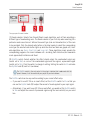
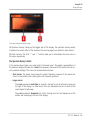
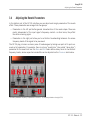
The display showing the Options page.
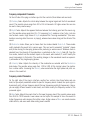
(6) Input Gain and Output Gain knobs: Adjust the level of the signals at the input and the output of the reverb unit, respectively. Used in conjunction with the Level meters above, these
knobs notably allow you to avoid any clipping from occurring (see ↑3.3.1, Common Controls for
more on the Level meters).
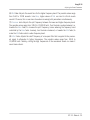
(7) Reverb Color selector: This selector is available only if the Reverb selector is set to Small
Hall or Large Hall at the top of the RC 24 interface (see ↑3.2, Global Parameters for more details). For each of these reverb types, the Reverb Color selector allows you to choose between
two variants of the algorithm. Click Dark to get a gloomier, somewhat muffled effect, or click
Bright to obtain a sparkling, more singing reverb.
(8) Quantization Noise button: Enables sound artifacts that are created as a side effect of the
lower bit resolution of classic hardware devices for a more authentic vintage sound.
The state of the Quantization Noise button is not saved with the preset. However, it will be
saved with your project in your host software.
(9) Realtime Audio Analysis button: If you disable the Realtime Audio Analysis button, the display in the Spectrum page only shows the static cloud of the reverb (i.e. without live input).
Disabling the Realtime Audio Analysis can be useful to save CPU power, for example if you
have many plug-in instances running in your host. See ↑3.3.2, The Spectrum Page for more
information.
The state of the Realtime Audio Analysis button is not saved with the preset. However, it
will be saved with your project in your host software.
RC 24 - Manual - 21