1
Flash Memory Upgrade
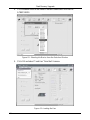
6. The Open File window opens. Select the correct HEX file that contains the
updated version of the firmware for VS-202YC (for example,
202YCM_V1p2.hex) and click Open.
7. Press the keyboard shortcut key F3 (or select the “Communication / RS232”
command from the Settings menu, or press the keys: Alt SCR).
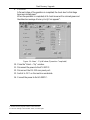
The “RS232” window appears. Change the COM port according to the
configuration of your computer and select the 9600 baud rate:
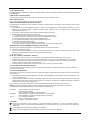
Figure 12: RS-232 Window
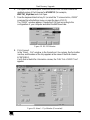
8. Click Connect.
In the “Atmel – Flip” window, in the Operations Flow column, the Run button
is active, and the name of the chip appears as the name of the third column:
AT89C51RD2.
Verify that in the Buffer Information column, the “HEX File: VS202YC.hex”
appears.
A
VS202YC hex
Figure 13: Atmel – Flip Window (Connected)
11