1
MEDIWARE
4.9
Edsim++ Desktop
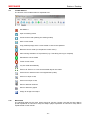
Toolbar Buttons
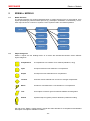
The function of the toolbar buttons is explained here.
Exit Edsim++
Open an existing model
Create a new model (clearing the existing model)
Save current model
Copy a bitmap image of the current model or chart to the clipboard
Build the current model (or compile the current macro)
Abort running simulation or fit procedure (e.g. if it is taking too long to complete)
Simulate the current model
Fit the current model
Lay-out model automatically
Zoom to fit. Zoom in or out so that all model objects are visible.
Cancel zoom. Restore zoom to its original state (100%)
Zoom in in steps of 10%
Zoom out in steps of 10%
Show or hide link numbers
Show or hide mini graphs
Assign an image to an object
4.10
Menu Items
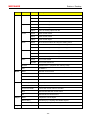
The following table lists all menu entries and their function. Please note that the terms Macro
(model expressed as C# source code) and Object (object expressed as C# source code) will be
explained later in this manual.
-21-