1
COMFILE Technology
www.ComfileTech.com
MSB764T User’s Manual__
__
This product is intended for small-scale automation,
standalone applications suitable for a Cubloc controller.
The MSB7XX series has a core module equivalent to the Cubloc CB400.
◆ What is the Cubloc?
-
Program Memory : 200KB
The Cubloc is a brand of industrial controllers that can execute BASIC and Ladder Logic
-
BASIC Data Memory : 6KB
simultaneously. PLCs, typically, can only execute Ladder Logic.
-
Ladder Logic Data Memory : 1KB
-
EEPROM Memory : 4KB (Only Accessible in BASIC)
Due to some limitations of Ladder Logic, it is not able to meet users’ every control
-
DC24V Input s: 32 (Port Numbers 0 ~ 31)
need. The Cubloc, with its support of BASIC programming, was created to compensate
-
NPN TR Outputs: 32 (Port Numbers 32 ~ 63)
for these limitations.
-
RS232C Communication Port : 2
-
High Speed Counter Inputs: 2
The Cubloc executes Ladder Logic and Basic concurrently without negatively affecting
-
LCD Connection Port : 1
one another. Therefore, users who are familiar with Ladder Logic can use Ladder Logic
-
Real-Time Clock and Built-in Battery (See RTCRead/RTCWrite functions in the Cubloc
Thank you for your purchase from Comfile Technology
Before making use of this product please be sure to read and observe all safety
precautions.
◆ MSB7XX Specifications
to implement most features, and use BASIC to complement the project by filling in the
gaps.
Warning
Manual).
-
Ability to connect to Comfile Technology’s ModPort.
1. For instruments with risk to life or property (e.g. nuclear power control,
medical equipment, vehicles, railways, aviation, combustion equipment,
Conversely, those users most familiar with BASIC can use BASIC to implement most
A dedicated connection port has been prepared for connection to the Comfile Technology’s
recreation equipment, safety devices, etc.), always employ adequate fail-safe
features, and user Ladder Logic to implement any auxiliary functionality.
ModPort providing the ability to add more I/O and other missing features.
mechanisms.
- Risk of fire, personal injury, and/or property damage.
The ability to use two different, yet mutually complementary, programming methods in
one controller is one of the Cubloc’s most prominent advantages.
2. Always mount to a panel.
Insert the following at the very beginning of your source code.
3. Do not attempt to repair, inspect, or wire while power is applied.
4. Do not attempt to alter or repair. Refer to a qualified technician.
5. Confirm all electrical connections
◆ MSB Usage Declaration
◆ About the MSB Series
#include "MSB7XX"
The Cubloc core module, in semiconductor form, can be mounted to a PCB. This is advantageous,
as users can integrate the Cubloc into a custom PCB design in a manner that suits their taste.
Caution
1. Do not use outdoors.
2. Always use the product within its specifications and ratings.
- Risk of fire and shortening of product’s life.
However, to a user without PCB fabrication skills, a custom PCB design can be quite difficult. This
◆ MSB Usage Advice
1.
user must also have the knowhow to implement the necessary Input and output circuitry.
interpreted and therefore suffers an execution speed penalty. Tens of microseconds
are required for each instruction. For a high-performance, modular, C-
3. Do not exceed ratings of relay switching contacts.
4. Does not use in environments with flammable or explosive materials,
moisture, direct sunlight, radiation, vibration and/or shock.
The MSB series was designed to make it easy for users to employ the Cubloc without
appropriate terminals.
► MSB764T: CE/FCC/KCC Class A
programmable controller, please consider Comfile Technology’s Moacon.
having to have professional PCB fabrication technology and skills.
2.
5. Keep product free of dust and debris.
6. Make connections correctly and confirm polarity by measuring at the
The Cubloc is used as the MSB’s core processor. The Cubloc’s execution is
Please be careful when using interrupts. Interrupts service routines should execute
The MSB series can be installed in the field, have its input and output terminal blocks wired, and can
to completion in as little time as possible to avoid negatively impacting the
be used just like existing PLCs.
operation of the system. Please use interrupts sparingly.
◆ MSB User’s Manual Composition
3.
Due to the nature of floating point numbers, you may notice a slight variation
between actual and expected results. For example, 4.0 may appear as 3.99999.
For BASIC programming, refer the Cubloc BASIC User’s Manual.
CUL-MSB765T
For Ladder Logic programming, refer to the Cubloc Ladder Logic User’s Manual.
4.
Please do not directly analyze incoming RS-232 data. Please use Modbus. Directly
analyzing the incoming data can be time consuming if one is not familiar with the
This manual only covers those elements unique to the MSB746T.
◆ CUBLOC STUDIO
To program the MSB series, CUBLOC STUDIO must be used. It can be downloaded
from www.ComfileTech.com in the “Cubloc/Cutouch Support” section for free.
format of the data.
◆ BASIC I/O Map
Direction
Range
Input Port
Input Voltage
0 ~ 31
0V or 24VDC
Description
◆ I/O Wiring
1 if input is 24V
0 if input is 0V
Output Port
32 ~ 63
NPN TR Output
If 1, TR is ON
Designation
Range
Unit
Function
Input Relay P
P0~P31
1 bit
External Input
Output Relay P
P32~P63
1 bit
Relay, etc.. on/off control
Internal Relay M
M0~M511
1 bit
Internal State
Special Purpose Relay F
F0~F127
1 bit
System Status
Timer T
T0~T99
16 bit (1 word)
For Timer
Counter C
C0~C49
16 bit (1 word)
For Counter
Data Region D
D0~99
16 bit (1 word)
Data Storage
By default, all IO is controlled by BASIC at power on. Ladder Logic must be given
permission to use it using the UsePin command.
Usepin 0, In
' From this point on use P0 in Ladder Logic
Usepin 32, Out
' From this point on, use P32 in Ladder Logic
Set Ladder On
' Place all UsePin commands before enabling Ladder
From now on, in Ladder Logic, P0 is to be used as an input and P32 is to be used as an
output.
◆ Status LED
The MSB764T has a programmable status LED. It can be programmed in Ladder Logic using
register F64, or in BASIC using the following code.
High 64
' Status LED ON
Low 64
' Status LED OFF
If using BASIC and Ladder Logic together, you can access register F64 from BASIC using the
◆ NPN TR Output Description
following syntax.
Set Ladder On
_F(64) = 1
' Status LED ON
_F(64) = 0
' Status LED OFF
+
Load
All outputs are NPN Transistor, current sinking outputs. The V terminal provides flyback
voltage suppression. Output HIGH from basic or ON from ladder causes a short to
ground. The opposite side of the load must be connected to positive power source.
Load
◆ Ladder Logic Memory Map
Load
Load
Load
Load
Load
Load
Load
Load
Load
' Read state of input at port number 10
Load
A = In(10)
Load
' Turn OFF output port number 32
Load
Low 32
Load
Example)
Load
Load
If 0, TR is OFF
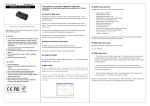
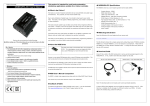
◆ External Features
◆ Dimensions
RS232
Ch. 2
NPN TR Output
Download
Rs232
Ch. 1
MODPORT
(Field I/O)
LCD port
24VDC
Power
Input
24VDC Input
High Speed
Counter
Input
If Comfile Technology’s CLCD module is connected to the LCD port, CLCD related commands (CLS, CLCDOut, etc...) can
be used (refer to www.ComfileTech.com).
◆
Digitial I/O Specifications
Digital Input Specifications
Number of Terminals
32
Input Voltage Range
22VDC ~ 26VDC
Operating Voltage
24VDC
ON / OFF Response Rate
1mS
Input Impedance
2.2KΩ @ 24VDC
High-Speed Counter Input Specifications
Number of Terminals
2
Input Voltage Range
22VDC ~ 26VDC
Operating Voltage
24VDC
Maximum Input Frequency
1KHz
Input Impedance
2.2KΩ@ 24VDC
NPN TR Output Specifications
Number of Terminals
32
Input Voltage
30V
Driving Current
250mA
ON / OFF Maximum
100Hz (100 times per second)
Frequency
◆ MODPORT Expansion
To expand the I/O capabilities and features (analog input/output, temperature
input, etc…) Comfile Technology’s ModPort can be added.
MD-DOSO8 (8-Channel DC Source Output Module)
MPSource ID, Channel, OnOff
MD-ADIN4 (4-Channel AD Input Module)
IntegerVariable = MPADIn ( ID, Channel)
ID : The ID of the ModPort module to use.
ID : The ID of the ModPort module to use.
Channel: Output channel to use (0 ~ 7)
Channel: Channel to use (0 ~ 3)
OnOff : 0 = OFF, 1 = ON
Function for the 4-channel analog-to-digital input module.
Function for 8-channel FET digital output module.
If input is between 1V and 5V, a value between 0 and 10,000 is returned (13.3 bit resolution).
If an error occurs, one of the following values may be returned:
MD-DOSI8 (8-Channel DC Sink Output Module)
MPSink ID, Channel, OnOff
ID : The ID of the ModPort module to use.
Channel: Output channel to use (0 ~ 7)
OnOff : 0 = OFF, 1 = ON
MD-DORL8
MD-DAOUT2
MD-THRT4
MD-ADIN4
MD-ADIN4
What is the ModPort? It is a Modbus field I/O controller with modular features
including digital I/O, analog I/O, temperature input, and a variety of other modules.
MD-DIDC8 (DC입력 8점)
IntegerVariable = MPIn (ID, Channel)
ID : The ID of the ModPort module to use.
Function for 8-Channel digital input module.
Results are stored in an integer variable. 12V ~ 24V results in a 1, otherwise 0
The ModPort can be controlled using a set of dedicated commands. The Modport
This manual will describe the different ModPort commands. For instructions on how
to wire the ModPort’s inputs and outputs, please see the ModPort manual.
By daisy-chaining as many as four 5-slot boards together, the system can be
expanded to a maximum of 20 ModPort modules.
MD-DORL8 (8-Channel Relay Output)
MPRelay ID, Relay, OnOff
ID : The ID of the ModPort module to use.
MD-HADIN4 (High-Resolution 4-Channel AD Input Moduel)
IntegerVariable = MPHADIn (ID, Channel)
ID : The ID of the ModPort module to use.
Function for the high-resolution 4-channel analog-to-digital input module.
If input is between 1V and 5V, a value between 0 and 100,000 is returned (16.6 bit resolution).
If an error occurs, one of the following values may be returned:
199999 – Module could not be found
555555 – Input is greater than +5V
-111111 – Input is below 1V.
MD-DAOUT2 (2-Channel DA Voltage Output Module)
MPDAOutV ( ID, Channel, OutputValue)
MD-THRT4 (4-Channel Thermistor (RTD) Input)
IntegerVariable = MPThIn (ID, Channel)
ID : The ID of the ModPort module to use.
Channel: Channel to use (0 ~ 1)
OutputValue: Integer Value (0~60000)
ID : The ID of the ModPort module to use.
Channel: Channel to use (0 ~ 3)
Function for the 4-channel temperature input module.
The return value is the temperature in °C multiplied by 10. In other words if the module
◆ MODPORT Commands
-11111 – Input is below 1V.
Channel: Channel to use (0 ~ 3)
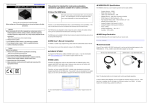
The MSB764T can be connected to the ModPort’s 5-slot board a shown in the figure
can only be controlled using BASIC; Ladder Logic control is not supported.
55555 – Input is greater than +5V
Function for 8-Channel FET digital output module.
Channel: Input channel to use (0 ~ 7)
above. The ModPort header module is not needed.
19999 – Module could not be found
returns the value 254, the actual temperature is 24.5 °C. If an error occurs, the
following values may be returned.
Function for 2-Channel digital-to-analog voltage output module. Change voltage to desired
value.
MD-DAOUT2B (2-Channel DA Current Output Module)
MPDAOutA ( ID, Channel, OutputValue)
9999 – Module could not be found
ID : The ID of the ModPort module to use.
5555 – Value exceeds valid maximum
Channel: Channel to use (0 ~ 1)
-1111 – Value is below valid minimum.
OutputValue: Integer Value (0~60000)
Relay : Relay channel to use (0 ~ 7)
OnOff : 0 = OFF, 1 = ON
If the return value is negative, the value’s most-significant bit will be a 1. Note that this
Function for 2-Channel digital-to-analog current output module. Change current to desired value.
is not 2’s complement. For information on wiring the module, please see the ModPort
Example) MPRelay 1, 3, 1 ‘ Turn module 1’s relay 3 ON.
manual.
Customer Support
Company Name : Comfile Technology
Each module can have a different ID set using the
Address : 14 Pidgeon Hill Drive, Suite 310, Sterling, VA 20165
rotary switch on the face of the module. This
Website : http://www.ComfileTech.com
provides the ability to have as many as 10
Phone : (888) 9CUBLOC, (888) 928 2562, Fax: (571) 322-5011
modules of the same type (0 ~ 9) installed
simultaneously.