1
DRIVE CUBE w/ Mounting Plate
Assembly and Attachment of
Drive Cube
If drives were not supplied, attach drives to side
rails via slotted holes on the sides of the rails.
The drives will then each have some adjustment
front to back.
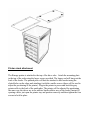
The mounting plate then slides on from the
bottom front so the mounting holes line up.
These four mounting holes are for attaching to
the top deck of the autoloader. These mounting
points have floating nuts so there is some
adjustment at this point. Attach cables and
power to the drives. Now would be the time to
use the loader utilities from within the loader
menus and calibrate the drive alignment. Swivel
the entire drive cube if need be and tighten down
the four large mounting screws. You may then
make fine adjustments to the drives individually.
Once alignment is finished place drive cover
over assembly and secure bottom four screws to
hold it on. (you may install the top four screws if
you do not have a printer attachment.)
The back cover is now attached with the 10
screws provided.
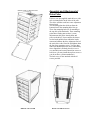
DRIVES with COVER
BACK COVER IN PLACE