1
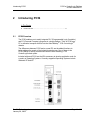
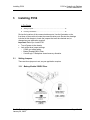
Installing PC56 3 PC56 ♦ ControlLogix Platform In-Rack Industrial PC Installing PC56 In This Chapter Setting Jumpers .................................................................................... 15 Inserting The Module............................................................................. 16 Review the locations of the communications ports. Use the illustration on the front door of the module to locate the communication ports. Review the drawings included in this chapter to locate the jumpers that must be checked and, or changed as your application requires. Important: Before you install PC56: 3.1 Turn off power to the chassis Look at the three jumper settings: o COM1 port mode setting o Battery Enable/CMOS Clear o ControlLogix™ Backplane shared memory allocation Setting Jumpers There are three jumpers to set, as your application requires. 3.1.1 Battery Enable/ CMOS Clear ProSoft Technology, Inc. January 28, 2008 Page 15 of 33