1
SLAP 2.0 Information System
User manual
SLAP Custom Report Creation
For creation of custom reports in SLAP , it’s necessary that you’re familiar with the Microsoft SQL Server
2008 Reporting Services applications, and sample data.
This document provides step-by-step instructions for building several types of custom reports using
Microsoft technology. The document focuses on the new SQL Server 2008 Report Builder 2.0 application.
Before You Begin
Estimated time to complete this lab
• Basic Exercises 1 – 5: 30 Minutes
•
Advanced Exercises 6 – 9: 45 minutes
Objectives
After completing this lab, you will be able to:
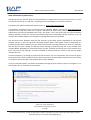
• Launch the new report designer application Report Builder 2.0.
•
Create a data source and a data set.
•
Design a new report using Report Builder 2.0.
•
Preview your report from the application and from Report Manager.
•
Enrich your report using the richly format-able text box.
•
Enrich your report using a chart.
•
Enrich your report using gauge.
•
Enhance your Tablix and create two dynamic column groups.
•
Add end-user power by adding dynamic filtering.
Required Environment
This lab requires the following:
• Microsoft SQL Server Reporting Services Report Server, for publishing reports.
•
Microsoft SQL Server 2008 Reporting Services Report Builder 2.0:
http://www.microsoft.com/downloads/details.aspx?familyid=9F783224-98714EEA-B1D5-F3140A253DB6&displaylang=en
•
Microsoft SQL Server 2008 Adventureworks Sample Database:
http://www.codeplex.com/MSFTDBProdSamples/Release/ProjectReleases.asp
x?Released=18407
For detailed information on SLAP 2.0 Information system functioning, you may contact the SLAP project manager
Darko Stalevski by e-mail: [email protected]