1
EXAMPLE III:
Setting of set points for temperature and carbon dioxide
concentration, the MAX and MIN values of the analogue outputs and
calibration of the sensor
The access code and the recalibration of the sensor are time limited. If the time limit
is exceeded the sensor returns to DEFAULT.
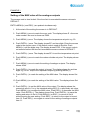
ENTR =MENU(+) and ESC(-) are pushed simultaneously.
1. At the start of the setting the sensor is in DEFAULT.
2. Push MENU(+) once to reach the error code. The display shows E + the error
code number. No error is shown as E000. (Push ESC(-) to return to DEFAULT if
requested
3. Push MENU(+) once. The display shows the temperature set point e.g. 20.0 C
and the carbon dioxide set point e.g. 750ppm.
4. Push ENTR(+-) once. The display shows EC and two digits. Enter the access
code to the service menu. If the default code is used do like this: Push MENU(+)
until the digits stop. The display shows EC55. If the correct code is not entered
before the time limit exceeds the sensor returns to DEFAULT.
5. Push ENTR(+-) once. The display shows SP t to set the temperature set point.
6. Push ENTR(+-) once. The display shows the temperature set point e.g. 20.0 oC.
Push MENU(+) to increase the set point value in steps of 0.2oC. Push ESC(-) to
decrease the set point value in steps of 0.2oC.
7. Push ENTR(+-) once when the set point is set. The display shows SP t. Push
ESC(-) to return to DEFAULT.
8. Push MENU(+) once to reach the carbon dioxide set point. The display shows SP
C.
9. Push ENTR(+-) once. The display shows the carbon dioxide set point e.g. 750
ppm. Push MENU(+) to increase the set point value in steps of 50 ppm. Push
ESC(-) to decrease the set point value in steps of 50 ppm.
10. Push ENTR(+-) once when the set point is set. The display shows SP C. Push
ESC(-) to return to DEFAULT.
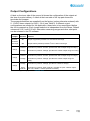
11. Push MENU(+) once to reach the setting of analogue outputs.
The display shows AOUt.
12. Push ENTR(+-) to reach the output to be set. The display shows An and two
digits e.g. An 01. Step to the requested output by pushing MENU(+).
Document
Rev
Page
12 (18)