1
Operating Modes
1.Video Mode
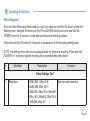
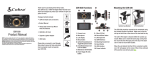
...The camera defaults to Video Mode when switched on manually or connected to the car
charger and will start recording automatically. Press and hold POWER for 1 second to stop/
start recording manually. A flashing red icon in the upper left hand corner of the screen and a
flashing blue led indicator on the camera body indicates that the camera is recording. When
the camera is connected to the 12/24V car charger it will shut off automatically after you turn
off the ignition or unplug the charger.
Emergency function. While in record mode click the the OK button once to manually
“protect” a file from being overwritten by the Loop Record function.
2.Photo Mode
Use the Up/Down buttons to zoom in/out
Press and hold POWER for 1 second to take a still photo
Press and hold the OK button to enter the photo specific settings menu
Page 21