1
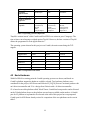
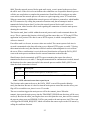
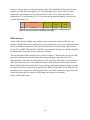
last time a sensor value was acquired from the sensor. This information will be stored at same
position as for the offset mark packet (1-4). The remaining 6 bytes are used for CO2 value,
temperature, and humidity, two bytes for each sensor value. CO2 is stored at position 5-6,
temperature at 7-8 and humidity at 9-10. The present application functionality uses soft-reset
variable at position 9-10.
Status
Offset mark
CO2 value
Temperature
value
Humidity
value
1 byte
4 bytes
2 bytes
2 bytes
2 bytes
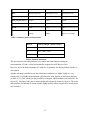
Table 10: An 11 byte packet containing sensor data
UDP collection
For the UDP collection slightly more modification was necessary. Because UDP gives no
assurance that the packets will reach the server, the node does not receive any confirmation from
the server and thus can not know if the packet has been delivered successfully. Hence no need
for the TCP_COMPLETE and SOFT_RESET events within the main process. Besides from this
the functionality of the main process is the same as before.
The state diagram for the network process is shown in figure 9. The network process uses UDP
protocol to transmit the sensor data. The sensor data packaging is the same as for TCP
implementation, where the size of the packets were five bytes for offset and 11 bytes for sensor
data. Data collection server will respond on the offset mark, letting the network process know
that the offset mark has been delivered. Upon receiving confirmation the network process enters
its simple state where it only can be triggered by the DATA_AVAILABLE event. Each time the
network process is triggered an UDP segment will be sent, which contains the sensor data, after
which the network process returns to its blocking state again to await another
DATA_AVAILABLE event.
28