1
-Ueeprom:w:TCP.elf.eep:a -Ulfuse:w:0xE2:m -Uhfuse:w:0x99:m
-Uefuse:w:0xFF:m
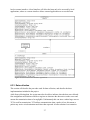
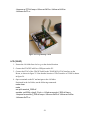
Figure 25: Programming a node
LCD (3290P)
1. Extract the lcd folder from lcd.tar-gz to the desired location.
2. Connect the JTAGICE mkII to a USB port on the PC.
3. Connect the JTAG of the JTAGICE mkII to the 3290P MCUs JTAG interface on the
Raven, as shown in figure 25. Note that the location of JTAG interface of 3290P is shown
in figure 26.
4. Open a terminal on the PC and navigate to the lcd folder.
Positioned in the lcd folder, run the following commands.
make clean
make
avr-split ravenlcd_3290.elf
avrdude -pm3290p -cjtag2 -Pusb -u -Uflash:w:ravenlcd_3290.elf.hex:a
-Ueeprom:w:ravenlcd_3290.elf.eep:a -Ulfuse:w:0xE2:m -Uhfuse:w:0x99:m
-Uefuse:w:0xFF:m
56