1
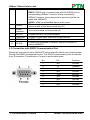
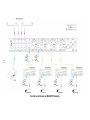
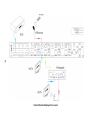
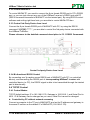
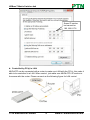
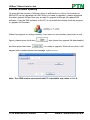
HDBaseT Matrix Switcher 4x4 5.3.2 Control MHD44TP To control MHD44TP, you need to connect the 9 pin female RS232 port to PC’s RS232 port, or you can just connect any one of the HDBaseT receiver’s RS232 port with PC (RS232 command transmits to MHD44TP via the twisted pair). By using RS232 control software and setting right baud rate, you are able to control MHD44TP then. 5.3.3 Control 3rd-Party Device from Local Connect the 9 pin female RS232 port of MHD44TP with PC, by using the RS232 command “/+[Y]/[X]:******.”, you are able to control the 3rd-party device connected with the HDBaseT receiver. Please reference to the detailed command description in 5.3.1 RS232 Commands. Control 3rd-party Device from Local 5.3.4 Bi-directional RS232 Control By connecting one 3p captive screw RS232 port of MHD44TP with PC (or controlled device), and connecting the RS232 port of corresponding HDBaseT receiver with controlled device (or PC), the RS232 signal is able to be transmitted through the twisted pair bi-directionally. 5.4 TCP/IP Control 5.4.1 Control Modes TCP/IP default settings: IP is 192.168.0.178, Gateway is 192.168.0.1, and Serial Port is 4001. IP & Gateway can be changed as you need, Serial Port cannot be changed. Controlled by PC without network accessing Connect a computer to the TP port of MHD44TP, and set its IP address and gateway to the same IP section as the default IP of MHD44TP (192.168.0.178). PTN Electronics Limited 18 www.PTN-electronics.com