1
© 2010 OJ Electronics A/S
67033 01/10 (DJU)
USER MANUAL
Type MCC4/MCD4
English
Contents
Introduction................................................................................ 1
First time settings...................................................................... 1
General operation ...................................................................... 2
Back......................................................................................... 2
Exit ........................................................................................... 2
Operation mode ......................................................................... 2
Auto mode .............................................................................. 2
Manual mode .......................................................................... 2
Comfort mode ......................................................................... 2
Thermostat setup menus.......................................................... 2
4-event settings ......................................................................... 2
User settings .............................................................................. 2
Time and date ......................................................................... 2
Child lock ................................................................................ 2
Display settings ...................................................................... 2
4-event schedule .................................................................... 2
Energy monitor ....................................................................... 3
Engineer settings....................................................................... 3
Offset temperature................................................................... 3
Adaptive function..................................................................... 3
Application ............................................................................... 3
Temperature scale ................................................................... 3
Language ................................................................................. 3
Factory reset ............................................................................ 3
Information .............................................................................. 3
Back......................................................................................... 3
Exit ........................................................................................... 3
Error messages ......................................................................... 3
Factory settings ......................................................................... 3
Preset schedule ....................................................................... 3
Introduction
The thermostat can switch on your heating system at predetermined
times on different days of the week. For each day of the week, you
can set individual temperatures for 4 different periods, called events.
Lowering the temperature when the home is unoccupied will reduce
your energy costs without reducing comfort.
The thermostat comes with a default schedule suitable for most
homes. Unless you change the settings, the thermostat will operate
in compliance with the default schedule.
Furthermore, the thermostat features an adaptive function that
automatically changes heating period start times so as to ensure
that the required temperature is reached at the set time. After three
days the adaptive function has learned when the heating must be
switched on.
• Set the actual hour and press the OK button. Then set the minutes. Press OK.
• Set the actual date: year, month and day. Confirm the settings
with the OK button.
The thermostat is now ready for use and will control your heating
in accordance with the pre-programmed 4-event schedule, see
Factory settings.
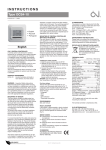
14:08
Power interrupter
Wed
20°C
Comfort Menu Manual
First time settings
The first time you switch the interrupter ON “I”, language, time and
date must be set. The menu will automatically guide you through the
process.
• Choose your language with the Up and Down buttons and
confirm with OK.
© 2010 OJ Electronics A/S
Navigation buttons
1