1
TRACKING YOUR TREATMENT
If you have used all the treatments on your
Troubleshooting
Customer Service
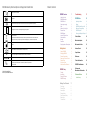
EXOGEN will alert you if something is not working properly. EXOGEN will beep and display an
Australia: 1800 428 220
alert screen. See the table below for examples of alerts and what to do if you get an alert.
Ireland: 1800 552 197
Treatment Card and you feel your fracture
has still not healed, please contact your
Alerts
doctor. If you are still under your doctor’s
care, they may prescribe you another
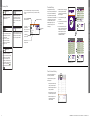
Pull down at
tab to open
Treatment Card. To order a replacement
Treatment Card, please contact Customer
Service. Once you receive your replacement Treatment Card follow the instructions
to replace your old card.
What does this mean?
Cover
(closed)
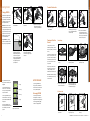
1.Make sure your device is turned off
and not plugged into a power source.
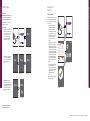
Gel Error: The countdown timer stops, EXOGEN beeps and displays
the yellow “Add Gel” screen. There is not enough gel on the transducer.
Add more gel to the transducer. See “Add Gel and Place Transducer” on
page 6. After you add more gel, place the transducer back over the fracture
using the strap or cast port. EXOGEN will stop beeping and the countdown
timer will restart. If EXOGEN still beeps and the “Add Gel” screen remains,
add more gel.
Low Battery: You are not able to start treatment or view history. EXOGEN beeps and displays the yellow “Low Battery” screen. The battery
level is very low. You must charge EXOGEN.
Plug EXOGEN into a power source with the provided charger. It is safe to
charge EXOGEN and treat at the same time.
Contact Customer Service: EXOGEN beeps and displays the yellow
“Contact Customer Service” screen. EXOGEN has detected that it is
not working properly.
Call Customer Service. Do not try to fix EXOGEN yourself.
Treatment Card Error: Your Treatment Card is missing, or is
improperly inserted.
Insert your card if it is not already inserted. If the card is inserted, remove it and
reinsert it according to the directions in the Treatment Card Insertion section on
page 5. If you are still having trouble, please contact Customer Service.
No Remaining Treatments on the Treatment Card: EXOGEN
beeps and displays the yellow “No Remaining Treatments” screen. No
treatments remain on the Treatment Card that is currently inserted in
the device.
If you are still being instructed by your doctor to treat your fracture with
EXOGEN, call Customer Service for instructions.
End of Service: EXOGEN beeps and displays the yellow “No Remaining Treatments” screen. EXOGEN has reached the end of its expected
service life (343 treatments). Note: Your Treatment Card may still have
treatments remaining but the number of treatments used and the number
of treatments available on the card will not be displayed.
If you are still being instructed by your doctor to treat your fracture with
EXOGEN, call Customer Service for instructions.
Cover
(open)
3.Pull down the tab to open the cover.
2.Find the cover on the right side
of EXOGEN.
4.Press the Treatment Card inward until
it clicks and then release your finger
from the Treatment Card. The card
should eject from the device far enough
for you to grab it.
Treatment Card
(metal contacts
facing up)
5.Remove the Treatment Card from
EXOGEN and discard.
6.Put the new Treatment Card into
the port, metal contacts facing up,
and entering first. Press the card into
EXOGEN until the card clicks into place.
What should I do?
UK: 0800 0516384
00800 02 04 06 08
7.Close the cover.
See “Charging EXOGEN” on page 4.
8.Leave your Treatment Card in
EXOGEN until all your treatments
have been used.
60/60
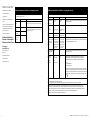
Problems
14
What does this mean?
What should I do?
Blank screen,
EXOGEN does
not turn on.
The battery may be completely discharged or your EXOGEN
has malfunctioned.
Plug in charger to EXOGEN and fully charge your battery. If EXOGEN still does
not respond, contact Customer Service.
The battery area on
EXOGEN or the
battery charger gets
excessively warm.
The battery or charger is malfunctioning.
Stop using EXOGEN and contact Customer Service.
Customer Service:
Australia: 1800 428 220
Ireland: 1800 552197
UK: 0800 0516384 15
TROUBLESHOOTING
Replacing Your
Treatment Card