1
Chapter 11: Lesson 9: Finance
46
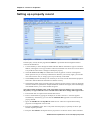
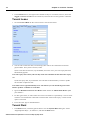
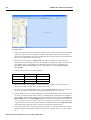
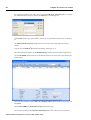
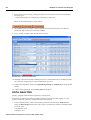
3. For a simple loan, add a new item by clicking the Add Finance Item button
, and in the
Name column type a name for the loan, like “Simple Loan”. Enter an interest rate in the Debit
% columns. This will provide a single interest rate throughout the term of the loan.
4. Choose “Interest only loan” in the Lending Type field.
5. Select “Purchase” in the Linked to.. field. This will ensure only the investment purchase figure
has the loan applied to it.
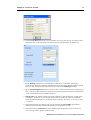
6. In the Capital £/% field enter 60.00 representing a loan of 60% of the purchase price. Any
figure over 100 will be regarded as a fixed amount and not as a percentage.
7. Leave the Duration at 0 years and 0 months to infer repayment at the end of the cash flow
period.
8. Select the Rate Type to “Effective”. This is the same as the APR or rate that will be
compounded by the remaining parameters to calculate the final annual rate.
9. Set Compounding to “Quarterly”, and Payments to “Monthly”.
10. Finally, make sure the Interest rolled up to end switch is off, otherwise all interest will be
accumulated at the end of the cash flow.
Other loans: Mortgage
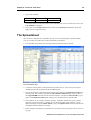
1. To create a Mortgage or amortised loan, add a new Finance item as before, and type 60% in the
Capital £/% field. Select “Mortgage” from the Lending Type drop-down, and type a name and
interest rate in the schedule.
2. All other fields are defined in the same way as a simple loan, except for the Interest rolled up
to end flag that is not available here.
Other loans: Equity
1. Similarly, add a new loan as above.
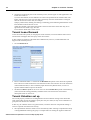
2. In the Capital £/% field, type 20000 as the equity investor’s capital.
3. Fields previously unavailable are now enabled to set up an equity partner’s input. These are the
Equity at end of DCF flag with its associated input field and the Equity % on monthly
balance field.
4. Set an interest rate in the schedule. This will act as a basic return on equity capital to be
extracted out of tenant income.
5. To represent a lump sum of the profit at the end of the DCF, tick the Equity at end of DCF box
and type 100 so that the investor retains 100% of the profit.
Other loans: Auto-regulating
1. This special purpose loan uses available income in prior months to reduce the debt balance and
to specify the sum or percentage that will be retained in the cash flow.
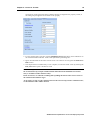
2. Set the Capital £/% to 100% and Cashflow Surplus Retained to 50%. This means that if there
is a positive surplus, 50% will be used to reduce the loan debt. If negative, then additional
money for the whole of the negative balance will have to be borrowed to redress the shortfall.
Finance in the Cash Flow
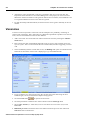
Each property cash flow can hold individual definitions of loans. These can also then be applied in
a portfolio cashflow.
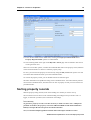
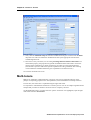
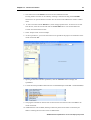
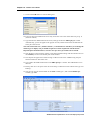
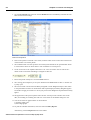
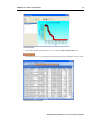
1. From the Command Centre, select a property, and click on the Cashflow button.
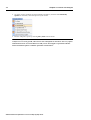
2. Click on the Finance tab, and check the Enable finance switch ON. The box headed Finance
will now be available.
ARGUS Valuation-Capitalisation version 2.50 Step-by-Step Guide