1
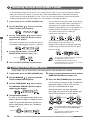
Reserving the Next Patch (DIRECT LOAD)
In the factory default condition, patches are switched as soon as you make the selection, resulting
in an immediate change in the sound. This is called "Direct Load". If you want to change to a distant
patch (for example from patch A1 to patch E5), all the intermediate patches will briefly change the
sound, which may not be desirable. In such a case, you can reserve the patch and cause the patch
change to be delayed until confirmed by you. This function is activated as follows;
1
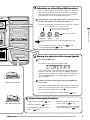
In play mode, press the EDIT (CANCEL) key.
2
Use the MODULE / keys to cause the
TOTAL module LED to light up.
The unit returns to the play mode, and reserving
a patch is now possible. When a new patch is
selected in this condition, the BANK/PATCH
indicator and the patch name on the display are
flashing, but the sound does not change yet.
This shows that the unit is waiting for
confirmation from the user.
MODULE
COMP•DIST
ZNR/EQ
MOD
REV
TOTAL
(ON/OFF)
3
Listening to Patches (Play Mode Operation)
Use the TYPE (BANK) ▼/▲ keys to cause
the indication "DIRLOD" (Direct Load) to
appear on the display.
BANK
BOTH
PATCH NAME
BANK
(GROUP)
4
BOTH
PATCH
EDITED
(VALUE)
5
BOTH
BANK
BOTH
PATCH
EDITED
(VALUE)
BANK
BOTH
PATCH
BANK
EDITED
BOTH
(VALUE)
PATCH
EDITED
(VALUE)
BANK
PATCH
BOTH
EDITED
(VALUE)
PATCH
EDITED
(VALUE)
Confirm
PATCH
PARM1 knob
BOTH
EDITED
(VALUE)
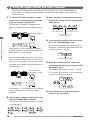
Turn parameter knob 1 so that the
BANK/PATCH indicator shows "oF".
BANK
BANK
To confirm the patch change, press both ▼/▲
foot switches at the same time. The
BANK/PATCH indicator and display indication
stop flashing, and the sound of the new patch
becomes active.
This parameter determines whether the sound is
switched immediately when a patch is selected.
TYPE (BANK)
PATCH
HINT
EDITED
(VALUE)
Press the EDIT (CANCEL) key once more.
• To return to the original operation mode, set
the DIRLOD parameter to "on".
• The DIRECT LOAD setting is stored
automatically by the unit. There is no need to
perform any steps for storing.
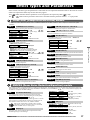
Fixing the Bank (BANK HOLD)
In play mode, you can fix the bank so that only patches within that bank are switched.
1
In play mode, press the EDIT (CANCEL) key.
5
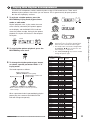
Keep on turning parameter knob 2 until the
BANK/PATCH indicator shows "on".
2
Use the MODULE / keys to cause the
TOTAL module LED to light up.
6
Press the EDIT (CANCEL) key once more.
3
Use the TYPE (BANK) ▼/▲ keys to cause
the indication "DIRLOD" (Direct Load) to
appear on the display.
TYPE (BANK)
PATCH NAME
(GROUP)
4
BANK
BOTH
PATCH
EDITED
(VALUE)
Turn parameter knob 2.
BANK
PATCH
PARM2 knob
BOTH
14
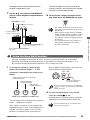
When Bank Hold is activated, repeatedly
pressing ▲ foot switch will switch patches only
within the current bank, as shown below.
BANK
As soon as you operate parameter knob 2, the
display indication changes to "BNKHLD" (Bank
Hold). This parameter determines whether the
bank is fixed in play mode or not. The default
setting is "oF".
PATCH NAME
The unit returns to the play mode. The BNKHLD
parameter setting is reset to "off" when the
GFX-707 is turned off and on again.
EDITED
(VALUE)
BOTH
PATCH
EDITED
(VALUE)
HINT
BANK
BOTH
PATCH
EDITED
(VALUE)
BANK
BOTH
PATCH
EDITED
(VALUE)
BANK
BOTH
PATCH
EDITED
(VALUE)
• In the Bank Hold condition, the bank can still
be switched with the TYPE (BANK) ▼/▲
keys.
• To return to the original setting, set the
BNKHLD parameter to "oF".
ZOOM GFX-707